
Product Requirements:
Tapwave Zodiac1 or 2 and a
power/sync cable
When Julie and I posted our review of the
Tapwave Zodiac2 last month, I
mentioned that I had ordered the separately available cradle. I am sure that for
some, a cable is the idea solution, but I like using a cradle because I enjoy having easy access to my PDA while
working at my desk. When in a cradle, my PDA is able to sync or charge as
needed, and a cradle looks less cluttered than a loose cable flapping about.
After using the sync/charge cable that came included with the
Tapwave for over a month, I was growing
tired of propping my Zod on the lower edge of my computer keyboard while
working. I was also annoyed with the way that the cable never seemed to maintain
a good connection with the PDA. I was really looking forward to receiving the
Zodiac Cradle,
and it finally arrived yesterday.
Allow me to back-track for just a moment…
When I ordered the cradle, I was pleasantly surprised by its reasonable
price. My past experience with pricing PDA cradles was that
they were generally marketed in the $40-$50 range. Since every other PDA I have
ever owned, with the exception of the Palm m100,
came with a cradle, I have never actually needed to buy a spare. Instead, I have always
acquired sync/charge cables for when I travel. In this case, with the cradle
being absent – yet so reasonable priced, I figured that I would just buy it.
This way I would have a cradle for my desk, and I could use the original
sync/charge cable for when I travel.
Yesterday, after digging through a rather large box filled with Styrofoam
peanuts, I discovered the prize: a black plastic weighted cradle, futuristically
shaped like a teardrop.
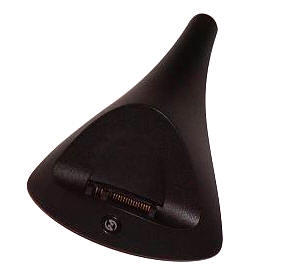
After further digging, I came to the conclusion that Tapwave had somehow
neglected to include the sync/charge cable that was pictured in the item’s
description…
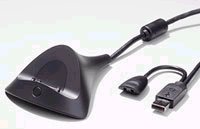
Picture courtesy of Tapwave
The cradle’s description had read:
"The Zodiac cradle recharges and instantly updates your Zodiac entertainment
console. Once you slide the Zodiac into the cradle and push the button, the
cradle automatically synchronizes the information in your Zodiac with your PC."
From reading the description above, and seeing the picture – wouldn’t you have
concluded the same thing?
I figured I would email Tapwave support and ask for my cable to be sent
later, but in the meantime I began to hook the cable I already owned to the new
cradle.
Under the cradle is a receptacle for the cable’s plug.
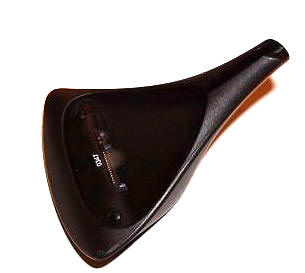
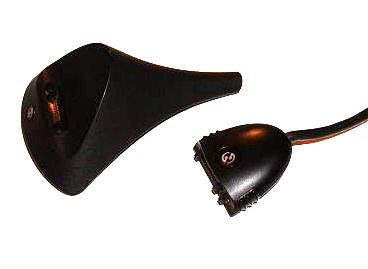
I was pleased that the cable entered the port with a solid click, and that
there was no "play" in the connection whatsoever.
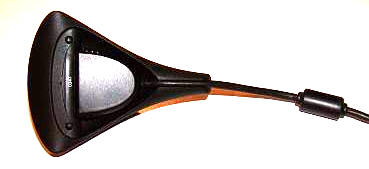
The cord is discretely shuttled out of the cradle’s narrow end, and the whole
contraption sits solidly on flat surfaces. Measuring only 4" long x 3" wide x
1.5′ tall and with a weight of 3.5 ounces, the cradle is solid enough to hold
the Zod securely, yet small enough that it doesn’t take up a lot of valuable
desk realty. The design is in keeping with the simple and clean lines of my
Zodiac2. In fact, the black plastic matches it quite nicely. The front sports a
hot-sync button…
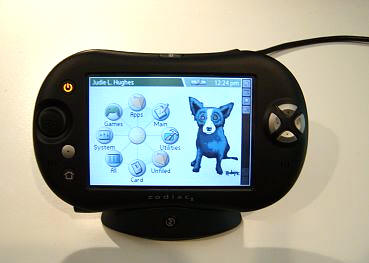
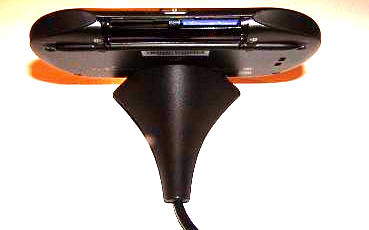
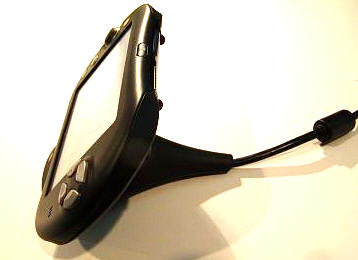
I like that there is no high back and that the Zod can be inserted and
removed without any tricky maneuvers. Overall, this is a very nice
cradle.
After setting up the cradle, yet before I wrote Tapwave, I decided to indulge
in my "daily surf." On this list are a couple of Tapwave specific sites,
including Zodiac Gamer. Imagine my
surprise when the first thing I saw was a new post about how the cradles were
arriving, but that Tapwave was not including the sync/charge cables…Huh?!
Even more alarming were the
five pages (at the time – there are more, now) of people who had also expected a cable to be
shipped with their cradles.
What a bad move for Tapwave! Either the description was intentionally
misleading, or Tapwave just assumed that people would know they were
supposed to order an additional cable in conjunction with the cradle (at
a cost of $14.99). I am going to tell you up front that I have no problem
with the cost of either item. Had I known that I needed both, then I would have
gone ahead and ordered both at the same time to save on shipping. As an
example: If I order either item by itself, shipping runs $6.23 to my zip code.
If I order the two items together, shipping is only $6.76. So now, if I want to
get the cable, then I will have to pay an additional $6.23 for shipping on an
item I should have known to order in the first place. :0/
As of today, the picture showing the cradle with a cable has been removed
from the Tapwave store and the description for the cradle has been modified to
read: "The Zodiac cradle recharges and instantly updates your Zodiac
entertainment console. Once you slide the Zodiac into the cradle and push the
button, the cradle automatically synchronizes the information in your Zodiac
with your PC. The cradle works in conjunction with the cables shipped with your
Zodiac." Evidently enough people have complained about the misleading
information, that it has now been changed.
The cradle is a welcome addition to my desktop and I am very glad to have it. Even though the cable wasn’t included with the cradle, I can’t fault the
product – though I am a bit miffed with Tapwave. I suppose I will have to chalk this up as a growing
pain on their part. Ah, the price of being an early adapter…
Price: $19.99
Pros:
Simple design with an elegant look
Allows easy viewing an use of Zodiac while at your desk
Stable cable/port connection
Cons:
You must either use the sync/charge cable that came with your Zodiac or order an
additional one

Palm Phone PVG100 (The Small Premium Unlocked Phone) with 32GB Memory and 12MP Camera (Gold)
(as of June 8, 2026 20:21 GMT -05:00 - More infoProduct prices and availability are accurate as of the date/time indicated and are subject to change. Any price and availability information displayed on [relevant Amazon Site(s), as applicable] at the time of purchase will apply to the purchase of this product.)
Palm Phone PVG100 Verizon GSM Unlocked Mini Smartphone 3.3 inch 32GB (Silver) (Renewed)
(as of June 8, 2026 20:21 GMT -05:00 - More infoProduct prices and availability are accurate as of the date/time indicated and are subject to change. Any price and availability information displayed on [relevant Amazon Site(s), as applicable] at the time of purchase will apply to the purchase of this product.)Product Information
| Price: | 19.99 |
| Manufacturer: | Tapwave |
| Pros: |
|
| Cons: |
|
