
Program Requirements:
Device:
Palm V/Vx (StreetFinder for the Palm III also
available)
145 K free RAM for application, maps take up additional space
Desktop:
Windows 95/98 or NT 4.0
CDrom
24MB Ram, 125MB HD space
The StreetFinder GPS for the Palm V/Vx is a clip-on GPS module from Rand
McNally. If that name sounds familiar, it should as they are the well respected
geographic and travel information company that has been around since 1856.
The StreetFinder GPS is a kit that contains the Palm V/Vx clip-on module, 2
AAA batteries, 12V car adapter, car mount, carrying case and StreetFinder Deluxe
software for your PC. The actual company that makes the GPS is Magellan.
If you don’t know what a GPS is, it is a Global Positioning System. 24
satellites circle the Earth twice a day in a very precise orbit and transmit
information to Earth. The StreetFinder GPS uses between 3 and 12 of those satellites to
help pinpoint your location to show where you are on a map.
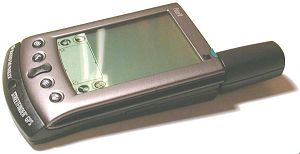 |
The clip-on module is basically the same module as the clip-on Palm V modem. The only difference is that there is an antenna popping out of one end and a place to plug in the 12V car adapter (cigarette lighter power adapter). The module requires 2 AAA batteries or the 12V adapter to power it. The module is small and pretty sturdy. The only thing I noticed was that the antenna could be wiggled back and forth a tiny bit.A button on the front of the unit starts operation. The GPS receiver will shut itself off automatically after a 90-second delay (after you turn off the Palm V). |
The kit comes with 3 CDs. An install CD installs the StreetFinder application
onto your Palm V/Vx and the StreetFinder Deluxe software onto your PC. The 2
other CDs are data CDs. One is for the Eastern US and the other is for the
Western US. These data CDs contain US streets and over 1 million business listings.
The PC software can actually be used on a laptop with a GPS attached.
The first thing you do is install the application (.PRC) onto the Palm V. The
only problem I ran into was that after it asked if I wanted to install the software on my Palm V, it
also wanted to install TripNotes (whatever that is) onto my HPC… which I
don’t have. I do have a Pocket PC though. The software must check to see if you
have the ActiveSync for Windows Powered devices installed.
After you have installed the software on your Palm V and on to your PC. You
can create maps and address to address directions that you can install on your
Palm V. The StreetFinder software has a lot of features. You can easily
zoom in and out on a map of the entire United States including Hawaii. The
farther you zoom in, the more details you’ll be able to see. You can turn on the
ability to see things such as banks, hotels, restaurants, schools, parking
garages, etc. There are quite a few items that you can see. These items will
show up as little icons or blocks depending how far you are zoomed in. You can
click on one of these items and to see the name and address. You can then add
the address to the address book that is built into the software.
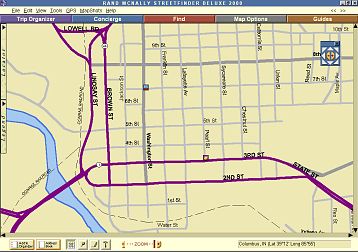
Although this is pretty cool and could be quite useful, I found that at least
in my area (Columbus, Indiana) that quite a few places that have been around for
years and years did not show up on the map. I also found some incorrect or
misplaced items. Bigger cities might not have this problem…
You can copy two kinds of maps to the Palm V. A regular map or address to
address directions with a map. Maps can contain info on restaurants, hotels etc.
Address to address directions can be plotted on the map and listed in text form
on the PDA screen. Creating just a map is easy. You just zoom in to an area that
you want and click on the MapShots button and a map will be created and
automatically put in your hotsync queue. You also can see how large the map is
before you download it to the PDA. Maps can be really large! I created a map Columbus and
Bloomington and it was almost 1.5meg in size. Syncing this map seemed to take
forever.
Creating address to address directions can be more frustrating. It’s easy if
you want to create driving directions from a place that is shown on the map like
a restaurant to another place that is shown on the map like a school. Doing this
is pretty easy. But, if you want to create directions from an address like your
house to another address, good luck. For example, I wanted to create directions
from my house to my place of work. First it couldn’t find my home address. The
road that I live on was marked as Unnamed on the map. I could create a spot on
the map and mark it as home, but I couldn’t set that spot as the starting point
for my address to address directions.
Then when I tried to find the destination address of the place where I work, it
couldn’t find it either (it’s been there for over 20yrs or longer). What really
annoyed me with the software was that when you search for an address, you can
put in the address, city, state and zip. It will then search for it on the CD.
What’s annoying is that it will ask you to swap CDs if it can’t find it on the
first one. I find this strange because if I specify the state, it shouldn’t try
to find the address in the other part of the United States!
Once you do succeed in setting your starting and ending destinations, you
have to be online to the internet for it to create the actual directions. In my
opinion, if you have to use the internet to create the directions then it should
just use the internet for the whole application. I know that my home address and
work address are available when I use mapping sites like Mapquest…
so why can’t this software also find it? Getting the directions is quick.
But then the software will ask you to put the original installation disk back into
your CD drive. Ok, you do that and then you can copy the directions to your PDA.
Then you’ll have to put the mapping CD back into the drive to look up something
else. Swapping CDs can be annoying as well.
The GPS kit comes with a nifty car mount that uses three suction cups to hold
the GPS and Palm V to your windshield. The Palm V with GPS attached can be
easily inserted and removed from this spring loaded mount.
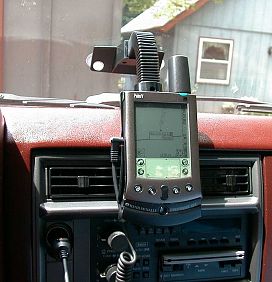
The GPS receiver must have an unobstructed view of the sky in order to obtain
a signal. GPS signals do not pass through solid objects such as roofs, tall
buildings or tree cover. So it won’t work well if you just hold the unit in your
lap as you drive. You have to have it pointing out of your window.
The first time you use the GPS, it usually takes about
10mins to initialize it. After that, it usually only takes less than a minute to
acquire a signal.
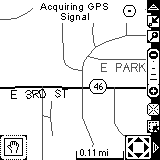
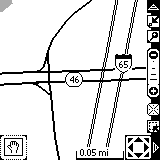
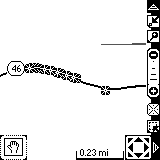
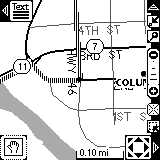
When you have a signal and are moving, a little star icon will move along the
map to show where you are and where you’re going. You can also display a
distance scale to give you an idea how far away the next turn is. When you get to the edge of
the screen, the software will scroll with you. Sometimes this takes a couple of
seconds. This might take longer depending on how large of a map that you’re
using.
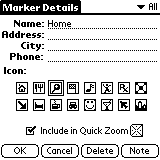
The StreetFinder software on your Palm has the ability to zoom in and out of
the map, mark points of interest, and find addresses using a toolbar on the
right side of the display. You have the option to turn this toolbar on or off as
you desire.
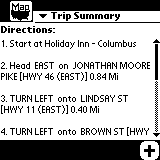
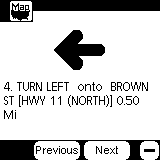
When you use address to address maps, you can either look at the map to see
view the path you should be taking, or you can view text directions. You can
easily toggle from the map to the text directions. You can either see a trip
summary that shows all the steps of your trip, or you can see step by step
instructions.
There are a couple things missing from the Palm software that I would like to
see. One thing is a compass. It would be nice to have the software tell you what
direction you are heading. It would also be nice if the software would tell you
your speed and elevation or latitude and longitude. Other than that, this kit is
pretty nice as long as you don’t mind swapping CDs all the time.
Price: $199
Pros:
Small unit.
No wires.
Kit contains everything you need.
PC software can be used on a laptop with a GPS.
Cons:
Finding addresses requires annoying disk swapping.
Noticed some incorrect locations on the map.
Address to Address directions finder requires an Internet connection on your PC.
L39 Ultra Slim UV Protective Filter for Leica Q3 43 Q2 Camera with Moisture-Proof Case & Removal Tool 19 Layers Mulit-Coated UV Ultraviolet Filter 99.3% Light Transmission Water Oil Scratch Resistant
(as of June 8, 2026 06:52 GMT -05:00 - More infoProduct prices and availability are accurate as of the date/time indicated and are subject to change. Any price and availability information displayed on [relevant Amazon Site(s), as applicable] at the time of purchase will apply to the purchase of this product.)
Ruilogod 32" 2-in-1 Light Mulit Collapsible Disc Reflector 80cm Silver Gold
(as of June 7, 2026 18:40 GMT -05:00 - More infoProduct prices and availability are accurate as of the date/time indicated and are subject to change. Any price and availability information displayed on [relevant Amazon Site(s), as applicable] at the time of purchase will apply to the purchase of this product.)Product Information
| Price: | $199.00 |
| Manufacturer: | Rand McNally |
| Pros: |
|
| Cons: |
|

Gadgeteer Comment Policy - Please read before commenting
Post your comments here on the Vaja i-Volution Natu Tungsten T Case.
http://www.the-gadgeteer.com/vaja-ivo-review.htm
Just click the POST REPLY button on this page.
Price is not a con? Remember, not many viewers get them free.
Mike
No, I don’t think price is a con. Do you consider the price a con if you were interested in buying a Rolex or a Porsche? Vaja cases are more expensive… that isn’t news to anyone.
Yet another Tungsten T case that is not cradle syncable.
Are there any cases that allow the Tungsten T to be synced in the cradle?
Even if you have to lift the cradle onto a coffee cup, like I did with my Palm Vx with hard case.
Vaja has a leather flip case that is supposed to be sync-able. We’re going to try to get samples soon to review.
Is there a way to search through The Gadgeteer website to find cases that can be synced in the cradle (for any PDA)?
If not, then I suggest that this might be a possible area of improvement for your site.
You could us the search feature to search on the keyword SYNCABLE.
Personally, I like Vaja cases very much, their fit and finish are exemplary but at $120, I think the I-volution case is extremely overpriced almost 1/3 the price of the PDA itself.
Using your analogy above would I pay top dollar for a Porsche? Perhaps…………Would I pay 1/3 the price of a Porsche for a premium car cover? Absolutely NOT!
a quick question: in order to extend TT, do you need to open the screen cover?
Overall, a nice case, but (1)too pricy and (2)just not my taste. I currently use Digital Express case too, but kind of “bulky” (all relatively speaking). Is anyone here actually use covertec case (for TT)? It looks MUCH MORE “professional” to me (and syncable through cradle?)…
My first post here… Hello neighbor Julie (I live in Indy)!!!
As usual, very nice review. I’ve been drawn to this site because of your straightforward reviews and especially real-world photos of the products in action. Manufacturer’s photos can be tough to gauge since they place the product out of any context.
I personally enjoy the reviews about the higher-end peripherals, e.g., Vaja Ivolution case. I think they’re especially important since they are more expensive – subsequently, a prospective customer like myself really likes insightful and fair testimonials.
Alas, while I think this case is the best of the bunch for the TT in terms of approach and aesthetics, I’m going to have to lust for it. It’s way out of my budget. I guess this will have to be an object of lust.
Hope to see more reviews of cases for the TT as they emerge.
Yes, you have to open the cover before you extend the PDA.
Hello there! 🙂
You’ve gotta be joking me! :rolleyes:
Lucan
Greetings:
I have purchased three Vaja cases so far, and I have one of the T/T cases that you cannot sync on the cradle with….
You would think that more manufacturers would clue into the fact that rechargeable PDA’s need to actually sit in a cradle (in this case provided as a part of the purchase), or plug into some other device (third party add-on) to, well, recharge.
I guess I’m just a bit taken aback that more cases don’t allow for sitting in the charging cradle as I suspect the majority of users have one sitting on their desks.
Oh well….
I am seriously considering buying this case and I have a few questions.
How snug is the fit? Since this is a molded case, is the fit tight or does the T|T move around in the case?
How much play is there between the hardware buttons and the case overlay? Is any additional pressure required to get the hardware buttons to respond including the 5-way navigator? Does the overlay interfere with the operation of programs like QLaunch or TealLaunch which allow additional functionality on a press and hold of a hardware button (please keep in mind that QLaunch even allows ‘press and hold’ functions to be assigned to the navigator)?
Can the Palm Ultra-Thin Keyboard be used with the T|T while in the case?
I apologize for all of the questions but this is vital information for my decision.
Thanks.
The fit is very snug. The T|T does not move around at all.
The leather overlay does take additional pressure to activate the buttons. As a result, I sometimes get double button presses.
Unfortunately, the Palm Ultra-Thin Keyboard can not be used with the T|T while in the case.
hi julie
thanks for a great review. seems like this vaja case is pretty awesome (despite the price). i just had three questions:
1.how easy is it to take it in and out of the case to hot sync it?
2. how much more bulk does the metal knob for the clip add to the case? (i’m trying to decide between getting one with or one without a clip, i previously had a vaja case for the sony clie and if i didn’t have the case hanging on my belt and had the case in my pocket that metal knob was extremely annoying.)
3. was double pressing a big issue (how often, say out of ten presses does it occur?)
thank you so much.
It’s not hard to take the T|T out of the case to sync/charge, it’s just annoying.
If the belt clip stud on another case bothered you, then this one will too. It sticks out about 1/8th of an inch.
I only really notice the double key press issue while I’m reading ebooks. It sometimes skips a page when I am paging down.
This topic is relative, obviously. I don’t mind paying $5000 for a watch, $75,000 for a car, and $600,000 for a house, so I don’t mind paying $120 to protect my PDA. BTW, my PDA may have cost $500, but the data in it is priceless. Yes, I will pay to keep that data protected. It is worth it, to me. Another relative statement.;)
Maybe Vaja can use that as their sales slogan……….Vaja I-volution for the man/ woman in your lifte that has everything. BTW……Did I mention you could have paid $335 for that $500 PDA here: http://www.compuplus.com/insidepage.php3?sid=jmnhx302i4fo59c&id=1000531&track=searchViewed
Just a couple of quick questions for you chronos:
I am housebroken, have had all my shots, charming, easy to get along with, Did I mention I was handy with electronic gadgets? I will consider being adopted
If adoption is out of the question, I have a reverse chrome muffler bearing that works with that Tungsten T and I-volution case you have there, did I mention the looks, they are to die for:p
If all else fails please reply with your real name address and telephone number, most recent bank statement and don’t forget to attach a .jpg map of your place to your email:x 😡 😎
……………………………….hope you don’t mind the kidding!!!
Regards
Greetings:
I think that any review should include a comment about the relative merits of any “accessory” to be used with a handheld device including a judgement about the “price” of the item and the value the user might expect to receive.
A couple of years ago there was a case for the Palm V series that was a basic leather flip cover. The big deal was that it was platinum and diamond encrusted and cost a TON o’ money. The price was, in this case, pretty much an issue as the relative value (in terms of protection or functionality) was minimal in relation to the amount required to acquire this gadget. It is NOT always true that high cost = high value.
In my experience with Vaja they design and build very nice cases that for the cost deliver the value that I am looking for. Not everyone NEEDS a hand-tooled leather case made of (insert voice of Richardo) “rich Corinthian leather…” in which to house their PDA.
Just my $0.02 worth (adjusted for inflation or devaluation)
David
Not at all- it’s deserved. Woke up on the wrong side of the bed this am. Sorry!
Hey- if the muffler thingy is shiny, maybe we can make a deal! 😉
Just trying to say its all relative; the protection provided by this type of case is important enough for me to drop $120, as my baby holds all my important data.
And BTW, those deals didn’t come out until well AFTER I bought my PDA. Such is life for an early, early adopter.:p
Chronos you’re my kind of people, An attitude and a sense of humor!
😉 Back at ya’!
Prismatic,
That’s funny stuff! Maybe we can make a deal and be twins.
We can call Chronos “Daddy Warbucks”!!
Chronos,
I did not take your post as harsh or with attitude.
If I had lots of money (Bill Gates money), I would not mind paying $500 for the case. But “minding” has nothing to do with it being a “con”.
I believe you can find a case that potects your pda just as well, if not better, and cost much less than Vaja.
Lucan
How about a “FREE” case as an alternative to that “$120” I-volution case? Just pay $6.95 shipping and handling, use coupon code “freecase”. Follow this link to see the selection of free cases available:
http://www.freecases.com/Merchant2/merchant.mv?Screen=CTGY&Store_Code=FC&Category_Code=FREE
Mini Review Follows:
Sturdy case available in a variety of colors and patterns, has two compartments for ID’s and credit cards as well as a compartment for for your cash. A compact zippered case with a heavy heavy duty pull made by Incipio, PDA attaches to case with velcro.
Case too compact to load Tungsten T, ID’s, credit cards and cash which is the purpose of slim wallet case. No problem with just the pda.
This is by no means my favorite palm case, it may serve well as an interim case or as a backup.
This is no Vaja case, but did I mention it was “Free”?
I wonder when this case would make it to market.I have a Vaja and love it to death the best case I have ever had for my M515. I just wish the price would come down. Going to have to wait for a sale on this one. Its funny to look a Vaja site and there pricing. If you have noticed the most popular pdas and the newest released pdas have the highest prices.
Boy the TT must be a hot seller by the looks of this cases price!!;)
I have this case for my TT and it is great!! Sits in the cradle with the case on and the price is right.
http://www.ebcases.com/Detail.bok/d8c8e03cf3599b8dfaf1?&category=Palm+Tungsten+T&start=1&total=11&no=204
I will have to check it out , thanks for the tip. I kind of like the idea of the Vaja better because its stiffer. Julie, is the I-volution case hard leather threw the whole thing or is it metal covered in leather?
It is just a stiffened leather. Not leather over metal.
I find your site very useful & informative – liked the proporta review.
I need some help regarding screen protectors – can anyone suggest a screen protector that does not take anything away from the awesome tungsten screen ?
I came across “Brando” screen protectors, but a reviewier mentioned that they reduced the brightness & clarity of the tungsten display (to such an extent that he removed it)
Are there any alternatives ?
thanx, aj
Yes, for the clearest protection, try the G2.
It’s avaiable at http://www.pdascreenprotectors.com
Judie :0)
thanx judie ! have ordered the G2 protectors, waiting for them to arrive 🙂
I just said that, Matt 😉
Let’s get the conversation back on topic – this is the Vaja i-Volution Natu case forum, not a screen protector forum.
Judie :0)
what are you talking about? This isn’t the first post to get of topic.You still haven’t answered my PM.:wow:
Do you mean the same e-mail you sent Julie?
What I was talking about was the post that you did right before mine where you asked if I thought the G2 was the clearest protection (right after I said that I did). What happened to that post?
Judie
off topic, I will PM you.
I note in examining the pictures of the case that, on the front, there is a slight gap between the part of the case the covers the screen and flips up and the fix portion that covers the buttons. It also appears from the photos that this gap is not uniform, in that, there appears to be less of a gap on the right side then the left.
Is this gap significant? Does it detract from the overall feel and look of the case? Am I correct that it is not uniform across the width of the T|T?
The gap is there. It’s very small though and regardless to the pictures, is uniform all the way across the front. It’s a non issue and isn’t noticable to me.
Thanks for the information. I’ve got one on order.
I usually always get Vaja (heh, I’m now paying the price – we know why in another forum 😉 ), but three things prevent me from getting this i-volution.
1 – That gap in the picture. What’s the good of making a case that completely encloses the Tungsten if they can’t even get the front cover to fit without having a gap that would effect you if the Tungsten fell? It’s also different from their photos where there is no gap in the front. That bothers me.
2 – They can’t make a case that completely closes, yet they leave the buttons completely covered? That doesn’t make sense…
3 – Given the first snafu, and how it makes the second point seem strange, then cost does become an issue. If the case was flawless, then it’d be worth the money, but it’s not.
Does anyone else here have the i-Volution? Is the gap a recurring feature?
hi guys,
I want to know which would be better?
the pocket solutions T|T Cover up or the Proporta Aluminum?
Thanks.
I so want one of these cases, but every time I get to the final checkout page on the Vaja site I come to my senses 🙂 Given that I got a good deal on my Tungsten, I’d be paying nearly 50% of the cost just for a case…
The trouble is that I’m spoiled by my I-volution case for my NR70V – I got it off ebay for a more sensible price, and I love the way that fits, it’s like a case that’s barely there. I’m sure Vaja would do more business if they brought their prices down a touch, or had promotions from time to time (other than the prerelease one).
If anyone wants to sell one of these I’ll take it off your hands for a good price 😉
Well thanks to the recent Vaja promotion I finally took the plunge and ordered a blue/black custom model. It arrived quicker than I thought, taking only 12 days from the order date, and that’s shipping to the UK.
Initial thoughts are that it’s worth the expense 🙂 The leather is very high quality, although I do notice that the grain of the black leather is coarser than the blue, which makes a nice contrast but I prefer the finer grain. If I had gone for the standard black case I think I would’ve felt misled if it didn’t look like the pics from Julie’s review and more like the ones on another site – http://www.foxpop.ndirect.co.uk/eclectica/vaja_15a.htm
The reason I like this case is that I hate the feel of anything “bulking up” my cool gadgets, and this is the thinnest and most invisible case I’ve used, including the proporta aluminium case. The fit and finish are perfect, and I don’t have the gap mentioned earlier – from the review pictures which show this, it could be that the cover wasn’t pushed down properly, as the cover could move up or down a fraction once it’s closed.
One thing not mentioned in the review is that the cover tries to spring back to the front once it’s opened, which means that it wll obscure the screen if you use the Tungsten with the graffiti area closed. Once open, the extra height will hold the cover open. I guess this could change with use, if the cover hinge had more “give”, but could be a nuisance at first.
Finally, the jury’s still out on the covered buttons issue… the application buttons are fine, but the navigator will take some getting used to. It’s only a minor thing to me, but again it could be a problem if you play games with the navpad.
Overall I’m happy with it, and it will be the one case that I keep! The runners up were the Palm hard case, Proporta aluminium and Krusell multidapt (leather), which all had their good points but in the end weren’t quite my cup of tea 🙂