
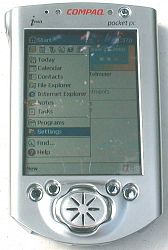
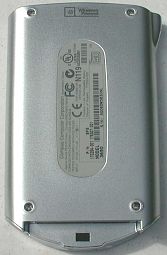
The Compaq iPAQ H3650 Pocket PC has been the most anticipated of the new Pocket PCs. Thanks to PDAMart, I was able to get my hands on one of the first available units. I even paid for it with my own hard earned cash. So it better be good, right? Well, let’s see.
Hardware Specs:
Operating System: Windows® Powered Pocket PC (in Flash memory)
Processor: 206 MHz Intel StrongARM 32 bit RISC Processor
Display Type: 240 x 320, .24 mm Pixel Pitch, 4096 color, Color reflective thin film transistor (TFT) LCD
Viewable Image Size: 2.26 x 3.02 inches
RAM: 32 MB
ROM: 16 MB Flash
Communications Port: Interface with USB cradle
Infrared Port: 115 Kbps
Expansion pack: optional slide on sleeves that offer various functions
Audio out: 3.5 mm Stereo
Battery: 950 mAh Lithium Polymer (up to 12hrs of life)
Dimensions: 5.11″ x 3.28″ x .62″
Weight: 6.3 oz. including battery
When you first see the iPAQ, you notice that it doesn’t look like any other Pocket PC to date. It has a modern, artsy, spacey, flashy look to it that you’ll either like or hate. At this point, it’s still growing on me. I think I’d like it more if it wasn’t so shiny.
The iPAQ is the smallest Pocket PC so far and is very similar in size to a Palm IIIc PDA. The sides are rounded and smooth with no rough edges. The front, top, bottom and sides of the PDA are made of a matte finished metal, the back is plastic made to look like matte finished metal. The shape is slightly tapered with the top being a bit wider than the bottom. The iPAQ is comfortable to hold in your hand. It is just the right size and weight. Having used the iPAQ for almost a week now, it is very hard to go back to my Casio E-115 which now seems like a huge brick in comparison.
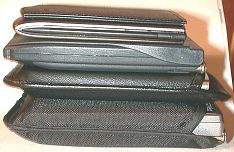
One small complaint that I have about the PDA is that it is almost too smooth as it has a slippery feeling in your hand. You can attach the basic style pack though which does make the unit feel less slippery (more about the packs later) but it increases the overall size of the unit somewhat.
The display on the iPAQ is very nice. It uses a reflective screen like the Aero Palm-size PC. The best thing about the display is that you can use your iPAQ
outside in full sunlight. Other color PDAs can’t be used comfortably outside. Their screens basically turn black and non-viewable. The iPAQ can be viewed just fine. If you look at the very first picture in this review, it was taken outside on a bright cloudy day. The screen also looks great on a bright sunny day with no clouds. I love the ability to use my PDA everywhere. It’s no fun to have to shade or squint at the screen when you are outside. I think that the iPAQ will be popular because of this. It will work great if you want to use it in your car with a GPS for example.
How does the screen compare with the Casio E-115? Well, side by side, I’d say that the Casio has a brighter display with richer colors. There are six brightness settings on the iPAQ, at the highest setting, it is just a bit brighter than the Casio’s dimmest setting. The iPAQ is easy and comfortable to read, but I would love for it to be just a little brighter. The iPAQ can only display 4096 colors while the Casio can display over 65,000 colors. Does this matter? Personally, I don’t think so. If all you’re going to do is use the iPAQ for the built-in applications, you’ll be perfectly happy. If you intend to use the iPAQ as a photo album, I think you’ll still be happy. You really can’t tell THAT much of a difference between 4096 colors and 65,000 colors. There is a difference, but it’s not super
drastic.
What about the using a stylus on the display? I actually prefer the iPAQ display to the Casio. The iPAQ is very slick like a piece of glass while the Casio has a more paper-like feel to it. This is just a matter of personal preference.
Unlike previous Palm-size PCs and Pocket PCs, the iPAQ has all the controls but one on the front of the unit. The only control not on the front is the voice recorder button which is on the top left side of the PDA. On the front top is the Microphone. The placement makes it easy to pick up the PDA with your right hand, press the voice recorder button with your thumb and talk into the microphone. It’s not as convenient for lefties, but it is still usable. An Ambient Light Sensor is located next to the microphone on the front of the unit. This sensor is supposed to adjust the brightness of the display depending on your surroundings.
I really couldn’t tell if the light sensor really did that much. Basically if you have the brightness setting set at Automatic, it turns the backlight to the Low setting no matter what lighting situation that you are in. An Alarm/Charge Indicator LED is also at the top front of the unit. This LED will flash yellow when the unit is charging and will glow a steady yellow when the unit is fully charged. It will also blink yellow when an alarm goes off. Next to it is the On/Off/Backlight button. Pressing the button once will toggle power to the unit. Pressing and holding the button will toggle the backlight. This doesn’t turn the display off, it just turns off the backlight (same as power save mode). You can still see the display. The button itself is small, recessed and pretty stiff. I find it a little hard to activate and end up using my thumbnail to press it.
I really couldn’t tell if the light sensor really did that much. Basically if you have the brightness setting set at Automatic, it turns the backlight to the Low setting no matter what lighting situation that you are in. An Alarm/Charge Indicator LED is also at the top front of the unit. This LED will flash yellow when the unit is charging and will glow a steady yellow when the unit is fully charged. It will also blink yellow when an alarm goes off. Next to it is the On/Off/Backlight button. Pressing the button once will toggle power to the unit. Pressing and holding the button will toggle the backlight. This doesn’t turn the display off, it just turns off the backlight (same as power save mode). You can still see the display. The button itself is small, recessed and pretty stiff. I find it a little hard to activate and end up using my thumbnail to press it.

At the bottom front of the PDA are 4 application buttons, the 5-way joystick and the speaker which is under the joystick. Although the 4 buttons can be reprogrammed to launch any application that you choose, they are initially set to launch the Calendar, Contacts, Qmenu and QStart. The outside buttons are a little larger than the inside buttons. They are all easy to press with your index finger and have good tactile feedback. The 5-way joystick is similar to the Casio joypad. But, iPAQ goes one better by letting you press the center of the button to do a select. This joystick is easy to use and works well in all applications. The only thing I don’t like about it is that my joystick makes a strange squeaky noise when I rock it to the left or right. It sounds mainly like the spring under it is creaking. I don’t like it. But then, I’m picky.
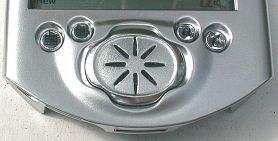
The speaker is housed under the joystick and is the loudest of any of the “palm sized” PDAs that I’ve tried so far. I don’t think you’ll miss an alarm on this PDA. Listening to .MP3 files thru this speaker won’t be optimal since the speaker isn’t stereo. But, it’s loud enough to play thru if you want to. It’s also just fine for listening to any voice recordings that you make using the built-in microphone. The recording quality of the iPAQ is quite good. You just have to play around with the settings to find the one that you feel sounds the best.
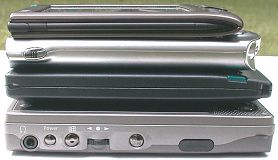
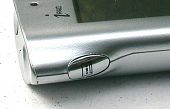
The top and bottom of the PDA aren’t flat but are concave. The top of the iPAQ has the stylus silo, stylus eject button, IR port, microphone, and earphone jack. The coolest thing is the stylus eject button. The small oval button next to the stylus silo when pressed will allow the stylus to pop up so that you can remove it. This rates pretty high on my nifty feature list. The stylus itself is a typical stock PDA stylus without much character. It is strangely shaped though. Sort of egg shaped and so that it can only fit in the stylus silo one way.
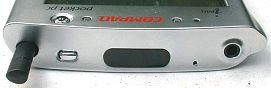
The IR port seems to be pretty strong. I did some tests beaming a note file back and forth to my Casio E-115. I used a long flat desk to lay the PDAs on and was able to successfully beam files as much as 64inches away…
Next to the IR port is a tiny hole. I am not sure what this is for. I don’t think it is another microphone because I tried covering the mic on the front while recording and recordings came out muffled.
The earphone jack is the standard 3.5mm size. The internal stereo sound on the iPAQ is great. It is about 3-4 times louder than the Casio E-115. The loudest setting on the Casio is equal to turning the volume a third of the way up on the iPAQ. Listening to .MP3s I noticed that the sound on the iPAQ is a little bit brighter than the Casio and the bass is also a bit deeper than the Casio. I’m very happy with the sound quality of the iPAQ except for one little thing. All the system sounds on the iPAQ end with a funny little hiss and a click. Sounds such as tapping on the Start bar or other icons all make this noise. I thought at first that it just might be the built in speaker, but listening thru the headphones you can really hear it. I’m not sure what is causing this but it is a little annoying.
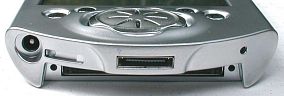
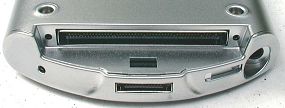
The bottom of the iPAQ has the AC adapter port, On/Off door with a toggle switch underneath, communications port, reset switch and Expansion Pack connector. The AC adapter cable which plugs into the cradle can also plug directly into the AC adapter port. The On/Off door is a sliding cover that hides a toggle switch underneath. You have to toggle the switch when you first get the iPAQ in order to allow the unit to turn on and charge the battery. The communications port mates with the cradle or optional cable. The reset switch can be activated with the tip of the stylus to reset the device. Pressing this button doesn’t erase data. The Expansion Pack connector is the connector that all the Expansion Pack sleeves will use. This port is exposed all the time unless you use the basic Expansion Pack sleeve that comes with the iPAQ. It does nothing but cover the back, sides and Expansion Pack slot of the iPAQ. Unfortunately you can’t turn the sleeve around to protect the screen. One nice thing is that you can still put the iPAQ in the cradle when this sleeve is on. Although the sleeve does keep the iPAQ from feeling so slippery, it does add a bit to the overall size and weight of the PDA. I would rather see someone create a small plastic cover for the Expansion Pack slot.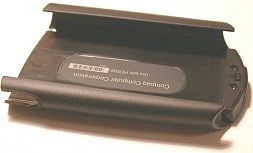
The Expansion Packs are Compaq’s answer to the Handspring Springboard modules. Packs will be available to allow you to use PCMCIA cards and Compact Flash cards with your iPAQ. Other ideas in the works are GPS packs, Cellphone packs, modem packs etc. This is a cool idea but the only bad thing about it is that these packs will cost you extra $$’s, and will add weight and size to your new small PDA. I just wish that Compaq would have included a CF card slot built into the iPAQ, instead of requiring users to buy a separate Expansion Pack for it.
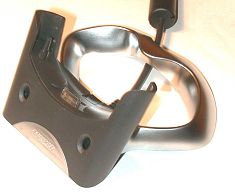
The iPAQ USB cradle is light weight and is made of plastic with aluminum (I think) on the bottom. The iPAQ fits in the cradle easily but requires two hands to remove it. You have to hold on to the cradle while pulling the iPAQ out. There are two stylus holders on the front of the cradle… does anyone ever use these?
USB is nice and it is quite a bit faster than serial. Syncing the Calendar, Contacts, Tasks and Notes are now much faster. The only bottleneck now is if you sync Avantgo sites. This is still way too slow for my liking… and I only sync 4 to 5 sites. Transferring .MP3 files directly to the iPAQ is tolerable (I wish there
was a CF slot though…). I did a couple tests to see how long it would take to transfer a 1meg file and a 5meg file by various methods and media. Here are my findings:
| 1067KB file transfer | 5019KB file transfer | |
| PC to iPAQ via USB iPAQ cradle | 14.04sec | 1min |
| PC to CF card via USB Sandisk CF Card Reader |
3sec | 11sec |
| PC to Casio E-115 via Casio Serial Cradle | 2min 32sec | 9mins 42 sec |
Battery life with the iPAQ seems fine. I don’t find battery life to be an issue with this generation Pocket PCs. Just stick the PDA in the cradle to charge a few minutes every other day or so and you’ll not have a problem.
The overall system speed of the iPAQ is excellent. It is FAST. I recently read an article that reported some actual benchmark data comparing the iPAQ, Casio E-115 and HP 545 and from this I was led to believe that the iPAQ’s StrongARM processor wasn’t all that superior speed-wise. Well, I was very pleased to find that real world use has revealed to me that the iPAQ is the fastest Windows Powered Pocket PC device yet. All the main built-in apps pop up instantly. The larger apps such as Pocket Excel, Pocket Explorer, Pocket Word and Microsoft Reader have a very slight lag to start with the Microsoft Reader being the slowest to start. That said, to me, the iPAQ really feels about twice as snappy as my Casio E-115. I’m very happy with the speed.
Let’s look at the software side of things now. I won’t go over the basics of the new apps that are built into the Pocket PCs. If you want to read more about Pocket Word, Pocket Excel, Microsoft Reader and the others, check out my review of the Casio E-115 where I did go into some details.
One of the great things about the iPAQ is that the OS is in Flash ROM. This means that you can update it with patches or even replace it totally. People are
already playing around with loading Linux on their iPAQs. Palm have been doing this for awhile with their PDAs and I think it is a very good thing.
What software goodies come with the iPAQ?
Software:
These are all apps built into the OS:
Calendar, Contacts, Pocket Excel, Pocket Word, Tasks, Voice Recorder, Notes, Pocket Internet Explorer, Calculator, Solitaire, Inbox, File Explorer, Media Player
These are on the Microsoft CD-ROM:
ActiveSync 3.1, Microsoft Outlook® 2000, Pocket Streets, Transcriber, Microsoft Money, Windows Media Manager, Microsoft Reader eBooks, Internet Explorer 5.0
These are the extras that Compaq put in the iPAQ ROM:
QMenu, Asset Viewer, Qstart, QUtility Picture Viewer, Backup
These are the extras on the Compaq CD-ROM:
Pocket Asset Manager, Reference Guide (pdf format) and Virtual Tour, AudiblePlayer and AudibleManager, Ilium eWallet and ListPro
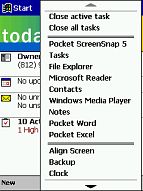
QMenu is a pop up task switcher and task closer tool. One of the hardware buttons on the front of the iPAQ is mapped to this tool by default. Qstart is Compaq’s Program Launcher program. This program will allow you to add your own categories that can be accessed from a pop up list at the bottom of the screen. Qstart is
also mapped to one of the hardware buttons by default. It’s a quick launcher and is easy to use. Asset Viewer gives you simple outline view of the iPAQ hardware
details. Picture Viewer is a very simple graphics viewer. Backup allows you to back up all your data to a CF card… which you won’t be able to use unless you buy an optional Expansion Pack.

The optional files that you can install from the Compaq CDrom are eWallet and ListPro from Ilium Software. eWallet allows you to store your personal information such as credit card numbers, passwords, pin numbers etc. ListPro allows you to create hierarchical lists and outlines.
There is a splash file on the iPAQ for a program called PacketVideo Player. This program is supposed to be a streaming video player. The splash screen tells you to go download the latest version from their website or install it from the enclosed CDrom. The file doesn’t exist on the CD and the website says the program will be available next month… The Compaq CD also shows a program called Formula 1 which looks like a race car game. But, this game isn’t available to install. I’m somewhat disappointed in the software bundle. It would have been great to get a couple more freebies.
Overall, I really like the iPAQ. For me it would be perfect if a compact flash slot was built in and if the screen were just a bit brighter and the colors more vivid. Other than that, I think Compaq has created the best Pocket PC so far. The only little gotcha is that some third party shareware apps aren’t available for the iPAQ yet. I think that will change very quickly though. I haven’t been able to review the HP Pocket PC yet, but from what I can guess, the iPAQ is the one to beat right now. It’s just replaced my Casio E-115 as my main PDA.

Samsung 14" Galaxy Chromebook Go Laptop PC Computer, Intel Celeron N4500 Processor, 4GB RAM, 64GB Storage, ChromeOS, XE340XDA-KA2US, Student Laptop, Silver
(as of June 8, 2026 18:53 GMT -05:00 - More infoProduct prices and availability are accurate as of the date/time indicated and are subject to change. Any price and availability information displayed on [relevant Amazon Site(s), as applicable] at the time of purchase will apply to the purchase of this product.)
HP Everyday Laptop • 2026 Edition • 8GB RAM • 256GB SSD • Microsoft Office 365 Included • Thin & Portable • Fast Charge and Up to 12 Hours Battery Life • Windows 11
(as of June 8, 2026 13:06 GMT -05:00 - More infoProduct prices and availability are accurate as of the date/time indicated and are subject to change. Any price and availability information displayed on [relevant Amazon Site(s), as applicable] at the time of purchase will apply to the purchase of this product.)Product Information
| Price: | $499.00 |
| Manufacturer: | Compaq |
| Pros: |
|
| Cons: |
|

Gadgeteer Comment Policy - Please read before commenting
Post your comments here on the Proporta Aluminum Case for the Palm Tungsten | T.
http://www.the-gadgeteer.com/tt-proporta-review.html
Just click the POST REPLY button on this page.
Again, excellent review…almost didn’t see this review since it snuck in with the ivolution review.
btw, who takes these outstanding macro shots of the product (what digicam is used)? These pics are extremely sharp and the perspective for every shot is meaningful.
A couple of questions/concerns? How is the finish of each of the aluminum edges? Is it very smooth, or can it be a little jagged and catch on clothing?
Also, any concerns about the permanence of the neoprene lining – is it thin and fragile enough where it may tear or rip out over time? That could look ugly.
Finally, since there’s no storage, where do you keep your extra SD cards?
Thanks! and another great review.
Judie
Excellent review as usual.
I received my Proporta case last week. I set out below a slightly amended copy of what I posted on a PIC forum.
I have the following specific points on your review:
1. It appears that this is the same case as the Innopocket metal case, which may be more available in the States (although Proports are very quick generally).
2. My Proporta case doesn’t have the neat looking logo on the front nor the Proporta name on the back – but I think it’s probably an early example.
3. It’s is a shame that you have to remove the case to reach the reset button, but if you have QuickLaunch, you can programme one of the hard buttons to soft reset.
4. Having used the hard case for a bit longer, I can endorse what you say about how tough and confidence-inspiring it seems.
GOOD STUFF
*The coating is a very nice “tungsten” colour. Appropriate! Under a bright light, it’s a slightly bluer shade than the TT itself
*The coating seems really tough – a bic ballpoint doesn’t seem to scratch it, although prong of a metal fork will (I actually tried this!). Feels nice in the hand.
* The pressing seems very neat and the structure tough; no creaking etc. I’ve just dropped it (by accident, not for the purposes of this post) about three feet onto my office floor and it seems fine
*The lining is soft black neoprene – classy and thin
*The TT slides in very smoothly and is gripped by (i) the shape of the case, (ii) the neoprene and (iii) two plastic lever sprung tabs that click into the two square indentations at the back of the TT. It seems very secure. I cannot see how the TT could fall out when the cover is open. When the cover is closed, the TT is prevented from moving at all. The cover clicks shut securely.
*The case is really quite small – certainly smaller than the scuba case. FWIW : 10.4cm x 8.4cm x 2cm. I guess that aluminium is the only way to get this compact.
*The SD card, stylus, power button and IR window are all accessible with the cover open or closed.
*When I ordered, I had my doubts about having to slide the body of the TT up away from the slider (which remains gripped in the case) rather than the slider down. I needn’t have worried – holding the top of the TT, thumb over the Palm badge at the front, forefinger griping the back through a cut-out – is obvious and instinctive. Much much easier than opening the slider with Palm scuba case.
BAD (OR AT LEAST SO-SO) STUFF
*It looks like it will plug into the cradle for sync/charging, but it won’t. You should be able to attach a sync/charge cable though (haven’t tried this). Sliding the TT out to put it on the cradle is no problem.
*The reset button is inaccessible when the Palm is in the case (even if you’ve opened the slider).
*The voice recorder button is accessible when the slider is closed, but it’s a bit of a stretch with your thumb (if that makes sense). Perhaps idiotically, when the slider is open, the voice button is partially covered. I haven’t yet worked out whether I care about this or not.
*There are no pockets for spare SD cards. Personally, I’m very happy to trade this lack to keep the case as slim as possible.
*The hinge is on the right-hand side and folds back just beyond 180 degrees i.e. flat, not right the way around the back. For me (I’m right-handed) this is distinctly unnatural both to open and to use. Maybe I am too used to the Palm hard case for my old Vx, but this case feels like it was designed for lefthanders.
I keep picking it up upside down, opening it and then realising. I must practice before I show off my new toy again in meetings 😉 And no, the TT won’t go into this case upside down.
*The ends of the hinges, if not sharp, are certainly not rounded off and I wonder whether they will snag on suit pockets, bags etc etc.
Peter,
I used my Olympus C-700 for this review. Doesn’t it take great shots? 🙂
The edges of the case are rounded and seem smooth – the only points that might snag (and it hasn’t happened to me yet) are on the hinge of the case. the hinge sticks out just a tad.
The Neoprene is thick and well applied – I don’t think it will come up as easily as some of the cases I have owned in the past with a similar, yet thinner, lining.
You’re right – there is no place for storage, so my extra SD cards go in a special pocket in my purse. Personally, I am hoping for the day when I have either a 512MB or 1GB card – I hate swapping cards out!
Timo,
Excellent overview – looks like we agree on most everything.
Regarding resets – I do have a button remapped to perform a soft reset, but when I get a “fatal error” (all too common with some of the software I have been trying), then I do have to actually remove the TT from the case, as everything just locks up.
Thanks for writing!
Judie :0)
Judie,
you might want to also mention that Proporta doesn’t appear to be shipping this case yet (or is backlogged). Their website also specifies that it is “due to be released”. I ordered mine on the 4th and have received the neoprene case (as per the co.s website) while I wait for the aluminium one. For me, at least, no word on when I will get the aluminium one.
I am happy, though, that the case, when I get it, should be what I want, based on your review. I would agree, also, that it looks identical to the innopocket case.
Could you please indicate whether there is a problem with the Proporta case pressing down on the Navigator (when closed)? Thanks.
stm,
I have had absolutely no problem with presure on the front of the case pushing any of the buttons or navpad. Believe me, I would have complained loudly about that if I had.
Judie :0)
Thanks for the review. The photos are very illustrative.
I just ordered the aluminium case from Proporta on Thursday. And today I got email from them saying that it was shipped on Friday. But I wonder if this is the free neoprene wet-suit case. Does anyone know if the aluminium case is already available at Proporta??
b.k.k.
I wouldn’t hold your breath. Their website description of the case went from “early February” to “early in 2003” and “due to release”. I have sent them an email asking when I should be expecting the case but zero response. Honestly, in retrospect, I should have got the Innopocket case (since it appears to be the same). The neoprene case is definately a stop gap. If you want to use properly you have to apply a large adhesive velcro patch to the back of your palm.
The Innopocket version of this case is exactly the same. They sent me one… The only difference is the lack of the ProPorta logo on the front.
I received my aluminium case from Proporta several weeks ago (although it did not have the neat Proporta logo). However I suspect there’s quite a back log.
For what it’s worth, I’ve found them very quick to deliver and responsive to enquiries. Why not email them and ask where your case is? If necessary, get the Innopocket (sp?) version.
Timo
As I said in my post before, I have emailed them – no response. Also, maybe your case was an Innopocket case since it didn’t have markings on it! Wierd, though, that they would ship you a case a few weeks ago and yet not have “released” the case yet. Seems a little strange. Honestly, I just want a case, but probably picked the wrong boat to sail with.
“…..I have emailed them – no response.”
That’s bad. Patchy service/responsiveness is sometimes worse than when it’s consistatly bad.
Hope yours arrives soon.
Timo
(still looking for a good use for my neoprene case)
Ok. I have now kindly sent them (Proporta) a second email requesting an update on the status of my order considering they have amended their website to reflect “early in 2003”. I have decided to assume that my original email was lost somewhere in the internet ether. Unfortunately, it has been another day now and they haven’t responded to this email. People can decide for themselves whether this represents poor customer service. I will give them another day or two before I cancel my original order and get the Innopocket version. This really sucks.:(
Success! I got a response from Proporta. Apparently one of their guys was sick and not getting to emails. I was told my hard case would be shipped today. I cannot wait.
I was wondering if the Proporta case is compatible with the ultrathin stowaway keyboard without removing it from the case.
-George
Unfortunately, you can’t use the Stowaway while the TT is in the Proporta.
Judie :0)
Hi, I won the Proporta competition, but the door is defective.. too small and doesn’t close. I’ve been waiting for ages for a case, I guess the search continues. 🙁
ACK! 😡 You should complain and ask for a replacement.
I did, and they’ll send me a new one, but first they want to see the one they sent, and I have to right a note stating the problem, and of course pay for the shipping.
And why am I crabby about this? Because I have the flue and am not looking forward to trudging through snow and ice that’s why. 😡
In the meatime I ordered the Palm slim case. It ain’t perfect, but it will hold cards and be one of those backup cases that no one admits they have. I hope that when I finally get the new proporta one that it’s as great as everyone says. It looks pretty cool except for the door not fitting.
That’s the other bit that gets me, you can see it in the packaging that it’s defective. Just normally looking at it shows the door isn’t right. Why send it out if you know you’re going to get it back? :rolleyes:
Ok ok , I’m grumpy. I want my case… I think I’ll have some Chicken noodle soup and head back to bed. I wish Cambells sold products in Finland. 😡
edit – right meaning write of course. Oops 😮
Even though I might get my case soon, and the fact that they have just started to make the case, I would have to say people should think twice in regards to purchasing from Proporta given my average experience. They have either not responded to emails, or told me ” its in the mail” sort of responses, and I am yet to see my case. When I have either called them or emailed they have told me different dates as to when its shipped. When I ordered their site stated it was shipping at the start of Feb. Well, its now over a month later I have seen no metal case.
Just my experience:(
Yeah, they’re no-doubt a small business and extremely busy and going all different directions as to who to sell to. Who designed and makes the Proporta case? The reason I ask is because it seems like they’re more interested in selling to resellers (Innopocket, Styluscentral, Brando, Rhinoskin) than in selling to customers.
Of course, it could be their manufacturer doing the reselling and not Proporta themselves.. that’s why I asked if anyone knows.
And I’d second the slowness and subpar customer service. They never would answer my questions (I sent two, two weeks apart) as to when I’d get my case, and then when I won the contest, it took two weeks to contact me.
Then they sent me a dud case, and wanted me to pay for the shipping and send it back _before_ they decide to send a new one. For winning a contest, that’s not the best customer service I’ve ever seen.
I’ve had the flue pretty bad and am just now getting over it, so trudging out to the post office in a foot of snow/ice wasn’t a priority last week. I sent it off the day before yesterday at a cost of 5 dollars…for something that was supposed to be free.
So to say the least, I’m not the most impressed with proporta.
Received my case! At long last.
Interestingly it didn’t have the proporta stamp on it. The photo of the case on the website also doesn’t have the stamp. Who knows, maybe they are using Innopocket cases!
My take: I really like the case, but didn’t enjoy the purchasing process or the ordering support. :rolleyes:
Capt Kanga,
I’m having the same dilemma as you now !! I ordered my Proporta Aluminium case for the Tungsten T on the 22nd February 2003.
I received the “Free Neoprene Case while you wait” on the 6th March 2003.
Today is 12 March 2003 and I sent out an email enquiry regarding my Aluminuim T|T Case on the 10 March 2003) to their Sales Manager,Amanda King. So far no response whatsoever from their side.
It’s going to be a month soon in 10 days time (22 FEB-22MAR) and I still see no sign of my case!
I hope the people at Proporta are reading this just to let others know when it comes to transactions with Proporta,expect to get the same treatment Capt Kanga and I received!
Cheers,
Allan
allanphang – good luck in your quest!
I now have to air my other major gripe with Proporta.
When I ordered the case, their website allows you to have the company’s prices quoted in USD. Well, at the end of the transaction I was charged $41.11
That seemed ok.
Well, I go on to find that my card has been charged $45.67!
The response back from Proporta regarding the inconsistency of the charge and the apparent error is:
“This will be due to daily fluctuations in the exchange rate. We are a British based company and so therefore charge in sterling. There has been no error.”
Well, honestly I think this is BS. At no point in the ordering process (in USD), does Proporta state the customer is taking foreign exchange risk, and on top of this, a change of over 10% in the exchange rate in a day is just ludicrous. They are misquoting the price, or lowballing the price in USD.
I reiterate that I would never do business with Proporta again.
😡
Also, in case anyone cares, you can get the same case on Ebay for $25 before shipping.
Finally !! My casing arrived today !
Looks exactly like what they mentioned at their site and like the review in The-Gadgeteer.com. Although the reviewer’s one (Ms. Judie Hughes) http://www.the-gadgeteer.com/tt-proporta-review.html, her’s looks more covered from the front view, whereas mine has a tiny gap at the bottom left corner, about 0.1 centimetres. Am I gonna return to them this one and request for a new case? (after hearing all the horror stories) …. No way !!
Now my only worry is their “charges”. I’d better check the billing info. ! Will keep you posted.
Cheers,
Allan
Ok. Final post on Proporta.
After I sent them an email back complaining about their policies regarding currency issues, etc. I got a call from them. I will have to give them props when due. They outlined to me how they were going to make changes on their web site which address’s issues that I raised.
* They will now more prominently disclose that you are purchasing in GBP converted to USD and that there could be differences in the final amount
* They are setting up the disclosed USD prices to be based on more current (maybe daily) conversion rates
* They plan to setup sales, so that you can pay in USD at some point in the future.
Also, they are sending me a charge/sync cable gratis – not bad!
At the end of all of this, I would have to say that Proporta is trying to be responsive and I would have to change the conclusion of my last post in that I would give them another chance.
I’ve read all the reviews about the Proporta case and the Palm metal one, but I’m still undecided. A friend of mine recently bought a Proporta case (took him only 3 days to receive it, one of the few perks of living in London!) and I’ve had a look at it. Got to admit, it does look better than the Palm and much lighter, colour seems better as well. However, the few concerns raised by other members do still stop me from going out and buying one.
Currently, I’m using a third-party case, by a company called MOC, which I think is French ‘cos its got ‘le sac pour tous’ on the front. It’s not a metal case, but is quite light, made from ‘fake’ leather but does its job admirably, being very strong and protective. Being a Southpaw, it also opens the ‘right’ way round, just like the Proporta actually. I got it while I was over in Hong Kong, for the equivalent of £10 and has protected my new Tungsten from several drops. It is similar to the Covertec case previously reviewed, but opens like the Proporta case. I’ve not seen this case anywhere else, but it may be a good cheaper option to those people having problems working out which protective case to get. If anyone does find out where they stock these on the Net then let me know (my friend is now interested in acquiring one).
Can I get opinions?
i live in the Philippines and I want to get a nice cover for my T|T.
I got the Palm Sleeve Case but it’s too bulky.
I like the Vaja but too $$$
i’m wondering between the Proporta or the Pocket Solution T|T Cover Up.
Help! 😀
Deuro_mcfile,
go for Innopocket…looks just like the Proporta casing…..if not identical!
Cheers,
Allan
Does Palm’s folding keyboard work with this case?
I have a Pocketop, but until they write a Palm OS5 driver, I’m SOL. The Palm keyboard is a smaller solution, anyway.
Ok… for sure I have put on a couple of pounds over the last few years while still forcing my way into old jeans BUT still… my Proporta case does fit into my pocket! Its not like I am forcing it into my pocket with a shoe horn. Anyway, after about 6 weeks using the case, it is pretty much bent out of shape. The only upside to this is that its now easy to get my TT in and out of the case for synching. The down side is that I had real concerns about the lid of the case squishing down on the tt. A few days ago I noticed a seriously deep indentation on the inside foam of the cover where the 5-way nav had been pushed on. Looking at the cover I noticed that it was almost flat while originally, it had a nice curve to it. It was too easy to bend it back into shape. The hinge also seems bent out of shape and I have also had to “adjust” the closure as the case no longer wanted to stay shut. Just so you know, I have the case with the nifty logo on the front. Has anyone tried the Rhino Leather flip case? I did see it in a catalog someplace but now can not even find it online.
Regards,
Gil
ps – I love the tt and bluetooth!
anybody seen the “Bellagio Designs” cases? Looks neat.
http://www.bellagiodesigns.com
Can a Tungsten T Proporta case (or its many variations) owner let me know something about using the headphone jack while the case is closed? I’m curious if a headphone jack with a 90-degree plug can be used with a Tungsten while it’s in the case. It’s difficult to tell if the notch for the jack and voice memo button has enough room for an angled plug to safely seat inside the jack. Any help would be appreciated.
On a side note, as a new owner of a Tungsten T, it’s agonizing trying to decide on a case! I really can’t make up my mind between metal vs. leather, and if leather, Covertec vs. E&B slipper vs. Xigma vs. … it’s making my brain hurt. 🙂
90 degree angle headphones fit just fine:
Thanks for the speedy response, Julie, and for the photo link (which I had missed). Does the plug have any problem rotating 180-degrees from the position in the picture, i.e., pointing towards the top of the case?
You didn’t miss the picture, I just took it for you tonight. The plug can rotate freely.
Just in case (no pun intended) anyone is interested, the InnoPocket version of this case can now be ordered with two SD card pockets inside the lid (way cool)…
InnoPocket Case
I just recieved the TC version of this case and kind of disappointed. Its so slippery!!! No texture on the outside of the case at all!! I have dropped it 3 times just getting it in the case! It feels awkward to hold open and at the same time not let it slip out of your hands.
Another thing, I ordered the 3 and 1 cable from them at the same time and I can’t sync with this cable in the case. I guess its all going back.:(
That seems *really* odd having the connector side of the card facing out when they’re stored in the case…is there a good reason for it??
Upon looking carefully at the slots, I figured out why they probably oriented the cards that way. All SD cards have a ‘rail’ on the edges. The slots in this newer Innopocket case, use those rails. Maybe if the cards were oriented the opposite direction, they would stick out more and potentially touch the screen when the cover was closed…
How easily can you remove the Tungsten from the Innopocket case? Should I buy a travel USB cable to avoid having to pull out the unit each time I sync or want to charge?
Thanks.
It’s not a problem at all to remove the T|T from the case when you want to sync / charge with the cradle.
Julie is correct, it isn’t too difficult to remove it from the case.
I’m waiting for MidWestPCB to make a Bridge unit for the Tungsten | T & cradle, so that I don’t have to remove it from the case at all. I was told by them that they are working on something, but it is not quite ready.
http://www.midwestpcbdesigns.com/
After reading this review I bought one of these cases for my Tungsten T. Very nice case. Excellent workmanship and well worth the money. Between this and my Tungsten Vaja case I’m pretty well covered!
I use the 3 in 1 cable. They sent it to me for free, given the issues I had with their “Innopocket’s” website and exchange rate disclosure, which they have fixed. The cable is able to sync with my palm just fine. It just took a little practice in getting the cable to attach, but now no issues.
Just wanted to chime in with my positive experience w/ordering from Proporta — I thought it odd that they did not convert into USD on their site, until I came here and saw the less than stellar experiences folks had had previously. I was happily surprised by how quickly my order was processed and shipped (only a few days time, faster than most domestic orders!)
Re: the case itself, I like it quite a bit; I like the brushed metal finish (more so than my old Rhinoskin Aluminum case for my Palm V) as well as the heft of the case. THe neoprene lining seems more “solid” than the Rhinoskin one as well. I haven’t figured out how to get the TT to clip into the clips for the back of the until, though it seems fine the way it is so I’m not pushing it. Also, there are no SD card slots (I thought there were for some reason, but maybe that was a different case…)
I do wish someone would make a metal case that completely encloses the TT (like the Rhinoskin Palm V one) so that I wouldn’t have to worry about dust getting into it, but oh well.
I have the RhinoSkin case, and have had a nightmare of a time with it (which is disappointing, considering how great their case for my old Clie T-665 was) so far, although thanks to customer service there’s still promise.
The bad news:
The hinge is very loose, which causes two problems. First, the pin has a tendency over time to work loose, although a firm squeeze with a pair of pliers in the right spot can fix this (albeit leaving a small mark if you forget to cover the ridges with something soft), not that you should have to do that repair on a new product.
Second, the hinge also allows the cover to wiggle, which means it has a tendency to bind to the lower half of the case when closed (you can see this if the case is closed, and you push gently but firmly on the lid with a slight rightward motion, it will slip past the lip of the lower half and get stuck). This can be alleviated by slightly bending in the left side of the lower half, but again, the customer shouldn’t have to do this repair (and, again, the cover shouldn’t be loose enough that it’s necessary anyway).
Also, I have that small gap on the left bottom between the cover and the lower half, as noted in an earlier post.
I’ve had two different cases, both of which had these problems. FWIW, both came from Mobile Planet (who I will never deal with again, their customer service was horrendous, they lied about shipping my replacement case on two separate occasions and made me fight for them to pay the shipping even after they had already promised they’d pay for it, etc.) so my initial thought was a bad batch. But….
The slightly better, but still not so good news:
After two bad cases came from Mobile Planet, I decided to skip past them and go right to Saunders/Rhinoskin. They were very good about sending me a replacement, and told me to hold onto my case until I got the replacement (MP wanted the case sent back first, I had to fight for an advance exchange so that my Palm wouldn’t go unprotected).
Unfortunately, when the replacement (#3) came, they had tried too hard to alleviate the problem, and there were awfully sharp nicks on the hinge from where somebody took a pair of pliers to the case to ensure the hinge didn’t come out. The hinge was also so tight that you had to fight to close the case. A bit of working on it got the hinge loose enough to use, but alas, it was now too loose, as with the earlier cases.
The “now we’re getting somewhere, and this almost qualifies as good” news:
So, I sent another e-mail to customer service, and begged them to please test the case with a real PDA in it before they sent it to me. Within a day, I got an e-mail back that the rep who received my e-mail had gone to the warehouse, pulled three cases off the shelf, and tested them. She discovered that they had the same problems I had complained about.
As of last notice, she was going to speak with the product development folks to work on fixing the problems, and would get back to me as soon as she could, and she told me to hang on to both cases I currently have until we figure out something to prevent the problems from happening again.
While the nightmarish experience with this case is exasperating, I’ll tentatively commend RhinoSkin’s customer service department for their assistance (although I reserve the right to take that back if they don’t get back to me with a solution in the near future :o)
–Andy (who really liked the Palm hard case, except for the fact that it doesn’t have a clasp to keep it shut, which was a deal breaker)
P.S.-New Yorker, the case doesn’t clip into the things inside the case. They are just tabs that fit into the notches on the back of the Palm via spring pressure to help hold it in. If the Palm is seated firmly in the case, it’s in there, there’s nothing to actively clip.
I just got an e-mail back from RhinoSkin/Saunders’s customer service dept. They informed me that they are inspecting every TT case they have in stock, not manufacturing any more at this time, and putting it through a redesign process! This, IMHO, is a very, very good thing, and a very responsible step for them. Yay!
I’ve had a steel case since October 2003. I don’t think they are great vaue.
The first thing to go was the hinge on which the pin worked loose and needed pushing back up regularly. Then the clip lost its grip and needed bending back. And finally the bottom caught as I pulled it from my pocket and bent. This creased one of the folds which snapped last week. So I’m on the look-out for something that will last slightly longer.
Anyone recommend one?
I agree about the pin on the hinge coming loose and sticking out. That has happened at least 3 or 4 times in the 6 months or so that I’ve had the case.
i have a ipaq pocket pc but no accesories , where can i buy them ?