
I’m the kind of person who can only wear one watch at a time. That is, I don’t wear one to work, another one for play, and yet another for dress. So it’s important to me that whatever I wear does everything I need.
Unfortunately for me, I’m drawn to gadgets, and I can be hard on my toys. For this reason, I’m a big fan of the Casio G-Shock products. Today I’m writing about my latest purchase, the Casio G-Shock GW9200-1 “Riseman” watch.
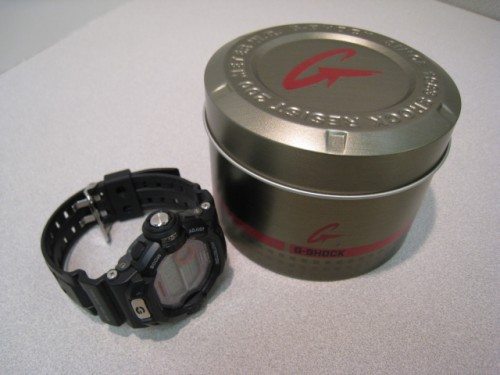
There are way too many features to list individually, so here are the main ones:
- Multi-Band Atomic Timekeeping (US, UK, Germany, Japan, China)
- Tough Solar Power
- 200M Water Resistant
- Altimeter
- Barometer
- Thermometer
- World Time
- 5 Daily Alarms (1 with snooze)
- Countdown Timer (1 minute to 24 hours)
- 1/100 second stopwatch (24 hours)
- Measuring modes: Elapsed time, split time, 1st-2nd place times
- Hourly Time Signal
- Approx. battery life: 9 months on full charge (without further exposure to light)
- Size of case/total weight: 51 x 48.9 x 15.9mm / 60.9g
There are other Casio “ABC” watches (Altimeter, Barometer, Compass), namely the Pathfinder/Protrek series, but the Riseman does not have a compass. What you gain, however, is a watch that is more in line with the G-Shock styling with the protected, recessed mineral crystal glass, and the plastic resin body that hides minor wear marks quite well.
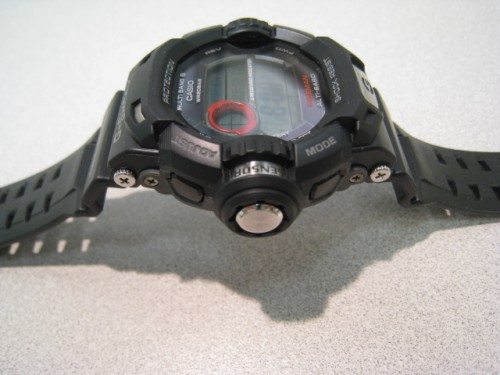
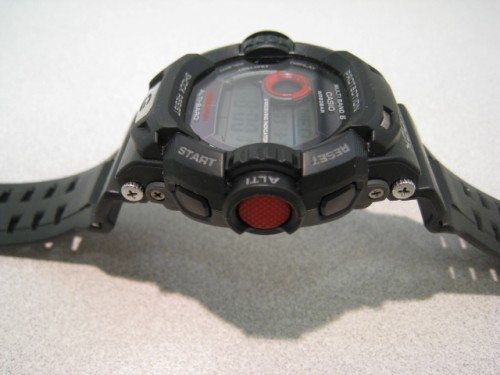
At first glance, the Riseman has a funny lump on the left side, which houses the sensor for the altimeter, barometer and thermometer. (Edit: There is only one sensor placed in the “lump” and that is a barometric pressure sensor. The watch then has a US Standard Atmosphere 1976 barometric formula based standard conversion chart in its memory that enables the watch to derive altitude readings from the current barometric pressure readings. Thanks to Watchuseek Forum member Joakim Agren for the correction.)
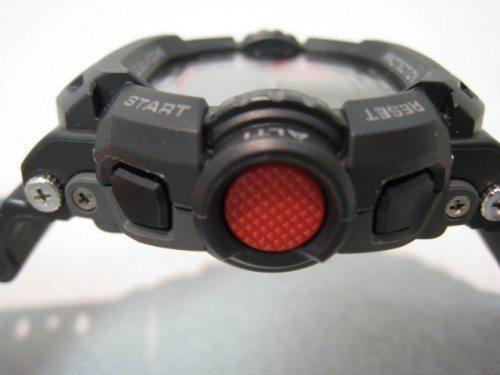
Unlike most Casio G-Shocks, the Riseman is controlled with six buttons instead of the usual five. Where’s the sixth button? The big red one on the right labeled “ALTI”. More on individual functions later.
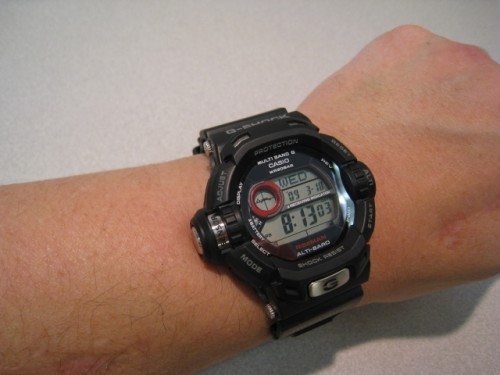
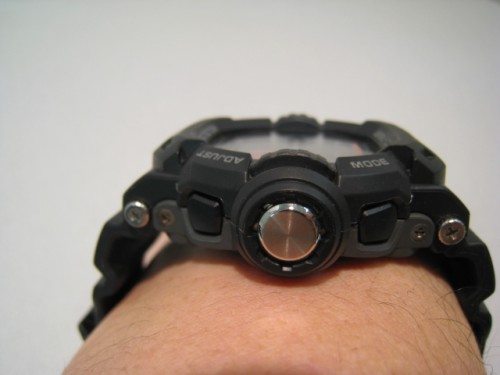
Before I put it on, I imagined a watch with so many features would be huge. Turns out that wasn’t the case. Very average for a G-Shock.
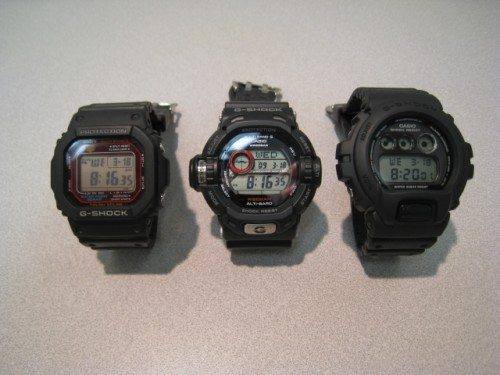
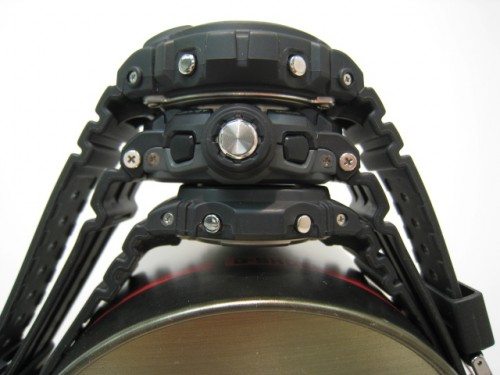
When compared to other classic G-Shocks, such as the 5600 series (GW-M5600 solar atomic shown) and the DW6900 (“three eyed monster”), the GW9200-1 Riseman falls somewhere in between in terms of bulk.
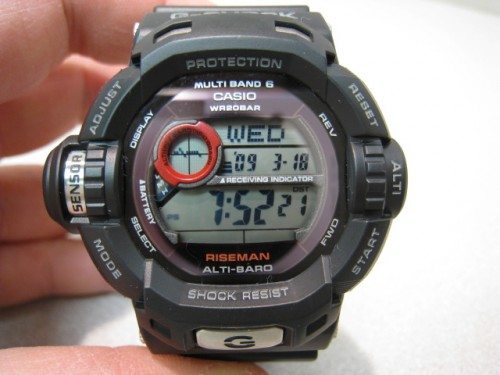
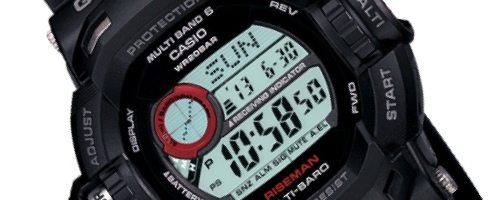
The Riseman’s face is split into several sections. The bottom digits display the time. The middle portion shows the year and month/date. The top section shows the day of the week. The red circle shows the barometric trend for the last 24 hours in two hour intervals per dot. Increasing pressure generally means improving weather, and decreasing pressure equates to degrading weather. Your results will vary!
The solar panels that charge the battery surround the LCD display. Current battery level is displayed via tiny LCD segments for L, M and H (Low, Medium, High). To save power, the Riseman has a user-selectable feature that turns the LCD off after a preset interval of no light, such as when you turn the lights out to sleep. This power saving feature can be also be activated if you wear long sleeves covering the watch long enough. I’ve never found this to be an issue as the watch comes back to life quickly.
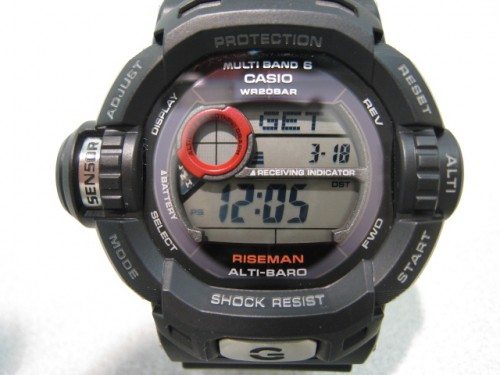
Since this watch has an atomic clock sync feature, a small three-lined indicator to the right of the red circle that appears when the watch has successfully synchronized. Unlike the battery indicator, the receive indicator is either on or off. There is no intermediate indication for a low or medium signal. However, you can manually perform a time sync by pressing and holding the START button (lower right) and the time display flashes your relative signal strength from L1 (lowest) to L3 (strongest). This is handy when trying to determine where in the house you can leave the watch to sync overnight at midnight, 1AM, 2AM, etc until the Riseman obtains a suitable signal.
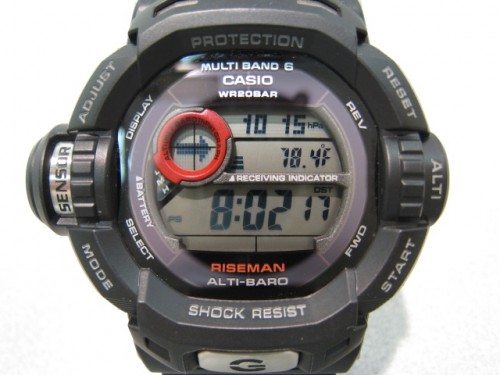
Pressing the MODE button cycles through the various watch modes. The first one is the barometer. In this mode, the current barometric pressure is displayed on the first row in either hPa or inHg, depending if you prefer metric or imperial units. The second row displays current temperature (C or F), and the red circle displays the recent barometric trend, user selectable as the 24-hour dot matrix graph or an easy to read arrow. What’s nice is that the Riseman constantly displays the current time at the bottom line. One problem is that as you wear the watch, the temperature displayed is most likely skewed due to heat from your wrist. Taking off the watch for a few minutes assumes a more accurate room temperature.
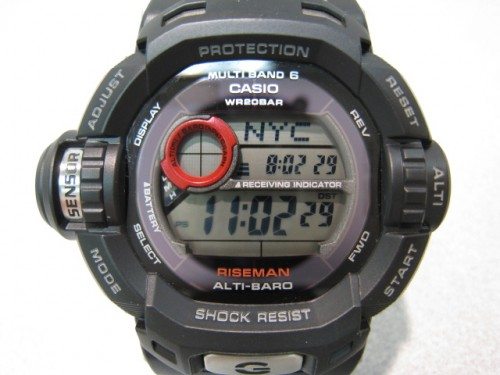
The next mode is the world time display. The city code shows on the top line (LAX, NYC, etc.) and the bottom row shows the time in that time zone. The middle row shows your local, current time for reference.
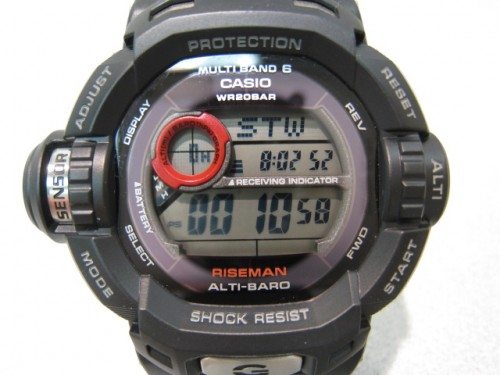
Pressing the mode button again gets you to the stopwatch. Pressing the START button starts and stops the stopwatch. The RESET button (upper right) clears to zero. You may notice the red circle shows the elapsed number of hours. The Riseman is rare in that it’s one of the few Casio G-Shocks to measure up to 24 hours, as well as displaying the current time in the middle display. This feature is more rare than you’d think.
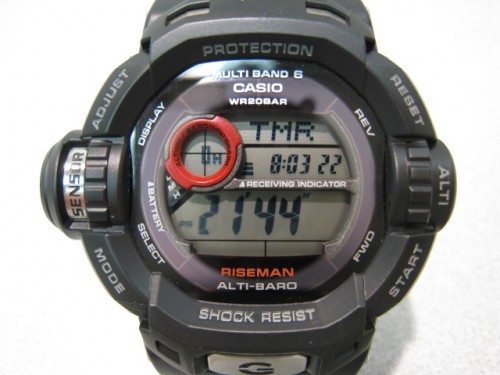
The next mode is the countdown timer. You start and stop the timer much like the stopwatch. The countdown timer can be set for a maximum of 24 hours and also displays the current time in the middle display. When the time reaches zero, the Riseman beeps.
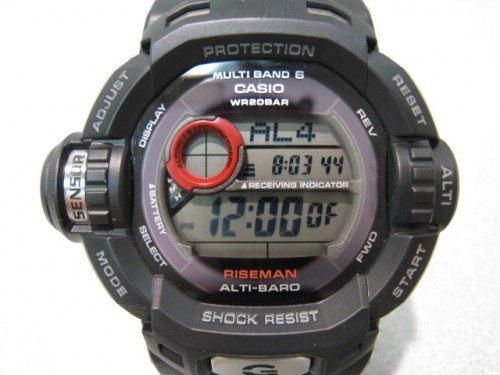
The alarm is the next mode. There are four individual alarms you can set, and one individual alarm you can set with a built-in snooze feature. In a break with Casio standards, pressing the big red ALTI button toggles each alarm on or off. If you’re familiar with G-Shocks and don’t read the manual to the Riseman, you’ll get confused at first as I did!
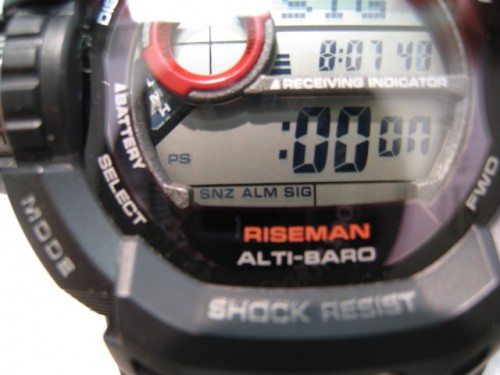
Small three-letter abbreviations appear on the bottom row to indicate Snooze (SNZ), Alarm (ALM) and hourly signal chime (SIG).
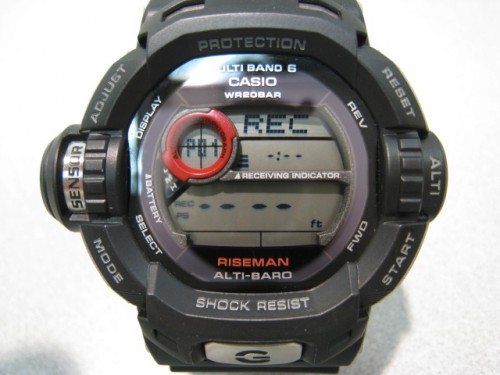
The last mode serves as an altimeter high/low playback. It shows the “min” and “max” recorded altitudes with the time stamp.
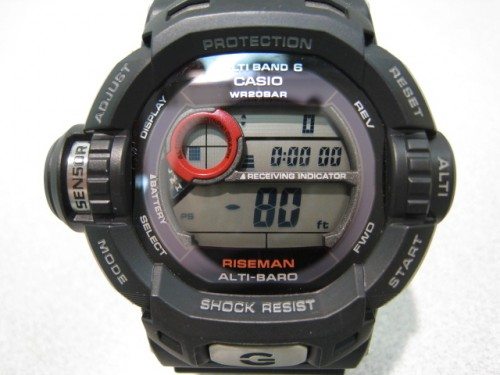
Speaking of altitude, the digital altimeter can be accessed in the timekeeping mode by pressing the red ALTI button. I have not calibrated this watch yet so it shows my altitude as a negative. A quick elevator ride proved to me that the altitude does change as expected.
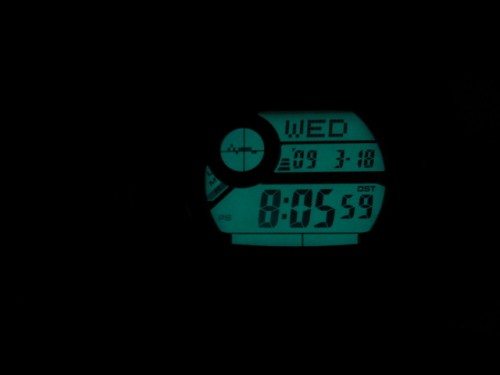
No do-it-all watch would be complete without a backlight! Pressing the big “G” button brings up an electroluminescent backlight. This can also be programmed to turn on with a flick of the wrist.
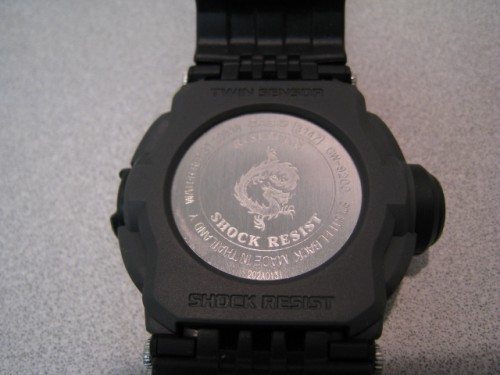
The back of the watch is no slouch, either. It’s surrounded by a plastic trim piece that must be removed to access the battery hatch. Notice the dragon pattern on the back. If you have a “flying squirrel” on the back instead of a dragon, you’ve got a version originally slated for sale outside the United States.
Edit: The Flying Fire dragon case back is found not only on US models but on all International atomic versions and on all non atomic version. The Flying squirrel is exclusive to Japanese domestic markets models and only found on the atomic versions. The Japanese versions do not support metric and imperial conversions for the different measurements given by the sensors, they are strictly metric only. (Thanks to Watchuseek Forum member Joakim Agren for the correction.)
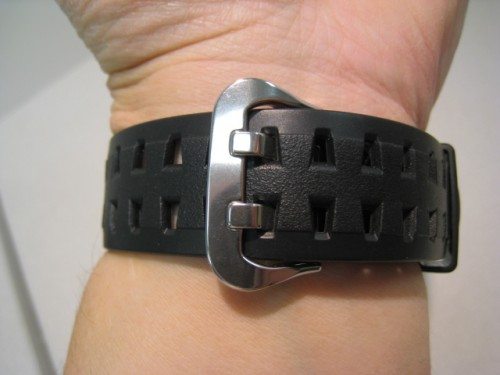
The strap is made of the same durable resin type material as the watch case. A dual-hole buckle gives it a real tough look.
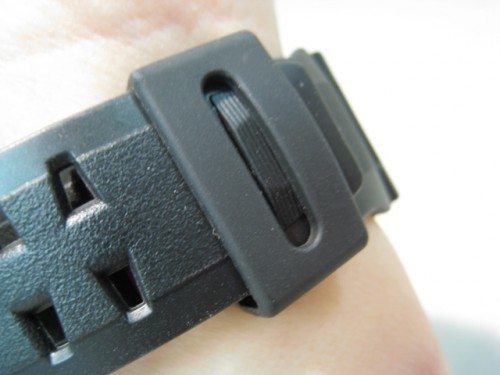
I like how the tip of the strap has a small bump at the end that helps the keeper from sliding off.
Do I like the Riseman? Oh yes I do! In fact, it’s the only watch I wear, and it does everything I need it to do.
Update 05/18/17
It’s been about 8 years, but I’ve still kept this watch and I’ve been wearing it again on a daily basis this year. The original plastic case and band got worn down a bit but spares are available online. A quick swap and it’s looking good as new. The latest version of this watch is the model 9400 “Rangeman”, but it’s just too big for my wrist.

Gadgeteer Comment Policy - Please read before commenting
Nicely written Andy. It definitely made me want one…at least until I saw the $220 price tag. Yikes!
Hope to see more from you.
Fortunately, the “street price” is significantly lower than that! I think I got mine in the mid 100’s.
Nice Review, I’m getting ready to trade in my Timex IronMan USB (had about 5-6 years now). Not only do I only wear the 1 watch for everything, I usually will wear that watch until superglue and ducktape will no longer keep it on my wrist.
Would you happen to be the Andy Chen that knows an Andrew Baker from CCFN, (LCD WIndow Employee Case Mod winner, a few years back). If you don’t know what that means, then your not him. 😉 If your him. Hello, and hope all is well with you. If your not him, well hope all is well with you anyways.
Nope, not me. There are a lot of us with the same name, however.
An army of Andy Chens’ shall someday overtake the earth and make us all their slaves! Seriously, good in-depth review, been needing a new digital watch for the last year and have been putting it off. I may look into one of these! Thanks!
Also, we’re in similar lines of work, I’m a full time police officer, so you understand the need for a dang good and sturdy watch! Thanks Andy!
Oh yes. G-Shocks are the ONLY way to go for a watch you can depend on to take hard knocks.
finally a new g-shock review… thanks andy!! and from home land too!! hehehe anyway i can know how much u get it for? i mean 220 is pretty cheap IMHO… but u get it lower? malaysian ringgit? where u got it?
Ah Loon,
I bought mine from Amazon.com. It’s available elsewhere too. I live in San Francisco, California.
Great review! I have the non-atomic version, the G-9200 Riseman, and I’m enjoying it as a gadget freak myself. I’ll be bringing my Gulfman to the beach this weekend, but I’m thinking of tagging the Riseman along as well; I’ve been meaning to calibrate the altimeter measurement according to actual sea level.
Bringing both to calibrate at the beach is a great idea. I suppose I could try this with a GPS, but I’m too lazy to calibrate my altimeter! That’s OK; the barometer is the function I use anyway.
Andy,
Great review, I just got my Riseman. Are there any sources to order different color bands & bezels? I have see an orange, and white version of this watch.
Thats weak i thought it had a compass?
The compass can be found on the Pathfinder/ProTrek models.
wonderfull review,.
Sadly, indonesia only sale the G9200, means no atomic sync..
You guys obviously know alot about the Riseman. I’ve been looking at atomic and non atomic versions on different websites, the features are exactly the same, am I overlooking something, can somebody please clear this up for me before I buy one, I’m not the sharpest tool in the shed. Thank you.
True. There ARE non-atomic versions!
If you live in an area that does not have atomic time coverage, it may be just the ticket. It’s entirely up to you.
Great review and semi-overview that is very helpful. I just ordered mine and should receive it next week and look forward to all the gadgets.
i live in the bronx in NYC. will this watch work properly here. the atomic version that is?
I don’t see why not. Your reception may vary but it should.
Hi to everybody, a 10 note review, thanks andy for sharing your work with us. In the past I owned a gshock (model G 7700 1e) and I was very pleased with the fact that I dont feel any worry about the watch in my everyday life and has nice features too, so i’m a few clicks away to have this g shock around my left hand in about 5 days 🙂 because i’m from Romania, order from amazon.
I wish you all the best.
Great review, Andy! Casio should give you commission; your review sold me on the watch. I’m in Afghanistan for the Army, and my G-Shock DW-6900 has made it through the deserts of Anbar Province, Iraq, as well as here, in Kandahar Province. I bought it for $40 at a PX in Baghdad, and while it’s still going strong, I really wanted an atomic version that relies on solar. I love the altimeter, too. Anyway, I’ll pick up my Riseman ($139.95) when I go home on leave in a couple of weeks. Thanks again!
Great review.I just bought the RISEMAN non atomic model-b’coz in India it is of little value. Can you tell me the average time frame in which the battery (the one charged by the solar panel) would have to be replaced?And practically how long should the Riseman see the sun to be fully functional?would be grateful.
i just got my version of riseman. the altimeter is yet showing negative. any idea how to calibrate it?
There is a calibration method, but I don’t remember what it is! Should be in the instruction manual.
Wow!!!
awesome review regarding RISEMAM:)
Thank you very much.
Cheers, im in australia and i cant find a gw9200 version – only the g9200 version. Any help thanks.
Thanks man.
GREAT review, I just ordered one! 😉
I have ordered one a week back. Waiting eagerly for it 🙂
Superb Watch from G-Shock!!! Quiet Impressed with it.
Thank you once again for the watch review.
Cheers 🙂
i really want to buy one, however, i have been searching it in new york city for a week.. and i still cant find it…. omg… i want it so badly… can someonw tell me where i could buy it in new york city???? plz plz give me an answer….
Hi,
I have a question regarding signal strength for syncing to atomic time. Regarding the signal from Germany or UK, I am moving in Budapest and I am curious if the signal will reach me. What is the farthest distance the watch can reliably receive a signal?
Thanks,
Jason
Jason,
This might help.
http://mygshock.com/wiki/Atomic_Sync_Signal
now the price has gone up to $280 but still i bought it. thanks for the review.
A comprehensive review with plenty of photographs. You didn’t ramble on but kept it factual and to the point.
I will be purchasing a Riseman ASAP.
Many thanks.
W
Whoa. We’ve got quite a sum of money there.Here’s a good photo of the risemen.
GW-9200.jpg
the signal is 2000 km from the the radio tower.form Germany you can recive the signal in Bulgaria .so you can check and count where you live and where is the nearest tower.
Awesome review. Great watch. Just bought and lovin it. Thanks for mentioning how to turn the alarms OFF, cudn’t even fing it in the pdf manual!
A complete detailed review, thanks much Andy!
This would be my first G shock, and I am going for it. I am currently in India and I placed the order yesterday, and it should come up to around Rs. 10000, which is close to $225.
I am sad that this does not have a compass, but since I tend to get sick quite often, I think the thermometer reading my body temparature is a good feature.
P.S.: I made up my mind to buy this only after seeing this review.
Cheers!
Hey guys…I own this watch, and i was wondering if you guys could explain how the whole wristflicking-backlight thing works. Mine doesn’t do it. I lost the manual and i’m searching for it now, but in any case would like a reaction from you guys!
Thanks!
Yasser:
Pres and hold the “G” button (the backlight) until you see a tiny “A.EL” appear in the lower right corner, under the seconds display.
Hi, great review.
Just one question: The stealthed 6900 – what model is it? Eg 6900b / 6900c?
Im looking for a monochrome 6900 to stealth and cant find one anywhere!
Regards
Its actually a regular 6900 that I stealthed myself. I removed the white lettering.
AWESOME !!! I definately want one. AT PRESENT i USE A gw-6900-3ER. iTS GREAT but an altimeter/barometer @ temperature would be the next logical progession.
My Riseman G-9200R orange’s colour has been slightly not at its best after a year plus of wearing it. On the strap part, bits of it has ‘peeled’ off and my strap holder has become darken. Could it be due to excessive sweat while using it doing sports?and worse the glass surface has 2 line scrach and a chip-off. do you think i can get the glass changes or even better with the whole outer shell changed?
I don’t own the orange variant so I can’t say for sure. If you get a outer shell and strap replacement, the crystal (glass) doesn’t come with it. The glass is part of the module.
Hello Andy, i have just read your review and it’s excellent! Very good job:) Anyway, i just wanted to ask you what is your opinion about the Riseman or Pathfinder. Which one do you think it’s the best? I would like the Riseman but it has no compass. Which one would you truly recommend and why? I have a very active lifestyle, i am into sports, biking, trekking and such. The compass is a nice feature on the Pathfinder but then again is the Pathfinder strong enough for an active outdoor lifestyle? Could you give me some advice on this? Thank you!
I’d say the Pathfinders are rugged enough. They all have mineral crystals on them, although the G-shocks tend to have recessed ones, which resist accidental damage a little better.
If you want a compass in a G-shock, consider the G9300. (Solar, no barometer or altimeter, however).
http://www.casio.com/products/Watches/G-Shock/G9300-1/
Nice share about Riseman.. I just started to wear this watch.. I used Casio Protrek PRG-130T before I got it. So I can try to compare them. Yes,,the weakness of riseman is no compass feature. But I already solved this problem, I add it with analog compass strap which can be installed on the strap. It’s powerful now. Hehe. I think Riseman is stronger than Protrek in material. Ready to high impact. But protrek 130 has titanium material. It’s light & rust resist. Protrek has a mineral glass, it’s strong enough, but it can be still scratched finely. I wish I have crystal saphire in protrek & riseman. I did many extreme tests in my protrek & also calibrate ABC feature with other gadgets like analog compass, timberland GPS, thermometer, etc. And it still work well,,next I will do the same with my riseman to see how strong this watch.. We can share each other about riseman & protrek.. I think they’re strong watches & very worthy.. Next I’ll share here if I already test riseman.. Thank you.. Cheers..
Hi thariq! Please tell me how do you add the compass to the Riseman. Also keep me posted if it’s ok with you about the Riseman test. I am very confused which one to buy, because i want only one watch to wear. I want to end up with the best outdoor watch possible which i can also wear in everyday life. Thank you for the info!
it probably won’t fit on my approx 5.5″ wrist, huh
thank you for your review. i purchased riseman today after hunting a long time for one. is in the post now. looking forward to it but yes i wish it had a compass.
Great review thanks. Really useful in helping me choose a watch for my husband. I am now looking at the gw9200-1 and the gw9200-1er and am having difficulty deciding which to go for. Are the gw9200-1 new model features worth the additional £90+? Cheers for your help.
I do not believe there is a difference. I think the “er” is packaged for the European market, “jr” for Japan, etc.
Wonderful review! I have one question for you guys: I’ve just got my first G-Shock, riseman of course, G-9200 :D; the thing bothers me a lot is the backcase got the word “Japan Y” instead of “Made in Japan” or “Made in Thailand” as usual; I just wonder if anything’s wrong with this (I mean if this is fake coz I paid $230 for this solid guy); The watch looks solid and all functions work well. Appreciate your help!
Kate, if all the functions work well, then it’s most likely real. It’s really hard to fake the altimeter and barometric functions.
This eBay link might help identify real vs. fake Risemen.
http://goo.gl/S1mpl
Hi Andy, thanks for your quick and very helpful link. After going through the check-list, it’s pretty sure that my one is real since all things work and looks right as described; however I still wonder if anybody knows why Casio put “Japan Y” instead of “Made in Japan” at the back. My assumption is all parts are made in Japan, but they are assembled else where outside Japan. Plz let me know if you have any idea of that. Thank you all you guys in advanced!
I would search around the Watchuseek forum for G-shocks. There are many Riseman fans there that probably already answered your question, and more!
http://goo.gl/FPQ4L
Thanks Andy, it’s really tons of info about the G-Shock, never know that till you posted. Thanks for your help! and now I have to dig in that web 😀
can the atomic feature work in india
I am not sure, hikmat.
This page illustrates the typical coverage areas.
http://www.gshock.com/technology/atomic/
Andy, thank you for your perfect description of Riseman, I am getting one for myself
awesome review! great job
Thanks for the review. I was looking for a good watch that could take some lumps and this review put this G into my cart. Almost got the Pathfinder but if I’m somewere that I need a compass I will be in my car (GPS) or in the woods camping (with a reel compass).
Hi guys (& gals) interesting comments.
I intended to ask if an atomic signal would reach where I live (Murcia, Spain) as my Riseman doesn’t seem to be able to receive it. Sod’s Law, I suppose. Will just have to depend on the in-built accuracy?
I bought my Riseman 2 weeks ago, to replace an Omega Speedmaster that I had stolen from my house – which was a bit of a bugger, as I’d just given my SeaMaster to one of my sons.. I think (much to my wife’s intense disgust) that the Riseman is so good that I prefer it to wearing my Rolex – dear wife said that it was thick, unattractive & ugly. Then she reflected for a moment, and said “it suits you”? Time to consult a “shrink”?
You like what you like, Mikey. Taste is an individual thing!
Don’t forget, if you can’t get the atomic sync signal, you can always manually set the time to the standard of your choosing, just like your Rolex.
Thanks Andy, although won’t setting my Riseman manually mean that I would have to (yeuk) actually read the manual?
It would appear that the last time an atomic signal was received (an inspired guess on my part by looking at the dial) was 4 April. I’ve now had the watch for 2 weeks, and checking on GMT online, the watch would appear to be 2 seconds slow. So a loss of 2 seconds in one month isn’t going to kill me. Anyway, just what would I do with those lousy 2 seconds???
Hi Andy (& possibly others in a similar position?)
Yesterday, I did actually manage to obtain an atomic time signal to reset the time. Most odd actually, as I was in Cartagena (which is actually considerably further away from Mainflingen) when I decided to try it. Perhaps it was because I was next to the sea, rather than in the mountains which surrround where I live. Either way, I’m cooking on gas, and ecstatic.
Viva el Casio, el mehores relor.
Very good review.
Just wondering, would it be too bulky on a 6″ wrist? I’m about to pull the trigger on amazon but I don’t want to look like I have a clock on my wrist!
Junkie,
It depends; the watch is nicely contoured where the strap is attached, but it IS a G-shock, and chunky by nature. If you’re buying from Amazon, you can probably return it if it doesn’t suit you.
I tried it out from a watch shop in my neighborhood. I think it looked fine. It is a bit chunky but like you said it’s a G Shock after all! Unfortunately they only had the non atomic G version instead of the GW. So I ordered it from Amazon. Looking forward to it!
I have had 2 Riseman GW9200-1 watches from amazon in last 3 weeks. Neither made any noise: no alarm; no hourly time signal; no button operation tone. On the second watch no “mute” on or off. Amazon traded first watch no problem & probably would trade second watch. Will send to Casio for fix. Other features are excellent. Anyone know how to fix this? Charge is good (Level 5). Thank you.
Something doesn’t sound right. Assuming the “mute” indicator isn’t on, it should be making noise with every button push. It’s odd that you’d get two in a row that don’t work. Hopefully the 3rd time is the charm.
Hi Robert, A very belated reply to your query regarding the Alarm.
My Riseman doesn’t make a Sound when Buttons are pressed, and it’s not set for “Mute”. But I can live with that, as what one never has, one never misses.
The Alarms DO work, but OMG, you have to have EXTREMELY acute hearing (which I obviously do not have) to hear them.
I’d somehow, and totally inadvertantly, set one of the alarms to Sound at 12 Noon: I didn’t hear it, but my wife did – and she was convinced that it was the car that was sending out some form of fault System – zeroed it down to the Riseman in the end, but just until it was all explained, she had me crawling along at 5 mph – “just in case”. Who wants alarms anyway: a cell phone does the trick much better, and no-one’s ever without their cp.
While I was packaging my “soundless” watch to return to Casio, I pushed the button to test to be sure it was not making noise. I heard absolutely n-o-t-h-i-n-g. A paralegal in my office asked “what is that noise?” Mikey is apparently hearing impaired as well. Some years ago, the bones in both my ears were surgically replaced with titanium (a stapedectomy for the medically inclined). As did Mikey, I also have kept the watch because while being hearing impaired, I am not altitude or chronologically impaired. Thank you Mikey!
Robert.
Hi Robert, Your ‘umble servant.
Join the ranks of the aurally-disadvantaged – with my darling wife (as with so many husbands), a distinct blessing, and as you so rightfully mention, being as deaf as a post, does not mean that your peepers don’t work fine.
Nil desperandum bastardum.
i had mine since 2010 and loved it since then and been using it daily.
I just bought one and I was looking at the barometer graph and the flashing dot was under the previous one but when I changed to the indicator the arrow was pointing upwards. Any idea why ?
Thanks in advance
I believe you’re in the barometer-only mode. It will show a large arrow for the trend.
the thing bothers me a lot is the backcase got the word “Japan Y” instead of “Made in Japan” or “Made in Thailand” as usual….can anyone help me with an answer ….please please
This may help.
http://forums.watchuseek.com/f17/thailand-vs-malaysian-vs-japan-made-g-shock-whats-deal-260638.html
“Basically G-Shocks are made in:
Japan, Japan H, Japan M, Japan Y, Japan T, Japan K
Thailand Y, Thailand H
China Y
Korea C, Korea T
Malaysia, Malaysia Y
The letter after the country name may indicate different factory.
Then there those Japan Y movement assembled in Thailand or Malaysia.
Some buckles are made in Indonesia.
Lastly there is Taiwan (but no Made in Taiwan)”
Hi, I bought this watch just ten days ago, I had been craving for it for years, lucky me! The production had been discontinued long back, however I managed to get this one from a shop. The only this I am concerned about is that the sensor is protruding out of its protective plastic cover, I think it’s the weakest part of a shock resistant watch, would you shed some light on it?
I wear watches on the left wrist, so maybe that’s why I’ve never had a problem with damage. I also believe the actual sensor is not the round, silver part, but behind it.