
If you’re interested in saving money and energy, Black & Decker’s new Power Monitor device is a viable solution. It is an easy to use device that allows you to wireless monitor your whole house energy usage.
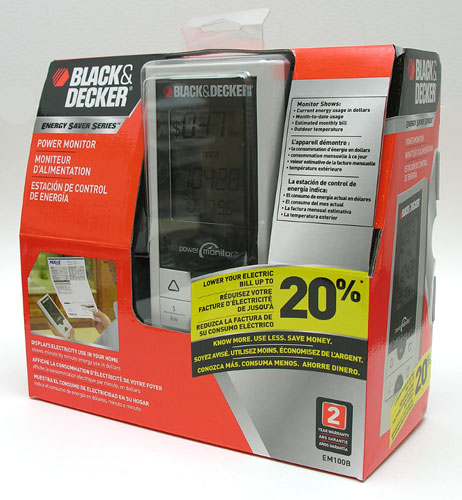
This device takes the Kill-A-Watt electric usage monitor product idea a step farther, to give you information about your total power usage. The Kill-A-Watt is perfect for checking the power consumption of individual appliances that plug into a wall socket. But, it can’t give you information about your dishwasher, furnace or air conditioner. The Black & Decker Power Monitor can show you real time usage and charges.
Hardware Specifications
Frequency: 433.92MHz
Update Rate: Approximately every 30 seconds
Range: Up to 60ft through a single external wall
Temperature range for outdoor sensor: -40F to 140F
Minimum power measurement: 300W
Power resolution: 100W
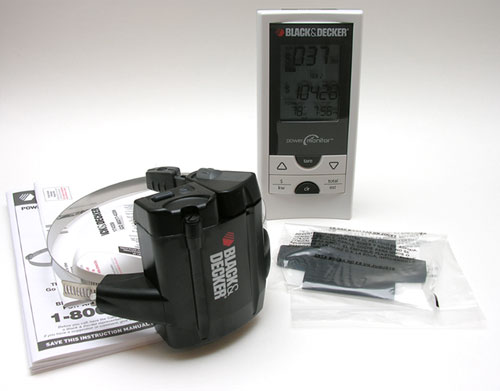
Package Contents
Digital display
Wireless sensor
Rubber shim
Instructions
I’ll admit, when I was first approached to review this device, I thought it was exactly like the Kill-A-Watt product, but from Black & Decker. I agreed to do a review because my review of the Kill-A-Watt EZ continues to be one of the most read reviews on The Gadgeteer. I figured a similar product might be popular too. Then when the product showed up on my door step and I realized it wasn’t quite the same thing at all, which made me even more excited…
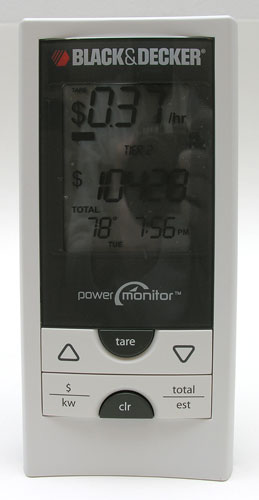
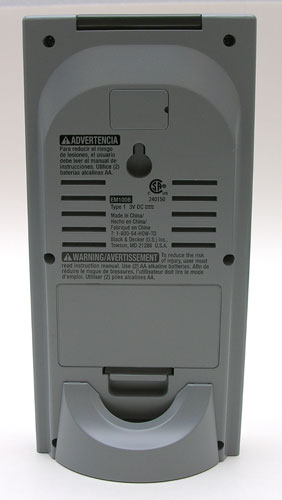
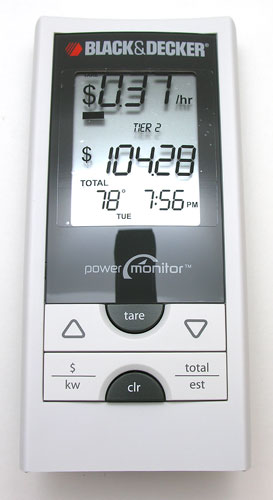
The Power Monitor has two main components. A digital display and a wireless sensor. The always on digital display runs on 2 AA batteries (not included) and continuously displays your $ per hour usage, total usage, temperature and time of day. The display can sit on a table or be hung on the wall.
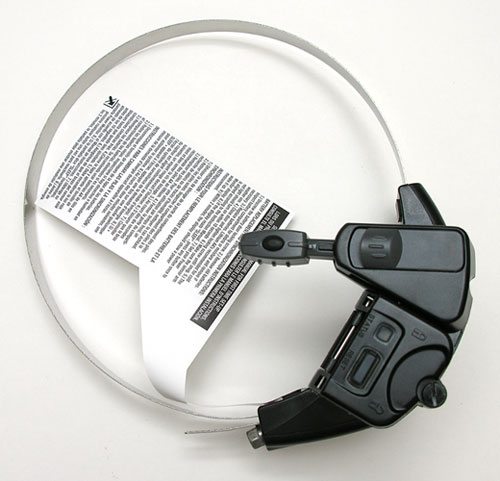
The second component of the power monitor is the wireless sensor. It also runs on 2 AA batteries which are not included. It is made of plastic, with an adjustable metal loop. What do you do with the sensor? You attach it to your outdoor power meter.
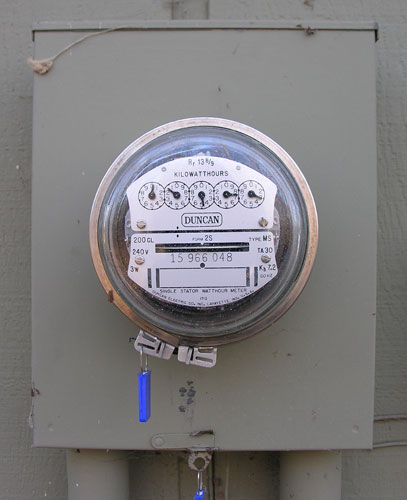
At first, I was a little worried that I would have to do some wiring to connect the wireless sensor to my meter. Not to worry though, no wiring is necessary.
In the image above, you see my power meter (wow, I should have wiped off the cobwebs huh?). It’s an electromechanical style of meter. The Power Monitor will also work with electronic meters with an optical port on the face or top.
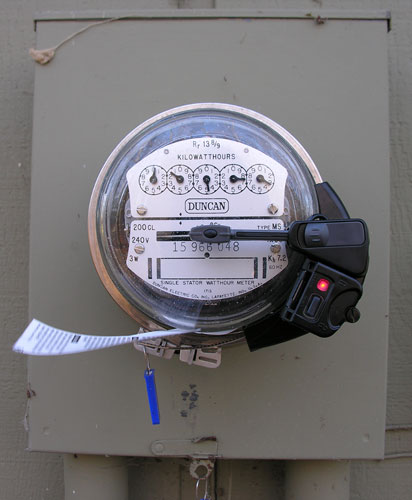
Installation is super easy and quick. All you have to do is to load 2 AA batteries into the sensor and then slip the metal ring around the meter. Line up the arm on the sensor with the revolving disk and tighten the the screw, which snugs the metal loop around the meter dome.
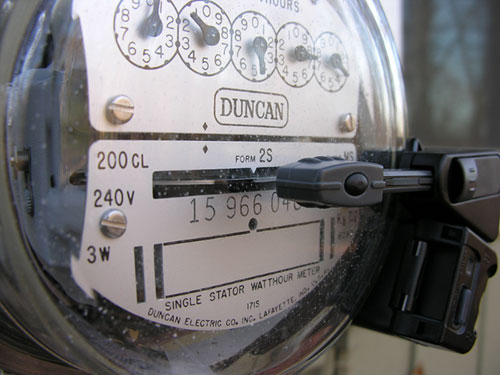
Then, you just press the reset switch on the front of the sensor so that it will start reading the spinning disc.
The second part of the setup involves plugging the right data into the Power Monitor’s digital display. You’ll need to know if your electric company charges you on a flat rate, tiered rate or a time-of-use rate system. In my area, we have Duke Energy. Staring at my online bill didn’t help me figure out what my kWh rate was. I was confused by the fact that every month, the rate appeared to change slightly. I ended up calling customer service, which turned out to be a good move, because I learned some important facts – at least about Duke Energy.
A flat rate system charges you a set fee per kWh used. In my area, we have a tiered rate system which works like this:
Tier 1 – The first 300 kWhs used are charged at 0.092945
Tier 2 – The next 700 kWhs used are charged at 0.054178
Tier 3 – Remaining kWhs used are charged at 0.044464
Depending on where you live, you might have a time-of-use rate system (TOU). That system will charge a different fee per kWh based on the time of day.
One thing I learned by calling Duke Energy is that there are other fees that make up your bill besides just your power usage. For Duke, there are 9 different riders with fees like: pollution control, emission control, fuel adjustment, clean coal adjustment, etc. These riders fluctuate month to month. We also have a $9.40/mo. fee that we have to pay just for the privilege of having electricity. All these little fees remind me of my land line and cell phone bills… But the information to be gleaned here, is that the Black & Decker Power Monitor will not be able to give you your exact billing amount each month to the penny. It can only tell you your power usage charges.
Once you have set up the display with the rate information for your area, you’ll immediately begin seeing various information such as the temperature (from the wireless sensor outside) and the time of day. It will also show you your cost per hour and total accumulated cost. If you click the Total / est button, it will toggle between the accumulated cost and estimated monthly cost. If you click the $ / kW button, it will toggle between displaying cost per hour and kWhs used per hour.
Another great feature of the Power Monitor is that it can also show you how much your major appliances are contributing to your bill. To see that info, you use the Tare button. First make sure all your other main appliances like your refrigerator compressor, sub pump and air conditioner aren’t running. Press the Tare button and then turn on the appliance that you want to measure. In a few seconds, cost and kWh information about that device will begin displaying.
I like this product, but I do see a couple of problem with it. The Power Monitor doesn’t take into consideration the start and end dates for your monthly bill. The power monitor isn’t going to be able to give you very accurate information if you don’t reset the accumulated data on the right day of the month. If you’re using a tiered or time of use system, it might give you inaccurate results when you are gathering data based on Tier 1 costs, when you’re really already in Tier 2 or 3. For that fact, this product is best used as a measurement device that can help you learn your own power usage trends. The Black & Decker Power Monitor is a great tool to use to keep an eye on your power usage habits. By seeing how much energy an appliance is using or your total usage, it can help you change your habits to save both money and energy.
Auto Amazon Links: No products found.
Product Information
| Price: | 99.99 |
| Manufacturer: | Black & Decker |
| Pros: |
|
| Cons: |
|

Gadgeteer Comment Policy - Please read before commenting
I think a device like this with a little more intelligence (ability to look up rate information on-the-fly via WiFi, or have a computer app to write information to it rather than programming via buttons, reset itself automatically, etc.) would be much more useful.
Although, it’s not terribly difficult to read your own meter and figure your usage and bill minus fees from there.
Can’t find the manual online. How far does the radio signal transmit. I am in apt Paying $156 a month and I think it is the hot water heater and refrigerator making the bill so high. But with the meter being 80 – 120 feet away I hope it will work.
Paul:
I just found the specs… The range is up to 60ft.
Thanks for info. Only 60ft that really limts it’s use.
I do building automation systems for a living, and while commendable, this “Power Monitor” is jsut another attempt to pry $$ out of your pocket for no good reason. The only true way to determine usage is to measure and track killowat hours (KWh) and see the impact of various house systems.
So, for $10,000, I could provide a kick ass building automation system that would allow you to measure realtime power consumption, add the values to a database, provide realtime trending of usage, provide automatic import into Excel where you could analysize to your hearts content.
You could also turn lights on and off, manage your HVAC systems, take advantage of “free cooling”, etc all from your PC. It would also make you the envy of EVERY GEEK IN THE COUNTRY.
Woo Hoo.
[Edited at November 23, 2008 10:57:23 AM.]
Robert:
While this product won’t give you an absolute accurate reading of what your bill will be for the current month, I think it can be a good tool. Anything that gets people to actually care about the resources that they are using and how to control them is a good thing in my opinion.
That said, I think I like the Kill-a-watt product better…
Hey, if you build me a $10k system, I’ll review it ;o)
I wanted to ask, is that white tag on the meter head a “don’t worry, we’re not breaking anything” disclaimer for the meter reader?
Robert:
Yes, that’s what it is :o)
Warning Will Robinson – Warning!!!
I Have, I should say HAD one of these installed for a few days. Then one morning I saw that it stopped working at the receiver. I get dressed and go out into the cold, and BAM!!! It was Gone! Nope, It didn’t Slip Off. It was flat out removed from the meter. Who would do something like this? Did someone see me putting this up and a jealous neighbor decided to take it from me? Not that I could figure out at all from asking around. I went and Called the Police, they came out to my house the next day to file a report, because I guess the next day is the best you can get for 18K a year in this area for your property taxes!
Sorry I got side tracked with the Corrupt New Jersey Tax system. Well I filling out my report with them in the cold, and my very nice mailman asks if everything is OK? I went and told him what I had purchased, and how some creep went and removed it. NOW HOLD ONTO YOUR HATS …His reply was that he saw the PSE&G Guy taking a readings yesterday in the area, which is almost always close to the end of the month. I ran right to the phone and called the local utility company, and they got in touch with the service people that was taking the readings the day before. In just about 30 minutes I got a call from a Service Supervisor and they confirmed that their Tech “Did Remove this from my Meter, and was discarded.” YES HE SAID DISCARDED!!! He went on to tell me that I “RENT” the Meter, I do not own it. For this reason it was removed from my meter, and Thrown in GET THIS, MY OWN TRASH CAN!!! I was rather upset over all this and started to yell, and he started to yell back that if I want to mount anything on the meter I can just buy the meter from them and do anything I @#$%ing Want! YEP, I got the F-BOMB Dropped on ME!
Well a Long Story Short at this point, I did recover the Device and mounting band which was cut off. The unit was damaged on purpose as it looks like the Meter Reader Jumped up and down on it crushing the outer case, and the extension arm was cleanly cut off with some kind of cutters. That Tag on mine meant nothing at all to them, except Remove Me and be a JERK!
Insult to Injury now, I get a Bill from them for the removal and disposal of the “Foreign Device” from my meter for $196.88. Followed with a Bill to replace the Glass Dome as it was damaged when it was removed from the meter by force, and this said force caused the meter to come separated from the wall causing damage to the integrity of the meter housing. Now I have a Bill for over $2000.00 for all this upset, and what will I do? Well the fees were added to my Utility Bill, ya know what happens when you refuse to pay you Utility Bill?
You get your plug pulled…BEEP BEEP BEEP, got to go! My Battery is going dead on this laptop while I’m using my flash light…BEEP BEEP BEEP. . . . . . . BEEEEEEEEEEEEEEEEEEP – SPUTTER – POP – FIZZ . . .
(To Be Continued…)
[Edited at November 30, 2008 21:58:10 PM.]
MyRealGenius:
Yikes! Since the customer service rep admitted to destroying your property, I would think you would be within your rights to request that they pay you for the damage to the monitor…
BTW: I’m glad I don’t live in NJ ;o)
From an electric companies perspective, you should call your provider to see if you can attach these to the meter. For someone who doesn’t know what this unit is, it could be viewed as something to alter the readings on the meter to try to steal electricity/ or lower your actual bill.
Great advice, just let the utility know that your putting it on. It is their property, so involve them and it won’t be an issue. We have a lot of people installing “devices” to slow the meter down, so when tech shows up and the device is unknown to them, the assumption will be that the meter is being tampered with. We just found on one of our meters and I found out what it was by a search. I manage the meters for the utility and we understand that people are doing things to reduce their bills. I hate my bill, but I use a lot of electricity, so I pay. Just saying that letting the utility know, alleviates confusion and a possible removal of your device.
“is it possible to program the unit , to calculate by day the first 30kwh at one price, and the rest of kwh used at an other price(usually higher), and have the unit remake the calculation for each day?”
@didierx: Unfortunately, it is not that sophisticated…
If you want to monitor your usage and not be concerned with the electric company having issue with items like the black and decker I would suggest getting a TED device, it works like this product but you hook it up to your electrical box inside the house, where the electric company never bothers you. Be careful you have to do some minor wiring in the box and unfortunately the monitor is not wireless but it uses no batteries so less stuff in a land fill. You can also get software where it will log your usage. Google “the energy detective” to find it. It’s about 50 bucks more then the B&D product but I think it may be better, but I couldn’t help looking for alternatives to it and I found this article.
The power utility where I live, (SaskPower in Saskatchewan Canada), not only encourages the use of this devise, but also subsidizes the purchase price. The power utility in the Garden State should perhaps stop and smell the roses!
I have used this device for about a year. I can say it’s help me save about $100 / month in costs. It really helped me understand where the waste is coming from.
In my case it was the light bulbs driving the waste. I changed the bulbs over to CF starting with the rooms where the kids were and went from there… I was surprised that my PC’s, 50″ LCD TV, and 36″ “tube” tv were not the big culprits.
Now that I have a good grasp on my waste, I’m going to lend to my brother.
Highly recommended…
Have had this product for about 6 months now and it has shaved about $40 / month or about 20% off our electric bill. Easy to install and very fun/informative/surprising to see what different items in the house are using. We learned that our Wii charger stand (not the wiii console) was using as much as our plasma tv, dvd, and tuner combined – so needless to say the wii charger is on a separate power bar now and only used as needed vs being on all-the-time. Great product and withstands our -40 Canadian temperatures just fine!
The device does exactly what they say it does. A pleasent surprise now a days,
I have a small hotel and it really makes a huge diference on my consumption. We have a/c and baseboard heaters in all rooms so the expendature is huge, this is up north canada so -40c draws a lot of power. Now I know if a heater is on or someone has air and heating on at teh same time..(I use 3 sensors and 3 meter reception unit, 1 oer meter) I am not concern about the totals counts to be to accurate. I need order of magnitude and consumption change, thats all anyone really neds. It has also allow me to see the diference between the a/c consumptions. i.e: 2 units rated exactly the same EER of 10.4 spend diferent amounts. one spends 1 0.7 kw/h(noma) for 5350 btu and the other one clocks 1.4 kilowat hour(ironically black and decker ac) for the same btu…now if they both ahve the same eer and btu the spendature should be the same..butit is not..they will tell you that one unit is more effective that the otherone but hands down one is spending doble when the compressor is on…period and the one spending 0.7 is way more effitient I can hear teh compressor going off all the time while the other one closk the 1.4 always and barely turns off…Another problem we had recently was some tard pluging in a heater..the thing was drawing 4.5 kw/h…like a dryer…only running more than 4 hours a day. I caught the spike as I have this thing with me at the reception…I love it…you can also detect defective appliances and old fans that draw huge amounts, it goes on and on,
So there is my feedback…and my modo…”you cant price it if you cant see it” this litle thing shows me yet another component to me.
Wishlist…a nice link to the pc to dump all the consumption records.
Take care!
Got mine for $49. and see where some are sold now for $37. but
mine only lasted about a year and poooooof….. will not sync to
the display unit even with new -good batteries in each unit and
placed right next to each other. Tossed in the trash barrel and
wrote it off as another piece of cheap Chinese junk. Don’t waste
your money. It did NOT tell me anything I didn’t already know
about electricity consumption not did it save me a single penny.
It only made some CEO a little richer ! ! !
I received this item as a gift as I was always complaining about my power bills. I always felt there was something wrong with my new geothermal system but people laughed and said my bills were in the normal range for a home my size. With this device, I was able to convince the installer that there was something wrong as we stood and watched the power monitor when the geothermal unit turned off and on. In the end, they found a small wire had burnt out in the motor. Not only did this devise cut my power bills in half, it made eveyone in the house energy aware and turn things off or down when not in use. My nagging has hit an all time low! It has become a standard present for me to give. Great idea!!!
Tyler – It is on it’s way
Vic – There are also two batteries in the unit outside that have to be replaced once a year or so. Maybe you threw it away for nothing.
Before you purchase one and install it on your meter, you should contact your local utility company. It may be against their policy to allow you to hook up any type of equipment onto their equipment. Other devices that provide similar information that can plug into your breaker box may be a better solution.
Am in Texas and our electric service company just removed ours…Its a shame.
I really like this unit to flag on peak consumption from the hot tub and water heater as they can be heated in off peak and shut off during the day. Our peak rates are nearly double the off peak rates. Originally I could not get the sensor to pick up the pulse from the meter. I gave up but left it on the meter to at least read outside temperature. At the first power failure after install it began working for about 24 hours then stopped again. I have had three power failures with exactly the same result….for some reason the meter stops outputting a pulse after 24 hours. You can test the sensor with a tv remote pulse and it works every time. Waiting to see if utility can shed some light on the programming of their smart meter.
Great product, had it 3-4 yrs now, definitely raised our awareness of what we were consuming and resulted in us all shutting things off and saving $$$. Love seeing how low we can get the pull…0.8 seems to be our lowest. We reward the kids for the total monthly comsumption being at/less the previous month. The outdoor temp display is nice too. Great product that will change the way you think and easily save 20% off your electrical bill.