
Product Requirements:
Device:
HP2200 iPaq Pocket PC
"We have the power to make it stronger, faster… " Some of you may
recall those words from a 70’s TV show called The Six Million Dollar Man. But
for me, these words remind me of
PocketPCTechs.com. These guys can take most Pocket PCs and turn them into
super PDAs. Known for their RAM upgrades, they are now offering accessories and
custom parts, such as HP2200 metal replacement grips.
Although some HP2200 owners have experienced problems with their stock covers
either coming off, or breaking, I never have with mine.
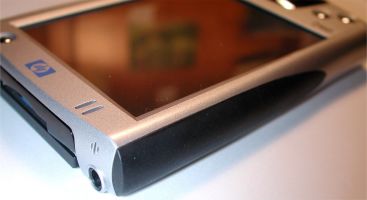
Made of anodized aluminum, and available in Black, Blue, Red and Silver,
these side covers replace the rubberized plastic stock covers that ship with the
HP2200 Pocket PC.
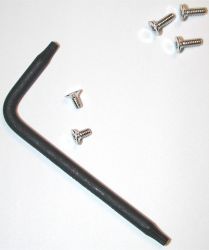
When you order the grips, they come as a do-it-yourself kit, which includes
the 2 side grips, 3 screws, Torx T-6 screwdriver, and instruction sheet.
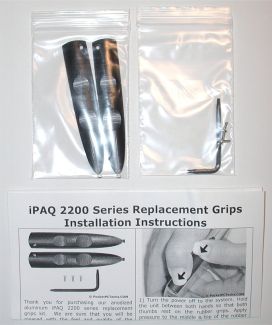
The instructions are easy to read and illustrated (Yay, pictures!), which
makes it super simple to perform the replacement. Well, sorta… The
instructions are easy to read, but the first step is a pain in the butt, if your
stock side covers are not defective. You basically have to press down and up on
the covers with your thumbs, to slide them off. Trying this for about 15 minutes
only resulted in sore thumbs for me. I was about ready to give up when I finally
got one side off. I’m either very wimpy, or my original rails were really well
fitting. I vote for the latter ;o)
The original covers themselves are thin plastic with a rubber coating on the
outside.
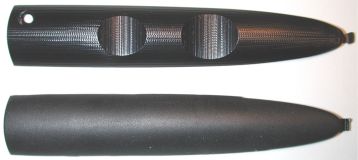
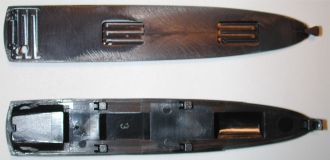
Top to bottom: Replacement grips, stock grips
Once the covers are removed, you will see a small screw on either side of the
PDA. Using the supplied Torx screwdriver, you remove these screws. Doing so is
easy as the screws are not too tight (at least they weren’t on my PDA).
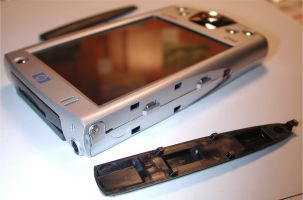
The next step is to snap in the new grips. This is a simple matter of
slipping the narrow tip into the slot first, then pressing the rest of the grip
flush with the side of the PDA.
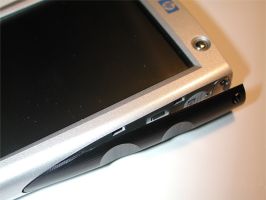
Once you press it in place, the screw holes line up, so that you can insert
one of the longer screws that are provided in the kit. PocketPCTechs are kind
enough to include and extra screw for those of us that tend to lose things.
At this point, the only thing that you can do wrong is to over tighten the
screws and strip out the holes. A warning in the directions caution to only
tighten them snuggly.
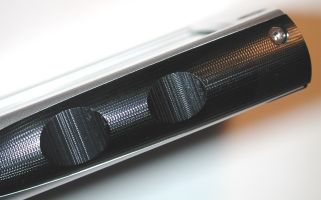
Once finished, you have a snazzy upgrade to an already great Pocket PC. The
new grips are not only obviously stronger due to the material that they are made
of, but they also have an improved grip. Instead of being smooth, each side has
two notches, that are perfectly spaced for your middle and index finger tips to
rest in, while holding the PDA. The grips also have fine lines etched into them,
that help to enhance the gripping factor.
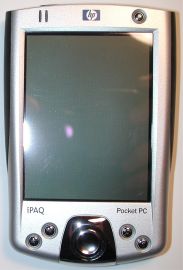
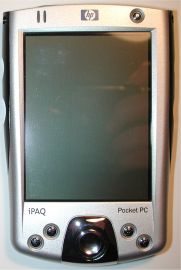
Left to right: Original grips, replacement grips
Some people may scoff at the 40 dollar price tag, but I don’t think it is too
steep for a set of grips, that not only look great, but really do improve the
gripability (I know that’s not a word, but it should be!) of your PDA. Keep the
custom parts coming guys!
Price: $39.99
Pros:
Easy to install
Enhance grip
Look great
Cons:
May be difficult to remove stock grips

Tylvx Mini PC 5.7" Touchscreen Handheld Computer, N150 up to 3.6GHz, 16GB RAM 512GB SSD, Win 11, Backlit Keyboard, WiFi6 BT5.2, Dual Type-C, HDMI 2.1 DP, Small Portable PC
(as of June 8, 2026 14:56 GMT -05:00 - More infoProduct prices and availability are accurate as of the date/time indicated and are subject to change. Any price and availability information displayed on [relevant Amazon Site(s), as applicable] at the time of purchase will apply to the purchase of this product.)
KOOFORWAY 8" Mini Laptop 2-in-1 HD Touchscreen Portable, Win 11 Pro Portable Pocket PC, N150 12 GB LPDDR5 512 GB M.2 SSD, Wi-Fi 6, BT 5.2 2 MP Camera, G-Sensor, HDMI, Type C
(as of June 8, 2026 14:56 GMT -05:00 - More infoProduct prices and availability are accurate as of the date/time indicated and are subject to change. Any price and availability information displayed on [relevant Amazon Site(s), as applicable] at the time of purchase will apply to the purchase of this product.)Product Information
| Price: | 39.99 |
| Manufacturer: | Pocket PC Techs |
| Pros: |
|
| Cons: |
|

Gadgeteer Comment Policy - Please read before commenting
Post your comments here on the PocketPCTechs.com HP2200 Replacement Grips Review.
http://www.the-gadgeteer.com/pocketpctechs-hp2200-grips-review.html
Just click the POST REPLY button on this page.
Great review, these look like an excellent idea and it is nice to have the ability to customize your PDA.
On a side note:
“…kind enough to include and extra screw…”
I believe that should be ‘an’ as opposed to and.