
Product Requirements:
Device:
Versions available for original and current iPod
models
Oh iPod, how do I love thee, let me count the ways… I listen to you in the
morning, and I listen to you at night. I listen to you at my desk while working,
the treadmill while exercising, and on an airplane while flying. But of all the
places that I listen to you most, it’s in my car that I wish I had a better
method. Listening through headphones will give you the best iPod audio
experience, but of course, a person shouldn’t use headphones while driving. So,
in order to listen to your tunes in a car, there are two popular methods. One
way is
with a cassette tape adapter, and the other method is with an FM transmitter. I’ve personally
been using a ratty old cassette adapter since purchasing my
30gb iPod months ago. Although it
works fine, it seems like I’m always getting the cord tangled up, which is
annoying.
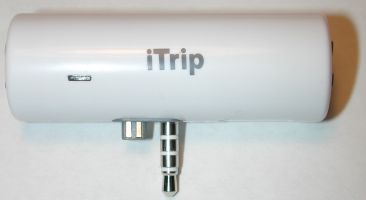
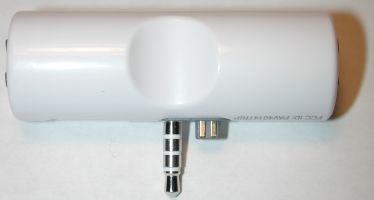
Enter the iTrip FM transmitter from
Griffin Technology, which allows
you to wirelessly transmit your music through your car stereo. The iTrip is
small, light weight and looks more like a lipstick tube, then a product similar
in functionality to the
iRock! or
Digiana. Using the earphone jack, it plugs securely into the top of the
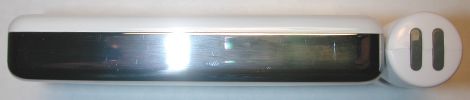
iPod. The iTrip has no buttons or switches, but does have a small red LED on the
front. It also does not require a battery as it draws power directly from the
iPod.
Hardware Specs
Size: 2.4" x .84"
Weight: 0.5oz
Built-in antenna
Power Requirement: None (it’s powered by the iPod)
Modulation: FM Stereo
Frequencies: 87.7 – 107.9 MHz (other frequencies available through website)
High stability crystal oscillator, phase-lock loop control
Stereo separation: greater than 45 dB
Signal distortion: less than .5%
Frequency response: 50 Hz to 15 kHz
Operating range: 10-30 feet, depending on the quality of the FM radio receiver
(limited by FCC regulations)
FCC compliant
International frequencies software selectable
Included in the packaging is the iTrip module, instruction manual, and a CD.
Since the iTrip has no moving parts or a way to manually change the frequency
that you want to transmit on, you have to electronically set it up. To do this,
you pop the CD into your desktop, and run the setup program. For Mac users, it will copy the
necessary frequency files (they are MP3’s) into iTunes. For Windows users, it
will copy them to MusicMatch. Right off the bat, this represented a problem for me, because
although I’m a Windows user, I do not use MusicMatch. Instead, I am using the
new iTunes for Windows. So, I had to manually create a folder and copy the files
into it. Griffin assures me that a new Windows version of their setup software will be
available in a couple of weeks.
Most other FM transmitters on the market only give you a few frequencies to
select from. Having any station as a choice, is one great advantage to this
product. You can also
download additional frequency sets from Griffin’s website.
After syncing the files to my iPod, I had a long list of FM frequencies (87.9
– 107.9MHz) that I could choose from.
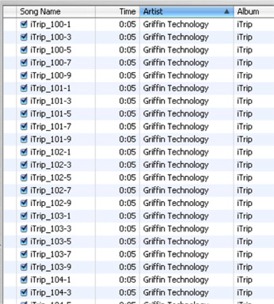
[partial listing]
Now comes the part where you have to figure out which frequency to actually
use… Depending on your location, it may take some experimentation before you
can find the best channel in your area. The iTrip does not have enough power to
override strong radio stations, so you have to search up and down the dial until
you find a station that is pretty much only static. Once you find it, you note
the station, and then plug the iTrip into the iPod. Then you navigate to the
Griffin Technology folder and find the ‘song’ that matches the frequency that
you want to transmit on. Play that ‘song’, and the LED on the front of the iTrip
will start blinking rapidly. You can then press play again and it should start
blinking slowly. This means that the frequency has been successfully set.
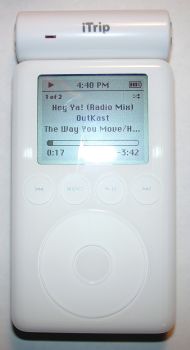
At this point, you are free to play music as you normally would. Doing so
will cause the audio to start playing through your car’s stereo. No more wires!
Cool huh?
It’s important to also note that the iTrip’s transmitting range is pretty impressive. I
was able to play music through my vehicle’s stereo, while the iPod/iTrip were
over 20-25 feet away! Wow! The iTrip also draws so little power from the iPod,
that you won’t notice your batteries draining any quicker while using it. It
powers down after 60 seconds of inactivity, just like the iPod does.
Of course there are a couple of gotchas with this product… The biggest one is
that the audio quality is a bit flat when compared to using a cassette adapter.
For most, this
is not a huge deal breaker, as any true audiophile will scoff at playing MP3s at
all, let alone through an FM radio! Although audio quality is very important to
me, convenience is also important. The iTrip gives me the ability to get in my
vehicle, turn on the radio, pull the iPod out of my bag, press play, and start
enjoying my music right away. Cassette adapters are bulkier, require a cassette
tape player
to use them, and let’s face it, they just aren’t as cool :o)
Another problem that I ran into was accidentally playing a frequency ‘song’
file when I didn’t mean to. I tend to randomly play songs from my entire 3500+ collection. One day
while I was driving home, I happened to hear a beep-boop-beep tone where I
thought a new song would be playing, and all of a sudden static started coming
out of the car stereo. Oops! If you don’t travel very often, a work around to
this problem would be to just delete all the frequency files from the iPod once
the correct frequency has been set. That said, I realize that this isn’t the
best option. Another work around for those of you that like to randomly play
songs from your library, is to make a playlist that includes all the songs
except the iTrip files.
Despite these two issues, the iTrip makes an excellent iPod accessory, that
is easy to use, takes up little space in a gear bag, and requires no batteries
to power it. This is a product that almost every iPod owner will appreciate and
have fun using.
Price: $35.00
Pros:
Easy to use
Doesn’t require a battery
Can use all frequencies
Cons:
Sound is a bit flat
Can’t use remote while using iTrip
Hard to see LED in full sunlight





Gadgeteer Comment Policy - Please read before commenting
Post your comments here on the iTrip FM Transmitter Review.
http://www.the-gadgeteer.com/itrip-review.html
Just click the POST REPLY button on this page.
I love the form factor of this accessory. I wish you could use it (or something like it from Griffin) for use with ANY gadget that played digital music.
I’d love to have something like this for my T3 or my Pocket PC’s. I use the cassette adapter too, and while I have an FM Transmitter, its big, its bulky and dangles off of my PDA’s.
Something like this would sit right off the ear phone jack and not dang’e anywhere…
I want one for my digital music player! Any chance of this working on a Palm or Pocket PC? Once set, I don’t think it would be a problem. I think the setup would be the biggest issue; but if the frequency files are really just MP3’s that are copied to the device and then played to set the frequency, this could theoretically work…
Kind Regards,
Christopher
The big problem would be the power tap… so such animal on non-iPod devices. You could possibly make an adapter, but neatness would go out the window. I like the form as well, looks very nice and the reception is much better than the iRock, which acts like the only way to get a good signal is to hang it on the antenna! I gave up on mine and went back to the cassette adapter.
Of course, the best way is to have a stereo system with a direct connect on the faceplate, then patch the audio out directly into the system. A rear mounted aux in will work as well, but you’d need to leave a pigtail connector accessible to plug in easily.
I’ve used cassette adapters and several FM transmitters (including the iTrip).
Trust me, the best thing you can do, is to go down to Best Buy or the equivalent, and have them put in a new stereo with a front mounted aux in jack. You can get a really cool new stereo (Look! an excuse for a new gadget!) installed for less than $200 and the sound from this arrangement is the best you will get! Added plus is that the new CD player can play MP3 CDs too. (not that I use them that much since I got my iPod!)
I added the Belkin iPod power adapter that has a dock cable connection, a universal cell phone holder from Radio Shack, and now all I have to do is slip the iPod into the holder, plug in the dock cable and I’m good to go! The Belkin adapter has a jack for the audio cable, so the audio comes out of the iPod via the dock cable, though the Belkin, and then into my stereo. A volume control on the Belkin over-rides the iPod volume so that I don’t get blasted when I plug in if I had the iPod’s volume cranked. I adjusted the Belkin volume to be close to my radio volume and now it is easy to use the Stereo volume when the iPod is plugged in.
If you spend much time in your vehicle, it is worth every cent!
Good review – but the iTrip has a major flaw if you travel: No way to manually change the frequency. I use the Belkin unit in cars as I travel and often have toi change the frequency because the local radio stations are too strong on the same channel.
Trust me this is major if you plan to travel anywhere with it. On top of that, I do not trust Griffin for ANYTHING requiring software updates – they have proven that in the past.
YuleLogger:
Do you have a link to the Belkin product that you talk about below?
JPVann:
I’m not sure what you mean by manually changing frequencies… All you have to do is play the desired frequency file on the iPod (assuming you didn’t delete them) and the frequency changes.
Whoops I missed the ability to change the frequency on the fly from within the iPod – problem solved. Thanks for the correction Julie.
The Belkin Tunecast unit is at: http://catalog.belkin.com/IWCatProductPage.process?Merchant_Id=&Section_Id=201526&pcount=&Product_Id=140984
Here you go!
Belkin Auto Kit for iPod w/ Dock Connector
I’ve been very pleased with this. It is nice to make one connection for power and audio.
Forgot to mention, but in some vehicles you may have ground loop noise. My Ford truck had this problem so I had to get a ground loop filter from Radio Shack. (Radio Shack catalog # Catalog #: 270-054) Solved the problem quickly.
The dash mounted holder I use is Radio Shack Catalog #: 17-531. It has a slot in the bottom that works perfect with the dock cord.
Hey Julie
Great review.. one item you might try to help your flat sound coming out of your car speakers, use the eq on the ipod set to loudness. I did that and was very pleased at the increase in the body of the music. It accomplished this without distorting the sound quality.
Thank you for the review. It would be nice to see something like that built for the Iriver IHP-120 HDAP which does provide a power tap for its LCD remote. The idea of using tones in an MP3 file to tune the transmitter is a great idea.
Currently, I use the Crane FM transmitter. It is expensive at $80 including shipping, but it is worth every penny. I have tried the Sound Feeder and some no name FM transmitters and they were worthless in urban areas (crowded FM band). So I searched USENET news and found that the Crane was highly recommended.
The Crane has a powerful transmitter (legal limit), the ability to adjust the level of FM modulation as well as the transmitter frequency from 88.3 to 107.7 in 0.05 khz digital increments. It runs off two AA batteries or 3-6 volt DC input with the included AC adapter. The construction is high quality.
This is the first FM transmitter that works for me in the metro Boston area. The sound quality is outstanding. It is better than my Philips cassette adapter. The first thing I noticed was very full bass.
You can see it at http://www.ccrane.com
palmfox:
Thanks for the tip. I didn’t even think about goofing with the EQ settings 🙂
This is a great little device but unfortunately if we use one in the UK we will fall foul of the law. In effect we will be operating our own pirate radio station, albeit with a range of just six feet!
How well does the iTrip fit with cases like the Countour? It seems that the thickness around the headphone jack might cause problems, but I can’t tell.
tamaracks:
Unfortunately, the iTrip will not work with most (if not all) cases that have any material above the top edge of the device. The iTrip needs to plug in flush against the iPod.
It iTrip does work fine with the Vaja iVod…
I’ve been spending a freakish amount of time rationalizing my iPod purchase. One of the selling points (selling it to my wife, that is) is playing audiobooks on road trips. Well, the last road trip we took, the rental didn’t have a tape player, so I stopped into my local Best Buy and picked up a version of the SoundFeeder FM broadcaster with a built-in car power adapter. Immediately I knew that the analog tuner was going to be a big problem since we didn’t even get out of Illinois and we were having to re-adjust the station we were tuned into. Boy was I right, as soon as I got back into town I headed straight for Best Buy and returned that crappy product. Anyway, the point of my post is that a sort of “hidden” advantage of the iTrip over every other FM transmitter I have found is it’s ability to tune digitally to every FM station from 87.7 through 107.9. The reason this is a big deal, is because in my area 88.1 is used up by a local station, and even the costly C.Crane starts at 88.1. Both Belkin’s analog and new digital FM broadcaster, the Digiana Audiax in all of it’s incarnations (such as the Cendyne and new Belkin units), basically EVERYTHING I have come across starts at 88.1. In the Chicagoland area it is extremely difficult to find an open stations, and the best unit because of this….is the iTrip! 87.9 is the clearest by far (although theoretically the greatest dynamic audio range would be achieved by using a station in the middle of the FM band [around the 97.9 FM, give or take]). Okay, I’ll just shut up now.
That is a good point. FYI, my Crane actually goes from 88.3 to 107.7 an even smaller tuning range.
However, I did find that placing the Crane transmitter in my cup holder (Dodge van) would provide enough transmit power to swamp most of the small stations in our metro area. The SoundFeeder was not strong enough to do that. I should have followed your example and returned it, too.
BTW, I have heard that the Crane can be “boosted”, so that a caravan of cars can enjoy your selection of music. 🙂
You mentioned in your review that your iPod accidentally played an iTrip frequency song file. That shouldn’t result in the frequency being changed.
Each iTrip song file has two sets of ‘instructions’ to the iTrip unit. The first set tell it to change frequency, but the second set tell it to ignore the change. This is why, during a real change of frequency, you hit the play button twice.
Thus if you accidentally play a frequency file, that frequency will be ignored by the iTrip (assuming you let it play to the end).
Tony.
tonygoulding:
Ah! I did not know that. I will have to go do some more testing because mine switched freqs automatically on me.
Hi Julie,
Enjoyed your review, I found a better solution than deleting the custom itrip frequency files from your Ipod.
On my ipod besides the itrip files, I have other audible spoken word content that I don’t want played when I’m using the ipod to play random music files.
All you have to do is make a selection of your entire music collection in Itunes (click on first and last song) and then deselect the itrip and any other files that you do no want played. click on the file menu and select new playlist from selection. Then you will have a custom playlist of only the material you want played.
This way your itrip and other content can remain on your Ipod when you need /want to use them.
When you want to use your Ipod in jukebox mode just use your custom playlist instead of the entire library.
Sounds good! Thanks for the tip 🙂
You’re welcome:)
If you’re not already familiar with Ipodlounge, or for other users that may not be aware check out:
http://www.ipodlounge.com/
It is my favorite ipod site to date
Thanks for your review, it pushed me over the edge to finally get one! (not blaming you!)
After using a cassette adapter (no longer have tape deck) and Belkin’s TuneCast (uses batteries, limited stations in NYC’s dense market) I finally decided after years of debating to purchase the iTrip. Unfortunatly it wasn’t as good as I hoped and although it doesn’t require batteries and has unlimited station range, the power of the signal was very weak in comparision to Belkin’s device that any benifit sadly becomes lost.
It’s really a nice device and fits really well with the iPod, and the switching stations thing doesn’t really bother me, doesn’t seem overly complex. I keep trying to convince myself to keep it.. I guess it’s true that nothing beats a hard wired connection, which I would totally do if I wasn’t so hesitant from ripping my fairly new cars dash apart.
This was for a first gen iPod, more tests and greviance at my blog (hey! everyone has one!)
I got mine from this site:
http://www.pcs-electronics.com/en/products.php?sub=pc_fm_trans
You can get a 5 and 10W amplifier as well, making it a real
radio station!
But the iTrip is good enough for near-by transmissions.
I ordered mine 18th of Dec. (5 days ago) and it arivied on Tuesday the 23rd of Dec. So i don’t know what the big wait was about ?
I also bought a powermate from griffin technology also. Great little gadget. Someone should be a review “wink wink”
Cheers
Jeff
Jeff:
Tell me about the Powermate, what is it?
The PowerMate is a ‘USB Multimedia Controller & Input Device’
It is a volume knob. But can do more than control volume.
It is an assignable controller so you can program it to do anything. It is the fastest way to scroll through long WebPages or word documents. (So it is like a scroll mouse but faster)
Made really for people who are into movie making, it allows you to back up, go forward, pause and 2 more actions.
The moves are:
Rotate Right
Rotate Left
Click
Click & Rotate Right
Click & Rotate Left
So those are five actions you can program the PowerMate to do. ‘If your keyboard can do it, PowerMate can do it’
It is great for Internet explorer. My five action commands are:
Rotate Right: Forward
Rotate Left: Back
Click: Home
Click & Rotate Right: Refresh
Click & Rotate Left: Stop
Here is their site:
http://www.griffintechnology.com/products/powermate/index.html
Plus it is ‘cool looking’ Black or Aluminium.
Cheers
Jeff
Jeff:
Sounds interesting, I’ll have to see about getting one. 🙂 Thanks for the description!
Your welcome
Cheers
Happy holidays
Jeff
Pittsburgh is one of those cities with too many radio stations and it’s hard to find a empty station.
So, I’ve simply pushed down my rectractible antenna on the car before using the iTrip and I’ve gotten *much* better reception.
Actually, Meredyth, I found that, at least in the Eastern Suburbs, if I leave it on the default 87.9, it works fairly well.
Also, for anyone interested, the iTrip works just fine with the new 4G iPod.
Hi!
Thank you Julie for your review, that was great!
But I have a little question for you guys…
I heard that the RoadTrip should get out soon (or it is)….
http://www.griffintechnology.com/products/roadtrip/
I would like to know if some person have it, and if it’s better than the iTrip…
At first sight, it look very great.
You can change frequency easily, no need software, you can plug it into your car lighter adapter and you can charge at the same time you iPod, so no need to buy the car charger….
And, there’s usb connector… so you can connect it to your computer to play music all around your house using iTune…
I don’t know what you think about this one, but I think I’ll wait for this one…
See ya!
Just from using the Seidio iMount ( http://www.the-gadgeteer.com/seidio-ipod-car-review.html ), I’ve really come to appreciate having a charger and a mount in one package. I’ll reserve judgment for the FM transmitter, some of them I like and some I don’t. I really think a cassette adapter gives much better sound.
My experience told me that no matter how it is boasted to be well signal transmission, FM transmitter like this always delivers a litter noise in the back ground. As the range, far enough. Most of the case are i used it in car with car stereo.So basically, it satisfied me. Which i had expected some worse. The prices of this kinds of gadgets are downright cheap these days, check out
[Edited at March 07, 2008 02:59:18 AM.]
Hi, may i know where can i get the songs to change the frequency of the itrip? please send them to me if you have it… thanks a million!
@23cartman I no longer have them. They were a download on http://www.griffintechnology.com/ You might want to contact them.
Hi,
I saw this iTrip transmitter on ebay but I don’t know if this one still works on the newer iPod versions. I am having an iPod classic 120 GB from 2008-09. Can somebody tell me if this will work out?
Thanks in forward!
I’m looking for somebody that can send me the music files to change the FM channel. They are no longer available on the griffin website and I contacted them, and I got a reply that they no longer have them.
Anybody else that can help me?
thanks, Michiel.