
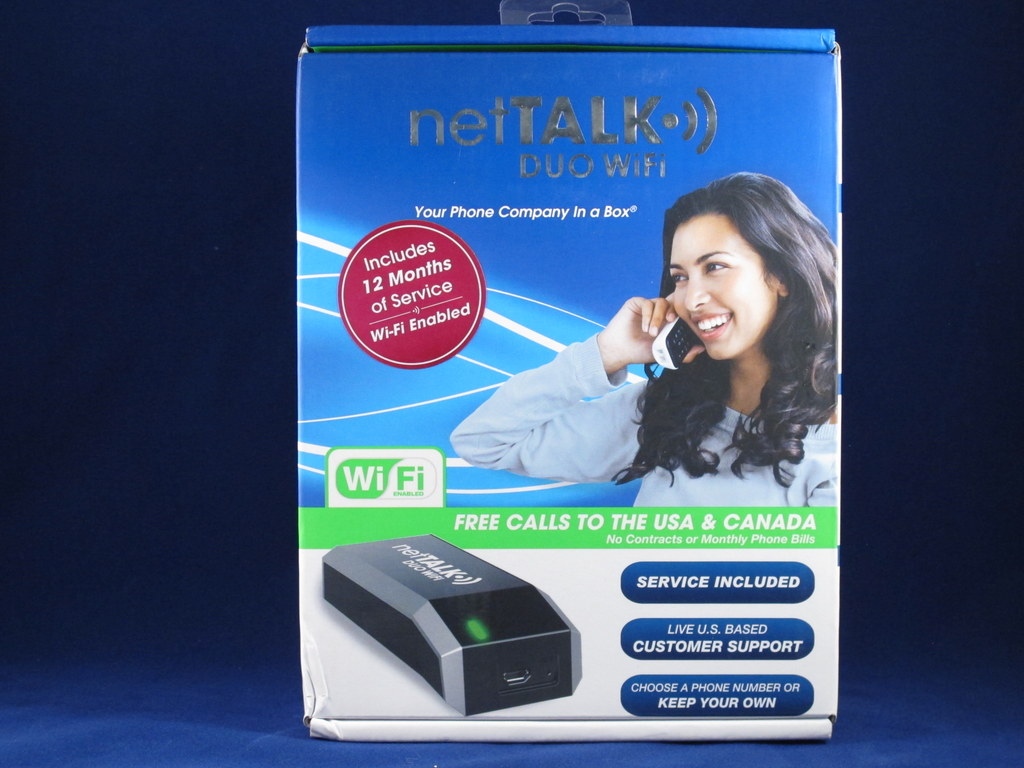
 About two years ago, I reviewed the netTALK DUO. Since then the people at netTALK have been keeping themselves busy by coming out with a new version, the netTALK DUO WiFi, which allows you to place the device anywhere there’s power and a WiFi signal. You’re no longer tethered to either the computer or a router. They’ve also added some other features.Before I go into the details of the netTALK DUO WiFi, I’d like to point out that switching to a VOIP solution for a phone service is not for everyone. This has become very clear to me based upon the numerous comments in a review I did for another VOIP device here on The Gadgeteer. Although you can save a bunch of money making the switch from the Telephone Company, there are trade offs. Personally, I went from paying over $30/ month 8 years ago for a local line without any features or long distance service, to less than $5/ month today with unlimited service to the USA and Canada, and I have a slew of features like caller ID, etc. Here’s a couple of tips to help you make your decision:
- You will need a broadband Internet connection. This does NOT include dialup. For the most part this means either cable or DSL, but not satellite. (Although some people have had success with satellite, it is not supported.) There are minimum required upload and download speeds. In the case of netTALK, they require at least 128 kbps in both directions. If you’re at the minimum, I’d suggest you upgrade your service to a higher speed. Speed isn’t the only factor affecting VOIP calls. You have jitter and delay. You can have your broadband supplier check out your line and make corrections if necessary. I had to do this at 2 different houses.
- Assuming you will use the netTALK either on WiFi or plugged into your LAN, you’ll need a router. I’ve learned the hard way that not all routers are created equal. Stick with the name brands, and if you haven’t upgraded in a couple of years, maybe you should buy a new one. At least make sure your router has the latest firmware installed.
- Understand that from time to time unexplained things happen and your phone won’t work. Most of the time this can be cleared up by power cycling your modem, router and DUO. If you don’t know how to do this, ask one of your kids 🙂
- Be advised that if you lose power or the Internet, you’ll lose your phone service. I’ve addressed the loss of power issue by having a battery backup on my modem, router and VOIP adapter.
- Ditch the 2.4Ghz cordless phones. They interfere with WiFi signals and cause all sorts of grief. Either use a wired phone or upgrade to DECT 6.0.
- Don’t port your telephone number to the VOIP service immediately. I’m surprised at the number of people who do this and then find out they didn’t have the minimum requirements for VOIP. Now they complain about losing a telephone number they’ve had since the dawn of time. Please wait and test out the new service and make sure it works for you. netTALK offers a 30 money back guarantee. Take advantage of it.
- Have patience. Again you have 30 days to check everything out. Make all your outgoing calls on the VOIP device and if you can, call forward your incoming calls from the telephone company line. I’ve found that sometimes it takes several days for a new activation to propagate through the net before I’m able to call certain numbers.
There’s probably other tips that are useful and readers are encouraged to chime in. Now back to the review!
Features:
- Call Blocking (block annoying calls)
- Call ID Blocking (protect your privacy)
- One year of service included
- 30 Day Money Back Guarantee
- WiFi enabled
- Choose a phone number or keep your own
- Free local and long distance calling to the U.S. and Canada
- Live technical support, 7 days a week
- Flat-rate, ultra low-cost international call plans
- Free DUO-to-DUO-calls anywhere in the world
- Plugs directly into your router or computer
- Landline goes anywhere there is internet
- 411 directory assistance
- Call waiting / caller ID / call forwarding
- 3-way calling / conference calling
- Visual voicemail
- Enhanced 911
- Fax-friendly
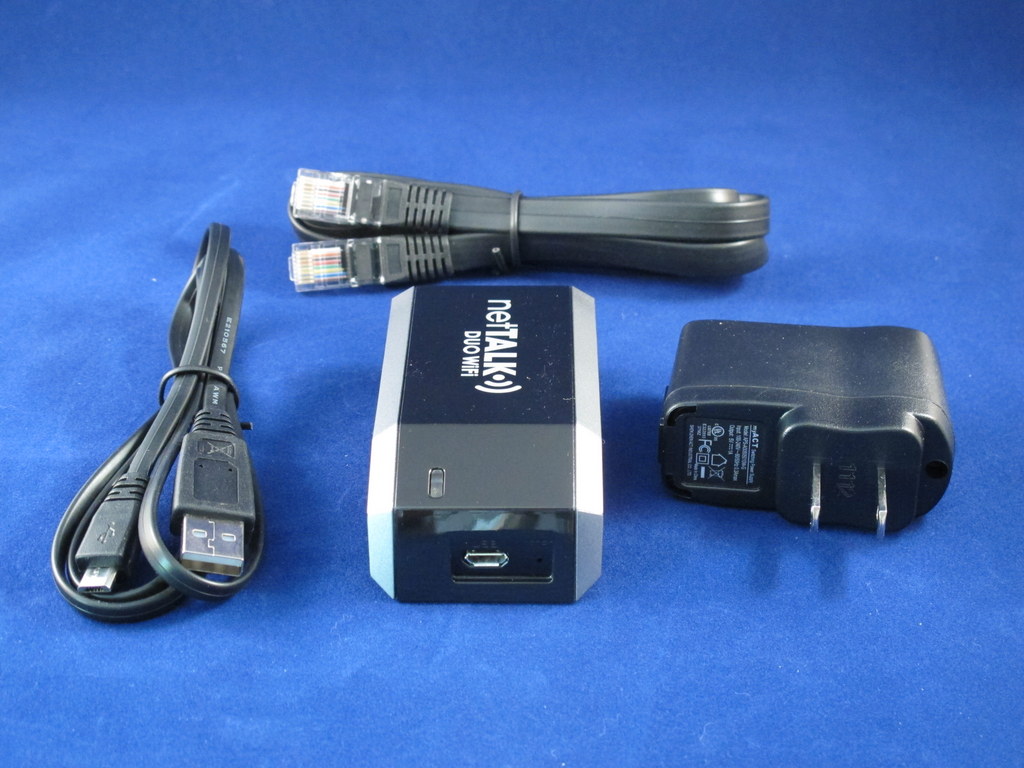 Here’s what you get, plus a small setup guide. The AC adapter is rated at 110/220 volts and 50/60 hz. The Ethernet cable is superfluous if you’re not plugging into the wired LAN.
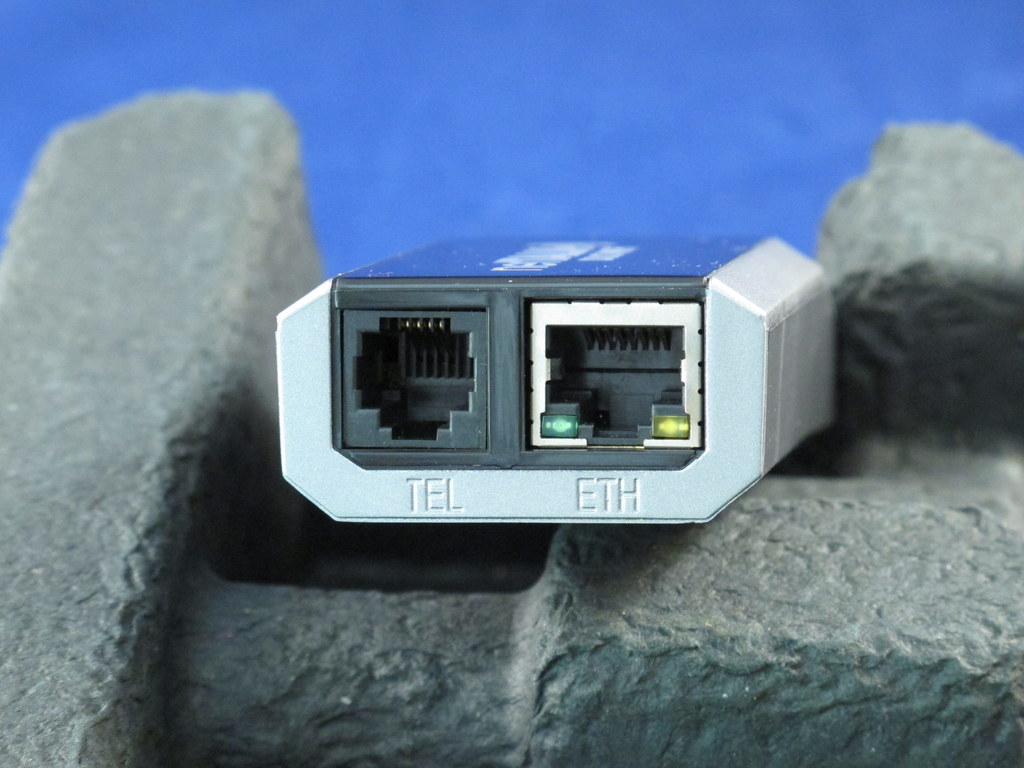 I’m not sure if this is the back or front, but it houses the cable connectors and indicator lights.
 Here’s the other side. Notice that there’s a reset button. I haven’t had the need to use it yet.
Installing the device is a multi-step process that should need only be done once. First, you’ll have to use your computer to activate the netTALK DUO WiFi using the username and password that came with the package. At this time you’ll also pick a phone number. I was impressed that netTALK had numbers available in my city. Other devices I reviewed forced me to use numbers that were toll calls for my neighbors.
Next I downloaded the software and drivers for the device. If you have old drivers in your system, the instructions show you how to remove them.
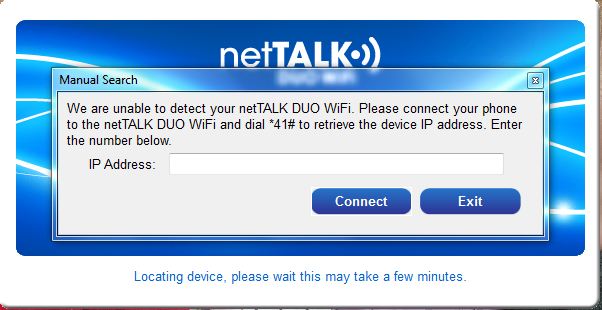 After plugging the DUO into a USB port on the computer and firing up the DUO WiFi management tool, the above screen popped up. Allegedly, the software is supposed to find the DUO automatically, but it never worked for me after several tries. This wasn’t a problem as I did as instructed and dialled *41# and retrieved the IP address of the device and entered it into the above form.
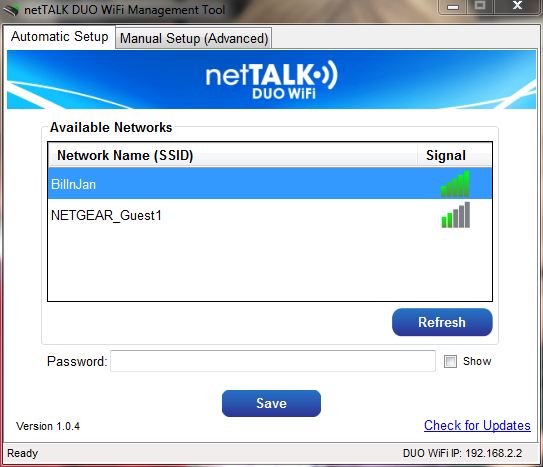 I was then presented with the networks available window and selected my home network. After entering my password and clicking save, I was advised that I was setup for WiFi use and could remove the device from the computer and position it anywhere I had my WiFi network access. At his point the DUO WiFi management tool is no longer needed unless you want to use another network.
I did bring the DUO WiFi with me when I visited my brother in New York. Using my laptop and the DUO WiFi management tool, I was able to connect to his network and use the DUO at his house. This wasn’t a problem because he gave me his password. The DUO will work on open WiFi networks, but not at places that require your input before providing a connection, such as McDonald’s.
When I returned, I expected that I could just plug the DUO into a power outlet and it would find my network and work. Unfortunately that didn’t happen. I had to use the DUO management application to reconnect. This is not the way it’s supposed to work according to netTALK’s FAQs. The DUO WiFi is supposed to remember up to 12 networks. I don’t consider this a big issue and it may have been something I missed.
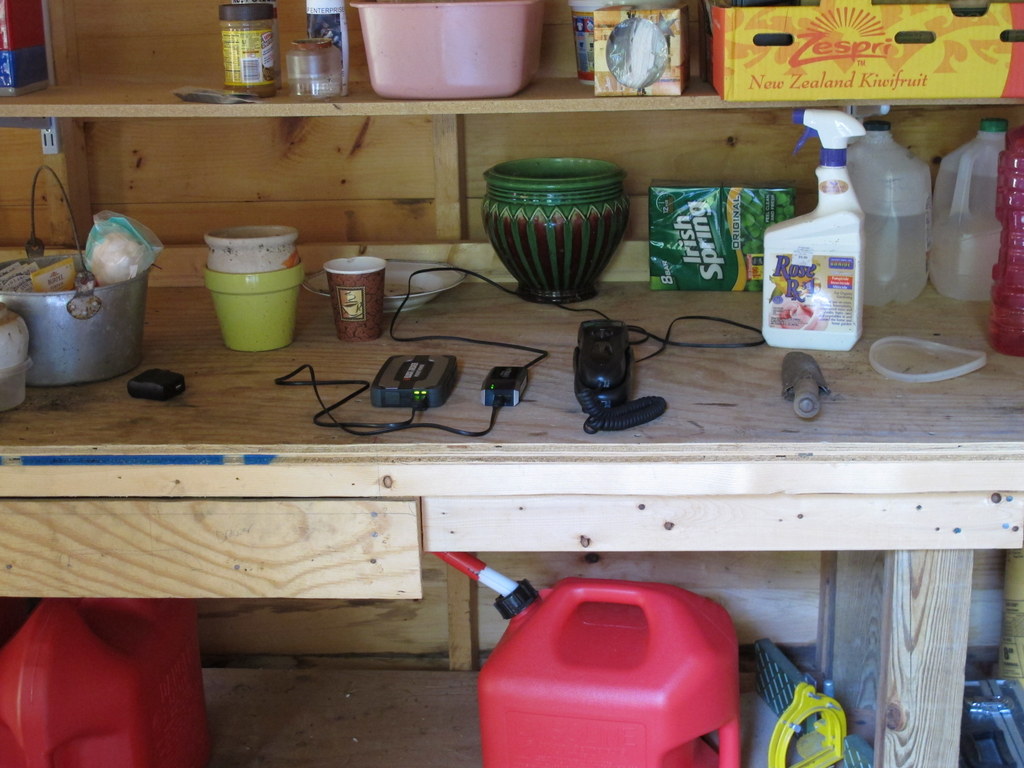 The purpose of this photo is illustrative of the flexibility of the device. I was able to bring it out to our potting shed and using a 5v battery supply, I could use the phone at the extreme end of my WiFi coverage. Of course in actuality I can use a cordless handset to the same effect.
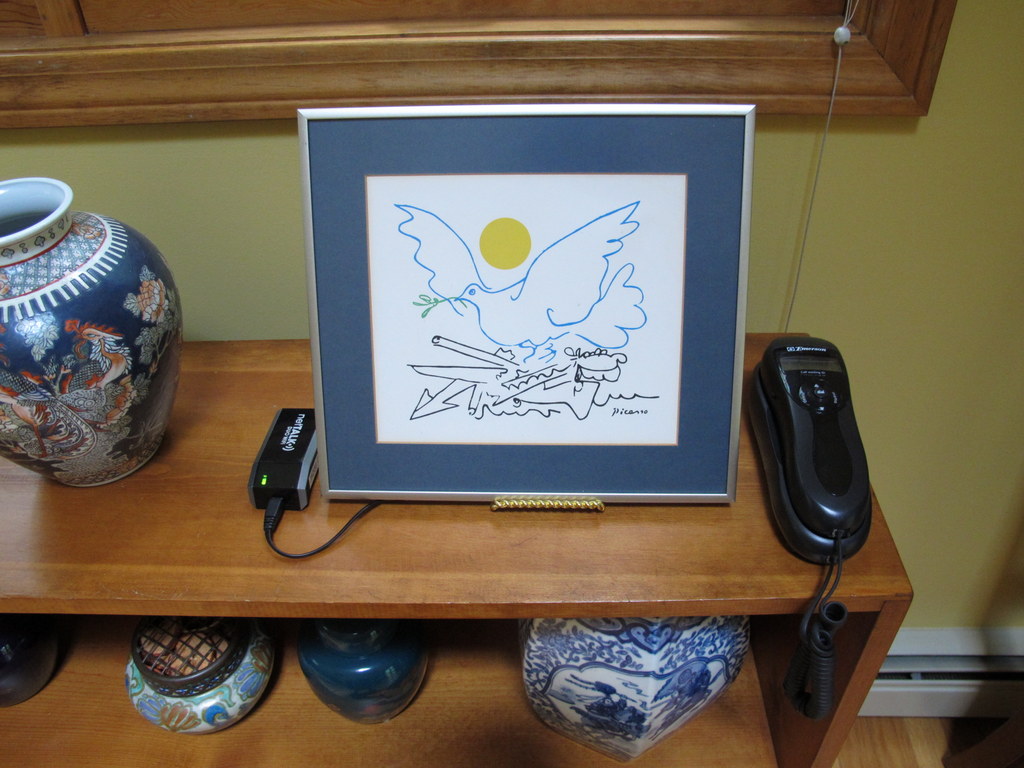 Here’s a more realistic setup. The DUO device could easily be put behind the photo and only the phone would be visible. By the way, I used a corded phone for the tests to eliminate any possibility that a cordless phone might cause interference. It will work fine with a DECT 6.0 cordless phone.
The WiFi capability of the netTALK DUO makes this a very flexible device. It can be situated anywhere there’s a power outlet within the range of your WiFi. The call quality is on a par with other VOIP offerings I’ve reviewed or use. Being able block (blacklist) unwanted callers individually or by group (“unknown” or “anonymous”) is definitely a plus. I’ve used the device in all 3 modes; connected to the computer, plugged into the router, and over WiFi and have experienced no issues. The web portal is minimalist, but gets the job done. There you can listen to voice mail, block callers, change your number, port your number, forward your number, check your call history and more.
Lastly, as a test, I called their technical support line, and after navigating a one step tree, I was informed that I was caller number 15 and the hold time would be about 55 minutes. This was done at 3 pm EDT on a Friday. Actually, the hold time doesn’t bother me because I doubt that most tech savvy people will need to call technical support. As an alternative, you can send an email with your question. Compared to many VOIP services that don’t even offer live customer support, I find having it a plus.

ESR for MagSafe Wallet, 5 Card Holder with RFID Blocking, MagSafe Sticker Included, Slim Magnetic Wallet for iPhone 17e/17/16/15/14/13/12 Series and Selected Samsung Devices, Not for 13/12 Mini, Black
(as of June 13, 2026 18:40 GMT -05:00 - More infoProduct prices and availability are accurate as of the date/time indicated and are subject to change. Any price and availability information displayed on [relevant Amazon Site(s), as applicable] at the time of purchase will apply to the purchase of this product.)
KRTALS Stronger Magnetic RFID Leather Mag-Safe Card Holder for iPhone 16 Series, Mag-Safe Accessories Stick on Series of iPhone 17/16/15/14/13/12 and Pro/Promax, Black
(as of June 13, 2026 17:00 GMT -05:00 - More infoProduct prices and availability are accurate as of the date/time indicated and are subject to change. Any price and availability information displayed on [relevant Amazon Site(s), as applicable] at the time of purchase will apply to the purchase of this product.)Product Information
| Price: | 64.95 includes 1 year service |
| Manufacturer: | netTALK |
| Retailer: | Many - check website |
| Requirements: |
|
| Pros: |
|
| Cons: |
|

Gadgeteer Comment Policy - Please read before commenting
Beware of NetTalk. If the device works it is okay. Their tech support is beyond atrocious. While they may tell you that you’re number ## with a ## minute wait…it’s incorrect. We threw out two NetTalk Duos with 10 months of subscription remaining because one failed after their firmware bricked the device and repeated calls and waits in excess of 7 hours (speaker phone) on the phone and tech support tickets went unanswered. So, yes the device is okay (voice quality is so so even on very fast connections with proper QoS settings)….but if something goes wrong you’re better served to throw it out. If you check their forums you’ll find many similar stories.
After using MagicJack and NetTalk in several installations in multiple locations we’ve moved everything over to Ooma which costs a bit more (still far cheaper than POTS, Comcast or Vonage) but has proven to be much, much more reliable, better quality and affords its customers real tech support.
I’ll second on Ooma. We’ve been customers for almost three years now. There is nothing better. Pay for the hardware, and, unless you want extra annual features, it doesn’t cost anything afterwards. High-quality hardware, and it doesn’t go down. Rarely do we need to restart the VOIP router. Very reliable, exceptional support.
I have had Ooma for close to 6 years and I am grandfathered into not paying any taxes or 911 fees. (unfortunately, now they charge a few bucks a month for taxes and 911). It is the VERY best VOIP service I have used, and I continue to use it daily. It is as good (or better) than my dial-up.
I have also had Magic Jack and Obi-Hai. At this time Obi-Hai is the ONLY alternative to truly free (no $fees, no $taxes, no $nuthin’)
Net talk is BS…..Can’t use it on other computers….Customer service is not in operation.. We will try Magic Jack plus or OOma.
The Nettalk was working after 11 months after that stoped without reason, I opened a ticket but I never got the answer, pity, used to be a good service
I have used the product for a year and would NOT recommend it. It’s not reliable for home or business. The line constantly drops, no dial tones, cannot dial 1-800 numbers. This is normal scenario, dial a number, line drops, wait, reset Duo, wait and no dial tone. Wait another 15 min, do dial tone. 4 hours no dial tone!
I have called Tech Support, the lousiest tech support, based in U.S. Get ready to wait 45 minutes to 1 hour for response. By Email, takes 4 days response and emails stop.
Overall I would not recommend this product, it ‘s going down my garbage chute as I would not sell it to some poor sucker!
Too bad I can’t file class action lawsuit for selling a defective product! Any pro bono lawyers out there! Product like this should never reach the market.
Wasted $80!
I see by the comments the same problems still exist with the latest Nettalk device as with the older model. My original Nettalk device died before the 30 days were up, I sent it back and got a full refund. Good luck to anyone that has gone over the 30 day mark, you will be stuck with a non-working device that you cannot return when it fails.
i had my net talk wifi duo. the idea of it is amazing but i had to return it because the volume is soooooo low. im going back with magic jack i never had a aproblem with my old one. this time im going for magic jack plus.
What an awful product and company,
Before buying this product, try calling their customer service line, see how long it takes to get through. The product is cheap, and broke after 2 months (will no longer power on) and after submitting an online ticket have heard nothing back in 3 weeks.
Also when it was working the phones were constantly plagued with reverberations and other robotic sounding effects.
Not worth with, DO NOT BUY IT
I first bought Magic Jack. It actually was working pretty well. Don’t like that it doesn’t give you
the name of the person calling, only the number. So I bought the Nettalk Duo Wifi, $65 unit. Hooked it up.
Have poorer line quality and cannot figure out how to set up voicemail. Can’t find it on their site under
FAQs. Called them a few times. I was caller 50 plus. I hung up. I sent them an email/trouble ticket. It’s been two days and they haven’t responded. I’m returning the Nettalk.
I am surprised by all of the negative comments here!! Over two years ago I purchased a Nettalk DUO (not the WiFi model) and I have had a very good experience. So then I got one for my parents who live 3000 miles away (using a different internet ISP, different modem & router) and they also had good luck with theirs. When I used to call customer service there was never more than a couple minutes hold time, often none at all. I have heard that has changed in recent months though. (I just called to see, I was told I was caller #36.)
I found voice quality was good, volume was good, almost all calls go through the first time, incoming calls are fine, all features work, etc. I connected it to my home telephone wiring so now all of my corded and cordless phones work all around the home. Voicemail on the DUO can be turned on or off which is a plus, many others don’t give the turnoff option. The caller’s caller-ID information comes up with both number AND name, also a big plus over Magicjack and some others.
I’ve used the Obihai and that has also been very good. (Actually it’s been great, especially with Google Voice, but it is a bit more technically involved and therefore not for everyone.) I don’t like Magicjack Plus for a number of reasons (yes, I’ve tried it) although I’ll admit it does work okay for the basics. Ooma just seems too expensive (although it probably works just fine for most) and then they charge you for the optional ‘extras’ that are standards with Nettalk and some others. Vonage is also pricey (although you may be able to get a $10 per month plan through some negotiation or special offer). Still, for only $50 (currently) for a DUO (which includes the device plus the first year of service) and then for only $30 per year after that the DUO is a great bargain as long as it works for you. I always tell friends to try it, and to return it if it doesn’t satisfy them. It is available online and also in-store at some retailers, the latter being places where you can avoid shipping charges.
Being this is generally a positive review for the DUO I feel the need to state that I don’t have any involvement with the company. Nonetheless I’d hate to see them disappear because they supply a great product and service in my opinion. I’d love to hear the experiences of others that have used it. Consider trying one on a trial basis for a couple weeks, then report back here with your favorable or disfavorable comments.
I have had Magic Jack for several years and have become very dissatisfied. The product is unreliable and MJ’s customer service is the worst. I am ready to move to Ooma.
For Gary December 28, 2012 at 2:40 pm
How did you connect the Nettalk Duo to your home telephone wiring?
Pamela Bruner
Nettalk is crap…Crap…Crap. Went back to Vonage on their $10.00 a month plan and get excellent service as well as voice quality. All I did with Nettalk is spend my time re-booting it. Voice quality terrible, worse than terrible…Horrific! Services are non-existent…Save money, time and frustration. Don’t buy it!
Just for the record I don’t usually write reviews, but this company is so bad they need to go bye bye!
I bought a NetTalk Duo a week ago and was impressed by it and the clarity of service. Bought another one 4 days ago to replace my second line. My setup is Netgear router on cable internet. Both Duos plugged into the router. Holding two conversions simultaneously and browsing the internet presented no problems so far. Using both corded and cordless Panasonic and Uniden phones. There seems to be a problem sometimes at the called end with some cordless phones not connecting properly.
I forwarded my current land line to one of the DUOs and forward my cell phone to the other Duo when I am home. All works flawless so far.
I now initiated the number porting process to get rid of the current land line
I will second all the negative opinions. I have used voip service from voipvoip.com and since I was paying $7 a month for phone number with unlimited incoming only calls, thought will give Duo Wifi a trial as I liked the Wifi option.
But it just fails to register on the Wifi and only works using Ethernet cable or USB port connected to a computer. Emailed tech support, a week back, no reply. Hold times are atrocious. Called them at 9:30AM EST (they open at 9am) and I am already called number #31. I choose them over Magicjack as there is a phone number to call for customer service, but if they have like few people to take those calls and the device looks crappy, you can expect why there is these long wait times.
Hopeless and for $65 with first year service, they are just collecting money from one time users and hopefully will shut off soon.
It is best to pay something reasonable to get good service. voipvoip.com is top notch. There website is so well laid out and if you ever need to contact tech support, you can just send emails from your account and they respond within few hours. They also know a lot technically, which I cannot vouch for nettalk as I have not been able to reach one. I doubt they can do much at all.
BIG MISTAKE! Purchased Nettalk Duo Wifi last June. It never worked as a satisfactory phone service. At first I had to reboot the thing every day to keep it online. After weeks of torment and hours waiting to talk to customer service to try and get the thing to work, a service rep got that fixed and it stayed connected. Even then the voices sound wavery and when talking to someone and would drop calls. It became a joke with our friends – “make your point quickly cause this phone will drop us soon”. I decided in August to port back to a reliable service with Comcast. Then the nightmare began as it is now Jan 9 and last night we finally have reliable phones. Comcast claims Nettalk would not respond to requests to release the number. I called Nettalk (long wait) to insist they release the number. I was given a bogus email address to send my request to a 3rd prover service who would release the number. It was kicked back. I bugged Comcast for weeks and they were also at wits end. Nettalk held our phone # hostage all these months. Paid $79 too much and today will return it to Target who will likely not want it but I am giving it back with a formal complaint about the product. Nettalk is a scam!
I at first had trouble with reliability and by chance changed cable modems from ubee to rca (both via TimeWarner). Since installing the rca modem, have not had a single problem.
I am on the side of unhappy customers. I was able to connect w/o a problem, but the device doesn’t stay connected. I nor the support were able to determine what causes it to drop off the network.
Jan, connection dropping could be due to the default lease times in your router. Check the lease times and increase them to the maximum or even better, assign a permanent local IP address to the MAC address of the Duo.
One positive vote for Nettalk Duo WiFi. I picked it over the other services because the net cost is over time appears to be lower.
I installed it and ported my home phone about two months ago. Not one problem since then. I did have to carefully walk through the installation process because the unit was not automatically recognized. Obtaining and entering the IP address worked. Voice quality and background noise are fine.
My guess is that many of the problems people have is with the router or WiFi connections. Of course i have to wait to determine reliability but if you have a stable setup and reliable power simple electronics like this should not fail. I agree there are network reliability issues with VOIP but I have my cell phone for backup if necessary.
If I were to do this again I would consider saving $20 and buy the basic Nettalk unit and then spending the $20 on a four port switch to interface my PC and Nettalk with the Internet router. It would not be as portable as with the Duo WiFi but it may make for a more stable connection. Obviously you do not want to plug in to a computer LAN port permanently because if it goes to sleep or you power down you will lose the phone function.
The worst customer care representatives on earth! They pay crooks to give excellent flawless review of the product to fool the minds of innocent people like me. I’ve learned my bitter lesson, and call me whatever name you want and try your luck with stupid duo. If I could see face to face those crazy people I communicated with, I’ll just give them Mohammed Ali punch to their mouth. They made me stay on the phone for 135 minutes only to tell me trash. I did not use their stupid service for a day and they’re telling me to renew. Renew what!?
This has got to be the worst piece of crap ever made, lousy support ,lousy service , either cuts off or doesn’t work , can’t dial out half the time, don’t get calls incoming ,can’t call toll free numbers. Do not buy this crap
I have never, in my 5 decades on this planet, found customer service as horrible as this. They would not assign a phone number to me for the first 6 months that I owned this unit, because they had no number available in West Virginia. After 6 months, they finally assigned a number to me… from Minnesota… 5 states away!! They continued to charge me for the 6 months that they would not give me a phone number. They refused to credit me for the 6 months. When I complained they vindictively shut my phone off completely! So now I have wasted the $72 purchase price and I only got 2 months of phone service from this stupid box. It is a horrible, unreliable system to begin with, which required rebooting every 2-3 days, but now it is a worthless piece of hardware cluttering up my desk. To say that I am frustrated and angry is an understatement. Customer service is non-existent. When they do answer an email or a phone call, it is patronizing and inappropriate. Expect to wait weeks for a reply to your email complaint and expect 2-4 hours of waiting on hold for a live customer service rep…then they will be ineffective and offer either a misguided or patronizing response. Do not buy this product. Try ANY of the other VOIP services. There are many. Just Google VOIP and you will get a list of services that will do better for you than NetTalk. Two cans and a tight string between them will do a better job than NetTalk.
I bought the NetTalk Duo Wireless. It does NOT work. I ported over my phone number and have been without phone service for over 1 week. Don’t believe all the “Expert” reviews. I really wanted to get rid of my phone company due to outrages fees. I read both good and bad reveiws of the Duo. The Duo doesn’t recognize or remember the IP address that you put in. It doesn’t recognize the wirelss connection. It does not recognize the broadband carrier (big company). I called Tech Support 3 times. The first time was a weekday. There were 80 calls ahead of me, and I didn’t want to wait. The second time, I called on a Sat. about 1 hour before Tech Support closed. There were 80 calls ahead of me, but I needed to get my phone working, so I stayed on hold for over 1 hour. I and was number 60, when I got disconnected from tech support. The third time, I decided to call at 9am just when tech support opened, and I was number 2. I had to use my cell because my Net Talk Duo connection was not working. I was on Tech Support for over 1 hour on my cell phone (lots of overtime minutes used) and they fixed the problem for about 30 min, then my Duo did not work. I decided that if tech support couldn’t fix it I am going to return it. If you insist on getting the Duo anyway, at least get it from and store and not direct from Nettalk. At least with a store, you can return because it won’t work for you either. The best choice would be to use port your landline number to your cell phone. I can’t do it because my mom is 82, and likes to use a regular phone. This company won’t be in business very long, once people give up their landlines and just use their cell.
REALLY REALLY REALLY BAD.
I’ve had it many months, never got the wifi working, send requests for email support that are answered weeks later with a reply that I never replied. I sometimes need to reboot it between calls. It takes minutes before connecting after I’ve dialed, if indeed it manages to connect.
My experience with aNettalk Duo and their customer service was very good. I purchased the non-wifi Duo which came with the first year service. Plugged it directly into my router connected to my ATT 6Mb DSL. Had it about 6 months and never had a problem with it. I am actually very impressed with the quality of the service. I just switched to U-Verse with voice line and plan on porting the phone number to my Nettalk. I plugged my cordless phone into the phone jack and had my phone working in the house. I would definitely try it and make sure you like it before you port your number to it.
with nettalk noone can call in unless they are in saskatchewan. In my opinion it is a complete waste of money..better to put the price into extra cell phone long distance minutes!
Craig
Good luck with porting back to U-verse. It took 5 months for Nettalk to release my number back to Comcast. The most frustrating experience one could have……… I felt like a hostage.
I have been using Nettalk for about 8 months. Or I should say trying to use it for months but it never worked. It drops the connection to my router constantly when other devices have no problem at all, like my smartphones, blu-ray player, apple TV etc. etc. Then I have to restart the router and the Duo wifi and wait for them to connect. My wife or I have to do it at least once a day to stay connected. I can’t even give my home phone to anyone coz it’s not reliable at all. In the beginning I gave this number to few of my friends and contacts but they all complaint that the calls never go through. So, now I use it only for the outgoing calls if I get the dial tone. Some times I get the dial tone but phone does not dial any number. Their customer service is a joke.
Recently Nettalk has cheated to all its existing customers specifically who are calling to India. This company has suddenly added a minute cap of 600 minute/month for India calling. This is setup for existing customers also. I have already paid money for 6 months, still 4 months are left. 600 minutes for $10 is very very costly.
More over unable to talk to their customer service center I have tried two times for about an hour but could not talk after spending 2 hours. I have even opened an issue ticket and nobody is responding from last two days. this is ridiculous.
Looks like nettalk is champion in cheating customers after reading it here. be careful with nettalk.
nettalk is fraud, dont buy. I lost $170 in 2 monthts
When I bought this service last year, it was very good and it was working as advertised. On March 2013(a month back), I renewed my service for whole year by paying 35.47 for US/Canada and 133.78 for International add on. It worked for a month and then suddenly I cannot call India, after waiting for 45 mins in call he asked me to send email to c2 at nettalk. com. I sent they said they reduced the minutes to 600 per month, so its 2 cents per minute but most of other online websites like rebtel lets me call for 1.5 cents. So I asked them to cancel my account and give me a refund, but without notice they cancelled my account and saying that they cannot refund the money.
I sent an email again, saying give me the money or re-enable my account and no reply from them. called today to customer service after waiting for 1 hour and again he asked me to send email to customer support. What a rip off these people, because of me, 3 of my friends bought this plan this year and they also have same problem. We will not continue this service again, I am lookin for justice in some way so i am writing here. Also I am going to write whereever I can.
Please dont buy this, I promise one day you’ll have a problem then you will not be answered by nettalk. I am going to get vonage.
Just got an email this morning :
Dear Valued netTALK Customer,
This notice is to inform you that we were conducting system upgrades to provide clearer call quality, reliability and the ability to add more features to your service in the future. Please note that during the upgrade installations a technical issue has arisen. This has affected in-coming calls in Canada for a small limited group of users which require us to change our phone number provider partner serving Canada. Your ability to receive in-coming calls has been restored.
The fastest and permanent way of restoring your full service is by assigning you with a new phone number, which will allow you to make and receive calls as normal. To see what your new phone number is, please log into your netTALK account manager or see your account information with your new phone number listed below.
netTALK Account #: *****
Username: *****
Phone Number: 1438*******
Note: Because of the change, you will not be able to retain or use your old netTALK phone number. Your newly assigned phone number can be changed free of charge to a more suitable geographical area if needed, or you can transfer your existing landline number. You can make that number change by logging into your account manager. (Your old number may still show up in your account but it will no longer work, you must use your new number.)
Also note: Each affected customer will be credited with 6 months of free service and it will be automatically added to your account within the next few business days!
We apologize for the inconvenience and confusion, thanks for your patience and for being a netTALK Customer.
Sincerely,
netTALK Call Quality Center
****************************************
When logging in to the account manager i dont see the new phone #. Only the old one and i simply cannot change it.
Also both new and old # doesnt receive incoming calls. And of course CS in unreachable.
This is not acceptable.
Wow Medy, that sucks. I haven’t received that email yet. Luckily for us, we just got our Canadian number only in mid-march and haven’t distributed it. So if they did this, I do hope to get a Toronto area and not some other area code as that was the whole point of getting this service.
i’m in Montreal… and there is no phone number available for the area !!! this is crazy !!! Plus, i have to change my contact number for almost everything … i doesn’t worth the 6 free months of service.
I was a happy custommer for almost 2 years … but i definitely consider switching.
My neighbour who got his Nettalk Duo Last june didn’t experience any issues with his Duo… Calls are OK for both incoming and outgoing … and he gets to keep his phone number !!!
Nettalk, how come this affects me when i’ve been a customer for almost 2 years with the same phone number !!!!
This is really not professional, my account expires in november 2013, and i’m already looking for a replacement solution.
I’ve had mine for little over a year and I’d say it’s been up and running for a good 80% of the time. The other 20% was based on power outages, firmware updates, and network issues. It’s all dependent on your network’s strength and stability along with your router (quality control notwithstanding). The confusing part at first was the setup as someone stated up-thread about adjusting your router’s settings. In my case, the router has it’s own address you can enter on the computer its connected to, leading to a control panel with settings.
I, too, was frustrated when first using it, having to power cycle the thing to even stay on. The NetTALK forums were very helpful, though things would’ve been a lot easier if there was a dedicated section for tip & tricks (even if in general) instead of searching for it. For my situation, this device is pretty decent as it saved me lots of money over other traditional lines that weren’t being used that much. Again, once you have the thing set-up properly, it should work.
The NetTalk is one of the worst VOIP telephone system ever have in the planet. Line gets hung up, get freeze several time everyday. You need to unplug then plugin. Sounds quality also worst. I DO NOT RECOMEND TO ANYONE. I had NetTalk for one year. Big punishment I invite myself by having NetTalk. Stay away from NetTalk. There customer service also very very bad.
Despite the negative comments I am travelling in Germany and with several ADSL connections I had no service problems. The Duo performed without any problems.
Wow. I have been using nettalk duo (not wifi) for almost two years without a single glitch. But with all the negative comments, I am going to look for other alternatives when my service expires. Because I didn’t have any problems the first year I renewed it for four years for 100 bucks. 🙁 I hope it continues to work flawlessly.
What always amazes me is when people who have had a bad experience with a product, they always accuse a person writing about a positive experience of being a “shill” for the company. I am not being paid or encouraged in anyway to write this. I have has a very good experience with NetTalk, which I believe is far superior in many ways to MagicJack. For one they truly have unlimited calling to US/Canada (they do not block calls to other Long Distance calling cards, conference platforms, or to rural US or Canada. They also provide and promote their Call Forwarding (which MJ has yanked from their customers without warning and will charge for in the future.) The only problem I have is that NetTalk (as well as a lot of LD calling alternatives) provide a phantom ring back as soon as you finish dialing the number (or a few seconds thereafter) in spite of the fact that the number you called may not yet be actually ringing, or could even be busy or providing a recording of some kind.) you will seldom or never hear a busy signal after dialing a number on a NetTalk device unless the call fails and that’s what you’ll hear. The FCC is even addressing this issue and will likely make this practice illegal. Other than that, I ported my old TMo cell number to NetTalk when I moved abroad and it works fine probably 99% of the time and have never knowingly had a problem receiving incoming calls and the call forwarding (follow me) option is great. I would definitely RECOMMEND NetTalk, but just common sense, don´t port your number until you know you’re happy. And as someone said, buy either NetTalk or MJ at a big bx retailer and then if you are unhappy, most have very liberal return policies.
Beware of Nettalk. Of good intentions is paved the road to hell!!!
Even though it looks original intentions to provide an acceptable “ATA” with some interesting associated new features were valid, due to:
– lack of technical support (stay more than 2 or 3 hours waiting does not look a serious choice),
– unreliable device which fails on random basis without any apparent reason,
– too many times the device shows poor voice quality or a monster tone leading to inaudible phone conversations, everything ,in spite that Nettalk keeps advertising that both DUO II/ DUO WIFI are able to offer “High Definition Voice”, something absolutely untruthful!!!
This and more, has turned products and services offered by Nettalk (and let me give them the benefit of doubt) on a kind of “unintentional?” scam!!!
it’s a shame for something that could be a good and affordable option 🙁 !
Totally frustrating. After using NetTalk Duo for one year, I just paid for the enhanced International calling plan. Tried multiple times to call Indonesia without success. There is no info on NetTalk website how to dial out to make an international call. Google has not been helpful nor has any NetTalk forum addressed the issue how to dial an international call from the USA. Looks like I threw away $120. I was put on hold 1 hour listening to background music trying to get through to Tech Support but finally hung up in frustration.
I’ve had pretty good luck with my Nettalk Duo. BUT…there are many factors that affect its performance. Be sure you have a decent modem. There is a list recommended modems on the Nettalk website.
Be sure your internet connection upload AND download speeds are adequate. The upload speed affects your call output and the download speed affects your call reception. I initially had very slow upload speed and while I could hear people on the other end using Nettalk, I was just a garbed, choppy noise to them.
For those having problems with toll free numbers, I had the same problem. It was an issue resolved by my ISP. For anyone having any problems that Nettalk support can’t solve, I would recommend calling your ISP tech support and having them do a checkup on your connection speeds and settings. They might be the key to whether or not your Nettalk device works properly.
After one of our sons suggested we buy NetTalk and I hooked it up, the problem started. Now I have no phone on my main home line and no NetTalk. And there is no information on how to UNINSTALL it. And then I found out that “your 555-555-3232 cannot be ported” AFTER it said it was ported! (??) What to do? They don’t answer the phone and although I get an automated reply to several “tickets”, no one has bothered to call me to solve this enormous problem. What to do? a) DON’T BUY NETTALK. b) I wish I had looked at these reviews before I did.
Customer Service & Tech Support are the worst. I purchased the NetTalk Duo II 2 weeks ago, and I have been trying to reach both customer service and tech support for 2-weeks with absolutely no luck. I wait on hold for hours each time I call, so I tried the chat support which is the very same thing — hours of wait time and you still don’t get someone to help. I finally gave up on NetTalk and bought a Magic Jack. The Magic jack works great. They only have chat support, but when I connected to tech support live chat, I was connected to an agent within 60 seconds.
I bought 7 of these! What a Putz I was! The customer service is horrible and after 6 months of trying, I still can’t get Nettalk to port my numbers, even though I paid 7X $20.00 a piece for the service. I had Majic Jack, and even though they were not the best service, they look like a winner next to Net talk. DON”T GET NET TALK!
@Ronald Tate: Dial 011 + country code + number works for me.
@Others: I’ve been using my NetTALK for about a year now, and while I haven’t had too many problems (about the worst I’ve had is being unable to connect with the other party, or only one side could hear the other, which a redial almost always fixed), my biggest worry is hearing about the number of people whose Duo died after X days/weeks/months. Personally, I’ve been OK with the service, but if the hardware dies on me, I know I’m out at least another $35 to get another Duo II. So, rather than throw away your unused and despised Duos, there are people like me who’d be willing to give you at least a few bucks to ship them our way. 😉
@Kaz,
Don’t get excited thinking you can get a used duo and it will work. You will still have to make a phone call to them to get it activated and there in lies the problem with this company. You just cannot get hold of tech support. First they reduced the hours and second, even if you choose the option for tech support and after the long wait get a human to talk to you, it is just to receive your info and call you back. If you are not near the duo when the tech calls back, then you are out of luck.
Also, I had this type of replacement done once, but in the first week of June when they had technical issues with their network, my replacement duo stopped registering. It was like that for 2 weeks and they never responded to my online support ticket. It was a fluke that I thought…hmm..let’s plug the old one and see and vola that worked. So somewhere in there system, the old one was made alive and the replacement one was de-activated.
I have used voip services since 2006 and dealt with several companies, this ought to be the worst one. I am not buying any more of these for friends and family and neither am I extended the service once my current one ends…hopefully the company stays in business till then.
@Navin: Yep, I hear you… I’m not really thrilled with the idea of it either, but I’d rather go through some hassle and pay a few bucks for a used one than pay $35 for a new one and go through that same hassle 😉
I used to tried jajah, and iconnnect( formal Delta 3). Not so handy. Now I just use Google Voice and smartphone(AT&T Gophone prepaid) and tablet.
It’s TOTALLY free and no device needed for GV.
Since this is the APPs world, I found it’s really convenient to download Groove ip Lite to both of my smartphone and tablet.
International calling is in a reaasonable charge, and refundable all in my figer tips.
The only problem I have, when the internet connection is down, then there is a blink spot for the call. But I always has my smartphone when I need a call.
I travel to Asia back and forth once a year. Using VOIP calls for 10+ years and still searching for a good one. They are never a good solution for in US. The ISP and landline are charging WAY too much. So far, Google Voice with Smartphone/table has been pretty good for me.
GV is totally free to call any phone number in USA and Canada. Then I pay $100 a year for AT&T Gophone prepaid, also bought the 250minute/month for $5 to International Long Distance calls Packages which deducted from my $100 prepaid fee. For those whom used nettalk to international calls, 600 minutes for $10 to call to India. May be you should try Gophone prepaid celluar phone. 250minutes for $5 and you can call landlines and mobile phones in mobile, no need to stick with the landline.
I bee having problems with the Duo WiFi. It doesn’t matter if I choose wireless or Cat-5 corded. It is always having problems to connect. Even if it connects successfuly like after three or four hours it will fail. Complain to your state’s general attorney for any issues!!
The Nettalk duo WiFii is a piece of *&^% and their customer service is even worse!!
Over the approx year I’ve spent with the device – I’ve had nothing but issues. Today was the last straw. After a 4 HOUR WAIT yesterday for customer service, only to be put off to a tech agent call-back till today. I just got off the phone with a tech agent who hung up on me and refused to explain why the device – that is Mac friendly – that I spent hours setting up and problem solving with other tech agents and has now not been working for about a week… This issue they don’t have a fix for because I have a Mac computer and won’t offer a refund even though they warranty it for a year and I’ve had mine for less.
Thank you Future shop, who is way more reasonable and interested in repeat customers and customer service, offered an in-store credit.
DO NOT BUT NETTALK!!!! BRUTAL!! NOTHING BUT HEADACHES AND FRUSTRATION!
This is is a bad phone. After 2 months of service, they will put a limit on your highest calling county. After few more months they will put a limit on to your next highest calling country. They are not able to place phone calls to some cell phones such as Simple Mobile or any prepaid carrier.
I have used The Duo for 2 years with random issues like trying to call in and having to do several times to get thru, or having to reset the thing with power downs a few times a year. Well Thanks to great Cell service or we would be back in the dark ages if we left communications to these Net Talk DO NO misfits. When i tried to renew my service the system didn’t recognize my address for billing and took 3 weeks to get a response after BBB complaints. Now calling in gets a busy signal and for a week no resolve with tech support which absolutely sucks. I has to complaint to the BBB to get a call back with attitude. The corporates here are truly on some other planet and cowardice in dealing with their clients wanting some Miami flop out to screen their complaints. With an hour on tech support after a long wait to get resolve no answer no repairs and still no service. Why should I renew. i am going to look into this oomba and see how they are. sales always answers for every company. What did we expect for 30 bux a year? Who’s the sucker now!!!
Its Saturday so I can’t call Net Talk. Just got it. Hooked it up as a faxline to my wifi printer. Its not fax friendly. Iv’e only tried it with the HP 800 test #. It sends but wont receive. I see from other comments that it does not work with toll freee #s. I will try it today with a local #. Iv’e used and will continue to use OOMA. Its been at least 2 years now and I have nothing but praise for these guys. Customer service ( rarely called ) is the best. Wow, you call Palo Alto, Ca. instead of Bangolore India. It remains to be seen as to my keeping the DUO for my fax. My tip to all is that if you want to buy and use your own VIOP, make sure you have a good router and a good service provider with enough speed to do the job. Its like-Don,t buy a 3D 240 MHz TV without the proper service provider and bring it back because you hooked it to a VCR and a coat hanger antenna. Bottom line. I pay 3-4 $ a month to OOMA. This is 911 and local taxes. I am a very happy OOMA customer. Just do it!
Net talk has NO customer service..Beware..Tec tickets go unanswered..No incoming calls..I would not recommend people to buy this product
I own the Nettalk Duo2 Wifi, and this thing pretty much did not work correctly from Day1. I have used other voip services before, such as magicjack, and this has been the worst one yet. Now on my side of things, I never called their support to get help, which is my fault. That being said I would not in any way buy their products again. The only reason I did not go back to magic jack was because their customer support was horrible and they double billed me, which frustrated me, so I just canceled their service.
If you are asked during the set up for a phone number, how do you avoid putting in your REAL number? Can you go back and change?
Thanks
Mona
Sorry, but you’ll be sorry if you get Nettalk. Instead these are your best options (least expensive to most expensive): Get the Obihai OBi100 for $38 from Amazon and a Google Voice account and get free local/long distance phone calls (no monthly payment) until May 2014, Get BasicTalk from Walmart for $9.99/month (plus taxes/fees) and they’ll port your number for free for unlimited local/long distance calls (this is basically Vonnage), or buy Ooma for $125 on Amazon plus pay $40 to port your number and they pay a small monthly fee for taxes/fees.
I have both MagicJack and NetTalk. I like the quality of MJ but I keep NT because MJ refuses to go into NH’s one and only area code 603. MJ will not port in a 603 number and they do not offer 603 numbers. They have had the same “coming soon” lip-service answer for several years now. NT does have NH 603 numbers and ports in NH 603 numbers.
NetTalk Head Office
1080 NW 163rd Drive
Miami, FL 33169
+1 305-621-1200
nettalk.com
Just like to add my voice with Net talk. I recently experience problems during the last 2 months. Can’t seem to use this service on the computer or router. Prior to this, NT will only work when I re-boot my computer for perhaps 30 minutes. Submit a ticket online, never heard from them. Spoke to a tech guy, has no clue how to solve problem after 45 minutes. I am considering switching to Magic Jack or Ooma. After reading some reviews here, its seems Ooma is a more reliable VOIP. My suggestions to anyone who is thinking about buying Net talk,….DON’T.
I never ever recommend this nettalk phone, basically they charge u for a year and if u come across any problems in the mid, u never get answer from their customer support. Even if u try to call to customer support, no body will be available to answer.
My kind request, don’t cheat by these cheating network. They need only money from u without providing service.
It is cheating company….
I can’t ever get help, beware others, the company has made me flase promises of help for i beleive my product is defective. I try going into the chat and after 20 min of waiting, because there is “x” number of people before me, i get the our customer support is busy leave us a message. I have 5 tickets, and all i ever got is one answer, a rididculous answer, saying i see you are having trouble, let us know if we can help. They never actually help me. I was supposed to receive a call from tech support twice, the only two times i was able to get onto the chat, now it just goes to sending tickets. They don’t supply a contact email, don’t supply a phonee number on their site, and don’t respond to my tickets or any other way i try to contact. I posted to the forum to try and get help, but after a few comments from a user and an eemployee of the company i got nowhere, they didnt help and less the employee was completely unhelpful. The Nettalk company is not even accredited with BBB, their accredited was revoked by BBB, and there have been numerous complaints about nettalk, people who have had the same problem. A total exceeding 290 complaints have been made. Hopefully you come here and read this before making a purchase.
I have had my NetTalk for about 6 months now, I am considering adding another year. I am reading the reviews here, and seeing much negativity. I have had good experiences with mine, phone calls are loud and clear. The callers hear me well. I think I will pay one more year rather than the two based on what I have read here to be sure. I do know the customer service does not exist. I tried to get help and it took them Months, not days or weeks but MONTHS to respond. So that is certainly a problem. Other than that, if the product works I am happy for now.
Don’t believe this company at a. They charge u per year and u never get the assistance if smtg wrong . This company is cheating company. The call quality is to bad and never know when it’s going die. U will not be able call to the number u want in a single dial. U have to try10 times to get it connected and automatically disconnects while speaking.
Total waste of money and time .
I strongly recommends not to buy this phone .
parents bought one fall 2012 wifi didn’t work from day one so had to use router method not described in duo wifi setup guide but in the orig. duo
If you’re up to a good laugh, this is the copied text from the Nettalk Customer service help chat service.
These people are a complete joke. The only thing not funny about it is I’m out $80 bucks. Apparently they do not refund money, And I had just renewed my service less than 23 days prior to being put on a pay as you go service.
The e mail I received explained that were to many different numbers calling my phone number. This phone is only used to call family in Canada by a 84 year old senior. After that I just went ahead and paid for another years service that same day, just to get my phone up and work again. I didn’t want to be charged by the minute.
It made no difference! I had to try three times just to get a place in the chat Que. And then I had a 95 minute wait, when I finally got someone they were anything but helpful. READ THE COPIED CHAT BELOW FROM THERE WEBSITE BEFORE YOU THINK ABOUT USING THERE PRODUCTS!
0:50:47
• × Close
• Print
• Email
• Sound: On
There are currently 25 people ahead of you in the queue.
Your Question: This is my third attempt to get through on the chat support line. And I’m getting no response. My service has been shut down according to the message because of over use or lack of credit. I have bought a one year service plan for the past two years.
Please wait and one of our operators will be with you shortly.
You are now chatting with Live Customer Support
12:20Live Customer Support:Our sincere apologies for the delay in response. We are working hard to resolve any issues you may be experiencing. Thank you for your patience
12:20Live Customer Support:Can you please provide me with the MAC# located underneath your netTALK device?
12:21Live Customer Support:As an ultra-low price provider of voice communication services, netTALK’s Basic call plan pricing is based on normal residential use. Based upon your usage, your account has been placed on our High Usage Prepaid plan due to abnormal calling usage according to our Terms of Service. You agreed to these terms when you signed up for your netTALK account. Please see section 5, article C paragraph 2 located at http://www.nettalk.com/en/terms-of-service and also http://www.nettalk.com/reasonableusepolicy.
12:21Live Customer Support:You must add calling credits to your account in order to place the call. You can add credits by logging into your netTALK account athttp://nettalk.com/en/login.
12:25David Golding:I just paid for a new one year service plan back in December of 2013. It included the US and Canada, and those are the only calls made by a 84 year old senior.
How could I have used up my credit?
12:26David Golding:Doesn’t this service include Canada?
12:27Live Customer Support:You still have telephone service, but since you have violated the terms of service you have been placed on Pre-paid until next month
12:28David Golding:What have I violated, the call usage is the same as it has been for over a year. She call her brothers and friends everyday back in Canada, Did I perches the wrong plan when I renewed my service?
12:31Live Customer Support:There is only one plan, Sir
12:31Live Customer Support:The only unlimited calling we offer is from one netTALK device to another
12:31David Golding:I was suposed to include Canada and the United States a. I also thought it was unlimited as advertised, so if this is not the case what plan do I need. I switched from being a six year customer with Vonage to get away from the monthly billing and because of the Nettalk rates?
12:31Live Customer Support:Yes, the US and Canada is included
12:32David Golding:Ok, if thats the case why is this the first time I’ve had this problem
12:32Live Customer Support:Thank you, Sir– you are a valued customer to us and we appreciate your business
12:32David Golding:She make the same calls almost everyday and I have had this service as of Nov. 2012
12:33Live Customer Support:Maybe this is the first time you have violated the usage
12:33David Golding:Again what violation, can you explain what it is? How many min or somthing?
12:33Live Customer Support:I’m not sure, Sir
12:34Live Customer Support:Please see section 5, article C paragraph 2 located at http://www.nettalk.com/en/terms-of-service and alsohttp://www.nettalk.com/reasonableusepolicy.
12:34Live Customer Support:You have exceeded your monthly limit
12:35Live Customer Support:You must add calling credits to your account in order to place the call. You can add credits by logging into your netTALK account athttp://nettalk.com/en/login.
12:35David Golding:Can you take a look at it please, if this is a problem and I’m going to be penalized every month as well as charged again for using your service with out explanation than I’ll just switch back to Vonage
12:36David Golding:I looked at the support page you linked, I don’t see limit quoted. Can you tell me what it is please
12:36Live Customer Support:Unfortunately, I have the same information you do
12:37David Golding:In call history it show all the calls made with in the plan as I can read it
12:37Live Customer Support:It doesn’t have a number. The policy just states that usage can not be excessive and abnormal and for residential use
12:37David Golding:Ok so what is normal usage? Shouldn’t be a hard question to answer
12:38Live Customer Support:Normal, residential use
12:39David Golding:The e mail I received also said something about commercial use. And that has not happened, so can you explain that please
12:39Live Customer Support:We do not offer commercial use calling
12:40Live Customer Support:Only residential use
12:40Live Customer Support:Or if you are looking for unlimited calling, we offer unlimited calling from DUO to DUO
12:40David Golding:That all it has been used for
12:41David Golding:I am looking for unlimited calling, I thought I had that when I bought this unit from Walmart
12:42David Golding:No, unlimited calling within the US and Canada
12:42Live Customer Support:So for unlimited calling, you would need to get another device
12:42David Golding:Such as?
12:42Live Customer Support:Right, we do not offer that. The only unlimited calling we offer is from DUO to DUO
12:44David Golding:So not from my DUO to a land line and you don’t know how many minutes are included in the plan or why I got an e mail stating that Netalk believes I’m using my service for commercial use?
12:45David Golding:And by the way my service dose not work at all right now other then a dial tone
12:46David Golding:Ok, can I speed to a supervisor please?
12:49Live Customer Support:Is there anything else I can assist you with today, Sir?
12:49Live Customer Support:Is there anything else I can assist you with today, Sir?
12:49Live Customer Support:Is there anything else I can assist you with today, Sir?
12:50Live Customer Support:Is there anything else I can assist you with today, Sir?
12:50David Golding:Ok, can I speed to a supervisor please?
12:50Live Customer Support:Is there anything else I can assist you with today, Sir?
12:50David Golding:Ok, can I speed to a supervisor please?
12:50Live Customer Support:Is there anything else I can assist you with today, Sir?
12:50Live Customer Support:Is there anything else I can assist you with today, Sir?
12:50David Golding:Ok, can I speed to a supervisor please?
12:50Live Customer Support:Is there anything else I can assist you with today, Sir?
12:50David Golding:Ok, can I speed to a supervisor please?
12:50David Golding:Ok, can I speed to a supervisor please?
12:51Live Customer Support:Is there anything else I can assist you with today, Sir?
12:51Live Customer Support:Is there anything else I can assist you with today, Sir?
12:51Live Customer Support:Is there anything else I can assist you with today, Sir?
12:51Live Customer Support:Is there anything else I can assist you with today, Sir?
12:52Live Customer Support:Is there anything else I can assist you with today, Sir?
12:52Live Customer Support:Is there anything else I can assist you with today, Sir?
12:52Live Customer Support:Is there anything else I can assist you with today, Sir?
12:52Live Customer Support:Is there anything else I can assist you with today, Sir?
12:53Live Customer Support:Is there anything else I can assist you with today, Sir?
0:53:47
• × Close
• Print
• Email
• Sound: On
There are currently 25 people ahead of you in the queue.
Your Question: This is my third attempt to get through on the chat support line. And I’m getting no response. My service has been shut down according to the message because of over use or lack of credit. I have bought a one year service plan for the past two years.
Please wait and one of our operators will be with you shortly.
You are now chatting with Live Customer Support
12:20Live Customer Support:Our sincere apologies for the delay in response. We are working hard to resolve any issues you may be experiencing. Thank you for your patience
12:20Live Customer Support:Can you please provide me with the MAC# located underneath your netTALK device?
12:21Live Customer Support:As an ultra-low price provider of voice communication services, netTALK’s Basic call plan pricing is based on normal residential use. Based upon your usage, your account has been placed on our High Usage Prepaid plan due to abnormal calling usage according to our Terms of Service. You agreed to these terms when you signed up for your netTALK account. Please see section 5, article C paragraph 2 located at http://www.nettalk.com/en/terms-of-service and also http://www.nettalk.com/reasonableusepolicy.
12:21Live Customer Support:You must add calling credits to your account in order to place the call. You can add credits by logging into your netTALK account athttp://nettalk.com/en/login.
12:25David Golding:I just paid for a new one year service plan back in December of 2013. It included the US and Canada, and those are the only calls made by a 84 year old senior.
How could I have used up my credit?
12:26David Golding:Doesn’t this service include Canada?
12:27Live Customer Support:You still have telephone service, but since you have violated the terms of service you have been placed on Pre-paid until next month
12:28David Golding:What have I violated, the call usage is the same as it has been for over a year. She call her brothers and friends everyday back in Canada, Did I perches the wrong plan when I renewed my service?
12:31Live Customer Support:There is only one plan, Sir
12:31Live Customer Support:The only unlimited calling we offer is from one netTALK device to another
12:31David Golding:I was suposed to include Canada and the United States a. I also thought it was unlimited as advertised, so if this is not the case what plan do I need. I switched from being a six year customer with Vonage to get away from the monthly billing and because of the Nettalk rates?
12:31Live Customer Support:Yes, the US and Canada is included
12:32David Golding:Ok, if thats the case why is this the first time I’ve had this problem
12:32Live Customer Support:Thank you, Sir– you are a valued customer to us and we appreciate your business
12:32David Golding:She make the same calls almost everyday and I have had this service as of Nov. 2012
12:33Live Customer Support:Maybe this is the first time you have violated the usage
12:33David Golding:Again what violation, can you explain what it is? How many min or somthing?
12:33Live Customer Support:I’m not sure, Sir
12:34Live Customer Support:Please see section 5, article C paragraph 2 located at http://www.nettalk.com/en/terms-of-service and alsohttp://www.nettalk.com/reasonableusepolicy.
12:34Live Customer Support:You have exceeded your monthly limit
12:35Live Customer Support:You must add calling credits to your account in order to place the call. You can add credits by logging into your netTALK account athttp://nettalk.com/en/login.
12:35David Golding:Can you take a look at it please, if this is a problem and I’m going to be penalized every month as well as charged again for using your service with out explanation than I’ll just switch back to Vonage
12:36David Golding:I looked at the support page you linked, I don’t see limit quoted. Can you tell me what it is please
12:36Live Customer Support:Unfortunately, I have the same information you do
12:37David Golding:In call history it show all the calls made with in the plan as I can read it
12:37Live Customer Support:It doesn’t have a number. The policy just states that usage can not be excessive and abnormal and for residential use
12:37David Golding:Ok so what is normal usage? Shouldn’t be a hard question to answer
12:38Live Customer Support:Normal, residential use
12:39David Golding:The e mail I received also said something about commercial use. And that has not happened, so can you explain that please
12:39Live Customer Support:We do not offer commercial use calling
12:40Live Customer Support:Only residential use
12:40Live Customer Support:Or if you are looking for unlimited calling, we offer unlimited calling from DUO to DUO
12:40David Golding:That all it has been used for
12:41David Golding:I am looking for unlimited calling, I thought I had that when I bought this unit from Walmart
12:42David Golding:No, unlimited calling within the US and Canada
12:42Live Customer Support:So for unlimited calling, you would need to get another device
12:42David Golding:Such as?
12:42Live Customer Support:Right, we do not offer that. The only unlimited calling we offer is from DUO to DUO
12:44David Golding:So not from my DUO to a land line and you don’t know how many minutes are included in the plan or why I got an e mail stating that Netalk believes I’m using my service for commercial use?
12:45David Golding:And by the way my service dose not work at all right now other then a dial tone
12:46David Golding:Ok, can I speed to a supervisor please?
12:49Live Customer Support:Is there anything else I can assist you with today, Sir?
12:49Live Customer Support:Is there anything else I can assist you with today, Sir?
12:49Live Customer Support:Is there anything else I can assist you with today, Sir?
12:50Live Customer Support:Is there anything else I can assist you with today, Sir?
12:50David Golding:Ok, can I speed to a supervisor please?
12:50Live Customer Support:Is there anything else I can assist you with today, Sir?
12:50David Golding:Ok, can I speed to a supervisor please?
12:50Live Customer Support:Is there anything else I can assist you with today, Sir?
12:50Live Customer Support:Is there anything else I can assist you with today, Sir?
12:50David Golding:Ok, can I speed to a supervisor please?
12:50Live Customer Support:Is there anything else I can assist you with today, Sir?
12:50David Golding:Ok, can I speed to a supervisor please?
12:50David Golding:Ok, can I speed to a supervisor please?
12:51Live Customer Support:Is there anything else I can assist you with today, Sir?
12:51Live Customer Support:Is there anything else I can assist you with today, Sir?
12:51Live Customer Support:Is there anything else I can assist you with today, Sir?
12:51Live Customer Support:Is there anything else I can assist you with today, Sir?
12:52Live Customer Support:Is there anything else I can assist you with today, Sir?
12:52Live Customer Support:Is there anything else I can assist you with today, Sir?
12:52Live Customer Support:Is there anything else I can assist you with today, Sir?
12:52Live Customer Support:Is there anything else I can assist you with today, Sir?
12:53Live Customer Support:Is there anything else I can assist you with today, Sir?
12:53Live Customer Support:Is there anything else I can assist you with today, Sir?
12:53Live Customer Support:Is there anything else I can assist you with today, Sir?
12:53Live Customer Support:Is there anything else I can assist you with today, Sir?
12:53David Golding:Ok, I’ll go ahead and e mail a copy of this conversation to the Nettalk support address, and get there take on your responses. I will also try back at a different time. Got a feeling you just really screwed up pal?
12:53Live Customer Support:Is there anything else I can assist you with today, Sir?
12:53Live Customer Support:Is there anything else I can assist you with today, Sir?
12:54David Golding:Kayako logo
0:50:47
× ClosePrintEmailSound: On
There are currently 25 people ahead of you in the queue.
Your Question: This is my third attempt to get through on the chat support line. And I’m getting no response. My service has been shut down according to the message because of over use or lack of credit. I have bought a one year service plan for the past two years.
Please wait and one of our operators will be with you shortly.
You are now chatting with Live Customer Support
12:20Live Customer Support:
Our sincere apologies for the delay in response. We are working hard to resolve any issues you may be experiencing. Thank you for your patience
12:20Live Customer Support:
Can you please provide me with the MAC# located underneath your netTALK device?
12:21Live Customer Support:
As an ultra-low price provider of voice communication services, netTALK’s Basic call plan pricing is based on normal residential use. Based upon your usage, your account has been placed on our High Usage Prepaid plan due to abnormal calling usage according to our Terms of Service. You agreed to these terms when you signed up for your netTALK account. Please see section 5, article C paragraph 2 located at http://www.nettalk.com/en/terms-of-service and also http://www.nettalk.com/reasonableusepolicy.
12:21Live Customer Support:
You must add calling credits to your account in order to place the call. You can add credits by logging into your netTALK account at http://nettalk.com/en/login.
12:25David Golding:
I just paid for a new one year service plan back in December of 2013. It included the US and Canada, and those are the only calls made by a 84 year old senior.
How could I have used up my credit?
12:26David Golding:
Doesn’t this service include Canada?
12:27Live Customer Support:
You still have telephone service, but since you have violated the terms of service you have been placed on Pre-paid until next month
12:28David Golding:
What have I violated, the call usage is the same as it has been for over a year. She call her brothers and friends everyday back in Canada, Did I perches the wrong plan when I renewed my service?
12:31Live Customer Support:
There is only one plan, Sir
12:31Live Customer Support:
The only unlimited calling we offer is from one netTALK device to another
12:31David Golding:
I was suposed to include Canada and the United States a. I also thought it was unlimited as advertised, so if this is not the case what plan do I need. I switched from being a six year customer with Vonage to get away from the monthly billing and because of the Nettalk rates?
12:31Live Customer Support:
Yes, the US and Canada is included
12:32David Golding:
Ok, if thats the case why is this the first time I’ve had this problem
12:32Live Customer Support:
Thank you, Sir– you are a valued customer to us and we appreciate your business
12:32David Golding:
She make the same calls almost everyday and I have had this service as of Nov. 2012
12:33Live Customer Support:
Maybe this is the first time you have violated the usage
12:33David Golding:
Again what violation, can you explain what it is? How many min or somthing?
12:33Live Customer Support:
I’m not sure, Sir
12:34Live Customer Support:
Please see section 5, article C paragraph 2 located at http://www.nettalk.com/en/terms-of-service and also http://www.nettalk.com/reasonableusepolicy.
12:34Live Customer Support:
You have exceeded your monthly limit
12:35Live Customer Support:
You must add calling credits to your account in order to place the call. You can add credits by logging into your netTALK account at http://nettalk.com/en/login.
12:35David Golding:
Can you take a look at it please, if this is a problem and I’m going to be penalized every month as well as charged again for using your service with out explanation than I’ll just switch back to Vonage
12:36David Golding:
I looked at the support page you linked, I don’t see limit quoted. Can you tell me what it is please
12:36Live Customer Support:
Unfortunately, I have the same information you do
12:37David Golding:
In call history it show all the calls made with in the plan as I can read it
12:37Live Customer Support:
It doesn’t have a number. The policy just states that usage can not be excessive and abnormal and for residential use
12:37David Golding:
Ok so what is normal usage? Shouldn’t be a hard question to answer
12:38Live Customer Support:
Normal, residential use
12:39David Golding:
The e mail I received also said something about commercial use. And that has not happened, so can you explain that please
12:39Live Customer Support:
We do not offer commercial use calling
12:40Live Customer Support:
Only residential use
12:40Live Customer Support:
Or if you are looking for unlimited calling, we offer unlimited calling from DUO to DUO
12:40David Golding:
That all it has been used for
12:41David Golding:
I am looking for unlimited calling, I thought I had that when I bought this unit from Walmart
12:42David Golding:
No, unlimited calling within the US and Canada
12:42Live Customer Support:
So for unlimited calling, you would need to get another device
12:42David Golding:
Such as?
12:42Live Customer Support:
Right, we do not offer that. The only unlimited calling we offer is from DUO to DUO
12:44David Golding:
So not from my DUO to a land line and you don’t know how many minutes are included in the plan or why I got an e mail stating that Netalk believes I’m using my service for commercial use?
12:45David Golding:
And by the way my service dose not work at all right now other then a dial tone
12:46David Golding:
Ok, can I speed to a supervisor please?
12:49Live Customer Support:
Is there anything else I can assist you with today, Sir?
12:49Live Customer Support:
Is there anything else I can assist you with today, Sir?
12:49Live Customer Support:
Is there anything else I can assist you with today, Sir?
12:50Live Customer Support:
Is there anything else I can assist you with today, Sir?
12:50David Golding:
Ok, can I speed to a supervisor please?
12:50Live Customer Support:
Is there anything else I can assist you with today, Sir?
12:50David Golding:
Ok, can I speed to a supervisor please?
12:50Live Customer Support:
Is there anything else I can assist you with today, Sir?
12:50Live Customer Support:
Is there anything else I can assist you with today, Sir?
12:50David Golding:
Ok, can I speed to a supervisor please?
12:50Live Customer Support:
Is there anything else I can assist you with today, Sir?
12:50David Golding:
Ok, can I speed to a supervisor please?
12:50David Golding:
Ok, can I speed to a supervisor please?
12:51Live Customer Support:
Is there anything else I can assist you with today, Sir?
12:51Live Customer Support:
Is there anything else I can assist you with today, Sir?
12:51Live Customer Support:
Is there anything else I can assist you with today, Sir?
12:51Live Customer Support:
Is there anything else I can assist you with today, Sir?
12:52Live Customer Support:
Is there anything else I can assist you with today, Sir?
12:52Live Customer Support:
Is there anything else I can assist you with today, Sir?
12:52Live Customer Support:
Is there anything else I can assist you with today, Sir?
12:52Live Customer Support:
Is there anything else I can assist you with today, Sir?
12:53Live Customer Support:
Is there anything else I can assist you with today, Sir?
12:54Live Customer Support:Is there anything else I can assist you with today, Sir?
12:54Live Customer Support:Is there anything else I can assist you with today, Sir?
12:54David Golding:Now would you please give me a supervisor!
12:55Live Customer Support:Is there anything else I can assist you with today, Sir?
12:55Live Customer Support:Is there anything else I can assist you with today, Sir?
12:55Live Customer Support:Is there anything else I can assist you with today, Sir?
12:55Live Customer Support:Is there anything else I can assist you with today, Sir?
12:55Live Customer Support:Is there anything else I can assist you with today, Sir?
12:55Live Customer Support:Is there anything else I can assist you with today, Sir?
12:55Live Customer Support:Is there anything else I can assist you with today, Sir?
12:55Live Customer Support:Is there anything else I can assist you with today, Sir?
12:55Live Customer Support:Is there anything else I can assist you with today, Sir?
12:55Live Customer Support:Is there anything else I can assist you with today, Sir?
12:55Live Customer Support:Is there anything else I can assist you with today, Sir?
12:55Live Customer Support:Is there anything else I can assist you with today, Sir?
12:55David Golding:Kayako logo
0:50:47
× ClosePrintEmailSound: On
There are currently 25 people ahead of you in the queue.
Your Question: This is my third attempt to get through on the chat support line. And I’m getting no response. My service has been shut down according to the message because of over use or lack of credit. I have bought a one year service plan for the past two years.
Please wait and one of our operators will be with you shortly.
You are now chatting with Live Customer Support
12:20Live Customer Support:
Our sincere apologies for the delay in response. We are working hard to resolve any issues you may be experiencing. Thank you for your patience
12:20Live Customer Support:
Can you please provide me with the MAC# located underneath your netTALK device?
12:21Live Customer Support:
As an ultra-low price provider of voice communication services, netTALK’s Basic call plan pricing is based on normal residential use. Based upon your usage, your account has been placed on our High Usage Prepaid plan due to abnormal calling usage according to our Terms of Service. You agreed to these terms when you signed up for your netTALK account. Please see section 5, article C paragraph 2 located at http://www.nettalk.com/en/terms-of-service and also http://www.nettalk.com/reasonableusepolicy.
12:21Live Customer Support:
You must add calling credits to your account in order to place the call. You can add credits by logging into your netTALK account at http://nettalk.com/en/login.
12:25David Golding:
I just paid for a new one year service plan back in December of 2013. It included the US and Canada, and those are the only calls made by a 84 year old senior.
How could I have used up my credit?
12:26David Golding:
Doesn’t this service include Canada?
12:27Live Customer Support:
You still have telephone service, but since you have violated the terms of service you have been placed on Pre-paid until next month
12:28David Golding:
What have I violated, the call usage is the same as it has been for over a year. She call her brothers and friends everyday back in Canada, Did I perches the wrong plan when I renewed my service?
12:31Live Customer Support:
There is only one plan, Sir
12:31Live Customer Support:
The only unlimited calling we offer is from one netTALK device to another
12:31David Golding:
I was suposed to include Canada and the United States a. I also thought it was unlimited as advertised, so if this is not the case what plan do I need. I switched from being a six year customer with Vonage to get away from the monthly billing and because of the Nettalk rates?
12:31Live Customer Support:
Yes, the US and Canada is included
12:32David Golding:
Ok, if thats the case why is this the first time I’ve had this problem
12:32Live Customer Support:
Thank you, Sir– you are a valued customer to us and we appreciate your business
12:32David Golding:
She make the same calls almost everyday and I have had this service as of Nov. 2012
12:33Live Customer Support:
Maybe this is the first time you have violated the usage
12:33David Golding:
Again what violation, can you explain what it is? How many min or somthing?
12:33Live Customer Support:
I’m not sure, Sir
12:34Live Customer Support:
Please see section 5, article C paragraph 2 located at http://www.nettalk.com/en/terms-of-service and also http://www.nettalk.com/reasonableusepolicy.
12:34Live Customer Support:
You have exceeded your monthly limit
12:35Live Customer Support:
You must add calling credits to your account in order to place the call. You can add credits by logging into your netTALK account at http://nettalk.com/en/login.
12:35David Golding:
Can you take a look at it please, if this is a problem and I’m going to be penalized every month as well as charged again for using your service with out explanation than I’ll just switch back to Vonage
12:36David Golding:
I looked at the support page you linked, I don’t see limit quoted. Can you tell me what it is please
12:36Live Customer Support:
Unfortunately, I have the same information you do
12:37David Golding:
In call history it show all the calls made with in the plan as I can read it
12:37Live Customer Support:
It doesn’t have a number. The policy just states that usage can not be excessive and abnormal and for residential use
12:37David Golding:
Ok so what is normal usage? Shouldn’t be a hard question to answer
12:38Live Customer Support:
Normal, residential use
12:39David Golding:
The e mail I received also said something about commercial use. And that has not happened, so can you explain that please
12:39Live Customer Support:
We do not offer commercial use calling
12:40Live Customer Support:
Only residential use
12:40Live Customer Support:
Or if you are looking for unlimited calling, we offer unlimited calling from DUO to DUO
12:40David Golding:
That all it has been used for
12:41David Golding:
I am looking for unlimited calling, I thought I had that when I bought this unit from Walmart
12:42David Golding:
No, unlimited calling within the US and Canada
12:42Live Customer Support:
So for unlimited calling, you would need to get another device
12:42David Golding:
Such as?
12:42Live Customer Support:
Right, we do not offer that. The only unlimited calling we offer is from DUO to DUO
12:44David Golding:
So not from my DUO to a land line and you don’t know how many minutes are included in the plan or why I got an e mail stating that Netalk believes I’m using my service for commercial use?
12:45David Golding:
And by the way my service dose not work at all right now other then a dial tone
12:46David Golding:
Ok, can I speed to a supervisor please?
12:49Live Customer Support:
Is there anything else I can assist you with today, Sir?
12:49Live Customer Support:
Is there anything else I can assist you with today, Sir?
12:49Live Customer Support:
Is there anything else I can assist you with today, Sir?
12:50Live Customer Support:
Is there anything else I can assist you with today, Sir?
12:50David Golding:
Ok, can I speed to a supervisor please?
12:50Live Customer Support:
Is there anything else I can assist you with today, Sir?
12:50David Golding:
Ok, can I speed to a supervisor please?
12:50Live Customer Support:
Is there anything else I can assist you with today, Sir?
12:50Live Customer Support:
Is there anything else I can assist you with today, Sir?
12:50David Golding:
Ok, can I speed to a supervisor please?
12:50Live Customer Support:
Is there anything else I can assist you with today, Sir?
12:50David Golding:
Ok, can I speed to a supervisor please?
12:50David Golding:
Ok, can I speed to a supervisor please?
12:51Live Customer Support:
Is there anything else I can assist you with today, Sir?
12:51Live Customer Support:
Is there anything else I can assist you with today, Sir?
12:51Live Customer Support:
Is there anything else I can assist you with today, Sir?
12:51Live Customer Support:
Is there anything else I can assist you with today, Sir?
12:52Live Customer Support:
Is there anything else I can assist you with today, Sir?
12:52Live Customer Support:
Is there anything else I can assist you with today, Sir?
12:52Live Customer Support:
Is there anything else I can assist you with today, Sir?
12:52Live Customer Support:
Is there anything else I can assist you with today, Sir?
12:53Live Customer Support:
Is there anything else I can assist you with today, Sir?
There are currently 25 people ahead of you in the queue.
Your Question: This is my third attempt to get through on the chat support line. And I’m getting no response. My service has been shut down according to the message because of over use or lack of credit. I have bought a one year service plan for the past two years.
Please wait and one of our operators will be with you shortly.
You are now chatting with Live Customer Support
12:20Live Customer Support:Our sincere apologies for the delay in response. We are working hard to resolve any issues you may be experiencing. Thank you for your patience
12:20Live Customer Support:Can you please provide me with the MAC# located underneath your netTALK device?
12:21Live Customer Support:As an ultra-low price provider of voice communication services, netTALK’s Basic call plan pricing is based on normal residential use. Based upon your usage, your account has been placed on our High Usage Prepaid plan due to abnormal calling usage according to our Terms of Service. You agreed to these terms when you signed up for your netTALK account. Please see section 5, article C paragraph 2 located at http://www.nettalk.com/en/terms-of-service and also http://www.nettalk.com/reasonableusepolicy.
12:21Live Customer Support:You must add calling credits to your account in order to place the call. You can add credits by logging into your netTALK account athttp://nettalk.com/en/login.
12:25David Golding:I just paid for a new one year service plan back in December of 2013. It included the US and Canada, and those are the only calls made by a 84 year old senior.
How could I have used up my credit?
12:26David Golding:Doesn’t this service include Canada?
12:27Live Customer Support:You still have telephone service, but since you have violated the terms of service you have been placed on Pre-paid until next month
12:28David Golding:What have I violated, the call usage is the same as it has been for over a year. She call her brothers and friends everyday back in Canada, Did I perches the wrong plan when I renewed my service?
12:31Live Customer Support:There is only one plan, Sir
12:31Live Customer Support:The only unlimited calling we offer is from one netTALK device to another
12:31David Golding:I was suposed to include Canada and the United States a. I also thought it was unlimited as advertised, so if this is not the case what plan do I need. I switched from being a six year customer with Vonage to get away from the monthly billing and because of the Nettalk rates?
12:31Live Customer Support:Yes, the US and Canada is included
12:32David Golding:Ok, if thats the case why is this the first time I’ve had this problem
12:32Live Customer Support:Thank you, Sir– you are a valued customer to us and we appreciate your business
12:32David Golding:She make the same calls almost everyday and I have had this service as of Nov. 2012
12:33Live Customer Support:Maybe this is the first time you have violated the usage
12:33David Golding:Again what violation, can you explain what it is? How many min or somthing?
12:33Live Customer Support:I’m not sure, Sir
12:34Live Customer Support:Please see section 5, article C paragraph 2 located at http://www.nettalk.com/en/terms-of-service and alsohttp://www.nettalk.com/reasonableusepolicy.
12:34Live Customer Support:You have exceeded your monthly limit
12:35Live Customer Support:You must add calling credits to your account in order to place the call. You can add credits by logging into your netTALK account athttp://nettalk.com/en/login.
12:35David Golding:Can you take a look at it please, if this is a problem and I’m going to be penalized every month as well as charged again for using your service with out explanation than I’ll just switch back to Vonage
12:36David Golding:I looked at the support page you linked, I don’t see limit quoted. Can you tell me what it is please
12:36Live Customer Support:Unfortunately, I have the same information you do
12:37David Golding:In call history it show all the calls made with in the plan as I can read it
12:37Live Customer Support:It doesn’t have a number. The policy just states that usage can not be excessive and abnormal and for residential use
12:37David Golding:Ok so what is normal usage? Shouldn’t be a hard question to answer
12:38Live Customer Support:Normal, residential use
12:39David Golding:The e mail I received also said something about commercial use. And that has not happened, so can you explain that please
12:39Live Customer Support:We do not offer commercial use calling
12:40Live Customer Support:Only residential use
12:40Live Customer Support:Or if you are looking for unlimited calling, we offer unlimited calling from DUO to DUO
12:40David Golding:That all it has been used for
12:41David Golding:I am looking for unlimited calling, I thought I had that when I bought this unit from Walmart
12:42David Golding:No, unlimited calling within the US and Canada
12:42Live Customer Support:So for unlimited calling, you would need to get another device
12:42David Golding:Such as?
12:42Live Customer Support:Right, we do not offer that. The only unlimited calling we offer is from DUO to DUO
12:44David Golding:So not from my DUO to a land line and you don’t know how many minutes are included in the plan or why I got an e mail stating that Netalk believes I’m using my service for commercial use?
12:45David Golding:And by the way my service dose not work at all right now other then a dial tone
12:46David Golding:Ok, can I speed to a supervisor please?
12:49Live Customer Support:Is there anything else I can assist you with today, Sir?
12:49Live Customer Support:Is there anything else I can assist you with today, Sir?
12:49Live Customer Support:Is there anything else I can assist you with today, Sir?
12:50Live Customer Support:Is there anything else I can assist you with today, Sir?
12:50David Golding:Ok, can I speed to a supervisor please?
12:50Live Customer Support:Is there anything else I can assist you with today, Sir?
12:50David Golding:Ok, can I speed to a supervisor please?
12:50Live Customer Support:Is there anything else I can assist you with today, Sir?
12:50Live Customer Support:Is there anything else I can assist you with today, Sir?
12:50David Golding:Ok, can I speed to a supervisor please?
12:50Live Customer Support:Is there anything else I can assist you with today, Sir?
12:50David Golding:Ok, can I speed to a supervisor please?
12:50David Golding:Ok, can I speed to a supervisor please?
12:51Live Customer Support:Is there anything else I can assist you with today, Sir?
12:51Live Customer Support:Is there anything else I can assist you with today, Sir?
12:51Live Customer Support:Is there anything else I can assist you with today, Sir?
12:51Live Customer Support:Is there anything else I can assist you with today, Sir?
12:52Live Customer Support:Is there anything else I can assist you with today, Sir?
12:52Live Customer Support:Is there anything else I can assist you with today, Sir?
12:52Live Customer Support:Is there anything else I can assist you with today, Sir?
12:52Live Customer Support:Is there anything else I can assist you with today, Sir?
12:53Live Customer Support:Is there anything else I can assist you with today, Sir?
12:53Live Customer Support:Is there anything else I can assist you with today, Sir?
12:53Live Customer Support:Is there anything else I can assist you with today, Sir?
12:53Live Customer Support:Is there anything else I can assist you with today, Sir?
12:53David Golding:Ok, I’ll go ahead and e mail a copy of this conversation to the Nettalk support address, and get there take on your responses. I will also try back at a different time. Got a feeling you just really screwed up pal?
12:53Live Customer Support:Is there anything else I can assist you with today, Sir?
12:53Live Customer Support:Is there anything else I can assist you with today, Sir?
12:54David Golding:Kayako logo
0:50:47
× ClosePrintEmailSound: On
There are currently 25 people ahead of you in the queue.
Your Question: This is my third attempt to get through on the chat support line. And I’m getting no response. My service has been shut down according to the message because of over use or lack of credit. I have bought a one year service plan for the past two years.
Please wait and one of our operators will be with you shortly.
You are now chatting with Live Customer Support
12:20Live Customer Support:
Our sincere apologies for the delay in response. We are working hard to resolve any issues you may be experiencing. Thank you for your patience
12:20Live Customer Support:
Can you please provide me with the MAC# located underneath your netTALK device?
12:21Live Customer Support:
As an ultra-low price provider of voice communication services, netTALK’s Basic call plan pricing is based on normal residential use. Based upon your usage, your account has been placed on our High Usage Prepaid plan due to abnormal calling usage according to our Terms of Service. You agreed to these terms when you signed up for your netTALK account. Please see section 5, article C paragraph 2 located at http://www.nettalk.com/en/terms-of-service and also http://www.nettalk.com/reasonableusepolicy.
12:21Live Customer Support:
You must add calling credits to your account in order to place the call. You can add credits by logging into your netTALK account at http://nettalk.com/en/login.
12:25David Golding:
I just paid for a new one year service plan back in December of 2013. It included the US and Canada, and those are the only calls made by a 84 year old senior.
How could I have used up my credit?
12:26David Golding:
Doesn’t this service include Canada?
12:27Live Customer Support:
You still have telephone service, but since you have violated the terms of service you have been placed on Pre-paid until next month
12:28David Golding:
What have I violated, the call usage is the same as it has been for over a year. She call her brothers and friends everyday back in Canada, Did I perches the wrong plan when I renewed my service?
12:31Live Customer Support:
There is only one plan, Sir
12:31Live Customer Support:
The only unlimited calling we offer is from one netTALK device to another
12:31David Golding:
I was suposed to include Canada and the United States a. I also thought it was unlimited as advertised, so if this is not the case what plan do I need. I switched from being a six year customer with Vonage to get away from the monthly billing and because of the Nettalk rates?
12:31Live Customer Support:
Yes, the US and Canada is included
12:32David Golding:
Ok, if thats the case why is this the first time I’ve had this problem
12:32Live Customer Support:
Thank you, Sir– you are a valued customer to us and we appreciate your business
12:32David Golding:
She make the same calls almost everyday and I have had this service as of Nov. 2012
12:33Live Customer Support:
Maybe this is the first time you have violated the usage
12:33David Golding:
Again what violation, can you explain what it is? How many min or somthing?
12:33Live Customer Support:
I’m not sure, Sir
12:34Live Customer Support:
Please see section 5, article C paragraph 2 located at http://www.nettalk.com/en/terms-of-service and also http://www.nettalk.com/reasonableusepolicy.
12:34Live Customer Support:
You have exceeded your monthly limit
12:35Live Customer Support:
You must add calling credits to your account in order to place the call. You can add credits by logging into your netTALK account at http://nettalk.com/en/login.
12:35David Golding:
Can you take a look at it please, if this is a problem and I’m going to be penalized every month as well as charged again for using your service with out explanation than I’ll just switch back to Vonage
12:36David Golding:
I looked at the support page you linked, I don’t see limit quoted. Can you tell me what it is please
12:36Live Customer Support:
Unfortunately, I have the same information you do
12:37David Golding:
In call history it show all the calls made with in the plan as I can read it
12:37Live Customer Support:
It doesn’t have a number. The policy just states that usage can not be excessive and abnormal and for residential use
12:37David Golding:
Ok so what is normal usage? Shouldn’t be a hard question to answer
12:38Live Customer Support:
Normal, residential use
12:39David Golding:
The e mail I received also said something about commercial use. And that has not happened, so can you explain that please
12:39Live Customer Support:
We do not offer commercial use calling
12:40Live Customer Support:
Only residential use
12:40Live Customer Support:
Or if you are looking for unlimited calling, we offer unlimited calling from DUO to DUO
12:40David Golding:
That all it has been used for
12:41David Golding:
I am looking for unlimited calling, I thought I had that when I bought this unit from Walmart
12:42David Golding:
No, unlimited calling within the US and Canada
12:42Live Customer Support:
So for unlimited calling, you would need to get another device
12:42David Golding:
Such as?
12:42Live Customer Support:
Right, we do not offer that. The only unlimited calling we offer is from DUO to DUO
12:44David Golding:
So not from my DUO to a land line and you don’t know how many minutes are included in the plan or why I got an e mail stating that Netalk believes I’m using my service for commercial use?
12:45David Golding:
And by the way my service dose not work at all right now other then a dial tone
12:46David Golding:
Ok, can I speed to a supervisor please?
12:49Live Customer Support:
Is there anything else I can assist you with today, Sir?
12:49Live Customer Support:
Is there anything else I can assist you with today, Sir?
12:49Live Customer Support:
Is there anything else I can assist you with today, Sir?
12:50Live Customer Support:
Is there anything else I can assist you with today, Sir?
12:50David Golding:
Ok, can I speed to a supervisor please?
12:50Live Customer Support:
Is there anything else I can assist you with today, Sir?
12:50David Golding:
Ok, can I speed to a supervisor please?
12:50Live Customer Support:
Is there anything else I can assist you with today, Sir?
12:50Live Customer Support:
Is there anything else I can assist you with today, Sir?
12:50David Golding:
Ok, can I speed to a supervisor please?
12:50Live Customer Support:
Is there anything else I can assist you with today, Sir?
12:50David Golding:
Ok, can I speed to a supervisor please?
12:50David Golding:
Ok, can I speed to a supervisor please?
12:51Live Customer Support:
Is there anything else I can assist you with today, Sir?
12:51Live Customer Support:
Is there anything else I can assist you with today, Sir?
12:51Live Customer Support:
Is there anything else I can assist you with today, Sir?
12:51Live Customer Support:
Is there anything else I can assist you with today, Sir?
12:52Live Customer Support:
Is there anything else I can assist you with today, Sir?
12:52Live Customer Support:
Is there anything else I can assist you with today, Sir?
12:52Live Customer Support:
Is there anything else I can assist you with today, Sir?
12:52Live Customer Support:
Is there anything else I can assist you with today, Sir?
12:53Live Customer Support:
Is there anything else I can assist you with today, Sir?
12:54Live Customer Support:Is there anything else I can assist you with today, Sir?
12:54Live Customer Support:Is there anything else I can assist you with today, Sir?
12:54David Golding:Now would you please give me a supervisor!
12:55Live Customer Support:Is there anything else I can assist you with today, Sir?
12:55Live Customer Support:Is there anything else I can assist you with today, Sir?
12:55Live Customer Support:Is there anything else I can assist you with today, Sir?
12:55Live Customer Support:Is there anything else I can assist you with today, Sir?
12:55Live Customer Support:Is there anything else I can assist you with today, Sir?
12:55Live Customer Support:Is there anything else I can assist you with today, Sir?
12:55Live Customer Support:Is there anything else I can assist you with today, Sir?
12:55Live Customer Support:Is there anything else I can assist you with today, Sir?
12:55Live Customer Support:Is there anything else I can assist you with today, Sir?
12:55Live Customer Support:Is there anything else I can assist you with today, Sir?
12:55Live Customer Support:Is there anything else I can assist you with today, Sir?
12:55Live Customer Support:Is there anything else I can assist you with today, Sir?
12:55David Golding:Kayako logo
0:50:47
× ClosePrintEmailSound: On
There are currently 25 people ahead of you in the queue.
Your Question: This is my third attempt to get through on the chat support line. And I’m getting no response. My service has been shut down according to the message because of over use or lack of credit. I have bought a one year service plan for the past two years.
Please wait and one of our operators will be with you shortly.
You are now chatting with Live Customer Support
12:20Live Customer Support:
Our sincere apologies for the delay in response. We are working hard to resolve any issues you may be experiencing. Thank you for your patience
12:20Live Customer Support:
Can you please provide me with the MAC# located underneath your netTALK device?
12:21Live Customer Support:
As an ultra-low price provider of voice communication services, netTALK’s Basic call plan pricing is based on normal residential use. Based upon your usage, your account has been placed on our High Usage Prepaid plan due to abnormal calling usage according to our Terms of Service. You agreed to these terms when you signed up for your netTALK account. Please see section 5, article C paragraph 2 located at http://www.nettalk.com/en/terms-of-service and also http://www.nettalk.com/reasonableusepolicy.
12:21Live Customer Support:
You must add calling credits to your account in order to place the call. You can add credits by logging into your netTALK account at http://nettalk.com/en/login.
12:25David Golding:
I just paid for a new one year service plan back in December of 2013. It included the US and Canada, and those are the only calls made by a 84 year old senior.
How could I have used up my credit?
12:26David Golding:
Doesn’t this service include Canada?
12:27Live Customer Support:
You still have telephone service, but since you have violated the terms of service you have been placed on Pre-paid until next month
12:28David Golding:
What have I violated, the call usage is the same as it has been for over a year. She call her brothers and friends everyday back in Canada, Did I perches the wrong plan when I renewed my service?
12:31Live Customer Support:
There is only one plan, Sir
12:31Live Customer Support:
The only unlimited calling we offer is from one netTALK device to another
12:31David Golding:
I was suposed to include Canada and the United States a. I also thought it was unlimited as advertised, so if this is not the case what plan do I need. I switched from being a six year customer with Vonage to get away from the monthly billing and because of the Nettalk rates?
12:31Live Customer Support:
Yes, the US and Canada is included
12:32David Golding:
Ok, if thats the case why is this the first time I’ve had this problem
12:32Live Customer Support:
Thank you, Sir– you are a valued customer to us and we appreciate your business
12:32David Golding:
She make the same calls almost everyday and I have had this service as of Nov. 2012
12:33Live Customer Support:
Maybe this is the first time you have violated the usage
12:33David Golding:
Again what violation, can you explain what it is? How many min or somthing?
12:33Live Customer Support:
I’m not sure, Sir
12:34Live Customer Support:
Please see section 5, article C paragraph 2 located at http://www.nettalk.com/en/terms-of-service and also http://www.nettalk.com/reasonableusepolicy.
12:34Live Customer Support:
You have exceeded your monthly limit
12:35Live Customer Support:
You must add calling credits to your account in order to place the call. You can add credits by logging into your netTALK account at http://nettalk.com/en/login.
12:35David Golding:
Can you take a look at it please, if this is a problem and I’m going to be penalized every month as well as charged again for using your service with out explanation than I’ll just switch back to Vonage
12:36David Golding:
I looked at the support page you linked, I don’t see limit quoted. Can you tell me what it is please
12:36Live Customer Support:
Unfortunately, I have the same information you do
12:37David Golding:
In call history it show all the calls made with in the plan as I can read it
12:37Live Customer Support:
It doesn’t have a number. The policy just states that usage can not be excessive and abnormal and for residential use
12:37David Golding:
Ok so what is normal usage? Shouldn’t be a hard question to answer
12:38Live Customer Support:
Normal, residential use
12:39David Golding:
The e mail I received also said something about commercial use. And that has not happened, so can you explain that please
12:39Live Customer Support:
We do not offer commercial use calling
12:40Live Customer Support:
Only residential use
12:40Live Customer Support:
Or if you are looking for unlimited calling, we offer unlimited calling from DUO to DUO
12:40David Golding:
That all it has been used for
12:41David Golding:
I am looking for unlimited calling, I thought I had that when I bought this unit from Walmart
12:42David Golding:
No, unlimited calling within the US and Canada
12:42Live Customer Support:
So for unlimited calling, you would need to get another device
12:42David Golding:
Such as?
12:42Live Customer Support:
Right, we do not offer that. The only unlimited calling we offer is from DUO to DUO
12:44David Golding:
So not from my DUO to a land line and you don’t know how many minutes are included in the plan or why I got an e mail stating that Netalk believes I’m using my service for commercial use?
12:45David Golding:
And by the way my service dose not work at all right now other then a dial tone
12:46David Golding:
Ok, can I speed to a supervisor please?
12:49Live Customer Support:
Is there anything else I can assist you with today, Sir?
12:49Live Customer Support:
Is there anything else I can assist you with today, Sir?
12:49Live Customer Support:
Is there anything else I can assist you with today, Sir?
12:50Live Customer Support:
Is there anything else I can assist you with today, Sir?
12:50David Golding:
Ok, can I speed to a supervisor please?
12:50Live Customer Support:
Is there anything else I can assist you with today, Sir?
12:50David Golding:
Ok, can I speed to a supervisor please?
12:50Live Customer Support:
Is there anything else I can assist you with today, Sir?
12:50Live Customer Support:
Is there anything else I can assist you with today, Sir?
12:50David Golding:
Ok, can I speed to a supervisor please?
12:50Live Customer Support:
Is there anything else I can assist you with today, Sir?
12:50David Golding:
Ok, can I speed to a supervisor please?
12:50David Golding:
Ok, can I speed to a supervisor please?
12:51Live Customer Support:
Is there anything else I can assist you with today, Sir?
12:51Live Customer Support:
Is there anything else I can assist you with today, Sir?
12:51Live Customer Support:
Is there anything else I can assist you with today, Sir?
12:51Live Customer Support:
Is there anything else I can assist you with today, Sir?
12:52Live Customer Support:
Is there anything else I can assist you with today, Sir?
12:52Live Customer Support:
Is there anything else I can assist you with today, Sir?
12:52Live Customer Support:
Is there anything else I can assist you with today, Sir?
12:52Live Customer Support:
Is there anything else I can assist you with today, Sir?
12:53Live Customer Support:
Is there anything else I can assist you with today, Sir?
12:56David Golding:Ok, can I speed to a supervisor please!
12:57David Golding:Ok, can I speak to a supervisor please!
12:58David Golding:Ok, can I speak to a supervisor please! And a name or operator number would be helpful
12:58David Golding:Ok, can I speak to a supervisor please! And a name or operator number would be helpful
13:00Live Customer Support:Unfortunately, for this matter there is nothing that we can do
13:00Live Customer Support:Unfortunately, for this matter there is nothing that we can do
13:00Live Customer Support:Unfortunately, for this matter there is nothing that we can do
13:00Live Customer Support:Unfortunately, for this matter there is nothing that we can do
13:00David Golding:Ok, can I speak to a supervisor please! And a name or operator number would be helpful
13:01Live Customer Support:You will need to purchase calling credits in order to make phone calls
13:01Live Customer Support:You will need to purchase calling credits in order to make phone calls
13:01Live Customer Support:You will need to purchase calling credits in order to make phone calls
13:01Live Customer Support:You will need to purchase calling credits in order to make phone calls
13:01David Golding:I think you should let a supervisor make that decision, pretty sure that’s how it works
Live Customer Support is typing…
13:03Live Customer Support:Unfortunately, you are unable to speak to someone for Terms of Service Violations
13:04David Golding:So you are refusing to let me talk to your supervisor?
Live Customer Support:Unfortunately, you are unable to speak to someone for Terms of Service Violations
13:04David Golding:So you are refusing to let me talk to your supervisor?
13:06Live Customer Support:You may E-mail them at [email protected]
13:09Live Customer Support:Is there anything else I can assist you with, Sir?
13:12David Golding:I already have there e mail, thank you. So you are refusing to turn this over to your supervisor. You’ve made that obvious. You have refused to help with just about any question I have asked you. Even what addition plan I could perches, you responses have been pretty much rude at best. If you didn’t want to be bothered because you were too busy you should have turned this over to someone that could answer my questions. At the very least you should have let me talk to your supervisor. I will for ward this entire conversation to you corporate office. I will also switch back to Vonage
It is sad that companies like Nettalk can exist in this world. Why would this reviewer attempt to give legitimacy to their product is beyond me.
There is no price low enough that would justify useless service with pretend customer support.
Spend your money elsewhere.
I used the Duo product for 1.5 years with some issues, however acceptable usability given the low price point and infrequent use.
In last 6 months the product became 100% unusable – most of the time it does not work at all, when it does people on the other side of the line cannot hear me. My internet and router setup did not change since I installed the product.
I tried communicating with the support desk, here is the response, 4 weeks after I logged a ticket #BUZ-872-89814
“I realize this response is delayed, i sincerely apologize for the inconvenience that has been caused on our behalf. Are you still having any issues, questions or comments???????”
Simply avoid.
Please do NOT purchase NetTalk. I had mine for 3 mo and this has been my experience with them:
12/30/13 – placed ticket number FZS-214-82310 stating the NetTalk was defective and did not work.
2/6/14 – received an email from NetTalk: explaining they knew the response was delayed and they apologize for the inconvenience that it has caused on their behalf and wanted to know “did I still have a problem”.
2/6/14 – I responded: Of course I am still having problems! I left all the information that you are asking me for, so here it is again…. IT DOESN’T WORK! The red light is blinking and it doesn’t work.
No response back from NetTalk
2/11/14 – After no response from NetTalk, I emailed them back and asked: What is the status of this? Have you sent me a new unit yet?
2/11/14 – I get the following from NetTalk: Ma’am I need the mac and serial number, a tech has to determine if you get a replacement. In order for them to decide you need a replacement i have to put you on the call back list in order for me to put you on the call back list you have to give me the information. I need more then just it doesn’t work.
I apologize that this is inconvenient but as i said to help you, you have to cooperate by giving me the necessary information.
Call back number that is not the nettalk number i need a time also what would be best for you keep in mind we are open Mon-Fri 10am-4pm
. Serial number of the device and the mac address.
2/11/14 – I responded with: I think if you will take the time to look at the emails that I have sent in the past and the TWO TICKETS that I requested, there was NEVER a request for the mac and serial number. So, your statement of “I said to help you, you have to cooperate by giving me the necessary information”, you need to get your facts straight before making comments like that, when I was never asked for information.
You can’t put me on a callback, because I have NO working phone, thanks to your faulty equipment and I haven’t for over a MONTH!
Serial Number: DUO 0182929 6245
MAC: 00:25:F6:02:CE:90
2/11/14 – No further response from NetTalk
2/19/14 – No response from NetTalk, so I sent another email: What is the status of this? Why am I not getting service and having this unit replaced?
For those interested in buying this, please don’t! I should have been wise when I was researching it and noticed on the setup page of their website, it says “Did you receive a replacement device?” I should have known then this was not reliable equipment. All I want is for it to work. We’ve tried resetting it, unplugging it and using multiple different phones to try and get it to work again. NetTalk EXPECTS you to have a number where they can troubleshoot with you, but when this is your number, what do you do? They should have replaced the equipment, no questions asked and had the defective device sent to them to troubleshoot instead of causing the customer more hassle, for what?
Please learn from what I’ve been through…
While some of these are useful info, you probably should not go posting your serial # and MAC address on a public site… that’s like, the social security number of your device. It could be used to basically steal the identity of your device.
It was the only thing available.
There exists no customer service. No functional forum. No customer contact email. Slow or inexistant answering to complaints. No contact number and can’t make international calls to reach you if you are outside the country.
Well i bought this product and it never worked. No matter what i tried. It doesn’t work, it’s most probably defective, but the incompetance at the nettalk company impedes them from being able to get a technician to call me in order to perform a diagnostic, so I don’t even know for certain. I’ve submitted tickets to their complaint office, and many of them at that. The only thing i got was the old school run around. Loads of bull excrements. I tried their chat but it’s the same. My only option was to contact the email that specifically said not a customer service email, which is where i got the closest thing to customer service, but they couldnt manage to make a call to an international number. I even sent an email with an explanaition on how it is done. This company is acreditation with BBB has been REVOKED. If at all possible don’t buy anything from this company. The device is garbage and the software is horrible and not user friendly in the least you don’t have any sort of options. Basically don’t buy it.
Would not recommend to a friend.
I have 2 of the Duo Wifi devices. The first device I have had for almost 2 years and it works good. It does cut off calls if you are on one for 3 hours. They said they can’t take that out of the programming. The second device I got in March 2013. It didn’t have a dial tone. They didn’t get my number ported over so I submitted ticket after ticket. I finally got a response from tech support in August. They said they would need to call me to work on the issue since they couldn’t connect to the device remotely. Never heard anything by email or phone. Right about then the device would no longer connect to the network by Ethernet or WIFI so submitted many more tickets. Finally got a call in Jan 2014 and they did a firmware update and got it working for the first time since March 2013. Submitted several tickets again to get the account credited for the porting that didn’t happen and the almost a year of the device not working. I still haven’t heard anything and the renewal is due at midnight EDT today. Seriously thinking about replacing the devices with other service since they don’t respond to customer service tickets or tech support tickets.
@ Bob Bliss. I am convinced this company is a total SCAM.They make money selling to the unknowing public and have no intention of supporting the faulty, lousy equipment. My story is very similar to yours.
This is the worst product I have ever purchased. Trust me if you are considering this product stop now and look at another option. If you recently bought this product return it ASAP. I purchased the Nettalk Duo II thinking I would remove my dependency on Comcast as I am a triple play holder at 2 locations. Thought I’d get slingbox at 1 site and remove cable and phone from the second home. Slingbox works OK. Nettalk is HORRIBLE. I cannot dial 800 numbers, they even have a special FAQ on this known issue which offers no help. Often I dial a number and receive dead silence (not even a ringing tone) even though the person I called receives the call and picks up. After 4 hours of no use I must unplug and then replug in the device. So far I have done this 25 times in 3 days. It works, sometimes, but often takes more than 1 try to resolve the issue. Best case I still can’t dial 800 numbers and the phone still goes dead. The only good thing with this product is it has a 30 day return policy, which is surprising because it took me 1 day to realize this is JUNK. Oh and there support. I could not find a phone number to call like other users have stated, I assume they dropped there phone support, maybe because they were answering calls on the POS device! Anyway to date I have contact online support for 2 days. They tell me I am 17, 14, 10, 12 in line. This is CRAP as they have never once actually replied to any of my web chats. Every single one has waited until my webchat has automatically been converted to an email and then the chat is closed, having never really opened. If you buy this product after reading these accurate complaints you deserve every bit of aggravation that awaits you. I will spend $150 for Ooma of MJ Plus.
The box I received wouldn’t work, tech support said as much and that I should send it back. I have waited three weeks and still don’t have the replacement. I have tried to contact them but to no avail. I send a support ticket every day and every day I don’t hear a word from them. Worst company I have ever dealt with. Incompetent fools or purposely a scam, please don’t waste your money.
Don’t buy NetTalk, Don’t do mistake. NetTalk has no support at all. if you will have a problem, but you will have some kind of problem for sure, no one won’t help you there. They have support through online chat only from Monday to Friday between 10am and 4pm only, not always replay back. No one to talk to. You will stay with your problems for long time and doesn’t matter if you have no phone line.
Some Problems:
1. Nova Scotia — OurNetTalk WiFi DUO phone is ON, then OFF, then ON, then OFF. Several hours of contacting and recontacting NetTalk resulted in several on line fix attempts but ended with them deciding to send us a new device. They did. We’re waiting for them to be at work (they don’t work weekends) so we can set up the new device, although we’re not too hopeful.They are required when a replacement device it set up
2. We are in New Minas, Nova Scotia. They supply the phone number with a Nova Scotia area code, but it is registered in Halifax, about 100 km away. While all calls from us, long distance or not, are free, ANYONE CALLING US LOCALLY PAY LONG DISTANCE CHARGES. This means that if our neighbor calls us the call is routed through Halifax and he pays long distance charges. Sorry, that’s just the way it is, they said. There’s not really much point in giving out our phone number locally. Nobody in town want to call us and pay a long distance fee.
The concept of the phone is great, but they have a way to go. Just because it’s free, or cheap anyway, doesn’t mean the product and service shouldn’t be perfect. I suppose it’s all about making money and we’re the ones being sucked in paying for it. Then again, trying to compete in a market that is economically and politically controlled by the arms of bullies giants like BELL MEDIA must be a tough struggle. But that’s another topic.
Don’t buy that device, don’t do mistake. NetTalk has no support at all.
if you will have a problem, but you will have some kind of problem for sure, no one won’t help you there. They have support through online chat only from Monday to Friday between 10am and 4pm only, not always replay back. No one to talk to. You will stay with your problems for long time and doesn’t matter if you have no phone line.
Similar experiences to the comments above, my duo worked for about a year, then all of a sudden I started having issues, around this time they cut out the phone support and now all there is, is chat which you wait and wait. Send a ‘ticket’ in and no one answers, I have sent 4 tickets in 4 months and have heard from no one, you wait hours for the chat. I asked for a email to get my duo refunded as i still have a year left on my subscription, the email given came back as not existing???
No support, no refund…will not recommend this product.
Anyone know which – if any- VoIP service will allow me to PERMANENTLY DISABLE Call-Waiting feature? I can’t believe I’m the only one that needs to have this flexibility… my wife will work for a translating service (spanish/english), which requires C/W be D I S A B L E D. Sorry for the emphatic repeat, but I’ve found that all entities in this VoIP world so far have a hard time getting that… WE CANNOT HAVE “beep beep” INTERRUPTIONS during ANY CALL, particularly those that were initiated by the Calling Party (i.e., we can’t just “dial *70, etc.” to disable it per outgoing phone call; needs to be disabled for INCOMING PHONE CALLS.) Thanks!
Me too so surprised of all bad comments. I used Nettalk duo Wifi over one year NO PROBLEM.
This unit does not work properly and when it happened to me, I tried to contact them through their chat. I got disconnected every time it happened, after half an hour. Then I found some email through Amazon and wrote there. We scheduled a talk and they never called at that day and time. They called on a different day and different time and said that they could not reach me. I keep wasting my time and nothing is happening. I asked for my money back and it seems to me that I am never going to receive it.
Do not buy this product and service. It is the worst I have ever seen in any country
I have purchased 4 Nettalk duos for my rental properties. I will never buy another one. If they go bad (and 2 of them have now), you will never get through to tech support. Literally hours in the Chat queue or weeks to wait for an email. I purchased a Magic Jack and it took just minutes to set up. There is no excuse for this poor of tech support. When you see you are number 51 in the Queue, you may as well dedicate the entire day to listening to a speaker phone – and that is usually a cell phone since your other phone is down!!
I have had 2 nettalk duos for more than three years. At first it was a struggle to get them working correctly with the help of tech support. Yes, I have the latest router, high speed internet, etc………..they want to blame you, not their devices.
Finally they worked. Then they began to drop calls, then there was a bad delay, then there was very poor voice quality. More tech support, got them propped up again.
Then they wouldn’t connect to cell phone numbers. Now I can get calls from cells but cannot place a call to them.
I have problems that aren’t even addressed by their crappy FAQ’s and you simply CANNOT reach anyone for help no matter what you try. So they are just overpriced little bricks as far as I am concerned.
People, do yourselves a big favor. Steer clear of this mis-engineered junk and get some real hardware: Ooma.
My netTalk Duo also lost the ability to call cell phones (Sprint) a few weeks ago.
I opened a trouble ticket more than a week ago and haven’t had a tech respond. Tried again and no response for a day, so far.
Tried today to use the online chat support. Not open when I started work today. Opened chat later in the day and waited more than an hour before they went home with no response. The whole time there were more than 20 in the queue in front of me – nobody’s problem got solved in more than an hour!!!
I’m ready to pull the plug on netTalk, as this is totally unprofessional behavior.
After using Nettalk for about 3 years I have moved to MagicJack. The device stopped working and it is impossible to reach any support. I opened 2 tickets and also opened a case with the BBB. Unfortunately I just renewed for 2 years and bought a bunch of international minutes so that was a waste of $80.
Do NOT buy a Nettalk. If you have one, switch now before you have issues and are without a home phone for two months like I was while I waited for help from that horrible company.
I hear where you are coming from Jesse! I was without service on one of my devices for 8 months before I got any help with it. I did finally get it working again after finally getting a call back from support. Billing did take care of the time I was without service at least, so I didn’t get stuck with paying for the down time. Wish support was a lot more timely in their tickets. I had to create 10+ tickets over the course of time. Their support process kept changing so had more tickets than should have been needed for the issue.
Ive had it for 2 years and the dumb thing wouldn’t authenticate over wifi. Just a heads up if you follow the mac instructions you can store more then one wifi network as its just a mini web ui
DO NOT BUY
Please think twice before you buy NETTALK services. The device which they supplies will not last long and they force you to buy new device. I renew my services for 4 years after completing 1st year and my device died within 18 months. Now they wants me to purchase new device or renew my account (since it is not in renewable state) to get replacement device.
NOT a good device. Don’t recommend to go for NETTALK
They allow only 600 minutes for international calling. This information is not included on their website. $130/year is expensive for international call with 600 minutes/month. Also no refund, even if you cancelled before 1 month of purchase
I/WE HAVE HAD NET TALK DUO FOR APPROX. SIX YEARS. HAVE HAD A FEW MINOR PROBLEMS, BUT FOR THE PRICE OF 50.00$ A YEAR, I CAN LIVE WITH THEM; UNTIL RECENTLY. I CANNOT MAKE OUTBOUND CALL AT TIMES, AND WHEN I TALK TOO LONG [IE. I TALK WITH MY MOTHER ABOUT ONCE A WEEK OR TEN DAYS.] WE AT TIMES HAVE TALKED FOR, THE RECORD, THREE HOURS AND TEN MINUTES;USUALLY TWO HOURS. I CALL MY DR.’s OFFICE SOMETIME ONCE OR TWICE PER MO, USUALLY NOT. ONCE IN A WHILE I CALL THE PHARMACY… THAT IS ALL THAT PHONE IS USED FOR. PERIODICALLY, I CANNOT CALL OUT. AND THE PHONE “CUTS OFF” SOMETIME AFTER 20 MIN, SOMETIME AN HOUR. THEN, WHEN I CALL BACK AN FEMALE, VOICE ANSWERING SYSTEM ANSWERS, AND WILL NOT ALLOW ME TO TALK WITH MY EIGHTY FOUR YEARS MOM. THEN SOMETIMES, A RECORDING SAYS THAT I NEED TO BUY ” TALK MINUTES”. WHEN I PURCHASED NET TALK DUO, IT WAS STATED, UNLIMITED TALKING FOR U.S.A. & CANADA.THEIR WEB SITE STILL STATES THE SAME. YET I CANNOT TALK WITH MY MOM FREELY? AND OUTGOING CALLS ARE RESTRICTED! ? DID THEY JUST GET GREEDY ]IER[? I AM IN THE PROCESS OF FINDING A DECENT PHONE CO. AND I MAY KEEP NET TALK DUO FOR A “THROW AWAY PHONE NUMBER”.FOR ALL THOSE WEB SITES THAT JUST HAVE TO HAVE A PHONE NUMBER. G O D{YHWHY=YAHWEH=YESHUA=I AM}CONTINUALLY BLESS YOU AND YOURS.