
Product Requirements:
Windows 98SE, Me, 2000 or XP with USB
port, 32MB of memory, Windows NT4 requires serial cable –
sold separately, Mac OS 10.1-10.2x
with USB port
As all of you are aware, there are basically two types of mobile phones
available. The first is the clam-shell, which covers every type of
flip-phone known to man. The second is the candy-bar, which covers all of the
phones that don’t fold in half in some manner. Sometimes, a candy-bar phone
coupled with a PDA screen can be better classified as a "brick," but that is not
the case with the new
Handspring
Trēo 600,
offered by Sprint PCS.
Initial impressions:
Included in the box are: the Trēo 600 Smart Device, AC charger, USB Hot-Sync
cable, slipcase, hands-free headset, synchronization software CD ROM (Windows
and Macintosh) and a "start here" guide (thick users manual).
I have to admit, I was pleasantly surprised when I pulled the Trēo out of its
box for the first time and and discovered that it was more phone-like than I had
thought it would be. After playing around with other PDA/phone combination
devices, I was expecting something more along the style of the
Samsung SPH-I330 or the Toshiba
2032SP. You know what I mean – a PDA that just happens to have phone
capabilities.
Of course, since it does have a built in thumb-keyboard, it might be more
realistic to compare it with the
Hitachi G1000 or even the original
Trēo 300 – which though small just never really did anything for me,
style-wise.
This new Trēo still looks like a PDA first, but it is thin and short enough
that it isn’t completely awkward to hold up to your head. By leaning the top of
the Trēo against your ear and holding the bottom at a 45˚
angle away from your face, it is possible to talk on the Trēo without the
dreaded cheek-on-the-screen syndrome. Phone calls on the 600 were clear and easy
to hear in this manner. Of course, you can also use the included headset, which
I will talk about some more, later.
As I mentioned, the new 600 is definitely more candy-bar than brick. It is
comprised of a dark grey sparkly metallic plastic, coupled with a lighter grey
sparkly metallic trim, with a flash of chrome underneath the screen framing the
hot buttons. When I say "sparkly," it’s to describe the way that the plastic
glints as it catches the light. The Trēo does not have a "flat matte" finish by
any means, but it is not necessarily flashy, either. This phone manages
to look pretty cool, even though it is loaded with nerdy features galore.
The 600 is taller in height, thinner in width and slightly thicker in depth
than a
Tungsten T. Here are some comparison shots…
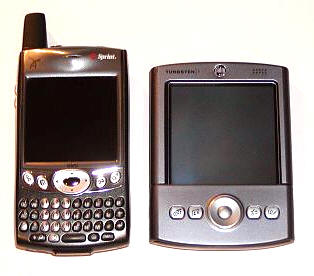
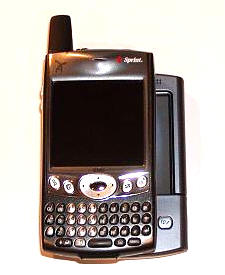
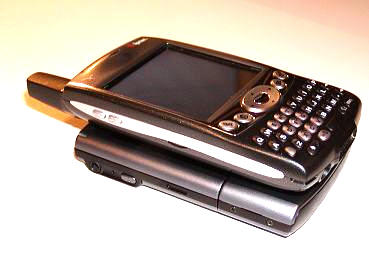
The plastic case is solid, easily passing our creak test. In fact, the only
creaking you might notice will be if you accidentally hit one of the keyboard’s
buttons while flexing the case. The Trēo is so small it almost reminds me of
something from a science fiction movie. As you can see, this phone fits in my
hand pretty well. The buttons are placed so that one-handed operation is easy
enough to accomplish. I am 5’10", so my hands are a little bit larger than the
average woman’s. However, most men’s hands will be larger than mine, so the Trēo
may actually feel a little bit too small to some.
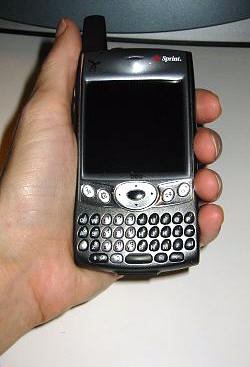
Does the hardware live up to it’s appearances? Let’s take a look…
Hardware Specs:
Processor: 144 MHz Texas Instruments OMAP (ARM)
Operating System: Palm OS v5.2.1
Memory: 32 MB (24 available to user)
Display: 160 x 160 pixels, 3375 colors (11.5-bit color, compatible with
16-bit applications) touch-sensitive LCD STN screen
Interface: USB (for HotSync® operation), Infrared
Input: Backlit QWERTY keyboard with dome-shaped keys, touch-screen
Dimensions and Weight: 4.4" x 2.4" x 0.9", 6.2 ounces
Battery: 1800 mAh Lithium Polymer, 3 hours charge time, with up to 4 hours talk time, 10 days
standby
Expansion: SDIO compatible SD/MMC slot
Band Type: 1900/800 PCS CDMA, Dual Band Digital. No Analog roaming.
E911 Emergency Location Capable: Includes embedded Global Positioning System
(GPS) chip necessary for utilizing the E911 emergency location services where
available.
TTY Services – TTY service requires network support.
Digital Camera – VGA Resolution 640×480, 0.3 mega-pixel with automatic light
balance
Speakerphone – Built-in, full-duplex
speakerphone capabilities
Sprint Vision Services available for this phone: Messaging, Web, PCS Business
Connection, Picture Mail, Ringers, Games, Screen Savers, & Voice
There are a lot of features to explore with this tiny package of dynamite, so
let’s start with the front…
The front of the Trēo, from the top down, features the small LED light
that will flash green when the phone is turned on and you have service. Next is
the ear speaker, and under that is the screen.
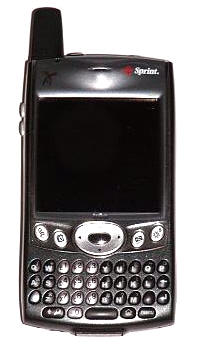
The screen measures 1.85" wide x 1.85" tall. It is considerably smaller than
the screen on a PDA such as the Tungsten T, but it doesn’t "feel" too small in
relation to the size of the rest of the hardware. Worth noting is the fact that
there is no graffiti area.
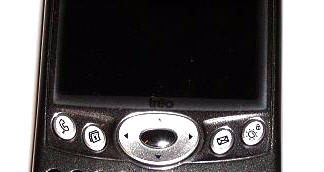
Under the screen is the traditional Palm layout: two buttons of either side
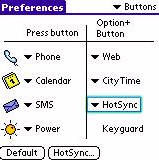
of a directional pad. In this case, the buttons are marked Phone, Calendar,
Messages, and a button with a sun/lock icon which operates a button that will either turn on the key-lock or turn on
and off the unit. Each of these buttons is re-mappable and worth
noting is that by pressing the Option button on the keyboard, you can also
launch a second assigned application.
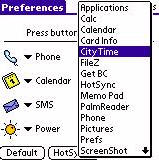
When the Phone screen is called up, the D-pad has four built in actions,
shown at the bottom of this screen…
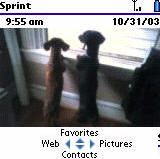
Pushing the D-pad to the left activates the Web, pushing to the right opens
the Pictures application, and the camera…
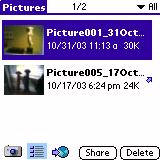
…pushing up opens favorite applications…
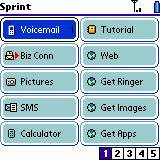
…and pushing down opens Contacts.
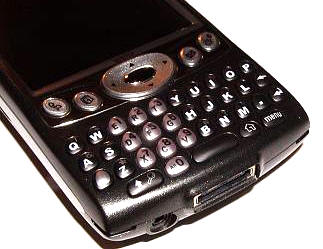
Next up is the thumb-keyboard. Through some experimentation, I decided that
the easiest way to securely hold the phone while using this keyboard was by
placing my pointer fingers on either side of the Trēo, with my thumbs on the
keyboard and my remaining three fingers of each hand behind the PDA, bracing it,
as it were.
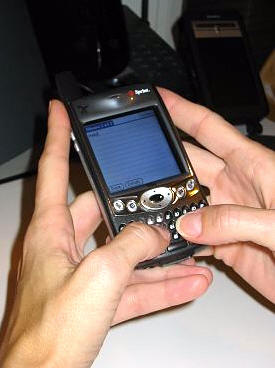
The buttons on the keyboard make a satisfying click as you hit them. they are
domed and light up when pressed. The black buttons glow blue where the white
letters and symbols are, and the silver buttons glow blue with the letters and
numbers in black. Note how the hard buttons and the directional pad also light up
with a bright blue glow
– slick!
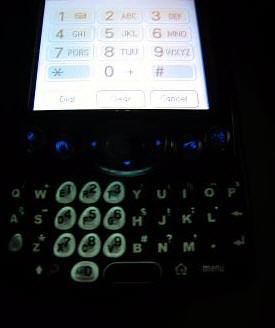
I have to admit that while the keyboard is manageable, I did have some
difficulty hitting the correct keys some of the time. I think that a man with
larger thumbs might have a problem. I would like to hear about other’s
experiences with the keyboard, and see if my fears are founded.
Each button on the keyboard serves more than one purpose, since there is no
graffiti area. Through the use of the Option button, each letter/number key
offers up logical variations that allow you to create all of the symbols that
would have been avaiable through the use of advanced graffiti or the old pop-up
soft-screen keyboard, which is not included in this model.
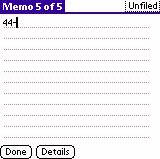
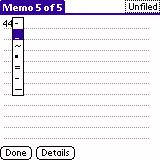
I’ll be honest, it took me a couple of days to get used to not writing on the
screen, and I almost felt like I had given up some kind of control. After I got
the hang of the keyboard and the "hidden" keystrokes, things got a lot easier.
While I won’t say that this system is completely intuitive, I will say that it
makes sense.
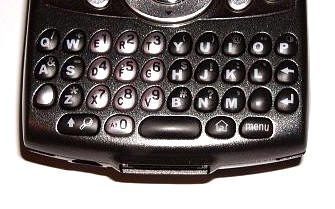
Because there is no graffiti area, the silk buttons that frame that area are
also missing. With that in mind, there are hard buttons at the very bottom of
the Trēo that correspond to the Find, Home and Menu buttons. The Find button
also doubles as a Shift key.
I admit that I miss graffiti even more than I thought I would, so if I were
keeping this unit, I would have to add an aftermarket program such as Jot or
Graffiti Anywhere.
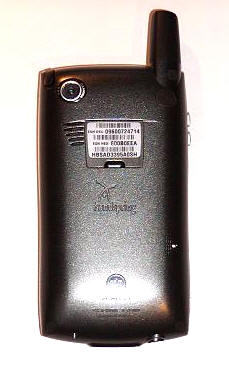
The back of the Trēo features the lens for the 0.3 mega-pixel camera, the
speaker, and the reset button.
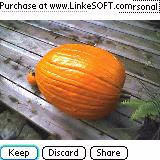
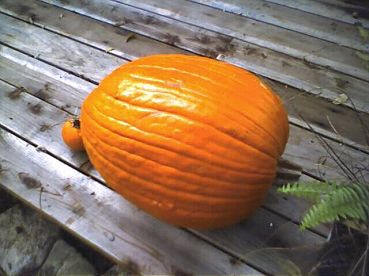
The camera is suitable for taking quick pictures
in good light that don’t involve a lot of detail. Here you can see a picture I
took. While it certainly won’t be winning any awards, it is definitely better than
nothing…
The built in speaker is great! It is plenty loud for just about every
application you can imagine, and best of all, when using the phone the speaker
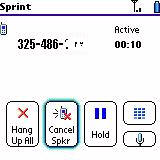
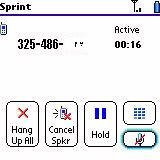
allows full-duplex speakerphone capabilities. While making a call, it is very
easy to toggle between using the ear speaker or the speakerphone feature…
The built in speaker is so great that I added
Pocket Tunes and viola, I had a built in MP3 player with an
excellent speaker. Coolness! Of course, I had to add the low-resolution skin,
but that’s okay…
The reset button requires the abnormally long pin found inside the stylus.
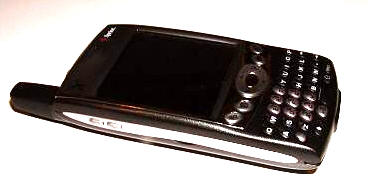
The left side of the Trēo simply holds a pair of volume toggle buttons…
…and the right side is bare.
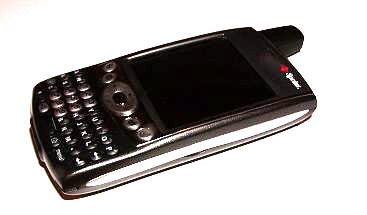
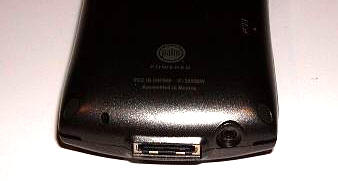
The bottom of the 600 houses the microphone, the power/hot-sync port, and the
head-set jack.
The top of the Trēo houses the stylus silo, the ringer switch – which allows
you to toggle all system sounds on or off, the infrared port, the SD/MMC card
slot, the power button, and the stubby, non-telescopic antenna.
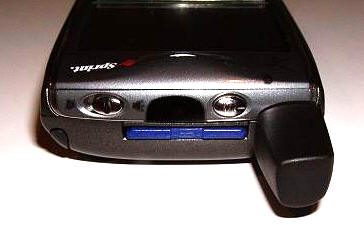
Let me save you a little bit of time right now, and tell you that when you
insert the SD card, it goes in with the print side of the card facing towards
the back of the Trēo. ;0)
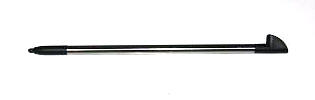
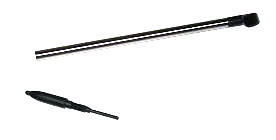
The stylus is a simple, but better than average metal and plastic affair. The
barrel closest to the tip unscrews to reveal the reset pin.
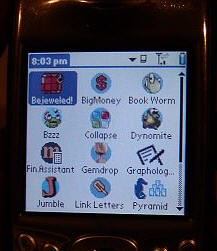
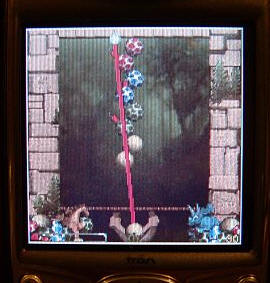
The screen is 160×160 resolution, which is acceptable for a phone. Since the
Trēo is designed to look more like a traditional PDA than a phone, I would
have been more impressed had the resolution been 320×320, as would befit any
higher end PDA. Be that as it may, the screen is bright and the display is fine.
Instead of including a cradle, the Trēo 600 comes with a travel sync and
charge cord that is actually quite convenient for use both at home and on the
road. It comes in two pieces that plug into each other so that if you don’t need
the sync portion, you can carry just the charge portion. As an even greater
convenience, there is a dedicated synchronization button on the sync cable that
plugs into the sync/charge port.
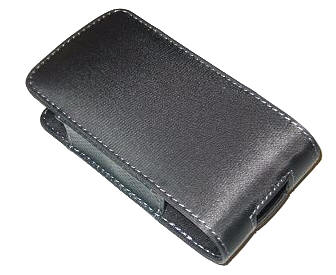
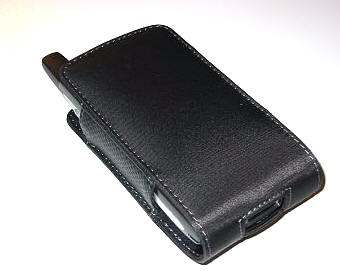
A nylon slipcase is included for protection, and while it won’t be winning
any design contests, it does manage to protect the PDA/phone.
The Trēo uses enhanced polyphonic ringer sounds, which means that you can
have great sounding ring tones (as well as a vibrating alert), instead of the
shrill ringers that so many mobile phones still use. You can also download
different ring tones directly from Sprint.
If you are in an area that supports Caller ID, then you can see numbers of incoming calls in
areas supported by Caller ID. If stored in your Phone Book, you’ll also see the
caller’s name.

It is easy to check your recently made and incoming calls, you just have to
hit the phone button and the center button of the 5-way D-pad.
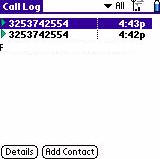
It is also easy to tell when you are using wireless minutes, the little
arrows above the signal strength indicator will both be green. When you are
offline, the arrows are grey…
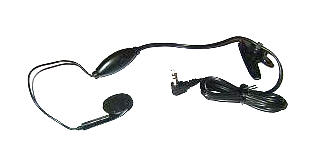
The wired headset consists of an ear piece, a plastic unit that contains a
microphone and headset button, and at the end of the wire, the headset jack. The
button can be used to answer incoming calls, answer call-waiting calls, switch
between two active calls or join the calls in a three way conference call. You
can also use it to hang up a single call.
The Trēo has many good things going for it on so many levels. My experience
with it has been largely positive, though I do wish that the screen would have
had a higher resolution. Nobody’s perfect, right?
With that said, let’s take a look at the included software…
Sprint Software
Phone – Including Palm OS Contacts, Favorites & Dial Pad.
This feature is cool because you can either show the regular dial-pad, or you
can use a picture you have taken as wall-paper.
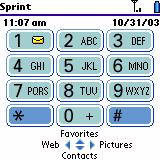
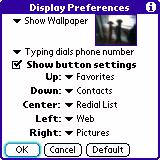
Picture Mail – Allows you to take a picture, upload it to the Sprint
server, and then deliver it in an email to a contact.
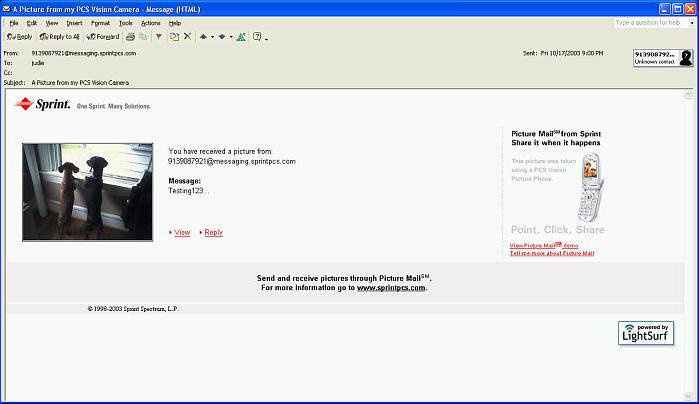
Once your contact receives it, they can download it, print it, resize it, and
rotate it. Pretty cool service, huh?
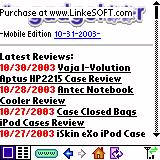
Blazer Browser – Access to most Web sites. Check news, stock quotes,
corporate and Internet email – all in full color at PCS Vision speeds. Obviously
this is not the worlds best screen for browsing, but in a pinch it is "mejor
que nada."
PCS Business Connect – "Accesses real time e-mail and more."
When you register, you
will get the first three months for free, after that it is $5 a month, with
normal air charges applying
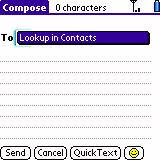
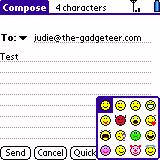
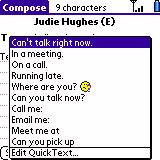
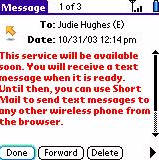
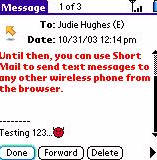
SMS – Doesn’t work yet, but should be fun when it does…
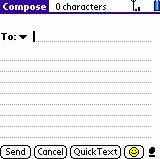
Palm™ Organizer Applications
– All of the standard applications are here, including…
Address
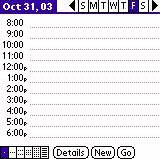
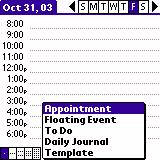
Calendar – This is the Datebook+ which has long shipped with
Handspring units, which is essentially
Datebk3 by
Pimlico Software. The
best thing about this particular version is the ability to create "floating"
events. Get this, you can enjoy a number of polyphonic alerts when an alarm goes
off. Pretty cool for a Palm. ☺
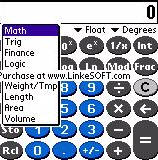
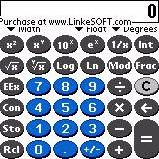
Calculator: The included Handspring calculator is quite nicer than the
basic Palm Calculator, see for yourself…
Memo Pad
To Do List
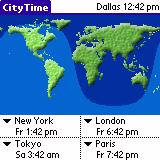
City Time: Shows the time in five time zones…
Value Added Software –
When using the installation CD, you are offered the choices of "Install
synchronization software," "Register for PCS Business Connection" (to access
real time e-mail and more), "Register now to receive your free gift" (one
of two free
software applications), "Accessorize your Trēo" (cases chargers, cradles and
more).
Well, ordinarily this is when I would start ragging about how all of the
included software titles (except for maybe one or two) were not included
for free, but were shareware. The Trēo 600 doesn’t come with any
shareware, nor any extra freeware (other than the one free title you get for
registering), so…I am not going to say a word. Well, I will say two:
Bah Humbug!
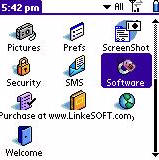
On the plus side, Sprint has some free downloadable software that you can
access through the Software soft button.
Conclusion:
The Trēo 600 is a compact PDA with a somewhat easy to use qwerty keyboard.
People who like the style of the
Sony TG50 CLIÉ might be willing to trade the lack of 320×320 resolution for
the addition of PCS cellular services. This is an almost ideal solution for
those that need to stay in touch while out of the office, or for those who work
in an environment where 802.11b networking is not an option. The subscription to
PCS Business Connect should make this device as
Blackberry-ish as possible, while using (what I consider to be) a better
OS. I am far more tempted to buy this convergent device than I thought I would
be, heck reading eBooks on it is even a decent experience because the D-pad is
so responsive. If you like thumb key-boards and if you live in an area with good
PCS coverage, then this might be the PDA/Phone combination for you.
You can view the online user’s guide
here.
You can view Sprint PCS coverage and plan information
here
Price: $599.99
Pros:
Built in keyboard
Current OS with 24MB usable memory
Excellent screen for a phone, decent screen for a PDA
Polyphonic ring-tones and alarms
Quality feel and heft
Very tight, top-notch construction
Expansion slot
Built in Speakerphone
Keyboard lights up when in use
MP3 playback is possible with an aftermarket program
Cons:
SMS does not work yet (Sprint Network’s fault – not Trēo’s)
No graffiti option
No analog roaming
Keyboard may be too small for larger thumbs

Summer Palm Tree Vacation Beach Case for iPhone 12/12 Pro
(as of June 8, 2026 20:21 GMT -05:00 - More infoProduct prices and availability are accurate as of the date/time indicated and are subject to change. Any price and availability information displayed on [relevant Amazon Site(s), as applicable] at the time of purchase will apply to the purchase of this product.)
Summer Palm Tree Vacation Beach Case for iPhone 13
(as of June 8, 2026 20:21 GMT -05:00 - More infoProduct prices and availability are accurate as of the date/time indicated and are subject to change. Any price and availability information displayed on [relevant Amazon Site(s), as applicable] at the time of purchase will apply to the purchase of this product.)Product Information
| Price: | 599.99 |
| Manufacturer: | Handspring |
| Pros: |
|
| Cons: |
|

Gadgeteer Comment Policy - Please read before commenting
Post your comments here on the Sprint PCS Handspring Treo 600 Palm OS Powered Phone.
http://www.the-gadgeteer.com/handspring-treo-600-review.html
Just click the POST REPLY button on this page.
Yeah, the review is up! 😉 Good review, Judie – but will you be adding this device to your daily gadget load?
The keyboard is a bit small for my hands (I am a 5’8″ male), but that’s a sacrifice I may be willing to make. How’s the overall usability of the screen when it comes to contacts and calendaring?
I have a Toshiba e740 I want to trade in. I never thought I would go to a convergence device, but the Treo 600 looks very tempting. I’ll have to live with going to a Palm OS device from a Pocket PC, and lose all the sunk money in software, but syncing with my Mac will be so much easier.
SIMS,
I will hold off on adding this PDA to my gear, because to me it feels like a PDA first, not a phone. If it were to be my primary PDA, I would need a much higher resolution screen. If it felt more like a phone, I might have been tempted.
Remember that the biggest requirements I have for a PDA involve viewing spreadsheets and Word Docs, then reading eBooks, then playing games. A screen this small just wouldn’t cut it as my daily driver.
But those are my needs. Everyone is different. Everyone’s mileage will vary.
Judie :0)
Other than eBooks, same needs here. I guess I’ll play with it and see. Maybe I need to be like some of the others, and carry the phone and a PDA. 😉
Judie, thanks for the excellent and comprehensive review of the Treo 600! Having moved from the original Treo 180 to various flavors of iPAQ PPC and Bluetooth S/E 610 phone, I have decided to move back to the “One-box” solution, and strongly consider the 600. However, like you, I am only hesitating because of the low-res screen, as I am a digital photographer, and I enjoy the top-notch resolution and quality of the iPAQ 2215 screen.
The main reason I am going back to the Palm Phone/PDA device is that I find that Bluetooth connectivity works only about 50% of the time I attempt to connect, and frankly, I am tired of playing this guessing game! I want a device (primarily PDA first, then phone) that will ALWAYS work, and used to like the original Treo 180, except for the grayscale screen.
Do I understand correctly that Handspring will eventually come out with a hi-res version of the 600? In that case, it should simply be a matter of “trading up”, and being already familiar with the 600, I would be ahead of the curve.
Thanks again,
Steve
I’ve been using AT&T’s GSM service with the Siemens SX56 for the past 7 months because I wanted a combined PDA/Cell Phone. It has been a good PDA, but the GSM network of AT&T in our area has been very frustrating (Provo, UT). I have enjoyed the MS operating system of the SX56 because it syncs easily with my XP Outlook software on my PC desktop.
However, the GSM cell-phone part of the Siemens SX56 has been very frustrating because of dropped calls, people not being able to connect with me, poor signal strength, etc. Consequently, I am planning on swithching to Sprint’s Treo 600 combined PDA/Cell device. My son, who lives in Virginia near Washington DC, recently bought a Treo 600 and gave his Treo 300 to his wife. He gives me glowing reports of its being the best PDA/Cell phone on the market.
Because of my frustrations with AT&T’s GSM service, I am planning on swithing to Sprint’s digital service, using the Treo 600. I have a digital phone service with AT&T that has worked flawlessly; my college son uses it and won’t convert to GSM. Unfortunately, I will be hit with AT&T’s $175 cancellation fee if I cancel my AT&T GSM contract before March 04.
Questions:
1) Has anyone compared the Siemens SX56 to the Treo 600? If so, what is your conclusion?
2) Is there anyway to avoid paying $175 to AT&T after 7 months of a 12 month contract since the GSM service has been awful?
Ah, sweet, then. I live in the same area.
no matter how you slice it, this thing is a brick compared to modern sub-5oz cell phones. the photos didn’t do much to change my mind.
it may not be the brick of the 20th century (like the first cell/pda frankinphone), but it sure is the brick of the 21st century.
10base,
Well sure it is a brick if you compare it to a simple cell-phone, but when you compare it to the other avaiable smartphones it isn’t at all.
Of course, I am looking forward to the day when a PDA has a built in mobile phone and an expandable or collapsable screen/body, but until then… 😉
Judie :0)
Judie, I totally agree…when compared to other “smartphones”, the Treo 600 is certainly not “a brick”. I think the last poster may be thinking of it as simply a phone, not one with major PDA functionality.
I firmly believe that in order for a phone to have PDA functionality, the screen must be at least 2 inches wide, which of course limits how small the device can be. For example, I’m sure that poster would consider the Sony Ericsson T610 a standard if not small phone, however, IMHO, its’ screen is too small for serious PDA usefulness.
Thanks, and I look forward to getting my Treo 600!
Steve
Steve,
I just saw your question about Handspring possibly coming out with a future hi-res version of the phone.
Since Palm and Handspring have merged, and they are both part of PalmOne now, I don’t know what will happen with this line of smart phones. I sure hope they continue to expand upon it, though.
Judie :0)
Judie, thanks for the reply! That is precisely why I am planning to get the Treo 600 now, (as soon as they release the GSM version), rather than wait an indefinite period of time. I think I can force myself to live without the hi-res screen for the time being, because it is equally important to me that I have a reliable and functional device. I do think that Bluetooth is a great technology when it works, as I have a Bluetooth USB adapter on my PC that lets me syn with the T610. However, as I said in an earlier post, Bluetooth only worked half of the time between the 610 and the iPAQ.
I went and played with one at the local Best Buy, and although I love the SD and could see getting used to the keyboard – form factor won out and I’ll stick with my Samsung i500 for now. The screen is smaller, but clearer to me (TFT v CSTN), and the lack of analog roaming (I know, that’s so “tin cans and a string” technology, but you’re NEVER out of touch) makes this an easier decision. Maybe if it had a 320×320 screen.
But did I mention form factor – the i500 is still so much more like a cell phone, and with Snappermail gets pretty decent email support. I’m sure (by 2005) Samsung will finally put out a successor with SDIO and OS5. Guess I’ll just have to wait. 🙁
Judie – how would you compare the two?
Quick run down:
Form factor – I prefer the Samsung
Screen – They are both adequate (320×320 might be a deciding factor)
Memory – Treo
Expansion – Treo
Battery life – similar
Access – Samsung also does analog roaming, so it wins
OS – both are fine, even though Samsung is older version (4.1), the benefits of OS5 are not huge
Size – Samsung
Features – Treo
Coolness – tie
Price – same
It is totally a matter of personal preference, I am afraid…
I would be more willing to carry the Samsung, simply because I like having a separate phone from my PDA. There are times when it would be nice to just take my phone and have contacts, schedule, email, web access and eWallet items on me while traveling light.
For those that don’t want/need a larger screen on their primary PDA, the Treo could be near perfect.
Judie :0)
In fact, if they’d have put bluetooth in the i500, it might have been a major tie-breaker. That size, with basic PIM for really light travel, but the ability to connect to a T3 or iPaq for Sprint wireless web services on the road, would have been great. I think, however, it is Sprint who’s actually discouraging bluetooth right now for that very reason (high traffic). Notice that neither the i500, Treo 600, or i700 have bluetooth. Then they dropped the ball on the Sony-Ericsson 608 bluetooth phone. Keeps us from gobbling bandwidth (just how long can you surf on either the i500 or Treo screens).
That’s the thing – you wouldn’t want to surf for long on either screen. However…you can always buy a cable to make the phone act as a laptop for your other PDA or laptop when on the road…
Judie :0)
dstrauss, I would think as long as your data plan permits!
hi judie,
my bad for using the wrong term, when i wrote “cell phone” i was not referring to regular cell phones like the SE t68i, but to upcoming smartphones like the SE p900 (not <5oz than still but lighter treo>http://www.sonyericsson.com/p900/main.htm
http://www.mobile-review.com/phonemodels/siemens/siemens-sx1-en.shtml
http://www.mobileburn.com/review.jsp?Id=514
http://www.brighthand.com/article/Samsung_Demos_SGH-i505
the point is, this field is changing fast, so for my $600 the treo 600 is just not worth it. by the time a lot of people set aside enough money i think there will be better alternatives on the market. and my standards aren’t even that high — the samsung sph-i500 with a lower price tag would be my perfect smartphone right now.
~10bt
This afternoon, I traded my Toshiba e740 for the Treo 600. Several reasons:
* I carry around my iPod and cell phone everywhere. I realized that I almost never carry my Pocket PC unless I am going to a meeting. As of late, I have been neglecting to take it with me even to meetings. A cell phone is my constant companion, so the Treo wins there.
* I use a Mac. While MarkSpace’s Missing Sync and the new PocketMac 3 work rather well, it’s still not seamless.
* I’ll miss Pocket PC’s larger screen, higher rez, and multi-tasking, but as Judie and Julie do – I can always buy another gadget. 😉 More and more, though, that Tapwave Zodiac appeals to me. Looking forward to that review next.
In the end, as Judie told me, it’s about personal usage. With an hour of charging the Treo (was with the wife at the mall, so I found a Treo 300 car charger that worked), I was using it to schedule delivery of our new couch, adding items to my chores list (thanks, honey!), and keeping an eye on the VT-Miami game. (Go VT! That just helps my Mountaineers!)
“”short enough that it isn’t completely awkward to hold up to your head””
welcome to ::
http://www.sidetalkin.com/
eeee..
F.
flamaest:
I ran across that site a week or two ago. Poor N-Gage… TOO FUNNY! 😀
flamaest,
That was great – thanks!
Judie :0)
While I enjoy the smaller form factor of the i500, the treo T-600’s following advantages more than makes up for its slightly larger size:
1) The i500 only has 16 mb of RAM compared to the Treo 600’s 32 MB. The latter is critical for a larger phone/pda informational database.
2) The i500 doesn’t have a speaker phone. I was amazed at the quality of the T-600’s speaker phone when the Sprint Rep was able to talk with my wife at home, while we were 4-5 feet from each other in the Sprint store. The ability to talk and work with the PDA functions of the phone using the speaker phone is a must for me. It is also great sharing phone calls with others via the speaker phone.
3) The SD expansion slot will allow me to store pictures, references, future uses (e.g., bluetooth, etc). This is a wonderful flexibility feature, which is lacking in the i500.
4) While I don’t need the picture taking capacity of the T-600, it will be a fun feature at times, which the i500 doesn’t have.
5) The QWERTY KEYBOARD of the T-600 allows a more accurate one handed entry system than the stylus approach of the i500. Yet, the T-600 has the stylus as an alternative.
6) The 5-way easy control dial of the T-600 makes one handed control preferable over the i500.
7) The screen of the T-600 is larger than the i500.
8) The processor in the T-600 runs faster than the i500.
9) T-600 is MP3 Player capable with third party application, but the i500 is not.
For a combined PDA/Cellphone, the Treo 600 is handsdown the preferred device.
If you want mostly a cellphone and are willing to lug around a second PDA device, then the i-500’s smaller clamshell form factor would be desireable.
I’ve had a bad experience with my Siemens SX56 combined pda/cell phone because of AT&T’s poor GSM service. I wouldn’t buy a GSM device from AT&T for a few years, if ever! As soon as my ordered the Treo 600 comes in, I’m switching to Sprint!!
Judie,
Curious about the lack of any other software. Did you have a pre-production or loaner unit that might not have had all the parts?
According to the specs page on HandSpring’s site -> Treo Specs
The Treo is supposed to ship w/ Docs to Go (I think just a viewer not the whole thing) Splash ID, Money and Shopper, Klondike and Zap!2016.
Co-worker has the Sprint version and his has those apps. If you really wanna hear the quality of the external speaker – play a game of Zap on it – you’ll be convinced. But I do like the idea that HS is shipping the unit w/ the kind of software that you could really use on this unit. I use my password manager almost as much as my contact list – and having access to a shopping list and checkbook app right on the phone is a great idea.
One other thing I really like about the Treo – is that when you are dialing – you have access to the traditional keypad complete with the letters above the numbers (shows on the screen – not the keyboard) I currently use a Blackberry Phone / PDA which does not have this feature – you never even think about it until you need to dial 1-800-Pack-Sand – and without the traditional keypad – you are SOL. This happens more than I expected.
Note that the Treo has a touch screen and you can either dial from the keyboard or by tapping on the screen. I have heard reports of new-owner complaints about having to dial from the keyboard – never knowing they could tap on the screen.
Also – it should be noted that the Treo’s headset jack is (a) on the bottom of the phone – a terrible place for it IMO – assuming you would have the phone in your shirt pocket, car cupholder, Scott eVest etc. and (b) uses a mini-jack – not the standard type plug. So if you have a headset you want to use, you get to buy an adapter to make it work. HS’s are backordered I have heard – but have an L shaped bend which is nice. Guess Radio Shack has a straight one. I have also heard mixed reports on forums about the ability to use the answer / mute button on the headset if you are using a non-HS mini-jack – but that is unconfirmed.
Screen complaints are kind of amusing. Funny how Palm was releasing 160×160’s up to the Tungsten|T (which isn’t quite a year old) and we were just grateful that the screen was color. That said – I would love a higher res screen too 🙂
Thanks for the great – and quite timely review Judie. I’m pacing the floor till the AT&T version comes out. Just returned a VERY disappointing Motorola MPx200 (Win Smartphone 2002) and am itching to get a real all-in-one device like the Treo.
SQL, good points about the 600…thanks! It’s comments like yours that further convince me of the usefulness of the Treo 600. I too, would like the higher-res screen, but I think that I can live with that one shortcoming of what appears to be an otherwise solid PDA/Phone device! Perhaps they opted for this configuration to optimize battery life, since it is not removable….just a guess.
Anyway, I was wondering if anyone would care to comment on the reliability and/or coverage areas of Sprint vs. T-Mobile, preferably in the Dallas, Texas area. I use T-Mobile now, and am waiting on the GSM model, but in view of that new option of switching carriers and keeping the same cell number, I’m wondering if it pays to stay with T-Mobile.
Thanks!
Dear SQLDba,
How is your GSM service in Nebraska? In our area (Provo, Utah), AT&T’s GSM service is poor. It’s digital service is great. Because the Treo 600 with AT&T only comes with GSM, I will be switching to Sprint.
Have you experienced a GSM device in your area?
I’d be curious if anyone thinks the wave of the future is going to be a Blue Tooth connection to a PDA.
Granted it doesn’t eliminate a device hanging from your belt or in your purse — but I’ve yet to find that device that did. Somehow I always gravitate toward carrying both a regular phone plus the multi-purpose device that was supposed to remove the need for carrying multiple devices.
And the phone carriers are just plain greedy. What other industry uses term contracts to make up for poor customer service? (The phones aren’t subsidized that much).
Everyone is always talking about the death of Bluetooth, but I’m not so sure I believe it. Bluetooth is still being embedded in more and more devices, and the cost per chipset and the power consumption are still lower than 802.11b (not that 802.11b and Bluetooth are really competetors). As a wireless PAN technology, Bluetooth is pretty darn good at what it does.
SQLDba,
I think I might have had a pre-production model, because the CD that was in the box wasn’t quite as slick as the one that came with the i500 I reviewed. Pre-production might explain that.
I played 50 Cent’s “In Da Club” and Alanis Morissette’s “Uninvited” over the Treo’s speaker, and just could not believe the sound quality! The speaker was the one of the best, if not the best, I have ever used!
It is funny (in a way) for me or anyone else to complain about 160×160 resolution, but since it seems to be the standard for any high end PDA to include a minimum of 320×320, it just seems chintzy that PDA/smartphone’s aren’t doing it, yet they are charging $600 for the device.
You had some great points and comments!
Judie :0)
As I wait for my Treo 600, I would appreciate any insights anyone has as to the best kind, place, and price to buy any of the following things I want to get for the Treo 600?
1) Carrying case that clips to belt? The one included doesn’t have a belt clip.
2) SD card? Minimum of 256k and preferably 512k.
3) Program that would increase the space for “Notes” with the contact information?
4) Program that allows one to write the Palm Graffiti?
Thanks, Bob
Amen – and now that nearly all new Macs have the option of having it built-in (gotta check on the eMac and iMac), I think it’ll grow. Laugh at that if you want, but recall it was Apple who really propelled 802.11b and USB. All my friend in Europe love BT.
Oh, and Judie – it’s “21 Questions” for me. 😉
I collected the best Treo 600 Links (Reviews, software, forums) on this page. Please recommend any additions. Thanks!
http://www.taekim.com/treo.html
Just so you know, the Treo 600 actually DOES come with a few registered apps. If you look in the add-in folder of your handspring directory, it gives you Zap-2016, a Klondike solitaire game, SplashID, SplashShopper, and SplashMoney, and a DocumentsToGo viewer. These should all have installed on your first HotSync.
I’m curious why these integrated devices never seem to have analog phone capabilities. If its chip interference or size limitations, then I could uinderstand it. If its cost, then the manufacturers are making a big mistake. I would have bought a Treo 600 if its phone included Analog and was a proven solid phone: I must be contactable by my work regardless of where I am i.e. travelling in older analog areas.
Oh well just means I have a heavy belt: Palm T3, Blackberry and digital/analog phone. While my belt may be heavy at least each of these devices does its job darn well: I haven’t had to settle for any compromises with 1 or more of my devices. Something to be said for taking notes on your Palm screen from a call you got out of the blue on your phone!
John M
Johnm, even when you’re on a call, you can switch to other applications to take down a note. This is definitely more feasible if you’re using the headset or speakerphone, but it still is possible.
Robert,
GSM service in Nebraska is kind of hit or miss. There is coverage in only a small strip between Lincoln and Omaha. Fortunately I spend 99% of my time there so I’m satisfied. One big plus for the GSM side of the Treo is that it is a quad band (850/900/1800/1900). This is bigger than you might think – a lot of phones released these days just cover the 1800/1900 spectrum. This gives you so-so coverage in the US (1800 I think) and coverage in Europe (the grand “world” phone)
However, AT&T is starting to expand GSM coverage in the 900 band and phones that don’t work on that spectrum lose out considerably. I’m not privy to all the details of the when and where of 1800 v. 900 expansion – but have lurked on the newsgroups long enough to know that the ability of the Treo to hit those towers too is a good thing.
In terms of accessories for the Treo – I have already ordered a screen protector and the zip-linq sync cord from Boxwave (http://www.boxwave.com) Brighthand did a nice comparison of nearly all the screen protectors out there – and the boxwave topped the list. My experience is that they are very good.
Still looking for a good case for the treo. I think this will be the first handheld I have had that I won’ t use a covertec case on it. I am a very big fan of covertec – I think the quality, style and price are top-notch. However, the 2 cases they have for the treo are not that great.
They have a “sunglasses” type case – clips to the belt, and holds the phone longwise along your belt. You have to remove it to use it. Yuck.
The other case if very much like the Handspring one, but the keypad and screen are covered with a clear plastic window. The reports are mixed as to whether this interferes with typing and the touchpad – but I just don’t like it. Too bad, too, because Covertec has a new belt clip system – that allows you to take off the little swivel nub if you wish – very nice touch. So I’ll keep looking for the case.
Strangest thing is that I have been ordering accessories for the Treo before it’s even out. The first handheld I will own where I’ll have the screen protector before the unit. Gadget fever I guess.
From what I’ve read, part of what Handspring brought to the table was the Treo as a product line, giving palmOne three product lines: Zire, Tungsten, and Treo.
They’ve made general commitments to innovating the Treo line, but no specifics on what we’ll see in future models. Big surprise. I, for one, definitely hope to see hi-res screens, faster data connections (i.e. EDGE on GSM), and Bluetooth in the next generation of the Treo.
Also, according to PalmInfocenter, Jeff Hawkins is focusing on the Next Big Palm OS Thing… details coming whenever someone gets them, but it’s all hush-hush for now.
Well, think I found a case or cases to look at. Bellagio will be releasing 2 cases on November 10th – one that is a PDA type w/ a flap cover ($39.99) and one that is more of a traditional candy bar cell phone case ($19.99) neither case has the touchscreen or keypad covered. Which can be good or bad depending on your point of view. Full grain leather w/ a removable belt clip on both. Have heard pretty good comments about Bellagio on the forums.
They are offering a package deal of both cases for $49.99. Ordered both so I’ll report when they arrive. Link to their page is below.
Yikes does this mean I’ll have the case and screen prot. before the actual unit? I’m ill…..very ill….
Bellagio Treo Cases
I played with a (pre-production) GSM Treo 600 a while ago…
My impresions:
Pro’s
-Great build, sleek looking machine.
-Keyboard is actually quite good (even for a 6Foot man with ‘hammer thumbs’ like me.
-Palm OS5
-plenty Memory
-speakerphone
Cons:
-Screen only 160×160… after using my NR70V for ages I’m used to 320×480….
-Camera is useless (even the crappy one in the NR70V is heaps better)
-Price outside US
I would also add:
No integrated voice recorder/voice dialer
No email client besides Sprint’ Biz Conn
The first one IMO is a huge deficiency IMO especially considering that is techically possible to implement. Fortunately, there are rumors that PalmOne is already working on a Rom update to rectify this. The lack of the visto email client as found on the GSM version, however, is extremely frustrating. It just smacks of greed on the behalf of Sprint to omitt this just so they can squeeze another $5/month out of you! 😡
Anyway regarding the lack of graffiti, as already mentioned in the review, there are several 3rd party solutions like Graffiti Anywhere and Newpen (both freeware).
Also, I would have loved to see a high rez and bluetooth version of the Treo600…
It should be noted that Sprint’s network doesn’t have analog anyway. All the AMPs enabled mobiles offered by Sprint roam on Verizon’s network FYI which can make it prohibitively expensive. I previously had a dual band + AMPs Sprint mobile, but I never allowed AMPs roaming precisely b/c of the exhorbitant roaming fees. However, I can understand the need for analog for those who desperately need to be in contact always. But just realize that even Verizon is gradually phasing out it’s analog coverage as well. Finally, I have always had pretty good digital coverage from Sprint anyway…
I know – on an emergency family trip, I was up in the hills of WV. My roaming fees for two days of calls were $170. Ouch.
That’s why I have a 3watt hard wired mobile phone in my truck. $30 as month to Cellular One makes sure that no matter what part of BFE I happen to be in, I can call for help. It stinks to have to do that, but living in West Texas – you do what you’ve gotta do…
Judie ;0)
AT&T makes a couple of dual band phones – i.e. GSM and TDMA. The problem is that when they switch over from one to the other – the call is dropped. Also, I have heard they have a preference toward GSM – so getting them to switch is something you have to do manually – and then switch back. Also, when I looked at them, the plans that would allow for dual bands, didn’t include some of the data services and were more expensive than the GSM only plans.
Hopefully, as the economy turns around, carriers will be more willing to add towers and improve coverage. Although there is such a glut of capacity now that expansion is pretty slow. We’ll probably see more expansion through carrier consolidation than anything else.
gfunk – that’s true in most of the metro/rural areas, but in areas like West Texas, our analog often comes through folks like Cingular, CellOne or local cell providers (yes, we still have small fry our here like WestTexCellular; Poka Lambro; etc.) Not cheap, but does get through in a pinch.
Another reason I’m sticking with the i500 for now, despite liking the feature set on the Treo 600 a lot (if it had 320×320 I’d probably roll over anyway – there’d just be too much multimedia bang to pass it up. As it is, at 160×160 a lot of all that neat horsepower of ARM/OS5/SDIO is wasted).
If I was getting a new cellphone, this would be one of my prime candidates.
A cam/palm/cellphone/mp3player all in one? Too bad the cam sux.
Which software would be best to add Grafitti software to the Treo 600, allowing stylus input to the screen without causing a problem with the device’s integration of the pda and cellphone?
JOT?
HANDANGO?
FREE-WARE?
SOMETHING ELSE?
or, should a new owner just “bite the bullet” and get used to the entry keys instead of the stylus? Your experience? I’m a long-time user of the stylus using Grafitti. That keyboard on the T 600 seems hard to see and to use with my less than perfect eyesight.
Thanks,
Bob
I pay an extra $10 per month with Sprint for pretty much unlimited analog roaming. I say “pretty much unlimited” because they don’t want you to use more than 50% of your minutes while on analog. This plan is called Sprint Free & Clear America plan. It provides great peace of mind, knowing I won’t be getting any more surprise $300 bills due to roaming fees.
My device of choice to replace my Kyocera 6035, which I love dearly, would be the Kyocera 7135. It is a clamshell, has analog mode, SD/MMC expansion, and color screen (low res, though). Unfortunately, Sprint isn’t offering it. I have considered switching to Verizon, though, just to get the 7135.
nathane,
That is a great option from Sprint, the only catch is (of course) You have to have a phone that is capable of making and receiving analog phones (not the Treo).
I would love to get my hands on the new Kyocera…unfortunately, if Sprint doesn’t carry it nobody will around here.
Judie :0)
Two other comments about analog…It sucks batteries dry. You’ll get significantly more battery life when in digital mode. Also, you can’t use any of the data-centric capabilities of the Treo without the digital data network. I would imagine these two factors were a big part of why the Treo 600 has no analog backup.
Scott
Scott,
Those are good points about analog – and they are part of why I carry a SCP-6000, which is just a single band phone, as my “every day phone.”
Judie :0)
That’s all true, but only if you use the analog mode – so having it when you need it is no drag on the battery; and if you didn’t already know the analog mode lacks data service, well….
True, but it probably would have added a few bucks to the cost to have the analog chip in there. Because of the two reasons I mentioned, I imagine Handspring decided that it wasn’t worth the extra couple of bucks for a phone that’s going to be touted for its data functionality.
Scott
We geeks can agree, but to the average joe, the lack of analog can be a deciding factor, so why scrimp? I know, it is an entire issue of compromises, why 160×160 CSTN when the current standard is 320×320 TFT? Why sealed battery, when so many (particularly cell phones) offer replaceable batteries.:confused:
Yeah, I was sure the Kyocera 7135 had an analog mode….though I couldn’t find it on Verizon’s website. It wasn’t available when I signed up with Verizon.
Plus it was only DragonBall, PalmOS 4.x…..so a step backwards from my T|T.
I used to be with Sprint…but I only had a single band phone with them….and first trip I went on…no 1900MHz CDMA service available in the area. My second was also still digital (TDMA @ 1900Mhz, I think)….but I had checked that they had digital service in the cities that I would likely travel to (and that included Calgary, Alberta)…..what happens…I end up going to a city that didn’t have digital service. And, yeah…battery life goes fast on analog and it was expensive.
So that’s why I went with Verizon…because even when it is on analog it didn’t cost any extra (as long as it was their analog network). And, my first trip north….I could still use my phone, even though it was analog…..and a few months later on another trip north….I found that in some cities they do have 800MHz CDMA and roaming agreements. Though my SMS/VM notification doesn’t work up there.
The problem is the company moved…and the new location is terrible for Verizon (it was kind of a cheat, because Verizon’s cellsite was on the roof of our old building…..probably kind of weird now that the anchor tenant is AT&T Wireless.)…but a couple of merger/acquisitions ago…we used to own the building.
I’m not sure who I’m going to switch to….I’ve heard that Sprint reception is good in the building, though I haven’t had anybody try from my cubicle. Some people with Verizon walk to the other end of the building to make calls. My manager has AT&T Wireless, but when I tried it…it was kind of iffy from the network closet. One of the former IT person has Cingular…though I used to have analog only service with them (or a previous entity that becamse Cingular)…it wasn’t very good in the area. Somebody had Nextel, but I don’t recall seeing a camera capable phone in their offering. 😉
Now Verizon can roam on to Sprint….but only if it can’t find Verizon digital or Verizon Analog….and the problem is when the digital signal fades, my phone jumps to analog….which is a problem for me. First losing calls, but I use SMS more than voice….
When I first became connected, I had a numeric pager…cellphone came later. Then I had an alphanumeric pager…. Then PCS phones replaced both. Though I have wondered if I should check out products the integrate the two in the other direction….
I still quite a bit to go on my Verizon contract….so I haven’t been too much in a hurry to break yet….but I’ve recently threatened to jump as soon as NP becomes a reality….because I’ve been calling Verizon about the problems for over a year now. And, they only just now responded that they probably won’t be doing anything to fix the problem….
The Dreamer
Robert,
To answer your questions on input method. It’s really going to depend on what you are using your handheld for and what works best for you.
Many users love graffitti – hate graffitti2 (Jot) and vice versa. Keyboard might be all you need if you do most of your data entry on a desktop and then sync it.
Don’t know if they have a Treo version, but I really like fitaly keyboard (http://www.fitaly.com) its an on-screen tap-tap keyboard but the layout of the keys makes it fairly fast.
Best advice is to try them all (Jot, Fitaly, TealScript, FatFinger etc) and pick which you like best. They all should have a 15-30 day trial period as shareware.
Dear SQLDba,
Thanks for your information. I’ll try the T-600 with the keyboard first to see how it goes. I hope my backorder for the T-600 gets here within a week. Then, I’ll consider checking out your suggestions if I want to go back to the stylus/Grafitti/JOT input.
Since I am switching from AT&T because of the poor GSM service in Provo, UT, do you have any opinions with regard to using the T-600 with SPRINT vs T-MOBILE? Because I have two sons with SPRINT, I’m inclined to go with SPRINT to take advantage of SPRINT’S unlimited M-T-M minutes for only $5/mo. I’ve had great experience with AT&T’s digital phone. I thought GSM was the “wave of the future.” But, I can’t wait to get back to digital again since I don’t travel to Europe anymore.
Thanks,
Bob
CDMA vs GSM/GPRS is almost a religious discussion for some. 🙂 Dealing with the two is part of my job, so let me try to weigh in impartially.
The BIGGEST factor for me in considering GSM/GPRS is the world-wide capability. I do travel overseas, but not enough where I had to have it. In addition, IMPO, where you do get GSM coverage, the quality is better.
That said, I found Sprint has coverage where Verizon and T-Mobile do not out in WV. I travel to Morgantown (Go Mountaineers!) often enough that coverage there is important. In addition, Sprint’s Vision service is faster than GSM/GPRS.
You know, I could go on and on, so why don’t you post any specific questions you have.
I found “Graffiti Anywhere” did not work with my Treo 600. I am now using Jot and find it works well. I have a hard time with Jot punctuation sometimes and find it easier to just use the keyboard for commas and for forward slashes (in URL’s). I have found that some applications resist the use of the pen at all, particularly Docs to Go.
I just couldn’t get used to having no pen input for note taking.
Autist,
did you get the JOT and wordcomplete combo promotion for $29.95? i plan to try the keyboard, even though i’ve always used the stylus before. did you give the keyboard a chance? knowing what you now know, would you not get JOT and stick with the keyboard? what kind of a device did you have before? why did you go with the t 600 and how do you like it?
thanks,
bob
I came across the Pocket Oxford English Dictionary and MSDict Viewer 5.0.1 while looking at supplementary software at palmgear.com. I was interested to know if it works well with the T 600 and the 5-way dial? Is there something better available and where? I assume that one could load it into the SD card to minimize using up RAM–correct?
Bob
I am using bdicty on my Treo 600. The only issue with the 600 is if the app can run on PalmOS 5. (some older apps actually crash and misbehave.)
As to other comments on the thread…
One of the great apps for me is Audible. It doesn’t require as much memory as a collection of MP3’s, and I’m partial to books.
The phone does feel like it weighs a ton, but the bulk of that is the new battery. The older Treos are far lighter, but the battery life is just terrible.
The new tiny keyboard has actually proved to be a little more responsive than my old 270. But it took a couple of weeks to adjust. The first couple of days were very slow going as far as typing.
The new control pad speeds up complex navigation a LOT.
The following is the e-mail dialogue I had with a Representative of “A-Lex English Dictionary” advertised through palmgear.com. It seems to have a top rating with the largest number of words in its handheld dictionary for the Palm OS. Has anyone used it with your Treo 600? Anyone find anything better?
Software Bug/Comment:
> I am buying a Handspring Treo 600 using the palm 5.2 OS. Questions:
> 1) Would A-LEX ENGLSIH DICTIONARY work well with it using its
SMARTPHONE functions and not mess up its complex integration programing?
A-Lex does not get involved with the Smartphone functions. It should not ‘mess up’ its integration.
> 2) To save space in RAM, would I put the A-LEX in the SD memory card, or should it be in RAM?
A-Lex can be installed in either memory although RAM is much fast than memory card.
> 3) Is there a better dictionary with more words for the Palm OS? If so what and how much and where?
We don’t think so but we are not exactly unbiased.
> 4) Why is the Oxford Dictionary the most popular bought from
palmgear.com?
You need to ask PalmGear.com about that. Judging from its relatively modest download count it cannot be the best selling or the most downloaded. Attributes like ‘most popular’ are often paid promotion. Even download counts are not a good indication. You need to judge the product by yourself. Better products usually allow free trial. Compare the features, try a few and then decide.
Good luck!
> Thanks,
> Bob
> [email protected]
> 801 229 1011
>
I’m not sure what you are trying to get at with the smartphone question. I don’t think any dictionary is going to do nice things like autofill in the main Treo apps.
Docs to go might support an external dictionary, but the included version of Docs2go on the Treo 600 is a reader ONLY. No document creation.
As to the 5 way jog dial support, I’m not sure it is going to matter. The jog dial basically adds left, right, and a center select button to the mix. Older apps that are designed for the old up and down keys still work with the up and down on the 600. In a dictionary program, you are mostly entering the partial search word, and scrolling down a few selections until you get your word. So you will mostly be using the up and down keys.
As to document tools, I actually use 3 different reference tools:
Bdicty: They do some fairly inexpensive bundles including translation dictionaries along with a traditional english dictionary, and some phrasebooks. I actually use the German/English translation dictionary quite a bit. The reader with the Oxford Dictionary is rather nicer, as hypertext linking might be nifty.
Tomeraider: This is an all-purpose text and formatted text reader. The nicety is that you can get a whole bunch of reference texts for free for it.
Handbase: I keep a few relational databases in this. Stuff like shopping lists, server databases, my boardgame database. (2500 games. It needs a database.)
But in general, as long as they are keeping the dictionary up to date, it is going to run.
Moo
Frank
I wanted to have a good dictionary to look up on my handheld should I need to confirm the spelling and/or definition of the word, including synonyms. Ideally, I’d like to put it on the SD memory card if access to it were convenient and quick.
I’d like to get something that has a large enough number of words that it would be worthwhile. I just bought a 256 SD San Disc memory card at Costco for $48 plus taxes. I want to use it for the dictionary and family pictures. Is this workable?
Please give me specific Internet address to get more information of software that works well with the Handspring T600.
Bob
Three things:
1) I still have my old sprint phone–Samsung N200. Right now, I have trouble getting/making calls in my own house (just moved here). I don’t know if it is the phone or the service. Works ok elsewhere. I was considering dropping Sprint and going to either T-Mobile or ATT. Don’t know if I should assume my phone is old and get new phone (Treo 600) and hope that it was not my service that was bad, or just pay $150 to early terminate my contract and go elsewhere. Reading the member’s comments about GSM is making me not want to go that way (then BT is not needed) and maybe just stay with Sprint.
2) I LOVE MY TUNGSTEN T!!! The recorder is irreplacable. I never, ever use the slider except to reset. The Treo 600 would be awesome if you could record with it. I do not use the Bluetooth so I would not miss that on the TT.
3) I have dropped my phone so many times (mostly because of those terrible phone cases that pop off the swivels). And I know I could just pay $50-$150 for another one. I would CRYYYYYYYY 🙁 if I dropped a $600 dollar phone. Oh just thinking about it is frightening…if that screen cracks or gets scratched.
Somebody convince me to get this Treo 600. I can’t decide…:confused:
It sounds like you should wait for the next great thing. I love my Treo but would really worry about the dropping thing. I don’t know if Sprint has insurance or not, I should look into it.
If I used a recorder, the loss of a it would almost make the Treo pointless. The point is convergence IMHO and having to carry a recorder around in your popcket defeats that purpose. I sure do hope someone comes up with a way to fix this shortcoming as I occasionally wish I had one.
I would be wary of getting another Sprint phone if you are having difficulty with reception now. What if someone else with Sprint service tested it at your house? I got terrible reception at my house with Nextel but Sprint is fine. And you really need to have good reception to use the web, email and SMS with the Treo.
Just my 2 cents.
My Siemens SX56 PC Phone using GSM with AT&T in our area (Provo, Utah) was very poor. The PDA syncing and usage was great. My previous digital AT&T worked fine, but you can’t get the Treo 600 with AT&T’s digital service. I switched to SPRINT’s Handspring Treo 600 and the reception is excellent. Sprint’s new plan (began this week) is 1000 anytime minutes plus free nights and weekends for $45/month. They give you 14 days to try it out without further obligation except for the $36 activation fee and days/minutes used. For an additional $4/month, you get a replacement warranty for anything (including theft, dropping, etc.) with only a $35 deductible. It is currently the best SMARTPHONE for its size on the market. The current rebate ($100-$150) promotion with SPRINT ends November 23. With a one year contract you get a $100 instant rebate. With a two-year contract, you get a $150 instant rebate. It is so popular that you’ll want to get on the “back order” list ASAP. My guess is that if you order now that SPRINT will honor your rebate even if your phone comes in after November 23. The following is an internet site for you to learn more about its features: http://www.handspring.com/products/communicators/treo600_overview.jhtml
It is the Editor’s Choice of C/Net:
http://reviews.cnet.com/Handspring_Treo_600/4505-6452_7-30520851.html?tag=subnav
OTHER HELPFUL T 600 REFERENCES: http://www.taekim.com/treo.html
It’s one-finger 5-way dial makes its usage easy. It has keyboard entry and/or stylus. For full-function stylus usage for letter entry, get JOT, http://www.shopcic.com/product_details/jot_details.asp.
Try it. You’ll like it. It’s an amazing all-in-one device with an SD memory slot. I just purchased a 256mb SanDisk SD memory card from CostCo for $48.
INCIDENTALLY, HAS ANYONE USED THIS 256MB SanDisk CARD ON YOUR DEVICE? WERE YOU PLEASED WITH ITS PERFORMANCE?
Bob
Its not here now but take a look at Nokia up and coming phone:
http://www.mobileburn.com/review.jsp?Id=525
Thanks robert. Great T600 review and testimony.
I recently posted an article on Tapland (my Tapwave Zodiac site) about shopping for memory cards that has some great information about speeds (both in the article and the attached discussion thread). Most of the information is not specific to the Zodiac (and, in retrospect, I probably should have posted it on goodthatway instead). Here’s the article:
http://tapland.com/news_arc/?id=47
To answer your question, I’d recommend against buying SanDisk. Panasonic-manufactured cards are the ones to beat. Panasonic sells their own cards and SimpleTech also uses Panasonic-manufactured SD cards.
Scott
Who makes the Lexar? The 256mb Lexar SD card seems to be popular. What brand do you recommend? Where and how much? Thanks for the info.
Bob
Panasonic
Simpletech
Danelec
Lexar
You won’t go wrong with any one of these 🙂
Robert, you should really check the link I provided in my last post. I mentioned in my article that Lexar used to use Panasonic cards but now they’ve either switched completely to SanDisk or, at least, are now using a mix and there’s no way of knowing what you got until after you bought it. As such, I would no longer recommend Lexar.
v0gu3b0y, the speed comparison chart I linked to in my article showed that three of the Dane-Elec cards were Panasonics, but one was a Toshiba. Toshiba’s seem to be pretty reliable and fast as well, but based on the numbers in that chart, might still fall short of the speed of the Panasonics (though the data is somewhat inconclusive).
My personal preference is SimpleTech. AFAIK, they use Panasonic for all of their cards and they offer the best warranty of anyone (lifetime). Panasonics are a good choice, too. They obviously use their own cards. They’re warranty is only 5 years, but let’s face it, five years from now we’ll be getting 1GB SD cards for under $50. As I mentioned in that article (and assuming the prices are still in effect), the best deals I’ve found recently were for Simpletech 128MB and 256MB cards from Amazon and the Panasonic 512MB card from Outpost.com.
Scott
I am wondering if we notice the differences in these speeds? Should I return my 256mb SanDisk from Costco ($48 + tax) and get one made by Panasonic? Or, is the real difference in perceptible speed by the user not that big of a deal? and/or are the panasonic cards not only faster but also more reliable? I’m new to this stuff. Your comments are greatly appreciated.
Bob
I just noticed that the “SD” label on this memory card I bought at Costco for $48 refers to “SanDisk,” but it is actually a 256mb Compact Flash Card–not Secure Digital (SD). So, I will return it anyway. Incidentally, what is the quality of the 256mb SanDisk compact flash card? I have a Canon S-45 that uses the Compact Flash Card.
I just ordered a 256mb SimpleTech SD memory card from Amazon.com for $74.99. Because I ordered it before November 23, 2003, I qualify for an additional $10 mail-in rebate. Because of a $20 discount promotion for using my new Amazon.com VISA Credit Card the first time, I get another $20 discount. So, I will be able to buy this 256mb Secure Digital memory card for a net price of $44.99–great price! Thanks for the tip about Amazon.com’s SimpleTech SD card. I pay no shipping and no taxes–what a deal:)
Thanks so much for your guidance in this matter. It will be fun having this SD memory card on my Sprint Handspring Treo 600. This is an amazing Smartphone which will only get better with future upgrades. But for now, its the best for its size and functions. While I miss some functions on my Siemens SX56 Pocket PC Phone, overall the T 600 is smaller and more enjoyable. The only negative is the small print on the keyboard and tiny keys! But, if this gets too difficult, I can always get JOT for Grafitti entry with the stylus. The Sprint digital service on the phone use of the device is 200% better than the GSM phone service on my old Siemens SX56.
Incidentally, does anyone have an old GSM phone from AT&T that you want to get rid of? I’ll pay for the shipping. Because AT&T wants to charge me $175 to discontinue my service because my contract ends in 4 months, it would be cheaper to keep my GSM service and find a phone so my son could use it for 4 months since I will be paying each month anyway until March 04.
By-the-way, I have an excellent Nokia Digital phone I used with T-Mobile (previously Voicestream) if anyone needs it. It’s very small and works great, but I no longer use T-Mobile/Voicestream. I would be happy to give it to someone needing it.
Best wishes,
Bob
Robert, I’m too tired to quote, so I’ll just comment on several points…
– I honestly am not up-to-speed on CF cards. Good resources to check would be Pocket PC sites and dpreview.com which is a digital camera review site with its own forums. Do some searches on the forums for “best”, “fastest”, “CF” or some combo of that.
– Good luck with the SimpleTech SD card. Hopefully they won’t prove me a liar and send you a bad one or have changed to using a manufacturer other than Panasonic.
– I’m a Treo 300 owner who was really hoping for more from the Treo 600. I really wanted a high res screen and bigger (not smaller) thumbboard. I’ve also been disappointed with the quality of photos that I’ve seen coming from it. Despite all that, I am still somewhat tempted by it and I may end up getting one for my wife regardless. My ideal phone, though, would be more like a smaller version of the old Nokia Communicator or something like the Danger Hiptop/Sidekick but running the Palm OS. By going the clamshell route (with a separate numeric keypad and small display on the outside) I think you can have both a good decently small phone and a large thumbboard and screen. So, for now I wait for some manufacturer to come up with that same idea.
– Are you sure that your T-Mobile phone is locked into T-Mobile? Have you tried using your AT&T SIM in it? If it’s locked into T-Mobile but uses the same frequency band as AT&T, you may still be able to get it unlocked. You can check HowardForums.com for info about that. If that would work out, you could solve both of your problems.
Scott
Scott,
My son went the other way. He gave his wife his T300 and loves his new T600. He likes the T600 so much better, e.g.: brighter screen, better speaker phone, efficient 5-way dial for one finger control, better integration of the Smartphone, doesn’t have to worry about flip cover breaking, has SD slot, faster processor, more RAM, etc. While the T600 added the picture taking ability (.3 mb is limited) because the T300 doesn’t have it, one needs a lot of light to get a decent picture because it doesn’t have a flash. But, the picture taking ability is not important to me. I prefer my 4mb Canon S-45 camera and may buy the new Rebel Digital SLR (6.3 mb).
I have another son who is getting frustrated with his T300 and is planning to trade up to the T600 as well.
I share your concern about the small keyboard and tiny letters. You may want to buy JOT and use the stylus sometimes. I’m thinking about doing that. I think Samsung will be coming out with a better version of the i500 sometime.
Thanks for your insights. I look forward to getting the SimpleTech 256 SD memory card for family pictures, dictionary, references, etc.
Bob
I love my Treo 600. Wish it had a higher rez screen. Be nice if the camera was better, but not a huge deal. Period. 🙂
I’ve had the Siemens SX56 Pocket PC with AT&T (GSM Service) for the past 7 months. I’ve had the Handspring Treo 600 with SPRINT (Digital service) for one week. This is my assessment of the comparative advantages of each.
SIEMENS SX 56 WITH AT&T’S GSM:
>larger screen.
>higher pixel resolution.
>better sync between outlook on pc desktop with the handheld.
>more fields are readily accessible for dialing from the device. >thinner (but T600 is otherwise smaller).
>easy built in grafitti entry system.
>allows many more than 15 contact categories.
>allows much larger notes under each contact.
>utilizes pocket word, excel, and powerpoint more naturally because it is a microsoft software driven device.
>comes with a carrying case with a belt attachment; whereas, one must buy a comparable belt attachable carrying case with the T600, which only has a limited slip-on covering included.
HANDSPRING TREO 600 WITH SPRINT:
>brighter screen.
>can increase the size of font for calendar and contacts.
>quick manipulation of programs and features using the 5-way-one finger-control dial.
>much easier and quicker access to frequently called numbers.
>full QWERTY keyboard entry system. additionally, it has a built-in stylus to use as well.
>faster access to the web.
>has picture taking ability, albeit limited resolution.
>a substantially lower monthly charge for web and PCS Vision services compared to AT&T. Only $15/mo for unlimited usage.
>better email system.
>telephone reception and calling is substantially better and more reliable.
>”floating” calendar appointments feature.
>shorter, narrower, and lighter in weight.
>louder ringing of the phone for easier detection.
>speaker phone can be set to be louder, but the sound is not any better than the siemens sx56.
>much safer to use in the car because of the one-handed controlability of the device.
>has access to huge amount of the palmware software on the market.
>conversion from ringing to silent vibration with the flip of a switch.
>longer battery life.
>SD memory slot is on the top (rather than the bottom of the SX56)
>fewer steps in accessing many functions.
The bottom line is that the telephone reception with the SX56 using the GSM AT&T service in Provo, UT is unacceptable. Also, the one-handed capability of the T600 is very handy. With the usage of JOT software, the T600’s stylus can also allow Grafitti if one wants. So, I returned the Siemens SX56 and am using the T600. Others in my family are also adopting the T600. The T600 can (& will) be improved; nevertheless, right now it is the leading SMARTPHONE for its size.
Bob
Treo 600 now available on AT&T Wireless
The primary reason for my discontinuing my AT&T Siemens SX56 PDA/Cell phone was that GSM reception in our area was so poor. That’s why I went with the Treo 600 with Sprint. It’s nice to be able to have dependable cellphone conversations with Sprint. I wouldn’t go with AT&T’s Treo 600 because it uses the GSM network. Hopefully, GSM will eventually deliver as promised, but right now in our Utah County area of Utah, GSM is very poor. I cannot speak for other areas however.
Bob
Yeah,
I have Sprint right now. I think my poor reception is due to my old non-pcs phone. I look at the coverage maps for GSM and it’s like if you go off the interstate to go to the rest room, you lose coverage.
I don’t know if I will get the Treo…I have a Tungsten T and having the Treo would be like having two PDAs except I like the fact that all my phone numbers would now be on my phone, and the possibility of the data services. Instead of having to look for a Bluetooth phone for CDMA service.
I am thinking about it. But yeah, you’re right…GSM coverage is too thin. The thing I do not like is no analog roaming. I don’t use mine but it is there in emergencies. I always have coverage even if sometimes I have to pay more.
For those wanting more references on the Handspring Treo 600 and accessories, the following should be helpful:
http://www.handspring.com/products/communicators/treo600_overview.jhtml
http://reviews.cnet.com/Handspring_Treo_600/4505-6452_7-30520851-2.html?tag=subnav
http://www.the-gadgeteer.com/handspring-treo-600-review.html
http://www.handspring.com/products/communicators/treo600_overview.jhtml
http://reviews.cnet.com/Handspring_Treo_600/4505-6452_7-30520851-2.html?tag=subnav
http://www.palminfocenter.com/view_story.asp?ID=6067
http://www.taekim.com/treo.html
http://ptech.wsj.com/archive/ptech-20030918.html
http://www.phonescoop.com/phones/phone.php?id=342
http://www.treocentral.com/content/Stories/289-1.htm
http://ptech.wsj.com/archive/print-ptech-20030918.html
http://www.handango.com/PlatformSoftware.jsp?siteId=1&jid=6288541XD6X14E7D44DX2A6F4A8FX8AC&platformId=1
http://www.dataviz.com
*SPRINT PROMOTION WITH $100 – $150 REBATES UNTIL JANUARY 3, 2004:
http://www.handspring.com/promos/treo600_sprint_promo.jhtml
(Similar promotions may be available for AT&T, Cingular & T-Mobile)
*NOTE: You must call Sprint to activate your service plan by January 10, 2004 in order to take advantage of this offer. You must agree to a 1-year service contract to qualify for the $100 service credit, or a 2-year service contract to qualify for the $150 service credit.
SPECIAL $200 DISCOUNT PROMOTION THROUGH AMAZON.COM bought by 11-25-03: http://www.amazon.com/exec/obidos/ASIN/B0000SX2U2/qid%3D1069183737/sr%3D11-1/ref%3Dsr%5F11%5F1/104-1231202-5260739
JOT software for handwriting entry and word completion:
http://www.shopcic.com/product_details/jot_details.asp
http://www.shopcic.com/product_details/wordcomp_details.asp
Individually, Jot sells for $39.00 and WordComplete sells for $24.99. But, CIC combined both of them into a special promotion for one price of $29.99.
CARRYING CASES WITH BELT CLIPS:
http://www.bellagiodesigns.com/showcategory3.php?cod_category3=28
http://www.vajacases.com/pda_eng.htm
http://www.mobileplanet.com/private/covertec/product.asp?unit=H.T600
http://store.treocentral.com/accessories_view.php?a_id=9
Screen protector & Mini-Sync – http://www.boxwave.com/
SimpleTech 256mb SD Memory Card – http://www.amazon.com/exec/obidos/tg/detail/-/B00006JI6U//ref=sr_8_xs_ap_bn0_xgl23/104-1231202-5260739?v=glance&s=electronics&n=507846
A-LEX DICTIONARY: A-Lex English Dictionary & Synonym & Voice 1.35 – http://palmgear.com/index.cfm?fuseaction=software.answernew&sid=D91CE707-871E-45FB-A7E4B3A7EE5A58EB&keyword=english%20dictionary
USER MANUAL – http://support.handspring.com/download/Treo600UG_Sprint.pdf
T 600 wins CEBIT Award for best handheld: http://www.phonescoop.com/articles/cebit_america_2003/;
http://www.phonescoop.com/articles/cebit_america_2003/?p=2
PC MAG TECHNICAL EXCELLENCE AWARD WINNER IN MOBILE DEVICES – http://www.pcmag.com/article2/0,4149,1383038,00.asp
PC MAG REVIEW: http://www.pcmag.com/article2/0,4149,1310701,00.asp
Great job, Robert!! :wow:
I noticed that the current Price after “special offers” at Amazon.com is now $249.99 for the HANDSPRING TREO 600:
http://www.amazon.com/exec/obidos/ASIN/B0000SX2U2/qid%3D1069183737/sr%3D11-1/ref%3Dsr%5F11%5F1/103-2911777-5467035
It is, IMO, the best SMARTPHONE currently on the market.
Bob
P. S. Judie, thanks for your thoughtful response to my previous posting.
I would say this and the Nokia 3600-series are the two best smartphones on the market currently, with each having distinct advantages over the other.
Regarding that $250 price…Know that that’s with a 2-year commitment, which is something that I would recommend against strongly. You can get it with just a one-year agreement for $50 more.
Scott
I did check this out at CompUSA and while I do like the design, my phones HAVE to be flips in order to survive my daily activities. That and the fact that I have a Zire 71 which meets ALL my needs and then some!
But to try and help those on the fence between the 600/Palm and PPC devices, I hear M$ product compatibilty as one of the main concerns. Have any of you ever heard of/used Iambic’s Agendus or Dataviz’s Doc 2 Go suites? The give you perfect functionality with Word, Excel, PPoint, AND Outlook. As a MOUS Power User, either of these apps do the trick (although I prefer D2G way better!)
I don’t think that excuse is valid as a deterrent from checking this out. (I’ve used iPaqs in the past) As I have an excellent Palm already, the i500 (i505?) would be more to my needs/wants.
Actually, the F&CA plan does digital roaming as well, using the Verizon network primarily…… so the treo can roam….
I pay an extra $10 per month with Sprint for pretty much unlimited analog roaming.
Last I spoke with Sprint reps up here (CT) this has been changed to $5/month for up to 50% digital roaming on VZW’s network. Unfortunately I’ve since heard that SMS, high-speed data, and voicemail (?!) is not functional while roaming off-network.
My device of choice to replace my Kyocera 6035, which I love dearly, would be the Kyocera 7135. It is a clamshell, has analog mode, SD/MMC expansion, and color screen (low res, though). Unfortunately, Sprint isn’t offering it. I have considered switching to Verizon, though, just to get the 7135.
Think again. I have the 7135 now and am not happy with the integration of phone/PDA much at all. Granted, basic functionality such as one-handed contact selection and dialing are present, much as was the case with the 6035 series, the phone and PDA are still not nearly as integrated as on similar devices such as the i500 and t600.
Currently I am on VZW and in the area which I travel (NYC -> ME) VZW’s coverage simply cannot be beat, cust service is superb, and pricing simply the best (400 voice, 1000M-M, high-speed data, & free N+W for $40). A similar voice-data plan on Sprint would run me over $60/mo.
Here are my gripes with the 7135…
1) Poor battery life. 2 hours voice +the requisite 5-10 min data runs the batt to nothing by the end of the day. Some days I’m not even sure I’ll make an entire day!
2) Big & Heavy. Small for a PDA, but huge for a flip. I just saw my first i500 at a Sprint kiosk a couple weeks back and was amazed at the size difference. ie: “Is that a couple packs of cards in your pocket or…”
3) Poor phone keys. Touch-dialing is near impossible due to the flush nature of the keys to the phone. Buttons also very small. The polar opposite to the much more easy to hit i500 keys. Also… no T9 text entry! I saw this on the i600 the other day and was blown away. What an incredibly great feature to leave out of Smartphone! (and I know of no way to install this 3rd party)
Having now used the Treo 600 hands-on just yesterday I can honestly say it is a much better integrated phone-PDA device than the Kyo. Mossberg’s review of the 7035, the i500, and Treo are *right on*
My only question now is whether it’s worth it to dump VZW’s superb coverage, cust service, and pricing for (what used to be 2 years ago) horrendous coverage with Sprint in the rural areas of CT/MA/NH, but a much better phone-PDA device in the t600.
Thoughts?
When I send a picture to my son in Virginia from my Sprint Handspring Treo 600 to his Handspring 600, he can open it. But, when he sends a picture to me in Utah Valley, Utah, I get an error message and cannot open his picture.
Is anyone else having such a problem receiving pictures with their Sprint Vision plan with the Handspring Treo 600?
Bob
You recommend against a two year plan strongly but don’t say why. Why?
Whether you sign up for a one or two year contract is a personal matter. If you are sure you want to stay with Sprint for 2 years, go ahead and save an extra $50. If you want the flexibility of changing plans in one year, then pay the extra $50.
Bob
It seems hardly anyone is happy with AT&T’s GSM service. I think they are trying to get their customers to pay for the netwok as they are building it even though it means poor service for the customer. I’m sure alot of people are getting AT&T service not understanding how limited GSM is. I just stopped traveling alot recently but everyone I know who travels and has their GSM is unhappy with it.
I just switched from a pocket pc to the Treo and, so far, I am very pleased. AT&T works well in NYC for both voice and web. I’m really getting spoiled by not having to schlep both a cellphone and a pda around all the time. If the screen was better, this device would be perfect.
As an aside, I forgot how much I liked the Palm OS. Its good to be back.
Sorry for the delay in responding to this. If you read “The Gadgeteer” and are interested in these types of gadgets, I figure that it’s safe to say that you’re interested in tech gadgets. Well, two years is a pretty long time in the tech world. A lot can happen in that time. Do you really want to be locked into the same device for two years?
Scott
You state:
Cons:
No graffiti option
While I agree with you that not having a default option for Graffiti is bad, there is an after-market app called “Graffiti Anywhere” that takes care of this problem.
http://www.palmgear.com/index.cfm?fuseaction=software.showsoftware&SID=0FE607F9-ECF6-4C54-91E3697BD01A90AF&prodID=45227
FYI
I just bought a Treo 600 and so far am pleased with it. But I keep putting my face against the display. Is there a plastic cover available to place over the display that is offered by Handspring or someone else? I checked the Handspring site and nothing like this appears to be available. And the local Office Depot didn’t have a plastic cover that fit the Treo 600, just other Palm devices. Thanks, Steve
Well, despite the lack of analog in this phone, I finally made the jump from the i500 to the Treo 600. I’m actually getting used to the keyboard, and the additional memory, faster processor, SD card, MP3, are all great features, but the selling point —
The D-pad! All PDA’s (agnostic – Palm OS, PPC, you name it) need an integrated D-pad like this. I have almost thrown away the stylus with the great use of this feature. Brings a whole new level of usability.
I compiled a list of cool stuff one can do with Treo 600. Let me know if you think of more cool things to do.
List of Cool Stuff I can do with Treo 600
hi,i am using palmone treo 600 and the problem is i dont know about memory card and mp3 player so plz let me know as soon as possible.
thank you