
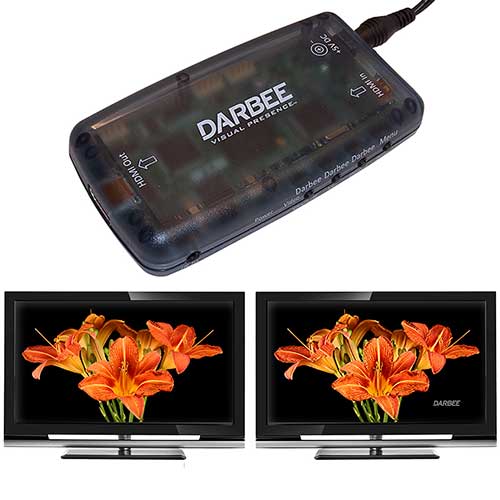
If you’re looking for a simple way to improve the picture quality of your TV, the Darbee might be one of the easiest ways to do it. The Darbee is a small iPhone sized device that has HDMI Input and an HDMI Output jacks. Plug this device in between your HD TV and your source (Satellite, Cable box, Gaming console, Smartphone, BluRay player, etc), connect an AC adapter to power and you’re done. The Darbee’s built in video processor embeds real depth information into a video stream, bringing unparalleled realism to images in real-time. It claims to do for images what Dolby does for sound. It’s compatible with HDMI 4.1 and will even work with 3D. Check the Darbee Vision site for more image examples. The price for this add-on is $269.00 and is available at various online retailers like Smarterhome.
![[MINI SIZE. ULTRA PORTABLE CHARGER]: Roughly the size of an AirPods Pro case, this smallest power bank packs 10,000mAh of long lasting power into a tiny, nano footprint. Easily slide this ultra slim, credit card size charger into your skinny jeans, a...](https://m.media-amazon.com/images/I/41rATpm6dyL._SL160_.jpg)
Now retrieving an image set.
INIU Portable Charger, Ultra Mini 10000mAh 45W Fast Charging with Detachable Cable, Flight-Safe Travel USB C Power Bank External Phone Battery Pack for Xiaomi iPhone 17 16 Samsung S26 Google iPad etc
(as of July 13, 2026 18:57 GMT -05:00 - More infoProduct prices and availability are accurate as of the date/time indicated and are subject to change. Any price and availability information displayed on [relevant Amazon Site(s), as applicable] at the time of purchase will apply to the purchase of this product.)
Now retrieving an image set.

Gadgeteer Comment Policy - Please read before commenting
Colour me rather dubious. This seems very expensive and details on what is actually does are rather lacking on their website. The examples photos don’t have a non-enhanced photo for comparison. What does this ($269) gadget do that can’t be done with the extensive picture options on a modern HDTV?
@chris I’m very curious about it. I’m hoping I can get them to send me one to review.
I would be extremely dubious as well, also why not spend the ($269) extra you would spend on this box on buying a better TV in the first place.
And it requires buying another HDMI cable.
Make sure you get this HDMI cable, or it won’t look better:
http://www.amazon.com/Diamond-Digital-Audio-Ethernet-Connection/dp/B003CT79OQ/ref=sr_1_74?s=electronics&ie=UTF8&qid=1338817282&sr=1-74
Julie,
Your site has earned a reputation for honest reviews based on personal experience–not based on quoting press releases. In your “review,” you said “The Darbee’s built in video processor embeds real depth information into a video stream, bringing unparalleled realism to images in real-time.” That’s a statement from you personally, as a reviewer. But obviously it’s a quote from a press release or advertisement. You acknowledge on this page in a Comment that you don’t even HAVE one of these things, let alone that you’ve tried it.
It is false to represent that you have experienced certain qualities in a device that you have never used. Please don’t fall into this trap. You’ll lose your (otherwise) faithful followers, like me.
@DavidConrad.
There is a difference between a review and an announcement on The Gadgeteer.
If it is a review, it says “Click to continue” at the end of front page blurb.
if it isn’t a review, which this one wasn’t, it does not say that.
Maybe they could make the Review wording more obvious, but I think as a faithful follower you would see the difference between the two types of article.
@tech Thanks for offering that info to David. It’s been a crazy day here at my day job and I am just now checking comments.
@DavidConrad Tech is right. That was just a quick news item for a product that I found to sound interesting. I guess I shouldn’t have copied that line about having “unparalleled realism”. So that’s my fault…
One sure way to know if the article is a review or a news post is that reviews have the word Review at the end. Like Apple iPad Review, or Samsung Galaxy III Review. News item titles usually have more of an eye grabby title like “New TV accessory product gives highest fidelity picture possible for HDTV”
I realised that it was just an announcement and not a review. In 5+ years of reading I have always felt the reviews here are excellent. They always feel like a real person talking about living with a gadget rather than a writer playing top trumps with specifications.
This product still smells of Monster Cables to me though. I’ll be interested in a hand-on review (if they send you one!)
@chris I’ve asked… we’ll see what happens.
I understand about reviews vs. announcements. However since you were willing to announce what is obviously just snake oil would you be so generous with your site’s space for a perpetual motion machine? Or a free energy device? How will you draw the line?
@David I don’t know that this product is “fake”. Did you watch the video linked on their site where they demo’d it at CES this past January?
@David @Julie
I did Darbee a slight disservice, their website does do comparison photos, and it looks like this is the movie version of the edge enhance / unsharp mask from photoshop/gimp.
@David @Chris
Why all the bitterness?
Across the world, video experts who have evaluated the technology with calibrated displays, agree that Darbee Visual Presence is a new and innovative approach that adds realism in a very gratifying manner. ie..
Japan – Asakura-san
USA – Jeff Meier
USA – Gary Reber
I hope that until Gadgeteer is able provide their direct review, the readers will consider the opinions of video fidelity experts and the happy customers.
@Larry
No bitterness here! Do you have links for those reviews?
Thanks
Chris
Josh Zyber, from today:
http://www.highdefdigest.com/blog/darbeevision-darblet/
Jeff Meierhas tested the Darblet in a couple of high end HT installations, after he calibrated the gear:
http://homecinemaguru.com/?p=1909
Gary Reber spent 6 weeks with a unit and wrote this review:
http://www.widescreenreview.com/flashserver.php?filename=168sample.swf¢rofilos=CKFg8Tz0uzWZi7pNTGMYrcvwEd6lpuHR241yD0T86XBxSP8iGWwkN_9PYHa8vY5tt0xEqGva3qHQ-tnNvUaQAw
Asakura-san’s article from CES 2011, is in Japanese here:
http://techon.nikkeibp.co.jp/article/NEWS/20110112/188655/
I received my review sample last night and will hook it up / test it soon.
Update: They sent me one and I tested it with my 55in Samsung LED TV. It didn’t improve the picture quality and made it worse… Almost like applying a sharpen filter in Photoshop. I tried it with various settings with my DirecTV satellite and also with my Samsung Bluray DVD. I didn’t like the results with either one. I’m wondering if lower quality TVs are the only ones that would benefit from this device. I’m not sure how to improve on an already outstanding picture like I have now.
@Julie You mentioned that you various settings with the DirecTV & Bluray. Were those different settings in the Darblet itself? Forums mention that it looks like how you described out of the box and needs to be tuned down to about 30-40% to look good.
@Ian I adjusted the Darblet’s settings, not my TV, Bluray or DirecTV. The instructions did not mention doing any settings changes to my video devices (that I recall).