
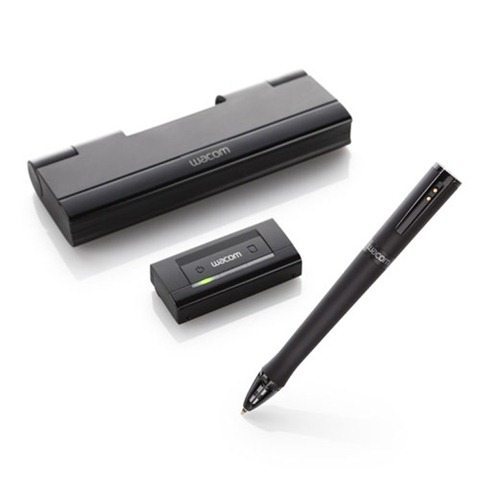
Most Wacom tablets have to be connected to a computer for it to work. But what if you prefer drawing on physical paper with a pen? That’s where Wacom’s Inkling comes in. It works similar to the Livescribe but the Inkling doesn’t require special paper.
The Inkling uses a clip-on receiver that you attach to your notepad and then you sketch with the included Wacom ink pen which has 1024 pressure points. Your sketch then gets transmitted to the receiver which can then be plugged into the computer so you can upload your sketches. What’s amazing is that the receiver has a button which will add new layers to your sketch. Once imported, you can edit these layers in Photoshop.
Wacom has nicely bundled everything into a small charging case ready to go at a moments notice.
Wacom’s Inkling will be available in mid-September at $199. Check out the video after the jump.
![[MINI SIZE. ULTRA PORTABLE CHARGER]: Roughly the size of an AirPods Pro case, this smallest power bank packs 10,000mAh of long lasting power into a tiny, nano footprint. Easily slide this ultra slim, credit card size charger into your skinny jeans, a...](https://m.media-amazon.com/images/I/41rATpm6dyL._SL160_.jpg)
Now retrieving an image set.
INIU Portable Charger, Ultra Mini 10000mAh 45W Fast Charging with Detachable Cable, Flight-Safe Travel USB C Power Bank External Phone Battery Pack for Xiaomi iPhone 17 16 Samsung S26 Google iPad etc

Now retrieving an image set.

Gadgeteer Comment Policy - Please read before commenting
Hmmm similar to the aPen reviewed earlier?
Probably works the same way. There are lots of similar products out there. I personally like the Wacom brand better for all my tablet needs.
Seems more sophisticated with the layers. aPen beats it with the ease of transferring your work to another device and sending ASAP. Hope to read a more in-depth review. Maybe even a comparison of these types of devices. Hint hint…
@Hellene – We’ll try to get one to review when it comes out.
The aPen just basically provides a image of what was written or drawn, which is easy for any device to use as at least a image file unless OCR or similar is used.
The Wacom’s Inkling is much more advance, storing a vector file with support for layers and 1024 levels of pressure sensitivity. The difference is you can edit the vector file on a computer with vector file compliant program like Adobe Illustrator, which also means the image can be scaled to any size (no limit). While layers also means effects can be added and adds to the amount of details/scale that can be used.
Apen is more for use on ipad etc?
wacom doesnt allow user to use them on ipads.
but the layers thing is really cool. pretty amazing. in fact
This Inkling gadget looks awesome- anybody here tried it yet?