
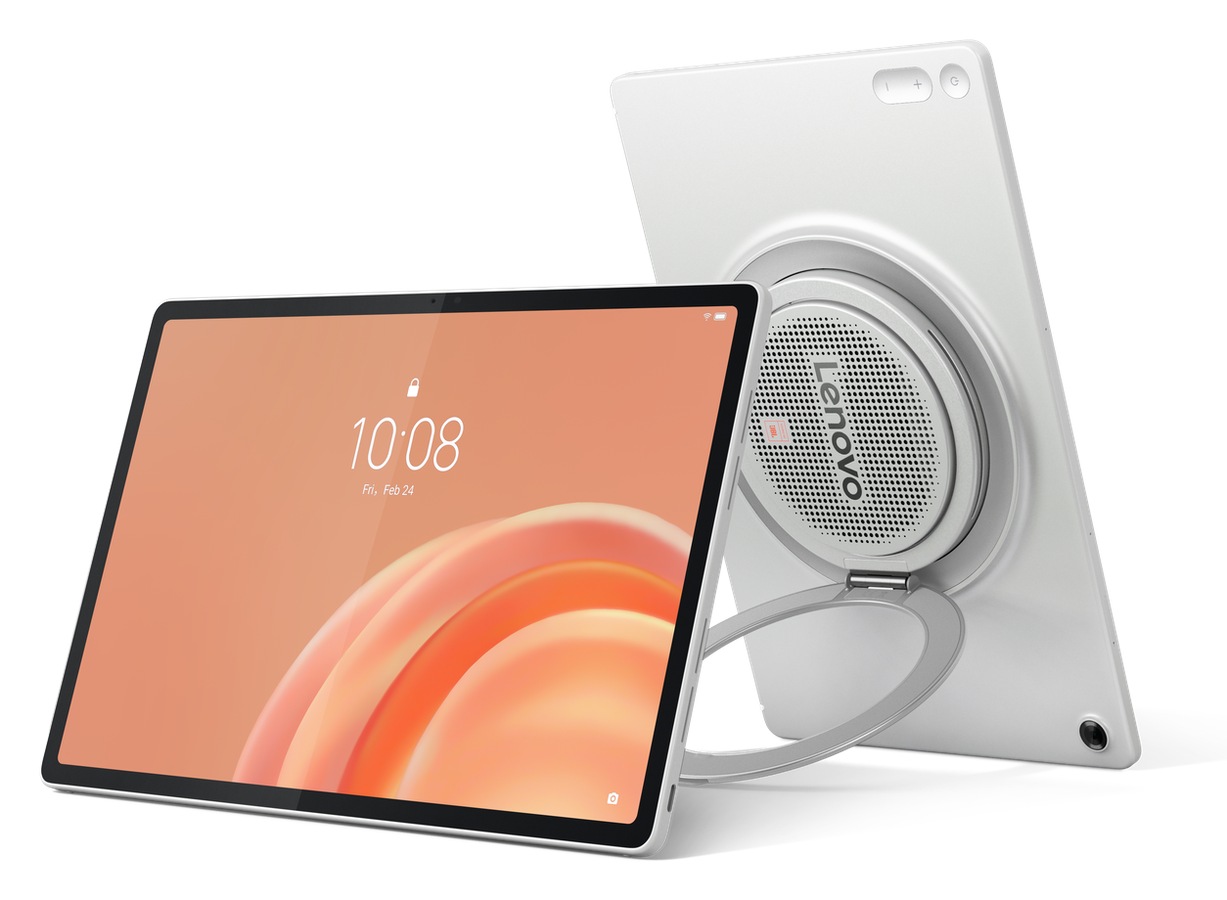
Most midrange tablets get the big stuff right and punt on audio. The screen handles Netflix, the battery lasts a day, and the speakers sound like a laptop fan arguing with itself. Lenovo’s answer to that pattern is the Tab Plus Gen 2, a $399.99 slate with a nine-speaker JBL system, a 360-degree kickstand, and a 12.1-inch 2.5K display built for the living room rather than the conference room, and it’s the latest move in Lenovo’s recent run of attention-grabbing hardware.
Price: $399.99
Where to buy: Amazon | Lenovo
The argument here isn’t raw power. A MediaTek Dimensity 7400 processor won’t trade blows with an iPad Pro or a flagship Galaxy Tab, and Lenovo isn’t pretending otherwise. What the Tab Plus Gen 2 is trying to do is replace the Bluetooth speaker you almost bought and the tablet stand you keep meaning to pick up, all in one 775-gram device that starts well below the $500 mark.
That’s a specific pitch, and it either lands for your situation or it doesn’t. TG readers who’ve ever watched a movie on a tablet and reflexively reached for a Bluetooth speaker will feel this one immediately.
Nine speakers isn’t a gimmick: it’s a hardware commitment
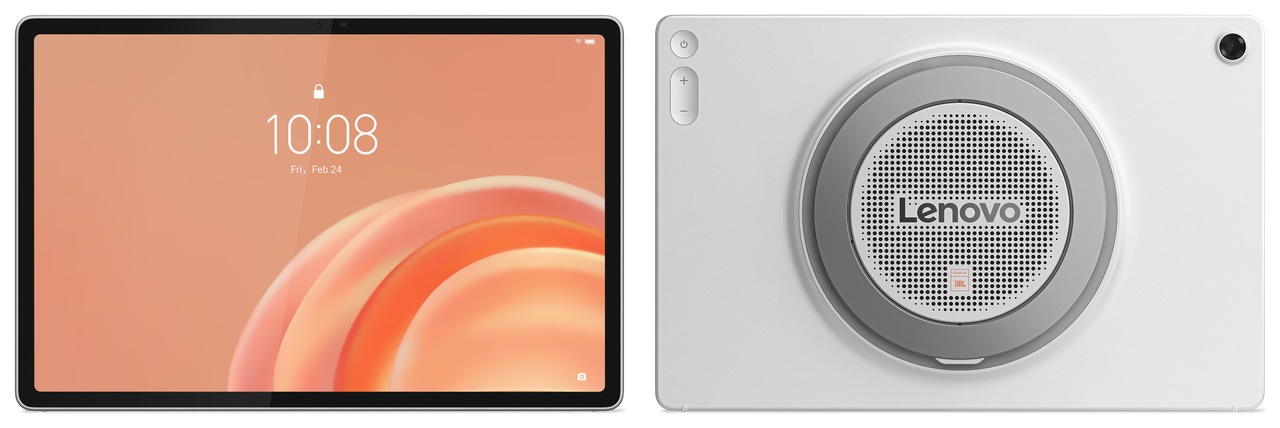
The speaker array is the whole reason this tablet exists. Nine JBL drivers sit across the chassis, tuned by Dolby Atmos and backed by dedicated bass units that Lenovo calls a Cinematic Audio System. Most tablets in this price range mount two or four speakers and call it stereo. Nine units with dedicated low-end drivers is a different category of hardware investment, full stop.

Dolby Atmos handles the spatial processing, and Dolby Audio adds three distinct preset modes: Dynamic, Movie, and Music. Dynamic adjusts on the fly based on content. Movie mode optimizes for dialogue separation and cinematic headroom. Music mode tilts the EQ toward fuller bass and presence. Three tuning modes on the same hardware is smarter than it sounds, because the strategy changes without the physical components having to.
The standalone Bluetooth speaker mode is the feature most coverage skips and probably shouldn’t. Activate it, pair your phone, and the screen goes dark while the nine-unit array keeps pushing audio. For TG readers who already have a Bluetooth speaker on the kitchen counter, this collapses two devices into one slot and one charging cable. That trade-off is worth pricing out before dismissing.
There’s a physics limit hiding in the spec sheet. The cabinet depth measures 22.7mm at the speaker bump, a shallow enclosure by audio standards, which constrains bass projection regardless of driver count. Nine speakers tuned by JBL will still outperform the typical two-speaker tablet setup by a wide margin, but buyers expecting subwoofer-level punch from a 775-gram slate need to calibrate expectations before checkout.
We haven’t put the Tab Plus Gen 2 on the bench yet, so the audio impressions above come from hardware specs and Lenovo’s stated tuning choices rather than firsthand listening sessions. The JBL and Dolby Atmos credentials are real, but how the nine-unit array translates at moderate volume and across different room acoustics is a question the hands-on review will answer.
A 120Hz panel at $399 does more work than you’d expect
At 12.1 inches, 2.5K resolution, and 249 pixels per inch, this display is sharp enough for detailed content and large enough that the extra screen real estate over a 10-inch slate is immediately noticeable on widescreen video. The 800-nit High Brightness Mode with Dolby Vision and HDR10 means it holds up outdoors without washing out on a bright patio or near a window.
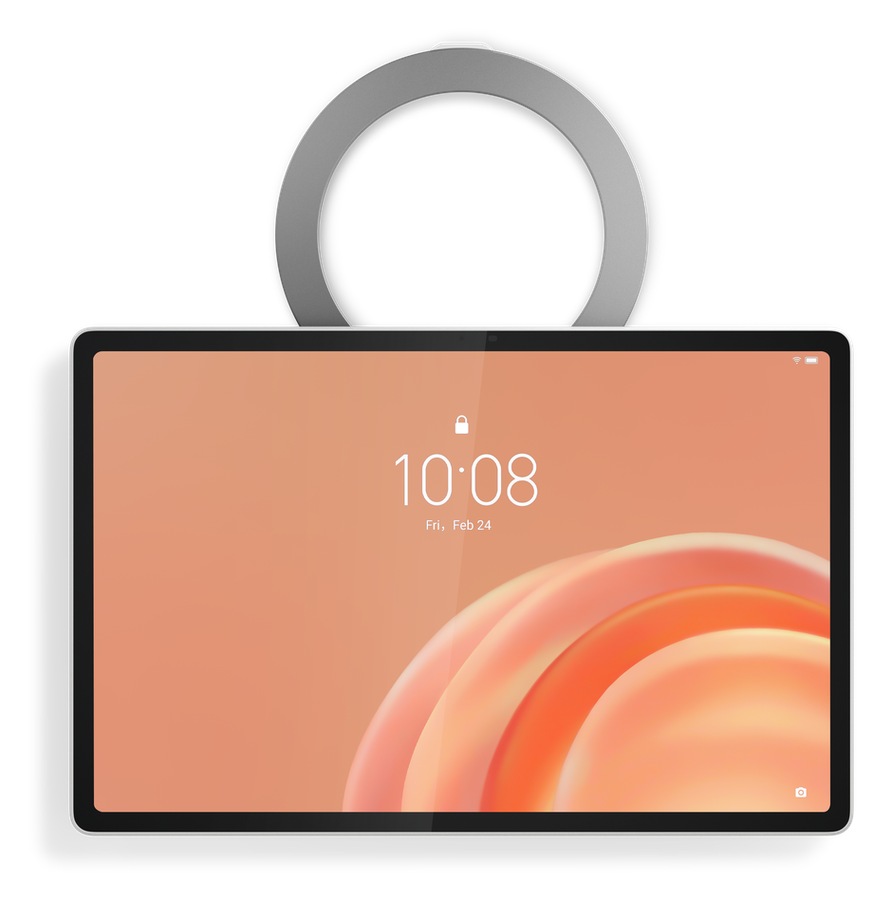
The 120Hz refresh rate is the spec worth flagging at this price. Competing slates in the sub-$400 range often cap at 90Hz or push buyers to spend more for smooth UI performance. Lenovo kept it at 120Hz, which means fluid scrolling and responsive gaming without a price premium, and that’s a genuine win for the money.
Four modes, a picture frame setting, and a kickstand that actually earns its keep
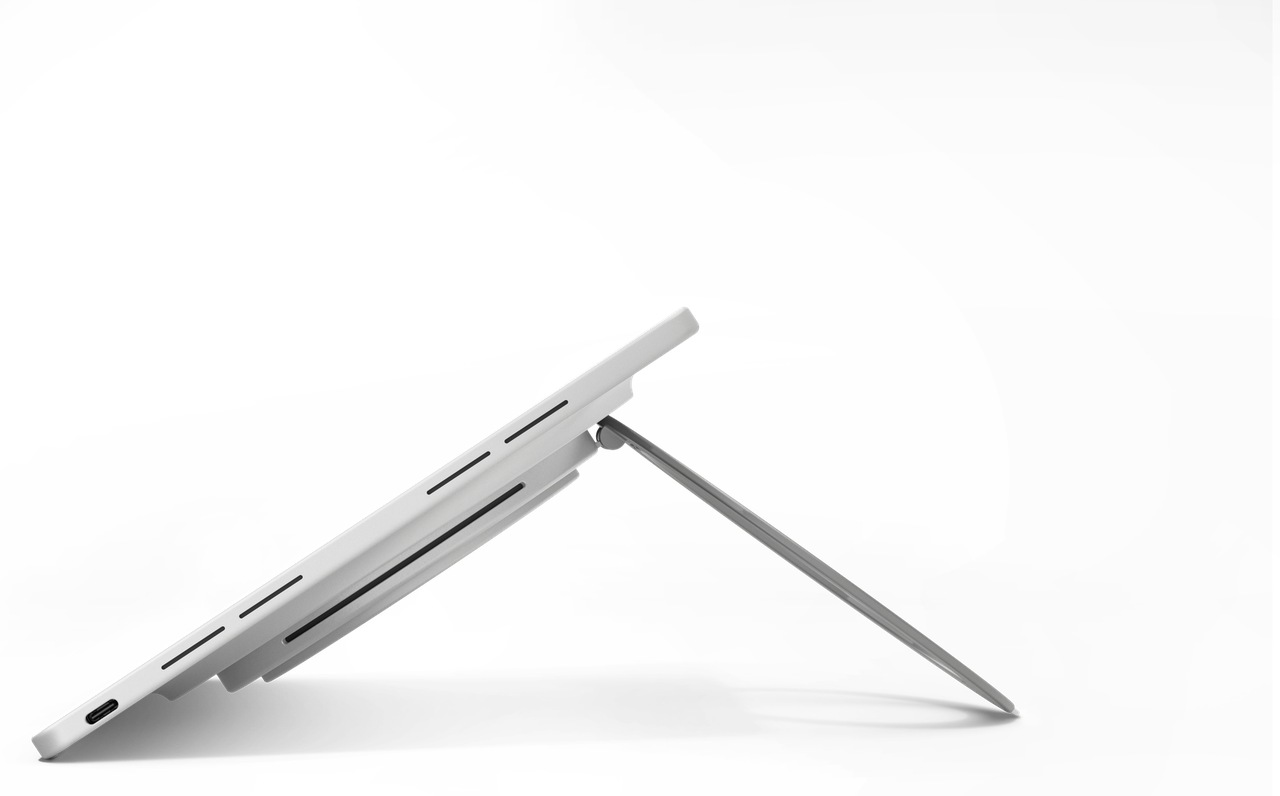
The 360-degree rotating kickstand is more useful than any spec sheet can capture. Lenovo names four positions: Lean, Theater, Stand, and Hanging. Lean and Theater cover the couch and desk scenarios most buyers picture first. Stand mode flips the tablet to portrait for reading, video calls, or recipe browsing without propping it against a water bottle. Hanging mode is the odd one, and probably the most practical in a kitchen where counter space is actively contested.
The standby mode that converts the Tab Plus Gen 2 into a digital picture frame turns an overlooked use case into an intentional one. For TG readers who’ve propped a tablet in the corner cycling screensavers, Lenovo made that official. The Lenovo Sleeve Suite with shoulder strap, available in select regions, adds a carry option that turns this into a room-to-room entertainment device rather than a desk fixture.
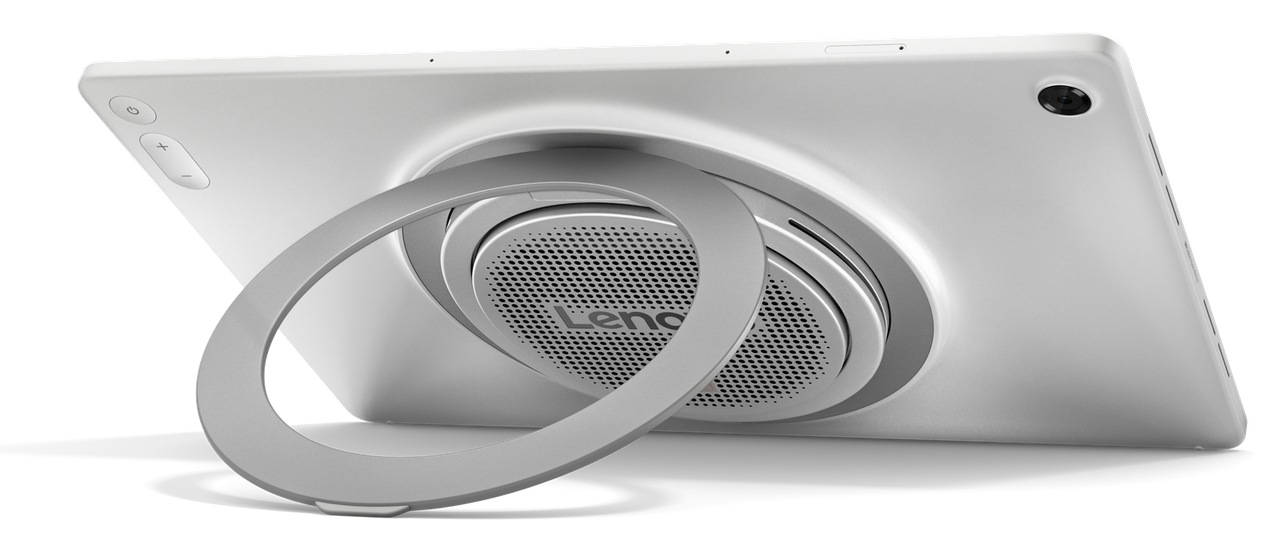
Wide-angle tilt ships alongside the rotation, meaning the kickstand adjusts viewing angle beyond what a fixed-hinge stand can do. Anyone who’s battled a tablet that won’t tilt far enough to see from standing height at a kitchen counter will appreciate that decision immediately.
The physical dimensions tell the rest of the story: 278.8mm wide, 181.1mm tall, 6.8mm thin at the body before the speaker bump adds that 22.7mm of depth at the rear. This is a large-format slate designed to sit somewhere and perform, not disappear into a bag. Buyers looking for something ultralight and pocketable should look elsewhere, because Lenovo made a deliberate trade here.
What the internals actually deliver at $399
The Dimensity 7400 octa-core drives four memory configurations: 6GB RAM with 128GB storage, 8GB with 128GB, 8GB with 256GB, and a 12GB with 256GB top spec. MicroSD expansion stretches to 2TB. Wi-Fi 6 with full 802.11a/b/g/n/ac/ax support handles fast home networks, Bluetooth 5.4 pairs accessories cleanly, and an accelerometer plus gyroscope round out the sensor package. The front camera is an 8-megapixel fixed-focus unit and the rear is a 13-megapixel autofocus shooter. Neither camera is the reason to buy this tablet.
Software is where Lenovo makes an under-the-radar argument that matters more than the spec sheet suggests. Android 16 ships at launch, with two full OS upgrades committed through Android 18 and four years of security patches running to 2030. Most Android tablets under $500 arrive with vague software promises and one update. Locking in support through 2030 is a real differentiator that affects long-term value in ways a processor benchmark never will. USB-C 2.0 handling both charging and audio is the trade-off: 45W fast charging works, but data transfers over the cable stay slow, so cloud storage becomes the practical answer for file management. Lenovo keeps finding angles like this, including a ThinkTab built to keep running after you pull the battery.
Lenovo AI Live Transcript handles real-time translation across 40-plus languages, with two hours of free daily use before hitting in-app purchase territory. Smarter Reader and AI Notes with Lenovo Notepad round out the AI feature set. For a tablet aimed squarely at entertainment and light productivity, these are serviceable additions rather than headline reasons to buy. The translation feature has genuine utility in multilingual households, and the two-hour daily cap is stingy enough that power users will notice it.
The bottom line
The Tab Plus Gen 2 goes on sale soon in select global markets starting at $399.99, with no firm date or full regional list confirmed yet. Compatible accessories include the Lenovo Tab Pen Plus, Lenovo Wireless Keyboard, Lenovo Sleeve Suite, and the Lenovo 68W USB-C Wall Charger, each sold separately.
If your primary use case is video, music, and shared-screen moments in the living room or kitchen, the Tab Plus Gen 2 is built around exactly that. The nine-speaker JBL array is the differentiator, the 360-degree kickstand is the practical enabler, and the software support commitment through 2030 is the long-game argument most buyers won’t read in a headline but will feel three years from now. Spec chasers, heavy multitaskers, and anyone who needs faster data transfer or a lighter form factor will still find better fits at higher price points. What Lenovo built here is a tablet that knows precisely what it is, and $399 is a fair price for that kind of clarity.
Price: $399.99
Where to buy: Amazon | Lenovo
FAQ
Does the Lenovo Tab Plus Gen 2 work as a standalone Bluetooth speaker?
Yes. A dedicated mode lets you stream audio from your phone directly to the nine-speaker array while the screen stays off. No separate speaker needed on the counter.
What Android version does it ship with, and how long will it get updates?
Android 16 out of the box, with two OS upgrades committed through Android 18 and security patches running to 2030. That’s a longer runway than most Android tablets under $500 offer.
Can you expand the storage?
Yes. The microSD slot supports cards up to 2TB, so the built-in 128GB or 256GB configs aren’t the ceiling.
Is the USB-C port fast enough for file transfers?
No. It’s USB 2.0, which caps data speeds. The 45W charging works fine, but for moving large files, cloud storage or wireless transfer is the practical move.
Auto Amazon Links: No products found.
