
Have you ever wished that you could easily share a USB device such as a printer, scanner, external hard drive, etc.
between to computers, without having to unplug and replug into either computer when you needed to use the device?
Kensington is here to help you out with their new ShareCentral USB
peripheral switch boxes.
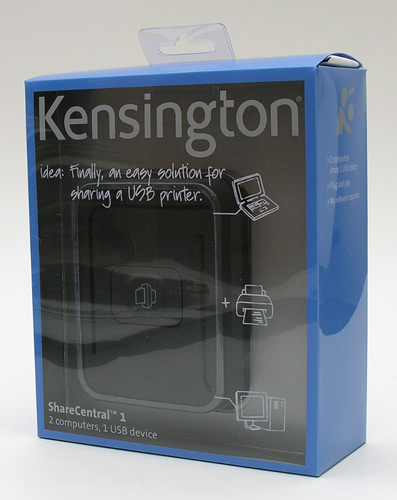
Available in 1, 2 and 5 device switching models, the
ShareCentral comes with everything you need to get started sharing devices
between two computers.
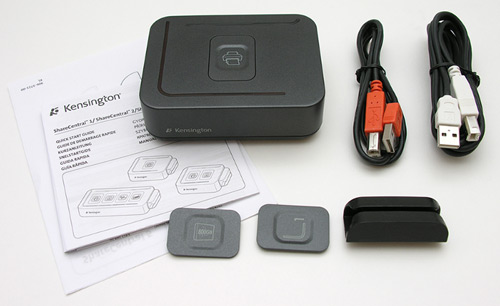
Package Contents
ShareCentral1
1 36 inch USB cable
1 70 inch USB cable
2 Magnetic ID plates
Setup guide
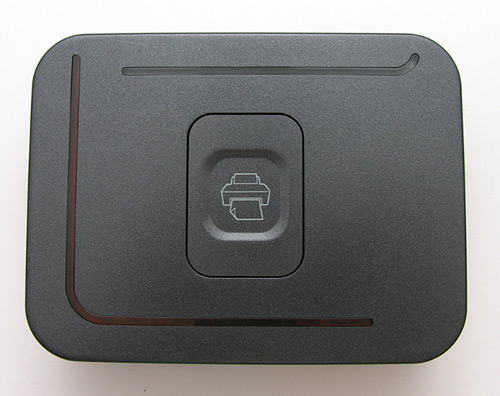
The ShareCentral module is
4.25 x 3.25 x 1.375
inches in size and has an eye pleasing design. I can remember using a very
utilitarian looking metal switch box back in the day to switch a monitor between
two computers. It had a big Black plastic rotary dial and wasn’t very techie
looking at all. By contrast, the ShareCentral looks pretty slick with a push
button switch, two Amber LEDs
and interchangeable ID plates.
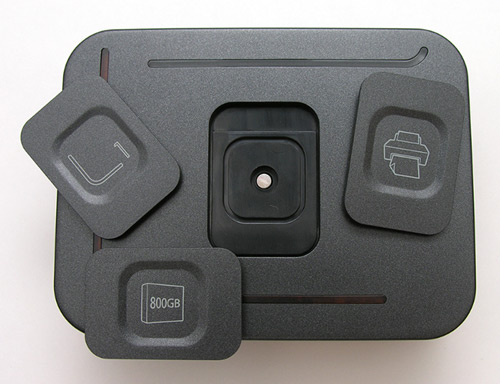
Included with the ShareCentral 1 are two additional ID plates that gives you the
ability to customize the switch box. There is one for a printer, hard drive and
a generic device plate. On the back side of each plate, there is a magnet that
allows you to easily snap in or remove the plate from the top of the box.
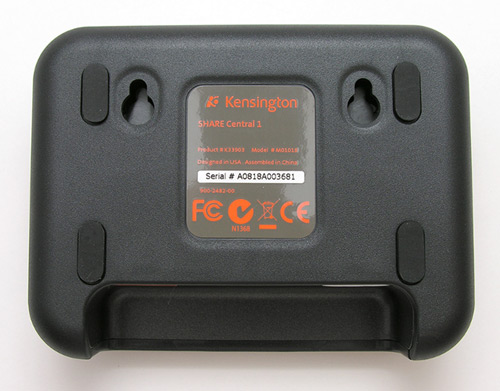
You can either place the ShareCentral on a desk, or mount it to the wall with
the mounting holes. They even include a paper template to help you know where to
put the screws in the wall.
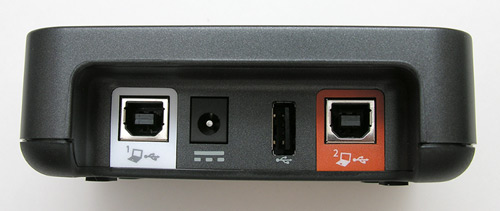
The ShareCentral 1 is the simplest of the three available models. It has two USB
Type B connectors, an AC connector and one regular USB connector. You connect
one of the included USB cables from the ShareCentral to one computer and the
other cable to the second computer. It doesn’t matter if you’re using Windows
PCs, Macs, or Linux boxes. No software is needed to use this product. It’s all
plug and play.
The next step is to connect the USB device that you want to share between the two computers, to the the lone USB connector on the
ShareCentral. I tested this switch box with two iMacs, a flash card reader, my Palm Centro USB charge / sync cable and a Canon flatbed scanner.
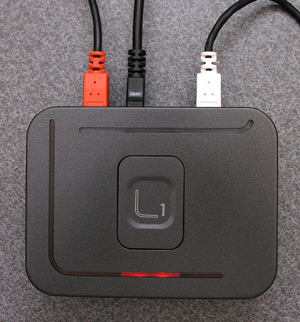
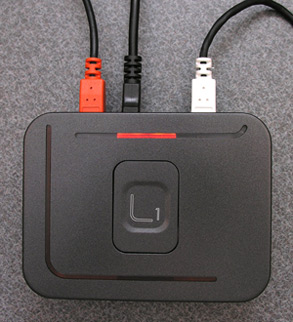
To switch the connected USB device from computer to computer, you just press the
button on the top of the ShareCentral. The LED will light up to show that the
device has moved and badda boom, you can now use the USB device on the other
computer. Fast and easy. The only issues that I had with the ShareCentral are
related to the fact that I am a Mac user. If you hook up a device like a flash
card reader to the ShareCentral and switch it to the second computer without
first ejecting it on the first computer, you’ll receive a device error popup
message. I also noticed that when I first hooked this switch box up to my two
iMacs, that the first time that I used it, I also had a keyboard popup message.
It was as if my Mac thought I had just plugged in a new keyboard. Weird. This
happened on both iMacs a couple of times…
This is a nifty little gadget that is pretty useful. The only thing I would say
is that I personally wouldn’t fork over $40 for a switch box that can only
switch one device. I’d probably spend more and get the ShareCentral 2 or 5. The
added benefit of getting one of them is the fact that they can also
automatically detect which computer needs to use the printer. No button pressing
required. Apparently this added bonus is only compatible with computers running
Windows XP or Vista and does require a software installation. But hey, I thought
I’d mention it :o)
If you’re looking for an easy way to share USB devices
between two computers, you really can’t find anything easier than the Kensington
ShareCentral line of switch boxes. This modern take on the clunky metal
switch box will cut down on having to buy duplicate devices, cable clutter and
network setup confusions. It’s a definite must have for multi computer families
that like to share peripherals.

Samsung 14" Galaxy Chromebook Go Laptop PC Computer, Intel Celeron N4500 Processor, 4GB RAM, 64GB Storage, ChromeOS, XE340XDA-KA2US, Student Laptop, Silver
(as of June 12, 2026 18:41 GMT -05:00 - More infoProduct prices and availability are accurate as of the date/time indicated and are subject to change. Any price and availability information displayed on [relevant Amazon Site(s), as applicable] at the time of purchase will apply to the purchase of this product.)
Apple 2026 MacBook Air 13-inch Laptop with M5 chip: Built for AI, 13.6-inch Liquid Retina Display, 16GB Unified Memory, 512GB SSD, 12MP Center Stage Camera, Touch ID, Wi-Fi 7; Sky Blue
(as of June 12, 2026 20:12 GMT -05:00 - More infoProduct prices and availability are accurate as of the date/time indicated and are subject to change. Any price and availability information displayed on [relevant Amazon Site(s), as applicable] at the time of purchase will apply to the purchase of this product.)Product Information
| Price: | 39.99 |
| Manufacturer: | Kensington |
| Pros: |
|
| Cons: |
|

Gadgeteer Comment Policy - Please read before commenting
I was looking through BestBuy,com, for something that would let me switch my USB keyboard and mouse between my laptop and home network gateway. It looks like they have a couple of ShareCentral models, available, in stock at a couple of local stores (no shipping, no difficulty in returns) . It could look sweet, but I wasn’t sure if it would work with Linux.
Kengsington has software available for the ShareCentral 2 and 5 port devices [citation]. In considering your review, it looks like it won’t be absolutely necessary, as long as I’m careful about preventing data-loss through the device.
My laptop has most often been running Vista, mostly as a home entertainment platform. My home network gateway is running Linux. Given that it’s a really low-volume, essentially one-user network, I can easily task out the gateway box as a workstation, without really affecting anyone. There’s been an issue, though, in that the desktop’s original keyboard is rather klunky. I much more comfortable with keyboard and the mouse that I’ve been using as as external peripherals, with my laptop. With one of these ShareCentral switches, it looks like I can make use of the keyboard and the mouse, on either system, without having to manually re-plug the items.
Considering the number of USB inputs on a ShareCentral device, I expect that it wouldn’t be too much of a concern, whereas one should be able to connect a powered USB hub to the device, and so expand the number of available inputs. (I don’t suppose that a ShareCentral device could limit the natural extensibility of a USB bus, like in how one can “daisy-chain” USB connections. Who knows, though, what limitations a manufacturer may introduce into a functioning system…)
As far as video output, I notice that it’s not an issue with my current configuration. The laptop is also connected to an external monitor, through HDMI. The desktop is connected to the same monitor, through a VGA output.
The desktop also has a DVI output, and I have a DVI-to-HDMI adapter, but I’ll have to buy an HDMI switch before that’ll be useful — the monitor was designed with only one HDMI input. Having to switch monitor and keyboard configurations, separately, it could seem to be a bit ironic, I suppose — in all this brave new world, and all — but I’m sure it would work.
It looks like the ShareCentral 1, 2, and 5 input-port models all support two outputs. I guess that one could daisy-chain ShareCentral devices, if one would require additional outputs.
I think it is kind of is ironic, how simply “low tech” and non-modular all of this switching stuff could appear to be, under all the fancy covers. Electronically, is it so much different than the old rotary-dial KVM switches, this item?
I think the issue is in the necessary modularity of it. With appropriate electronics for it, it would be possible to switch keyboard input, mouse input, and video output, between multiple static configurations, with no loss of signal quality, and through a switch with exactly one button — regardless of what connections those devices would all be using, within the range of conventional connections (e.g PS/2 or USB ; VGA/DVI/HDMI/Composite/S-Video — no format conversion necessary, just output switching). Of course, if some designer out there would start with an assumption that it wouldn’t be, let’s say, an “Easy” design, then I guess the idea would be shot from the get-go, y’know? and of course, if such a simple piece of electronics ever was deigned, then inveitably, someone would be wanting the customer’s next of kin, in the bargain.
There may be some slightly more fancy-sounding options. I’ve read about networked USB hubs, which sound neat, but which don’t work with Linux — with the fault for that much belonging, in fact, with the manufacturers of the said hubs (not to mistake the right seat of responsibility, in the matter) . I don’t necessarily trust the manufacturers, anyway, as far as network-wise security features, on said hubs. It is, at least, a slightly fancier (and also more limited) switching option. I think I’ll stick with this solid-state stuff, though, and see how it goes.