
Electronic Arts has brought Scrabble, the classic board game to the iPhone and iPod Touch. This word building game has been around since the 1930’s and is fun for kids and adults alike. Let’s see if see how EA’s version translates to the iPhone.
The opening splash screen and animation are nifty to watch for the first couple
of times that you launch this game. But after that, you’ll probably become
annoyed at the 20 second wait for it to finish each time. Unfortunately, there
doesn’t appear to be a way to speed up the loading of the game. Once it’s loaded
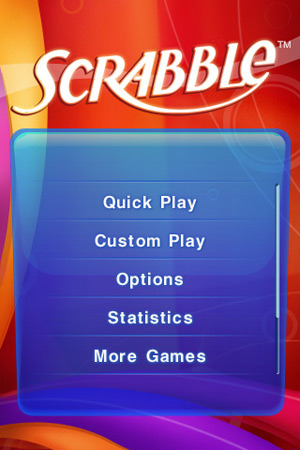
though, you’re presented with an menu that allows you to pick a Quick Play or
Custom Play game. Quick Play is computer vs. player mode. Custom will let you
choose computer vs. player, solo and pass ‘n-play. Pass ‘n play let’s you play a
1-4 player game where you take a turn, pass the iPhone / touch to the next
player and so on. What this game really needs is a way to play another player
over WiFi.
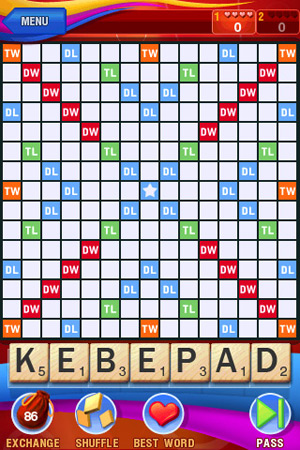
If you’re not familiar with Scrabble, it’s a game where you have seven letter
tiles that you use to build words on the game board. Certain letters have more
points associated with them and certain game board squares enable higher
scoring. To win a game, you have to create words that earn you a higher score
than your opponent.
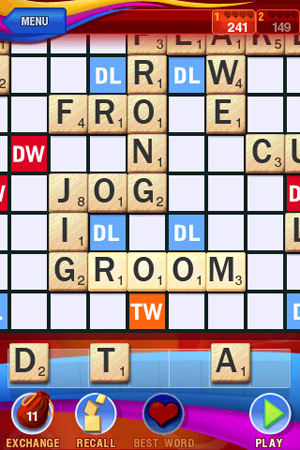
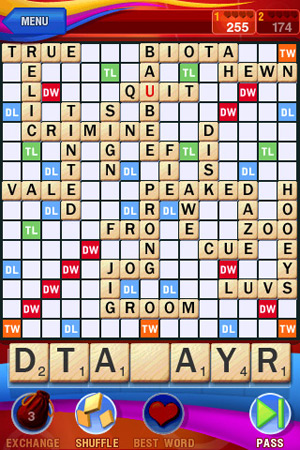
To place your tiles on the game board, you hold your finger down on a tile until
it turns dark and then you can drag it up to the desired location on the game
board. The game board zooms in when you’re in the placement mode. The only issue
I seemed to have with this method was that my fingertip made it a bit difficult
to see where I was trying to place a tile.
To help you figure out what words that your tiles might be
able to create, you can either press the shuffle button, shake your iPhone /
Touch or use finger to rearrange tiles. You can also swap out a completely new
set of times by tapping the Exchange bag in the lower Left corner. However,
doing so will also cause any word entered for that round to be scored as a zero.
If you’re really having a heard time figuring out a word, you
can press the heart button. This will place the best word possible given your
set of times. You can only use this feature four times per game.
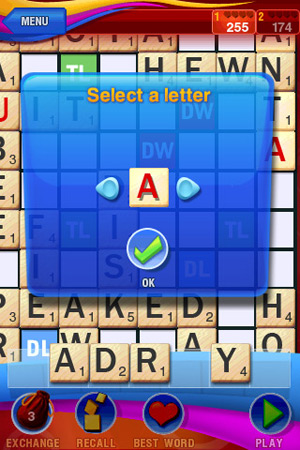
Sometimes you’ll receive a blank tile that you can use as any letter you wish.
When you tap that letter, a special window will popup that you can use to select
the desired letter that you want to play.
This game is easy to learn to play and definitely fun for two to four people. I
do wish that it had a built in dictionary so that you could see the definition
of the words that the computer sometimes creates. But as it is, Electronic Arts
has done a very nice version of this game and it’s one that I wouldn’t hesitate
to purchase if I was a fan of vocabulary building games.

15.6 Inch Windows 11 Laptop, 5205U Processor, 4GB RAM 128GB Storage Expandable to 1TB, FHD Display with Numpad, Office 365 Pre-Installed, Wi-Fi 5 Bluetooth 4.2, Type-C for Student & Business
(as of June 9, 2026 12:58 GMT -05:00 - More infoProduct prices and availability are accurate as of the date/time indicated and are subject to change. Any price and availability information displayed on [relevant Amazon Site(s), as applicable] at the time of purchase will apply to the purchase of this product.)
Samsung 14" Galaxy Chromebook Go Laptop PC Computer, Intel Celeron N4500 Processor, 4GB RAM, 64GB Storage, ChromeOS, XE340XDA-KA2US, Student Laptop, Silver
(as of June 9, 2026 12:57 GMT -05:00 - More infoProduct prices and availability are accurate as of the date/time indicated and are subject to change. Any price and availability information displayed on [relevant Amazon Site(s), as applicable] at the time of purchase will apply to the purchase of this product.)Product Information
| Price: | 9.99 |
| Manufacturer: | Electronic Arts |
| Requirements: |
|
| Pros: |
|
| Cons: |
|

Gadgeteer Comment Policy - Please read before commenting
Except the words it allows you to make are ridiculous and often not in the dictionary. I don’t know what dictionary they used. This spoils the game a bit as you can often just guess that something is a word and it accepts it, even though you have no idea what it means.
Example: “henned”.