
After purchasing an iPAQ 12 months ago, my long daily commute with this Pocket
PC and Avantgo left me with a feeling of wanting "something more." Not wanting
to spend a lot of additional money, I avoided the cost, bulk, and wait for
wireless networking alternatives, such as the now defunct Ricochet. These
solutions typically require a PC card adapter, the wireless card itself, and
hefty monthly subscription fees.
Fast forward 1 year later – I’m still loving every minute with my little buddy.
But today, I successfully connected my iPAQ to my shiny new cell phone. The
result? True mobile internet access, at the cost of my regular air time (my plan
has 300 peak minutes, and 3,200 off peak), at a speed of 14.4k. What does this
mean in English? With the purchase of the connecting cables, I now have internet access
through my cell phone provider (Verizon)
for the cost of a regular cell phone call.
The Nitty Gritty
You have two choices for connecting your cell phone to your iPAQ:
One way is to cobble together a cable and various adapters. I already had a
serial autosync cable from the days when I used my little buddy to control my
computerized telescope (fodder for another article here!). As I recall, I
paid something like $30 for the cable. In addition to the serial autosync cable
(forget about using USB – it won’t work), you will need a null modem adapter (I
didn’t say dull, I said null), and a gender changer. I found a nice compact
gender changer at Radio Shack for a few dollars which lets everything fit
together nicely.
-or-
You can buy a Compaq (the iPAQ’s daddy) cable created just for the purpose
you want. It is a RS-232 serial connection cable, Part Number 236251-B21,
available from Compaq for $26 clams plus their shipping and handling (which
might be close to an additional $26 based on my experience with Compaq). The
link is here:
http://www.compaq.com/products/handhelds/pocketpc/options/pc_connectivity.html.
This $26 cable should remove the need for the null modem adapter, the gender
changer, and a rubber band to hold approximately 4 or so feet of extra cable.
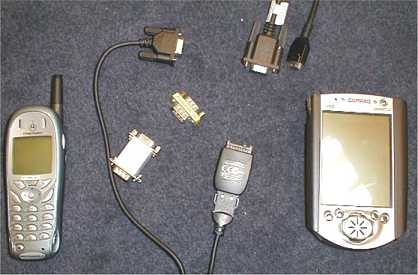
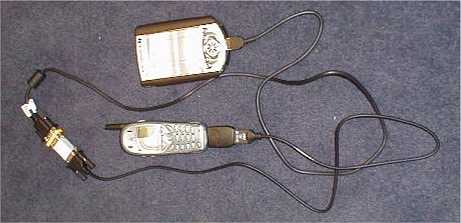
Whether you go with my hodge-podge autosync and adapters route, or the smarter
Compaq cable method, you will still need a serial cable for your phone, and of
course the service from your provider. You will be using the cell phone as a
wireless modem, so you need to make sure your phone has this feature. If your
phone has a serial cable as an option, and your provider allows it, you should
be in business. In my instance, my phone is a fancy-schmancy Motorola 270c –
which means I basically overpaid, as the free phone with my wife’s plan (the
LG-TM510) also has the capability. For Verizon, you can check
http://www.verizonwireless.com. For
the other providers, well, I wouldn’t know where to send you, but checking their
home page would be a good place to start.
Next, you need to have digital service in your area. Nowadays, most of these
phones switch to analog as a fallback if digital is unavailable or in a fringe
area. If you allow your phone to fall back to analog, you’ll lose your internet
connection for that outing. I guess there are worse things in life… But, if
you have a critical connection you’ll probably want to switch the phone to
digital only, at least for that session.
The service from Verizon is called Mobile Office. They offer various "kits" for
several phones which include a phone specific serial cable, and a null modem
adapter. The kit differs from the loose cable in that software is included. They
did not have a kit for my phone (the price of getting the latest and greatest).
That’s okay – you knew your little buddy didn’t need a driver for this, right?
The Verizon page has a great .pdf file for installation to a Windows CE device –
I upgraded my 3630 to Pocket PC 2002 (regrets galore, but that would be yet
another article), and although there were few differences, it all worked out in
the end. I must concede that I did have a tad bit of trouble getting the
connection to work. I had configured my CF modem without much effort, but for
some reason my phone kept displaying 111 instead of 777 (for Verizon, your
system may differ). I called Verizon, and about 10 minutes later I was running
(ok, jogging) at full speed. The problem seemed to be that I needed to create a
new connection, rather than rehashing the existing ones. I had also tried
setting the iPAQ to dial my ISP, however that is no longer necessary.
Configuration is required for e-mailing – basically you just copy the settings
from your desktop.
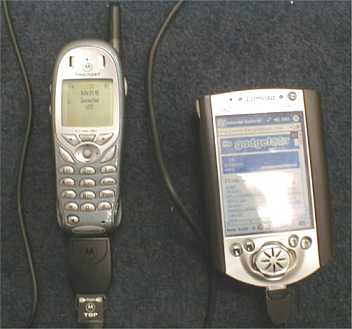
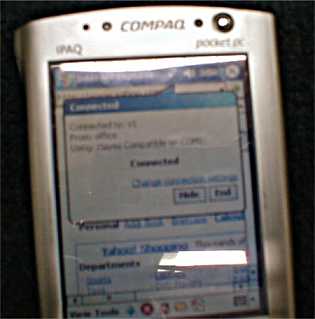
I have not used instant messaging wirelessly, though I have tried it with the CF
modem. It should work without incident.
So, what were the costs, and was it worth it? The cable for the phone ran $41
(but actually closer to $60 with phone-configuring software which allows a
primitive contacts manager and scheduler – Outlook does a much better job). I
already had the autosync cable and adapters, so they were free, otherwise they
would have likely cost around $50 – which is roughly double the cost of the
shorter, more intelligent Compaq RS232 serial cable. So for about $65 plus the
cost of your normal phone calls, you can have wireless internet access on your
iPAQ via Verizon. As with all things in life, your mileage may vary. For roughly
$65, I can have "emergency" internet access on my iPAQ. I wouldn’t post any
e-bay ads, download files, or run graphic intensive web pages, if I could help
it.
I can, however:
a) fax as necessary – not sure exactly how, but Verizon says I can and I believe
them.
b) take digital photos, go presto-chango, pop em into the cf sleeve (or add the
appropriate adapter of your choice), and e-mail my photos on the spot.
c) if I get this faxing thing figured out, I can print documents by sending to a
fax machine.
d) I can pay bills, order things on-line, etc. while on the go
e) I can use http://www.mapblast.com or
the various other mapping sites to get directions. NOW – the old way, with
Avantgo, did not make for real time mapping. (Yes, I’m a gadgeteer, and I
already ordered my next car with satellite navigation).
f) I can get or send that important e-mail now!
The Future of Wireless
Bluetooth is coming. It’s been slow in the U.S., but rest assured it is on
it’s way, and will likely make quite the splash in the next few years, as it has
in Europe. I’m just sorry I have to wait. What is Bluetooth? In a nutshell, it
is a wireless protocol. With Bluetooth enabled equipment, you can throw out all
those wires within say, a 30 foot range. I overpaid on my Motorola 270c because
of 3 reasons. It has a nifty joystick and a big screen for the wow factor, it
has a built in speaker phone (gadgeteer’s delight), and IT IS THE ONLY U.S.
RELEASED CELL PHONE WITH BLUETOOTH CAPABILITY. Sure, that capability will cost
you $300 clams right now, which includes a module that goes on the back of the
phone and requires a larger rear cover (think iPAQ expansion sleeve), and it
includes a PCMCIA Bluetooth card for your notebook. Jump ahead to the
forthcoming iPAQ 3870 with Bluetooth built in, and you can start to see where
we’re heading – Bluetooth phone, Bluetooth iPAQ, and with the included PCMCIA
card, you have a Bluetooth computer connection – the wires are quickly
disappearing. (Sony has a Bluetooth video camera for Europe, not released in the
U.S. – that would mean bluetoothing to your iPAQ, computer, or internet (via
Bluetooth phone) – can you start to see the possibilities?
In a nutshell, connecting your iPAQ to the internet via a cell phone is an
inexpensive way to surf or make transactions on the net. Though it is slow, you
no longer need to lug a notebook as an internet gateway, and it increases the
functionality of the already incredibly versatile iPAQ.
Pros:
Inexpensive true internet access
Cons:
Slooooooow – 14.4k, 1/4 the speed of CF card 56k modem
Lots of cables – jump rope anyone?
Can’t use Stowaway keyboard or other "bottom connected" accessories at same time

Now retrieving an image set.
GuangMaoBo USB Sync Data Charger Cable for Hp IPAQ Rz1700/1710/1715/1717/h1900/1910/h1915/1920/h1930/h1937/h1940/1945/rx1950/rx1955/hx2110
(as of June 8, 2026 16:32 GMT -05:00 - More infoProduct prices and availability are accurate as of the date/time indicated and are subject to change. Any price and availability information displayed on [relevant Amazon Site(s), as applicable] at the time of purchase will apply to the purchase of this product.)
Now retrieving an image set.

Gadgeteer Comment Policy - Please read before commenting
Post your comments here on the Innopocket Aluminum PDA Case Reviews.
Tungsten C Case
Toshiba e740 Case
Zire 71
HP 2215
HP 1910
Just click the POST REPLY button on this page.[
Finally, a hard case for the C! Can you do some testing to see if the case interferes with the WiFi signal?
Thanks for your great reviews, as always!
When I got my Innopocket I had to bend the cover slightly to even get the case to open it was sealed shut so tight. Also, the metal on the top left of the case is overlapping some. But for the money this is a great case. I can throw it in my pocket or my laptop bag and don’t have to worry about it getting damaged.
Even though I like the Innopocket case, I think now that Vaja has an Ivolution for the T|C I’m going to move up to that. You may see my metal case on ebay soon 🙂
I couldn’t put up with having to remove the PDA from the case to charge it. Synching isn’t a problem because I can do that over WiFi. Why don’t the case makers think about the cradle/charger issue? Or perhaps they do and have decided that it’s too difficult to get around and we just have to take the thing out every time. Now if Palm etc. made a charger like the one on my Panasonic shaver then that would be good. The shaver uses induction to charge the batteries so it just needs to fit into a coil with no plugs or connectors. Palm, are you listening?
I returned the case for a serveral of reasons. One is using the thumboard is impossible to do while balancing the case in your hands. Two, the case is two slipper and would drop easily.Lastly I couldn’t us the 3-1 innopocket sync /charge/sd card cable I purchased. You need to the and the back of the TC open to use teh cable.
🙁
Has anyone noticed any affect on the WiFi performance of the T|C when its in a metal case? I’d expect them to shield the antenna and reduce the range, but I don’t know how noticable that is.
The title of the site should be
“The Gageteer with tones of PDA Case Reviews”
Aie.
The way that the SD card pins are exposed when inserted into the case makes me ancy.
Two questions about the Innopocket Zire 71 case:
When the SD card slots are full, do they touch the screen and run the risk of scratching it?
Does the snug fitting case run the risk of scratching the finish on the Zire 71 when removed from the case?
Yeah, I’m a little bit of a scratchphobe if you haven’t noticed.. 😮 Nice review by the way!
Although I didn’t write the Zire 71 case review, I’m going to respond to this message. Innopocket styled their cases in such a way that the cover is usually bowed out. This allows the SD card / cards to NOT touch the screen whe the cover is closed.
As for the cases scratching the PDA from repeated insertion and removal, that should also not be a problem as long as the neoprene lining is still in place. The lining is soft and spongy, and will not marr the finish on your PDA. <- At least it never has on any of my PDAs so far.
Thanks for the speedy reply Julie! I’m happy to hear there no scratch related risks with the case. Now, if only they could make a metal case that opened/closed like a flip cover… then I’d be in heaven. 🙂
Hi,
I had bought a Innopocket case for my e750 via web. Once I opened up my package, I was amazed on how attactive it looked.
And surely felt solid once I opened it. I quickly put my PDA in it but once I got in, I discovered that it was tough to get it out!
I played with it for an hour or two, finally I had found out a sure way to get it out for my e750 Innopocket case. Perhaps someone already knew this, but I could not find it anywhere in the web. So let me voice this out.
The problem of not getting out, is the clips that lock the PDA, where there are 2 holds at the back of the e750. So I insert a screen protector, see attached image, so it helps to pass down at least one of the clips. And slightly push with a stylus toward the opening of the case at the bottom of the PDA and it will slide out easily. I have not tried it, but a credit card should work as well.
Only now that I got my unit out and found the clips does stretch a little of the back of my PDA.
BUY THIS CASE!! :love: They DO protect your PDA as promised!
I have a Zire 71 and purchased this cases bretheren from iConcepts which is the exact same case. I recently found out Innopocket, iConcepts, and Rhino Skin all have a version of this case.
I does fit to the exact measurements of the PDA and the neoprene protects nicely. The SD are reverse because of the “short factor” of the contacts meeting with the metal casing. (Although they could have lined the interior so you can turn them around and actually SEE which cards are which. :rolleyes: )
The case IS slippery and as a result, when I got out of my car this morning, it slipped from my hand as I was adjusting a small FedEx package I needed to send. I watched in horror as it flew from my hand tumbling sideways end-over-end towards the parking garage concrete. (complete with slow motion “N-o-o-o-o-o-oooooo..”:eek: ) WHAM!! as it landed on a corner and slid a bit. I nausiatedly reached for it expecting a case full of pieces when EUREKA!! Not a scratch!! Powered it up and it was perfect. Even better was the hardcase did not fly open on impact risking the screen!! WOW! I am very impressed with this case now and will purchase them for every PDA I ever own from now on!!