
Product Requirements:
Device:
Microsoft Windows 98, 98SE, ME, 2000, XP
Pentium 133MHz or faster
USB Port
A lot of people, myself included, like their personal electronics to be sleek and sexy. As a result, Palm was the first to go skinny with the Palm V, Vx, m500 and m505. Then came Handspring with the Visor Edge. Next came the Sony T415 and now we have the T615C. This color PDA is in my opinion, a huge improvement over what Palm and Handspring are presently offering.
Let’s take a detailed look at the physical device.
Hardware Specs:
Processor: Motorola Dragonball VZ 33mhz
Operating System: Palm OS software version v.4.1
Memory: 16MB (DRAM), 4MB (Flash)
Display: TFT color LCD with backlight 320 x 320 pixels, 16 bit color (65,000 colors)
Interface: USB (cradle), Infrared
Dimensions and Weight: 4.65 (H) x 2.83 (W) x 0.50 (D) inches, 4.9 oz. (including stylus)
Power: AC Power Adapter (supplied) Output DC5.2V, Input AC100V – 240V
Battery: Lithium-ion polymer rechargeable battery (internal)
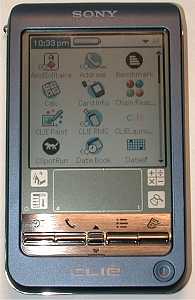
When I first saw the T615C, it immediately made my little gadgeteer heart flutter. Style-wise, I find it very appealing. The T615C’s casing is made of aluminum and is available in 2 colors: Silver and Royal Blue. Because I like to be different, I opted for the Royal Blue version. Of course it took much longer to ship,
but I am glad that I stuck with my choice.. The color is a deep blue that in some lighting can be mistaken for violet or even black. Whatever color it actually is, I find it to be very classy and attractive.
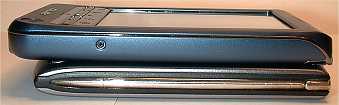
The T615C is a little thicker and longer than the m505, but not quite as wide. Both the m505 and Sony weigh about the same. The T615C feels really comfortable in my hand and is very solid. Squeezing the sides of the PDA didn’t produce any creaks, cracks or flexing whatsoever. Shaking it however, does result in a little rattling from both the lanyard eyelet and IR port lens. This doesn’t bother though as I don’t go around shaking my PDAs like maracas!
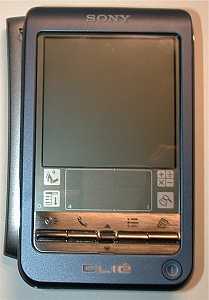
The front of the device is pretty much completely flat except for a rounded top and a very slightly angled bottom. The top of the PDA has the Sony logo embossed in white and at the bottom is the CLIÉ logo in
raised metal lettering. Above the CLIÉ logo is an LED that glows orange while charging in the cradle and turns off when fully charged. It can also be used as an alarm indicator. To the right of the CLIÉ logo is the power button. This is a round concave button that sits flush with the casing.
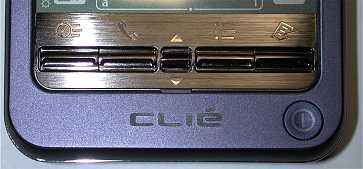
The application and scroll buttons are my biggest gripe with this device. They are skinny rectangular shaped buttons that will make the action game player weep. Surrounded by a brushed silver plate that has the associated functions embossed on it, the buttons are laid out as follows: Calendar, Address book, Up/Down scroll button, To Dos, and Memo Pad. Although they have good tactile feedback and work fine, I just don’t like the shape and size. Even though I don’t play that many action games, just knowing that I won’t be able to makes me hate them even more. I could actually get used to the application buttons, but the Up/Down scroll button is just hideous! It’s a single button with a ridge that you push forward or pull backwards depending on the direction you wish to scroll. This button is very tiny and awkward to use. I REALLY hate it.
One of the most impressive features that the T615C has, is its color display. With the 320×320 resolution, it’s just plain gorgeous! I had been so disappointed with the m505’s color display, that I wasn’t expecting much with the T615C. I’m happy to report that this display totally knocks the socks off the m505. There’s no contest. Unlike other color Palm PDAs, I am unable to see the pixel grid on the T615C. This is a big deal to some people that can’t stand to see each individual pixel on the screen.
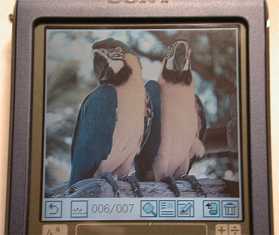
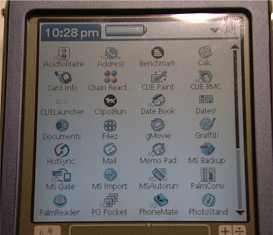
Unlike the m505, the T615C’s display has a backlight instead of a side light which yields a nice even appearance. Even at the half brightness setting, the Sony is very crisp, clear and easy to read. That’s saying a lot considering that I almost always run my PDAs at full throttle brightness.

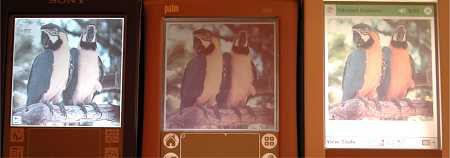
[left to right: Original jpg images, T615C, m505, Toshiba e570 all on max brightness settings]
Some people have mentioned that they feel that the CLIE screen appears washed out and that the colors aren’t bright enough. I really don’t feel this way at all.
The Sony will remember if you had the backlight turned on and will keep that setting when you power off and then back on. The m505 didn’t do this…
The screen is very comfortable on my eyes. I find it easy to view in any lighting condition. Fonts are crisp and clear making e-book reading on this little PDA is a real joy.
With the backlight off, the Sony and m505 look almost identical and are equally easy to view outdoors in full sunlight.
As far as writing on the display with a stylus, I found the screen to be sensitive and responsive. The display is slick and does have a very slight give (sponginess) to it.
The only things that could make the display even better would be to do away with the graffiti area like on the Handera 330, increase the resolution to take advantage of a screen without a graffiti area, and make the graffiti area backlit. Well, I can dream can’t I? :o)
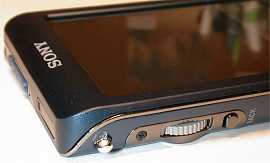
The left side of the Sony has a little metal swivel lanyard eyelet, a Jog Dial and a Back button. The eyelet allows you to attach an optional hand strap if you so desire. The Jog Dial can be used as an alternative to the scroll button in all applications that take advantage of the up/down scroll button. This dial is made of grey plastic and has a serrated edge. It be rolled up or down continuously without stopping. Pressing the button in, is the same as a SELECT action. This may or may not have any effect depending on what application you may be in. For example, if you use the Jog Dial while you’re in the Memo Pad listing, it will highlight the memos as you scroll thru them. Pressing the dial in will open the selected memo. Pressing the dial a 2nd time will go back to the listings screen at the same location prior to opening the previous memo. Doing the same thing in the To Dos listing will only allow you to scroll up or down thru the list. Pressing the dial will have no effect.
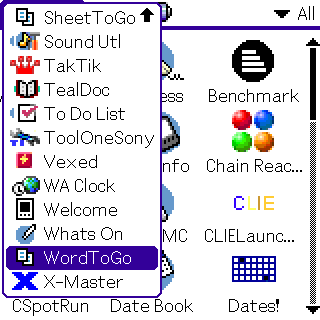
Rolling the Jog Dial in the applications listing screen will popup a list of the installed apps. Selecting an app will launch it. You can then use the Back button to back out of the application.
I’m not big on Jog Dials because of the fact that I’m a lefty and it doesn’t feel comfortable to use the index finger on my right hand to roll the dial. Some people really love them though…
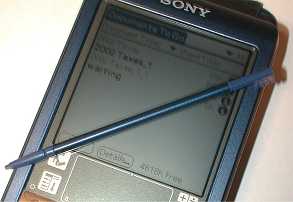
The right side of the PDA is plain except for the stylus silo. The supplied stylus is very skinny. It has a metal barrel with threaded ends. The top screws off to reveal a reset pin.
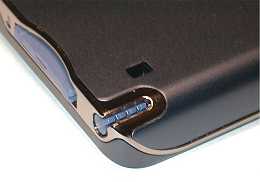
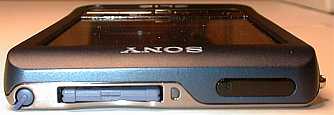
The top of the Sony has the IR port and Memory Stick slot. The IR port on this PDA is enhanced to allow for control of TVs, VCRs, etc. A slick little Remote app comes preinstalled on the Sony that is compatible with the following devices:
TV
Sony, Akai, Emerson, General Electric, Hitachi, JVC, Magnavox, Mitsubishi/MGA, NEC, Panasonic, Philips, Pioneer, RCA/PROSCAN, Samsung, Sanyo, Sharp, Symphonic, Toshiba
VCR
Sony, Aiwa, Akai, Emerson, Funai, General Electric, Hitachi, JVC, Magnavox, Mitsubishi/MGA, NEC, Orion, Panasonic, Philips, Pioneer, RCA/PROSCAN, Samsung, Sanyo, Sharp, Symphonic, Toshiba
DVD
Sony, Aiwa, Denon, Harmon/Kardon, Hitachi, JVC, KLH, Onkyo, Panasonic, Philips, Pioneer, RCA, Samsung, Sharp, Shinco, Sylvania, Thomson, Toshiba, Yamaha, Zenith
AV-AMP (amplifier)
Sony, Kenwood, Onkyo, Pioneer, Technics, Yamaha
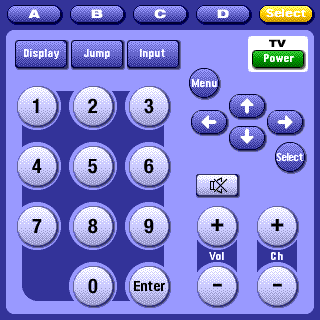
I had no problem getting it to control my old RCA VCR and Magnavox TV. I was VERY surprised that I could stand 15-20ft away and control them with no problem. The application allows you to program the hardware buttons to do different tasks. For example, you can program things so that pressing the Address button would turn on your TV, Pressing the Calendar button would turn on your VCR, and pressing the up/down scroll button would channel up or down thru the TV channels. Fun stuff! The only thing this app doesn’t have is a learning mode.
Using the IR port to beam applications and data to and from other Palm PDAs yielded the same results and other Palm PDAs. The max distance that I could successfully beam or receive was approximately 5ft.
With 16MB of RAM, you shouldn’t “outgrow” this little PDA very quickly. But if you do, you can extend your file storage with Memory Sticks. The Memory Stick slot is pretty much the same as with other CLIÉs. It is spring loaded and has a swing flap to protect the slot when you don’t have a stick inserted. Next to the stick slot is a small half circle shaped LED that blinks orange when accessing files on the stick.
The T615C comes with several utilities that you can use to manage the files on your Memory Stick. There is a file manager application, a backup application, and an import application. I didn’t really expect any surprises using Memory Sticks after having used SD and CF cards with my Pocket PCs. For the most part, they work the same… But I did find out something that made me go Hmmmmmmm. Copying a file from one location on a Memory Stick to another location (folder) on the same stick is as slow as molasses in January! I thought my PDA had frozen up. So, I did a couple tests:
| m505 | T615C | |
| Time that it took to copy a 160k file from RAM to memory card |
4 seconds | 4 seconds |
| Time that it took to copy a 160k file from memory card to another folder on the same card |
29 seconds | 1 minute 50 seconds |
What the heck is up with the Sony?! I used the same file for both tests, somI’m not sure where the problem is.
If you don’t need to move files around on the Memory Stick, you should be ok. But there is one other thing to consider… The amount of space that a file uses on a Memory Stick may not be what you think… Depending on the size of the stick, a 1K file may use as much as 16K of storage space. For those of you that
might have lots of small DOC files, the storage space will be chewed up quickly. I’ve not done any tests to see if this is true of SD cards on Palm devices.
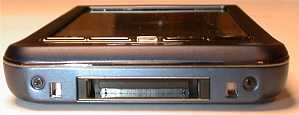
The bottom of the Sony has the hotsync port which unfortunately is not the same as previous CLIÉs. So, if you have peripherals such as keyboards or modems for the N series, they will not work with the T615C.
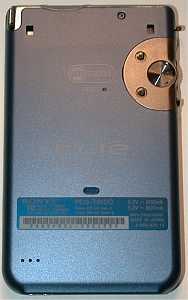
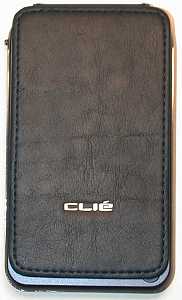
The back of the PDA has the reset switch, screen cover attachment points and speaker holes. The T615C comes with a nice deep blue leather cover that is a million times better than the flip cover that came with the 710 and 760CLIÉs. Although there is nothing to keep the cover from flopping open, it keeps the PDA as slim as possible.
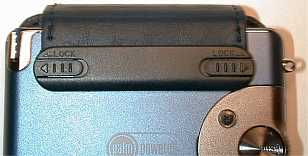
The speaker on the T615C is another great upgrade over all previous Palm PDA speakers. Like the T415, this one can play more than anemic beeps and boops. It can play converted .WAV and MIDI (Format 0) sound files. The sound quality is great and makes the PDA much more fun! A converter program comes on the CD which allows you to convert sound files on your desktop and then upload them to the Sony. The only thing you can’t do out of the box is listen to MP3 files. You can buy an optional headphone dongle thingy for $130 which will give you that capability though…
The speaker is quite loud and should have no problem alerting you for your appointments. Besides the speaker, you have another option for alarms. Most of the newer Palm OS PDAs have a vibrating alarm feature and the T615C is no exception. Unfortunately, the vibration is less than attention getting. Unless you have the PDA right next to your body, you are not going to feel it when it goes off.
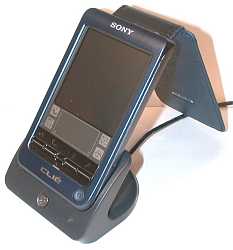
The USB cradle that comes with the T615C is plastic with a metal base. It’s not very heavy, but it is small and easy to dock and undock the PDA even with one hand. A flat button on the front initiates hotsyncing when pressed. To the right of the button is a small LED that glows green when the CLIÉ is docked in the cradle. The AC adapter plugs into the back of the cradle. Unlike previous CLIÉs, you can’t plug the AC adapter directly into the PDA to charge it. Instead you have to charge thru the cradle.
The T615C comes with Intellisync Lite instead of PocketMirror to sync with Outlook like other Palm PDAs. I’m not sure I really like Intellisync all that much. Every time it finds a new or changed item during hotsyncing, it will pop up a window asking if you accept or decline the new or changed item… This can get monotonous if you make many changes to your Address, Calendar or To-Dos.
I have also noticed some problems with my computer (mouse) freezing during hotsync operations. However, this might not be a CLIÉ problem as I have had some USB problems in the past.
As far as performance, the Sony is pretty snappy with its 33mhz VZ Dragonball chip. I don’t have any complaints with the speed of opening apps, switching screens, etc. Using Neal Bridges Benchmark program (v2.0), I’ve recorded benchmark results of several Palm devices. As you can see, the Sony comes out on top.
| T615C | m125 | Visor Prism |
m500 | m505 | m100 |
| 214% | 154% | 205% | 154% | 156% | 91% |
As for battery life, the built-in lithium-ion polymer battery is rated to last up to 12 days of use on one charge. I didn’t do a test, but I did find that just placing the PDA in the cradle once or twice a day to sync or
install a new program kept the battery level maxed out. I’ve yet to see the level go below 90% or so. After using Pocket PCs for so long, I have to say that it’s really nice not to have to worry when I can get back home to charge my PDA.
Now let’s check out the software side of this device. The T615C actually comes with a nice sized bundle.
Software:
Sony Software
PictureGear Pocket -Take your favorite pictures with you wherever you go. Great little viewer application that is easy to use.
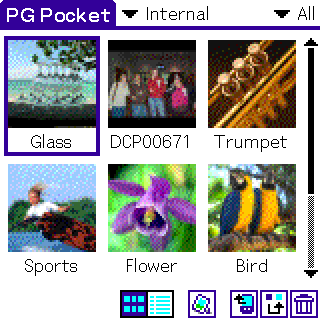
PictureGear 4.4 Lite (for PC) – This is the program that you run on your desktop to convert images to a format that the CLIÉ can view.
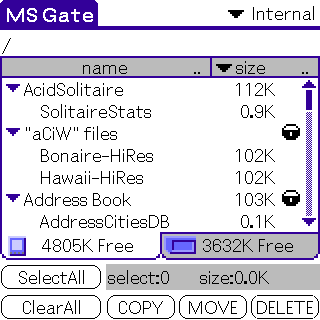
Memory Stick® Gate – File manager application.
Memory Stick® Autorun – Application that allows you to copy to RAM and automatically start a program
from the Memory Stick when it is inserted. The file will then be deleted when the stick is removed.
Memory Stick® Backup – Easy to use backup application that copies everything to your Memory Stick. You can save several date stamped archives that can later be restored if needed.
Memory Stick® Import – When you run this application on the CLIÉ, it will create a mounted drive on your PC that you can use to copy files to and from the Memory Stick in the CLIÉ.
Sound Utility – Nifty little program that allows you to listen to all the sound files installed on your device.
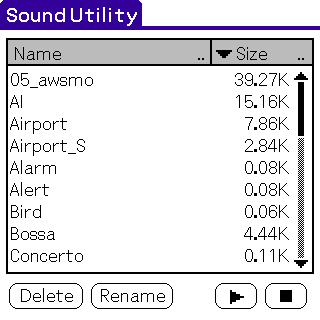
Sound Converter v. 1.0 (for PC) – Use this program on your PC to convert MIDI and .WAV files to a format that you can listen to on the CLIÉ.
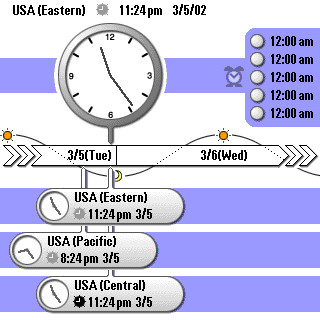
World Alarm Clock – Keeps track of 4 different time zones.
CLIÉ Paint – Easy to use paint program.
CLIÉ Remote Commander – Control your TV, VCR with your CLIÉ!
3rd Party Applications included on CD
AvantGo (AvantGo) – Automatically download internet content to your device with every hotsync.
gMovie (Generic Media) -Watch video clips in the palm of your hand. However clips tend to be choppy and
not near as smooth as watching them on a Pocket PC.
powerOne Personal (Infinity Softworks) – Powerful calculator.
Vindigo (Vindigo) – Free city guide for finding the best places to eat, shop and play.
Amy Reiley’s Pocket Vineyard (neohand)* – Wine guide.
Amy Reiley’s Pocket Gourmet (neohand)* – Database of restaurant notes and dining terms.
AcidSolitaire (Red Mercury)* – Colorful solitaire game.
Bejeweled (Astraware)* – Fun gem matching game .
StreetFinder® Express (Rand McNally) – View interactive city maps.
Documents To Go® – Standard Edition (DataViz. Inc.) -allows you to create, view, and edit Microsoft® Word and Excel files on the handheld.
PhoneMate (MobiMate) *
WorldMate (MobiMate) *
Zap!2016 (Astraware) * – Space shoot-em up.
Race Fever (Digital Fiction) * – 3D car racing game.
Presenter-to-Go (MARGI) * – View Powerpoint slides on your Palm.
Acrobat Reader v. 5.0 (Adobe Systems, Inc.)
Intellisync Lite v. 4.0 (Pumatech, Inc.)
QuickTime v. 5.0.2 (Apple Computer, Inc.)
* Trial version software
Hardware-wise, the CLIÉ is almost perfect. I’ve really gotten to like this device in the last 2 weeks. The Sony CLIÉ PEG-T615C is a lot of PDA in a little package. It has a wonderful display, great sound and snazzy looks. For me it is my new favorite Palm OS device and will be taking the place of my Handspring Prism and Palm m505 in my gear bag.
Am I switching back to Palm OS with this PDA? I’ll admit that I’m really seriously thinking about it! The only things that keep me from switching back are the lack of built-in MP3 features, good video playback, and my fave Pocket PC app: Pocket TV Listings… Yes, I know I can go out and buy the MP3 audio adapter, but I don’t feel like spending another $130.
Video playback on the CLIÉ is less than adequate, and What’s On, just doesn’t cut it yet… So, I’m just going to have fun playing with this new PDA and will allow it remain my main brain until I make up my mind…
Bottom line: people looking for a thin, color Palm OS PDA, this one is definitely it!!!
Price: $399.99
Pros:
Great screen
Excellent sound
Sleek style
TV/VCR remote features
Cons:
Teeny tiny up/down scroll button
Intellisync Lite isn’t as effortless to use as Pocket Mirror
Some Memory Stick file operations are slow

Google Review Tap Cards (3-Pack) by TapFive - Tap for Instant Reviews - All Phones Compatible - Reusable Smart Tap NFC & QR - Boost Business Reviews - Powered by TapFive (3 Card Pack)
(as of June 8, 2026 19:25 GMT -05:00 - More infoProduct prices and availability are accurate as of the date/time indicated and are subject to change. Any price and availability information displayed on [relevant Amazon Site(s), as applicable] at the time of purchase will apply to the purchase of this product.)
Google Review Tap Card Stand | Boost Online Reviews and Google Rank with Fast Zappy NFC Tap QR Code Stand Works Like Digital Business Card | Compatible with iPhone and Android Devices (1 Large Stand)
(as of June 8, 2026 18:42 GMT -05:00 - More infoProduct prices and availability are accurate as of the date/time indicated and are subject to change. Any price and availability information displayed on [relevant Amazon Site(s), as applicable] at the time of purchase will apply to the purchase of this product.)Product Information
| Price: | $399.99 |
| Manufacturer: | Sony |
| Pros: |
|
| Cons: |
|

Gadgeteer Comment Policy - Please read before commenting
Hi my sony clié charger doesn’t want to charge can I charge it with my Toshiba laptop and I dlnt have a stylo pen I use the note two pen I bought this item 8 years ago and just opened it . It charged the first time and the battery was full and then it had 30 percent left I put it on the charger and it didn’t charge at all
duh, you cant let a lithium ion battery sit for 8 years and expect it to work as good as new, they loose capacity in under a year without use