
Product Requirements:
Device:
Windows 98SE or later PC with USB port
Hey, guess what? Sony came out with a new PDA!!! Ninety days must have
passed
Im sure by the time that this review is POSTED; my new Clié will have
faded into the PDA purgatory that seems to envelop all Sony products after just a few
weeks. Hey, dont get me wrong, I love alternatives, and Sony has them coming from
every angle.
Anyway, the Sony Clié TG50 (nestling in the #2
spot between the SJ-series, and little sib to the soon to be replaced – NX and the
mammoth NZ) is an INTERESTING little number that introduces some new features to the
T-series line-up.
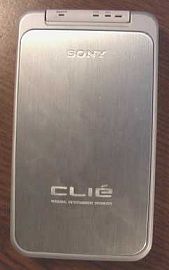
Yes, I know that it only has a 320×320 screen can we move on???
Hardware Specifications (direct from Sony)
OS: Palm OS® 5
On-board CPU: 200 MHz
Memory: 16 MB (RAM 11 usable)/16 MB (ROM)
Interface: USB (for HotSync® operation), Infrared (IrDA 1.2), Memory Stick slot, Remote
Commander LED3, Bluetooth
Display: TFT color display with backlights, 320×320 dots, 65,356 colors
Dimensions: Approx. 2 7/8 x 5 x 1/2 inches (Including cover; projecting parts not
included)
Weight: 6.2 oz. (including cover and stylus)
AC Power Adapter: (supplied)Output DC5.2V/Input AC100V 240V
Battery: Lithium-ion polymer rechargeable battery (internal)
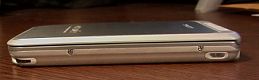
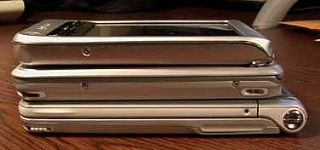
With the unit closed, it really looks like an adolescent NR (see photo). My reactions
to the pictures of the PDA led me to believe that it was closer to my T615 in size, which
it actually is much closer to that of the NR. However, in operation, the device does not
seem nearly as large as the now-famous clamshell design. I have actually been carrying it
in my shirt pocket since purchasing the unit and it has never fallen out.
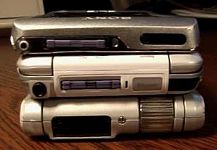
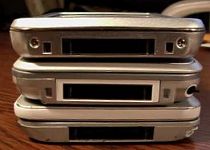
I gave the TG Julies patented twist-test, to which the device gets an "A
minus." While the chassis itself has no flex or groan, the battery cover is somewhat
ill-fitting and tends to "pop" on twisting or prolonged keyboard usage.
With the previous criticism out in the open, let me now remark that the TG would seem
to be one of the more durable PDAs that I have ever owned. Given a similar time-frame of
NR or T615 ownership, the surface of both had become marred and scratched from my
destructive tendencies. Im not exactly sure why or how, but the TG has but a single
bit of damage (a slight wearing of the corner near the sync port) in the torture-test that
is my life.
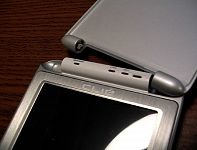
The cover is spring-loaded and is held fast in the closed and open (about 150 degrees)
positions. The sides of the cover are smooth, making the flip open operation a tiny bit
difficult. A small thumb groove in the sides of the cover would solve this problem (but I
will wait a while before taking the Dremel to my new PDA, thank you very much). The cover
can also be quickly removed by pulling it sideways and out of the mount, but the large
hinge assembly extends out of the unit, not really slimming the DEVICE at all. Several DIY
folk out there have cut their covers allow button access while maintaining screen
protection do it at your own risk, of course.
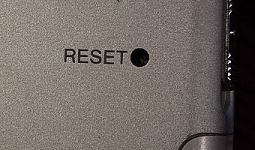
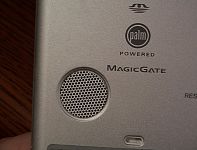
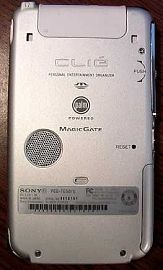
The back of the unit is the same silver metal that Clié users have come to know. There
is some texture to the material (so as not to be too slippery) and it collects
fingerprints the way I collect PDA cases. This rear plate also houses the speaker and
reset button (which is shallow enough to allow resets with the tip of the stylus no
more unscrewing!).
Speaking of the stylus, it is accessed from the bottom of the unit, exactly as the NR
series. Personally, I prefer access from the top, as I lost two styli (irretrievably) as I
wore my NR in its iVolution case on my belt. Next door to the silo is the standard Clié
connector that began life with the T-series and continues to this day. All of my NR and T
accessories were compatible, including my stowaway keyboard, though I had to download an
updated driver from their site (and find a PC unstuff it the DL is an .exe file
no Macs). The stylus is the same old news from the T and NR, and was sitting in a
DRAWER about 15 seconds after taking the PDA out of the box.
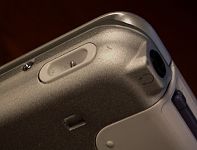
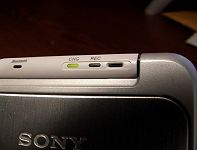
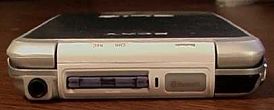
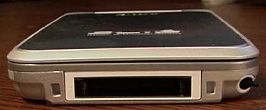
The top of the unit houses the headphone jack (none are supplied, but Im fine
with that, the quality is usually so poor that I have to get new ones anyway
),
Memory Stick slot (which appears to be free of the problems that plagued the NR series),
Bluetooth "Flashlight" (more on that one later) and the enhanced IR port.
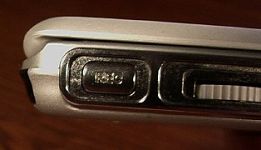
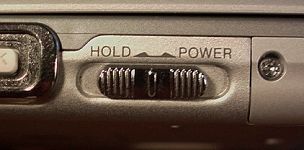
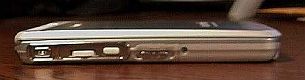
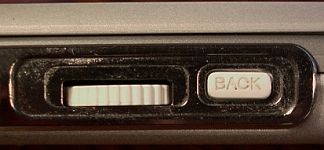
The left-hand side of the unit sports your usual array of Clié buttons, the jog, back,
voice record, and a fairly new item with Sony, the power/hold button combo. Personally, I
hate this item. Powering on or off the unit requires a thumb swipe (true, you can power up
with the traditional application buttons but not the new side buttons, but more on
those later). As much as I dislike the power switch, I have to give serious kudos to Sony
for enlarging the back button. I thought that the version present on the T615 was fine
(not that I had anything to compare with after migrating from a Vx) but the micro sized
jobber on the NR was only fit for Hobbits, and not much else. With this design change, I
am actually using the back button again.
Speaking of buttons, this little number has quite a few
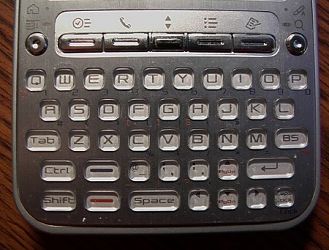
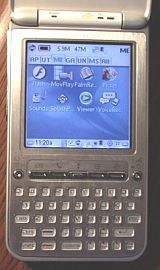
Yup, I write of the keyboard, the most CONTROVERSIAL aspect of the device. It is your
basic QWERTY affair with no dedicated numerical buttons; they are accessed through the use
of the black shift function (as opposed to the red one). In fact, if you are inputting
anything other than a letter, dash, period, or comma, you will be using the function
buttons. The keys are backlit and are spaced quite well for my little hands ymmv.
The graffiti command FUNCTIONS are duplicated with a dizzying array of keystrokes (there
are four total MODIFIER buttons on the board), of which I have mastered maybe 25%.
All-in-all, I have to say that the keyboard is superior to that of the NR, but it still
gets mighty annoying when a numeral is needed or I am in my second sentence I still
use graffiti (more on that later) when entering more than a scant few words. The keys were
somewhat stiff when first purchasing the unit, necessitating the use of thumb nails for
input, but they soon softened so that the tips of my digits were enough.
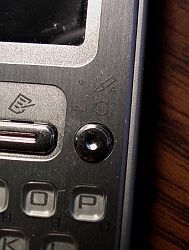
Just north of the keyboard are the revised application buttons. At first glance, they
appear almost identical to the T-series buttons (and the reason I purchased my first
aftermarket launcher application) but they are more usable. The "Main four" are
easy enough to push and even have a dimpled slot for stylus launching. The up/down toggle
is somewhat more usable than the T, but can still be a little on the painful side. I would
really appreciate an OS5 hack that would allow the inverted T arrows on the thumboard to
use with games.
Okay, on to the new buttons
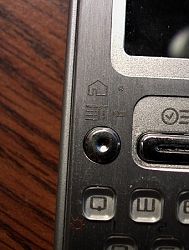
You may have noticed that there is no graffiti area on this device (and if you
hadnt, you certainly do now
). The four basic silkscreen buttons of the
traditional graffiti area are mimicked with a circular button to either side of the
traditional application buttons. The left one activates the "home" button (with
a short press) and the drop-down menu function (with a hold), and the right-hand version
pops up a graffiti window (more later) on a quick jab or search with a hold you are
out of luck for a quick link to the calculator. My usage of these buttons has been light,
partially because they are not user-changeable within the prefs (there are other apps that
will help you out, though), the buttons will not power the unit on (though the normal app
buttons will) and because the back button, launcher, and stylus make up the slack. These
buttons are also dimpled for easy stylus pressing. I have had incidents with several
applications that would not recognize these replacement buttons, leaving me literally
stuck in the app with no other choice but a soft reset. I sincerely hope that future
application updates address this situation.
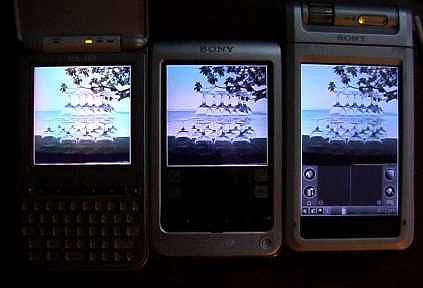
Okay, on to the screen. As you can see, it is quite bright when compared to the T and
NR (all were set to maximum brightness in the pic), and as you can also see, the TG
backlighting is plagued by wavy lines at the very bottom of the screen, or as I call them,
the "stage lights." Ive been using the unit for a month now, I have to
think about the stage lights to actually notice them, but they may be a serious problem
for some.
All right, for those of you who have really not been paying attention here, this screen
is 320×320, not 320×480. The size of the screen was my single biggest source of
apprehension regarding my NR migration. I was used to hires+, could I ever go back? In a
word, yes. After my time with this device, the only time that the lack of pixels bothers
me is when scrolling application in my launcher, reading/writing certain long documents,
viewing pictures, and when I see a really cool new VG skin that I can no longer use. Given
the smaller size and speed bump of the TG, I really prefer it to my NR.
Whew! Thats just the outside, what happens when you actually turn the thing on???
This is my first outing with OS5 and the faster processors that it supports, and I have to
say that I am impressed. The annoying [beat] between launching certain applications (like
zLauncher with all the toys on) is gone for everything but large games that I run via the
memory stick.
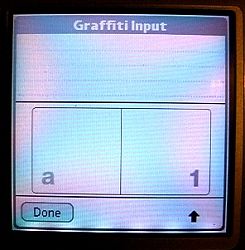
For those of you who still use graffiti, there is some good, some bad, some more bad
and some more good news. The first good news is that you can still use your classic
strokes to input letters and numbers (actually, the digitizer is the best I have ever seen
on a PDA) through the graffiti pop-up window. The bad news is that pressing a button push
is now required to use it and the cursor must be placed in an applicable text field to
launch the pop-up. This situation is particularly annoying when adding an address (as only
one field can be view at a time), using one of the command functions (if there is no
applicable text field), or in an application that the new graffiti window does not
recognize (as with the current version 2.2.10 of Wordsmith, a program that you just might
want to use graffiti with). Another piece of bad
this device does not ship with OS
5.2 and the graffiti 2 of the new tungsten model; you are stuck with the pop-up window
unless you look to other options. Speaking of options, the last bit of good news is
graffiti anywhere, a FREE application that allows command strokes anywhere, works with
every application I have thrown at it, and is configurable with any of the standard
application, jog, and back buttons.
And did I mention, its free???
As additional alternative to graffiti is the on-screen keyboard. Sure, its been
there since the birth of the Palm, but it seems a lot more useful on this Palm than those
in the past maybe not having a graffiti area that is unused while it is open has
some psychological benefits???
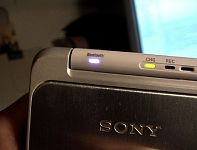
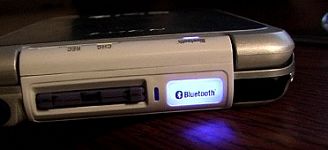
Lets talk a minute about Bluetooth
for those of you who are reading this
article for some hard data on the Bluetooth capabilities of the TG, you may be a little
disappointed. Sadly, this PDA is the only Bluetooth device that I own (and I call myself a
gadgeteer
). All I can say with assurance is that I was able to communicate with a
Tungsten T from 15 feet away and that the Bluetooth activation light is annoying. How
annoying is it? See the pic
I dont call it "The flashlight" for
nothing. When I get up the courage to take this guy apart (still have 60 days on the
*super duper* Sony warranty) I will pull the plug on the flashlight, then look into some
Bluetooth peripherals although making it work with the old phaser application and
TaleLight would be kinda cool (yeah, some of you laugh, others need an explanation
).
I will update this document when I go the whole Bluetooth route.
The last of the hardware/software features is the voice recorder. Honestly, I thought
that this feature (which has been on PocketPC for years) was an exercise in silliness. Why
in the heck would I want to record a voice memo when I can just write one??? Sure, there
is the driving situation, Ill grant you that, but what else is it good for? (trying
soooo hard not to break into Edward Starr
).
Honestly, I have gotten some good use out of the function, from recording draft
voiceovers for a multimedia presentation to performing an elementary reading assessment
for an impending career change. The function is about as useful as the camera on the NR.
Sure, you dont use it every day, but its nice to know its there. Quality
is very good and you can get hours of recording from a memory stick.
Software wise, the TG comes loaded with the multimedia options that Clié buyers have
come top expect. In addition to the "big four" apps, this model also includes
built-in:
Launcher: The swanky new one that first shipped with the NX, now in a smaller size.
Audio Player: Now in hi-res with the ability to set playlists.
Flash Player: Does just what it claims, but make sure there is enough free space on the
device to run the .swf files (free space = size of file).
Clié Viewer: This nifty (in theory) little app serves as a portal for the voice recorder,
image viewer and movie player application, so that all media can be managed from one
place. It is a neat idea, but I managed to really choke the thing with 80 jpegs. The video
application is quite nice, giving higher quality than Kinoma in a smaller size (but no Mac
support).
Netfront: From what I have read, THE browser for the Clié but I can not confirm
this, as I am still a member of the Bluetooth-challenged segment of the world.
As with all PDAs, there were some additional trial and demo APPLICATIONS aslo bundled:
Acid Free Cell
Bejewled
Breakout
BumpAttack
Crossword Puzzles for Palm OS
Intellisync Lite
Mobipocket Reader
Contact Pro
PowerOne Finance
PowerOne Personal Calculator
Presenter-to-Go
Streetfinder Express
WorldMate
Vindingo
Zap!
Overall, life with the TG has been a pretty pleasant affair – I have successfully made
the transition back to a 320×320 screen. I am loving the OS5, and even get some use out of
the keyboard. However, as I mentioned at the beginning of this review, Sony has a
development cycle second-to-none in the PDA industry. With Palm’s release of the new Zire
and Tungsten, rumors are already flying regarding the Sony response.
I Really like this unit, but would be really tempted by a model that trades the
keyboard for virtual graffiti, and there will probably be one soon.
Battery life was fairly good, I typically use the unit 2-5 hours a day (half of the
time with the keyboard) and I never get below 40% by evening. Of course, I charge every
night and I really don’t use the Bluetooth features.
The TG seems to have "Cult" written all over it. I can see this device (even
after it has been rendered obsolete – which may be by the time you are reading this
article) becoming something of a new TRG (once again, some people laugh, others need an
explanation), there are some folks out there who will just love this device, to others it
will simply be an technological oddity that is quickly obscured by the sands of time…
Price: $399.99
Pros:
Flip cover that can withstand "Mikey the terrible"
A keyboard that is (almost) usable
Bluetooth capability and MS usage
Cons:
No graffiti area/limited button support
Keyboard becomes cumbersome for large inputs/numerals
Bluetooth flash may cause seizures
320×320 screen (not hires+)
Goofy power switch

GMKtec Mini PC, G3 PRO Intel Core i3-10110U (Beats 4300U/N150), 16GB DDR4 RAM (Dual Channel) 512GB Storage Drive, Desktop Computer 4K Dual HDMI/USB3.2/WiFi 6/BT5.2/2.5GbE for Office, Business
(as of June 8, 2026 13:52 GMT -05:00 - More infoProduct prices and availability are accurate as of the date/time indicated and are subject to change. Any price and availability information displayed on [relevant Amazon Site(s), as applicable] at the time of purchase will apply to the purchase of this product.)
KAMRUI Pinova P1 Mini PC Computer, AMD Ryzen 4300U (Beats i3-10110U/3500U), 16GB RAM 256GB SSD, Mini Desktop Computer Support Triple 4K, USB-C, WiFi, Bluetooth, Ethernet for Business, Education, Home
(as of June 8, 2026 13:52 GMT -05:00 - More infoProduct prices and availability are accurate as of the date/time indicated and are subject to change. Any price and availability information displayed on [relevant Amazon Site(s), as applicable] at the time of purchase will apply to the purchase of this product.)Product Information
| Price: | 399.99 |
| Manufacturer: | Sony |
| Pros: |
|
| Cons: |
|

Gadgeteer Comment Policy - Please read before commenting
hi. please help me.
i bought the Hagiwara Sys-Com Memory Stick Wi-Fi Wireless LAN Card and i cant get it to work on my TG50. its compatible and i installed all the drivers, and the card lights up when i put it in but i cant configure it to connect to a wifi connection.
it cant search for available wireless connections and the browser its looking for in my TG50 in netscape. i cant find anymore netscape browsers…
what can i do? please help me.
Danielle,
I am very sorry, but I have not owned that device for some years now…and I would not be of any help in getting that set up with your WiFi card…
Once again, sorry…
Mike
I just got a TG50 a few days ago NEW through eBay for close to $200.00. I also ordered a higher capacity battery for a few bucks.
To install the battery (according to the Sony manual) you remove the little battery door, pull a couple of tabs and your off. Just pull out the old and put in the new.
WARNING! Do not do this. It’s the inserting of the new battery where the danger is. You are highly likely to take out the screen. I screwed mine up really bad. Fortunately I have a high aptitude for tinkering with electronics. I fixed it.
If you want to replace the battery, remove the entire back of the device so that you can reinsert the battery without doing damage to screen connections at the bottom of the device. One will kill the screen back-light and one will make the screen virtually useless. Be careful.