
Step right up folks, it’s the incredible shrinking iPod! The new Apple iPod shuffle makes their first generation shuffle look absolutely huge in comparison. Their slogan of “Put some music on” is fitting as this new shuffle has a built-in clip that you can use to fasten to your shirt, coat, gear bag, jeans, etc. Is this the end all be all mini DAP (digital audio player)? Let me tell you more about it and we can decide.
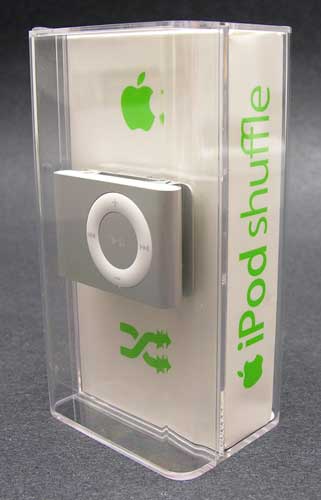
To start, I have to tell you that I like the new style of packaging that the shuffle and new nano are using. The cool reusable clear hard plastic container is so much nicer than the sealed plastic type of packaging that requires a blow torch and an ambulance on stand-by.
Hardware Specs
1GB flash memory
Frequency response: 20Hz to 20,000Hz
Audio formats: MP3 (8 to 320 Kbps), MP3 VBR, AAC (8 to 320 Kbps), Protected AAC (from iTunes Store, M4A, M4B, M4P), Audible (formats 2, 3 and 4), WAV, and AIFF
Audio: 3.5mm stereo headphone minijack
Power: Rechargeable lithium polymer battery
Size: 1.07 x 1.62 x 0.41in
Weight: .55 oz.
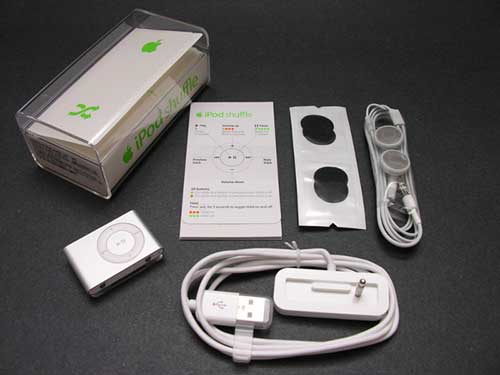
Package Contents
iPod shuffle
Earphones with 2 sets of earpads
USB Dock
Quick Start guide
Apple stickers
Hardware Design
Front and Back
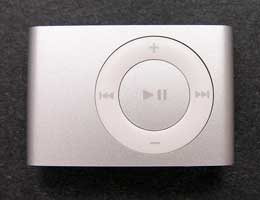
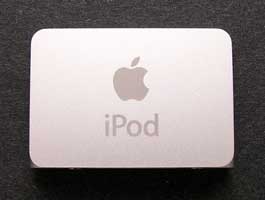
Smaller than a match book, this new shuffle is the perfect size for carrying with you all the time. I don’t think there’s anyone that can’t find room to put this little player in a pocket, purse or gear bag.
The body of the player appears to be made of plastic, while the outside shell is a brushed aluminum. No case is needed, although I’ve already been seeing silicon skins on the market for it.
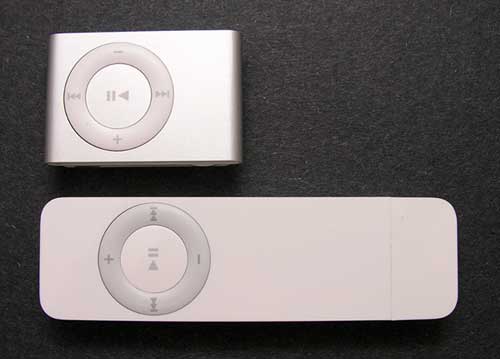
The style of the shuffle should be familiar to those of you that own or have seen the original shuffle. It has the same circular button configuration, that is your interface to the music stored within. There are controls to adjust the volume, play/pause, and go backwards and forwards through tracks. Some of the buttons have extra functions such as the play/pause button. If you hold this button down for 3 seconds, it puts the player into Hold mode. Hold mode will ignore button presses. Pressing and holding for 3 seconds will toggle it out of Hold mode. You can also press the play/pause button 3 times to go back to the first song in the playlist.
Top and Bottom
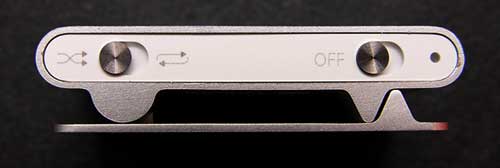
The top edge of the shuffle has two small metal switches and a tiny LED. The switch on the Left toggles between shuffle-play mode and play-in-order mode. The button on the Right is the power switch, and the small LED beside it, gives you status for battery, hold, pause, etc.
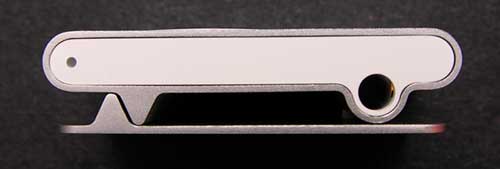
On the bottom you will find the 3.5mm earphone / sync / charge jack and the other side, the status LED. That’s right, the LED is duplicated on both sides of the player. Pretty nice as you can clip it in either orientation and still view the status.
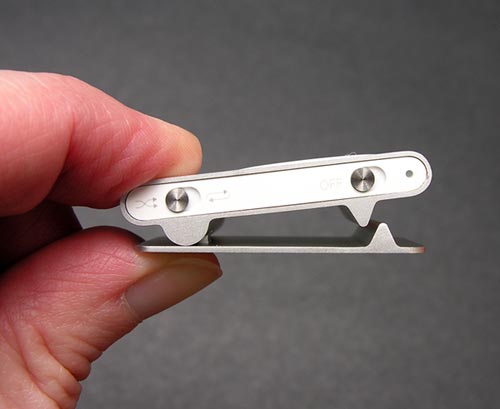
Speaking of the clip. The shuffle has a spring loaded metal clip built into the back side of the player. The spring isn’t super strong, but the two offset teeth allow it to keep a relatively good grip on things.
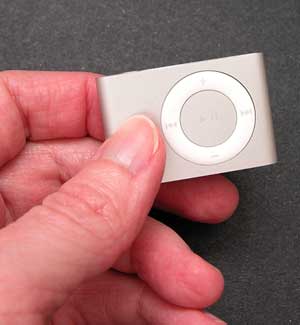
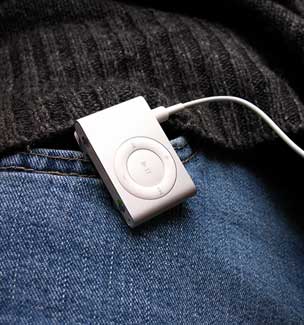
Most of the time, I keep the shuffle clipped on the neck of my sweater or my jeans. It’s so light weight that I don’t even notice it’s there. This would make a great player for use while working out, running, etc.
Before you can start enjoying this player, you have to first charge the battery. This is done with the included mini USB dock. The dock has a 3.5mm plug sticking out. It looks like the same plug that most earphones use. In fact, it plugs directly into the earphone jack on the player. It uses this same connector for earphones, charging the battery and syncing with your computer. Pretty nifty huh?
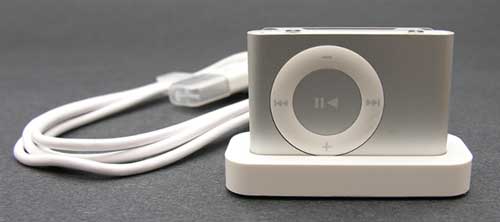
Isn’t the dock cute? Admittedly, I would rather have a retractable cable instead of the little dock though. A cable is easier to pack in a gear bag in my opinion and I predict such a cable will be available soon.
Now let’s get some music in this little puppy! In order to do so, you need iTunes. Fortunately for me, I already had it installed since I’m a self confessed iPod maniac. For those of you that don’t have iTunes on your computers, you have to download it as it is not included with the player.
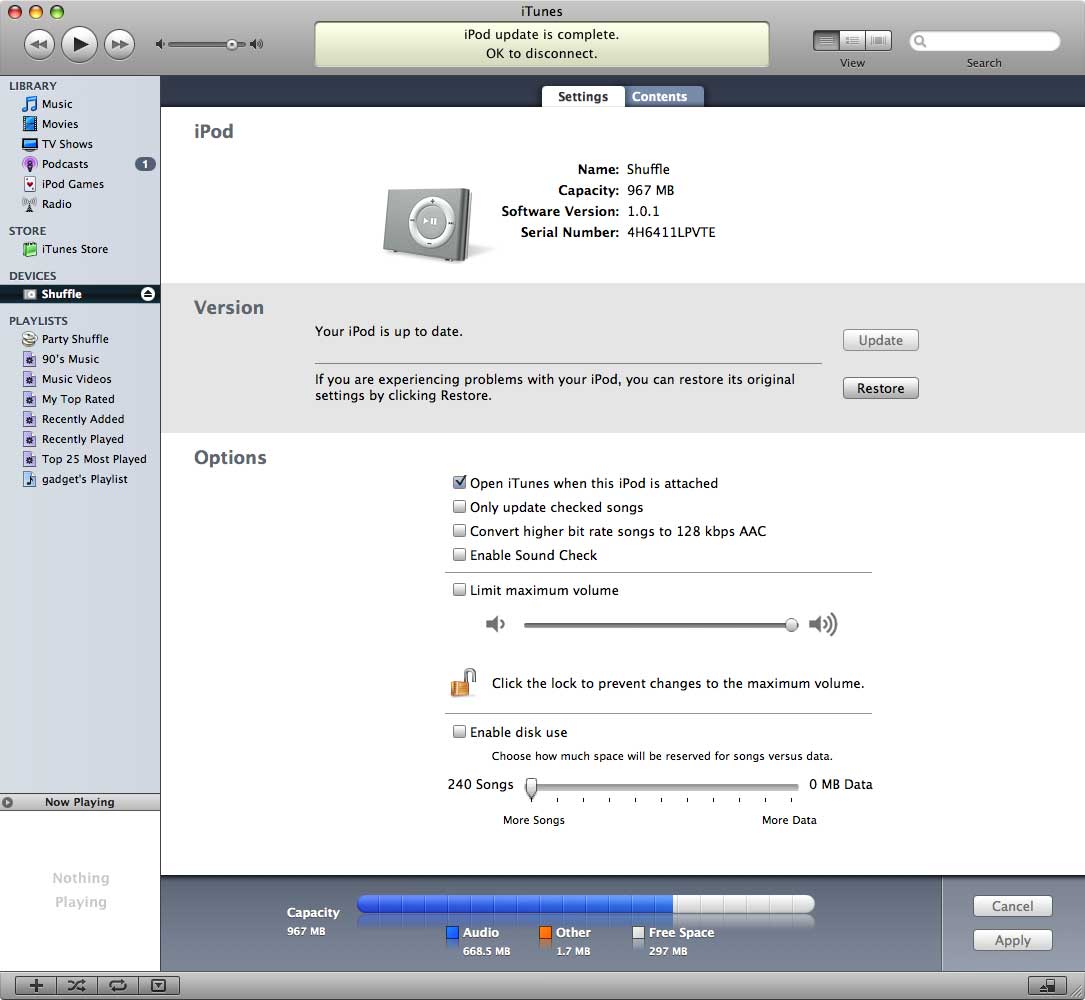

Click thumbnails to see full-size screenshots
After iTunes has been installed, all you need to do is plug the dock into a free USB port, plug the shuffle into the dock and wait for iTunes to recognize it. Then you can decide how you want to configure the player. You have the option of using all the memory (1GB) for music, or partioning it for part music and part data.
Other settings that you can customize have to do with your music. Do you want iTunes to pick a random selection of songs from your entire library and fill the shuffle? Or do you want to create a playlist of certain songs and just copy that over? You can also just drag and drop songs/albums. One nice feature is the ability to convert higher bit rate songs to 128kps AAC format before copying them to the shuffle. This allows you to cram more songs into the shuffle’s memory. I always rip my music at 192kpbs, so this feature is useful to me and doesn’t effect the original songs stored in my iTunes library. Without this using this feature, I was only able to copy 166 songs to the shuffle before the memory completely filled up. When I turned the convert to 128kpbs feature on, it converted and recopied all the music. Even though it takes some time to do the conversion and recopy, it was worth it when I had 317 megabytes of extra space to copy more songs into.
Sound quality with this player is on par with other players that I’ve tested in the past. It sounds good to me. Crisp, clear, and with enough bass to make thumpy songs sound good. It is interesting to note that the earbuds included with the shuffle are the original type and not the new improved ones shipping with the new iPod second generation nano.
A couple of random things… Just like previous iPod’s, if you pull out the earphones while the player is on and playing, it will automatically go into pause mode. Also, if you turn off the player in the middle of a song, the music will start playing from where it left off when you power back on and press the play button. Nice if you have to stop in the middle of listening to a podcast.
I like everything about the new shuffle except for the fact that it doesn’t have a display. I’m spoiled with my regular full-sized iPod in that respect. Of course this player isn’t really being marketed as the ultimate media player, so I can’t really complain. I’ll just whine ever so slightly instead ;o) Seriously, for $79, the new shuffle would make a great player for a kid. There’s not much on it that they can break. It’s also good for athletes and anyone that wants a digital audio player that both super small and super easy to use.
Gerber Gear Suspension 12-in-1 EDC Multi-Plier Multitool with Pocket Knife, Needle Nose Pliers, Wire Cutters and More, Gifts for Men, Camping and Survival, Grey
(as of June 9, 2026 18:46 GMT -05:00 - More infoProduct prices and availability are accurate as of the date/time indicated and are subject to change. Any price and availability information displayed on [relevant Amazon Site(s), as applicable] at the time of purchase will apply to the purchase of this product.)
Gerber Gear Diesel Multitool Needle Nose Pliers Set, 12-in-1 EDC Multi-Tool Knife, Survival Gear and Equipment, Black
(as of June 9, 2026 18:46 GMT -05:00 - More infoProduct prices and availability are accurate as of the date/time indicated and are subject to change. Any price and availability information displayed on [relevant Amazon Site(s), as applicable] at the time of purchase will apply to the purchase of this product.)Product Information
| Price: | 79.0 |
| Manufacturer: | Apple |
| Retailer: | Apple |
| Requirements: |
|
| Pros: |
|
| Cons: |
|

Gadgeteer Comment Policy - Please read before commenting
Post your comments on the Apple iPod shuffle (2nd gen) review.
http://www.the-gadgeteer.com/review/apple_ipod_shuffle_2nd_gen_
Just click the POST REPLY button on this page.
Thanks for the review, Julie.
As far as navigating to specific song on Shuffles is not too bad, since you can load your Shuffle categorized by Artist/Album/Song . Here is hwo I would to it, if I were looking for Vertigo, by U2.
1. Switch to random mode and skip songs until I got to a band whose name is in the second half of the alphabet.
2. Switch to sequential mode and skip songs until I got to U2 in the band list.
3. Skip songs until I got to “How to Dismantle an Atomic Bomb.”
4. Skip to “Vertigo.”
This sounds like a lot of work, but isn’t so bad, if you know yor songs by band/album. I got pretty good at (just a few clicks) it when my 2year old was demanding certain songs.
Of course, this was before my 1st Gen Shuffle died after 18 months.
Julie,
I’ve had an iPod since the very beginning. Currently using the 1st Gen Shuffle and I’m doing quite fine without a display. I’d love to make the jump to the 2nd gen!
However, I’ve read reviews by some “golden ears” who say the audio quality isn’t as good as the 1st gen shuffle.
To me, an iPod is an audio player FIRST and foremost. I certainly wouldn’t want the sound to get worse on the next itty bitty Shuffle I get!
Can you compare the two (same headphones, same music track, different shuffles?)
Great review!!! I have a 3rd gen iPod 30 GB (dead battery) and a 1st gen Nano 4 GB, but I still like the idea of this Shuffle for working outside, taking hikes, bringing traveling…how many iPods does a person need, anyway! I still have a Rio Carbon sitting around!!!!
Mark
Forrester:
Yikes. Your method is too involved for me 😉 Hehehe.
WirelessAndy:
I’ve plugged my 1st gen shuffle into a USB port to charge up. It’s totally dead. I’ll compare the sound quality tomorrow for you. 🙂
Can’t wait to “hear” the results (well, not literally)!
I compared 4 different songs, all saved at 128k AAC and heard no difference between the original and current shuffle. Both sound great to me 🙂
Super! Thanks for that.
Nothing left to do but to try it out for myself!
OK, so I went out today and bought one, and loaded it with Audible books. Since I have the device set to play the books in order, I don’t need a display, so it’s perfect. Only one boggle…the Shuffle charges fine through a PC’s USB port, but it will not charge if plugged into my various USB AC adapters (or Boxwave battery-powered emergency charger), a problem I never had with my Nano. Anyone experiencing this? I plug it into the USB AC adapter, the light blinks orange three times and then goes out. I updated the firmware, no difference.
Thanks!
Mark
Whilst websurfing this morning, I came across this link:
iPod ShuffleBud
It’s a $6 (US) adapter that lets you plug your new shuffle straight into the USB port.
Looks like it’d be a nice solution for your travel needs. 🙂
After reading many reviews, I bought a 2Gen Shuffle for my wife for Christmas.
I put the new Shuffle through it’s paces in the store, and was completely satisfied with the sound quality and the interface. I think the Shuffle will be perfect for her since she’ll use it mainly when she’s working out or hiking. I still have my 3Gen standard iPod for carrying around the bulk of our music library when we need it.
The unit felt a little cheaper than the 1Gen Shuffle. Maybe it was the somewhat enimic spring on the clip (though in my testing, it’s strength was sufficient to keep the player on my clothes thanks to the well-designed teeth), or maybe the small and cheesy switches they used on the top, or perhaps just the light weight… but it just didn’t feel like an Apple product, in all honesty. But it definitely grew on me just what little I held it and used it in the store.
I’m mildly disappointed that they didn’t put a standard dock connector on the thing, though. With all the third-party products that now use dock connectors, including the high-end integration unit I have in my car, it seems like a pretty important piece of the puzzle. If my wife ever takes my car to workout, it would’ve been nice if she were able to plug her Shuffle in, just like I do my full-sized iPod. I’m hoping that somewhere down the line, there will be an adapter with a dock connector on one end, and the Shuffle’s hybrid mini headphone jack on the other. And, quite frankly, I’m a bit surprised there isn’t already one out.
I’m also a little scared that, with Apple releasing yet another connector, third party manufacturers are going to start thinking iPods are too hard to support… and we’ll see fewer and fewer cool iPod-specific accessories.
But, for the advantages of it’s size (not to mention it’s price point), I think it’s a great little unit.
The only bad part about the whole purchase is it’s sitting wrapped up under the tree so I haven’t been able to really play with it. :rolleyes:
Thank you to everyone that posted reviews. It definitely made the decision easier… and more informed.
This iPod is beast. Its been through the wash. In a pond. Run over by trucks. Smashed by hammers and all other forms of torture. Its perfect if you have a job where small stuff tends to get broken. Its because theres nothing to break on it. theres 5 buttons and 2 switches the rest is basicly just aluminum. Ive had it for two years and with the above treatment. Good music player here. Never ever gonna get one that has a screen. Pce
how can you return it to the being of the first song?
please right back right now
@anna That’s a very good question. I don’t think there is a way to get back to the first song in a playlist without skipping all the songs till you get back to it. Depending on how many songs that you have in each list, that could take a long time.
If you are in “shuffle” mode, pressing the PLAY button 3x (like doing a triple click on a mouse) will shuffle the songs and play the first song of the shuffled playlist. If you are in “Normal” mode, pressing the PLAY button will send you back to the first song of your playlist (and this should answer your question 😀 )
I forgot to mention on Normal mode, you have to press the PLAY button 3x also to go back to the first song of the list, without the need to skip through the rest of your songs. 😀
Hey Whats up. A friend gave me his Shuffle after getting a new Nano but lost everything that came with it. i bought the ipod shuffle USB cable for it and i already had iTunes on my comp but its not reading it for some reason. i dont know if the shuffles jack is messed up or what but i dont understand why its not reading it. is it because i need the Dock or somethings rong with the suffle its self? please get back to me on this. i would Love to be able to finally have my own ipod to injoy.
Thanks Donnie D ; )
@Donnie D When you plug in the shuffle, does the LED next to the power switch glow to show that it’s charging?
I want to buy an ipod shuffle because the other ipods cost to much!
I already have an MP3 player but want an ipod because it can use itunes!
Can you use itunes for mp3’s or just ipod’s?
Is it annoying when you try to find a specific song and you have to go through heaps of songs or is it in alphabetical order?
Thanks 🙂
I am totally in another world when it comes to iPods, etc. I am thinking of buying a 2nd gen Shuffle to connect to my motorcycle. I know that you can insert a regular memory stick into it, but can you use the Shuffle to do the same thing? Or, must I buy a Nano?
I might buy one ! 🙂
im brobably gettin 1 2morow ! 😉 😉 🙂 🙂 :p ;p :-p ;-p
I would like my Shuffle (2G) to turn off after playing through the play list as I listen to it while going to sleep. Is there anyway to do this?
Thanks!
-Trouble getting to sleep.
I keep my shuffle in my gym bag. I haven’t used it in a while, so the battery has run out. I am trying to charge it from my computer but the orange light keeps blinking and it’s been charging overnight. Does anyone know if that usual or if something is wrong? Thanks for your help!
I have the iPod shuffle 2nd generation and is perfectly fine! I have had it a while and it has never gone wrong once! Hope this is helpful!
Please help!!! I won this “ipod shuffle” in a game at a local resteraunt. But its not a real ipod. it is the same as the ipod shuffle 2nd gen except it only has one switch and an atcual plug for the computer not one that goes where the head phones go. one light is red and the other is blue. It even came in the same package except everywhere it says “ipod,” it says MP3. I got music on it and it plays when plugged into the computer but it won’t turn on when i unplug it, please help!
-Evan
I bought my 2nd generation ipod shuffle many years ago,and I haven’t used it in many years. and it wont charge. How do I fix that?