
The other day a friend of mine showed me their new cellphone. I couldn’t tell a difference between their old one and the new one. The new version looked exactly like the old one. This has happened to me before with various things, like software programs for example. Sometimes the new version simply doesn’t provide enough reason to upgrade. Avid bought the Pinnacle software line a couple years back and turned Pinnacle Studio into Avid Studio, which I reviewed in the summer of 2011. It was a serious, fundamental change from the Pinnacle Studio I had grown to love, but my review was favorable. And now Avid recently sold the software line to Corel who decided to return to the Pinnacle brand loved by so many. So with the new release of Pinnacle Studio 16 Ultimate, would version 16 live up to the Pinnacle brand I had known and loved? Would it best Avid Studio? Would it again be another complete departure from previous packages? Let’s find out!

When I opened Pinnacle 16 the first time I thought I was looking at Avid Studio. Honestly, I thought I had mistakenly opened the Avid Studio package because I was expecting to see an updated Pinnacle interface from a previous version of Pinnacle. But what I discovered was that Pinnacle Studio 16 is an upgrade from Avid Studio. I initially couldn’t see any difference between them, which caused me to be a little disappointed. But that quickly changed, as you will soon find out. But first…
My initial thoughts when I opened the box:
- Green screen sheet. Nice.
- 3D glasses… whoa… what’s this? Interesting indeed.
- Tutorial DVD… nice touch as well. Although the same videos are on the Pinnacle website.
- Installation guide. Helpful.
- Quick-Start Guide. Very helpful.
- Free 25GB of storage from Box, and an additional 25GB when you register the product. Wow. 50GB?? That’s more than I have with Dropbox, Google Drive, and Skydrive. Sweet.
So I got the Pinnacle Studio 16 Ultimate package ($129.95), which is a step up from the Pinnacle Studio 16 Plus ($99.95). So what do you get for that extra $30? A bunch:
- Green screen sheet
- Red Giant toolkit
- Motion Graphics toolkit
- 2,000+ 2D/3D effects, transitions, titles, & templates (as opposed to 1,800+)
- Unlimited audio and video timeline layers, instead of 24 you get in Plus
Installation and first use
I had some issues right after installation. My video camera that I use the most records in .MOV format. And none of my .MOV files would play in the timeline. I submitted a tech support request (after registering my product, of course), and working with them revealed that there was an issue with the codecs that my files were using and the Pinnacle software. Tech support provided me some files to replace on my system after they discovered the issue, and it was resolved. I give them props for a quick resolution to that problem.
What’s new in Pinnacle 16?
I am going to refer several times to Avid Studio, since this package is an upgrade to it, so if you want to read my review of that package then go here.
I discovered a whole host of upgrades and enhancements from Avid Studio to Pinnacle Studio 16. Little things that I didn’t initially notice but that now are really big in my mind. Let me simply list them in bullet form for you. (Some screenshots that refer to these bullet points are below.)
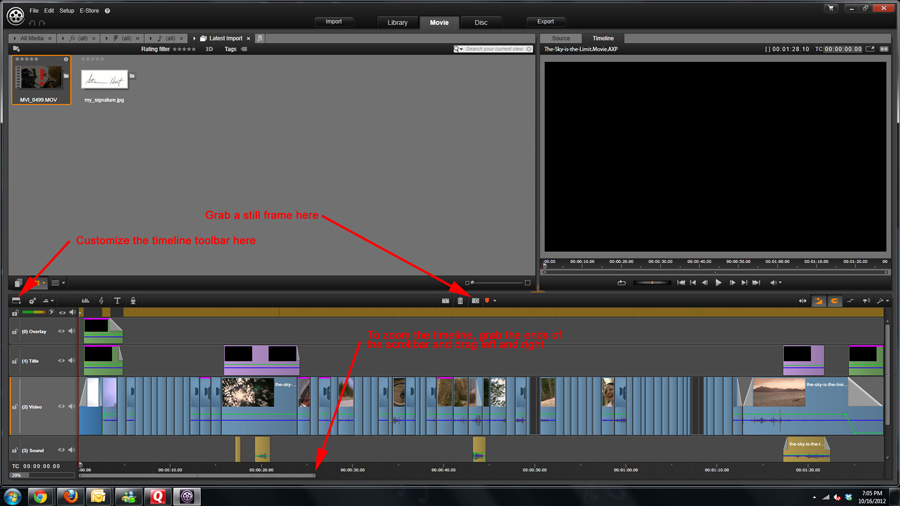
- There is a toolbar right above the timeline. You can customize which buttons show up on that toolbar, which you couldn’t do in Avid Studio. Very, very nice!
- In Avid Studio if you wanted to grab a still frame from a video (which is a common thing to do in these video packages), you had to open up the clip in ‘corrections mode’ and then grab it there. Big hassle. Now with Studio 16 you can use the Snapshot button on the timeline toolbar without opening up anything else. This is one of the biggest improvements, and whoever decided to do this deserves a hug. Seriously.
- Also on the Timeline toolbar is the Dynamic Length Transitions button, which allows you to set the duration of the transitions you add. If you don’t have this selected, a standard transition length will be added, which you set in the project settings.
- All the options available in the Import tool remain (webcam, DVD, computer, stop motion, snapshot), but now you can also import media from the “cloud”, which is that free Box.com account that I previously mentioned. It sure would be nice if they integrated Dropbox, Skydrive, and Google Drive as well.
- In the Library when you preview clips, you have many more options, including scrubbing through the clip, uploading to Box.com, applying tags, etc.
- The Export tool in Avid only had options for File, Disc, and Web, and the only destination for ‘Web’ was YouTube. Now the Export tool has options for File, Disc, Cloud, and Device. Cloud allows uploading to Box.com, Facebook, Vimeo, and YouTube. And Device adds types for Apple, Nintendo Wii, Xbox, PSP, and PS3. This update to the Export tool is awesome, and much needed.
- The Export tool also added an ‘image sequence’ output option, which creates a series of HDV TIFF images.
- In the Control Panel, you now have an option for “Keyboard”, where you can create your own keyboard shortcuts for almost every task you can perform. Very nice touch!
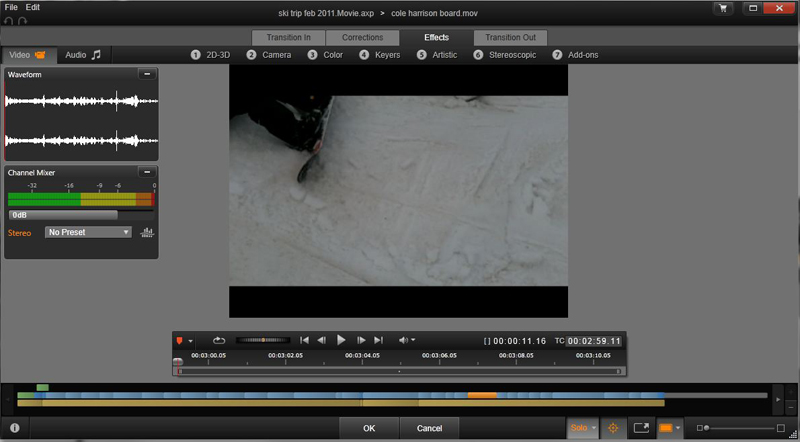
- The Corrections Editor and Effects Editor have more options available to you. In fact, in the Effects editor you can now apply affects to any transitions that are attached to the clip, which is a nice addition.
The updated Import Tool:

The updated Effects Editor tool:
Timeline zooming
One of the biggest interface changes is something I wanted to specifically mention. In Avid, if you wanted to zoom the timeline to see more or less of it on the screen, you had to use this Zoom Selection window below the timeline. The use of it grew on me, yet the manner in which you use it still doesn’t seem natural. In Pinnacle 16 ,they completely changed it so that you simply grab the ends of the scroll bar on the left or right ends and drag it to show more or less of the timeline. I will be honest and say that I think this is a step back. Not in the aspect of how it works because once I figured it out, I get it. But for the average person, especially the novice, this feature may never be discovered because the usability of the feature is unlike anything in use today.
I think that Avid needs to quit getting creative with the zooming for the timeline. Just make a zoom slider to do it, which most users will recognize because they are used in a bunch of other software programs. In fact, there is already a simple zoom slider in the library panel view, so why not do the same thing for the timeline?? Makes no sense to me. The person who came up with that does not get a hug.
3D features
A big enhancement in Studio 16 is the ability to import 3D clips, edit in the timeline and apply effects to the 3D clips, and output in full 3D format. Using the 3D glasses included in the package you should be able to use the package for all your needs. Unfortunately I didn’t have any 3D footage to test this, so I can’t speak to how it performs in this regard.
Claiming your Box.com account
The first time you export to the cloud to Box.com, you’ll be prompted to open your free Box.com account with the free storage. There are no instructions in the box on this, so let me just go ahead and say “you’re welcome”.
Studio 16 update
Before using Pinnacle Studio 16, go grab the system update here. There are many improvements and fixes, which you can read about at that link.
Performance
The bottom line in performance is that the software imports files faster, renders faster, plays preview clips faster, and generally operates faster than Avid Studio in just about every way. I am very, very happy about this.
Bottom Line
The improvements and enhancements between Avid Studio and Pinnacle Studio 16 are huge, although you won’t be able to initially tell it by looking at the interface. But make no mistake, this update is big. And the fact that they knocked off $40 from the price and gave you more is simply icing on the cake. The price is still higher than other consumer-level products, so that will keep some folks away. And I still think, as I did with Avid, that this package is a little more than the complete video novice will be able to handle. But what you get for the price is amazing, and the interface and performance improvements will make existing customers upgrade for sure. There are still some improvements that Avid can make, but on a scale of 1 to 10, I give this package at least an 8, maybe a 9.
Product Information
| Price: | $129.95 |
| Manufacturer: | Corel |
| Retailer: | Corel |
| Requirements: |
|
| Pros: |
|
| Cons: |
|

Gadgeteer Comment Policy - Please read before commenting
Great review! Some additional info… Corel, yes the PaintShopPro and VideoStudioPro people, over the summer bought Pinnacle from Avid. So, it is a part of the Corel family. Corel’s plans, at least for the moment is to keep Pinnacle “separate” from the Corel website. Whatever you need to access concerning Pinnacle can be done in Pinnaclesys.com.
I know that there is a lot of cram into a review, and time will bring out further what enhancements and improvements PS16 has over AS1, but there is now a “Storyboard” feature, while not as easy or intuitive as Studio, it works for those that like “Storyboard”. Me personally, I never use it, but it’s there. The 50gig free Box account you get will allow you to upload files up to 2gigs. Nice. If you have Avid Studio, when you upgrade to PS16, you will notice that in Red Giant, while you gain Mojo, Cosmo and Warp, you lose ToonIt and 3DStroke. BUT, they can be copied over from Avid Studio and work just fine.
All in all, I haven’t touched Avid Studio since I have gotten PS16 Ultimate! I hope Corel continues moving this product forward.
And thanks for reviewing a product that I really enjoy working with. Oh, I do not work for Pinnacle or Corel, I am just a very satisfied user!
@TonyP You are correct…. Corel is indeed the owner of the Pinnacle line now. I communicated with Corel folks several times regarding this product, so that mistake is a pretty big one. Thanks for catching that. I have made that correction in the text, but I still refer numerous times in the review to ‘Avid Studio’ because I am comparing this version to that previous version.
I am glad that you make the reference to Avid Studio. There has been much confusion for some people thinking that PS16 is an upgrade for Studio15 and shocked to find out it isn’t. Especially after buying it! Some people just want to edit the family vacation. Studio15 was easy to use and great for that. But I guess Corel figures it has VideoStudioPro (I do have both X4 and X5 Ultimate) which was a direct competitor to Studio15. Some people can not make the transition. I guess Corel was leaning on the marketing value of the Pinnacle Studio name.
Hey, the next time you communicate with the folks at Corel, tell them to add some prosumer features like secondary color correction, dynamic time warp, OpenCL support, the Classic Title from Studio (the current one produces soft titles), 2k & 4k support (for marketing purposes), multicam with auto sync, and you add some too!
Re timeline zooming – I did not know you could grab the end of the timeline scroll bar to zoom, until you mentioned this I clicked and dragged in the timeline just above it. Now you’ve told me about this method I love it – because it gives a high speed zoom compared with the method I was using. How this compares with the industry standard I don’t know. I don’t do enough video editing to comment on industry standards but I know that, having started with Pinnacle 8 and since used 9, 12, 14 and Avid Studio 1 and 1.1 before Pinnacle 16, I’m loving this ‘version’. Studio 1.1 was good but there were times it could make me quite frustrated. Corel have made a whole bunch of unlisted changes to Studio 1.1 and, to my mind, all for the good.
I am just waiting for them to update how ‘titles’ are handled – these are still a cause of annoyance but, judging by what they’ve done so far, it shows they’re listening and I’ve no doubt it will be on their ToDo list.
Paul
Paul, I too have griped about the quality of the titles. What is missing is the Classic Titler from legacy Studio. The old Title Deko that made working with Titles so much faster and easier, along with producing a better output.
@Paul Clicking above the timeline and dragging is a hold-over from Pinnacle Studio, but in my opinion that isn’t intuitive either. I still think that a zoom slider makes the most sense and from a usability standpoint, most users would recognize that. There is plenty of room in the toolbar above the timeline for it, so it is just a matter of them putting one there. I feel good about Corel’s responsiveness to customer feedback, so I think the titler will get updated.
@TonyP
>> What is missing is the Classic Titler from legacy Studio. <<
Indeed, a wonderful example of if it aint broke don't fix it. The Titler in all previous versions of PS worked just fine.
@Sreve
You may be right in that it's not intuitive but, like all things, once learnt it's OK and some, like me, may prefer it. Not that I'd object to a zoom slider as you describe – so long as it was added as opposed to substituted.
Great review, very balanced and above all clearly written, it has made my mind up to upgrade from Avid Studio which although frustrating at times was the best I have used.
I also agree with Tony P about the Classic Title Editor and Auto Sync – these would be a tremendous help that I would be willing to pay for !!!
Thanks again
Bob
Excellent review as I have always used Pinnacle for editing this has given me a clear picture of the upgrade, but I have just bought a new higher spec 64 bit computer and a Panasonic HC-X900 camera. Will I be able to load the video direct into Studio through a USB 3 port as the camera does not have a firewire connection on it? If so I will purchase it.
Thanks for the info
My computer specs are Win7Pro 64bit with 16gigs RAM, ATI HD5870 w/2GIGS ram, OC’ed AMD 1090T 6core CPU and the program works well. I edit Canon AVCHD and Canon DSLR mov videos with no problem.
What I would suggest to you Richard is to download the trial version first before making the purchase. If you have any issues, the best place for answers is the Pinnacle Forum. The download can be gotten here http://www.pinnaclesys.com/PublicSite/us/Products/Consumer+Products/Home+Video/Studio+Family/Pinnacle+Studio+16+free+trial.htm
The user forums is http://forums.pinnaclesys.com
@Richard TonyP gives good advice. Download the trial and wear it out to make sure it does what you need. I think you’ll like it.
I just bought this product due to an issue I was having making movies in the simple Windows Movie Maker – issue being the program would not read the video in my .mov files – which are the only ones I have and need to make movies with.
Will I be able to still use the program with my .mov files from a Nikon Coolpix S8200 camera?!
@Courtney… you should be able to edit those .mov files. I use a Canon DSLR and edit the .mov files all the time without any problems. My suggest is, IF you haven’t opened the software yet and can return it, download the trial version first (30days trial) and see if you can work with your HD files. You can get it here..
http://www.pinnaclesys.com/PublicSite/us/Products/Consumer+Products/Home+Video/Studio+Family/Pinnacle+Studio+16+free+trial.htm
TonyP speaks the truth. He’s the bomb. I also use .mov files with my movies, which were created with a Kodak camera.
Thank you so much for the quick advise! I am working on making videos for my company. I will take the advise and get started, thank you!
@Courtney, no problem! I have used the software since it was released and it’s precursor, Avid Studio. Yes, the software does have some problems, but I have been able to finish whatever I have started. There is a learning curve, but the tutorial DVD helps getting you up and running. For additional help, you can log into the Forums. Plenty of good people there willing to help out others.
http://forums.pinnaclesys.com/forums/242/ShowForum.aspx
@Steve, you are much too kind! I enjoy using the software and use it almost daily. Hoping for continued improvements from Corel in the future! BTW, Happy New Year!
Okay, so now my only problem is that I do not know what program to open the downloaded free trial file in . . . I do not really have anything close to what it is on my Windows 7 computer . . . any suggestions?
Add .exe to the end of the file and then double click on it.
Have just spent the last 2 hours being shuffled back n forth between Pinnacle’s site and Corel while I try and download the product I purchased. The set up of existing Pinnacle accounts and the new ownership by Corel is a total shambles. Different user names and passwords for your account, the store and technical support. Can’t find my existing order as the password Pinnacle sent me is INCORRECT !!
My recommendation is GIVE THIS PRODUCT A MISS…find a much more user-friendly software manufacturer and particularly a much more user-friendly web site. The new owners of Pinnacle are turning a well supported product into total chaos. Shame on you Corel !!
Peter T, I can totally understand your pain in this. The migration from Avid to Corel should have been done a long time ago. Corel obtained Pinnacle last summer, in the midst of Avid Studio (the name for PS16 at that time) being updated to Avid Studio v2 (now PS16). The Pinnacle Forums (http://forums.pinnaclesys.com) would be the place where you can get the most assistance. There are user Moderators that are in touch with the “powers that be” along with a couple of employees that stop by to trouble shoot. Give it a shot at least.
I still use my original user name and password that I have had since DV500 and Studio 8 days. Have you tried http://corel.force.com/pinnacle?lang=en
Can you log in here with your previous account info?
http://www.pinnaclesys.com/PublicSite/us/MyPinnacle/
Stop by the forums and make a post. There are those that can help.
Also, try this phone number 1-877-582-6735
I hope it helps.
I also was a Pinnacle user from ”Studio 9” 11” 14” and now 16” ultimate witch is the worst.
The layout is done very nicely and I was able to see some extra FX that I needed to purchase separately in the earlier versions.
Advid which also makes Pro Tools DAW audio recording program sold Pinnacle to Corel and just like I thought, this transition sucks. Pro Tools is also loosing it’s popularity as well, except for the studio’s that started with Pro Tools and invested thousands and thousands of dollars.
I needed help to solve a problem uninstalling the earlier Ultimate 14 from my Laptop the every time I boot it up it gives me an several error codes that is very annoying, I tried to get help for almost three days and it is totally impossible being directed to Pinnacle to obtain a service code number then be directed to Corel and back and forth with no phone support, I even called a listed support # that was disconnected, this is a total nightmare.
I got refunded and may wait until Corel totally implement the Pinnacle setup into their program.
Hopefully it will get better in the future but for now, do yourself a favor and avoid Pinnacle 16 like a plague.
@Reggmail Sorry to hear about your troubles. My experience has been much better than yours. I still stand by my review of the software, and I still use it often. thanks.
Reggmail. You say PS16U is the worst but give no real reasons why. Yes, there are bugs with the program and they have been reported. The Forum Moderators are keeping up with issues that can be reproduced. So exactly, why is PS16 Ultimate terrible?
As for your inability to uninstall S14, that can be from many many factors that are not related to S14 but your computer. You failed to give what errors you get. I have had Studio since version 8, so I pre-date you on the usage of Pinnacle software. I’ve had every version from S8-S15U and have uninstalled them without any problems. IF you really want help, then stop by the Pinnacle user forums, log in and make a post with as much detailed information that you have. Saying I get errors does not help. Give the error code and what it says.
People will blame a piece of software for not doing “something”, when a lot of times, it is user error or some issue with their computer. If many people are using it and are able to uninstall it and you can’t, where do you think the problem is?
Hello Steve and Tony P.
Thank you both for your response.
Here is a copy of the request in (specifics) that I sent to Avid Support.
Recently you requested assistance from Avid Customer Success. Below is a summary of your request and our response.
To update this case, reply to this email leaving the subject line as it is and enter your response at the top of the email.
If there is no response, we will check in with you in 5 days.
If you have a support contract you may use the following link to log in and view, create and manage your cases (does not apply to Avid Vantage or ASC cases):
Description of my problem.
I am receiving these messages on my laptop after uninstalling Pinnacle 12 &14 and then installing Pinnacle 16 Ultimate. Every time I turn on my Laptop I receive at least tree or four of these messages below. ”The feature you are trying to use is on a network resource that is unavailable. Click ok to try again or enter an ultimate path to a folder containing the installation package ‘status msi’ in the box below”. C:\Users\Reggie\AppData\Local\Temp\7zS4EAA\OJ6500vE709_Full_14\setup\status\ C:\Users\Reggie\AppData\Local\Temp\7zS4EAA\OJ6500vE709_Full_14\setup\status\ C:\Users\Reggie\AppData\Local\Temp\7zS4EAA\OJ6500vE709_Full_14\setup\status\ What do I need to do to stop this from occurring. Thank you.
Reply from Avid Support. Dear Mr. Sutton,
Thank you for contacting Avid Support.
Regarding your query, please be informed that all Avid Studio and Pinnacle products have
been purchased by Corel . As a result, all Studio related queries should be addressed directly to them.
For more information on how to contact support, please visit the following websites:
http://www.corel.com/corel/pages/index.jsp?pgid=800145
http://corel.force.com/pinnacle
Also, I can advise you to use the Pinnacle forums in order to find solutions to the issue.
http://forums.pinnaclesys.com/forums/default.aspx
Please don’t get me wrong, and I apologies if my letter seem to be downing Pinnacle as the worst Video program…it is not. In fact, being with Pinnacle as long as I have should prove that.
It’s just that I got very frustrated when I tried to call, write, email, going back and forth from Corel to Avid getting case number’s lots of hassle on top of the original problem issue, and received no direct response to solve my problem.
Being a music producer I have used many programs over the years and most companies respond and help solve your issue, without hoop jumping.
Pinnacle at this transitional time for me was the worst costumer service I have dealt with in years. (Then they direct you to the forum where helpful people at times use trial and error options that may work and sometimes can make matters worst.
I truly hope that Pinnacle 17 if they continue the brand have better technical service people will deal with issues and not pass them off. again thank you for your response.
@Remail, first, Avid has not owned Pinnacle since last year, so you are writing to the wrong people. The links they sent you should work. Also, the link to the webforum is best to try and get help. In general, run a registry cleaner after uninstalling will remove bits and pieces left in the registry by just about every program. I use Ccleaner which is free.
For further help, go by the Pinnacle forums.
Thank you for your response Tony P.
As I mentioned in the response before, I did notify Corel the owner of Pinnacle 16 and was not successful after many tries. That is why I got frustrated. As I also stated earlier for the time that the ownership changed hands, the customer technical department response, should be just as accurate and efficient as the sales department. In my experience, at this time that is not the case.
I do use C Cleaner as well and it wasn’t able to salve this ongoing problem, thank you for the suggestions.
@Remail, looking at the location of those files, they are in the temp folder. I have a couple of suggestions. Run CCleaner “Cleaner”. See if when it finishes analyzing that those links show up. If not, since it is a temp folder, rename them something else. Those are “hidden” folders so that you have to “show” them. Open My Computer>Tools>Folder Options. Select the tab “View”, then Advance Settings>Files and Folders>Hidden Folders. Tick “on” Show hidden files, folders and drives. Then you can go to that directory and do the renaming.
Hope it works.
Thank you again for your help TonyP.
I will give this a try, it does show up in C Clean when I run the registry. Then I allow C Clean to fix /delete the files but when I reboot, the annoying gray three boxes of notification comes back.
I will give your suggestions a try…thanks again for your help and concern.
hey tony. how big is the green screen?
@Stephanie, I really don’t know. Mine is still in the vacuum sealed blister pack. But I would have to guess it’s big enough to be put on the wall so that one person can be “green screened”.
What I would strongly suggest is that you download the program, look for tutorials on green screen and see if you can’t pull it off with another flat wall color using Chromakey.
@ Stephanie… ok… I have the size of the green screen.
5 ft x 6 ft (1.5 m x 1.8 m)
Not big for a full body shot of me (6’3″ tall), but for most people, it is fine. Especially if doing upper body shooting.
I have used my green screen numerous times, and like Tony P said it is good for a shot from the waist up. The only difficult part is stretching the green screen properly so that there are no wrinkles or folds, and lighting the subject properly.
TonyP said “I edit Canon AVCHD” on December 27, 2012 at 2:31 pm
I used to use PS14 and just switched to PS16, and I have difficulty to read Canon AVCHD video clips into PS16 (IPS14 read it easily). Would you tell me how to make it work?
My video is recorded to SD cards. I create a folder on my computer for the video. Dump all the video there.
When I open PS16, I go to the Setup>Watchfolder. ADD the new folder and you will see the assets being added in the lower right corner.
Let me know what happens.
Hi – Upgrading from ye old Studio 11U to this 16U version…I only make videos from time to time but I love having the best versions and I ran into that old “skippy transitions” thing…
Any hints for this jump in versions? I read above and am in process at this moment in downloading the trial version. You mentioned some enhancements that should be loaded before you start. Can I load these on a trail version? Or do I need to get the full version first? ANy deals for an upgrade or will I need to pay the full $129? In Studio 7 I think I bought a bunch of effects…Will they all be found, etc? I remember one upgrade where I had to get all my Keys re-entered. DOn’t know if I even have all those lying around anymore…Or is all that old hat anyway? Answer what you can, I am not too concerned overall…I am sure I will love it…
I would strongly suggest you look at the online tutorials by Class on Demand. This will give you an idea of how to use the software. While it isn’t a hard one to learn, it is a total departure from Studio. It is really Avid Studio V2. While it can be used by the casual user, PS16U is more for the enthusiast/prosumer who wants to do more. I would suggest you download the 30day trial and give it a go. You can get it at this link along with watching the tutorials.
http://www.pinnaclesys.com/PublicSite/us/Products/Consumer+Products/Home+Video/Studio+Family/Pinnacle+Studio+16+free+trial.htm
As for moving your purchased effects over… sorry no. BUT, take a look at what comes with the Ultimate (the Plus is limited to 21 tracks and does not have Red Giant plugins) version. You get Red Giant products, Montage themes and motion titles. I would not recommend the HD version of this software. It stands for “Horribly Disabled”. The Plus version is great if, again, you don’t need the Red Giant Plugins (I personally love them).
All this requires a fast computer. Make sure that yours meets the recommended (or better) specs. I edit in AVCHD and Canon DSLR .mov file formats. Everything is done in 1080p.
As for upgrade, if you do it through Pinnacle, you won’t pay as much. I think it’s $90 for Ultimate. You can find the prices for the various versions (stay away from HD!!!) by going to here..
http://www.pinnaclesys.com/PublicSite/us/Products/Consumer+Products/Home+Video/Studio+Family/
can select BUY. You will see the prices.
Okay -I messed up…I actually have Studio 15U that I got last year…I don’t know why I thought I had 11…So I am quite familiar with 15, have done at least 5 videos, I am a computer scientist, age 46, no dummy and I am not afraid of the software… 🙂 Already went through tutorials and it is not radically different…Will I need to remove the trail version to do an upgrade? Perhaps knowing it is 15U will make it easier?
Okay – one more thing I forgot…You said stay away from HD…But I want the ultimate package and can do HD videos right?
I only see three versions:
Video Editing Software
Pinnacle Studio 16, Pinnacle Studio 16 Plus, Pinnacle Studio 16 Ultimate
WHat is HD?
My PC is pretty new so no worry there Del XPS 8300 with 8GB RAM and i7-s600 CPU @3.40 GHz 64 bit Windows 7
I hope you like answering questions, lol. So I have all me keys (grabbed it al from 15U) and I think upgrading will be a snap…Using the trial version I brought in a Studio 15 video I made. I see a “lock image “appears over parts of my video (import went smooth) even though it keeps playing…Is that because I need the full version? THen I will see these locked locks go away?
THe file types I have issue with are 3GPP Audio/Video (.3gp)
Guess that is important to note…
If there is issue, how do I resolve?
Ok. First suggestion is to log into Pinnacle’s user forum for Pinnacle Studio 16. http://forums.pinnaclesys.com
There you can ask all your questions and get answers from seasoned users, Moderators and sometimes, employees.
1. There are 3 versions of PS16. The basic one (HD) stay away from. IF you don’t need more than 21 tracks and Red Giant, the Plus version would be the one to get. IF you want all the “bells and whistles” and have the computer muscle (mine is 8cores 4.3ghz), then Ultimate is the way to go. The 30day trial is the Plus version.
2. They all edit HD video. Now, with AVCHD 2 out along with 60p, I don’t know for sure how that is handled. Best to stop in the Forums and ask. What file format are your videos in?
3. You can keep S15U (I have that one too) on the computer while you get comfortable with PS16U. Upgrading should be no problem with it installed since it will know where to look to verify it’s an upgrade. The locks are when you first activate the codec. Pinnacle has to pay when this is done. So, they don’t have to pay for each copy produced, only those activated. IF the video plays and does no longer have the “lock” you are good to go. In the trial version, I believe everything is “unlocked”. Again, if you are having problems with the trial, please stop by the forum. A lot more brain power there than I have! 🙂
You format I guess is from a cell phone. It “might” be supported.
What you can do is convert the file to something that PS16 will easily handle. I use Handbrake. It’s easy to use and FREE!!
http://handbrake.fr/downloads.php
Those cellphone videos have variable frame rates which most editors can’t handle. This will make it easy!
I don’t mind answering questions. No, I am not a paid Corel/Pinnacle employee. Just someone that has some answers and don’t mind sharing. Same in Pinnacle’s user forums. I’ll see you there! I use the same name there as here.
Thanks!
I found nothing on forums about the “locks” for some of the video…I fear I may have to purchase to see if this clears it up. These same videos (Yes, they are from my HTC cell phone and are HD) ran fine on 15U all the way through rendering…Strange 16U would lock them.. I can hear the videos and they play, but I don’t see anything but the lock which moves around like I had setup the videos to move around…zoom in and out, etc…How do you “unlock” codecs, etc…Full version only? I do not see anyplace to put activation keys…Perhaps that option only shows after purchase? I think I will go with the plus…You’re right..Ultimate is overkill for me…
Oh the videos NOT playing are mp4…THe 3GPP’s came in fine and I can see and hear and play them fine…It’s the MP4’s that will not “show” video but I can hear them….
You do not have to purchase the product to play mpg4 videos.
Suggestion (besides, once again, joining the forums and making a post with your problem), open PS16. At the top left, ?>Activation Keys>View Activation Keys. See if MPEG4 Encode-Decode is listed. You did register via internet, yes?
Hi,
I recently created MOV files using iMovie. They play on my windows machine but when I imported them into Pinnacle to create the DVD, it didn’t play any sound.
What codec did you have to install to make Pinnacle work with MOV files?
@Clive, .mov is a container, that is all. It is what is IN that container that PS16 can not read. I have some .mov files that play fine, others had to be converted. I use Handbrake. It’s free. Also, you can find out what is inside that container using another free program, MediaInfo. Also, what Activation Keys are already installed? You can access it by going to ?>Activation Keys>View Activation Keys. List what you have minus the activation codes.
Also, come join the user forums at http://forums.pinnaclesys.com where you can get almost any questioned answered.
Hi, I really need some help and am getting sooo frustrated. I currently have Pinnacle Studio 12 Ultimate (started at 8). I also use a Dazzle 100 USB card (previously used a PCI700 card with no problems). I have a high spec Pc – A Dell OptiPlex 900 with 8Gb ram and 1.5 Tb of disc (2 drives). I write all my video media to the 2nd drive and have the programs on the C: drive. Since moving to the Dazzle 100 USB solution I have had nothing but problems with capturing content from video. The real problem is that when I capture I immediately drop 5 frames, so I started to start capturing before I started the video running, but every time I get the video and sound out of sync. Sadly I didn’t check this and threw away some of the video not realising there was a problem. Please, please can someone help me as I am desperate and quite a lot of video content I need to transfer to DVD. Thank-you in advance. If there is anyone in the UK who can visit I am willing to cover their costs as I really need to sort this.
@Kevin. Can’t help you. But there are experienced Studio users in the Pinnacle Forum. Stop by there and ask. S12 is several years old, but I know people that still use it in the forums. This article is about Pinnacle Studio 16 Ultimate. An entirely different program.
http://forums.pinnaclesys.com/forums/default.aspx
I have been a follwer of Pinnacle studio since Version 7, 7+ then on to 8,9 and skipped 10 and went straight to 12, and now I have version 16 ultimate. I would like to congratulate Avid pinnacle studio for there great success in this amazing product. I have felt home using this software. I feel they should not of sold up to Corel. Although Corel is great in there own way of video editing. As I use corel Paintshop Pro. But I feel Avid should of held onto it’s name. They had it right, there layout of teh software was just right, easy use and gave oppertunities to learn. The reason I wrote a comment on here, I feel it would be good for Pinnacle Studio to make a special Tutorial Pack, that comes complete with the Box. I understand that its extra money if they do all these things seperately. I feel Pinnacle would make a huge come back and sales of the product would sky rocket off the scale. Because everyone now, wants to have fun making fun videos, and need a good, professional looking, upto date, and easy use of software all packaged into one great bundle. Which Avid Pinnacle studio has done. Avid? please release yourself from the Corel Name. and Come back to Avid pinnacle Studio. No disrespect to Corel.
@Richard. Avid bought the Pinnacle line to get into the consumer video market. Pinnacle had Avid Liquid, which was discontinued by Avid since it was a direct competitor to their (at the time) extremely overpriced Media Composer. They killed it. When Avid got into financial trouble, they sold of Pinnacle to Corel for peanuts compared to what they paid for it. Since being with Corel, there has been a major revision update to Avid Studio along with the renaming, calling it Pinnacle Studio. The legacy Pinnacle Studio (v8-15) was discontinued. I guess because it was a direct competitor to Corel’s own VideoStudioPro. Avid Studio was not. The tutorials that were included with Avid Studio are still online and updated to PS16. No, they aren’t included in the package, but they can be accessed here
http://www.youtube.com/playlist?list=PL5A0D7B138D67A075
You will never see Avid buying Pinnacle again. They have enough of their own $$$ problems right now. They sold of their entire consumer division (audio and video) catering only to the professional market. If people take the time to research, they will find that PS16 has a great user forum and the best online tutorials by ClassOnDemand.
Can video clips, from videoblocks.com, be imported and edited in Pinnacle Studio 16 Ultimate? It appears that most use CS4 (or higher) after effects. I don’t want to waste my time if these are not useable in Pinnacle.
thank-you
Jan you are correct. I bit the bullet and purchased After Effect CS6 and Premiere. I also have Pinnacle 16 Ultimate that hardly get used now. With Video Blocks the Tittles are specifically and exclusively for AE. If you want to use them in Pinnacle you would need to convert then in After Effects, then to MP4 or another compatible format the would work in Pinnacle. After Effects and Adobe Premiere had everything I needed with pro quality. It was no need to convert, then import in Pinnacle (Twice the Work). I hope this info helps.
I hope this helps.
After Effects and Adobe CS are very expensive. Compare the price to PS16 and also the learning curve involved.
Now, looking at VideoBlocks, you can download in either mpg4 (H.264) or Quicktime .mov. PS16 supports mpg4 with no problem. These are video clips and motion backgrounds. There is no need to convert.
Now the clips that are specifically labeled for After Effects, guess what you need.
As far as clips with alpha channel, I am not sure. Go to the Pinnacle webforums and ask there.
One additional note, when you sign up for VideoBlocks, I believe to be able to download their products for “free”, you have to give them your credit card number. And you will be billed, IIRC some high dollar amount EACH month, whether you use their service or not. Read the Terms of Agreement closely and go down to Fees and Purchase terms. People have posted problems cancelling the service.
What specifically are you looking for in their service? Motion backgrounds?
I’n having both programs and also having a active subscription to VideoBlocks, I can tell you that you will experience crashing problems opining up even some MP4 in Pinnacle 16. Tony is correct about the MP4, you may be able to view some without crashing but it will eventually happen.
Although it may say MP4 it’s something about the extension that may not be compatible with all MP4’s and you may experience some problems.
Videoblocks always have specials and although you need to use your credit card to start a trial, most people forget and don’t cancel before the trial ends, they get upset at the company. (End your subscription a day before your end trial date, and keep that confirmation email that you ended it) Very nice Title’s and clips on VideoBlocks, they are always adding new clips almost daily and they are one of the cheapest. Tony is also correct about the Adobe software, (Expansive compared to Pinnacle yes, but you only need to buy it once) the quality is second to none that’s why most TV / Video / Motion Picture pro’s use there software.
I hope this helps. Peace & blessings.
Reggmail & TonyP ~ Thank-you for comments; they are very helpful.
TonyP – I was interested in VideoBlocks: Time Lapse, Slow Motion, & after effects. I beleive Pinnacle Studio has limited effects that can be used?? I know before Coral purchased them one could buy extra effects and plugins– in all honesty I haven’t checked into that with Coral. I did read through VideoBlocks regarding cancellation prior to the 7th day.
The high price of Adobe’s After Effects and Adobe Premiere was not an option for me. I bit the bullet buying Adobe CS6 & Lightroom. 🙂 (I have no interest in subscribing to the “Cloud”) I’ve used Pinnacle Studio 15 and liked it & decided to upgrade to PS16 Ultimate. Though I don’t create videos professionally, I do occasionally create them for my church; even at that, a professional look would be nice, especially when creating one for mission trips to Africa.
Thanks again and best regards,
Jan
Sure Jan, Like I was trying to explain. Video Block is a business like many others. I had no problems except when I tried to open some of the AE titles and found out about some restrictions that I write about in my previous response.
Most of the problems are usually from human error, VB have been well with me, even when I needed help, a contact person responded immediately with suggestions, and the special rate for 8 months was very affordable.
Here are a few examples of what I was able to do with Pinnacle 16 Ultimate, for the first video and the second with Adobe Premiere, only the title was done in After Effects. (This is Rap So some language may be unsuitable) Turn down the sound and you can view and compare the work. Pinnacle is good, but Adobe After Effect, Premiere is on a more professional looking level. Luring curve is for both, and they have lots of video tutorials on the Internet, you only have to learn it once.
I pray that you have much success on your trip, bring back many pictures and please contact me so that I can see them. Peace & blessings.
(This is Rap video’s so some language may be unsuitable)
1st Editing + FX Pinnacle._”Baller” http://www.youtube.com/watch?v=gFttyGh7uyI
2nd FX + Editing Adobe AF+Premiere ”Turnkey” http://www.youtube.com/watch?v=3yKzXndu3iE
@Jan, I don’t know which version you have of PS16. I have the Ultimate version with Red Giant plug ins. I do video for my church, but I am a cut and fade type of person. I try to tell a story with the videos. With PS16, it is you that have to create the video, and there is a lot that you can do with it. Plugins aren’t always the answer. You are the answer. There is a person in the Pinnacle forums that push the effects to the limit. He does this in his tutorials. Join the forum as I suggested. There you can ask questions and get answers. I will link some of the work I have done.
@Reggmail. I watched both videos. I could tell which one was done in Pinnacle. I am intimate with what it can do. I also watched the one done with Adobe, and I have to say, a lot of the effects can be done in Pinnacle (except for the titles, but Corel’s own VideoStudioPro allows motion tracking). The multilayered videos can be done. The sunglasses can be done not as precise as what was done in your video, but something similar can be done (green screen).
In the end, it is the person that produces the video, not the software. By knowing your software is the start. The rest is your creative ability.
I am a native NY’er who retired in Poland. My wife is Polish and I speak no Polish! My church has English translation during service.
My Church
http://www.youtube.com/watch?v=UW_-Ab8l1Ek
First evangelical outreach
http://www.youtube.com/watch?v=ApXLm467Psw
Where I now live in Poland
http://www.youtube.com/watch?v=cPYONA71ED4
Where I live with a little fancy transitions and some titles. Watch the opening title and then jump to 2:40
http://www.youtube.com/watch?v=srLTCKkz79A
My Youtube Channel where you will find more
http://www.youtube.com/user/Reyfox1
Pinnacle Studio Pro Youtube Channel. My ‘goto’ guy for ‘how do you do this’ effect
http://www.youtube.com/user/PinnacleStudioPro
Hi Steve,
I received some .mov files from a friend. He wanted me to make a movie out of the .mov files he produced from a flip camera. But when I use them in my PS 6 Ultimate project, the sound is missing. There is no sound at all.
How did you resolve your problem on .mov files? Who did you contact at Pinnacle?
Thank you very much for your help.
Kiks
@Kiks, .mov is a “container” for video. Now, the video in that “container” may not be supported in PS16, so you will have to convert it. I use Handbrake. It’s easy to use and it’s free. You can get it here http://handbrake.fr/downloads.php
Make sure that you do not use variable rate, but fixed. Take a small sample and work with that. IF you need more help in getting started, post back. Once converted (and it’s fast using all your CPU cores), PS16 will handle it just fine.
Either way, report back your results.
Tony I respectfully agree on most of what you said, but in using both software’s I can say that not only the software but the camera, lighting, computer power and equipment does make a difference. I agree that you should know you software and it’s limitations. Sometimes you may need to upgrade to better equipment as well as software to achene better results. By the way…Your video’s are great, the female singing on the link http://youtu.be/ApXLm467Psw was fantastic and your overall production is done very well.
@Reggmail. I totally agree with you. A lot goes into making videos. Sometimes, it’s family events that you don’t have time to set up for or get the best shots you would like. But that is what makes them “family” videos. All of what you are saying about the hardware and software are true. There are times when you just need to upgrade to get the results you want more easily. You need motion tracking? Multicam with auto sync? How about secondary color correction? But with those additional soft/hardware comes that wonderful learning curve and getting comfortable with it. Still, it is the person that does the storytelling. Having the “best” equipment and software will not make up for a bad video. Without a good “story”, it’s just another video. Me? I try to tell stories. Thank you for your kind words. My brain just doesn’t have room for Adobe and After Effects. It did years ago, but not now. Heck Boris Graffiti gives me a tough time!
Happy Editing!
I can understand where you’re coming from Tony.
I started off as a music producer and needed to expand because
of the competition. It forced me to start wearing more hats.
I agree also that the story is important but I believe that the equipment is just as important.
Some time ago I would totally agree with your statement. Story books and imagination was all that was needed.
Today…it’s a technological age where presentation is as equally important as a good story. That’s why commercials and music video’s realize that you only have a few seconds to get attention and idea across to someone watching on a cell phone, tablet, TV /LED,LCD or PC and it must look good on all devices.
You are very correct Tony, me being 50+ would have loved to use one program and be content. Because of the competition, me as an independent ” a small guy going against major labels” that spending hundreds and thousands of dollars on video equipment and production, makes me step up my game. That being said, It forces me to constantly upgrade and study ( you’re never to old to learn) new technics to try and compete with those majors in the industry.
Tony as talented as you are with such a good eye for Depth of field, lighting, focus area shooting you would be more dangerous than now.
Both systems PSU and Adobe as with most video along with audio software are kind of the same, the application is what’s deferent and the level of specific approaches.
As you know most pro software like Adobe (AF and PR) although it may cost a bit more would give you more specific levels and versatility in it’s approach / application. Thanks’ for sharing not only your great insight, but your fantastic video work as well Tony. Peace & blessings.
Fortunately, I have more than a few seconds than a commercial. I understand the media and how they have to be able to “sell” you in that 30second time slot. They have to do something that will be burned into your mind, and that takes something “special”. All the Superbowl commercials show it. All the music videos show this. You need the software to accomplish this. I started with the Amiga and Video Toaster, which put me way ahead of the competition back then. My “production” days are long gone now. I now do videos basically for myself, a few friends, and am the “recorder” for my church. My demands are not like yours. I am “thrilled” because of that! I think back on the demands of event recording and editing, I wonder how I was able to survive. Back then, it was the constant upgrade of soft/hardware to try and stay one step ahead, or at least on equal footing with the competition. The constant learning was fun in the beginning, but as time went on, it became “not fun”. You need Adobe and AF, and I am sure other tools and plugins in your arsenal. I am so satisfied now with a “consumer” editing product where I only basically record the event and put it together. Looking at your work, you need those tools to accomplish what the client wants. Nothing wrong here at all. That’s business, and as you said, to be able to compete with the competition. And yes, be able to have it look good on all platforms. It takes software and the special skills, something you have in “spades”. I am grateful for people like you that continue to push and explore the limits. I can see what is out there and enjoy the creativeness of people like yourself.
Now, about that cost of Adobe and AE!! It’s a little more than the price of PS16! But then, it works with all pro codecs and then there is AF. Heck, I had someone try and teach me PS. Can you say “Epic Fail”??
And to my video editing friend, continue to search the boundaries and the limits of your software, and more importantly, your mind. I’m giving my mind a well deserved rest. It is time for me to actually “smell the roses”.
Happy Editing!
Tony you are a great videographer and I really enjoy watching your work.
Judging from not only your work but your correspondence that you’ve ”Been There And Done That” so you do understand my position.
Like you said, in by business you have to try and stay above the competition and that not only become expensive
but still challenging as well…it’s a rat race out there.
One day I will also be able to smell the roses and just park there as well, now I smell them and quickly move on the next bushel that’s (not always roses…Lol.)
I am glad to have had this corresponded with such a good (Brother), and I look forward to seeing more of your beautiful video’s.
Peace & blessings to you and your family.
@Reggmail, blessings to you and your family. Hoping that one day, you can sit and smell the roses, for they smell wonderful!
Now, back to editing for the both of us!!! 😛
I just installed Studio 16, but in edit mode, when I press play, there is no sound. I have checked all the settings in Pinnacle I can find. Sound works fine with all other applications. Here is the odd part. If I grab the timeline slider, and drag it across, the sound plays as I move the slider, fast or slow speed, in pace with how fast I move it. But if I press the play button, it plays normal, but no sound. Anyone heard of this before?
@Terry, make sure that the Mixer volume is all the way up. Your little speaker icon on your desktop located in the lower right of the task bar. Click on the speaker, then Mixer and make sure the PS16 volume is all the way up. Do this when you have PS16 open. Also, within PS16, you can control the volume level.
Also, look at the Master Volume meters on the lower left. When playing the video, are they moving? If so, your Mixer settings are too low or off.
Hi Tony, thanks, I have tried all that with no luck. All the controls inside of Pinnacle that I can find, and all the Windows controls also. It’s odd that I hear sounds only when moving the timeline slider.
There is an article in the FAQ of Pinnacle on how to update the settings.ini file for Pinnacle if you have multiple sound cards. However, the article shows details for Windows XP and Windows Vista, I am running Windows 7, and the Pinnacle settings.ini file is not in any of the locations shown in the article. I have tried scanning, but still can’t locate it, only the Windows settings.ini file. Any idea where the Pinnacle file might be located?
Thanks!
Terry
@Terry, has this always been the case or is this something new that has happened. Are your sound drivers up to date. Are you using integrated sound or a sound card for audio output. Look at the VU meters on the lower left. Play clip. Do they move?
Also, is this with all files? If you load the Sample Project (?>Getting Started>Load Sample Movie) is there audio?
Suggestion, stop by the Pinnacle Forums and register. Lots of additional brain power there. Moderators with lots of experience and sometimes Pinnacle employees stopping by.
http://forums.pinnaclesys.com/
I use the same user name as here.
Hallo, My Pinnacle Studio 16 stopped suddenly working after being perfect for months. Suddenly the title editor went missing. Unable to recover it I finally decided that the best way to go is by removing the program from my pc and reinstalling it. I also upgraded it with the PinnacleStudio16_1_0_Patch. It works just fine until…I tried to open any existing projects. Unable to link the missing data. The video files have not been moved to another folder or have been deleted or so and when the box with the question “would you like to re-link missing data?” it won’t re-link. My footage files are named Can_PAL_0001 and so on but on the time line (and in the library’s sub-tab “missing media”) the files are named can_pal_0001 (different due to no use of capital letters). I’ve tried to change the names of the original files (so Can_PAL_0520 into can_pal_0520) without success. When I try to search the path where the project wants to find the video files it comes also up with a path (c/users/public: documents/pinnacle/content/footage files/ canon pal) that doesn’t exist, the correct path sould be D/footage/canon pal. Maybe I should change that path? I am completely lost. I removed and reinstalled pinnacle 16 for the third time and nothing works correctly. Anybody out there that can help? It very much appreciated.
I do not have an answer for you. I think that a couple of other people on the Pinnacle User Forums mentioned something like that happening to them. I do not know if the problem was resolved or not.
I suggest you log into the user forums and post your question there. More brains working than my one tired old brain!
http://forums.pinnaclesys.com/forums/default.aspx
Hope to see you there!
>EDITED<
I recently bought Pinnacle 16 Ultimate, which was nothing like the earlier versions. It’s like starting from scratch almost. It worked well for a while but a week ago, it stopped working altogether. It froze and I was forced to use Task Manager to close it. Now it’s stuck in a loop.
When I try to open it, the program appears to open and the storyboards appear. I get the error message that says the program did not close properly, would I like to open the last project or start a new one, etc. No matter what I choose, it locks up and fails to open.
I’ve tried the usual tricks. Shutting down the computer and re-starting it. I uninstalled the program and re-installed using the disc. I’ve downloaded a patch. Nothing helps.
Before I bury it in a shallow grave, any suggestions?
@Video Cat. you can try resetting the program by following the steps posted here…
http://www.pinnaclestudio.info/page31.html
The problem is, when you uninstall, as with all programs, some things are left behind. Doing a registry clean (I use Ccleaner) after uninstalling is a good thing. But I use Revo Uninstaller Free to uninstall software. It hunts down files, folders and registry left over by the usual uninstall. It also creates a system restore point for you.
I have PS16U and it works for me. I am running Win7 64bit with all the MS updates.
As I posted above, go to the user forum. Lots of help there.
As for learning the software (yes, it is different from legacy Studio), you can get a head start on it’s features by looking at the online tutorials here…..
https://www.youtube.com/playlist?list=PL5A0D7B138D67A075
There is even a part for those coming from Studio15 and before to help them get over the teething pains.
Hello, after a clean uninstall make sure when you reinstall ”if you have not all readt done so” the most overlooked is turning off any virous protection or firewall while installing. Also if you’re running any Malware or spyware after installing, you must instuct the software not to scan the Pinnacle 16 folders. Sometimes software like this remove some impertand drivers needed to run the software. Hope this helps.
I have video studio and it is a great bit of software, I am not sure why I did not buy Pinnacle though as it looks like it is a little more advanced and better at doing what I think I need it to do.
Great review 😀 I will go and look further 😀
@Cheshire Plasterers…. there is a new version of VideoStudio out right now, X9. Some great features. The latest version of Pinnacle Studio is 19. It is a more advanced editor, but I have both. VideoStudio has motion tracking, subtitles and Boris Graffiti for titling.