
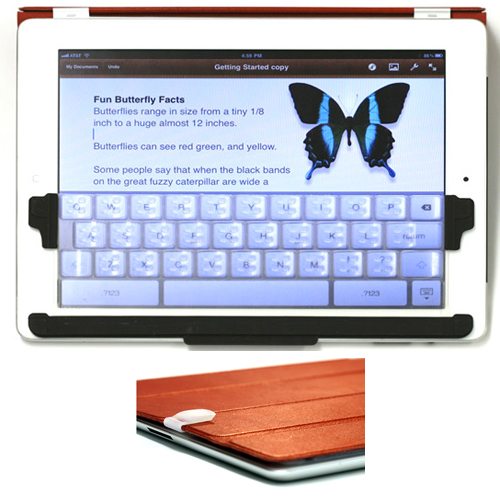
 I don’t like using the on-screen keyboard on my iPad. There’s no tactile feedback, so I can’t tell if my hands are in the correct position nor if I actually struck a key. The TouchFire Screen-Top Keyboard for iPad looks like a very promising way to add a tactile keyboard to your iPad without having to lug around an external keyboard or bury your iPad inside a big, bulky keyboard case. The TouchFire is made of a thin, high-performance silicone rubber that’s thin enough that you can swipe through it horizontally. It’s stiff enough vertically that you can supposedly rest your fingers on the home row of keys without accidentally entering a letter. It’s stiff enough to offer resistance and spring back when you strike a key. It’s designed attach to Apple’s original black iPad cover or to the Smart Cover for iPad 2, and it can be folded back out of the way when you aren’t using it. It also comes with a storage case if you’d rather not leave it attached to your cover. By the way, it will work with any cover that allows enough space for it.
The first production run is sold out, but you can reserve one from the next run with a $10 deposit. The full price is $44.95. Delivery is expected in late February or early March 2012.
![[MINI SIZE. ULTRA PORTABLE CHARGER]: Roughly the size of an AirPods Pro case, this smallest power bank packs 10,000mAh of long lasting power into a tiny, nano footprint. Easily slide this ultra slim, credit card size charger into your skinny jeans, a...](https://m.media-amazon.com/images/I/41rATpm6dyL._SL160_.jpg)
Now retrieving an image set.
INIU Portable Charger, Ultra Mini 10000mAh 45W Fast Charging with Detachable Cable, Flight-Safe Travel USB C Power Bank External Phone Battery Pack for Xiaomi iPhone 17 16 Samsung S26 Google iPad etc
(as of July 13, 2026 18:57 GMT -05:00 - More infoProduct prices and availability are accurate as of the date/time indicated and are subject to change. Any price and availability information displayed on [relevant Amazon Site(s), as applicable] at the time of purchase will apply to the purchase of this product.)
Now retrieving an image set.
