
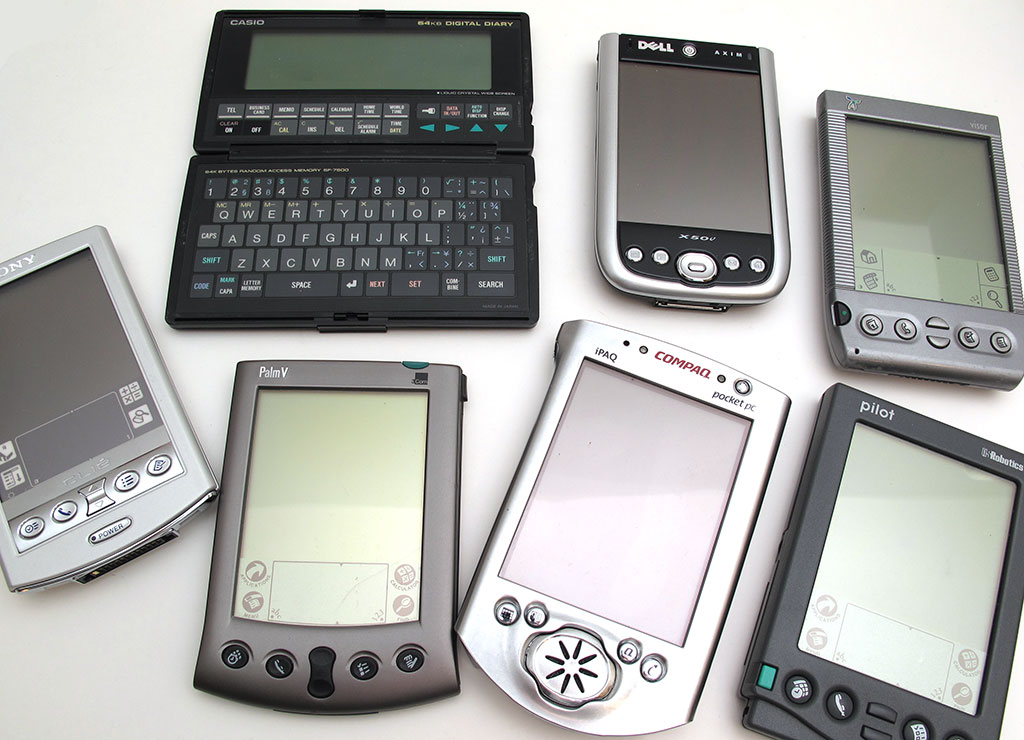
A few years ago, most of the people reading this article probably carried two devices with them every day in their pocket or bag: a mobile phone and a PDA. PDAs aka Personal Digital Assistants were the norm back then, while smartphones were still just a glimmer in eye of Steve Jobs and the Google whiz kids. These days no one wants two devices when they can carry one uber-nifty mega smartphone right? Maybe not.
Once a month or so, I’ll receive an email like this one:
Hi Julie,
I was wondering if you could give me some advice on a replacement for my Palm TX? I’ve done quite a bit of research and found that no one except HP (IPAQ) is making PDAs any longer. (And they are expensive.)
I could go to a different platform, but it seems that there isn’t anything handheld that enables you to enter data with a stylus and that functions primarily as a business organizer (focus on calendar, contacts, notes, and enables you to sync it with the computer.) I don’t need a phone with more functions and I don’t want to have to pay a monthly data fee to use the device. I really like the simplicity of Palm devices. It seems I am not alone.
Some people are turning to the iPod Touch, but I really like the “always on” feature of PDAs. Plus, I understand it is primarily an entertainment device as opposed to a business organizer.
Any thoughts. I’ll need to sync with a Windows 7 PC.
Don
I know that Don isn’t alone because I live with someone that has no desire for a smartphone. She still uses a Palm Zire 31 which was released way back in 2004, the dark ages of mobile computing.
As I see it, people that want to continue using pocket sized PDAs, have 3 choices:
1. Continue using older PDA devices for as long as you can find / replace them
Most of the people that email me asking for PDA advice, always start out by saying that their Palm device is dying and what current device can they buy to replace it. Guess what? You can still find brand new boxed Palm PDAs for less than $50 on eBay. And if you don’t mind used devices, you can easily spend less than $25. Handspring Visors and Windows Pocket PCs can be found too. This is the most inexpensive solution and most likely the best one for people who are perfectly happy kicking it old school.
In addition to the basic PIM (Personal Information Management) apps that are built-in to each device, you can still download 3rd party productivity apps from sites like Handango and Freeware Palm.
The biggest problem I can see with these older devices is the fact that there is little to no support for them other than like minded users on various online forums. There’s also the issue that as we continue to update our desktop computers to newer OS versions, the ability to sync/backup our data on these devices will probably become impossible due to software incompatibility. That said, depending on the device, you can still find syncing software for Palm and Windows CE/Pocket PC devices on http://www.hpwebos.com/ and http://hp.com respectively.
2. Consider a WiFi enabled Android device
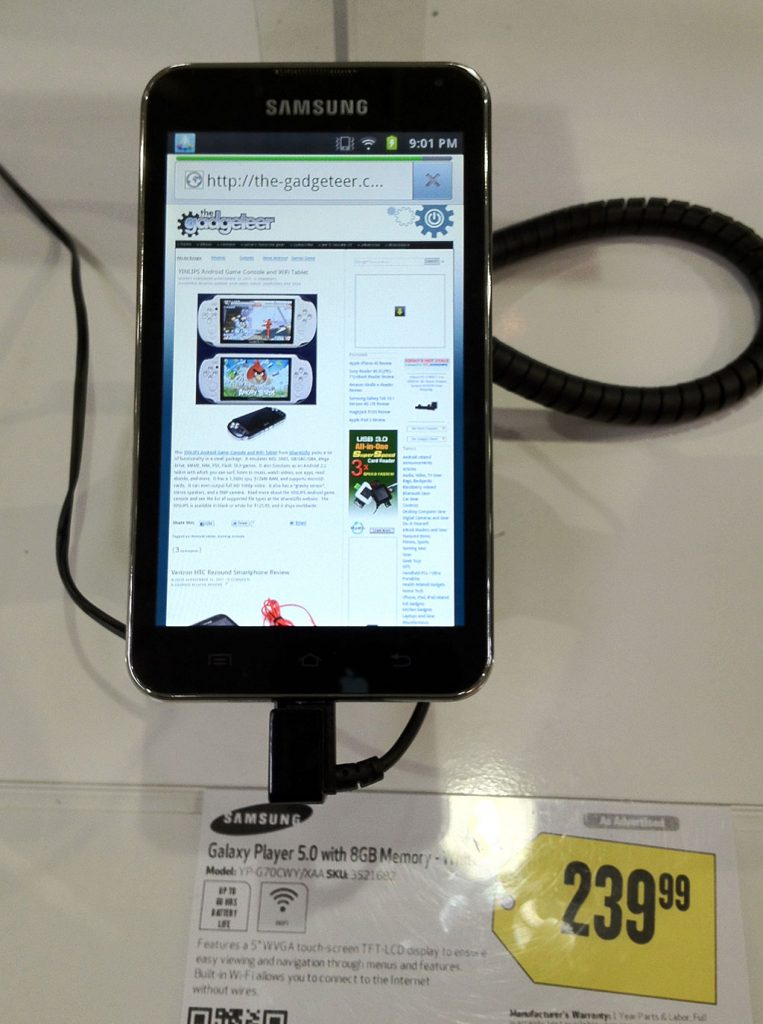
There are two ways to get a pocket sized Android device that can serve as a PDA. One way is to buy a WiFi enabled smartphone and only use the WiFi connection instead of the cellular connection. Just like with older Palm devices, older Android smartphones can be found at bargain prices. However, if you want something shiny and new, consider one of the Samsung Galaxy Player devices. They offer 4 and 5 inch models that are priced at $230 – $270. They have all the main features of current Android smartphones like WiFi, GPS, Camera, SD card expansion and Bluetooth, but without the need to pay for a monthly data plan. I took a quick look at the Galaxy Player 5.0 at my local Best Buy and was tempted to buy one just to do a review.
One of the best reasons to go with an Android device is the fact that you completely bypass the need to sync data with a desktop PC. All data syncing is done with Google (calendar, contacts, email) via WiFi to the cloud. And for those of you that are extra paranoid, there are third party apps that will back up your data to an SD card.
3. Another option is an iPod touch
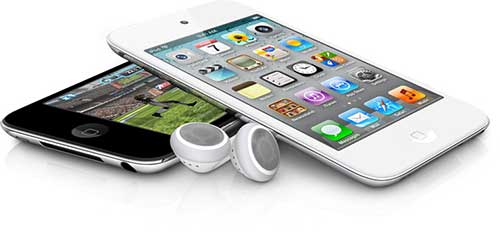
Apple’s iPod touch is almost like having a thinner iPhone without the actual phone feature. Priced at $199 – $399 depending on the capacity, the touch has WiFi, Bluetooth, and front / rear facing cameras. What it doesn’t have is a flash card slot or a real GPS… but there is a mapping feature that uses proximity to known Wi-Fi networks to figure out your location. Definitely not very accurate though.
There are a bazillion productivity apps for the touch including some of the really popular ones that used to be available for the Pocket PC and Palm OS like Pocket Informant and iambic’s Agendus.
Like Android devices, you have the option not to connect the iPod touch to a desktop computer as the data will be stored in the cloud with iCloud. iCloud will also make sure that your data is the same across all your iOS devices which is cool. I like that I can take a picture with my iPhone and it will automatically show up on my iPad and iMac. You can even sync your Google data (calendar, email, contacts) with Apple’s built in apps.
Of course if you choose option #2 or #3, you’ll have to charge your device every 2-3 days unlike 2-3 weeks or longer with an older Palm device.
If it were me, I’d probably choose the iPod touch for a few different reasons. For one thing, it has more support from Apple in the way of OS updates than the Samsung Galaxy Player and other older Android devices. Apple tends to provide major OS updates through 2 generations of devices. So if you buy the current or last gen device, you can still run the latest and greatest version of the OS. This doesn’t seem to be the case with Android devices. There is also a huge variety of 3rd party accessories for the touch that include cases, charging docks, speakers, fitness sensors and more.
So what do you think? Is there still a market for PDAs? Are there other devices not mentioned here that you think would make a great PDA for the non-smartphone crowd? Let me know your ideas.
Apple iPad Air 2 16GB WiFi 2GB iOS 10 9.7in Tablet - Space Gray (Renewed)
(as of July 12, 2026 19:25 GMT -05:00 - More infoProduct prices and availability are accurate as of the date/time indicated and are subject to change. Any price and availability information displayed on [relevant Amazon Site(s), as applicable] at the time of purchase will apply to the purchase of this product.)

Gadgeteer Comment Policy - Please read before commenting
I have to say: I recently switched to an Android phone from a WebOS device, which I switched to from a Palm TX.
I’m seriously considering going back to the TX. It was easier and faster to get basic ‘PDA’ data: Calendar, To-Dos, etc. It was also *much* easier to *enter* that information. (Many of the better programs for getting to the data that I’ve found don’t even ofter a way to enter it: It’s assumed you get do that someplace else.)
Part of this is just that it takes way to much attention to type on my Android, no matter what keyboard I use. My Palm Pre was better, even with a poor keyboard. But I can type on my TX nearly as fast as I can on my desktop, and using almost the same amount of attention.
I like the Android phone for a lot of things, but as a PDA device, it’s a disappointment.
I use a cheap android phone + ipod touch. Yeah, I’m carrying two devices, but they are both fairly small and fit snug together in my front pocket. My phone acts as a wifi gateway when I’m away from the office/home.
I was a palm guy for many years (since the US Robotics days) until about 3 years ago — then switched to WinMobile (which worked well for me, mostly). I’m not a huge ios fan, but I have to admit, I like the email client. That’s the main reason I switched to the platform I use now.
The Samsung Note will be available in the US in the near future and may be the solution. Android, but with a stylus…a real stylus.
Mmmm,
In the old days carried a combination of:
Sharp Organiser, Palm 1000, M500, M505, Ipaq 3970, 2470
AND
Assorted Motorola, Nokia, SE mobile phones ( actually my first mobile was the brickish NEC 9B 🙂 )
Moved to a “convergence” device; O2 Atom, then a HP Data Messenger which did both functions
Currently using an Android HTC Desire and a Lenovo Thinkpad Tablet
Not sure if I’m going backwards or forwards 🙂
I use an Android phone, with the Graffiti keyboard and Note Everything for text or ‘drawn’ notes for a more Palm-like experience. I sometimes think about getting a PDA again, but honestly- the ability of my Android to interface with Google and other cloud-based apps means that I can work with most of my stuff at pretty much any computer I am at- too much of a benefit to give up.
PDA fans might consider some of the Android-based prepaid plans that offer little talk time, but unlimited data for about $45/mo.
I have a Tungsten T5 which I have not replaced because I love the Palm Desktop software.
Clearly the T5 may not last forever, but can anyone identify an Android application which has similar functionality to the Palm Desktop?
Thanks.
@Ken Somehow I’ve managed to not hear about the Samsung note. I’ll have to go do some googling…
Update – Ok, the note looks great, but it’s a smartphone, which means it will be sold by carriers and will require a data plan.
@John The desktop software for Android would be your web browser and your gmail acct. When you’re logged into gmail, you’ll have access to your contacts, calendar and mail.
@nicky You’re right, nothing is set in stone when it comes to upgrades. While writing this article, I checked to see which devices supported iOS5 and depending on the device, it is able to be installed on 1-2 older gen models.
about apple’s updates, remember they have for example disabled the appstore for ios 3 devices , so i wouldn’t be so confident on OS updates from apple on long-term 😉
As many PDA-ists I started with Palm and moved between the Palm and Microsoft mobile operating systems, having numerous iPaqs, Handsprings, Sony’s and of course Palm Pilots and the TX.
Today, I do not carry a phone, but the iPad Touch is a fantastic PDA replacement. The screen at 3.5inches is slightly smaller than the 3.7inch Palm TX, but resolution and speed and number of applications is superior. Web browsing is infinitely better than the Palm. The one downside is the syncing. How I love the ability of putting a device into a cradle and it syncs everything in one go. With the Palms and the Androids, some will sync wirelessly automatically, for for many programs you need to open up the desktop app, and then the mobile app and sync – application by application – a definite inconvenience.
The apps are also better in my mind that the Palm/iPaq counterparts – but probably only because they are still developing the iOS and Android ones, whereas the others are discontinued.
I miss however the form factor of the Psion 5 with a large widescreen and a keyboard. You can still buy them now and again on eBay, but the screen is not worth the mention in comparison to today’s full colour touchscreens.
I do believe that Santa is bringing me a Galaxy Palyer 5.0. So 5 inches of Android. Some of the Bible apps I use are not as advanced as their iOs counterparts, but the 5 inch screen is the real clincher. And of course at $269 or less a good price. I could of course go for a phone, but I do not want a 2 year plan contract and buying one off-contract is a huge price.
So is the PDA still alive? Yes. The iPod Touch (4 inch in Q1 2012??) and the Androids. Better than the Palms and iPaq’s etc? Yes – infinitely. Some backward steps? Yes – syncing.
When my TX died two years ago, I surveyed what was a available and decided on an Archos 5IT. It’s an Android (1.5 at the time, now 1.6) device with a 5″ resistive screen that works with a PDA stylus (it doesn’t have a silo but I use a multi-pen).
As far as software, I definitely recommend Note Everything for inking notes (although there is no handwriting recognition). Perhaps with the advent of Android tablets, Evernote will build inking into their Android app.
There is Graffiti for Android available in the market but I haven’t tried it since it was a new and very raw app. I find I can type with a stylus faster than I could ink on my TX.
Now, since a two year old device is geriatric in technical terms, I’m looking at the Galaxy Players and the current Archos lineup.
Similar to the Galaxy player (in some places sold as Galaxy S wifi) series, is the Sony Walkman Z. I think it showed up in the FCC test report site recently.
I was an early adopter of Palm (PalmPilot 1000, baby!), and stuck with them up to my Tapwave Zodiac. But now, honestly, I’m really happy with the PDA functionality available through my iPhone, and if I wanted a stand-alone device, I’d go for the Touch.
I recently got a Samsung Galaxy Player 5.0 on sale at Amazon ($229, I think it is hovering around $239 at the moment, though it was on sale at BestBuy for one day recently at $209) and have been very impressed.
Of course, it is my first Android device and I am not a smartphone owner, since I don’t want the expensive data plan. The device is working out well for me, it’s light and portable and the screen has been easy for for my 50+ eyes to read, which has not always been the case with many 7″ tablets out there that I’ve looked at. I think it is because the Galaxy Player has slightly higher resolution than say a Nook Color.
So far I’m finding the Swype keyboard pretty convenient for note taking, and I am going to investigate the speech input thing. I’ve never owned a PDA, so I can’t speak to whether this is a good substitute, but I’m just thrilled so far.
@digi_owl
It is good to see some other mainstream manufacturers moving into the PDA arena – though calling it a PMP. The Sony Walkman Z looks like one classy looking PDA/PMP. The 4.3inch screen will make it pocketable – but more screen real estate than an iPod Touch – and no data plan. It’s not often that Apple are behind the times, but the iPod Touch is looking jaded in my opinion. 3.5 inches is not enough if it is to be more than a music player. Archos have a 4.3 inch PDA, now Sony, with Samsung at 4inches and 5 inches.
Perhaps we are seeing the revival of the PDA for those of us cheapsters who don’t want an expensive data plan.
My daughter uses my old Handspring Prism as a multi-alarm clock. I still use my Zodiac for its quick interface to Quicken (via PocketQuicken). I love WebOS, but my Palm Pre is on its last legs. Headed to iPhone 4S in the next week or two. It’s pseudo-multitasking will be so Palm-like, but the hardware will be sweet!
I still have my tungsten T (which is cool because I have a non-bluetooth thinkoutside keyboard for it too) and I use my Palm Centro as a PDA (although I need a new chassis for it). But I do not carry either of them around.
And I have a iPod Touch but the fact the battery is non-removable and you have to sync it (somewhat…cause there are very few desktop apps for it) with a computer or the cloud, makes it not so much desirable as a PDA. I actually want a m125 again…
Oh for gosh sakes, its almost 2012 already. A single purpose PDA is as dead as the Dodo. This from someone who started with a US Robotics Palm and ended up with the HP iPAQ (still around here someplace).
What can you do with a PDA that you cannot do with a smarthphone? Be honest now, cause the answer is nothing. Datebook, tasks, contacts, web, apps up the wazoo and a phone? It’s Android for me.
I am using my Palm Centro to sync Ultrasoft Money to Microsoft Money on my (WinXP) computer. It’s all dinosaur hardware and software, but it does *exactly* what I need it to do, and I have not found anything even remotely close to that triple-whammy ease-of-use for my Droid 2 phone or Toshiba Thrive tablet, despite spending LOTS of time looking.
I don’t totally agree with @Robert, but I do definitely feel like there isn’t anything my old Palm PDAs could do that I can’t do on my iPhone faster and easier. Plus, it took weeks of finagling and converting to get movies to play right on my Zodiac–now I can convert or download, and they all look great. Plus all the different eReaders. Plus: it’s a phone! Plus: Siri! Seriously, I wouldn’t want to go back; one device is what I always wanted, anyway.
@Robert Grenader
Okay, I would agree that given the oportunity to have an iPhone 4S or an iPod Touch 4thGen, I would take the iPhone. Given a choice between a Samsung Galaxy Player and the Samsung Note, it would be the Note. Both choices (iPhone and Note) have phone’s built in.
BUT, both require expensive data plans, locked in for 2 years most likely or very expensive off-contract purchases. I can afford neither, so the PDA functionality is taken away from me, since I cannot purchase either.
So, in steps the iPod Touch and the Galaxy Player. Both are “single purpose” PDA’s as you say, but obtainable. Used at home they are connected via wifi and the internet is now in range.
So no, I would disagree that the single purpose PDA is dead. My iTouch is a great study device. Much thinner and lighter than than the iPhone, so more pocketable.
So for some, the dodo lives.
In reviewing the options, you missed a critical function: synching to Outlook, something essential for me. I have a Palm T/X and a Centro, and I fear the moment when they´ll die. I am sorry HP dropped WebOS, so, my only future alternative now might be Windows Phone 8.
@Jlua – iOS syncs fine to Outlook. I started using PDAs in 1995 with a Psion 3a, in 2009 I got an iPod Touch and it was fantastic. After 18 months I got an iPhone, but the Touch feels nicer as it is amazingly thin and is fine for watching movies on planes. I have had Palm and Windows PDAs too, but the Touch is a great device.
I would like to see a modern version of the Psion/Jornada but can’t see them being available – the HTC Universal was similar but cost me a fortune and was not that good as a phone!
Wow talk about a walk down memory lane! I think I still have about 8 PDAs of assorted brands laying around. Two Dells Axims )one with WIF), three HPs 200LX- 95LX(missing somewhere in my storage)- OmniGo, a Sony SJ22, Palm M125, a Dana from AlphSmart, and something else… Oh a Newton! All still work except the M125 which is apart waiting repair for for the past decade 😛
Yeah. the Apple Touch is the way to go for me at least, but I do miss the old days and every now and then I’ll fire up one of the old ones and play 🙂
I carry around an iphone but also a Palm Tx which I still find ideal for organizing my life. icloud? No thanks plus the unbeatable combination of the exquisitely and simply designed Mac Palm desktop together with the beautifully tactile experience of using grafitti on the wonderfully able Tx are going to keep me old school for some time to come. These days bloatware really is the bane of the user experience. Its a pity Apple doesn’t recognize its obligation to continue supporting older software like the Palm Desktop on its current hardware.
@Thenikjones: The reason I had abandoned the idea of going the iOS route is that my understanding is that it synchs with Outlook email and Calendar fine, but that it didn´t -at least out-of-the-box- synch Tasks and Memos. Isn´t that right? I use Tasks a lot, so my thought is that going the Windows Phone route I am assured comprehensive synching with Outlook. Can you synch fine with iOS all “Big Four”: Email, Calendar, Tasks and Memos?
To those of you say that there’s nothing a PDA can do that a smartphone can’t: NOT TRUE.
I’ve been using Palms for years, and currently have two TX models (one is a backup) running Iambic’s Agendus. Agendus is a critical application because it actually integrates the Calendar, Contacts, Tasks and Memos functions. I can go to a client’s listing in Contacts and bring up a list of all of his appointments, tasks I’ve done for him, and memos. I can go go the other way around as well.
I can run my entire business on my Agendus for Windows and Agendus for Palm applications, and I’ve searched high and low to find a way to do what I’m doing on a smartphone. I’ve examined Android and iPhone applications (the Agendus iPhone app is weak, at best), as well as products from CompanionLink that are supposed to let me sync all this stuff together through Gmail and Google Calendar. None of the alternatives work because the iPhone calendar is practically inaccessible to third-party apps, and the Google Calendar/Gmail systems are not designed to work together with the kind of integration that I need. So I will just keep picking up Palm TX units on eBay as I need them, and save $30 per month in smartphone service that I don’t have to buy.
I now have an iPod Touch 3G.
Years ago, I owned a Casio Organizer. It was good for me: it listed my contacts and calendar. It allowed me to enter notes and list inventory items (but not “to-do” lists). In those days, it didn’t sync very easily with my computer. And it was a 1 way affair. I could not edit my computer Calendar and Address Book from my PDA.
One day, I dropped it on the garage floor when getting out of my car and … lost all my info. I held off getting another PDA – they were expensive and didn’t really satisfy my needs.
Since then, I had been looking for the perfect PDA … and finally bought an iPod Touch. And it just works great. I use it for workouts, I listen to music when reading or on the road, I connect to the internet, read newspaper/magazine articles. I’ve hooked up to my home audio system. I create shopping lists, to-do lists, inventory and expense reports. I use the camera daily … I just love how it syncs with my notebook.
I’ve been experimenting with utility, productivity and financial apps and I just love what the iTunes App store has to offer. I get unlimited Texting via TextFree with Voice. In fact, when in Canada, I used TextFree Voice instead of my cell phone, and this saves lots of $$$. I have no regrets with this purchase.
Wish I had this device (or the iPhone 25 years ago!).
BYW, I do have a cell phone and it would be nice to have just one gadget. But I really have a problem paying for the Smart Phone plan. If I were working, I would have an iPhone.
Julie, I really love the new Avatars you have assigned your readers. Where did you get them?
@Jane P. The avatars you see are defaults for people that haven’t created their own personalized avatars through http://gravator.com
@Jane: they’re generated “randomly” (based on the email address from the comment form, so that you always get the same one) by the Gravatar service if you don’t have an account there. They have several different themes for random avatars; this one is the “Wavatar” theme.
Dang, after reading this article I decided to just check out some PDAs on EBay and ended up buying a Palm M105 for $17. I think I need therapy 🙁
@Bob I wasn’t going to say anything… 😉
I started off with the PDA offered by Radio Shack back around 1997. I eventually bought a Palm Tungsten IIe. I still have it and use it to this day. I recently purchased an iPaq 210 (Nov. 2011) and a week later picked up an HP Touchpad. I love the PDA’s and will continue to use them. They are simple to use and basically, all I need are a few core apps. Address book, notes, Splash I’D and a few others. That’s it. I now use the iPaq as my primary music player (I retired my Zune80) and because it has WiFi (the Tungsten does not have WiFi). I use my Touchpad for several hours a day but the iPaq goes with me when I leave the house. And yes, it is separate from my Blackberry phone. Is there still a market for PDA’s? Yes… As long as a phone is built in. But I will never give up my PDA’s and will continue to use them until either they or I kick the bucket. -Koa-
@Jlua
Syncing with Addresses, Notes and Contacts is automatic. Tasks does not does so automatically, I use Appigo’s ToDo and sync it to the online service Toodledo. Not ideal for you, but I decided that the Touch offered more than any PDA alternative currently available.
@Julie
I figure $17 is about the price I’d pay for dinner (at the burrito joint in town) and a movie (matinee). The PDA will keep me off the streets for a few nights while I mess with it on an old Win98 laptop I’ll need to dust off 🙂
Group therapy?
@Thinkjones: After I posted my last message, I found out that Windows Phone 7.5 does not support Tasks, as inexplicable as it is. After all, it turns out that Palm was and is the only one that flawlessly did and does all what I need. It is a sad turn of events now that Palm is gone for good.
Tell you what; someone come out with a SD-card cellphone radio for a Palm TX with accompanying software, and I’ll gladly continue to use it until it disintegrates. Or even just provide updated cellphone syncing profiles; I think they released one update about a year after release?
throw in 802.11g WiFi (it’s getting hard to connect with 11b at times) and I’d be truly happy.
The length (and passion) of this thread has convinced me of one thing (which I was pretty sure of before anyway): Palm didn’t just *kinda* blow it when they let the PDA market slip away from them, they *really* blew it. Here you had a passionate customer base of millions, plenty of whom are still longing for their old Palm devices, and you just . . . ignored them.
Just goes to prove–as if we didn’t know!–that stoopid management can screw up even the best situations.
@Jlua,
I had a number of Palms – the last was the Tungsten E2 – and Task syncing was not great – you could only assign a single Category, for example. When I compare it to the Touch, it is inferior in many ways. I was never one who lived in Agendus or Datebook+ so had no problems with PIM software (given that I started using Toodledo) The web browser is far better, the screen is much better resolution, capacitive beats resistive any day of the week, and the usic playing is much better. Really, the Touch is the PDA of today; after almost 2 years of daily use I upgraded to an iPhone, but if I had to go back to Touch and basic phone, I would be happy.
@Doug, being English, I went through the pain of Psion throwing away their lead, only to go through the same thing with Palm. Arghh!
@Thenikjones
Agreed about Psion. I can remember reading an interview with the Psion Sales Director who was saying that a colour Psion 5 was on its way and much more was being planned. Within a month Psion closed it all down. Brilliant!!
Regarding the iPod Touch, I agree, much better than any PDA of yesteryear. I desparately tried to keep my Palm TX going, but finally succumed to progress with the Touch. I am surprised that other manufacturers have not picked up on the potential market – a PDA (no data plan). Still we have the 3.5 inch Touch, the 4 & 5 inch Samsung Galaxy Players, the 4.3 inch Sony Walkman Z, and then to a less quality the Archos 43.
I have an iPod touch as well, and tried a number of ways to use it as a replacement for my Palm TX, including downloading some pretty impressive apps for it. Unfortunately, the end result wasn’t even close. Sure, the screen is much better than the TX, the browser is far superior, and the overall look and feel is wonderful. But, at the end of the day, it still can’t integrate all the databases together. As long as I can still buy TX models on eBay and have a reliable repair service, I’m going to stay on Palm until someone, someday, offers a product that can do what the Palm/Agendus duo can do. I’m not holding my breath.
Oh dear…I always wanted a T|X and now after reading this article, one is on its way from ebay. Not sure exactly what it is I will do with it though. Thanks Julie!
@ravager814 Have fun with it 🙂
Julie,
I recently stumbled upon this site: http://androidforums.com/samsung-galaxy-players/522990-old-palm-user-needs-assistance.html
According to this you can sync your Galaxy Player with the Palm desktop, (or other desktop like Outlook) without going to the Cloud. If this truly works, I will seriously consider the Galaxy Player.
Don
Socket Mobile has a PDA that has the same layout as the HP iPaq 210 model but with more memory and better wifi. Their newest model, the Somo 655, will be released in June 2012 and the company is planning on supporting it for 5 years at least.
I am seeking an alternate to Palm Desktop.
Iambic Agendus has been suggested in one of these posts, and it looks great. BUT – there is not an Android version, and I was considering a Samsung Galaxy S2 or S3 smartphone.
In August 2010 (!) Iambic stated that they were considering an Android version … but given that was 18 months ago, I am forced to conclude that it is looking unlikely.
So, my $64K question – what’s the best similar app for Android that will also sync to my laptop?
Sorry about the name duplication.
I’m still using my T|X every day. Like jdl50cc, Agendus is the key to my business. I’m not interested in synching to the cloud; my business has confidentiality requirements, and I feel much safer synching to my own desktop. I bought the T|X with my business in mind, and it’s worked wonderfully for that. Agendus is the only piece of expensive software I have; the rest was free or less than $10. I don’t have a laptop, and my T|X can do anything I need it to do. I don’t need it to make phone calls, nor do I need a $50 a month phone service. I do have a spare, and I think I should probably buy another one or two…they seem to be popular. Even so, I felt lost when I sent mine off to get a new battery last week.
I’d never owned a pda of any kind before I bought the T|X, and had no idea I needed one. It’s not just keeping my appointments and phone numbers straight…it’s the furthest thing in the world from a “single-purpose” pda. I routinely use it to make spreadsheets, and occasionally to draft letters. BTW, the T|X is fine for playing games, reading books, playing music and otherwise keeping me quite thoroughly entertained. I bought a keyboard for it long ago, but I only use it if I need to input large amounts of text.
I’ve shopped for new hardware, and the idea of combining the other functions with a phone does have some appeal, but the high cost and the lack of business function always turn me away.
@Julie @Julie “Sorry about the name duplication.”
Boy that had me confused especially when I read “I don’t have a laptop…” Yikes! I thought to myself, our Julie has a laptop! A MacBook Pro I believe… Somethings is seriously wrong- duh I finally figured it out 😛
By the way @Julie @Julie, it was a very nice post and I’m going to check out Agendus. I really liked the layout and form of the Palm Desktop, though…
@ Bob DeLoyd,
If you “really like the layout and form of the Palm Desktop,” then you will be absolutely floored by the Agendus desktop. It’s the Palm Desktop on steroids. (You’d think I worked for them, wouldn’t ya…but I don’t. LOL!) Download a free trial copy and check it out.
I wasn´t aware of Agendus, and it looks very interesting, especially some features like contact history (I used to use ACT! years ago as a desktop contact manager app, and it was great). However, nowadays my life is in Outlook, so I would need a platform and apps that sync extremely well with Outlook, and from what I see, Agendus only does it with its own desktop app.
Ah, but not so! Agendus has a Windows Outlook Edition that syncs your Palm with Outlook. Actually, I use the regular Agendus Desktop but I’m giving serious consideration to trying MS Outlook and the Agendus Outlook Edition because the one thing I don’t like about my current setup is that my email (using Outlook Express) is not integrated with my contact histories. When I look at a contact’s history in Agendus now, I see all appointments, phone calls, and tasks, but not emails, which are becoming an increasing part of my client relationships. I’m told the solution will work. So one of these days I’m going to download the trial versions of Agendus Outlook Edition and MS Outlook 2010 onto my backup PC, and see if I can get a good results (using my backup Palm T|X as well.) I’ll report back if you’re interested.
@Jdl50cc ah ya beat me to it- on your advice I went to their website the other day. I don’t use Outlook, but noticed they had one that supported Outlook: http://www.iambic.com/agendus/winoued/
I’m experimenting with Agendus for Outlook, and I’m not entirely pleased. It seems to triple all the appointments and contacts. I’ve only been playing with it since yesterday, but I think I’m going back to Agendus for Palm Desktop….
Julie@Julie (Julie2) I’m going to go back to their website and do a little reading. I only want the Palm Desktop one, but if I come across anything on your problem with the Outlook one I’ll post it here 🙂
Thanks! Unfortunately, the Iambic community boards have all vanished, replaced by new, mostly empty, ones run by Splashdata. That means all the years’ worth of advice posted by Iambic techs is gone too. That’s a shame, because there was a lot of good information there.
That’s unfortunate about the community boards. On the other hand, the tech support is still in place. I had an extended, multi-email conversation with “Nancy” two weeks ago about the features and abilities of the the Outlook Edition, and she really knew her stuff. I’ll drop her a message and ask her if there’s any way to get to the old community boards.
Thanks! My first choice was to check out the community boards, but if I have to go to tech support, I will. If I can’t make Outlook behave as I’d like, I can always go back to the Palm Desktop version, which has never given me any problems.
Just heard from “Nancy.” The old forums were obliterated when SplashData created new ones on their servers.
Thanks for the the tip, jdl50cc. My triplication problem has been solved, and some other, lesser, issues are being dealt with.
Julie and others,
For the remaining Palm user out there, I found an option that works for me. (Everyone uses their Palm differently, so maybe this will help someone decide what to do.)
I just switched over from a old Palm TX (with a bad screen), to a Samsung Galaxy. (This one: http://www.bestbuy.com/site/Samsung+-+Galaxy+Player+4.0+with+8GB+Memory+-+White/3521646.p?id=1218407827482&skuId=3521646&st=samsung%20galaxy&cp=5&lp=11 ) However any Android device should do.
It’s basically a glorified Android MP3 player, but you don’t need a cell phone plan to use it. I found a way to get my data on the Palm Desktop to sync to the Galaxy.
Before go on, I should mention that I found while I could install the Palm Desktop on my Windows 7 computer, the hotsync was not compatible with Windows 7. So even if I purchased a backup Palm, I couldn’t sync the data. So I exported my contacts, memos, datebook, and tasks from my old computer… then installed the desktop on the Windows 7 machine, (with no data), and imported the data into the desktop.
To get the data on the Galaxy, I used the CompanionLink app, which synced my data without issues. CompanionLink offers a 14 day trial, but so far the sync seems to work great (in both directions). The app for the Android device is free, but you need a $49.99 license (one-time purchase) to install CompanionLink on the desktop. When compared to buying another Palm, I didn’t think the cost of buying an Android device for $150 and a $50 license was that bad.
Finally, a few things about CompanionLink. The password protected private notes come over without issues, but the private contacts do not. So I removed all of my private contacts and put the “data” in a private note. Also, the generic CompanionLink contacts, calendar and notes are not that great. So if you want to go this route, I suggest you do as I did and download and sync to a better calendar (I found Business Calendar), and also sync to the Android device’s contact list.
So I am finally done with Palm… kind of. 🙂 I now have an Android device, but I still will use the Palm desktop, (which I am so familiar with).
Don
Just wanted to post this update… CompanionLink did bring over the private Contacts from the Palm desktop. The setting for private data is on a security menu elsewhere on the device, and it took a while to notice that.
Don, does the Galaxy provide full integration between the calendar, address book, task list and memoranda like Agendus does on the Palm? I suspect not, because I believe it’s all Google-based, and the Google address book and calendar do not play well together. Please tell me if I’m wrong. Otherwise, this still makes a switch to an Android platform a non-starter for me.
By the way, the Palm can be synchronized with Windows 7. Since the Hotsync software cannot address the USB port directly in Windows 7, however, you need to sync through BlueTooth, hence you have to procure a BlueTooth “dongle” to attach. I am not familiar with the details off hand, but I know they can be found with a Google search; I’ve seen them somewhere.
I attest that Bluetooth Hotsync synchronization works fine on Windows 7 to sync Palm with Outlook (I also use Chapura PocketMirror to keep my Tasks on separate folders, by Category). When my beloved Palms (I have two) die, my plan -or hope- is to move towards a Windows 8 Phone platform, since good, solid synching to Outlook email, Calendar and Tasks is a must-have for me, and my hope is that Microsoft will do a good job at that.
Like many of you, I have invested (wasted) many hours trying to transfer data from my PDA (Palm TX) to other devices; iphone 4S & Galaxy Tab 2.0. So far I have no clear success path. I have no problem buying used TX’s on ebay. However, my employer recently upgraded our computer software to Windows 7 and I can no longer sync my Palm desktop to the TX. I can sync my Palm desktop to my TX at home using a bluetooth dongle but this solution does not work at work. I’ve downloaded Companion Link software (free 14 day trial) but so far I’ve only been able to download contacts and a partial calendar (repeating events only). Also, with Companion Link software on my Galaxy Tab (DejaOffice) I have no idea how to Search my data. Searching and retrieving data is what makes the PDA so valuable. So all in all, I’m very disappointed with my lack of skills, intelligence, or good looks that is preventing me from finding a solution.
“I’m very disappointed with my lack of skills, intelligence, or good looks that is preventing me from finding a solution.”
I sincerely doubt that any of those are the problem. The problem is that Palm made a series of bad business decisions that resulted in loss of technological leadership and market share, and then deserted its clients with no upgrade or migration path. You’d think that with all the developers scrambling to write applications for iOS and Android, someone would conclude that there’s a large enough untapped market out there looking for a migration path from Palm. The newer devices leave Palm in the dust when it comes to hardware capability, but no one has bothered writing a software application that mimics or replaces the Palm functionality. It seems hard to believe that no one thinks there would be enough customers to make it worth the trouble.
For anyone still looking for a 100% Palm compatible device:
I just found out that New Zealand’s Aceeca (http://aceeca.com) is marketing what seems to be the last line of Palm OS Garnet 5.4 devices (http://aceeca.com/handhelds/compare)
The cheapest one is the PDA32, a semi-ruggedized unit about the size of a TX, but thicker.
Cherry on the cake, they allow the free download of a 64-bit Windows driver that reportedly works with legacy Palm Desktop (no support though).
Looks like the ticket for me whenever my TX dies…
@filofel They look pretty bulky.
Interesting to know. What catches my attention is the 400mz processor, versus the 320mz in the TX. My TX struggles opening my Agendus with all my linked contacts and appts. The extra 28% horsepower could be helpful to my continued sanity (such as it is.)
@Julie: I guess this is the price to pay for “(semi-)ruggedization” – definitly the niche that Aceeca occupies. The main difference I see between a TX and the PDA32 is that it’s significantly thicker (other dimensions are about the same).
As for the big yellow ones, they sure look BIG. 🙂
Anyway, the 64-bit Win driver looks like a blessing for many current Palm Desktop users.
Good discussion — I also use a Palm TX with Agendus and the Agendus Desktop. Also prefer handwriting with Mobile Write & myKbd. Don’t use & don’t really need a cell phone (yet).
The 64-bit USB driver for Palm PDAs (with Palm sync manager 7.0.2) is available at
http://aceeca.com/index.php?option=com_maqmahelpdesk&Itemid=5&id_workgroup=1&task=downloads_getfile&id=6&id_version=6 . It works perfectly if you follow the setup instructions carefully.
(I had an additional problem — was unable to complete a sync until I removed conduits for the old, or shadow, databases. Don’t know why I had them, but a trial version of Conduit Buddy was immensely helpful!)
I finally moved on to what is a reasonable substitute for my TX: An iPod Touch.
I didn’t want to give up my excellent Agendus desktop, so I’m using CompanionLink to synchronize it to Google Calendar and Google Contacts (Gmail). My tasks sync to Google Calendar as well. I imported my memos into Notespark, which was easy. My iPod Touch then syncs with Google and Notespark through Wi-Fi, and I’m ready to go. Not having the calendar and contacts integrated on my portable device is a minor inconvenience, but the compensation is the iPod’s fast search functions, much better Wi-Fi browser, and many other applications that aren’t available for the Palm TX (e.g., Evernote.)
I learned something important during the transition process: Great organization habits, of which my Palm was a central part, are no longer necessary or even desirable in the age of powerful search engines. I used to organize all my mail in little folders on my desktop, and now I just leave them in the Gmail “All Mail” folder and can search through them faster than I could ever access the folders on my desktop, and I entirely skip the step of having to sort incoming mail. The same applies to the calendar. I used to use Agendus’s integration to find all my appointments with a certain contact. In Google Calendar, by comparison, I just search on the contact’s name and everything pops up instantly.
Farewell Palm TX. I knew ye and loved ye, but your time has come and gone. The iPod Touch is a better PDA in today’s world.
@jdl50cc
I switched to the iTouch a few years back; like you said it’s time has come and gone- time to move on to better tech, but we’ll keep our old PDAs around to play with when we get that old nostalgic feeling 🙂
Has any tried CompanionLink software on their PC plus Deja Office on their Android device?
I have, but it was unsuccessful – I could never get the suggested fixes to work! The two way sync would not work, plus I lost a lot of data from my Palm Desktop. Fortunately I retrieved that from my Palm Tungsten T5.
Very simply, it allows you to continue with Palm Desktop on your PC and syncs with Deja Office. A brilliant concept.
I would love to hear from anyone who has been successful with CompanionLink.
Yes, I had DejaOffice running on an Acer Android tablet and everything was synchronizing just fine with my Palm/Agendus desktop. The problem was that I have very large databases, and it brought the tablet to a crawl. It became unusable. To do this again, I’d need to get a more powerful Android machine. I also had my desktop syncing with my iPod Touch, but response was leisurely, at best. Ultimately I decided that I was getting better performance from other apps for the iPod, so I stopped using DejaOffice and resorted to using the cloud Google apps to handle everything.
Me again!
I note a number of posts about not being able to use Palm Desktop with Windows 7. But I have not had any issues at all with Palm Desktop 6.2 and Windows 7 – not at all.
When I was speaking with CompanionLink support about the problems in my previous post they often claimed that PD6.2 would lose data itself. Well that’s never been the case with me.
@John Groarke it might be that they are running 64bit Win7 and not 32bit. I found a few old programs that will run on the 32bit but not the 64bit Win7.
Well there are a bunch of old programs that won’t run or run incorrectly on neither of them… I think it has to do with .NET Framework or something… I forget 🙁
I’m a pretty tech savvy guy. I run an engineering company that addresses cutting edge problems. Been using a Palm since day 1, when I recognized that it was poised to be the hot item in PDAs, and exactly what I was looking for.
I used to get so many raised eyebrows from my “Apple” friends every time I hauled out the Palm. Seems that the iWhatever is supposed to do everything better than everything else, until you actually put it to the test. So I decided to put it to the test with an iTouch…after all, one day I might not be able to get a replacement Palm.
DejaOffice is still not what the old (Desktop 4.1.4) and Palm Tungsen T5 ARE today. The iTouch can’t touch the Palm for speed and convenience. It shows its “toy” heritage every time it is turned on. I would simply not trade the stylus for the crude typewriter interface of the iTouch, and syncing DO over WiFi is way less convenient (and less reliable, it seems) than USB syncing of the Palm. If I need a keyboard on the T5 (such as when moving can cause poor Grafitti character formation), I can still get that AND use the stylus for better control than seems possible w the iTouch. With the Palm and USB, I can sync to any computer that I care to put the desktop on. With the iTouch, I need WiFi.
With the stylus and the T5, I get fairly fine drawing skills. Many times, I have given directions to someone by drawing a map on the T5. Tried that lately w the iTouch? I know that there are iTouch mapping programs, but if you are out of WiFi, you’re out of luck w the iTouch screen and its child-crayon-sized lines.
I run a host of apps on the T5. I can turn the screen landscape. Can’t do that w the iTouch.
I see the iTouch as a sophisticated toy, but one that is trying to leave all that behind. Nice apps such as Google Maps.
Palm: Dateline 2013.02.03
Faster data entry w Grafitti.
Faster sync w USB, anywhere, any desktop
Works flawlessly with Palm desktop, still a hot runner in the PIM marketplace, AFAIAC.
Way longer battery life.
Better Tibetan singing bowl timer for my meditation 😉
My wife and I can sync both Palms to the same computer, giving us each other’s scheds and contacts, WITHOUT the cloud!
PDFs, DocsToGo, iSilo.
(mumble, mumble…something about cold dead hands 😉
~R~
Nineteees – every person is different so if the atouch is not for you, so be ut. Can’t run apps in Landscape mode – really??
The Touch has a camera so get a map, annotate with a pen and send the person a picture – much better than a childish stylus drawing 😉 Remind me how you send drawings with a Palm if no WiFi is available?
@Thenikjones: Good point all. Each to his own…the blog seems to be asking for comment, so I thought that I’d add mine.
1. Landscape: I meant the main screens. I do run some apps landscape.
2. Someone stops me and asks for directions: I “get a map, [take a picture,] annotate with a pen and send the person a picture”? Seems easier to draw my childish drawing in a few seconds just to give an idea of where to go…of course, your point about sending it is a good one…OTOH, I don’t know how to annotate images on the iTouch, though I think that I could use, say, Google maps, and take a screen shot…but I’d already be done, using the T5. It’s not that I don’t appreciate moving forward — I did, after all buy into the Palm when it first appeared, and I have a rep for using cutting edge tools — it’s just that for me the T5 is easier and faster, and so is the Palm desktop, still one of the best PIM desktops, even if it doesn’t have the bells and whistles of its big brothers.
3. Good point about sending drawings if there is no WiFi…how do I do that with the iTouch when there is no WiFi? If I want to send something to another Palm user, I just IR beam it. Pretty old school, eh? Still no equivalent w the iTouch.
Remember: this is just my perpective…I’m fine with others enjoying their iTouches…
~R~
My company is switching to Windows 7 and I need to part with my beloved Palm Tungsten T3. Whatever I try, the syncing does not work. And having the same data on my Palm and on the desktop following a 5 second sync procedure was the thing I loved most on Palms. I do not want to change that. I am willing to pay $100 or so to buy an app that would enable me to continue using my Palm. I am sure most of you here would be able to chip in that money too. All you smart programmers writing those silly game applications – why don’t you reach for that money lying right there on the sidewalk???
Up until last week I was able to synch my beloved Palm Centro and Palm XT to Windows 8×64 with Outlook 2010, via Chapura Pocket Mirror. However, I installed Office 360 last week, and that was the end of it. Now, Office 360 seems to be out-of-bounds (I get an Outlook version not supported error message) , so I am out of luck. In the next few months I am going to have to start investigating the iPhone and Windows Phone to find out if can get a minimal of sync functionality with Outlook.
I’m also amazed at the number of us who prefer the Palm to the plethora of Apple du jour products. I have read all the entries and wonder (as of March 10 2013) if the best non-apple suggestion is still an Android device? I am currently keeping an old XP desktop limping along mostly to sync the Palm Zire. Would like to move the data to Win7 laptop, but as you all know, that is not possible. Any advice appreciated (but know that Apple devices are not an option for a variety of reasons).
@dcmonique
Yes, I keep and old XP desktop limping along, too, I have so many old PDAs from Palm, Sony and Dell that I lost count 🙂
I would be interested to hear your reasons why Apple devices are not an option, or not trying an Android device… I have an iTouch and Android tablets but still miss the simplicity and lack of distractions of the PDA.
After many years of being a very happy Palm user, I encountered an impenetrable wall. I upgraded to Outlook 365/Outlook 2013, and Hotsynch throws a “Outlook version not supported” error message that, no matter what I do, it synchs no more. Even if Chapura PocketMirror (discontinued product and company) is installed or not. Therefore, the time has arrived to start thinking of moving to another platform, and the choice ain´t easy. No platform today -not even Windows Phone 8- does a perfect synch of Tasks and Contacts along with their respective Categories. Something the Palm did perfectly well. Incredible but true.
After several months of experience, I still recommend the Apple iPod Touch as a Palm replacement. It isn’t perfect, but it does several things much better (such as WiFi, email and Web browsing, as well as access to lots of applications) than my Palm TX did, so I’ve concluded the trade-off is reasonable.
Syncing between Palm/Outlook and Google using CompanionLink is flawless for Contacts and Calendar. And the iPod syncs flawlessly with Google. Categories are maintained without a problem. It even syncs all my Agendus-related extra data in the files, so my Agendus/Palm combination works great. BTW, CompanionLink costs about $50. Cheap for the value it provides, IMHO.
The WEAK SPOT is the Tasks sync; it doesn’t work very well if done in both directions, and I was getting duplication and messed up dates. I have finally settled on the following solution: I sync Tasks in only one direction: PC to Google, and I have a free app on the iPod that syncs the Tasks to the Google calendar. (The calendar and the contacts from Google are already syncing with the iPod.)
I can see all my Tasks on my iPod. The problem is that if I’m on the road and I want to add a Task (a frequent occurrence), I can’t add it to the list because of the uni-directional sync. Solution: I send an email to myself with the Task, which takes mere seconds. Once I get back to my office and the iPod finds the WiFi, it immediately sends the email. So by the time I get to my desk, there is a short email from me for each Task I need to add to the master list in Palm. It’s inelegant, to be sure, but it works. And the ability to walk into anyplace with WiFi (e.g., fast food restaurants and coffee shops) and immediately update my email, contacts and calendar, without paying $30 per month for smartphone service, is fantastic. Plus, all the other apps I’ve downloaded onto the iPod (mostly for free) either replace or trump everything I had on the Palm TX.
I had to be dragged screaming and kicking from my beloved Palm. But it worked out, and I don’t look back. Well, at least, not much.
I recommend GoTasks on the iPod (which I have for 40 months now…3rdGen, as well as iPhone5. It syncs with Google Tasks in both directions and can be viewed offline.
https://itunes.apple.com/us/app/gotasks-google-tasks-client/id389113399?mt=8
jdl50cc:
Thanks for your message. It sounds encouraging, since I certainly would favor going the iPhone route.
I thought I had read that the iPhone didn´t synch well Contact Categories with Outlook, but, from what you say, it seems that with the help of CompanionLink that issue is no longer a problem. One question: I read that CompanionLink comes with, and synchs to DejaOffice only. Is using DejaOffice acceptable, as opposed to using the native iPhone/iTouch Contact/Calendar apps?
Its too bad that this combo doesn´t do Tasks well, but there´s always the third-party alternatives, like Jason´s suggestion of GoTasks, or others, like Remember the Milk, although it would be nicer to keep all in Outlook…
jlua,
CompanionLink syncs with a variety of platforms. I tried DejaOffice first, which doesn’t require involving Google in the process. I found it to be slow, and I decided that I had might as well start synchronizing through the Google cloud in order to make it easier for me to share things with other parties who need access to my calendar and contacts. So I stopped using DejaOffice and redirected CompanionLink to sync with Google Calendar and Gmail. The iPod also syncs with Google Calendar and Gmail as well, and everyone plays nice.
My desktop application is Palm Desktop 4.2, although I more commonly use Agendus for Windows 4.31 (which I love.) Although I don’t use Outlook, it allegedly works just fine with the same version of CompanionLink as well.
I am using the the stock Mail app on the iPod, but replaced the Calendar app with the far superior Week Calendar, which includes the week view that I use most of the time.
Tasks are synchronized between the PC and Google Calendar by the creation of a Tasks category in the Google Calendar. The Apple calendar app ignores that category, but any task management app for iOS takes that “category” of the calendar and manages it separately. Since you can’t have categories within categories, all the Tasks are a single category.
GoTasks works well and looks good, but I found it to be slow to synchronize. Instead, now I’m using GTasks, which is a bit bare-boned but syncs more quickly. I not really satisfied with either but, as I said, the Task management on an iPod (or iPhone) doesn’t work very well when done in sync with Palm/Outlook. The solution I described in my earlier posting is lumpy, but it works, however. I am still seeking a better solution, but am not holding my breath.
Hope this helps.
I am happy that I can still use my Palm on Windows 7 Pro x64…read on…
Thought that I’d comment back…but don’t mean to be contentious…just discussing the matter…
DejaOffice notes: I have been testing it on and off for nearly a year, and I still don’t trust it completely. It is much faster now. I set the Palm Desktop as master, erase all records on the iTouch before syncing, and sync one way. I still get the occasional missing alarm, or duplicate alarms, but at different times. The vendor suggests that creating alarms on the iTouch might be the culprit. There are regular updates to DO and CompanionLink (CL), which is both good and bad: good, because it means that the vendor is responsive, and bad, because so many updates are needed. There is no notification of updates, as with some of my other products, so one must keep checking the website for updates. I find that I am better off if I do a clean and sync after every update, else DO doesn’t work correctly.
DO still doesn’t have all the search capability of the Palm.
As for what I need on the road, I make notes in the iTouch Notes…but they can’t be sent easily to the Windows desktop…
I’ve been using DocsToGo for many years on the Palm, and use it on the iTouch, too. Seems to work OK, but I have not done much with it because it is so tedious. I did create my own syncing folder on the laptop to use with it, and that went well.
I liked the email suggestion above, but when I tried to set up an email account, it seemed to require a password…I have a rule about that…especially after reading about hacked Apple account disasters…I don’t store passwords /anywhere/. I’d be happy if Mail would just send me to, say, gmail, with my user name filled in, and leave me naught but to enter the password. Maybe I didn’t look into it far enough.
I don’t really want the cloud, or Google Calendar, or…I’m kinda private that way. I do want to send calendar events and notes seamlessly to my wife, without using the net. Can’t. The USB cable sync that is so useful with the Palm…I can use it with /any/ Windows desktop, with no need for Wi-Fi. The down side? I gotta have the USB cable 😉 Sigh.
As you saw in my earlier post, my wife and I are able to a) sync both our Palms to the same computer flawlessly, and b) send each other memos and contacts at the flick of a stylus…so old fashioned, I know…but so convenient.
“but there’s always the third-party alternatives,”…that comment alone, used so many times with regard to the iTouch, shows it’s not ready for prime time. It’s true that there is a countably large number of apps for the iTouch, many of which I think are useful and very attractive. But what I want it the ease of the Palm for what I do /mostly/ with it.
I don’t think that the Palm desktop app is flawless, but I do think that 4.2 is better than 6.x. And better, for what I want it to do, than any of the several desktop PIMs that I reviewed that worked with the iTouch.
So I am happy that I can still use my Palm on Windows 7 Pro x64…the down side is that I then need to carry the iTouch and the Palm. The iTouch does some new things better than the Palm, such as all the new document formats and display styles. The Palm is stuck w what it had years ago. But I trust the Palm, and I don’t trust DO, and the Palm is more convenient than the iTouch. No iTouch Graffiti, handwriting recognition (this /is/ 2013, after all)…and I guess that I’ve said it all before…
I am using a USB driver from Aceeca down under (New Zealand)…
There /are/ pros and cons, and I certainly don’t want to make it sound as if those who prefer the iTouch to the Palm are mentally deficient. They are just making a different choice. I’d make it in a heartbeat if I could get the features on the iTouch that I like on the Palm. In fact, the iTouch has features that I wish were on the Palm, such as “flicking” and “zooming”. In the week view on the Palm, I can’t see any text to indicate what the events are, BUT I can select them and see them in detail. On the iTouch, I can see the events in brief, but can’t view them temporarily unless I edit, then cancel, them. Tradeoffs. It’s not all one way…it’s just that the Palm gets more points for my specific needs. Maybe…just maybe…if I got faster on “thumb typing” on the iTouch, it would gain a few more points.
I think that devices such as “smart” phones and pads will eventually evolve to be more useful in the ways that I want them to be. Meanwhile, I just see them mostly as expensive toys. Every time that I “upgraded” my mobile phone, I lost capability.
Ninetrees,
Thanks so much for your excellent comments. As a former Palm die-hard, I “get” every point you make. If you’re not ready to use Google to do your synchronizing due to privacy concerns, then I figure you’re doing about the best that is possible.
I want to provide an update on my experience synchronizing my Palm/Agendus desktop to my iPod Touch because I’ve made a lot of progress in the past couple of weeks. I have found the CompanionLink customer service to be amaziing. I’ve had a couple of problems, and they were right there to give me help. At one point, when I was having trouble syncing tasks, they asked me to send them a log file of my sync activity, which they used to produce a new beta version of CompanionLink for me to test. The result was perfect. So, at long last, I’m using CompanionLink to effectively synchronize my Palm 4.2/Agendus databases with Google Contacts and Google Calendar (which includes Tasks) in both directions. (Yes, even the Tasks go in both directions now, so I don’t need to use email for them anymore.) Google then syncs with my iPod Touch and my wife’s iPad Mini flawlessly. For memos, I’m using Notespark which syncs my desktop to my iPod Touch.
I’ve gotten better at touch-typing on the iPod, especially when I learned to turn it sideways to get larger keys in landscape mode. The thing I miss the most is the lack of integration between the calendar appointments and the contacts list, although you wouldn’t have that on the Palm, anyway, unless you’re using Agendus.
My wife switched from her Palm Z22 to her new iPad Mini this week and she is absolutely delighted with the results. And we both like the fact that we can update our calendars (plus receive our email) from any Wi-Fi enabled location. I spend a lot of time in McDonald’s restaurants these days buying $1.00 coffee or soda-pop! LOL!
The last two commenters make me feel like getting out my Palm and downloading some software.
I realize this is an old post and with that in mind, my comment may not be published. I do however feel the need to share my opinion on the old PDA’s and their usefulness. A couple of years back (2010-2012) I ran a small but flourishing website dedicated to PDA’s, HPC’s and organizers. I had no clue so many people needed information, download links (legal of course) and information regarding Palm’s, Mobile Pro’s and even simple Casio organizers.
I’ve realized that there IS still a market for PDA’s and HPC’s, but the market is small. I had a friend who carried around an iPad with an external keyboard just to edit documents on the go. That’s pretty much all he used it for. He hated it. Primarily because there was no real easy way to sync that data to his home computer or laptop and also due to the fact he had to carry two separate items just to be able to write and edit text.
I lent him my old Psion 5. He looked it over and was a little hesitant, but after describing the fact that it can use two AA batteries and the fact that the Psion 5 fit in his pocket, he went for it. After a week, he came by to drop my Psion 5 off. He had nothing but great things to say about it. He loved the fact that the keyboard was large enough to touch type and that when he ran out of battery juice, all he had to do was pop in some batteries you can find anywhere. I also found out he had won an auction on eBay for a Psion 5mx and that he’ll be leaving his iPad at home. He did need a little help setting up the sync with his new computer (seeing it used a serial), I also showed him he could just use the memory card to transfer files. After two years, he’s still using his Psion 5mx!
Not everyone wants a smart phone. Heck, I know some people (my age late 20’s and early 30’s) who don’t even want a cell phone. That’s where these PDA’s come in real handy. I’ve even recommended a couple of Palms to friends of mine with kids who want to their children to have all the “must have” phone numbers with them at all times but don’t want them having a cell phone. Plus, the kids get a kick out of playing space invaders.
But those are just a couple of examples. If you watch eBay and some of the old PDA’s put up for sale, they’re actually being sold! From old Casio organizers to big fancy Mobile Pro’s with color screens. So naturally, someone out there still finds these micro computers to be a handy solution for their needs.
I still use all of my palmtop computers and PDA’s. (I’ve got a few as I love collecting them.) I do use an Android phone (switched over from the beautiful but now worthless Nokia Communicators) but I find myself often leaving the house with a PDA in favor of my phone.
But that’s just me. 🙂
@Duncan Great post! You say you “ran” a site. No longer?
Duncan, how do you transfer files from a Psion 5 using the CF card? I had both the 3 and the 5 (still use the 3 as a desk calculator) and from memory, the 3 had TXT, RTF and WK1 formats built in whereas the 5 used Psion native formats – a big retrograde step. I remember using nConvert or similar to get files from the 5 to my PC but that was years ago. If you could advise me, I’d look to buy a 5 this week!
In case anyone would need to export PIM data from Palm device (eg for migrating them into non-Palm device) I’ve written a PDB file parser (in Python). It’s available for free at http://pastebin.com/E2P9u0nQ and can print out contents of Datebook, Addressbook, Memo and ToDo. With some tweaking it could produce XML or CSV output that could be readable by new device. The code is tested on my m515 (Garnet devices may have some additional fields). Feel free to improve it (pls let me know if you do so).
I’ve found out Access company made Palm’s patented Graffiti 1 available as an alternative input mean for Android devices – for free with ads or for small fee without. See
http://gl.access-company.com/files/legacy/products/nflife/app_graffitipro.html
and
http://gl.access-company.com/files/legacy/products/nflife/app_graffiti.html
or
https://play.google.com/store/apps/details?id=com.access_company.graffiti
@Jiri Bajer
I am sure most of the folks on this page (and me) would be interested in this program you wrote and that App for writing Graffiti on Android; lots of folks here had used it everyday for years 🙂
G’day from Sydney, Australia
The day I had dreaded has arrived – I cannot sync my T5 with Palm Desktop 6.2 running on my Windows7 laptop. Hot Sync gets as far as Synchronising Datebook and then just sits there with the green bar refreshing but not moving!
I have backed-up all my data on the laptop and re-installed Palm Desktop but the same happens. I have repeated this process … four times!
My only plan is to install Palm Desktop on my home-office desktop and try that over the weekend … fingers crossed.
So, two questions for the ‘gurus’ out there:
1. If I completely stuff-up, such that I am left with all my precious data on the T5 – how do I get it off the T5?
2. What are the best PIM alternates to Palm Desktop, that don’t involve the cloud!
I look forward to your wisdom … which will be rewarded.
Thanks & cheers – John
@John Groarke: There are several alternatives, but to a degree they depend upon what caused the problem.
Was it working before, and now not?
Have you just changed to Windows 7?
I run Windows 7 x64, Palm Desktop 4.1.4 (which I like better than 6.2), a Palm T5 (as does my wife), and the Aceeca WIN_x64 HotSync. I sync via USB, and it works fine.
You can also follow a series of steps to use the last copy of your database on the desktop, assuming that you have that backed up someplace, and move to the DejaOffice and CompanionLink on several different devices. Comments addressing the various alternatives are listed above, though they may not be complete. Having tested it extensively on the iTouch, and seen other devices in action, I’d steer you away from Apple, not so much because it doesn’t work, but because it doesn’t work as well on the Apples, and the other devices have access to tools such as GraffitPro, that the Apples apparently do not. I recently saw Swyping, and thought it pretty cool, but didn’t have a chance to test it myself. I’d love to see a modern version of the Palm, even if it were just an app on some device. One of the reasons that I didn’t move to a smart phone is because I was told that in order to have the apps that I wanted I’d have to buy into an expensive plan, even though I would not use the plan features. I wonder how we to to the point where think that we can’t live without $200+ USD phones and $700/year phone bills. I think that the market is changing, but I have not looked into those changes.
As an aside, I just returned from a double balloon mission (to 90 000 ft) that was planned and assembled by some HS students. Several times on the road I got asked if I had a smart device, like a smart phone or iPad, and could access the web via my phone. All that would have cost me a cool $1000, just so that I could check the web. I do these summer missions annually, but I am not ready to shell out a grand for the privilege. It’s all part of the technology game. $500/yr for internet, $500/yr for a basic channel package, $500/yr for a basic phone…it’s not that I’m opposed to change or advancement…after all, I run a technology company…but I don’t like the ROI that I see for all these toys.
Nonetheless, you have alternatives that span a range of technologies, and they are not too costly: Aceeca is free (they’d like to hear from you if it works from you), and the other apps are not too expensive once you have shelled out for the new device of choice and have access to wireless.
OMG! How can you EVEN CONSIDER android as a replacement for palm???? Just give all your private information out to the cloud to google or whomever.
We must have a private & secure PDA that DOES NOT GO OUT OVER THE NETWORKS TALKING TO BIG BROTHER EVERY 2 MINUTES, a device with handwriting input! IT IS A MUST HAVE.
The electronics industry conspires against this wish.
truly, sorry for follow on posting.
I heard apple recently purchased Palm for, like a bag of chips (Actually $10mn).
Will they just SIT on this IP and kill it off or BRING IT TO MARKET.
How nice if palm had been open sourced!!! Still the best PIM around…categories for every entry…searchable….password…etc.
Has anyone tried to download a virtual version of Windows XP and to then hotsync the Palm? I haven’t… I’ve just heard that it might work.
I still use my Palm TX. I can connect to the Internet and use it for email, contacts, docs to go (with a sandisk) even plain text books! memo, notes, calendar… photos +++ It’s amazing – still to this day.
I tried an ipod touch and I tried an Asus Memo Pad but I do not like the touch screen at all.
Fortunately for me… I have two Palms, one is in a box and barely used at all and I don’t like all this ‘cloud’ business either. I was very pleased to see that I’m not alone in this… there are many many many of us – how great is that?
Hi, yes I am a Palm tragic too, they were the very last word on “integrated” personal organization. I wish the Chinese had bought the company! Clearly HP bought it in order to kill and bury it. I have tried a number of times to “migrate” from Palm to something else, with great promise, but little success. Also re clouds and such, I keep my whole life on my Pda and I want to keep total control of that information, not send it off for a trip.round the internet thankyou.
Here’s the thing, someone who comes up with a Palm emulator for android will be greatly loved!
Hi Don,
How to synch?? Thanks for an enlightening article. I’m an old Palm Zire 31 die-hard, whose multiple palm 31’s are in fact dying on him. Your article convinced me to come into the modern era but I still don’t want to to pay monthly fees. I have a Tracfone (an LG 800) and, since I don’t use the phone function much, I don’t need that. My big question is (drum roll) if I buy a Samsung Galaxy Player 5.0, how can I synch my contact database from the Palm Zire 31 to it?? If you can answer this question I will be eternally grateful. Thanks much, Bob
Yes, you can do it with CompanionLink software. The easiest way is through The Cloud (Google), but if you’d rather not use that method, then you can also get DejaOffice (also from CompanionLink) to do a direct USB sync from your PC (Palm Desktop) to your mobile device, assuming that your Android device has a USB port as well. I’ve done it both ways. Because I have to share my calendar and contacts with others, I opted to stick with The Cloud method.
DejaOffice is free, but CompanionLink is about $50. It may be the best $50 I ever spent, however.
Thank you jdl50cc!
Thought you all might get a kick outta this 😉
http://www.biemiller.com/fstrap.htm
Scroll to the bottom it the rest doesn’t interest you…I can relate both ways 😉
http://www.biemiller.com/v20-3-palm.jpg
Not much about the Palm, But what a Wonderful story!
I like this part of what Mike writes as he makes his first landing on an aircraft carrier and what the Air Boss in the ship’s tower tells him over the radio: “OK son, we got ya’. You can throttle back now, you’re not going to make the ship go any faster.”
You really have to read this colorful story to understand 🙂
Thanks @Ninetrees for such a wonderful read!
I still reach over to my current smartphone (which is iPhone 5) cradles thinking I can hit the sync button…
Just thought about this today for one reason alone. Think the gov’t (or hackers for that matter) will ever scale down their efforts to shove their grubby little fingers into your personally owned information? Fat chance. Well guys, good luck doing that when I only put anything more important than a stupid internet picture on my non-wifi, non-cellular, non GPS PDA from 1998 🙂 An air gap is the best security there is. (and no, I won’t be syncing that data to my pc) Backups will be SD card or :gasp: paper copies if they are that important. Might even buy a cheap laptop that will never have net access to store info on. Ancient. Linux. Computer.
I have a PalmIIIxe that I purchased brand new in April of 2001. I sync it every day to my computer at my office. I’ve never had any issues with it. I love it and don’t want to ever let it go. The IT department at my office has informed me that I am due for a new computer in a week or two and that it will not support my Palm. I do not want to use something other than my Palm. I don’t have a smartphone and don’t want to pay a monthly fee to access my own stuff. Hopefully, I can utilize some of the tips in this article for when the day comes that my Palm is no longer functional.
Lynn: I feel your pain. I have been using my beloved Palm, until the day I upgraded to Office 365. Then the Palm synching stopped working altogether. My support synching software PocketMirror by Chapura is a discontinued product now. You may want to look into CompanionLink, a product which claims to support the synching, as I understand when I read their web site. However, I see the writing on the wall, and I am going to buy an iPhone 5s. We´ll see what happens, because the path is not very clear to me, but waht is clear is that I must start thinking to move on…
Thank you for this article, like most of you, I have been using a Palm pda since the 90’s. Currently, I am using a Palm T/X, actually my second since 3 years ago.
I believe that until somebody could come up with a device with at least 4 ‘hot buttons’, that would immediately turn on the device and immediately run an application when pressed, and with a powerful search function, Palm owners will always stick with their device.
Right now, I am still playing with a Nexus 10. I found out that with a usb keyboard attached, pressing any keys would immediately turn on the device.
Now if only I could figure out a way to assign my favorite apps to the 12 Function keys . . .
I moved on to Android, but I still have a soft spot for Palms. So I wrote an emulator, so I could still carry my favorite apps and games around with me. I even have my old Datebook diary – 1.4MB and counting – loaded up.
It’s on the Google Play store – “PHEM”, the Palm Hardware Emulator.
After being a Palm person for many years, I had to switch because when I installed Office 365, Hotsync and Chapura Pockemirror gave up. So -after much reflection, fear, and research- I recently bought an iPhone 5s, which I am now using with CompanionLink. As fearful as I was of leaving my beloved Palm devices behind ( I have used almost all Palm devices since day one), I must say that I have been pleasantly surprised that this combination does much of what Palm did, Categories and all. I still think that Palm was the most elegant and intelligent design for a device. But, I can now say that the iPhone+CompanionLink combo does what it does pretty well, and I am happy with the result, in case anyone out there is as fearful of a platform switch as I was.
jlua,
You and I are pretty much in the same boat. I am using an iPod Touch the way you are using your iPhone, with pretty good results, although I miss the integration of addresses, appointments and tasks that Agendus provided me (and still does on my Desktop).
The only thing I’ve been really struggling with is the memo function. I was using NoteSpark for a while, but they just announced that they’re discontinuing the product. Now I’m trying Dropbox and PlainText, and they seem to be working out pretty well.
Thanks for the article! I have a Win8 phone, but I still use old-school PDAs for my calendar and tasks. I have an iPAQ 110 from work, and purchased a Celio Redfly dock to make typing easier (the Redfly works with any WM6.x pda or phone). I also have several older handheld PCs (HPCs), including an HP Jornada 720 and NEC MobilePro 880. Both are like small laptops – clamshells with physical keyboards – but they function like PDAs. Instant-on and they sync with Outlook just like a pocket pc or Palm. I’ve tried to just use my phone, but I don’t like the short battery life and I like the bigger screens on the HPCs.
Great article.
I have a Workpad Desktop 3.0 (goes back to the days when IBM was selling the Pilot, I believe in 1998). I have to get off Windows XP (no longer supported). I have a laptop w. Windows 7 and I am trying to “migrate” the Palm SW to it as I would love to keep it. I tried straight copy of the whole directory but not even the desktop app comes up. Any suggestions re. how to move over the Pilot (assuming that the SW works w. Windows 7)? It is not only the money I would not like to spend but I dislike a lot touch screens, I need only the capability to store addresses in an organized fashion and notes. Thanks in advance.
@Ray Ingles
I just saw a video of your PHEM APP and I have to say you were being very modest in what you posted here. This is a very incredible Palm APP for Android!
I would post the video myself, but like you said, “It’s on the Google Play store – “PHEM”, the Palm Hardware Emulator.”
Okay. I think I have most of you beat! I have a Handspring Visor Prism which I adore. Unfortunately, I had to replace my PC and the new one runs Windows 7. So of course, I can no longer HotSync. My life (quite literally) is on this PDA. Any ideas for a replacement…without having to pay any monthly charges like Apple products. And ideas how I get my life off of this machine that I don’t really want to part with at all?
There are options as long as you don’t mind using “The Cloud” as a conduit to get your devices to talk to each other.
If you have a smartphone, then use CompanionLink to sync it to your PC database via Google. CompanionLink is about $50.
If you don’t have a smartphone (like me), then get an iPod Touch to replace your Prism. If you don’t want to buy a new one, you can get a used one on Rakuten.com for about $150. (I used Rakuten.com to buy a used Thinkpad laptop and I am delighted with the purchase.)
Nancy,
You CAN use Hotsync on Win 7, I used Palm Desktop on a 64-bit Win 7 and it worked just great (I now use Linux that has PalmDesktop-like software available).
All it took was installing the appropriate USB / Palm conduit driver – couple of minutes, and here is how to get it:
Aceeca.com makes and sells hardened Palm devices.
And they have the appropriate USB drivers for WIn 7 32-bit and or 64-bit.
Download them from there:
http://aceeca.com/index.php?option=com_maqmahelpdesk&Itemid=96&id_workgroup=1&task=downloads_category&id=8
And they can still sell you a brand new full PalmOS device. Just choose from there:
http://aceeca.com/handhelds/compare
The simplest one (PDA32), a “halfed-rugged” model, looks good enough for regular use. It’s just a bit thick – but probably doesn’t require a case, since it’s most likely more robust than the original Palm.
I haven’t bought one yet since my Palm/Tx is still running, but I definitly will when it dies.
For more info, also look there:
http://aceeca.com/index.php?Itemid=96&option=com_maqmahelpdesk&view=downloads
Note that I’m not affiliated in any way with Aceeca. I just happened to find their site a few years ago, benefited from their up to date Palm / USB driver, and intend to buy a “PDA32” from them as a replacement for my good’ole Palm/Tx whenever it fails.
PalmOS ain’t as dead as everybody seems to think…
PhA.
I use a Palm Tungsten E as a customer database for my one-man business. I plan on using it for as long as I can. Like other palm users I have come to like the instant on and quick searching ability it has. While talking to a customer I punch in their info and it pops up right away. For what I do, the Palm is the best choice.
And I don’t have to pay a monthly fee to access my info and it’s not stored on-line for others to look through. For those that think net-connected computers are safe, you should talk to the 70,000,000 Target store shoppers that had their info hacked.
I have a spare palm (got new on E-Bay) and I also kept my old XP laptop to sync with the Palm. I back up the palm almost every day.
Sorry Nancy. I’m still using a 1998 Handspring Visor Platinum. I’ve had to rebuild it a few times over the year. Let’s face it, these things were never meant to last 10+ years especially the digitizers. Still as I tell the kids at work it’s all I need. For sure I don’t need to pay an extra $360 a year, every year, for a data plan that I don’t want and don’t need.
Everytime I see a post here on PDA I go right to eBay and start checking them out. I have other PDAs: 2 Dells, and a few older Palms that lose all memory because of a faulty capacitor (see way above in comments), oh and a Sony CLIÉ PEG-SJ22 that’s charged up and ready to go; I still wanted to get a more recent Palm. So I just bought a Palm Zire 71 with Cradle, AC Adapter, Case, Software and User Guide for $20 and free shipping. I have an XP laptop and a ME desktop that are dedicated to running these and other old programs and devices that I own. The windows millenium desktop has not been online for… a longtime. I imagine that with a good antivirus I can use the XP for a year or two if I watch where I go… then it stays offline 😉
For you hardcore Palm addicts who need to keep your hardware going, be sure you’re aware of Palm Dr./Shortronics. Chris Short has been fixing my Palms since 2010. His work is fast and cheap, and he does a great job.
You can find him at http://www.palmdr.com/
I just purchased a TX from a 3rd party vendor on Amazon (and they were terrific). I downloaded the drivers from Aceeca mentioned in an earlier comments.
On a 64 bt Windows 7 works GREAT and the vendor helped me understand how to transfer from my aging Zire m150 to the newer TX.
Maybe there are less expensive options on Ebay, but I wanted the forum to know that the vendor selling on Amazon (“renew electronics) is very good and has very helpful customer service people.
I highly recommend them…and can now retire my XP beast without concern.
I so appreciate all the tips from the forum. Thank you all.
Thanks jdl50cc for the infer re. PalmDr’s website and service. He just fixed some problems that prevented my Pilot to synchronize. Very professional, quick and effective help. Highly recommended to anyone who still insists on having a Pilot or similar device supported/serviced by Chris.
I was happily using a T5 until my ex-girlfriend killed the Prizm I gave her, then killed the battery on my T5 by playing Scrabble endlessly. I’m relatively new to PDAs. In 2008 I used a Prizm for a PHONE for some months, but the headset plug on it was weak and I had to get a real phone. I then bought a used T5 that was a beta test model from Palm. It had serial numbers stamped onto the case, and still developer notes on Palm products from it’s previous owner. I bought a used TX, but the screen had the off-registration problem on the screen.
I still own and use an m100 Palm Pilot to this very day That’s how old school I am. It still serves me well. I HotSync it once a week, sometimes twice a week. I still have a few vinyl records and a record player. Oh, I do own and use an audio CD player, but I never upgraded after that. I don’t own an iPod.
As people become more aware the government is using mobile phones, wi-fi and GPS to track your every move a PDA such as the Palm E suddenly looks very cool.
@Dan
Funny you should comment on this right after I just plugged my Palm Zire 71 in for charging after months of nonuse… 🙂
I just bought a new Palm TX, it has colour, and MP3 player, diary, calculator, memos, contacts and tasks. I just dumped my mobile and it feels good not being on call to everyone else…. FREEDOM!!!!
Ha!
I just found drivers for the Palm Desktop to run on 64bit Win7 and 8.1 🙂
I am going to give it a go and will report back….
http://h30434.www3.hp.com/t5/Palm-OS-WinMo-Hardware-and-Software/64-Bit-Windows7-8-8-1-USB-drivers-for-Palm-Desktop/td-p/2159769
I cannot wait to hear about it.
I have the exact dilemma. I find the article interesting (& funny) but it doesn’t provide me much of an option & paint the wrong picture of PDA users. I am a smartphone users. I’m not anti-smartphones. I have an iPod Touch and a Galaxy S5 only using via wifi since I’ve upgraded to an S6. I just bought a Surface Pro 3. However, with all those gadgets, I’m still in love with my Palm Vx (bought in 2000). I love its simplicity, quick response (on/off), sync function with one touch button and battery that lasts for weeks (still does!). I really think that only a Palm lover could really understand the pain. I don’t mind upgrading but to what? The best part of Palm is not syncing to any cloud. The iPod Touch has apps and so does the smartphone via wifi, which mean data can be taken without your knowledge. Big no no. There need to be more reasonably priced PDAs for us “old school” or just like to keep things private.
I find that if you want the stylus feel, a note 4 is a good modern option, with chrome, google docs/hancom, and drive. i dont normally work on one, but i definitly could. the stylus is also very well made/programmed.
But i do admit, getting my pda and thinkpad working again would be pretty fun.
Psion 5mx. There was never made a better PDA. I really hope that PDAs will come back.
I wouldn’t hold my breath for that. As much as I prized my Palm, I believe a “come back” of that technology is about as likely as crank windows, manual typewriters, 78 RPM shellac records and wooden washboards. Their time has come and gone.
Nostalgia just ain’t what it used to.
Still getting the occasional drive-by, I see. I’ve been using the Palm for decades. I am currently on Windows 10 Pro x64, and syncing works fine. Seems ironic that I used to get all sorts of mocking comments from iUsers, and now my other PDA is a Note 4. 😉 It comes pretty close to the Palm, and in some instances is better. But it took all those years to catch up. I use DejaOffice. Took quite a while before I trusted it, because it had so many problems, and corrupted my Palm data regularly. Has not happened for a while, but I use my Palm as my primary, partly because it is so convenient to share data with my wife. I hear whispering of PDAs coming back, and letting phones be phones, but I think that phones are too entrenched now. I seldom run across folks who use their devices to capacity, instead simply using the same set of features, such as the camera and text messaging. Only someone used to the convenience of the Palm would appreciate what is lost on most of the phones. I use a lot of Note 4 features, but usually reach for the Palm in most business contexts. My wife manages many schedules for public venues, and all on the Palm. Nonetheless, handwriting recognition, one of the main reasons I stuck w the Palm, is often better on the Note 4. For some reason, Google services, such as Chrome, don’t seem to use handwriting well on the Note 4. It’s great for texting, though, and I appreciate having it to use when I need to text. I so dislike keyboarding on these devices, Palm included. I marvel at those who just seem to pump out volumes of text with their thumbs 😉 Searching is better on the Palm and the Palm desktop. I have not found a desktop that I like better than the Palm. Seem to me that a handful of folks are trying to create something different, in the hopes that it will be better. Some things just work well as they are. For me 😉 Still, with the inclusion of the stylus, the Note 4 now is almost a replacement for my Palm Pilot. Still too big, too power hungry, not secure enough for my taste (I’ve been involved in business internet/intranet app dev since the 1980s, and have been stunned by the security holes since day 1.), and I can’t just beam something to my wife without the cloud (and it’s exposure). Though I think that there is a market for a good PDA | app platform, like a Palm-iTouch hybrid, I don’t think anyone is going to gamble on it. I know too many who mock the Palm without knowing what it does that their devices don’t. It would take one of the big players to make a move. I don’t really DESIRE a PDA-only device, despite my attachment to my Palm. After all, I use quite the handful of apps on it, too. I just like 5s syncs, complete searches, which I use a lot, and so on. I can send someone a record over IR, and use PDFs, digital books, and mapping (with add-on GPS), to name a few, on the Palm. I can’t use a mapping program while I am away from Wi-Fi. I can’t find a plethora of apps for it any longer. When I speak of the possibility of a PDA, I mean one that uses all the updated screen res, handwriting tools, etc, that we are used to now. I think if the Palm had been handled well in the 1990s, it might have survived as a serious competitor. The Note 4 is, and I appreciate all it does for me, despite those few areas where it falls short of the Palm.
Ninetrees: I sympathise with your comments because I have been a dedicated user of Palm for a very long time. I abandoned it with great sorrow and worry. However, I have now moved to a complete Apple environment: desktop, laptop, iPhone and iPad, and I have to admit that it is such a superior environment that there is no way back. Note that I have been a Microsoft/DOS/Windows user since 1983, and only moved to Apple about a year and a half ago. Trust me if I say that it is a seriously superior environment, including its organiser functions. For a very long time Palm was the winner and my platform of choice, by far. However, I won´t go into the long list of benefits, but trust me that if you moved to Apple you won´t miss your Palm anymore, except for a feeling of sweet nostalgia, like I do now.
I admit that I have been looking hard at doing the same. There seem to be pros and cons for the move. I think the Apple line is very polished, and it would be nice to have a line that works together. It loses points because when I started looking at Apple a few years back, and I was told by Apple salespeople that it would replace the Palm, I bought into Apple, only to find that it fell FAR short of the Palm. I used to think that it was relatively problem-free, but I get a lot of negative comments about Apple playing well with others, and I need to play well with others. Now, I am NOT a Windows advocate by any means, and getting less content with it as the days pass. But I work in a challenging environment (science research), and many colleagues use Apple products. As a techno-geek, I get many requests to get this or that to work, all the while listening to gushing about how wonderful life is with Apple. You might be excused for thinking that I am an Apple cynic, but not so. We (industry) used to produce lines of technology that were smooth and polished. I’d pay for that. But these days, it seems that tech vendors are more inclined to rush out the next “cool” thing, rather than turn out a polished, thoughtful product, from phones to automobiles. Hence the security problems with Apple in the recent past. And I guess that I will be difficult to sway as long as Apple thinks that I should be using crayons to write upon their portable devices. I can draw very detailed maps, circuits, and equations on my Palm. This is one of the draws for the Note 4. Despite my criticisms here, it is likely that in the next year or two that I will move to Apple, accepting its shortcomings as I now accept Windows and droid. I still use my HP 15C, even though I own the latest HP gear. I criticize HP for the same behaviour: The 15C and devices of that era are well-thought out and well-engineered. The HP Prime is a powerful contender, but comes with these lovely pastel orange and blue keys. I’m sure that they looked good in some newbie 20s-something color review, but every engineer and scientist I know thinks they are hard to read. Pastel keys are fine for cure sales brochures, but not so good for every day use. I think that Apple suffers from the same approach. Too much cuteness (and yes, I like colors and sophisticated screens), and not enough utility. I guess that I am a cranky, seasoned techno-jock scientist with demanding requirements. Who may soon be a reluctant Apple user 😉
My Palm PDA died a few months ago. I cannot say how sorry I am. I still use the PC based component for my contacts, I could not decide what to get to replace the Palm. I do not have a smart phone. 2 yrs ago I switched from a Windows based environment to an Apple desktop. I regret it every day. It is just as bug ridden as the Windows environment. Safari keeps crashing, their mail front end lacks many features good old Eudora had many years ago. Their hardware is good, but their software is lousy. It is neither user friendly nor safe. I use Office for the Mac for word processing and spreadsheets. As a result I would be very reluctant to become a hostage to the Apple line which is expensive, inflexible (cannot replace batteries in many of their devices, cannot add memory, etc.), doesn’t play well with other OSs, it is no longer more secure than other OSs and if you look at the “support” website (run by volunteers) you can see the many cries about bugs that never get fixed… Apple really doesn’t care and doesn’t live up to their promises. Their devices are more a “status symbol” than truly better computers. I still do not know what could replace my Palm Pilot PDA..
If you still have your heart set on a Palm, there are many of them available on eBay, Amazon, and my favorite Palm repair shop, PalmDr.com.
Sue: The eternal discussion of Windows Vs. Apple is sometimes equivalent to a religious dispute, and probably this is not the place for it. But what I can do is speak about my own personal experience, and I can assure you that my experience is not at all near what you describe, even though there are some objective facts that you mention that are indisputable, like the assertion that mobile Apple devices don´t have removable batteries, or extendable memory, and there are technical, philosophical, and -probably- marketing reasons for that, but that has never become a problem for me. It is also true that Apple is more expensive, and that the Apple environment is much more “closed”, which a result of a certain design philosophy, with its advantages and disadvantages. However, while all is not “perfect” by any means, for example, iCloud has much room to improve, the Mac OS and iOS environment are certainly not “bug ridden”, in great part because at least under Mac OS is UNIX, the most stable and probably most solid industry-strong OS ever developed, with which I have much worked in my professional life and know quite well. As for your concern with security, I use Norton, and while Norton used to continually give me reports of security access attempts on my Wintel machines, there have been no serious security reports on my Mac OS machine in the past year and a half. Finally, Apple consistently has the highest ratings in consumer satisfaction with their technical and customer support, and I can say that it has also been my own experience with them. I have no personal stakes in this discussion, and I don´t own Apple shares; all I have is more than 35 years of experience as a computer scientist, and I enjoy sharing my experience with fellow users. Of course, my experience can be different from that of other users, and that´s why, fortunately, we all have choices as users and consumers, which is a very good thing.
Ninetrees: I so much relate to what you say. I have worked all my life as a Computer Scientist, and after being a Wintel machine user for decades, every new problem was a challenge that I enjoyed spending the time to resolve. The downside with the Apple environment is that it is very boring for people like me. No challenges anymore… I remember reading a study that Lockheed did many years ago that discovered that between a third and a fourth of its employees´ time was spent “twiddling” (their word) with their computers. Needless to say, they were all Windows machines.
jlua et al: Good morning! Imagine my surprise to awake to several post in this thread, started in 2011 😉
Years ago, working in the nuclear field, I was using HP calculators for reactivity calculations in the field. When my latest HP calculator showed a bug that was a constant annoyance — that is, not some esoteric bug that I needed to search for — I contacted HP. To my surprise, they assigned an engineer to work with me, understand the bug, and fix it. My own company, started in 1990, and now winding down by my choice, offers iron-clad guarantees. We never needed to use them. Not once.
Last night, Windows 10 Pro x64 decided to swap my extended and main displays. Took me 25 minutes to “fix” that problem, and I knew where to look. OTOH, after listening to the mocking of so many Apple users who could not believe that I still use a Palm, I decided to seriously consider Apple. My wife and I went to several Apple stores, taking our Palm Pilot Tungsten T5(s), and exploring how to make the switch. We were even turned over to “technical experts”, who assured us that we would be able to use the Apples just as we did the Palms, and that we would soon not miss the stylus. As a result, even though we didn’t actually see what we wanted to see, we were convinced that we would if we bought the devices and learned to use them. After struggling for a few months, we agreed that they were simply not even //close// to the Palm. We kept them as alarm clocks, and music players, and went back to Palm. Now I don’t mean this as another flame in the Windows-Apple firestorm. It’s just one experience. Advantage neither. I am strongly attracted to Apple for some of the reasons listed as criticisms. But I opine that we have become a society of “echo chamber” citizens. I have experienced this at every level, from blue collar workers sipping a brew on a Friday night at the local bar, to top-level officers in companies with multi-billion USD annual revenues. They all heard what they wanted to hear from those around them who said what they thought every one wanted to hear. On one occasion, returning from dinner with some of those top officers, my wife asked me if they worked for the same company she had been hearing about from others. Yep. They just all got together and told each other what they wanted to hear. Diverging a bit further on this same path, the pundits — all but a small minority — thought that Trump had no chance to be Pres. Echo chamber. I want to be open-minded about technology. After all, it is here to make my life easier, or to help me solve challenging problems. Like many others, I still use Eudora, not because I am too stuck in my ways to change…I visit alternatives regularly to see what I am missing…but because it does what I want in an email package, and so simply, and the alternatives don’t. Sadly, it doesn’t handle UTF8 natively.
My experiences with Apple and Windows (and droid) are that they all have problems. I’m often asked to “fix” something on both systems, so I don’t get to see either as better overall, even though I see strengths in both. My company acts as a consultant, aiding others with scientific and engineering design and development. In one Apple-rich environment, we routinely get hit with Apple bugs when we are there. Doesn’t make Apple worse than Windows. It just means that we live in a world populated by incredibly complex devices, and we don’t manage that as well as I’d like it managed. I guess that I could add that before the Palm, I was using a product that I was deeply committed to, and went through a period when I used it and the Palm. In the end, the Palm was the clear winner. I like to think that I apply the same open-minded approach to all new products-tools-devices that I consider.
From the web (2014)…Still, Sparks doesn’t love adding or editing his contacts with Apple’s Contacts. “It takes far too many mouse clicks to get things rolling.”
I can’t comment.
https://arstechnica.com/information-technology/2016/11/how-to-stop-the-wave-of-apple-calendar-alert-spam/
Active in intra- and internet application development since the early 1980s, I have been shocked for decades at the slack approach to security and protecting my rights…from Apple, Microsoft, Firefox, Google…the list goes on.
Back to PDAs? Well, the T5 still works as advertised. I’m lucky that I can find drivers for Win 10. I am moving away from the Palm, recognizing that it /will/ one day not inter-operate with my desktop. I’m grateful that there are vendors out there who saw the large number of folks who needed a way to move past Palm Pilot, and got to developing alternatives. At least one of them is making good strides, so I have at least one viable alternative.
But I can close with this. Recently I was crossing the campus of a major university, and using my T5. A passing student commented. Ready for the usual mocking comments, I was surprised to find him lauding the merits of the device. Seems that he enrolled in a technical class—I think chem—and the prof required the use of Palm Pilots, which he supplied. They are, after all, not generally available 😉 The student said that he came to like the Palm, and realized that the act of taking notes using the stylus helped him remember them better. The prof wanted the convenience of electronic note and data gathering for his review.
Sorry for so many words 😉 And for not reviewing them for content before posting.
~R~
I’d like to recommend what I find to be an excellent little device for note taking called the EchoPen. Check out the features and reviews for yourself, but from what I’ve seen, it’s one of the best actively developed devices for writing in the market currently. Not to mention it is very compact and integrates with smartphones and tablets. Similarly, I’ve been impressed with the LiveScribe for people like lecturers who wish to take notes with audio and give students the chance to replay the sessions later. Immense help while I was taking my math class once year. No need to bug the prof or rearrange my life around tutoring when I could simply play and replay lectures, and research parts I didn’t understand well.
I still use my Palm Tungsten C daily for my business (I’m an I.T. professional). Imagine the looks and comments I’ve gotten in my profession using one of these in 2017, haha! I wrote my own article about it here in 2010, and it still applies today.
https://www.thedarkener.com/why-i-still-use-a-palm-pilot-gasp/
I have 3 other Tungsten Cs for backups (one works fully, other two for parts). For me the C’s chicklet keypad is just the best thing for Palm. I’ve had others including the IIIc and 5v (?) and was very used to graffiti, but I always preferred a physical keyboard. I’ve had Palm Pilots and other earlier PDAs since about 1997.
I hate that my smartphone doesn’t have a physical keyboard. I’m looking at the Pyra handheld for when it comes out to replace my phone with a pocket Linux-based computer that happens to have a cell modem on it too. It’s nice to see others still love the Palm today as well, I don’t feel so alone. =p Cheers!
Still using my Palm Pilot, too. See above. But a few years ago, I was “strongly encouraged” by my science team to get a smart phone, and I eventually settled on the Note 4. The stylus was the swing point for me. Now I am told by my provider that I “must” upgrade, because my phone is “obsolete” and will “stop working within a year”. I’ll wait.
But the Note 4 stylus is great, because it means that I can write notes while not looking at the phone, keeping my attention focused. The battery is not as good as the palm, but the screen is both better and brighter. I also now have an external USB battery, so I can hook that up in meetings. I unlock it so that when it auto turns off, I can just swipe if on again. Most of the comments on thedarkener work for me as well.
i love and dearly miss my palm hand held.
i still have two of them.
i presently still use the calendar and the contact list……ON MY DESK TOP AND WONDER IF OR WHEN IT WOULD CRASH.
there is no other device that can replace it. I CAN CUT AND PASTE PDF’S AS WELL AS SYNC DATA TO OTHER LOCATIONS.
NOW I DRIVE TO JOBS WITH OUT A HANDY HAND HELD TO REFER TO.
FOR ME A GPS & A HAND HELD IS ESSENTIAL TO DO BUSINESS EFFORTLESSLY.
NOW I JUST HAVE THE GPS. HOPEFULLY THE CHINESE COMPANY CAN REVIVE THE PALM AND PERHAPS MY TWO HANDHELDS CAN LIVE AGAIN.
THANKS
BOB
Your Palm handhelds can be restored by this outfit: https://www.palmdr.com/
Also known as Shortronics, because it’s run by Chris Short. Have used him in the past on my Palms, and now he fixes my obsolete Garmin GPS units. First rate service.
The “Hello Moto” ads have been reminding me of the Handspring PDAs, due to the Moto’s clip-on accessories.
I just bought a refurbished Palm TX on a whim. I always fancied one back in the day but never got around to getting one.
Hmm, it’s a challenge to get it to connect to the outside world.
Bluetooth won’t work.
I managed to get it to connect to my laptop with wifi but Blazer won’t connect.
And it seems so hard to get anything on the screen to actually do anything.
I press icons with the stylus or my finger, and mostly nothing happens.
When it does work, you end up hitting something you didn’t want to select.
Makes me appreciate my iphone 4s
You’ll need to use an old-school stylus. The screen is resistive, not capacitive. It was not designed to be used with your fingers. :o) Basically you need a plastic stick 🙂
Hi Julie,
The biggest problem is trying to write in notepad. It looks like a spider scrawled across the screen no matter how much I try. (using the stylus).
Hmmm, it’s possible that the digitizer needs to be calibrated.
How do I do that please Julie ?
It’s been a LONG time since I’ve used a Palm PDA. See if this helps:
1. Go to the Applications screen (tap the Home button).
2. From the list of Applications, tap “Prefs”.
3. Tap the top right drop-down menu and select “Digitizer”.
4. A target will appear on the screen. Tap the center of this target.
5. Continue tapping these targets until you receive a “Digitizer successfully calibrated” message.
I generally can no longer connect my TX to Wi-Fi because it cannot handle the newer security protocols. Even when I can make a connection to a low-security network, the limited memory of the TX and lack of features in Blazer make it very difficult to download any modern website, most of which use all sorts of HTML code that didn’t even exist when Blazer was developed. It’s like driving on an expressway with a 75 MPH speed limit in a Ford Model T. The Model T may be working as well as it ever did, but it wasn’t designed for that environment.
Thanks JDL50CC
I found an update that gave me more protocols and it now connects to my laptops server ok.
But the browser won’t connect.
I even downloaded Opera Mini ? and the IBM Java thingy, but still no luck.
Try an old and graphically simple website if you can. Maybe Craigslist? It certainly looks graphically simple.
Thanks jdl50cc
I’ll have a play around. I spent most of today fiddling around trying to get it to connect. The hours swept passed.
I’m beginning to like this little gizmo for some reason !
Bluetooth still a no go.
Besides all this, I’m kind of ‘digging it’.
I’m certainly enjoying the challenge of getting the old girl up and running.
But then, I also enjoy tinkering with my trusty C64. 🙂
Just a couple more Q’s guys.
The data cable and the smaller power cable seem hard to connect. They almost have to be forced to connect & disconnect. Is there a trick to that ? I think I have already damaged the smaller power cable. It won’t stay in. Just falls out. But still charges the unit if you are careful not to dislodge it.
Q2.
There seems to be a distinct screen lag.
Every time I switch between screens or menus, I have to wait several seconds before I can access anything.
Anyway, all good. It’s keeping me up late, so it must be.
Thanks Julie !
It’s working like a champ now. Connects to the internet via virtual router running on my laptop. I mucked around with the ip settings and got there in the end.
Still can’t get Bluetooth to work at all though.
Hi, I also still have a tungsten c. It’s a well made device despite not having a ; on the keyboard and the ridiculous 2.5 size headphone jack.
Hi, anyone selling a Palm tungsten t5 that stills holds a good charge? Thanks, John
PalmDr.com can replace the battery in a Tungten T5. I’ve used them several times for service on Palms and Garmin GPS units.
I hated my Palm 105. It was barely usable, and data loss paranoia was constant. The Kodak camera attachment was terrible (the B&W screen a viewfinder for a 640×480 256 colour camera 9_9), and the external keyboard was overpriced.
My Acer n300 with its dock and a USB keyboard was my desk drawer computer, not a PDA. I never took it anywhere, I typed and carried the SD cards between home and work. I’m glad I can type blind because I would have *gone* blind looking at that screen.
I miss my netbook, but I don’t miss PDAs. Unlike most technologies that goes through phases of nostalgia, PDAs won’t have one. Only Blackberry addicts will miss them.
Oh I disagree. I still miss my Tapwave Zodiac. It was ahead of its time, and if it had been backed by a big company I think it would have been wildly successfully. In many ways it presaged the iPhone and other smartphones we all use today. In fact I continue to be surprised no one has duplicated its innovation, ie an analog joystick built in to the device. Julie had one, I believe.
I love using my Palm TX and syncing it with the well designed Palm Desktop on my iMac while enjoying my custom installed original graffiti on the TX as a satisfying, simple and elegant way to transfer diary info to the 27 inch screen.
I can’t believe this post is still creating comments!
I still have all my PDAs and getting them out once in a while to mess around with. I like how I can still read old books I downloaded a decade or more ago on the Palm Reader. I have one Palm sitting next to my bed to make fast notes to myself without being interrupted by FaceBook notices and stuff like that; sometimes it’s better than looking around for a pencil and paper in the dark of night…
Besides I find some of the old tech quite useful at times 🙂
Last year I was at a business, pulled out the Palm Tungsten T5 to make some notes, and the person I was working with asked what I was doing. So I showed that I was writing in full screen mode, and it was creating text from my writing. He was stunned. He had the latest iPhone, and remarked that it was so much faster for me to write than for him to use his phone. And I still get that “dated” remark when I mention that I’ll put that appointment in my Palm Pilot. I don’t even think about it because saying it is such a reflex. I am always surprised when anyone mentions that the remark is dated. I also have a droid phone. Samsung, with stylus. They have just come out with screen writing anywhere that updates a text box. And I have a tablet. Not saying that they don’t have their places. I appreciate them. But I am surprised that the Palm Pilot paradigm has taken so long to be replaced. I know of so many who use newer tech, and are surprised when they see that I am using tech from 1995 so effectively. I will eventually retire the Palm, I know. But it is just so good at what it does. I use state of the art tech every day, so it’s not that I don’t appreciate advancing tech.
I still have my iPAQ and PalmOne Tungsten E2. I will never get rid of them. They both still work just fine. I had to get rid of my Blackberry recently since it was from 2008 and I had to upgrade to a 5G phone. The Blackberry was still 3g. So I upgraded to a Samsung Z Flip 3 which is super nice. But there is just something about electronics from the 90s to around 2015 that the newer tech just do not have. I can’t put my finger on it. I guess I look at the older tech the same way I look at Steampunk. Outdated but still super cool.Then again, I am still an AOL member.