
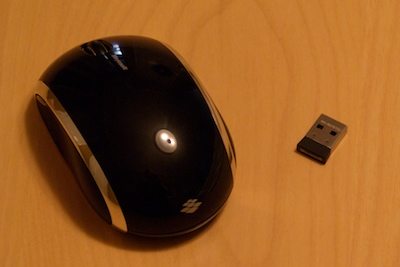
Like a lot of people, if I have room for it while working on my laptop, I’d rather use a mouse than the trackpad. Most mobile mice seem to be created approximately equal, but recently Microsoft introduced something new to the field with their BlueTrack technology which claims to work more smoothly on more surfaces than the typical red or infrared laser systems of other mice. Microsoft is using BlueTrack in various products, but it seems to be an especially appropriate fit for a mobile mouse such as the Microsoft Wireless Mobile Mouse 6000.
Overview
The Microsoft Wireless Mobile Mouse 6000 is a compact mouse with a tiny USB receiver, intended for use with laptops and netbooks. It has five buttons: the usual three on top and one on each side. The wheel is smooth instead of having the “clicks” that many other mice have; I personally like this a lot since I have gotten used to a smooth wheel from using a Logitech MX at home, although I wish it had the same momentum as the Logitech style wheel. The wheel also tilts, as is common in most newer mice.
Like most mobile mice, this one has a USB receiver. It is a “nano” receiver, meaning that it is barely bigger than the USB plug itself, sticking out only about 1/4 inch from the port so that you can leave it plugged in while your laptop is stowed in a case. If you don’t want to do that, the receiver also stores neatly in a compartment on the bottom of the mouse.
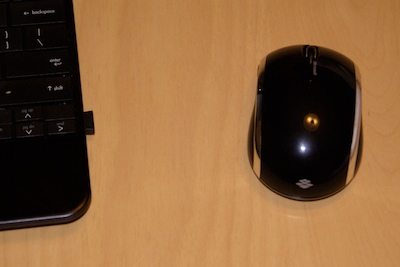
Although the top of the mouse is smooth, the sides have a more “grippy” surface as well as an inward curve toward the front, making it easy to hold with your thumb and fingers. It’s very light, and fairly fast – not quite as sensitive and twitchy as I like a desktop mouse to be, but perfect for laptop-sized displays.
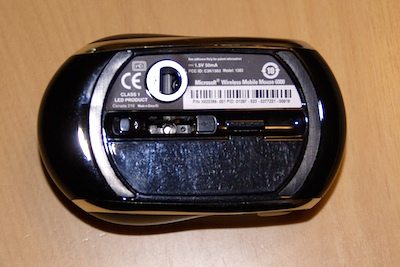
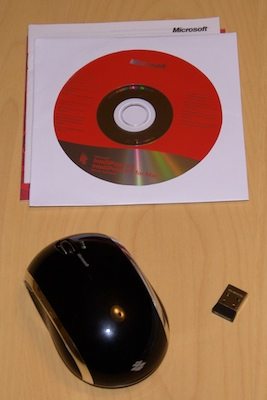
Included in the package with the mouse are an AA battery (the mouse uses just the one, and it is supposed to last up to 10 months) and Microsoft’s Intellipoint drivers which allow for advanced button assignments on Windows and the Mac. As with most mice the software isn’t actually required to work with any modern operating system; although I didn’t install the Intellipoint driver on my Mac, I could assign the extra buttons to Expose’ and Spaces functions through the system preferences as usual.
BlueTrack
The most interesting thing about this mouse is its BlueTrack optical system, which is claimed to work on nearly any surface except for clear glass or mirrors. In order to test this, I tried the mouse on nearly every semi-flat surface I could find in the house, and was pleased to find out that Microsoft isn’t kidding about how well BlueTrack works. Here’s a sampling:
- Papers and books
- Several kinds of wood (tabletops, 2×4, particle board)
- A marble countertop
- Vinyl flooring
- Carpet
- Furniture upholstery
- Bed sheets
- Leather
- Clothing
- Shower tile (dry)
- My own skin (use your other hand as a mouse pad…)
- The black, polished back of my guitar
- The trunk lid of my car
Even semi-reflective surfaces like my car and guitar were not a problem, so I feel safe in saying that this mouse will probably work on any surface you’re likely to find next to your laptop or netbook, including your own body if necessary.
Conclusion
All in all, I like this mouse, and its tiny receiver is now installed semi-permanently in my HP Mini. It’s light and sensitive, and the smooth wheel and extra buttons are very nice. I admit that I don’t really need the ability for it to track on almost any surface, but it’s nice to know that I could use it that way if I had to. I can only think of two ways in which I would improve it: adding momentum to the wheel like the Logitech MX/VX mice have, and supplying a protective pouch. Overall, Microsoft continues their tradition of making good peripherals with this one.
Product Information
| Price: | $49.99 |
| Manufacturer: | Microsoft |
| Requirements: |
|
| Pros: |
|
| Cons: |
|

Gadgeteer Comment Policy - Please read before commenting
I have a 4000, and it’s very similar, but the middle button is much too firm. I bought it because I want to use it for 3D modeling, and I hate bumpy scroll wheels that cause my index finger to go numb. To me, the 4000 was great except the excessive effort required and subsequently violent click when pressing the middle button. It’s as bad on my hand as the worst scroll wheel. I also noticed it has a delay for the middle button, which is incredibly irritating when modeling something quickly. For now I’m using a very sensitive scroll wheeled mouse that, although it clicks, is pretty benign compared to some mice I’ve used over the years.
I think the manufacturers are overly concerned that the wheel will go off all the time. They should consider that only people who want the sensitivity, in order to preserve their hands, will be buying the mouse. To me, the 4000 was a dream until I pressed the middle button and my hand sent me the omfg-die signal.
I bought this mouse a month and a half ago, like it quite a bit and I use it constantly so I wasn’t expecting anywhere near the battery life they claim it can get “up to”, and like you say it is easy to forget to turn it off. I’ve gone through the battery it came with and another so far, which isn’t bad considering I use it all day every day and often forget to turn it off. Only real issue I’m finding now is the wheel doesn’t scroll so smoothly and I can’t figure out how to open the damn thing to clean / lube it. Remember the old days when manufacturers build mice assuming you would want to open them to clean instead of assuming you will just buy another? :/
I have one and liked it very much until it stopped working i.e. my computer no longer recognized the receiver in the USB port. When I took in out, I realized the receiver was extremely hot – almost too hot to hold im my hand. I think it was “cooked.”
I got a white one for free from Ingram Micro Singapore’s Christmas Office:Mac Bundle + Free Mouse
Same issue as Jim H. all of a sudden, my laptop couldnt recognize the receiver. when i ejected the receiver, it was so hot, it almost burned my finger. Not sure if microsoft provides a warranty? i’ve owned the product for about 3 months
i like the mouse and all, its great really for the first few days than bam. The nanoreciever malfunctions and heats way up. It doesnt work anymore and thats fifty dollars wasted. This happened twice on my laptop and i will not be getting a new one. just warning u all.
i’ve had the same problem, the receiver got really hot on my 3 month old mouse. i contacted microsoft and a replacement was sent to me (a brand new mouse in complete package) though not the same colour i bought, still better than nothing
Have read with interest the comments relating to the failed dongles! I am now on my second mouse as a result of the same fault mentioned. i.e. All of a sudden the USB device is not recognised. Mine also got so hot that the dongle burned me upon removal from the USB port, causing me to drop it! I returned the mouse to the store of purchase (in New Zealand) and was issued a replacement. I have had the 2nd mouse approximately two weeks and again it has failed. NB: the store confirmed manufacturers warranty of 1095 days, so there is hope! However am now concerned about what damage this is causing my 8 month old Dell laptop?? Has anyone had a response from MS on these failures?
I bought one at USA in May 2010. It is not working now. I may not be having the warranty certificate too. Is there any way to get it repaired?
We purchased this mouse 4 days ago. Last night, my mouse stopped working. My laptop said that the mouse malfunctioned and then it did not recognize it at all. When I began to remove the Nano Receiver, it was very difficult to get out. When I got it out, it burned my fingers and I dropped it and I now have blisters where it burned me. We are returning it to the Staples today.
PLEASE! For YOUR SAFETY, Stay AWAY from this product!
I have the same problem as Jim H. The receiver on my 6000 got so hot, it burnt my fingers. Now I’m ticked. Why won’t MS sell a new receiver? I replace the 6000 with another brand but I would really like to go back to using the 6000. Anybody have an answer? Please email.
Same issue as others, I have the MS wireless mouse 6000 and it stopped working all of a sudden. Took the receiver out and dropped it as it was very hot. Tried the receiver it all different USB ports, no luck. Only thing that happened was that the receiver heated up every time I took it out to try in different port. I switched to a corded mouse into the USB port, working instantly. I’m calling MS now and will post if have any resolution.
I, too, have the same problem. My mouse just suddenly stopped working this morning. I almost always turn it off at night, but didn’t last night. When I got back to my computer this morning, the mouse wasn’t working, and is not recognized by the laptop. I have tried uninstalling and reinstalling the driver, changing battery, the connect button on the bottom, tried putting the usb reciever into all the usb ports. I’ve only had the laptop and mouse for 4 or 5 weeks. The receiver has gotten hot, like everyone elses’, but it didn’t burn me, happily. If anyone has a solution or if MS is replacing it with no questions, please post. I don’t know what I did with the paperwork, if any, I got with the mouse. Didn’t expect it to be a problem. Thanks! 🙂
For replacement of broken or defective products call warranty directly. No paperwork required, but you DO need the Product ID (PID) number off the bottom of the mouse; it’s in this format: xxxxx-xxx-xxxxxxx-xxxxx U.S.: 800-360-7561 Canada: 800-933-4750.
Had two MS Wireless Mobile 4000 mice quit on me due to overheating. I called to report a failure on 2/21/2011, and had the replacement by 3/1/2011. It failed today, 3/2/2011. Called to tell them of the second failure today and they’re sending a MS-WMM version 6000 to see if that works better for me. Hopefully the short turnaround will happen again.
N.B.: First one quit when left plugged in for several hours while not being used; second quit when my computer told me my battery was low and I plugged in the power supply. Maybe the thing to do is to avoid long duration non-use and NOT do anything that will spike the voltage of the USB (like plugging in the power supply). Yes I realise these are not things one ordinarily should have to worry about, but if these mice are problematic, then taking a bit of care may extend their lives significantly.
same issue here, stopped working after sev. months. Will try and see if they can replace it. MOuse gets warm and blue light doesnt come on
My new WMM6000 arrived shortly thereafter (see above) and it has worked reliably since then. The nano-receiver stays cool-ish at all times (discernible heat slightly above room temperature). I am still on the first battery, and the additional feature of the green LED on top (that lights momentarily when you turn it on) which will illuminate when the battery is low, has not activated yet. On the whole, the 6000 is a very reliable little device, whose only shortcoming seems to be the placement of the side buttons too far forward.
Thanks to Microsoft for the fast turnaround time, and this much more reliable device, without all the hassle of returning the failed ones or providing receipts/proof-of-purchase.
I have same problem, too. I purchased it one week ago, but all of a sudden it does not work. I tried to reinstall the driver, checked battery, plugged different USB port.
I just downloaded/installed the latest Intellipoint and my MS Wireless Mobile Mouse 6000 immediately improved – resolved the frustrating delay in the scroll wheel. It now jumps quickly when I first lightly turn the wheel. That is a simple/quick solution – just load the latest Intellipoint driver.
I love this mouse, I’ve had mine for about 6 months now and it is so light and responsive. I use it for my netbook and my desktop. It is so lightweight that it is easy on my hand and wrist. I like that I can turn it off to save on the battery, and I bought it for that reason. I also use rechargeable AA batteries, so it saves on cost. Unfortunately, I accidently put the receiver in backwards and now I can’t remove it from the mouse… I wish they made them so that it would not happen. I have tried taking it apart to pop it out, but haven’t been successful. I hate to fork out the bucks to buy another one…
No need for that Pearl. If you can’t wedge a pair of tweezers in there to grab it (bending one side a bit, then straightening it out once you retrieve the sender) then here are a couple of plans of attack:
1) Ask a mechanic friend (someone with a decent set of tools) to recover it by using a small pair of needle-nose pliers, but instead of trying to grab the edge, put the tips *inside* the open end of the receiver and *open* the pliers so as to grab it from the inside out.
2) If you have a #0 or #00 crocheting hook, just reach inside the open end and grab one of the holes (there are two) on the top side of the plug and slide it right out.
Good luck.
how to open or disassemble a microsoft mobile wireless mouse 3500 limited edition..?? can someone tell how to do that..?? tq..,
I wouldn’t bother with these mice unless it’s for short-term stints, or you have very small hands.
Your hand just gets cramped and quite uncomfortable to use.
Since when is it so difficult to carry a regular desktop mouse with you on your travels?
The laziness of today’s generation is just mind boggling, considering this is a vastly inferior product to a full size mouse.
I’ve had my 6000 mouse for about 4 years & Have got my money’s worth & Used Intelipoint since setting up but my nano going into computer Got Hotter than H___L & Quit working after taking out than the very tip broke off from being so hot!
It’s warranty is for 5 yrs, so Will See What Microsoft Says & Does!
Hate to say but NO Sales slip Either, But it’s the BEST Mouse Ever…
“The laziness of today’s generation is just mind boggling, considering this is a vastly inferior product to a full size mouse.”
So Greg you somehow draw the conclusion from the general population buying a small mouse that today’s generation is lazy? What a troll.
Also I’ve had this mouse for several years, and I think it’s great! I haven’t experienced the overheating, but judging from previous comments, suppose I was just lucky.