
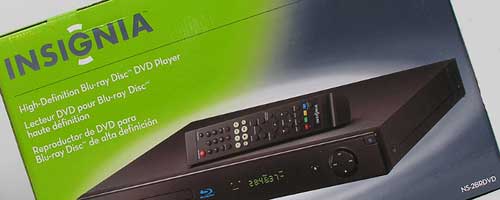
I was one of those people that picked the wrong side in the hi-def DVD format wars. I purchased an HD DVD player add-on for my XBox 360. Of course only a few months after I did, the war was over, Blu-ray won and NetFlix sent me a Dear Julie letter letting me know that they weren’t going to offer HD disks any longer. Garrrrr…. Since then, I’ve been dragging my feet to buy a Blu-ray player. Prices were more than I wanted to spend on one until now, with the Insignia NS-2BRDVD Blu-ray player. Insignia is Best Buy’s house brand for electronics and usually offers a nice set of features for an equally nice price. Let’s check it out.
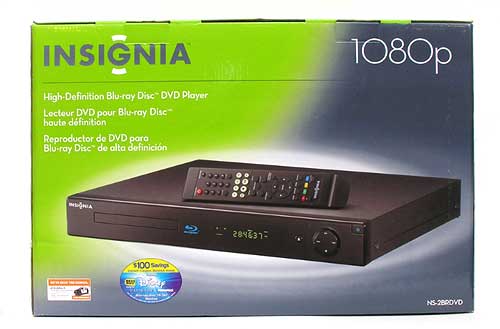
Hardware Specifications
DVD Player Type: DVD Player (Single)
Disc Capacity: 1
Playback Formats: BD-ROM, DVD, DVD+R/RW, DVD-R/RW, CD, CD-R/RW, MP3, WMA and JPEG
Maximum Output Resolution: High Definition up to 1080p
Digital Tuner: No
Progressive Scan: Yes
Dolby Digital Decoder: Yes
DTS Decoder: Yes
Simulated Surround: Yes
Media Card Slot: No
USB Port: Yes
Optical Digital Audio Outputs: 1
Coaxial Digital Audio Outputs: 1
Composite Video Outputs: 1
Audio Outputs: 1
Component Video Outputs: 1
IEEE 1394 FireWire Port: No
HDMI Outputs: 1
DVI Outputs: No
Stereo Audio Outputs: 1
Zoom Feature: Yes
Remote Control Type: Standard
Video D/A Conversion Rate SE: 10-bit, 108MHz
Audio D/A Conversion Rate SE: 24-bit, 192kHz
ENERGY STAR Qualified: No
Product Dimensions : 2-1/5″ x 16-9/10″ x 10″
Product Weight: 6.4 lbs.
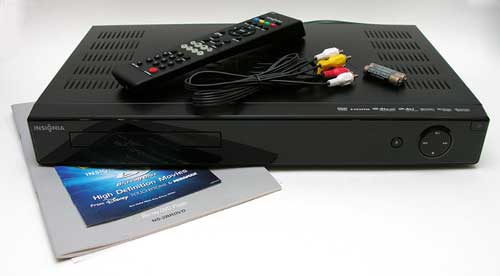
Package Contents
Insignia Blu-ray Disc Player with 1080p Output
Remote with 2 AAA batteries
A/V cable
Composite video cable
AC cord
Owner’s manual
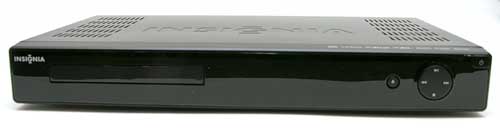
The player has a shiny Black plastic front, with a Black metal case.
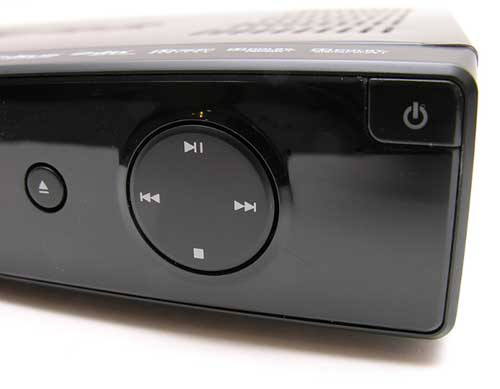
The only buttons on the front are the power button, eject button and the 4-way playback control button.
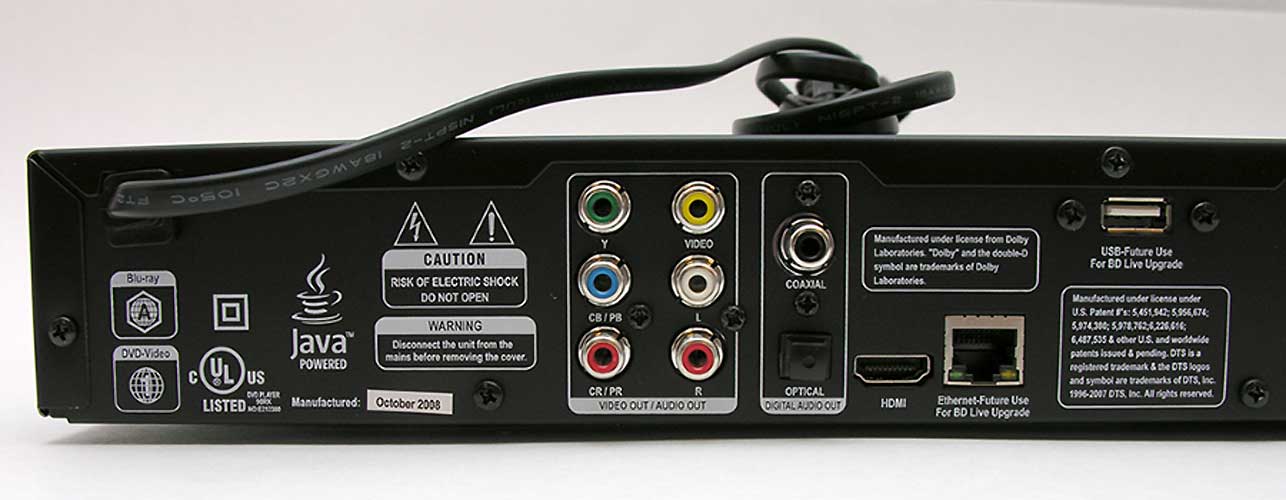
The back panel has all the various connection points (click the thumbnail to see a larger view). The player can be connected to your TV with composite, component or HDMI cables. I opted for HDMI to get the best picture possible for my 1080i TV.
You’ll also notice that there is a USB connector and an Ethernet connector. Both say they are for future use. A firmware update makes the USB port available for displaying images and playing audio files through the player. At the time of this writing, the Ethernet port is still not supported.
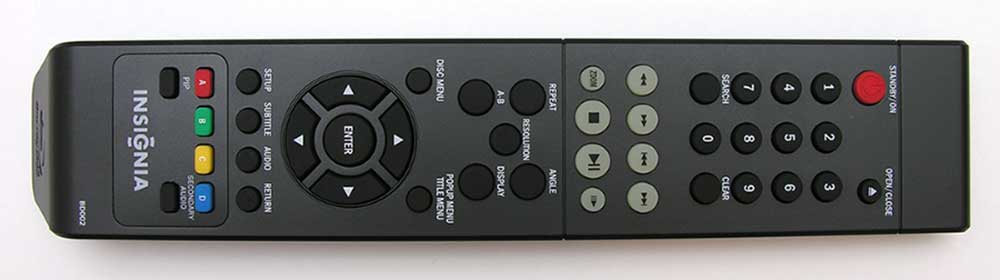
The remote is nothing extraordinary. It has all the necessary buttons, is light weight and comfortable to use. Click the thumbnail to see a bigger view.
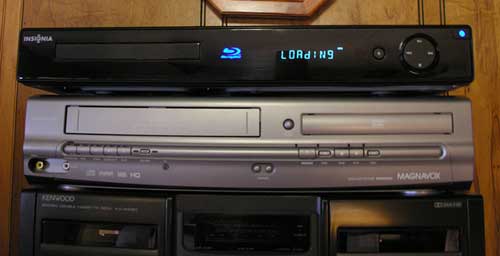
When the player is powered up, it has a Blue LED display and Blue LEDs for power and the Blu-ray logo.
The first thing that I noticed about the player once I put a disc in the drawer and closed it, was the noise. It makes noticeable shuttle and spinning up noises that my old Panasonic DVD player never did. After the disc loads and the movie is playing, I no longer hear the noises.
Loading time for some of the DVDs that I’ve tested has felt pretty long to me. Upwards to a minute from the time the disc drawer closes to when you finally see video on the screen. It actually seemed a bit longer before I did a firmware update on it…
The firmware update also enables the USB port on the back of the player, so that you can put .jpg and .mp3 files on a flash drive to view / listen to them through your TV. This feature is pretty basic, but it does work.
I tested this player with several DVDs and once a movie is loaded up, this player is great as far as picture quality and audio quality. Granted, my 65″ Mitsubishi RPTV can only do 1080i, not 1080p. Also, my audio is only 5.1 surround sound with RCA cables, but to my ears and eyes, it’s much much nicer than regular non-Blu-ray discs. That said, you have to remember, that I’m a Blu-ray virgin, so I don’t have any other Blu-ray players to compare with this one.
My only complaints about this player are that it’s slow loading DVDs and it seems to ignore me half the time when I press the disc eject button on the remote or the actual player. It will show the OPEN icon on the screen, but it doesn’t open the drawer. I have usually power the player off and on again before it decides to obey me. Also, since the Ethernet port is not enabled, you can’t take advantage of BD-Live features on DVDs. Other than those issues, I’d be happy to recommend the Insignia NS-2BRDVD Blu-ray DVD player for thrifty folks.
Product Information
| Price: | $229.99 |
| Manufacturer: | Insignia |
| Pros: |
|
| Cons: |
|

Gadgeteer Comment Policy - Please read before commenting
Seems almost like they’re rushing Blu-Ray players out a little under cooked. I have a friend that has had two players replaced already for weird glitches that made the damn things almost unusable.
Sorry to hear you fell on the wrong side of the format war. You should have followed my K-Mart corollary. Once you can buy a device from K-Mart made by Emerson, Coby, etc. you know the format is has become stable.
GPX minidisc player? No.
Audiovox DCC decks? Nope. (but I got burnt on that one anyway)
price? Pros/Cons?
@aphid oops, my review summary box didn’t show up due to an error on my side. Fixed now 🙂 Thanks for the heads up.
I think the Sony BDP 350 is a better buy ( got mine for $199 on sale at The Superstore ). And have seen it at that price from time to time..
No problems with it, except it takes a while to load ( approx.45 sec. ).
The up-conversion is fare, but my Toshiba HD 35 is much better in that area. I also went HD DVD, but I’m going to keep it, because it’s up-converting is, to me, is excellent on my Panasonic 1080p plasma.
I think the Sony is a good buy, if you can get it on sale.
Normal price for the player I seen is anywhere from $249 to $299 cnd.
And for the Insignia, friends of mine that perchance it had the same problem and other problems, and returned it and went for Sony for a few dollars more.
I opted for the PS3.*cough*blu-ray
My son Erik appropriated my third floor Sony Blu-ray that was matched with my Mitsubishi 52″ LED TV. I am looking for a replacement. My Sony Blu-ray works great downstairs. I would hate to keep climbing the stairs replacing malfunctioning players!
A couple of points:
* I agree with Julie, the loading speed is a big drawback
* Does the player picks up where it left off? You can try this by stopping in the middle of the movie, turn off the player, then turn it back on.
* The USB in the back is inconvenient
* Many of my coworkers keep telling me that the Sony PS3 is a good candidate: excellent picture quality, regular firmware upgrade, and a gaming system to add. I don’t play game, so I’m sort of hesitate a little.
Because Blu-Ray is not quite finished yet in this regard, and I don’t have a high-def set to play it on, anyway, I just recently (yesterday, in fact) purchased a new camcorder, and it is standard definition. Until Blu-Ray has more market saturation and I can afford to get one and a decent-sized 1080p television, there’s no reason to get an HD camcorder.
Hmm..i’ll go for a PS3…but first I have to upgrade my tv, surround sound and everything else. Oh well. Nevermind then! haha
I tried the PS3 as a BluRay Player for over a year. After about 45 minutes, the fan would turn on and drown our the movie’s sound, especially if the volume was low. It became intolerable.
We then received a low end SONY BluRay player and have been very happy. It just works and the fan never is too loud.
We are looking at the Samsung or LG BluRay player that will also play NetFlix streaming movies as an upgrade…
The difference in picture quality between Blu-ray and standard-definition DVD was very obvious. But the difference is accentuated when you get the chance to flip back and forth between the two. Just as many owners of rear-projection DLP sets don’t notice that their picture is getting dimmer over time, many owners of standard-definition DVD players will be perfectly happy with the picture quality, and won’t notice what they’re missing, unless they have something better, such as Blu-ray, with which to compare it.
I have this player, and recently learned to my dismay that it will not play some blu ray disks. I have tried five (5) different blu ray copies of Quantum of Solace, and last night it would not play The Day the Earth Stood Still. The trailers on the disk, and the main menu comes up, but after that no matter what you try, it just reloads the main menu. Has anyone else had this problem?
I have indeed had the same issue. I went to the movie store to get the Quantum of Solace only to find that it wouldn’t work on my player, upon bringing it back I made a fool out of myself by telling the store clerk that her movie was a piece and I took another off the shelf. Same result though. Apparently it’s not the movie. It’s the player. Some movies also come across as fuzzy… Anyone else had this issue?
I have had the Quantum of Solace issue (loads menu and trailers, but nothing else) on 3 different blu-ray discs, except with a different Blu-ray player. I’m using the Sherwood BDP-5003. VERY curious to know if anybody knows what’s going on here.
I have this same Blu Ray player and haven’t had any major problems with it except for the slow loading. I have been away at school for a while so I haven’t been buying new blu rays, but I was actually going to go buy Quantam of Solace soon. Have any of the people with these problems contacted Insignia to find out a reason for the glitch? Also, Do the people with this problem have their players hooked into a working internet connection via the ethernet port? I feel like this could just be a software issue and there could be an update available to easily correct this.
For anyone reading about this player that is thinking about purchasing it here is a little more information.
The first thing I looked for to help narrow down my selection was that the Blu Ray had some type of input that would allow me to upgrade the software via an ethernet or USB cord. This player has both and that is a big deal because when I was doing my research on what to look for in a Blu Ray that was the number one thing. Without this a user would be unable to ever update the software. And as others have already commented Blu Ray is still an evolving technology so I wouldn’t be surprised if there were updates coming out for years. The long and short of it is that if you don’t have any way to upgrade the software you could be stuck with a Blu Ray that has some bad issues just like not being able to play newer Blu Rays. This is why I am interested as to whether the people having trouble with Quantam of Solace and The Day the Earth Stood still have ever connected for an update.
The picture quality is great for it being such a cheap player. Unless you are planning on spending over a thousand dollars on a top-of-the-line Blu Ray you will probably get similar results from most of the less expensive Blu Ray players.
Insignia is best buys house brand. This means that best buy pays a company ( I believe it is LG but i’m not 100% on that) to make different electronics for them and stamp it with the insignia brand. On best buys part this is a great idea to help increase profits. I have a 42 inch insignia LCD that is 1080P. I got it for far less than any other 1080P tv’s that were the same size. I have had it for over a year now and still have never had a problem with it. However, one of my friends got an insignia receiver for his birthday less than 4 months ago and it has already been replaced twice. As far as this Blu Ray player goes there seem to be some minor inconveniences but nothing that actually affects the picture or sound quality. (I wouldn’t go waste my money on an insignia receiver though they seem to be about the only thing insignia puts out that has lots of problems)
The loading speed once you turn on the Blu Ray player can take 15-20 seconds before you can even open the disc tray. This can be annoying but not enough that I would tell someone to buy a different player that could very well have the same issue.
My only other complaint about the player in question is that without the remote it is about as useful as a coaster. There are only 3 buttons on the device itself. Power, Eject, and a larger button that has stop, rewind, fast forward, play/pause (just like an ipod). When I bought it I thought I wouldn’t have any problems since there was a play button right on the player, however, when you put a disc in and get to the main menu you have to hit “enter” on the remote. Hitting play on the player wont do anything. This is a big problem for me because I just realized I lost the remote for it before I went back to school this spring.
In the end based on price, picture quality, and overall ease of use I would rate this player an 8 out of 10. But, if this model won’t play newer Blu Rays and this is not an issue that can be fixed with a software update then I would advise you to try and find another comparable Blu Ray. No matter what Blu Ray or any other type of expensive electronics you invest in make sure you do your research before you buy. Don’t expect to go into a store thinking the employees will find the right thing for you. Know what features you want and what you don’t care about.
My player is not hooked up to the Internet. I contacted Best Buy aobut the problem and they ‘transferred’ me to Insignia, some sort of quick message in FRENCH and then the line disconnects. They also gave me the telephone number with the same result. I am very dissappointed with this player. The picture quality is very good, but the sound output is less than average. Also, it takes a very long time to load any discs, and it is very noisy until the disc is actually running.
In the spirit of full disclosure, here is an update. Insignia finally sent me a software update, and it seems to have worked. I have not found any Blu-ray discs that it will not play, although it does take a very long time for some of them to load. That being said, if a company knows that there is a problem with a specific unit, they should AT A MINIMUM cut a software update disc and slip it into the box BEFORE it is purchased. The customer should not have to go searching and complaining to get the fix. I wonder how many people who just wanted a blu-ray player and are not computer savy, purchased this product and now have a ‘lemon’ on their hands, not knowing that there is a fix available. Terrible customer service.
I had the same issue with the james bond movie. Found out the firmware on the blue-ray was out of date. Go to the website and download the fw update software. You burn it to a dvd and insert and its very easy to do.
Played that movie fine, and everyone since then as well
Forget about BD-Live it will not work after 3 days of updateing firmware and following instructions it still not working. Not happy!!!!
Got this blu ray player about a year ago because it was the cheapest out there at the time that had an optical digital output. I have a Logitech z5500 5.1 system with dolby didital and dts decoders. I was extremely impressed with the sound quality that blu ray affords. The jump in quality from dvd sound to blu ray sound is unmistakeable with my system. Soon found out that the player would not play certain blu rays like the aforementioned Quantum of Solace. I have noticed that ones that don’t work are published by MGM studios such as Valkyrie. Some published by Fox r iffy. Anyway, i waited awhile before finally goin to the Insignia website to download the firmware upgrade. Now i don’t have problems playing anything. BUT, now i have a new problem – I can’t get digital soundtracks to play through the either the coax or optical digital outputs. I basically get an analog signal and the receiver goes to pro logic II mode which is basically the sound quality of a dvd using red and white stereo cables. I’ve called Insignia customer support and told them what happened after applying the update and they gave me a bunch of bs that the firmware (june 2009) was not the latest version and they were having trouble uploading the newest version to their site or something like that. So they sent me a firmware upgrade disc in the mail and it was the exact same version that i had downloaded from their website. Called them back. Did not solve the problem and they said i would have to take it to Best Buy which is and hour away from where i live. If they don’t replace it, then they may have to ship it out for repair or whatever which they may try to charge me for. I doubt they will be able to help me in store and send me home unless they just furnish me a new model that doesn’t suck. Its not just this brand that seems to have problems with the bluray format, but the sound issue really pisses me off. I have heard also that some Insignia hdtvs continuously blow power supplies. So bottom line, don’t trust this shit brand. You get what u pay for and u pay for what u get.
Frank is dead on. This Blu-Ray was sent from the factory and is sold as a Blu-Ray but it cannot play Blu-Rays, unless and until you get the “firmware” upgrade via Insignia. So Best Buy is essentially selling us a DVD player but is representing it as a Blu-Ray. What a crock!
Early this year I got a insignia player from best buy. It would not play two movies I rented. I don’t remember what they were but I went back and got different ones from blockbuster and same result. I called they company which is out the country aparently and they said that they did not have any firmware updates coming out anytime soon. I returned it to best buy and probably won’t buy blu ray players for some time.
does anyone know if it can play multi region blue rays discs???
shairul
We have had two of these (returned the first one for the same problem we had with the second one) and both of them only lasted a few months and then suddenly stopped playing discs: blu ray, DVDs, didn’t matter. Wouldn’t load and then it opens up and says load disc…. this thing sucks!
The price is right, but the remote control is a real pain. You have to push the button 2 or 3 times before it accepts a command. Hope they fix that in future designs!
I have the same model bluray player. It was originally in the family room, but when we moved my parents bought a few new ones so I got to take this one. I’ve noticed the same problems as mentioned, when I try to eject a disc it takes a few minutes and a lot of pushing the eject button to get the player to eject a disc. Also it makes a fair amount of noise when it first loads and reads the disc. Also I’ve noticed that depending on which type of disc I’m playing the player takes a considerable amount of time to read certain discs, especially the new bluray discs as opposed to the older bluray discs or the regular DVDs. I didn’t know that you could update the firmware until very recently, so I’m going to do that in hopes that maybe some of these problems will get better or stop completely. I know that is wishful thinking but it’s worth a shot.
update your player directly by ethernet not wifi in your home.
brought mine at a yard sale foe twenty dollars. My player didnt contain bd live and other features. Took it to best buy, tech had a hard time finding firmware but alas found it and now my player works like a champ. Contains features that it never once had. tech said i didnt owe him nothing, maybe because it was Sunday.
Disc player had the same problems you guys have now works like a charm. That guy at that yard sale is going to be very angry when he found out that his insignia player only needed to be updated. I won!!!!