
Most people won’t argue when I say that the Palm V is a very cool PDA. It looks cool, it feels cool, it is just downright cool. But, there were loud complaints when it came out. People moaned that it only had 2meg of RAM and that it could not be upgraded. I could understand these complaints because I had been using an 8meg Palm III for quite awhile. Moving backwards to 2meg was / is very difficult. But, I really liked the Palm V for its size and its great new screen so I settled…
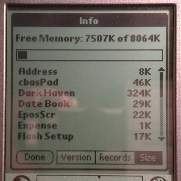 |
Well, there is now some very good news for those of us that bought the Palm V but need more than 2meg of memory. A company called EFIG.com has created an upgrade process for the Palm V that will give it 8meg of RAM. You can either send your Palm V to them to upgrade, or you can buy a new upgraded unit directly from them. Using TRG’s FlashPro you can also take advantage of the 824k of Flash (I tested FlashPro with this upgraded unit and it worked just fine).Here’s a bit of background info on EFIG.com. EFIG has been in business since 1997. They have electronics experience since 1975. Other products that they work with are high speed digital design for consumer and industrial products with a special focus on signal integrity and electromagnetic emissions compatibility. DVD players and MPEG set-top boxes. |
Probably the biggest questions on everyone’s minds are “What does the unit look like after the upgrade?”, “How will the upgrade affect my warranty?”, and “How will it affect my battery life or performance?” I’ll try to answer each of those questions in order.
“What does the unit look like after the upgrade?”
To upgrade the Palm V, it requires that the two metal shells that make up the case be separated. These two shells are actually glued together, and not held in place with screws. That was my main worry, what would the unit look like after it was taken apart and
then glued back together again.
| When the unit arrived, I was anxious to carefully look it over. I was sure I’d find some scratches, dents or other signs that the unit had been opened. I was really surprised when I could find no real signs that the two shells had ever been separated.If you look at the picture on the right, you’ll see my non-upgraded Palm V is on top, and the upgraded unit is on the bottom. You can see that there is a slight space between the seam where the two shells meet. In the photos, the space look pretty noticeable but I actually didn’t notice it until I took these pictures. | 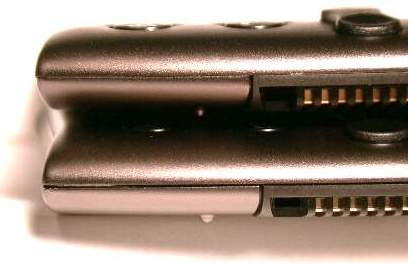 |
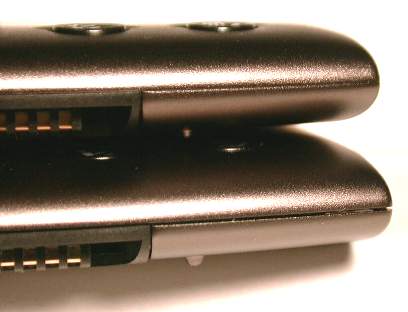 |
Here’s another picture of the other side. You can see the space between the shells on this side as well. Although you can see this, the case does not flex or feel any less solid due to the upgrade.Also, the space between the seam is even and not wider or narrower at different points.
I tried squeezing the shells together to see if I could close the gap but the case didn’t budge. |
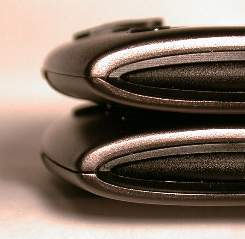
| To the right is another view of the bottom seam. I didn’t show pictures of the sides or backs of the units because there wasn’t anything different between the two that I could see. Actually the only place where there was any difference between my non-upgraded unit and the upgraded unit was the bottom seam.As you can see below, I’ve included pictures of the top seams. In these pictures, my non-upgraded unit is on top and the upgraded unit is on the bottom.
These seams are perfect. The only thing I found on the upgraded unit was a bit of dried glue on the edge of the seam. Using my fingernail, I was easily able to scrape it off. The power button and contrast button work just fine on the upgraded unit. As does the removal of the styli on either side of the unit. |
 |
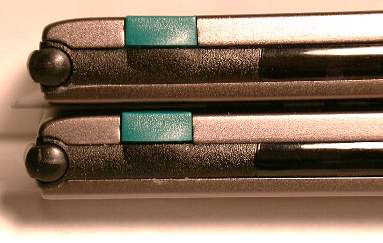
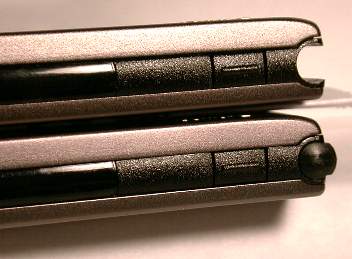
I’d have to say that the workmanship on this unit is terrific. If I didn’t know any better, I wouldn’t be able to really tell the difference between the upgraded unit and my unit. If that is your main worry about having the upgrade performed on your Palm V, I would let you fears rest.
“How will the upgrade affect my warranty?”
The upgrade will void your warranty from 3com. EFIG.com will be supplying their own warranty. I don’t have any details on this yet.
“How will it affect my battery life or performance?”
Unfortunately, I have only had the upgraded unit for a few hours and must return it soon. As a result, I won’t have the time to do any real battery testing. EFIG.com has done some of their own extensive testing. They found that “active use” battery life was extended. But the downside was that an upgraded device will only retain memory for 41 days compared to 100 days for a standard PalmV when that unit is turned off and not in use. You can find more details of their testing at their site.
As for performance, I can’t tell any difference between the two units. They both are just as snappy at opening and running programs. I ran the same benchmark program that I used in my Palm V review and came up with the same results +/- one second.
So, if you have a Palm V should you upgrade it? That really depends on your typical memory usage. The first thing I would do if you are filling the 2meg is to buy FlashPro (this software will let you use 824k of unused flash memory). Then if you are still running out of memory, I would definitely consider this upgrade. I am personally going to have my unit upgraded after seeing the great job that was done on the review unit that I’ve had.
Product Information
| Price: | $249.00 |
| Manufacturer: | N/A |
| Pros: |
|
| Cons: |
|

Gadgeteer Comment Policy - Please read before commenting
Mornin’ Y’all!
I was wondering if you have received your H5455’s yet? I have some $$ to spend and was curious to see if they had arrived yet. I’m not as brave as you two and won’t order unless I know I’m going to receive something next day.
Let us know if you have them, and if its a better PDA than the 3900’s.
Thanks!
Christopher Spera
Not to mess up the trend of my ordering bad luck streak, my order is delayed until tomorrow. Of course Judie got hers today.
What am I doing wrong?!? 😡
That is SO not right…
I dunno. You and I have similar luck. I wish I knew…
Well, in all fairness, she did order hers about 12hrs before I ordered mine 😉
yeah, but that’s still not fair! :rolleyes:
I got to Eval a Pre Production unit from HP for work. Unfortunately I am still waiting for the Production Unit hopefully next week. On the Pre Production unit I had the feel of the device was the same as the 3900 except the themes were more like WinXP. Backup and Restore tool stayed the same which was good for us that’s how we build our images. On the Pre unit the Bluetooth, WiFi and Biometric finger print reader didn’t work. HP didn’t tell us this at the time until we locked the device up with the finger print scanning. 🙁 and had to do a hard reset. I think before I spend the money on one I will give it just a little more time and re eval the unit when I get m Production unit.
Diz
I’ve been playing with the biometrics quite a bit, and I think it may be the one thing that will actually get me to keep my PDA in a secure mode. It seemed like too much of a hassle, before. It’s worked 9 out of 10 tries, so I guess they fixed any glitches.
Judie :0)