
I’ve been a Palm Treo junkie since March of 2005 when I began my odyssey into the world of smartphones. It was a strange journey that began with a Sprint Treo 650 that had been hacked to work on the Verizon network. Then I switched carriers from Verizon to Cingular and purchased an unlocked 650, which I’ve been using as my main device ever since. In the past year, I have seen Palm release the 700p and 700w for non-GSM carriers. No joy for me! But, finally Palm has released a new GSM phone. The 750v is a quad band (850, 900, 1800, 1900) phone for the Vodafone network. Right now it is only available outside the US, but will eventually be available here. Of course you didn’t think that I would be patient enough to wait around for that day did you? Ummmm…. NO! A little googling turned me on to PhoneSource-USA.com and one day later I had an unlocked 750v in my hands.
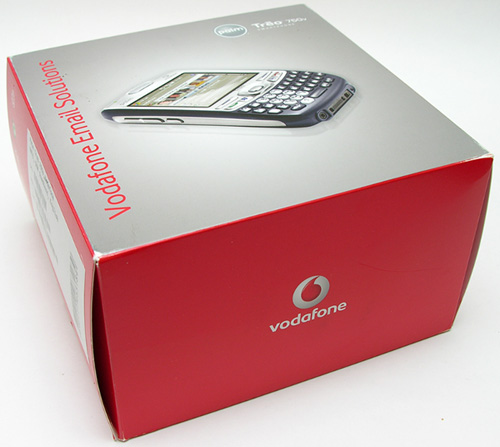
Hardware Specs
Operating System: Windows Mobile 5.2
Memory: 128MB / 60MB nonvolatile flash memory available to user
Processor: 300MHz Samsung processor
Display: 240 x 240 16-bit color (65,000+) TFT touchscreen display
Radio: GSM/GPRS/EDGE/UMTS radio, GSM bands: 850/900/1800/1900, UMTS bands: 850/1900/2100
Connectivity: Bluetooth 1.2 wireless technology, Infrared (IR)
Expansion: miniSD card slot
Camera: 1.3 megapixel with 2x digital zoom
Audio: 2.5mm headset jack is stereo headset compatible
Battery: Removable 1200 mAH Lithium-ion
Talk time: up to 4.5 hours GSM / 2.5 hours UMTS, Standby time: 10 days
Power: AC adapter (Input 100-120V ~ 50/60Hz 0.2A / Output +5.2V)
Size: 111mm x 58mm x 213mm
Weight: 5.4 ounces / 154 grams
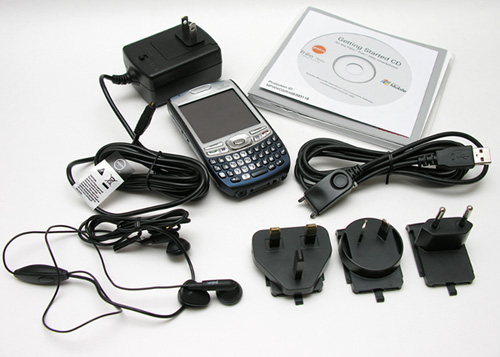
Package Contents
Treo 750v
Li-ion battery
AC charger with 4 country adapters
Stereo headset / mic
USB sync cable
Getting Started CD
Quick Start Guide
User Manual
The design of the 750v hasn’t changed radically from the original Treo 600, 650 and 700 models. That said, there have been some subtle changes, so let’s take a look.
Hardware Design
Front
The first obvious thing that you will notice about the 750v is its lack of an external antenna on the upper left corner. You might worry that a lack of an external antenna might cause reception to suffer. I’ve actually found that the 750v gets better reception than my 650. I’ve been able to use the 750v in places where my 650 would have problems with dropped calls and bad audio.
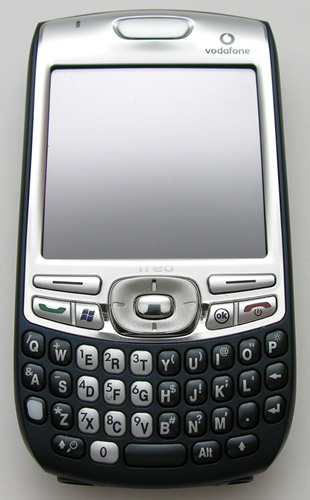
Everything else about this phone looks very familiar, which is both good and boring. I guess Palm didn’t want to mess with a good thing considering how popular the Treo has become. Personally, I wouldn’t mind a little innovation…
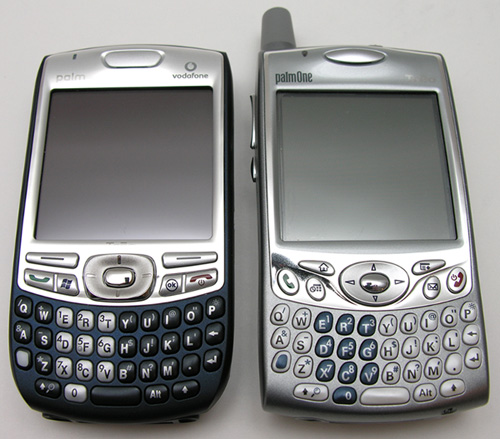
Compared to the 650, the 750v has slightly larger buttons and keyboard keys. It also has more rounded corners, which makes it feel smaller in your hand. But if we compare the size of both devices, there really isn’t a big difference. The 750v is 1 ounce lighter than the 650 and feels solid. This phone passes the Gadgeteer squeeze test with nary a creak or flex.
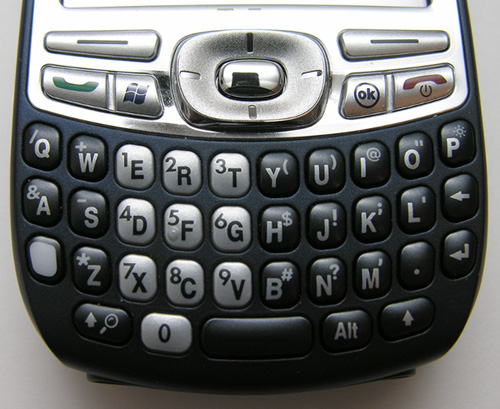
The thumb board keys are square with rounded corners and seem to be a bit flatter than the 650 keys. The tactile feedback is good and the layout is identical to the 650, so the learning curve is nil if you’re someone that is upgrading from a previous Treo device. The 5 way navigation button and phone buttons are shaped a bit differently and the call Answer / Start button and call End / OK button are actually 2 buttons now instead of 4. Each set is a rocker button instead of an individual button. I haven’t found this to be a problem so far.
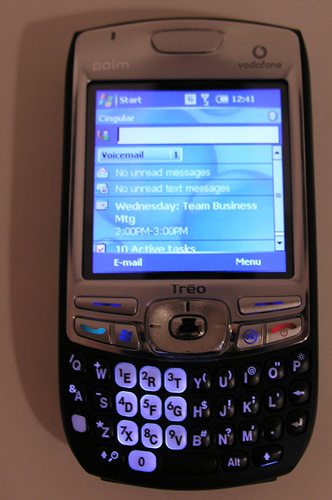
The keyboard and other keys light up when activated. You will notice that the 4 points of the nav button do not light up though like they do on the 650. Not a big deal, just pointing it out.
Let’s talk about the display… The resolution is 240 x 240, which is a step down from what I’ve been used to with the 650 (320 x 320). I was worried that this would bother me, but so far I’m not noticing a huge difference. Granted, so far I’m mainly just using the built in set of core applications. We’ll see what happens when I get to the software section of the review.
Left to Right: Treo 650, Treo 750v
Besides the resolution issue, the display itself is easy to read, the colors bright and the text crisp.
Back
The stylus silo, camera and speaker are located on the back of the phone. You’ll also notice that the outer shell of the 750v is a deep Blue. What you can’t see, is that it is rubberized. This is a nice improvement over the 650, which I’ve always found to be a bit slippery.
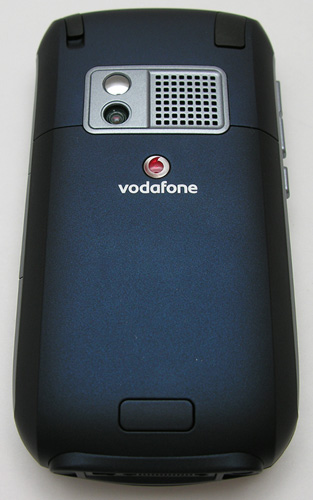
The back side has ridges (hard to see in the picture) along the sides that give the phone a thinner feeling in hand.
The built in speaker on the back of the device is loud enough for demoing an MP3 to a friend and definitely loud enough to be used as an alarm clock.
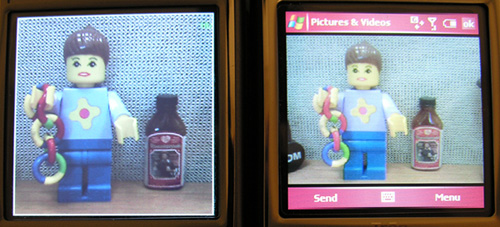
The camera built into the 750v seems to be worse than the crummy camera built into the 650. Which seems odd to me because the 650 is only a .3 megapixel and the 750v is a 1.3 megapixel. I’ll let you judge for yourself though.

Left to Right: 750v, 650. Click thumbnail to view full size image

Left to Right: 750v, 650. Click thumbnail to view full size image
The images on the left was taken with the 750v, the ones on the right the 650. Both were taken within seconds of each other from the same distance. The only thing I did was to set the 750v to snap at 640 x 480, since that is the max resolution of the 650. As you can see, the image taken with the 750v is noticeably blurrier. Disappointing…
Hey, does anyone really use these tiny self-portrait mirrors? I mean, how can you even see yourself in these things?
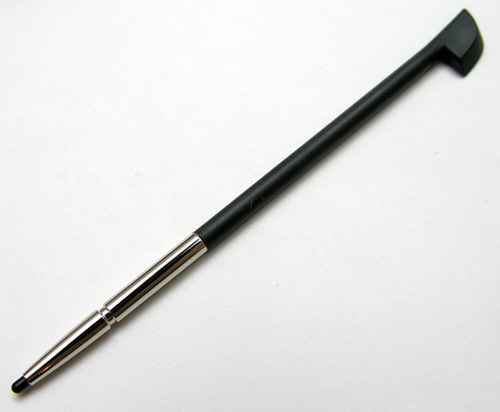
The stylus included with the 750v is typical skinny stylus.
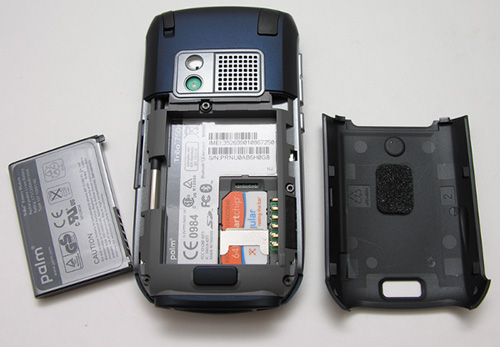
The battery cover pops off without much trouble, and reveals the battery compartment and SIM card slot. The battery included with the 750v is 1200mAH. The 650 has a 1800mAH battery. I tried my 650 battery in the 750v and it does work. But, it’s too thick to allow the battery cover to snap back on. I’ve yet to really test the battery life of this new phone, so I’m not sure how the difference in capacity really compares.
Left Side
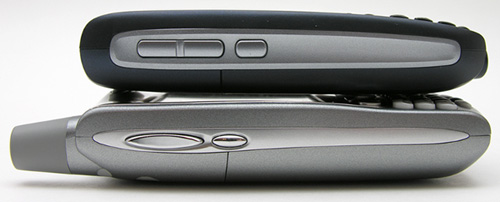
The left side of the phone has a volume adjustment rocker button, and a user definable button. I prefer the shape of the volume rocker on the 650. The ends of the 650 button are raised so that your thumb can easily find the right end to press for adjustment. Volume level through the earphone on the front of the phone seems a lot louder than the 650. I’m used to keeping the 650 set to max volume, I don’t need to do this with the 750v.
In the image above, you can see how the thickness of the 750v compares to a 650.
Right Side
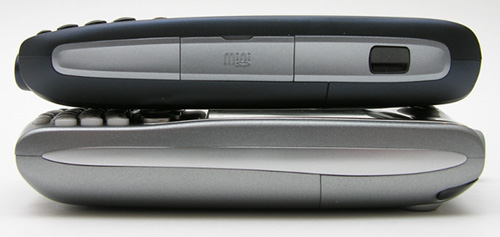
On the right side, you’ll notice the new location for the IR port and memory expansion slot.
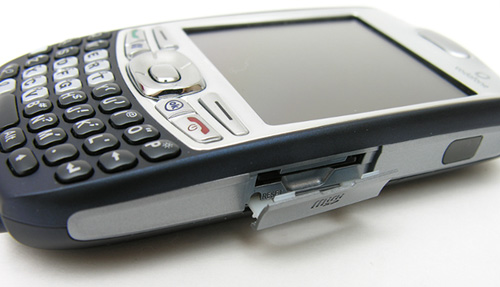
The 750v doesn’t have an SD card. Instead, it has a slot for a MiniSD card. The change from SD to MiniSD isn’t a big deal, except for one issue… the ability to easily add WiFi to the 750v. MiniSD WiFi cards are coming to market, there is at least one available now: the Spectec SDW-822. But the the problem with that one is that the card sticks out of the slot, making it easy to accidentally break off the door. For me the lack of WiFi really isn’t that big of a deal. If I want to surf, I just use my mobile data plan.
It’s hard to see in the image above, but at the bottom right corner under the card slot, there is a reset switch. This location is more convenient than under the battery door like previous Treo models.
Top
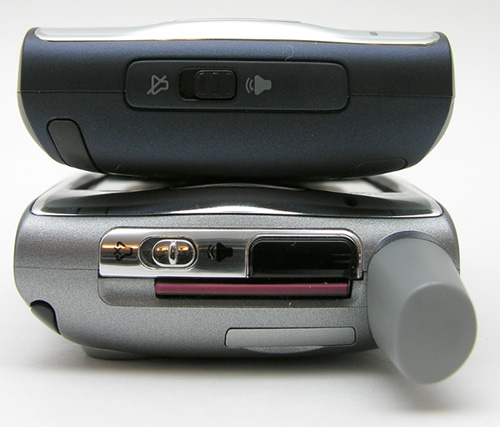
The top of the 750v has the speaker on/off switch. When you switch it to the off position, the Treo will vibrate to remind you of the setting.
Bottom
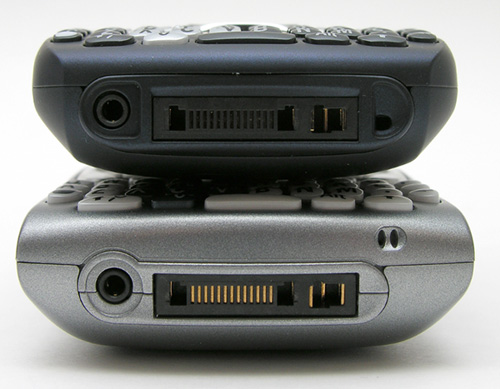
Nothing much has changed along the bottom edge of the 750v. You can see the 2.5mm audio jack, sync and power connections and the microphone, which has moved to a new location to the Right of the power port.
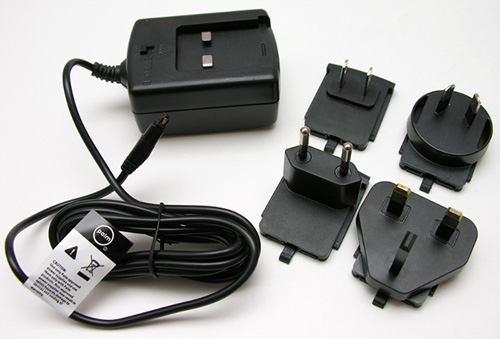
Speaking of power, when I first pulled out the AC adapter, I was reminded that this phone is from the UK and not the US. I wasn’t too concerned due to the fact that a USB charge/sync cable was also included. But then I noticed some plastic slugs at the bottom of the box that included outlet prong configurations for power outlets of different countries. Great for world travelers!
As far as the hardware, this Treo is on par with previous models. The build quality feels rugged enough for typical day to day abuse. I do wish the camera were better and that the resolution of the display was higher. So far these are my only two gripes, but I’ve only been using this phone for a few days.
Now let’s take a look at the software side of the 750v. I’m not going to cover every application because that would make this already long review into a novel. But I will talk about the phone application and a few other things that people have asked me about.
Software Installed On Device
ActiveSync
Alarm Clock
Bubble Breaker
Calculator
Camera
Internet Explorer Mobile
File Explorer
Microsoft Office Outlook Mobile
– Email
– Calendar
– Contacts
– Tasks
– Notes
Microsoft Office Mobile
– Word Mobile
– Excel Mobile
– PowerPoint Mobile
Modem Link
Phone
Pictures and Video
Picsel PDF Viewer
Quick Tour
Search
Setup email for Vodafone
SIM Manager
SMS / MMS Messaging with chat view
Solitaire
Sounds and Notifications Manager
Terminal Services Client
Voice Command
Windows Media Player 10 Mobile
Wired Car Kit Support
Software on CD
Adobe Reader (link for your desktop)
ActiveSync 4.2 (for your desktop)
Audible (link)
Avvenu (link)
Dynomite! By Astraware
Outlook 2002 (for your desktop)
Spritesoft Backup and restore
User Guide pdf
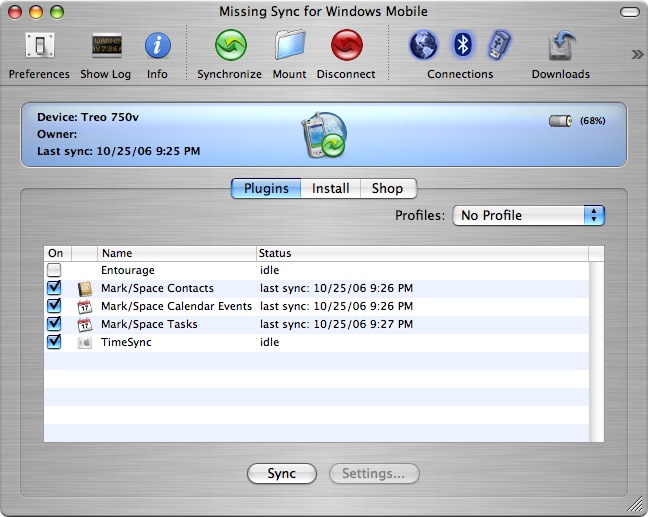
First of all, as a Mac user, I have been syncing my phone using MissingSync for Windows Mobile 5 from Mark/Space. I’ve been very happy with it. The only feature it lacks is the ability to sync notes files.
The screen that you’ll be viewing most of the time on the Treo 750v, is the Today screen.
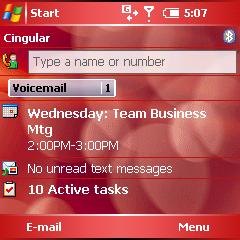
Included with the phone are 3 or 4 themes, like the one you see above. Like all Windows Mobile devices, you can configure it to show your upcoming appointments, status of tasks, emails, etc.
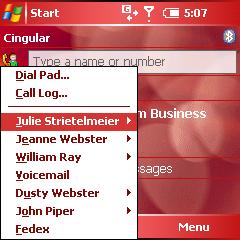
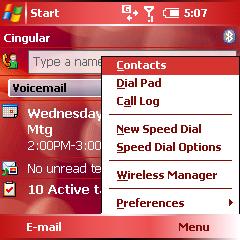
There are several ways to make calls. If you press the Green Talk button, you’ll get a popup showing your most recent contacts. From there, you can initiate a call. Pressing the Menu key (button above the Red End Call button), will give you access to various settings.
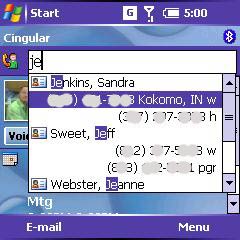
If you just start typing a number or a name, a search box will display that will filter based on the numbers / letters that you type. Once you find the person you want to call, you can then press Select to dial.
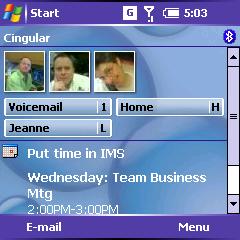
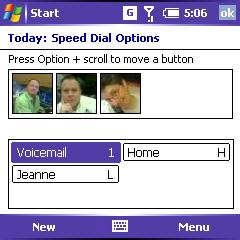
Yet another way to make a phone call, is to configure the speed dial feature. With this feature, you can have text buttons, or pictures. The picture above on the left, gives you an example of both. It’s interesting to note that you can’t customize your Today screen to have no speed dial buttons. At a minimum, the Voicemail button has to be there. Hmmmmm…
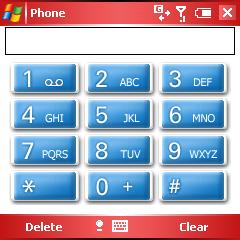
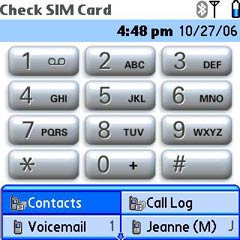
There’s always the good old dial pad. Not sure why you would want to use this, when you can press the keys, but it’s there if you so desire. For reference, the Treo 650 dial pad is shown on the right.
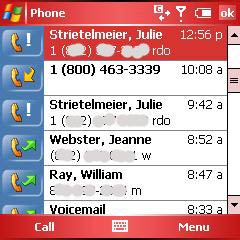
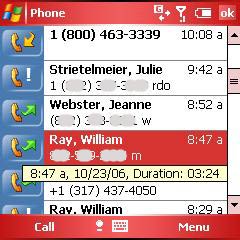
The call log is accessible my pressing the menu button from the Today screen.
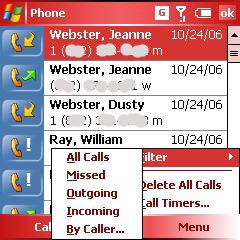
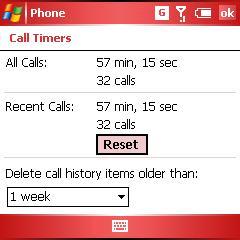
The log can be filtered by different criteria. You can also access the call timer screen, which basically tells you how many calls you’ve placed and how much time you’ve talked since the log was last reset.
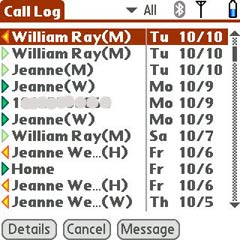
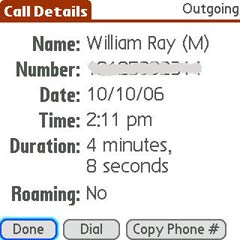
For reference, I’ve included the call log screens from the Treo 650 above.
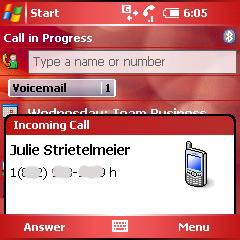
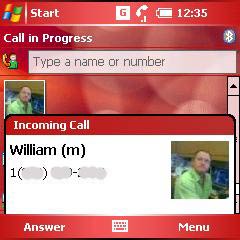
When a call comes into the 750v, a small popup with the caller’s name (if a member of your contact list) will display at the bottom of the screen. If you have a picture associated with that person, it will display along with the name.
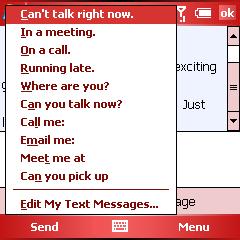
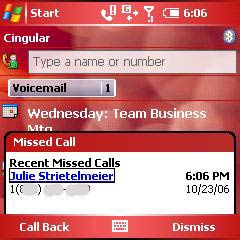
If you don’t want to answer the call, you can ignore or ignore with a text message. A selection of messages are available from a popup list or you can create your own. Missed calls have the dialog box as shown above on the right.
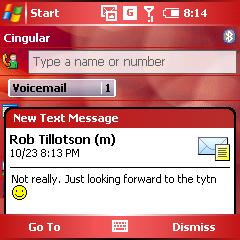
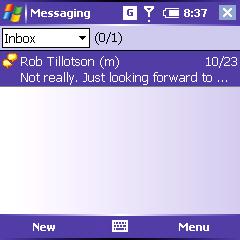
Text messages display at the bottom of the Today screen. Multiple messages are threaded. Clicking on the block will show the threaded conversation.
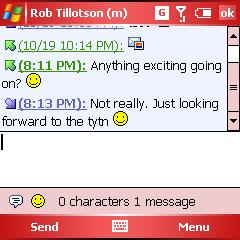
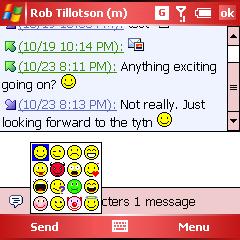
You can even add emoticons. :o) This threaded chat feature was first available on the Treo 650. Below are screenshots of the 650 chat app.
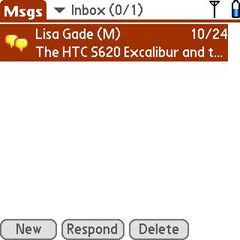
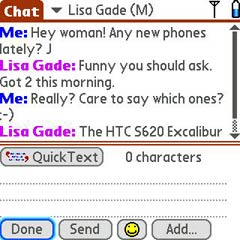
As you can see, the 750v chat application is very similar.
Surfing the web on the 750v has been similar to what I’ve been used to with the 650. The screen is small, so the experience isn’t exactly wonderful. That said, it’s fine for reading text and sites optimized for mobile devices.
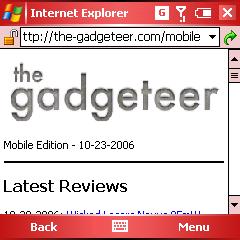
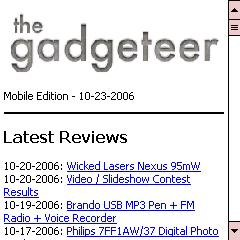
The pictures above give you an idea of how much information you’re able to view per screen. You can view in fullscreen mode, which does offer a few more viewable lines of text.
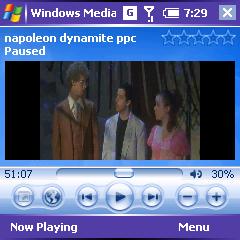

Watching movies on the 750v is doable, but not advised. I say this because the 300MHz processor isn’t really up to the task. Yes, you can watch movies, but I found that they do pause and stutter here and there. Also, the screen is just too small for comfortable viewing. In full screen mode widescreen formatted videos are stretched and look pretty fuzzy and pixelated.
Due to the size of the 750v’s display, applications made for higher resolution Pocket PCs, will not always display correctly on the Treo’s display. A lot of times you have to scroll down to see the bottom of the screen. For this fact, it’s always best to download the latest versions of your favorite apps, as they will have probably taken the smaller display into consideration and will compensate.
Comparing the 750v to the 650 isn’t quite fair, as they do run different operating systems. But, I will say that the 650 feels snappier than the 750v. Not by a huge margin, but I do notice a difference. Other than the speed issue, I’ve been surprised that I’ve easily made the transition from Palm OS to Windows Mobile. At this point, I’m not entirely sure the move is going to stick, but I’m going to give it a good try.
I have been asked a few questions concerning the 750. I thought it best to include them below:
Q. When is this freakin’ phone going to hit the Cingular market?
A. Good question. I wish I knew the answer too…
Q. Will the Cingular phone have HSDPA? Or just UMTS?
A. The 750v has UMTS, but HSDPA can be enabled through software. When the phone comes out for Cingular, it will most likely be enabled.
Q. Because you have used both (650 and 750v) Which one do you prefer when it comes to the phone app and using your Treo as a phone?
A. The 750v because it has a little better reception and many ways to make calls.
Q. I don’t think it’s fair to set the 750v to take a picture at 640×480 and compare
them that way. I understand what you were trying to do — compare apples to apples.
A. Hmmm, good point. I’ll take some more shots in the next couple of days and add them to the review.
This phone is not yet available here in the US… You can find it on some import sites if you are willing to pay a premium. I got mine from PhoneSource-USA.com. The price was an insane $759.95.

ESR for MagSafe Wallet, 5 Card Holder with RFID Blocking, MagSafe Sticker Included, Slim Magnetic Wallet for iPhone 17e/17/16/15/14/13/12 Series and Selected Samsung Devices, Not for 13/12 Mini, Black
(as of June 9, 2026 21:13 GMT -05:00 - More infoProduct prices and availability are accurate as of the date/time indicated and are subject to change. Any price and availability information displayed on [relevant Amazon Site(s), as applicable] at the time of purchase will apply to the purchase of this product.)
KRTALS Stronger Magnetic RFID Leather Mag-Safe Card Holder for iPhone 16 Series, Mag-Safe Accessories Stick on Series of iPhone 17/16/15/14/13/12 and Pro/Promax, Black
(as of June 9, 2026 21:13 GMT -05:00 - More infoProduct prices and availability are accurate as of the date/time indicated and are subject to change. Any price and availability information displayed on [relevant Amazon Site(s), as applicable] at the time of purchase will apply to the purchase of this product.)Product Information
| Price: | |
| Manufacturer: | Palm |
| Requirements: |
|
| Pros: |
|
| Cons: |
|

Gadgeteer Comment Policy - Please read before commenting
Post your comments on the palm_treo_750v_smartphone review.
http://www.the-gadgeteer.com/review/palm_treo_750v_smartphone
Just click the POST REPLY button on this page.
Thanks Julie,
I have been waiting for your review before deciding the take the leap. In part 2 of your review, can you look into the much touted SMS function and how close is it to the 650? In addition, can you confirm whether the Phone software similar to Phone in 650 or is it the standard WM5.2 Phone (which is a nightmare to use).
Lastly, it is the multimedia performance, such as watching video. I strongly suspect the 300Mhz CPU may not be able to handle video. My previous experience with Windows Mobile shown me that a min 400Mhz CPU is required for smooth video playing.
Interesting. Ya know, I still am not tempted to upgrade my Treo 650! Despite the antenna and limited memory, there has been nothing released that even remotely piques a desire to change. Maybe that will change by the time my New Every Two with Verizon kicks in next March. Thank you for the review, Julie! 🙂
Yes, the “upgraded” treos haven’t changed that much. A few teaks here and there. I would consider a change to be something like added wifi connectivity or an actual Palm OS change 😮 I doubt the latter will ever happen..
Excellent review and photos Julie. I see that the treo 680 will arrive soon as the U.S. model. Only thing is that Sprint is not carrying the device 🙁
Just so no one is confused the 680 is NOT the same device as the 750v.
The 680 is being hailed as the “consumer-friendly” Treo.
Also, the 680 runs the Palm OS not Windows Mobile. Big difference.
Here’s a good comparison of the 680 to the 750.
http://euro.palm.com/uk/en/products/compare_smartphones.html
Yes, I am aware of that… 🙂
It was just your wording of the “680 will arrive as the U.S. Model” which was confusing. The 750 is going to be offered in the U.S. as well.
Hey Julie,
How is the 750v on the Cingular 3G UMTS network? I have given up on the HTC Hermes for the moment. I realised how important one handed texting is to me, so the Hermes doesn’t fit the bill, and that WiFi really isn’t that important. With my new 10MB data included per month, and really cheap data thereafter, WiFi really isn’t a big concern. The 750v is really starting to appeal to me.
Just hoping it come out somewhere around the AU$899 mark!
Sigh:
I’ll have some pictures and info comparing the SMS/MMS app on the 650 vs. 750v. They are pretty similiar. As for playing videos, I tried that last night with a .WMV 118mb video of the Napolean Dynomite movie. Watching movies on the 750v is possible, but just not sure you’d really want to do it. Yes, there was some pausing every so often.
Mitchell:
Unfortunately for me, my area only has EDGE coverage… So I can’t test 3G speeds.
I did some searching around an hour ago and found a site called ImportGSM.com who are selling the Treo 750v. I have sent them an email to get a shipping cost to Australia.
They also offer a service where they will buy your old (or depending on your case, new) handset from you. I sent them the details of my M600i to get a quote as well.
Doubt I will buy one any time soon though. Still tweaking my car at the moment (my first car!). Looking to put in a good sound system, so the M600i may have to suffice until money comes along.
Talked with the local Cingular sales a few days ago – trying to find a cheap replacement for my SMT5600 (dropped one too many times). He says Cingular will offer the “750” sometime after the first of the year. It’s “in testing” now.
Yep, The Boy Genius is showing the Cingular branded 750v and the person who got the photos says the device is being tested by Cingular’s data group.
http://www.boygeniusreport.com/
I’m more and impressed with the 750v now that I’ve switched off to review the HP6915. The 750v has a slower processor, but feels snappier. Also it gives a better phone experience. I’ve not had a lot of time with the HP yet, but so far I don’t like it near as well…
You stated in your review that:
” It’s interesting to note that you can’t customize your Today screen to have no speed dial buttons. At a minimum, the Voicemail button has to be there.”
You can disable this by going to settings – today – items then disabling the speed dial check box.
BTW the only thing missing from the 750v that really would enhance the Treo experience is that you can’t launch programs using the keyboard from the today screen, ala 650 style.
Just my two cents
aminhafez:
You’re right that you can disable the speed dial feature, but then you can’t show any buttons/pics. I’m trying to figure out a way to just get rid of the default voicemail button.
I simply changed mine to a picture speed dial and made a custom image for it.
Nice Today screen. What app are you using?
-Wisbar Advanced – http://www.lakeridgesoftware.com
-Phone Alarm – http://www.pocketmax.com
-Marsware Weather Panel – http://www.marsware.net
-Logohide – http://www.ppcgeeks.com
Thanks for a great review as always. I’m not sure I’m willing to part with my 650 just yet. I guess it looks like Palm is getting out of the SIM tray, which I personally thought was a great idea. I do not like having the SIM underneath the battery as it’s quite cumbersome to swap SIM cards. And the mini-SD isn’t good for me since I have SD cards. Also, the camera doesn’t look as nice compared to the 650, even though it has a higher resolution.
maceyr:
I agree that the SIM tray is much more convenient! I swap SIMs like I swap socks 😉 The mini SD doesn’t bother me THAT much, but I do wish it was just a slot and didn’t have the little door over it.
Wow! That’s a fast reply!
I’m quite disappointed that it looks like the latest Treos all don’t have the SIM tray. Maybe they were getting too many complaints with the faulty SIM tray which can normally be fixed with a piece of paper stuck in. I do tend to swap SIM cards and I really dislike having to go through the process of removing the battery cover, then the battery and then have access to the card.
It’s disappointing to hear that the hardware doesn’t fully support the resource requirement of the underlying Win Mobile OS, although it’s partly Palm’s fault as they’re quite used to the efficient Palm OS. But then, hopefully things will improve in time.
I am starting to warm up to the Win Mobile Palm and it’s nice to get an idea of what it’s like. Thanks for a great review!
Julie, how would you compare the basic phone functions with the Palm OS? The question is really would you prefer a 680 or a 750v? I don’t find either camera to be important and am not in an area with 3G data at this point, so reliability, responsiveness and ease of use for phone applications is most important. Do you think a Treo 680 is in your future?
– Joe
joeru:
That is a VERY good question. A question that I’ll be better to answer after I finish my review of the HP6945. It seems the more I use Windows Mobile, the more I wish I had my Treo 650 back. I know that I turned my nose up at the 680 when it was announced. But that was mainly because I’m disappointed that Palm continues with their habit of tiny tweaks = new device. I know I’ll grab a 680 to review. It may (probably will) end up being my daily phone. I’ll just have to see.
Hi Julie, you lucky little devil you!
The 750 seems to have a great package bundled with the 3G downloading capabilities (speed is paramount, don’t ‘cha think?).
In comparison to the 650, do web pages load much faster?
Also, why on earth would they downgrade the resolution on the screen? 240 x 240 seems awfully close to that nasty 160 x 160 we had on the 600. Now that you’ve had it for a while, do you notice it much?
Thanx for your input.
Windows Mobile doesn’t have support for 320×320. Only 240×240 or 480×480 in the square resolution. I think the less resolution over 240×320 would be bareable because you don’t need the SIP.
Julie – Have you tried syncing the Tero 750v with your Mac? If so, how does that compare (speed, accuracy) with syncing to the 650?
sosha:
Web pages don’t load any faster as far as I can tell when comparing my 650 to the 750v. But this is because the area where I live does not yet have 3G coverage. I just have Edge coverage right now, so both phones download at the same speed.
Regarding the display, I still don’t notice a problem when using the built in application suite. The problem with the lower resolution really only makes itself evident when I try to run some Pocket PC applications on the 750v. If the applications haven’t been upgraded for the smaller display, some scrolling is required. Not fun.
joeru:
Yes, I sync the 750v with my iMac using MissingSync. There are no speed issues or accuracy issues. The only problem as far as I can tell between Missing Sync and ActiveSync on a PC is that MissingSync does NOT sync your notes/memos. Supposedly MarkSpace is going to have this feature for a future version, but I’ve been reading that for a LONG time.
Looks like Cingular is about to offer both a 680 and a 750 model. They have a rebate form with both on their website at
http://www.cingular.com/global/MEDIA_CustomProductCatalog/MIR_RPHL_123006.pdf
I’m still not sure which would be better for me. Appreciate your thoughts.
joeru:
I need to get my hands on a 680. The one of the things that keep me from really getting behind Windows Mobile is the fact that I can’t sync my notes/memos on the Mac.
Are you a Palm or Windows Mobile person?
I have used Palm (last one was a T3) and am using a WM5 smartphone (2125), but find the screen too limiting for email and reading. I would like a converged phone/PDA and need to sync with both a Mac and PC. I have never had a Treo, but they seem to have a good combination of size and features.
The 8525 (TyTN) is a contender and seems to have alot of features (WiFi, fast CPU, HSDPA), but looks to be a bit heavy and not easy to use for quick phone and email use.
I also like the fact that the Treo can use a single charger for the Palm bluetooth headset and phone. Since you have used a 650 for awhile, if you end up liking that more than the 750v, I would expect that the 680 can only be better with more memory, a combined contact/phone application and better casing.
joeru:
The Treo size and feature set really has me hooked.
I have a TyTN to look at next. I’ve been using the HP6945 and have not been impressed with it as a phone.
“…have a TyTN..”
You get the coolest toys!
Some reviews found the TyTN to have some background hiss during the call. Would be interested in knowing if you find that as well. Reviewers seemed to be coming from the PPC form-factor, where the TyTN is actually not too big.
Your perspective as a Treo user might be different.
As my primary phone, I am prioritizing good phone quality and phone features that are easy to use (few keystrokes).
I’m with you, I want my phone to work perfectly as a phone first and then have good PDA functions on top of it. I’ll let you know about the TyTN after I start using it. 🙂
I had a few questions, if you have time to check:
1. On the Treo 650 with a bluetooth headset, can you answer and disconnect calls without having to handle the Treo? I was told that you had to manually transfer and disconnect calls to a headset. On my WM smartphone, I can receive an incoming call by touching the headset and disconnect by holding the same button on the headset (a Palm ultralight)
2. On a calendar appointment, the WM5 smartphone shows me the appointment basics, but I can’t see who the meeting organizer and attendees are (sent via email). This is visible in Outlook and iCal, but not on the mobile device. On the Treo 650 or 750, is this information visible?
3. Can the Treo 650 (with Versamail or Chattermail) or 750 view HTML email? On the WM5 Smartphone, only plain text is shown.
4. Does voice dialing work on the 750V from a bluetooth headset?
joeru:
1. I don’t know who told you that you have manually transfer a call between a BT headset and a Treo 650, but that’s not true. Both the 650 and 750 will automatically answer and end calls with a paired BT headset.
2. You can see the attendees on the Treo 750v. This isn’t an option on the 650.
3. Pocket Outlook on the 750v does not view HTML messages. It just strips them down to plain text. Versamail (v3.1) on the 650 does a pretty good job of displaying HTML messages. I’ve not tried Chattermail.
4. I haven’t tried voice dialing through a BT headset, but because of your question I noticed the voice command option (I hadn’t seen it till now) and have been playing with it. Pretty cool!
Looks like Notes syncing is now available:
http://www.markspace.com/missingsync_windowsmobile.php
Yes! Yay! 😀
Not sure if you are using the TyTN yet, but this question applies to the 750v as well. If you get a native Word, Excel, or PowerPoint attachment via email, can you view it immediately or do you have to convert it into a “pocket” format first?
If you are using the TyTN, any initial thoughts on how it compares to the 750v or 650?
joeru:
Haven’t started using the TyTN yet. But I can answer your question. Word, Excel, Power point files coming in through an email attachment, DO NOT have to be converted. You just click on them and they open up. 🙂
Thanks, Julie. That is good news for the 750 and 8525. Here is a link to someone who is using a TyTN and had a Treo 650:
http://www.linquist.net/life/2006/11/02/treo-650-vs-htc-tytn-cingular-8525/
He has not tried a 750 at this point.
I thought this was interesting:
http://www.broadcom.com/press/release.php?id=929310
There is a possibility that the Treo 680 might have improved reception and voice quality when compared to the 750, based on this Broadcom announcement.
– Joe
So Julie, based on your experience so far, if you had to choose between the 750v or your current 650, what are your thoughts?
joeru:
I don’t have a good answer for you yet. Let me just say that so far I’ve learned that I need/want the Treo form factor and the phone experience that it provides. Now the answer is do I want to really hop from Palm OS to Windows Mobile? I still haven’t answered that for myself…
Thanks. I see the 8525 is now available from Cingular and am tempted by that, although I read that it might be slightly slower than the 750 at phone functions. I should probably just wait until the 680 is out.
One other thing to note with regard to getting rid of the Speed Dial function on the Today screen – that the quick keys assigned to any of your speed dials (such as the default number ‘1’ for Voice Mail), those quick keys still work, EVEN IF those buttons don’t actually show. So you can have a mess of speed dials set up, and quick keys assigned to them, and as long as you know which quick key dials which contact, you can get rid of all your speed dials, and still have that quick dial function.
Give it a try!
I am in the same boat! Get the Cingular 8525, wait for the Treo 750, or give up and wait until a Nokia phone with a slimmer factor tan the E62 and 3G is released. My Treo 650 is dying – hard resets are common – so need something soon!
—
My gadget blog: http://www.mindflayer.net/
For what it is worth, a local Cingular store told me this weekend that the Treo 750v launch date is 5 Dec 06 (on their current print out). She said that unless that date slips, they will be able to order it on that date and the device should arrive 3-4 days later.
I’ve heard last week, this Thursday, next Friday, and about 100 other stories.
—
My gadget blog: http://www.mindflayer.net/
I just bought a Treo 750v off eBay for GBP 311 delivered to Australia with insurrance 😀
Congrats Mitchell! Don’t forget to check back in with your comments on the phone. 🙂
I received my 750v today and its great!!!
Only issue I seem to be having is with the ringer switch. A lot of the time when I switch it back to normal, the sound does not come back on. I have to soft reset before I can get any sound out of the speakers. Flicking the switch back and forth has no effect. Only way to fix is the reset.
Anyone else had this issue?
MitchellO:
I have not had this issue with my 750v…. :blink:
I am going to buy the 8525 today, see how it works out for me. If I am lucky, the 750 will drop within the 30-day return limit so I may try both.
Glad you are all enjoying your 750s! I got mine the day after it was launched in the UK (I think it was early October) and have had no problems with it since then – it is a really great phone.
Julie, you mention that you don’t like the voicemail speed dial button on the today screen. One way to get rid of it is to change it to the picture version of the speed dials, or, if you have a little more patience, you can get rid of it with a registry tweak. If you load on a registry editing program (I use PHM registry) you can modify the following key:HKLM\SOFTWARE\Palm\Varnish\SpeedDialPlugin\VoiceMa il\IngoreSIM to 1, then edit the number assigned or just delete it – the deletable, editable keys are also handy here (not that ingore is not a mistype by me, that is how it is on my phone).
I travel overseas a lot, and the phone always goes with me, and I sometimes find that it has reverted back to the original vodafone settings (I had my handset unlocked by vodafone to use with other networks when travelling), but it only takes a couple of seconds to change it back. I got the original tweak from the xda-developers forum (not my original work, and I have nothing to do with the site), I’m sure they’ll have something by now that makes the change more permanent.
Enjoy,
RichP
richp:
Thanks for the tip!!!! 🙂
I’m a bit confused by a few things.
Other than the obvious differences between OS’s, the 680 and 750V seem very similar. Oddly, according to the link posted above for the Euro Palm site, the Euro 680 has 128MB of memory, while the US version has 64! Another difference seems to be UMTS. Can someone tell me what that is? Is it a faster way of connecting to a data plan (an improvement over EDGE)? It would seem redundant to offer a 680 and a 750 Palm OS version.
Also, a more generic question. I see the posts about bluetooth headsets, etc. Which Treos allow BT headset answering? As far as I know, none of the Treos have A2DP/BT 2.0 do they (although on another forum I read about some kind of work-around for BT 2.0 for Lifedrives)?
Also, on a related note, I’ve been told that none of the Treos come set up for voice-dialing. Some come with some third-party software package or something, but no built in function. Does this package allow voice-dialing via the headsets? Is this so and for which models? It seems that by now, Treos should be able to voice-dial!
The 680 and 750v are totally different devices on the inside. Their similarilies are literally skin deep.
Yes UMTS is vast an improvement over EDGE, offering much higher speeds, and the ability to be on a phone call while still connected to the internet.
There will not be a 750 Palm OS version because the Palm OS does not support the simulataneous data/voice connections of UMTS. The 680 is Quadband GSM which is a good as it will get with the current Palm OS. If you want fast speeds with a Palm OS device, you will need to go with an EVDO device (like the 700p).
The Treo 750v comes with BT 1.2, and it has no problems answering calls with the button on a bluetooth headset or car kit. You can also use the button to initial voice dialing.
Which comes to your next point. The 750v comes with Microsoft Voice Command 1.5, which gives you voice dialling capabilities, as well as a variety of other voice features.
And both the UK, US and even Australian sites say that the 680 only has 64MB memory, not 128MB. If you are looking at the Treo comparison page, the comment at the bottom states 64MB user memory.
Thanks Mitchell for the comprehensive answer. I didn’t see the note on the link provided about the Euro 680, which says 128. Still, the 680 has more usable memory than the 750V by that note. Other than UMTS, the differences don’t seem that severe (again considering the different OS’s). And, as UMTS is far from ubiquitous here (and according to the Wall Street Journal, 3G is flagging in Europe and Asia), not a great loss to me. Do you know what the speed differential is between UMTS and Verizon’s EV-D0? I believe EV-DO is significantly faster than EDGE and other competing data protocols (at least in North America). It’s interesting to me that the Euro 3G networks seem to be leaning to W-CDMA and other CDMA formats (again quoting from that article). That may mean a convergence between North America, Europe, and other systems. (China is currently evaluating 3G formats). I don’t quite understand how inter-operable UMTS might be with other W-CDMA-based systems however.
I did a quick check EV-DO is as fast as current UMTS systems, although wikipedia says UMTS can go to 11 Mb/s. Currently, its fastest is 3.6 Mb/s with a HSDPA, but only on the downlink, while EV-DO is 3.1 Mb/s, 1.8 uplink (which is about 6 times UMTS). Still HSDPA (I guess this is the form of w-cdma which is succeeding UMTS?) seems to be the winning pathway.
Edit: Why would the Palm OS have anything to do with the phone function? Palm OS works with EV-DO. I’m sure they could make it work with UMTS/HSDPA. That’s the radio-spectrum issue, not the OS.
Edit again: By the way, I’m not a cheerleader for the USA system. I think these guys ought to get together (and 3G or now 3.5-4.0G) would be a good time to do it! Asia committed to EV-DO and then switched to W-CDMA/HSDPA. I’d like to have one personal phone for the world, not 2 or 3.
The problem with UMTS on the Palm OS is that it does not support some of the multitasking that UMTS requires to have simultaneous data and voice. Its a technical limitation that can’t be overcome with the current Palm OS 5.
The Palm OS controls the phone, so it is integral in the functioning of it. As I said, EVDO doesn’t support simultaneous data/voice which is why it works fine on Palm OS and UMTS doesn’t.
While EVDO may currently have a slight speed edge, its not much good when you get outside of the US where GSM reigns king.
It seems from what I’ve read that UMTS is W-CDMA based. Also, EVDO (at least until recently) was dominant in Asia (Japan, Korea, and China, although China is moving to WCDMA) Also, EVDO can (but it’s harder to set up) do simultaneous data/voice transmission. I can’t imagine that the Palm OS either prohibits simultaneity or that it can’t be relatively easily modified to allow it. Still, you’re right overall. I just wonder if (at least for the moment) there is that much access to UMTS/HSDPA even in Australia. As Julie mentioned, she doesn’t even get EDGE (and I can get EVDO quite easily). By the time it matters, we will be several generations of Treos et al. away from the 750.
Varjak:
Actually, I *DO* have Edge. I *DON’T* have 3G though 🙂
Sorry. I meant UMTS/3G. I was thinking the equivalent of EVDO, which EDGE isn’t really. Sorry for the mix-up.
Out of curiousity, why pony up for the 750V is you don’t have 3G service yet? By the time you do, there will be the ‘next big thing?’
Varjak:
I bought the 750v because I just love the Treo form factor. I’ve been a Treo 650 user for over a year and was also curious to switch from Palm to Windows Mobile.
I get UMTS in most areas that I go here in Australia, and the coverage is expanding, particularly with the launch of Telstra’s NextG service.
And yeah, the 750v is the only option for people looking for a GSM/3G Windows Mobile Treo. I certainly wouldn’t have gone anywhere near the 750v if it was Palm OS based. Too old and limited.
I tried a Treo 680, but returned it today 🙁
I require Exchange synchronization and neither VersaMail, RoadSync, nor ChatterMail’s exchange plugin sync would allow me to send and receive email with the Exchange server. My Windows Mobile smartphone does that flawlessly.
I also found that manually hitting the hotsync button was more cumbersome compared with ActiveSync. I would just get a calendar update and have to wait for the entire hotsync to finish before I could remove the Treo.
There were other quibbles, but those two were important to me.
I might get a Treo 750 when Cingular offers one.
– Joe
Julie – Did you find the 750v or the TyTN to be more responsive in using and switching applications?
joeru:
I’m not sure I noticed enough speed difference to really comment on. Both are pretty snappy.
Well I tried the 8525 for nearly 30 days and it performed without a problem. Sigh. I really liked the features but found it to be a bit heavy and opening/closing the keyboard was cumbersome. And in bright light, I could not see the screen.
I would have kept it, but then had a Cingular 750 to try side by side for a few days. The lighter weight, rounder form factor and Palm enhancements like keyboard shortcuts really made it easier for me to use. So I am using the 750 now. I tested alarms a few times and the phone woke up and alarmed with no problem. Have not changed time zones to test that.
– Joe
joeru:
Let me know how the 750 works out for you. Right now I’m mad at mine and am using a Nokia N73 for awhile 🙂
Tried the 750, and I am sticking to the 8525. Despite the nicer form factor and the great Palm tweaks, along with my familiarity with the Treo platform, I decided that the 8525 was better for me.
Extreme – Did you have a 750v or a Cingular 750? Seems there are some differences in the ROM. I haven’t had any random reboots on the 750 at this point. I did not have any on the 8525 either. I did have that on the 680, however.
For the record I have never had any random reboots on my Treo 750v.
MitchellO:
Any missing alarms so far? I’ve never had any spontaneous reboots with my 750v. With the 650 though, it happened frequently.
Cingular 750.
Yes, my 650 was quite annoying with the random reboots as well.
Julie – The camera on the Nokia N73 specs are great for a phone. How do you sync with your Mac?
– Joe
joeru:
I am using iSync. I had to manually add an entry for the phone in one of the iSync files, but that wasn’t hard to do and it works great. The only thing it doesn’t do is sync notes/memos, which is critical for me… As a result, I’m about to hop back to the 750v again.
On xda forums, I see a number of people who seem to think the Cingular ROM fixes some issues that the earlier Vodaphone 750v has. I don’t know if it is worth selling the 750v and getting a Cingular 750, but I haven’t had problems with the Cingular 750 at this point. I has only been a week.
I’m also toying with the idea of just going back to Palm and a 680. I am sending back the 680 that I was sent to review because it has some problems. I may just opt for buying one of my own… In all honesty, Palm OS just feels better / faster / leaner / easier to me.
I originally got a Treo 680, but need MS Exchange email and could never get the 680 to work reliably for me. I found it just slightly faster, but I was surprised at how much I missed the multitasking. Everytime I went back and forth to Contacts or a webpage, for example, I had to do a new search. I sync with both a Mac and PC and found Activesync to be easier than Hotsync for me on the PC. Hotsync starts the whole syncing process from the beginning when I really just wanted to add a single appointment. Activesync did that automatically. The 680 also rebooted on me about 3-4 times. Sigh.
Argh… I was hoping that the bad 680 that I had was just a fluke. Now you make me wonder otherwise… I’m unsure what I want to do for a smartphone. MissingSync doesn’t work well for syncing memos/notes for me to the 750v. It seems to crash often. I really like the size of the N73, but with no keyboard and notes, it feels a bit restricted.
I do sync notes with Missing Sync 3 and the Cingular 750. I have not had a crash but will post if I experience one.
i love the palm treo 750, so easy to use …but i suggest improvement on the battery life be made
My treo palm is not booting what can i do please
where can i buy a charger like that in the philippines ?
can any one tell me how to install wifi on my treo smartphone 750 and also the best websites to download games and softwares?