
My Windows to Mac OS X odyssey started way back in the Spring of 2002, during the heyday of Apple’s Switch campaign. A friend at work had given me a demo of his Titanium Powerbook, and it wasn’t long after that I placed my own order for a G4 TiBook. Once it arrived, I was completely in love. Unfortunately the romance turned out to be a very short fling. Before the Summer sun barely had time to cool down, I had already sold it and was back in the land of Microsoft.
What happened? Problem #1 was the fact that my Direcway satellite ISP at the time only had a USB modem which was not compatible with the Mac. Since I had to keep a PC around to access the internet, it was way too easy to just use the PC for everything and neglect the Powerbook. Problem #2 had to do with moving my huge Microsoft Outlook email archive over to the Mac. There wasn’t an easy way to do this, and I didn’t want to start over. So, without much real effort, I threw in the towel and sold the laptop.
Fast forward to April of 2004 when almost 2yrs to the day that I bought my first Apple laptop, I decided at the spur of the moment to try again and buy another one: a 4 month old 15″ aluminum Powerbook from a friend. Problem #1 from the last try was no longer an issue since I had upgraded to a new Direcway modem that used Ethernet instead of USB. And Problem #2 was solved by using a great little $10 program called Outlook2Mac. It allowed me to easily convert my 15,000 emails in Outlook to a format that Apple’s mail.app could import. But once again, about 4 months later, I started using the PC again.
I can’t really put my finger on why the switch didn’t stick this 2nd time. I think it was a combination of a bunch of little annoyances that finally made going back to the PC seem easier. Or maybe I’m just fickle and can’t make up my mind which OS I prefer. :o) Either way, I was back on the dark side once again, and around Christmas time I ended up selling the Powerbook to the same person that bought my Tibook!
Of course, you knew the fever would strike me again right? This shouldn’t be a surprise by now. ;o) Two months ago I got so fed up with virus problems on my PC, that I snapped and placed an order for an iMac. I know, I know, you’re thinking “here we go again…” But I don’t think so. You know the old saying: “third time’s a charm”? I think that’s going to hold true for me. Really. I mean it this time. Come on, don’t you believe me? I’m not kidding…
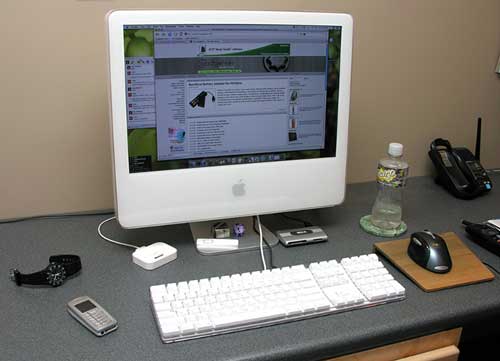
I ordered the stock high end configuration, which included the 20″ display, G5 2.0GHz processor, 512MB of RAM, 250GB hard drive, Bluetooth, WiFi, and a double-layer 8x SuperDrive. From the day the iMac arrived, I’ve been using it as my main computer. At the same time that I ordered the computer, I also ordered two 1GB sticks of memory from Crucial.com. I decided to use the computer as is for at least a week just to judge if 512MB is ‘enough’. I found that if you’re not a game player and only do basic image editing, 512MB actually is pretty much ok and definitely usable. I didn’t feel like sending the memory back though, so after a week I dismantled the iMac and installed the extra RAM.
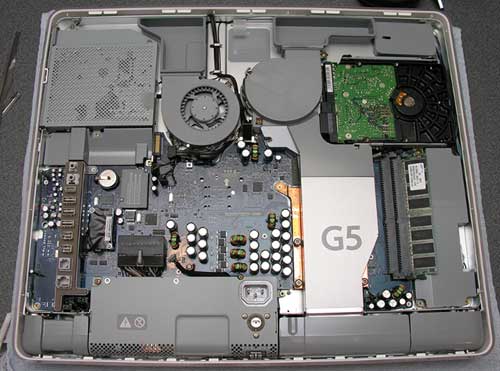
Breaking into the iMac really wasn’t that difficult. It just required loosening 3 screws, lifting off the back shell, finding the memory slots, and popping in the new sticks. Actually, the hardest part of the whole operation was picking up and flipping the computer on to its face. This was a little awkward due to the weight.
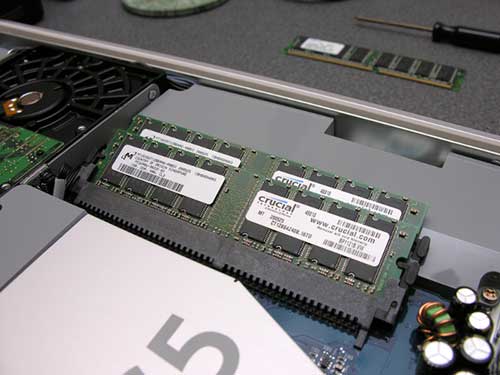
After the new memory was installed, I put the back case back on, tightened the screws, set the computer upright on the desk, and I was good to go.
I should really comment on the overall design of the iMac. I remember when it was first announced, I wasn’t all that enamored with it. I have to tell you though, once it is sitting on your desk, you can’t help but love this thing. It looks like it has been carved out of one giant block of Lucite. There’s also no huge noisy tower to shove under your desk, everything is right there where you need it (well mostly…).
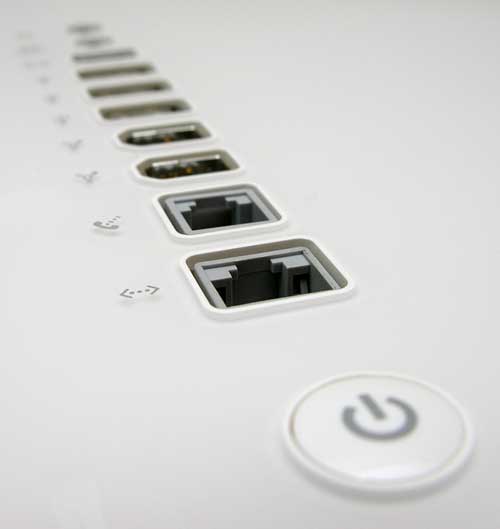
On the back right side (as you are facing the display), you have a row of inputs with the power button on the bottom. The inputs are from top to bottom: audio line in, headphone out/optical audio out, video out, 3 USB 2.0 ports, 2 Firewire 400 ports, Modem, and Ethernet 10/100/1000Base-T. I really wish there were a few USB ports and the power button on the front of the computer. Yeah, I know that would detract from the clean style, but I get tired of reaching around the side to plug or unplug a device.
The 20″ display is wonderful. It’s bright, crisp and lovely to stare at for hours on end. I just love it. The only thing that could possibly make it better would be a way to adjust the height. As is, you can only adjust the tilt/angle of the display. At first I felt that the screen was too high for comfort since my desktop is already about 1 inch higher than standard. I raised my chair a bit and am now comfortable. There are 2 USB ports located on the keyboard, but they are not USB 2.0 ports… Can you say slow?
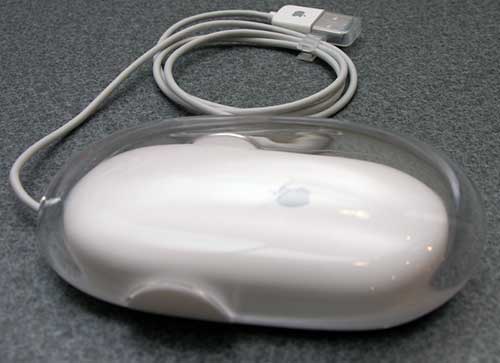
Since I mentioned the keyboard, I’ll go on to say that I really like it. The keys are very quiet, but have great action. The mouse on the other hand sucks. I hate one button mice and quickly threw it in a drawer and set up my Logitech MX Laser wireless mouse instead.
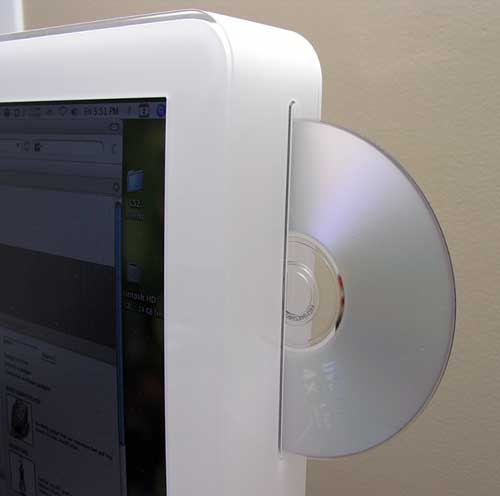
One of the coolest features of the iMac is the slot loading Superdrive on the right side. Like the Powerbooks, you just slide the disc in part way and the computer automatically grabs it and sucks it the rest of the way into the drive. The first time my sister saw a disc eject out the side of the computer, she said “no way!”. It’s hard for people to fathom that the whole computer is housed in the display.
Although the iMac is not silent, it is very quiet. There is a slight fan whir at all times, but nothing like the loud PC that I’ve been used to.
Connecting the computer to my network was a no-brainer. I just plugged in a free Ethernet cable and I was in business. No fuss, no muss! I was even able to mount the drives on my PC without even needing to tell it the workgroup name. Nice! I found using the built-in WiFi and Bluetooth to be equally non-stressful. You gotta love when things just work.
As far as how snappy this 2.0GHz G5 computer feels when compared to my 2800 Athlon PC, sometimes it feels slower. Most of the times it feels as fast or faster. I really can’t complain and am pretty happy with the performance.
Once again I used that handy Outlook2Mac utility to export my emails to the Mac from my PC. And in the last 2 months, I’ve collected a nice group of commercial and freeware apps that I have been using on a daily basis:
Quicksilver – This is a keyboard driven application launcher / info finder. It’s very powerful, but I’ve only scratched the surface of its capabilities.
Nvu – Freeware WYSIWYG HTML editor. This is a great application and doesn’t me miss Microsoft FrontPage at all.
Adium – Freeware instant messaging application that can connect to AIM, MSN, Jabber, Yahoo and more.
Colloquy – Freeware IRC client.
iuTime – Freeware date calculator. So-so app, still looking for something better.
Fugu – Freeware FTP client.
DockArt – Freeware script that will display album art in the dock instead of the iTunes icon.
Taco HTML Edit – Freeware HTML and PHP text editor.
NeoOffice – Freeware Microsoft Office compatible productivity suite including a word processor, spreadsheet, presentation, vector drawing and database.
JunkMatcher – Freeware spam filter for mail.app. Even though mail.app has very good junk mail filters of its own, this add-on gives it even more power with Bayesian filtering.
The Missing Sync – Commercial application for handheld (Palm and Pocket PC) and Smart-Phone synchronization.
PocketMac – Commercial Pocket PC synchronization software. I really can’t make up my mind as to which Pocket PC syncing package I prefer. Both Missing Sync and PocketMac get the job done…
I’m on the lookout for other must have apps, so feel free to send me suggestions. I’m getting ready to try out GIMP (photo editor) to see if I can replace the trial copy of Photoshop that I have.
I am surprised at how smoothly the transistion has gone this time. I have only had 2 small issues so far. The first one is that Safari seems to be too slow sometimes and will do strange things like just display the text for a webpage, without the graphics. I’m sure that this has to do with my Direcway satellite though, so I’m not going to blame it on the iMac or OS X. This problem doesn’t make me grumble at all since I am a Firefox person anyway. I’m going to blame the second issue on my Direcway too. Sometimes when I try to do a software update, it will crap out in the middle of looking for the updates and come back with a network error. This seemed to happen more frequently in the beginning and has slacked off in the past couple of weeks. Until I am unable to grab a critical update, this also doesn’t bother me all that much.
With only 2 months under my belt this time, it’s easy to assume that I’ll be switching back to Windows in a few months. I really don’t see that happening this time, but I’ve learned not rule anything out. As anyone that knows me can attest, I get bored easily… with PDAs, phones, and computers. I have to say though that time around, OS X just feels right. In fact, I’m close to buying a 12″ iBook as a travel computer and maybe even a mini just to goof around with. So stay tuned…
Interested in buying your own Apple iMac? Check for lowest prices here.

GMKtec Mini PC, G3 PRO Intel Core i3-10110U (Beats 4300U/N150), 16GB DDR4 RAM (Dual Channel) 512GB Storage Drive, Desktop Computer 4K Dual HDMI/USB3.2/WiFi 6/BT5.2/2.5GbE for Office, Business
(as of June 8, 2026 13:52 GMT -05:00 - More infoProduct prices and availability are accurate as of the date/time indicated and are subject to change. Any price and availability information displayed on [relevant Amazon Site(s), as applicable] at the time of purchase will apply to the purchase of this product.)

Gadgeteer Comment Policy - Please read before commenting
Post your comments here on the Switch from PC to iMac. 3rd Time the Charm? article.
http://www.the-gadgeteer.com/article/switch_from_pc_to_imac_3rd_time_the_charm_
Just click the POST REPLY button on this page.
Glad to see you’re liking the Mac this time around…
I’ve just switched to a Powerbook 17″, and I don’t care if I NEVER use Windows again !! I’m primarily running Linux / Solaris at home, but my wife liked Windows, so it took me ages to convince her to move to a Mac. My 5 year old still uses Windows for her educational stuff, although after seeing daddy’s new 17″ toy, and Mummy’s 15″ one, she wants a 12″ PowerBook for Christmas !!!
Women !!!
Ah well, at least I got a 60Gb Ipod Photo to go with it…:-)
Jon
P.S. When are you gals going to do a Gadgeteer Podcast ? Or should I see if I can get Leo Laporte to have you on “This Week In Tech” as guests ?..:>-)
Julie,
you should give DiskTop a try. It’s rather useless, but so much fun, especially with an iMac G5.
the thing i hate about macs is the mouse acceleration. there is no way to adjust it at all. whenever i switch from my win/linux laptop back to my emac at home, i hate it. does anyone know if theres a hack or something?
Well I don’t want you to feel like your alone. I did something very simular. I purchased a 15″ Powerbook and kept it for about 2 month in early 2004 sold it and 3 months later got another one and have not look back. Like you I love the fact things just work. Don’t get me wrong I still love my Tablet PC however I does not get used as much as it should.
As for software check out Salling Clicker. There just might be a surprise or two in it future.
You know the funny thing is the companies that gain the most from people switching to OS X are Apple, and Microsoft.
I forgot, try the new Mighty Mouse from Apple too.
If you get a laptop think about the 12″ powerbook. Its main advantage is it has miniDVI out so you can plug it into a nice Apple flat panel display and keyboard when you are not on the road. The 12″ iBook doesn’t have miniDVI out just VGA.
Works for me.
Regards – Michael
PS: Great website.
I didn’t ‘switch’ to Mac…I use it in addition to an XP laptop. Work issued my laptop, a Dell D600, which handles 90% of what I throw at it quite well. My biggest hang-up with the Dell…no style. As with the iPod, if there was a “Wintel” laptop that looked and felt as cool as my Powerbook G4 I’d be all over it. Part of the fun of using a Mac is that it just ‘feels’ cool. It’s hard to explain, but I’m sure there are a number of you out there who know what I am talking about.
While both systems have their drawbacks, I will say that using the Mac has made my XP experience more enjoyable. Small things, that are intuitive on the Mac, I wanted to replicate on my Dell. With a small amount of effort, lots of the cool things that make a Mac a Mac can be deployed on an XP machine. The best example is Mac’s “Spotlight” feature. “Widgets”?…useless, as far as I am concerned, but “Spotlight”…I wanted that on my Dell. After about 30 seconds of searching for something to provide that function on my Dell, I found it; it’s called “Google Desktop Search”. It sits right in my ‘taskbar’, ready whenever I want it. And at the risk of sounding like a schill for Google, which I am not, if you like how iPhoto handles your photos, there is “Picasa2”, also from Google.
My Dell still is the ugly duckling, but with a little effort some of the best of Mac can be had on an XP machine. But, then again, there will always be those of us who simply want to bitch about the shortcomings of each system…
Julie, your photography skills are getting really l33t! That picture of all the ports, in particular, is a great photo. Thanks for the nice shots.
edit: ugh, you’re, your, their, they’re, there!
Julie if you are having problems with safari, try firefox. I spent my first year on a mac using safari, but now I am a firefox gal. it’s a wee bit slower at times, but everything loads well overall. Its not as pretty as safari, but its far more utilitarian.
IMAP is the answer to your email problem — you’ll never be bound to a single email client ever again. Speaking of which, I got too frustrated with mail.app to stick with it, and switched to Thunderbird (since Evolution really doesn’t work well (or nearly at all) on OS X).
I keep trying to use Firefox but I’m so spoiled by Safari’s spell-checking on web text fields that I find I can’t go back. I use Firefox exclusively on my Linux desktop of course.
The killer feature of my PowerBook G4 is sleep mode. I love the fact that I close the lid and it’s ready to go in under a second, and comes back to life immediately when I open the cover. Never had that with any x86 laptop, that’s for sure.
Thanks for the software suggestions. I’ll be checking them out tonight.
mmurray:
I’ll probably get the iBook. Like I said, this will be a travel only machine. I don’t intend to make it my main one as I have the iMac for that 😉
dmccarty:
Thanks for the compliment! I love my camera (Nikon Coolpix 8800). I’m really enjoying photography and have even considered taking a photography tour vacation next year.
questionfear:
I switched to Firefox almost immediately after switching to the iMac. I used Firefox on my PC too. I actually think it’s much faster than Safari. The only thing missing in the Mac version vs. the PC version is that you can’t click the middle mouse button to open a link in a new tab. Then from Safari I miss the spell checking that is built into it.
If someone knows how to get the GIMP running under OSX could you please let everyone know.
I love my little Mac Mini but still do not have a decent image editor working on it yet. The GIMP seems to be a major hassle to get running under OSX. I’ve read the directions but they’re not very helpful.
The Mac Mini is plenty fast for everything I’ve encountered. Hoping the GIMP will run fine on it too. A fab computer at a great price.
Ben S:
I tried IMAP during switch #2. It didn’t work for me due to my Direcway satellite ISP and latency. It VERY slow updating folders (I have 100’s). I’ve been thinking about trying it again but always downloading a copy of the mail on my local machine at home.
I actually like mail.app. But now you have me curious to try Thunderbird.
One piece of software to recommend, Julie — Virtual PC for Mac. You are lucky enough to have both Macs and PeeCees available, but I only use Macs, and like most MacAddict/Gadgeteers, have found a few toys that don’t get along with Mac. What to do? Install VPC, and get your firmware updates/compatibility issues solved. If you’d like to give VPC a try, I could send you my copy of VPC 7 (no MS OS bundled with, just the emulation software). I typically transferred over my Virtual Machines (OS Installations) from VPC 6, but I stomped the disc accidentally, and needed to get a full install. Ughh..anyhow, you’re welcome to my install disk and codes for evaluation, provided I can turn that copy of VPC up quickly. I’ll take a peek around for it.
Might want to take a look at a set of SoundSticks II for the iMac, as well. I currently have JBL Creature II speakers. Love the look, but output doesn’t match that gorgeous 20″ screen. There are better bang-for-the-buck speakers out there, but the SoundSticks are a nice complement to Apple’s designs, and with a USB connector, are recognized by the OS and adjustable via System Preferences, where the Creatures use dials and switches. My Creature II’s will be “relegated” to the bedroom, for iPod duties.
Cheers,
Matthew Z.
Matthew Z:
Thank you for the offer to send VPC to me to try out. I don’t think I need it though since I still have the Athlon desktop in my office. I’m sure it’s probably much faster than VPC anyway 🙂
Regarding speakers, so far I’ve been happy with the built in ones. I will probably want upgrade at some point though.
My biggest issue when I got an iBook for a laptop wasn’t the Macintosh part, it was the laptop part. The little keyboard and trackpad both annoyed the heck outta me after so many years of a full-size keyboard and hugely-responsive mouse. Just about every moment of stress I’ve had with the machine boils down to the controls. If I had enough real estate on my desk to have an extra keyboard and mouse on it for the mac (KVM switches hurt the responsiveness of the mouse, and I’m a gamer, so they’re out) then I’d be perfectly happy with the thing.
Having a desktop-class Mac might be what’s made the difference for you this time; most of us keyboard jockeys harbor a subconscious resentment of using squished-in keyboards and trackpads.
Where to start…..recently switched to a PowerMac Dual 2.0 as my main machine and love it.
If you love Firefox – stick with it. Something about Safari keeps me using it – so I stumbled upon an app called SafariSpeed that has made a huge difference in pumping up Safari. Apparently there is a built in “feature” in Safari which creates a page loading delay. SafariSpeed changes a setting and eliminates that delay. Tiger Compatible.
For FTP – give Cyberduck a try. It’s another freeware FTP client – and I really like it.
On GIMP – go to Apple’s downloads section – they have a packaged, downloadable version of GIMP there, that installed seemlessly for me. I tried MacGimp, and a pretty promising re-mix called GIMPshop (I think) which had been config’d to look and act like photoshop. However, I couldn’t get either to install. The package I got from Apple loaded perfectly, and had the newest updated engine in it as well. And it’s free – and I think MacGimp wants $30 or something like that…
TextWrangler is another good HTML editor – from the folks that make BBEdit.
I’ve never understood all that I could do with Quicksilver – but another good launcher is LaunchBar – worth a look. Also – TigerLaunch is a good freeware launcher that puts a drop down in your top menu.
Finally – try ClearDock from Unsanity.com. This is a little app that removes the opaque dock – making your docked icons just float on the screen. At first I thought this was dumb – but now I really like the look. It’s freeware.
You can find all this stuff and a ton of other apps at either VersionTracker.com or MacUpdate.com. And both sites have dashboard widgets as well so you can stay on top of program updates and releases.
I’ll echo TextWrangler, or it’s big brother, BBEdit… (The only full application I have set to auto launch at login.)
GIMP != Photoshop, but it may be all you need. Take a look. Also take a look at GraphicConverter.
As for the rest… Just ask. I bet I can find something that can do whatever you need. 😉 I’ve been using Macs since System 7, and Apples since 1984.
Oh, Quickie, take a look under the ‘Keyboard and Mouse’ preference pane. It has some rudimentary acceleration settings. Otherwise, your best bet is probably Kensington’s MouseWorks software. It’s a free download, and works without using one of their mice. (Other mice drivers may work as well, but they are who I know.)
Gimpshop installed seamlessly on my Powerbook, I would recommend that if you are at all familiar w/ Photoshop.
Otherwise, just d/l gimp.app.
Graphic Converter, more than likely, came installed on your machine (along w/ omnioutliner & omnigraffle). Graphic Converter is not feature rich, but gets the job down for simple tasks. The two Omni products are worth trying out; one is for creating lists/outlines, the other is a slicker version of Visio.
Other than that, a good recent thread is from Om Malik’s site about top ten Mac Programs (here ).
Also recently, MacZealots’ recent annual top shareware article (here).
Good Luck.
Julie,
This is an interesting article. I found myself in the same boat, meaning I have attempted to make OS X my primary machine before, but I finally sold my 12-inch iBook for the following reasons:
– Fonts are tiny, perhaps the 14-inch iBook will work better
– Many apps and hardware require Windows
– Other small things
Now, I am no stranger to the Mac, I have two iMacs, one Windows desktop, and two Windows laptops. I have been using the iMac primarily for music, video (along with my camcorder). Interestingly, I have not used the Mac for serious photo need because I found the combination of Picasa 2 and Photoshop CS on my Windows machine is adequate.
It would be more interesting to see if you can post a follow-up in a couple of months, sharing your experience further. I am going to graduate sometimes in March, and I am interested in getting another iBook to try the second time while my educational discount is in effect.
Best regards,
Hai (Mr. VuVeeYou)
haivu:
An update to the article in a couple of months is a good idea. We’ll see if I can surpass my last 2 tries. I have a feeling that I’ll be a in Mac land for a long time…
Julie,
Once again, thanks for your authoritaive review: I am myself considering switching so I was deeply interested in your switch.
Have you experienced problem with over-heating?
There is a thrilling article in Popular Mechanics about iMac G5 over-heating “Is the Mac running hot?” with an inside thermo-picture at http://www.popularmechanics.com/technology/computers/1707756.html , with possible damage to the hard disk drive (temperature over 130 °F).
What is your own experience?
Thanks.
rei_vilo:
I’ve not had an issue with my iMac running hot. I’ve heard of this problem though. I’ve only heard the fans inside the iMac kick into high gear once or twice in the 2+ months that I’ve had the machine. I should start monitoring the internal temperature to see what the average is though.
Overheating was a problem for the current-generation iMacs, but Apple has done a minor revision to the line to alleviate it, from what I heard. (For those who had the problem, Apple was replacing the power supply.)
DStaal:
I need to find out what rev level I have… I wonder if there is there a way to find out without having to take the back off the computer?
The revision occurred when they changed the lineup back in May – when they bumped the standard RAM to 512, and made WiFi & Bluetooth standard. So you have the latest revision, Julie.
CraigS:
Yay! 🙂 So I hope I don’t need to worry about the exploding capacitor problem. 😉
I see that Craig has addressed immediate worry, but to answer the actual question: Yes, I believe (can’t test at the moment, OS/2 machines at work) that you can get that information from the ‘System Profiler’ application. Of course, knowing what to look for is the question.
I think it should also be on the back of the case, next to/part of the model number and serial number.
Oh, and there was a ‘warning sign’ for if the capacitor was about to blow on the old revision: the screen would start to discolor, in a band near that spot. (Macfixit.com is very useful for keeping track of these sorts of issues. I subscribe, but then I’m tech support for a Mac family.)
DStaal:
Thanks for the link, I’ve bookmarked it!
Hey Julie have you tried Nanosaur on the iMac? It comes with all iMacs. Go to Applications>Nanosaur 2 and try it. It’s pretty fun.
InsertusernameHere:
Yes, I did try it not long after getting my iMac. It is a fun game, and free is good :o)
Ok, how did we forget games?
Go, right now, to Ambrosia Software. They have some utilities, but what they are famous for are their games. Personal favorite is EV Nova, but depending on what you are looking for they have plenty. Do check though: they still have some of their old pre-OS X games up. They are great games, but you may have to load into classic to use them. (The best of them are being updated.)
Another classic of Mac gaming is Glider. In this case time has given you luck: The company that was selling it went bankrupt, so the author decided to release the OS X version for free…
That should get you started…
DStaal:
I’m more into puzzle type games that don’t take a lot of time to learn or play. Mostly because I don’t have time for fun. 😉
some more free apps…
clutter – gets album art for you
JewelCase – best visualiser for iTunes to display said album art
Shiira – another browser, compact and fast, based on the same render engine as Safari, but a bit slicker imo
this site has an excellent selection of free apps as well…
http://www.freemacware.com/
finally, stick with quicksilver, if you can…it’s probably the best app around. you can try this to help grasp the idea, and it’ll only take you 10 minutes….
http://vjarmy.com/archives/2004/03/quicksilver_a_b.php
enjoy 🙂
Hi – I will be really interested to hear more on your experiences with Missing Sync and Pocket Mac. I am wanting to purchase an iPaq but have not heard encouraging reports on either of these apps.
Larry Elliott
Larry Elliott:
Both seem to work fine for syncing calendar, tasks and contact data. PocketMac Pro is supposed to sync notes by using the Mac’s sticky notes.
At the moment, I’m trying to switch over to the Audiovox SMT5600 smartphone. So I bought the smartphone edition of PocketMac. It’s annoying me as all I’ve been able to sync so far is my address book. 🙁 grrrr.
For a cheap (free) image editor that runs in tiger without having to fool with X11, you might want to try LiveQuartz it’s built on Core Image and so runs blazingly fast, but the UI is a little weak.
Also, I keep trying different email clients, but keep comming back to mail. I have detailed rules and scripts that sort mail from different accounts into different folders, labels some, and automark some as read so they don’t show as new mail. I know entourage and thunderbird can probably do this, but I already have it set up in Mail and don’t have the patience to fix it in the others.
Last but not least: Camino. A firefox build that’s optimized for OS X. And if you are feeling <u>REALLY</u> 1337, you can pick up one of the nightly builds that’s optimized for your processor. Only downside is that Camino is kinda ugly.
MrTeacherMan:
I’m still a FireFox lover. I’ve tried almost all the Mac OS X browsers, but keep coming back to FireFox because it’s fassssssssssssssssssssst.
I need to learn GIMP. I only have a couple of things that I use Photoshop for, but I can’t figure out GIMP yet enough to switch over. I guess I need to get a book.
Still loving the iMac. 🙂
I’m glad to hear your experience is going good. I’m considering doing the same thing but instead with an iMac, but an iBook. My concern is a lot of the current stuff and devices I use (Tapwave Zodiac, Creative Zen Micro) don’t play well on the Mac. From what I’ve been reading though, thanks to programs like Virtual PC that may not be an issue.
I also want a Macintosh (iMac/iBook) for personal education. Being a PC junkie (former Windows XP support technician) I want to learn how it works so I can support it. The viability of someone in my area who is both Mac and PC capable is invaluable. Have any suggestions on technical training manuals, or other resources to help me learn how to support Macs?
MacFixIt. Honestly, it’s the best resourse around. If you read it every day you’ll have a better understanding of what problems can come up and what how they are solved on a Mac than just about anything else out there. They also have peridodic articles on troubleshooting tools and utilities. You can also subscribe and have access to their archives.
There are some good books on the internals (the ‘Inside Mac…’ series is well-known), but a lot of troubleshooting Macs is actually the feel, in my opinion. How to describe and explain what is going on or needs to be done in Mac terms. If you can do that, you often will find out that: You need to do it a different way, or: There is a function to help you find/solve the problem. Not always of course, but often. (Actually, I should mention that Apple just put up the ADC (Apple Developer Connection) library on a O’Reilly’s ‘Safari’-style system. News article at MacWorld.)
If you have any exposure to Unix/Linux that will help at this point. Many of OS X’s more esoteric troubleshooting tools are built into the Unix base layer. But get a Mac (even an old one), play with it, and read MacFixIt. Having done that as a technially minded person you will probably be able to support it.
Julie,
Winn Schwartau wrote a very interesting column on his switch to Mac
. the series “Mad as Hell – Switching to Mac 1-16”
http://securityawareness.blogspot.com/2005/09/mad-as-hell-switching-to-mac-1-16.html
. the TCO calculation
http://securityawareness.blogspot.com/2005_09_01_securityawareness_archive.html
Kensington’s MouseWorks, which works with their mice and trackballs, allows you to adjust acceleration.
Another drawback of Firefox as it comes: the autocompletion in the address bar looks only at the history, not at the favorites/bookmarks. Safari’s autocompletion looks at both. That, by itself, is enough to keep me from using Firefox. There are other issues, as well. It’s turned out that Firefox may be even more vulnterable to attacks than MSIE.
Yeah if you ever feel like switcging back to pc you can use boot camp!
As you may know its a program for leopard that allows you to switch from mac orperating system to windows. All you need to do is download boot camp off mac.com (http://www.apple.com/macosx/features/bootcamp.html) and follow the instrictions on the website!
[Edited at February 13, 2008 07:27:23 AM.]