
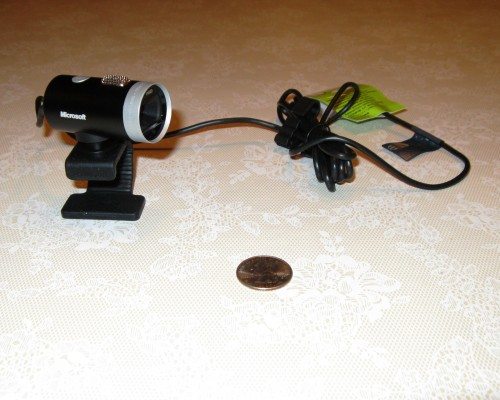
I’ve had the pleasure of getting to play with the new Microsoft LifeCam Cinema and I am impressed. I haven’t tried any other HD webcams but compared to my previous webcam, the Microsoft LifeCam Cinema is far superior. To make this review simple, I compared the QuickCam Pro 9000 that I purchased in March 2009 with the new Microsoft LifeCam Cinema. What a difference! The picture quality is much clearer. Check out the videos and see for yourself (you can even see the dust on my floor). 🙂
LifeCam-1 (.WMV file)
QuickCam-1 (.WMV file)
I didn’t know my old webcam was so horrible! I initially thought the poor image quality might be due to the low lighting in the hallway, so I recorded two more comparison videos just to make sure.
LifeCam-2 (.WMV file)
QuickCam-2 (.WMV file)
The Microsoft LifeCam is clearly the winner here. (Notice the files are 20 times larger than the QuickCam Pro 9000 however). The QuickCam Pro 9000 is an older camera so this may not be a fair comparison but the box does say that it has high definition video (up to 1600×1200), whereas the LifeCam has 720p HD widescreen video (1280×720 video resolution).
Installation of the LifeCam Cinema was easy, I just inserted the CD into the appropriate drive, followed the directions and plugged in the camera. Operating the camera is simple too (except I almost went nuts trying to locate the dashboard only to discover that it was minimized and right in front of my face). The design is sleek and simple and it’s not much bigger than a D cell battery. The sound quality is good. It has a digital noise-cancelling microphone to help improve speech. The webcam also has a Windows Live Call Button on the top of the unit to access Windows Live Messenger. (I use Skype so I didn’t try this button.) The webcam works fine with Skype, the picture quality wasn’t fabulous but that’s due to Skype, not the camera. I even surfed the net while on Skype to see if my computer would freeze due to the power requirements of the LifeCam but I didn’t have any problems. (My PC has a little more than the minimum system requirements.)
Overall, this is a good webcam with a sleek design for a reasonable price. I recommend it. Just make sure you have the minimum system requirements; I have listed them below.
System Requirements: Windows® 7/Windows Vista®/Windows XP (with Service Pack 2 or higher) Intel Dual-Core 1.6 GHz or higher and 1 GB of RAM (recommended: Intel Dual-Core 3.0 GHz or higher and 2 GB of RAM) 1.5 GB free space CD-ROM USB 2.0

Zip Ties Assorted Sizes(4”+6”+8”+12”), 400 Pack, Black Cable Ties, UV Resistant Wire Ties by ANOSON
(as of June 10, 2026 13:56 GMT -05:00 - More infoProduct prices and availability are accurate as of the date/time indicated and are subject to change. Any price and availability information displayed on [relevant Amazon Site(s), as applicable] at the time of purchase will apply to the purchase of this product.)
STREBITO Electronics Precision Screwdriver Sets 142-Piece with 120 Bits Magnetic Repair Tool Kit for iPhone, MacBook, Computer, Laptop, PC, Tablet, PS4, Xbox, Nintendo, Game Console
(as of June 10, 2026 13:56 GMT -05:00 - More infoProduct prices and availability are accurate as of the date/time indicated and are subject to change. Any price and availability information displayed on [relevant Amazon Site(s), as applicable] at the time of purchase will apply to the purchase of this product.)Product Information
| Price: | $79.95 |
| Manufacturer: | Microsoft |
| Pros: |
|
| Cons: |
|

Gadgeteer Comment Policy - Please read before commenting
These look great! We’re looking for some HD cameras for some of our salesman to use with Office Communicator. I think this would fit the bill quite well!
Great review Krista!
James
I LOVED the LifeCam-1 video!!! My kids are about 10 years older. Did the LifeCame-1 still work after you let him attack it? 🙂
I wish you would stop posting all this good stuff — it makes me want to shop…
Both cameras survived and are still working. 🙂 Thanks for your comments.
Great Review!!!! I also did a video review and a side by Side with the Lifecam and the Quickcam 9000. Few things I have found over time that are wrong with the camera are the weird resolutions it supports . My main streaming software Vidblaster doesnt like some of the resolutions that it supports and im having scaling issues
Here is the video reviews I made
http://www.guysfromqueens.com/?p=419
http://www.guysfromqueens.com/?p=409
I understand that some people think the Lifecam Cinema is better than the Quickcam 9000 but consider the following:
1) Quickcam 9000 is now replaced by Webcam 9000, which also supports 720P at 30fps (per Logitech Specs)
2) How are the two posted videos a fair comparison? You encoded the Quickcam videos at 320 x 240 pixel resolution by the Lifecam ones at 1280 x 720 resolution. Of course the Lifecam ones will look better!
3) Are you using the same software to record the two videos?
The guy from Queens (comment above) seems to have a more comparable comparison, although your baby *is* cuter.
YIKES! Jesse you are correct. I did not change any settings when I recorded the videos and I did not realize that the QuickCam was only 320×240 until you mentioned it. When I viewed them both on my home PC with Media Player before I uploaded them, they appeared to be the same size so I didn’t catch that. I recorded a new video today with the QuickCam in the HD mode but it still wasn’t as good as the LifeCam. As you mentioned the QuickCam has been replaced/upgraded, so again, this is not the best comparison. My intention was to simplify the review because I was having a hard time comparing the specifications. Now that I have read some other reviews, I still recommend the LifeCam but it should be noted that the LifeCam isn’t the best in low lighting (thank you Andrew Z). I primarily use my webcam with Skype and for that I can honestly recommend it.
have you tried this out on a mac? i would like to make short arts and crafts films for my blog and am looking for a web cam.
Thanks guys for nice nice comments. When I talk about the Lifecam being better Im talking about streaming. The lifecam can stream 1280×720 at 30fps ( I use vidblaster) The Logitech 9000 isnt able to do 30 fps at that resolution. when your recording both are able to do 30fps at 1280×720. Another interesting thing I have found is that the Quickcam 9000 vs webcam 9000. BOTH CAN DO WIDE SCREEN. I know there are many sites out there saying that the Quickcam cant do widescreen but it can with the latest drivers. If any of you have questions please feel free to email me .
I bought the Lifecam Cinema yesterday and it is nice, but I have problems getting 30fps! When recording using the bundled software I only get 15fps (at all resolutions). Anyone having any idéa what the problem is? I have tried it on two computers, one with XP and one with Vista (both cases using really good lighting).
Jan – I was able to get 30fps at 424×240 video (or less). Hmmm….
Sometimes having too many USB Port’s in use can cause the 15FPS at 1280×720. Try unplugging other USB Devices and see if that increases it to 30FPS.
Max sure you have at least the minimum specification! (Maybe you need recommend for the 30FPS)
I hope someone can answer my questions. (4)
I orginally purchased the Microsoft lifecam vx5000. I loaded the disk and the webcam worked good. When I clicked on the button on the camera, live messenger popped up.
The next day, i turned on my computer and after boot up, I got this message: windows live messenger stopped working….Why?
Then after reading reviews, I went and purchased the Microsoft lifecam Cinema to try out. So I uninstalled the lifecam vx5000 and starlight from add/remove programs…..
After restart, Windows live messenger popped up with the same “stopped working” error.
I then went ahead and installed the disk for the Cinema webcam.
The video and audio came out great. But when I went to push the button on the webcam for live messenger, nothing happened.
Why? I also noticed that silverlight did not install with the
Cinema disk, but did install with the vx5000 disk..
Should I download the starlight software? Does it really matter to have that installed?
Another question, I realize you can set the resolution when recording a video, but when one uses Skype or others, what resolution is being produced? Is it the resolution that’s set?
Or is there a default that it goes to? I hope someone can answer my questions.
One more thing, I have Windows 7-32 bit desktop, built by a local computer store. core 2 duo- 2.93 ghz- 3 Gig ram.
I tried the Logitech webcam pro 9000 and the 5000.
The software gave me a error: LWS.EXE not responding.
For two months I tried to get this to work, uninstall- reinstall, nothing worked, and I finally spoke to the top tech for logitech. He said it is my computer, something is wrong….we tried for 3 hours on the phone to no avail. So my logitech webcam did not work with Windows 7..The tech said to me, I am one in a million people that has this problem..Wonderful, I am the lucky one.
Anyway, please see what you can do to answer my (4) questions about the Microsoft questions, Live messenger stopped working, silverlight, live messenger does not come up pushing camera button, and the resolution when using Skype.
thank you very much, hope to hear from someone.
Billy
I can’t mak my mic/work on me lifecam…I have tried ever thing I know…all other people get when i try to chat with them is a buzzing sound onthe other end..Help!
Just installed Microsoft LifeCam Cinema on to my computer using Windows 7. Every works. I cannot increase the video resolution. It will not allow me to change it. It doesnt give me any options. This is connected to an HDTV. What am I doing wrong?
D.
Dear Krista – you provided a very good review of the HD web cam. thank you! I am using Skype just like you all the time. Can this microsoft web cam provide HQ in Skype. You know this small simbol in the left up conner of the window?
I thought that only logitech web cams support this HQ mode in skype. I hoep I am wrong. if you say yes, I will go buy the microsoft HD cam. thank you very much! alex
My apologies for not replying to everyone sooner. I unfortunately have not used the LifeCam Cinema much after writing this review. Being a mother of a toddler and twin infants in addition to working full-time has left me without much spare time (and my computer room has been converted to a nursery). If I do learn the answers to any of your questions, I will reply to this thread.
~Krista
Great review Krista. Like others I had trouble getting the lifecam to reach 30fps at 720p. I downloaded vidblaster as that is apparently the best place to test them, however still couldnt get the fps. I went and bought an aGent V5 which is a 1080P HD webcam, figuring it would do better and it did. Got 720p at 30fps. And its cheap! google agent v5.
well i bought the cam too… and i have a really biiiig problem…
although the cam works properly via msn…
when i m trying to open the software..it says that no cam is connected :/ what can i do to fix that ?
If this is still active, anais gr, check your device management. (Start -> run -> “devmgmt.msc”) if you have a little yellow ! that means your drivers are corrupt. double click it and uninstall and reinstall the drivers.
For anyone else, i’m trying to use this camera in wide screen in skype. any answers?
hey i bought the lifecam cinema webcam
its good but i have 1 problem
how can i use mirror with the lifecam cinema
my older cam has this option
can some one support me ?
Hi,
I have a Lifecam Cinema. Good picture but two major problems:
I have a Core i7 based desktop running Windows 7 Pro 64 bit with 6Gb of RAM. The Lifecam seems to work properly after the driver installation integrating with Skpe and running in the supplied Lifecam software. Both problems manifest after a reboot when something seems to activate the camera as the blue light comes on but shutting all running programs, including Skpe, does not help. The other problem is in trying to open any other program the whole system hangs until I unplug the Lifcam from its USB connection. I have tried reloading the driver which I checked covers 64 bit Windows 7 but still the same after a reboot or any restarting of the computer. Any ideas please?
Hello, and greetings from Finland!
Thank you Krista, it was a really great and informative review,
and it is really great to know that this product´s got such positive reception in general! 😀
Anyways, I bought the same product a few days ago,
and my only dilemma is, that I can´t get a higher resolution,
whether I´m just taking still photos, or recording motion video.
I´ve checked the manual, I tried to search for the problem from
Microsoft´s own pages, updating drivers etc. but nothing seems to work. If anyone around here´s got a clue, please be so kind
to illuminate me aswell… I would be forever grateful!
Nevertheless, thank you once more!
i have just installed 720p life cam,using skype,i cannot see the other person but he can see me on video call,i am getting a message from microsoft telling me it cannot complete the call due to another program is trying to access my webb cam.can you solve the problem for me.
thankyou
I use one of these as my weather cam as part of my weather updates. Delivers a great picture and you can easily see incoming clouds and rain. Handles the white levels well and would recommend to anyone looking for something like that.
Great camera back in the day wish they still made them.