
Did you ever want a drum kit when you were a kid, but your parents vetoed the idea because you didn’t have the space and they didn’t want to deal with all of the crash boom bangs? What about now, do you still fancy yourself as the next Larry Mullen Jr. of U2? If so, I have a nifty little electronic drum pad from Dream Cheeky that just might start you down the path of stardom. Or not…
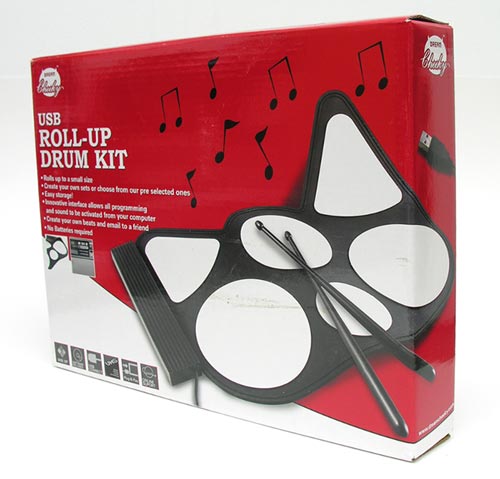
When Brando asked if I might like to review a roll-up drum kit, I had to think about it for a bit. I’d never really had the ambition to learn to play drums. But I thought what the heck, I’d give it a shot.
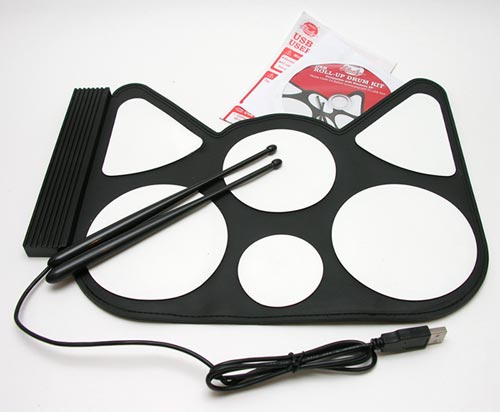
The kit basically consists of two plastic drum sticks (not standard size), a Windows software CD and the pad. The pad is a black rubber mat with six white playing areas (for snare, kick, plus 2 toms). The mat is flexible and can be rolled up for storage if desired. FYI: it sorta smells like an old tire. It is nice and compact though, so you will have no problems finding space on your desk for this kit.
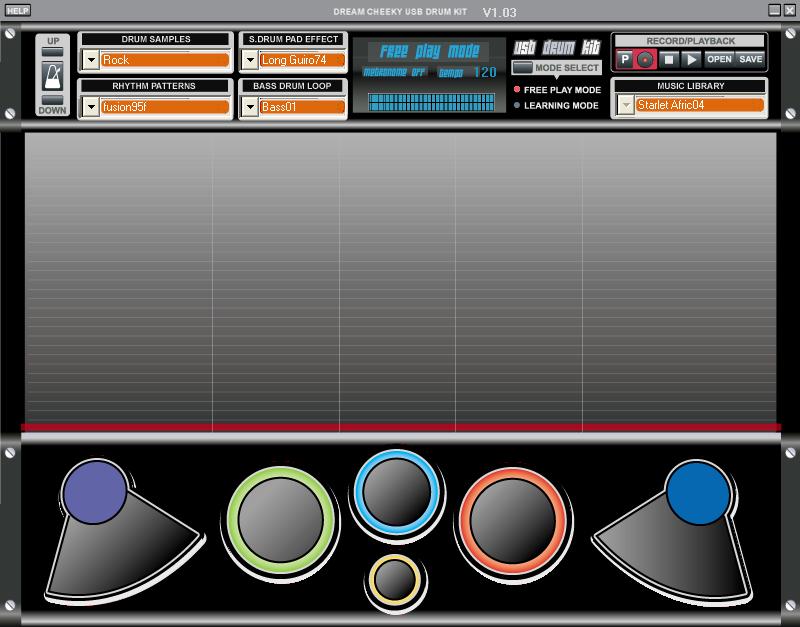
Click to see full size image
On its own, this kit won’t do anything when you plug the attached USB cable into your computer (yay, no batteries needed!). You have to first install the application which is included on the CD. Unfortunately, this software is only for Windows users…
The software is very simple, but does have the following features:
3-level learning feature
Play along option
Record/playback and program option
Tone: 6 Levels and Default of (-3 to +3)
Tempo 40-208 Bpm
50 Percussion Sounds
20 Preprogrammed percussion sets
100 Preprogrammed beats
You can choose from various drum samples (Jazz, Rock, Latin, Africa, Waltzes, Country and Electron), so that the sounds that come from the pads when you hit them change according to the style of music chosen.
The learning mode is reminiscent of the Guitar Hero game. Music plays, while colored bars descend down the screen above the pads that need to be hit with the stick. Let’s just say that playing drums is way harder (for me) than guitar! ;o)
You can use your mouse to press the onscreen pads if you like, but it doesn’t work near as well as using the plastic drum sticks.
You can even record your beats and save them as a .WAV file. Here’s an example of my next Top 40 hit. Click to listen…
Drum Test (156k .WAV file)
What do you think? Yeah I know, don’t quit my day job(s) right? ;o)
The Roll-Up Drum Kit is not a professional instrument, but it is easy to use and kinda fun. If you ever wanted to be a drummer, try one of these before you plunk down $100’s for the real thing. Your parents, significant other and neighbors will be happy that you did.

Green Toys Car Carrier, Blue - Pretend Play, Motor Skills, Kids Toy Vehicle. No BPA, phthalates, PVC. Dishwasher Safe, Recycled Plastic, Made in USA.
13% Off
Amazon Echo Pop Kids (newest model), Designed for kids, with parental controls, Includes 6 months of Amazon Kids+, Disney Princess
$49.99 (as of July 11, 2025 18:01 GMT -04:00 - More infoProduct prices and availability are accurate as of the date/time indicated and are subject to change. Any price and availability information displayed on [relevant Amazon Site(s), as applicable] at the time of purchase will apply to the purchase of this product.)Product Information
| Price: | 42.0 |
| Manufacturer: | Dream Cheeky |
| Retailer: | Brando USB |
| Requirements: |
|
| Pros: |
|
| Cons: |
|

Gadgeteer Comment Policy - Please read before commenting
Post your comments on the Dream Cheeky USB Roll-Up Drum Kit review.
http://www.the-gadgeteer.com/review/dream_cheeky_usb_drum_kit
Just click the POST REPLY button on this page.
Julie, is this drum not recognized by GarageBand on the Mac?
If it is compatible with GarageBand, I sure can’t figure it out…
Why is ‘smells like a tire’ listed as a con?
Or have i worked at a gas station for too long?
If you like the smell of tires, then you are warped 😉
Its such a warm, earthy smell. It reminds me of my dad… but so does gasoline. And grease.
If I only had anything like musical talent- I’d order these!
Well ok it smells like tires and almost fun…Does it work with MIDI ? Is the thing Velocity Sensitive…and who the h.ll is Dream Cheeky ????
YO>>>:wacko:how about some tech info from a tech forum…
CharlyTuna:
This keyboard is not MIDI, it’s USB. No velocity sensitive keys either. It’s a very cheap keyboard that smells like tires 😉
Yes in does MIDI !..sort of.
software is basic but midi messages Are produced through my Terratec DMX6 fire sound card and happily triggers my Roland sound module.
Yes I can play my external Midi Synth module from the pads- via my PC.
Ok so the pads are basic but its better than hitting the keys on my midi keyboard. It is also possible to record this midi data into a DAW-
‘midi through’ output from sound module into Cubase-watch out for midi feedback loops though !
I cannot get the pads to be recognised as a Usb input in Cubase but I’m looking into this….
paddy c!
Have you got any further details on how you managed this? You seem to be the only person on the net who has!
I’m trying to get it to trigger sounds in ableton live or garageband on my mac, but no luck so far…
Hey @ all, is the usb roll up drum kit also compatibel for mac ? it’s a b-day gift for my brother and he has a mac….so i need a answer please!!!!
Schicko:
Unless they’ve come out with software for the Mac, no, it is not. It just comes with a Windows only app.
Is it possible to play DTX Mania using this electronic drumpads?
I got one of these last Christmas, but I have a Mac. Finally, this Christmas, I got around to writing a driver for it. I mean, why not? It runs in Terminal and translates the drumkit hits to MIDI messages which you can use to control GarageBand or Logic or send out a MIDI interface to control MIDI hardware. Doesn’t have any of the fancy learning modes or anything, though; just lets you play it. Email mail_ben_schmidt at yahoo com au if you’re interested.
So I’m trying to record the tracks that I’m playing but it isn’t working. On another site it said that it was from faulty programing. Is anyone else having this problem?
Thanks, Ben. Your Mac Driver worked great on my Mac Mini with OS 10.5 and GarageBand.
Yeah i’m having similar problems it says ive recorded something and i save it, it shows up on my desktop but a.) wont open in the program and b.) is just silence when i play in windows media player or vlc… any answers anyone?
Hello to all , thanks a lot to Ben for the driver that it has sent to me, but don’t know how to istall it, someone could help me? I have mac osx 10.5.8 and I would want to use the drum kit with logic, thanks
Uauuuuu, I have succeeded to find aid and now it work fine, thanks still Ben, you are a hero; -)
Hey guys
I’m trying to use the drum kit in Logic on my mac with 10.6.2. Are the drivers still available? 🙂
Thanks,
-Brett
When I tried this there was a huge (in drum terms) delay between hitting the mat and the PC playing the sound. Which makes it pretty useless.
Brett: Yes, the driver is still available. Email me as my earlier post said if you want it.
If you can write a driver for it then i assume i can use a software app like controller mate midi
( http://www.orderedbytes.com/controllermate/ ) to run it on a mac inside ableton/logic??
Hi,
I have Windows 7 OS,
Is it Possible to recognize this midi usb through cubase?
my cubase doesnt recognize this product as midi input.
please help me.
thanks
I managed getting it working on my PC with Logic 5, but when I try to record MIDI, it doesn’t seams to send midi off, as every note I hit produces a long midi note (long as the recording takes). Just wanted to know how others are doing with the Rollup Drum Kit in order to understand if the midi off problems I got are due to the poor software developed by Dream Cheeky or if it can be resolved with better drivers. If so, can anyone out there write better drivers for PCs?
I’m thinking about buying one next week to use as a practice pad. Will it work in linux. Would like to hear feedback from any drummers about it. Would also like to hear any pros and cons from any one. ty all.
I’ve tried contacting ben, but with no luck (either he’s not checking his email weekly, or I can’t figure out his email – ma**************@***oo.com, or do the underscores not belong there, or does it not need the mail bit?).
Does anyone have that mac driver laying around.
let me know, cl********@***il.com
Not working on linux at all
Corey: about the addy for the mac driver… from what i gather, you need to add an “au” after the .com… my guess is it represents his country of residence. so you have it all correct just make it to say
yahoo.com.au
forgive me if im wrong, just thought i would offer my opinion since no one else seemd to reply yet. good luck
This should be easier, now! I’ve written a new version of the driver with a nice-ish interface. Thanks to Paul Redfern in the UK who helped me with some technical details, it works for the roll-up piano, too. For easy access, it’s on the web (indeed, this gave me a reason to finally set up a personal web site!):
http://www.insightful-schmidt.info/dreamcheekymusic
i am using the kit with a mac os. and i got it to work thanks to unofficial dream cheeky. great thanks.
however in garageband when i hit one pad it triggers several keys simultaneously. if someone can help it would be much appreciated. thanks glenn