
When I was a kid, I remember my Dad having this large Yellow Celestron telescope. He was very proud of that telescope and had a special foot locker that he kept it in. The thing was that I think he only actually used the scope maybe once or twice. It was difficult to find a place where lights from houses and street lamps would not ruin his star gazing attempts. One of the times that he did go out, it was in the middle of Winter. So he came back home late at night about half frozen. Hmmmm… fun. NOT! That’s why I had to think of him, when Brando asked if I was interested in reviewing the Sega Toys HomeStar planetarium.
Even though the HomeStar is being sold by Sega Toys, this is definitely not a toy. The $200+ price tag should clue you in on that fact. This globe-like projector was developed in collaboration with Takayuki Ohira, who created the world’s most advanced planetarium projector called the MegaStar Cosmos II.
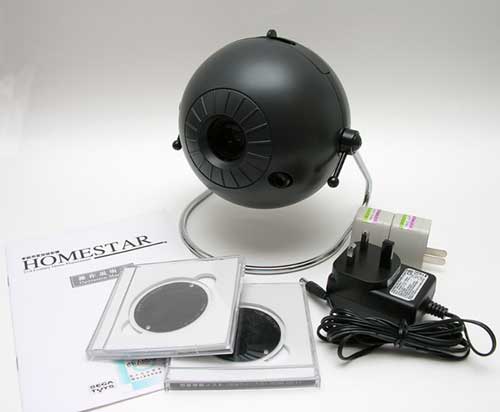
The HomeStar comes with everything you need to create a planetarium in your own home.
Package Contents
HomeStar projector
AC Adapter (100~240V, 50/60Hz)
Battery box (holds 4 1.5V C cells)
2 Software disks
Operation manual
The HomeStar is available in 2 colors: Black and Silver. I was sent the Black version. Upon removing it from the box, my first impression was that it looked like an eyeball.
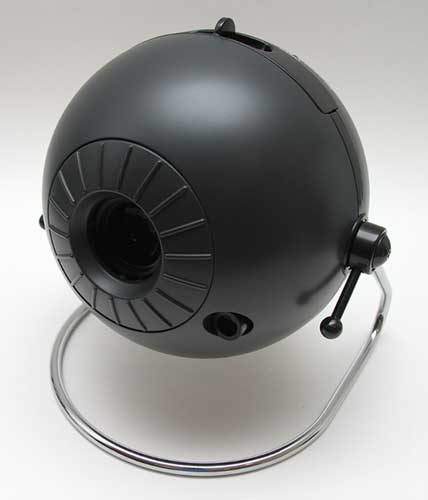
The projector is a plastic globe-like module, approximately the size of a softball. It is attached to a chrome stand.
A large iris-like main lens is on the front of the globe, along with a smaller lens located in the lower right quadrant.
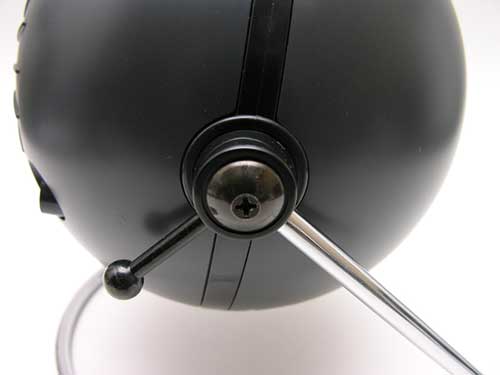
The angle of projection is easily adjusted by swiveling the globe up or down. Fixing the position is accomplished by tightening the long screw arms on each side of the stand.
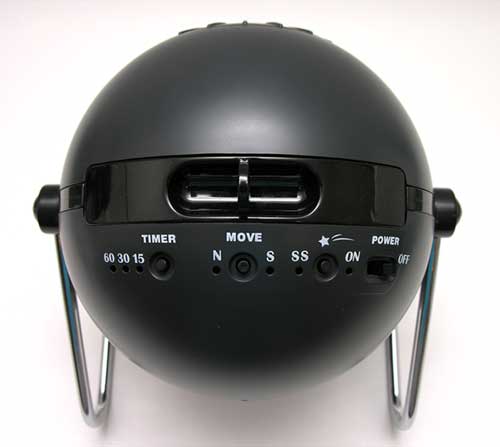
All of the switches are located on the top of the projector. You would imagine that a planetarium might be somewhat complex to operate. Not the case with the HomeStar. There are only 4 switches to worry about. There is an On/Off slider switch, which is pretty self explanatory. There is also a Shooting Star toggle switch. This switch is used in conjunction with the Diurnal Motion switch. Diurnal motion can be set to either clockwise (South) or counterclockwise (North). It simulates the movement of the stars in the night sky. A complete revolution takes approximately 12 minutes (the speed can not be adjusted). There is also a Timer switch, that can be set for 15, 30 or 60 minutes. Enabling the timer allows the HomeStar to automatically power off after the desired duration. Several LEDs display the status for each of the switch features.
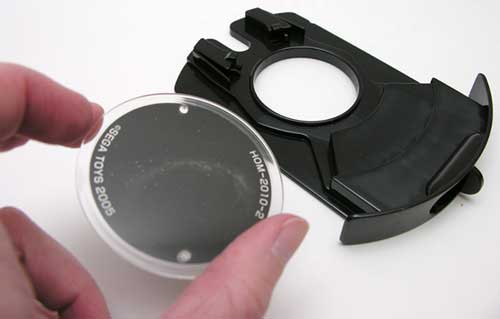
The HomeStar ships with 2 software disks for the Northern hemisphere. There is a Southern hemisphere disk set available separately. These disks don’t really have computer software on them; they are actually plastic disks that have 10,000 stars printed on them. Yes, I said 10,000 stars!
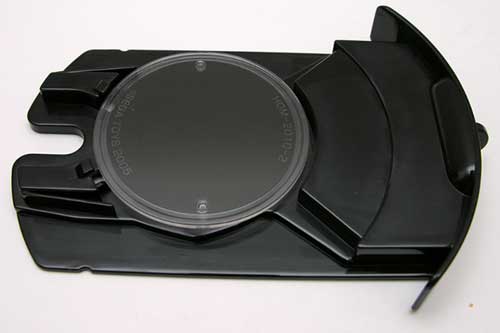
The disk fits in the disk tray, just as a CD might fit into the CDrom tray of your computer.
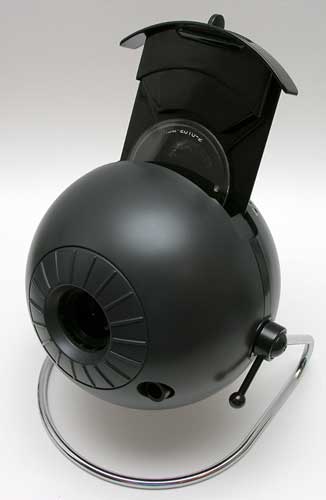
The tray then slides into the slot on the top of the HomeStar. Once the disk is in place, you just need to find a blank wall or ceiling to project the stars. Ten feet (2m) is the recommended optimal projection distance.
This is where I ran into a bit of trouble. All of the ceilings in my house have either ceiling fans or a light fixture, in the center. I finally found that the best place for me to try the HomeStar was to project it on to a White wall in my computer room. The focus can be adjusted by turning the ring around the lens left or right.
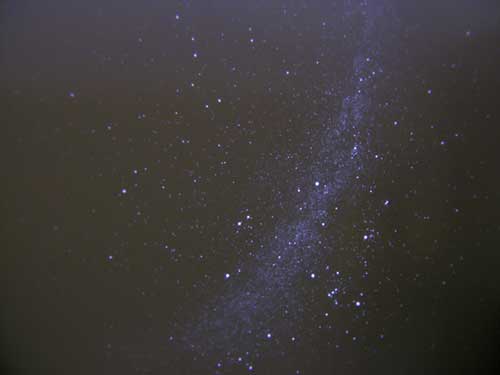
Here is an image that I captured while using the star disk. It sure does look like you are gazing up at the night sky, doesn’t it? I was surprised at how bright and focused the stars actually were.
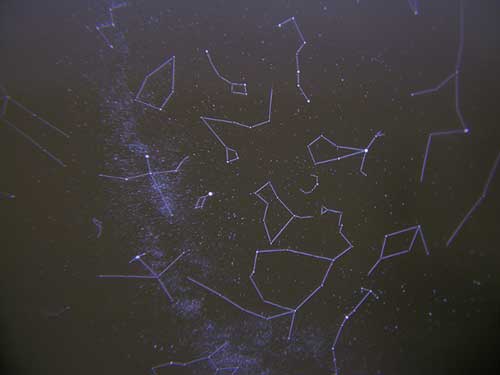
The other software disk shows the constellations. I was disappointed that the HomeStar didn’t come with any documentation to tell you the names of the constellations. Sure, I could pick out the Big Dipper and Little Dipper. Everyone can do that… But I didn’t and still don’t know the names of all the other star formations.
The Shooting Star function will display a shooting star approximately once every 30 seconds, as long as the Diurnal Motion function is also enabled. This feature is kinda neat, but quickly becomes ho-hum when you realize that the star always shoots in the exact same location every time…
The HomeStar is an interesting gadget, but the 200 price tag makes it a little prohibitive for most casual astronomy buffs. In my opinion, this product is better suited for a class room setting, instead of a home.
Product Information
| Price: | 229.0 |
| Manufacturer: | Sega Toys |
| Retailer: | Brando Toy Shop |
| Pros: |
|
| Cons: |
|

Gadgeteer Comment Policy - Please read before commenting
Post your comments on the Sega Toys HomeStar Planetarium review.
http://www.the-gadgeteer.com/review/sega_toys_homestar_planetarium
Just click the POST REPLY button on this page.
Isn’t there a trademark on HomeStar??
I would definetly drop down 200 bucks if it included more information like constellation names and such and had a meteor shower function. I can just imagine having my ceiling turned into a light show of shooting stars all over the place. A few years back I was fighting a fire in the middle of the arizona desert and I remember spending hours just staring up at all the stars. Let me tell you, after growing up in Los Angeles, it was a BIG deal!
Mountain:
That’s the thing, I don’t feel that there are enough extras with this product to justify the price. Yes, it’s cool that you can project 10,000 stars on your ceiling, but is it $200 worth of cool?
This has really started a bug in me cause frankly, I really like the idea of a light show since I spend alot of time relaxing in a pitch black room with no ceiling fixtures. While doing a cursory google search I came across this item
http://www.24hours7days.com/Astro/Star_Theater_Version_2.html
and it might just be exactly what i’m looking for. I’m gonna look into it some more and I’ll post what I find if I end up getting something.
I suspect the licensing costs of the constellation images on the discs are what is making the price so high..
F.
Mountain:
Email me your mailing address and I’ll send you the HomeStar 🙂
That’s odd. Mine did come with a tiny little star chart with names and everything, as well as a guided audio tour. . . all in Japanese. I guess that’s why it’s not included here.
I bought the special edition Winter version in Japan and it came with all 4 star discs, two miniature planetariums and a CD of spooky new age music. It really is just a toy, and it feels like one, all plasticky. You also have to be careful with the disc tray, I’ve managed to jam it a couple of times and it seems really brittle.
Mountain, I think I’ve seen the Star Theater in Toys r’ Us. The main difference is that the Star Theater projects a ‘negative image’, ie the stars are shown as shadows, whilst the Homestar projects the stars as points of light.
A friend has the HomeStar. It’s above average for a kid’s toy, but does not really approximate the Night Sky as you see it in Arizona or on Georgian Bay. 10,000 stars sounds like a lot, but is not really. They’re only focused in the centre, on the sides they’re just blobs without defined edges.
I really want to find something that projects a much better approximation of a real night sky for my bedroom ceiling. Does anybody out there know of anything suitable? Or have a suggestion who I should ask?
I’m prepared to spend considerably more than the Sega toy costs if I can find something suitable.
are the stars as faded as it is in the pictures or is it due to the quality of the camera that it doesnt seem as nice and clear?
I bought the Sega Homestar planetarium for my son who adores it. We had it for only two months and now it no longer works. when you plug it it the light flashes then goes out. Its been cared for and never mis handled. I wish we could find a place to have it repaired. It cost a fortune and its a terrible shame to have it work for 60 days then quit.
My son wants another desperately as he can’t sleep without it now. Any ideas on repairs? I bought it new from a vendor on Ebay.
PS Evan, the stars are bright and clear as they are in real life, its amazing how beautiful they are!
I bought a Homestar Extra the end of December and there is no comparison to the Homestar pro, which I also have. The Extra is superior and a joy to use. The stars are almost too bright. The shooting star on the Extra is completely random and very realistic. The stars have 12 light levels. The Extra comes with a remote control. I have taken both units apart and the engineering of the Extra is superior to the pro. The optics of the Extra are also much more advanced and the stars at the edges are greatly improved over the Pro version. The only drawback is the higher magnitude stars are large than they should be to increase the apparent light, but this is the same with other version. I am currently working a replacement star disc that will have grey scales levels that should eliminate this problem.
hi, I have just bought the Homestar Extra and it’s great exept I don’t read japanese! also I would like to buy more discs. Anyone know where I could get extra discs, perhaps the moon.
Thanks
Hi, I have the older PRO version, as much as I do think it projects a good image, I find it very dim if not used in a totally blacked out room. I put on abstract and graphic laser shows just like the old Laserium shows that were shown in planetariums around the world, they always looked great in this environment as the start field from the start projector worked as a fantastic backdrop to the patterns and images projected by the laser in the show. I originally bought he PRO version for this reason, however it is WAY to dim to be even visible against even the most subtle laser pattern. I have also used a laser stars projector for a good back-ground star effect but it is not the same as the effect of looking into the night sky. Please can anybody give me advise as to how much brighter the EXTRA model is against the old PRO. I don’t want to shell out several hundred dollars if it won’t be effective. I have been checking out the Megastar web site and there is a smaller portable projector (semi professional) called the Megastar Zero which looks like a professional version of the Sega projectors. I have no idea of the price of these but it’s either a Homestar Extra or the Megastar Zero which I guess will be a couple of thousand dollars at least. If anyone can help or give me some feedback about the EXTRA or the ZERO I would be very grateful, thanks.
Hello i would like to know if you could stop or freeze the homestar stop all stars from moving
I have one that quit moving if you want to trade
I would like to figgure out how to take it apart and fix it, Anyone know how?
Between this thing and AMBIEN, I sleep like a baby!!!
we would like to know how to buy homestar planetarium
I found the Homestar while cleaning out my father-in-law’s house. I could not match up any of the AC adapters I found with the Homestar. What DC voltage is required to operate the Homestar? It should be written on the AC adapter. Thanks, William.
Could you ship this product to Buenos Aires, Argentina?
How many days does it take to arrive?
Thanks
I have the homestar, not the pro, and i love the thing… have the moon disc and we just ordered a 3 disc set of the earth, solar system and a new constellation disc… the blurring of the edges isnt as bad as everyone makes it sound… it gives it kind of a “fisheye” feel, kinda a weird 3D effect actually as it moves… I cant rave enough of this thing, especially with the moon disc, have spent many nights just relaxing under it listening to music, it really is quite amazing for the price… we found a great deal online somewhere in the US for like 115 bucks… that was CHEAP compared to other prices we’ve seen.. now the 3 disc set we just ordered tonight was another story…lol.. they were 113 bucks, but i had to have them since i love this machine so much… anyone who likes this type of thing, dont hesitate, BUY IT!…lol.. and i’m just talkin about te basic one here, the extra or pro are probly better, but i love this anyways…
Hi i have been looking into a new planatarium I have the laser stars which i love but have always wanted to see the homestar in real life instead of always going to my neighbor hood planatarium. I wanted to know have any of you used the Star theater pro planatarium. http://www.thinkgeek.com/geektoys/science/c057/?cpg=froogle , and can it use the same disk as the homestar ?
The Star Theater Pro is much better than the Homestar Pro, much brighter. The discs are not interchangable
Simon, I contacted the designer of the HomeStar series in Japan (about the “Extra” model which is way superior to the Pro/Pro2) and also asked about the professional (definitely NOT semi-pro) Megastar Zero as I was also under the impression it was a small scale interim between domestic and professional planetariums. It isn’t! – It’s now been discontinued as Dr Takayuki Ohira is redesigning a Mk2, but when it was sold, depending on spec it cost between $40,000 – $90,000 !, and required a large domed ceiling to project “into”, not a regular flat lounge / bedroom ceiling to project onto, so err, definitely not a casual domestic purchase! 🙂
Having researched all the competition extensively, it appears that the HomeStar Extra version (about $400-$500) is by far the best amateur planetarium on the market, and in a different league to the glut of cheap, dim toys on Amazon, eBay and online gadget sites.
I’m just about to order an Extra, and also try and source the additional discs (moon and southern hemisphere).
Cheers
Charles
Where does everyone get the extra discs? The ones that have the Solar System, Constellation Study, Aurora etc. And what’s the price like? Thanks.
F.Y.I.
Homestar on sale for $89.99 at: http://www.restorationhardware.com/rh/catalog/product/product.jsp?productId=prod20026&navAction=jump
Restoration Hardware’s site lists it as Personal Planetarium.
🙂 Happy Gazing
HEY: this has got my attention! am i to assume that this comes in japaneze? is there an english version?does it come with “all” the extra discs you guys are talkin about? are replacement parts available? ex: bulbs, power supplies.
I have to agree that the HomeStar is a great projector, but you do have to know your way around the night sky a bit to get the most out of it. It’s a shame that they don’t supply a book or something with it. As is pointed out, this would be ideal for a classroom setting though. I have a similar type of projector myself and you can’t fault the quality of the images – they really are clear and quite accurate.
The stars move as you look at them according to some posts here, can this be shut off for any of the models. Just put the disk in and keep it in one position?
I mean, can you look at the stars as you would the actual night sky (while the earth moves, we don’t perceive it)
How noisy are these products? I want something that is suitable for my baby’s room but have been put off some products that have noisy whirring fans. Cheers.
How the similar (better?) item Uncle Milton Star Theatre Pro on sale in Amazon for $30 with free shipping.
hello
I am French and I search for additional disks Sega Homestar Extra
5 discs for the “Home Planetarium Star Extra”: earth, constellation pictures, alaska aurora, solar system, constellation study?
can you tell me where I can buy these records?
thank you
Hi
I am also looking for discs for Hestar Pro
Anyone know any web sites which sell them?
Thanks
Derek
Broke after 32 days. Still projects, but doesn’t rotate. Stuck with one version of the sky with a bunch of white dots. No place to have it fixed. No place to contact. From other comments, I think this is a common problem.
Hi,
Japantrendshop.com has discs. Maybe expensive as they sell the extra for almost 1000 USD.
Simon.
Any one know how to change the light bulb on the home star pro??? Mine has just blown 🙁
Anyone looking for extra star discs for the Homestar Extra, the Homestar Pro, and the Milton Star Theater Pro can get them from Miller Engineering, http://www.microstru.com. Their main business is scale model structures, miniature florescent signs, and custom lightening accessories. However on the left-hand side of the main page at the bottom of the list of products you will find a link for “Star Discs”. I have 7 of their star discs and they are much better than what comes from Sega or Milton. They even offer to help answer service/repair questions if you are having a problem with one of these three home planetariums.
Is there a comparison between Homestar Extra and Dark Skys DS1?