
Product Requirements:
Device:
Windows 98SE, 2000, XP, Mac, and Linux machines with
a free USB port
Digital photographers have it made, they can snap as many pictures as they
desire and never have to worry that the pictures they end up printing will not
turn out as expected. While there are many advantages to going digital, there
are also a few caveats. One particular caveat is the fact that shooting high
resolution pictures require high capacity memory cards. Images from 4-8megapixel
cameras can vary in size from around 1megabyte to 16megabytes per picture
depending on the compression mode. It’s not hard to realize
that even a 1gb media card can be quickly filled to capacity.
Sure, you can buy extra memory cards and just swap them out as needed, but
what do you do when you’re on vacation and don’t have access a computer to
offload the pix at the end of the day? You can either go to a store and buy
another flash card, or you can travel with a product like the
QCool On-The-Go USB Portable Card Reader / HD
Case.
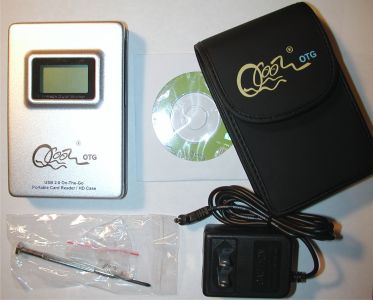
The QCool uses the same concept as the
Sony HDD Photo
Storage HDPS-M1 reviewed here a few months ago. I performs as a card reader,
external hard drive and an image tank. The Sony device was for
Memory Sticks only, while the QCool can read most of the popular card formats
available on the market today. Check out the specs…
Hardware Specs
Material: Aluminum
Size: 11.6x78x2.2cm
Weight: 145g
Internal Battery: Lithium Ion Rechargeable (2hr average operating time per
charge)
External Power: 110/240V AC Adapter
Hard disk size: 2.5in/9.5mm
External Interface: USB 2.0
Card Formats Supported: CF (Type I & II), Microdrive, Memory Stick, Memory Stick
Pro, SD/MMC, SM, XD (with adapter – not included)
Package Contents
QCool Shell
AC Adapter
USB cable
Carrying case
CD with drivers
Quick Start Guide
Screwdriver & screws
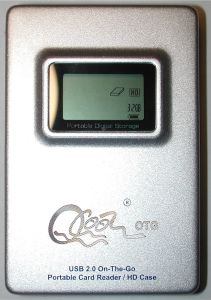
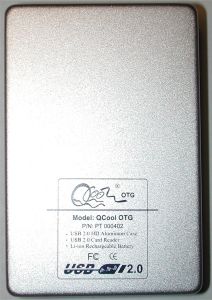
Physically the QCool is solid and compact. The front and back covers are made of
aluminum, while the sides have a slightly rubberized feel.
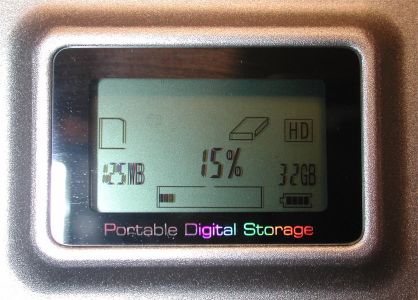
The front of the device has a small monochrome display that shows battery
level, space left on the internal hard drive and copy progress. The display is
easy to read in well lit conditions, but not so well in dim lighting. A
backlight would be a welcome addition.
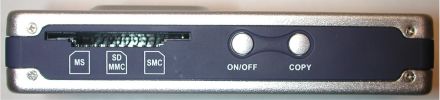
The card readers are located on both sides of the QCool. On the left side,
there slot can accommodate a Memory Stick, SD/MMC card or SmartMedia card. Only
one at a time of course. Also on this side of the device are the On/Off switch
and Copy button. These buttons are both a little too easy to press and in my
opinion, their locations were not thought out very well. Many times I found
myself accidentally activating the buttons or causing an unwanted copy when I
picked up the device to move it. A better location for the buttons would be on
the top of the device.
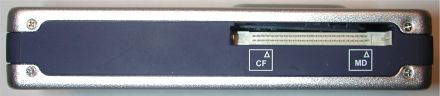
The CompactFlash and Microdrive slot is located on the right side of the
QCool. You can actually have a CF/MD card plugged in and accessible while also
having a card inserted on the opposite side of the device. Files can be copied
back and forth from card to card or card to HD when using the QCool as just a
card reader or external hard drive.
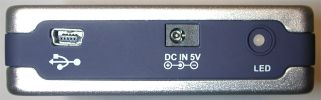
The bottom of the QCool has the USB connector, DC in and charging status LED.
Out of the box, the QCool, it does not come with a hard drive installed.
Although you can use the QCool without a hard drive, doing so will only give you
a USB 2.0 card reader. Not exactly worth the $99 price tag eh? In order to take
advantage of the other features, you have to install a 2.5 inch (Standard
notebook size) IDE hard drive. For this review, I ordered a 2.5 inch 40gb
Fujitsu hard drive from Newegg.com.
Installation takes less than 5 minutes. All you do is remove the four screws
that hold on the back cover using the supplied screw driver. Then you plug in
the hard drive, replace the screws and you’re done.
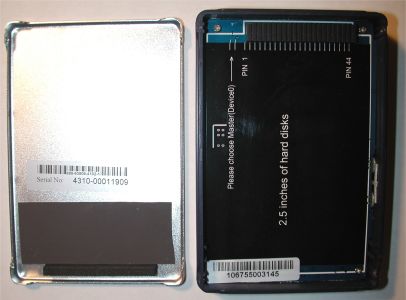
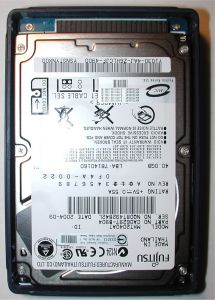
Left to right: empty QCool shell, Fujitsu drive installed
After the drive is installed and the back cover is screwed securely into
place (they give you 2 spare screws in case you lose a couple), you must then
format the drive. To do this, you plug in the included USB cable to your PC, Mac
or Linux box. Then you use a utility to format the drive. After reading the 4
page Quick Start guide included with the QCool, I launched the compmgmt.msc
application which is part of Windows XP.
According to the directions, you’re supposed to format the drive with the
FAT32 file system. Well, when I tried formatting my 40gb drive, the only option
I had was to format using NTFS. So I went ahead and used that format, not
thinking it would really make a difference… ummm… wrong! Keep reading…
After the drive was formatted, I plugged the QCool in to charge the internal
Li-ion battery. The LED on the bottom of the device glows red while charging and
then green when finished. 3 hrs later, the battery was fully charged and I was
ready to begin testing the device.
The first thing I did was plug it into my desktop computer using the USB
cable. Under XP, it shows up automatically as regular hard drive. Copying files
to and from it worked great.
My next test was to plug in a CF card. Boom, it showed up as a removable
drive on my desktop. I was then able to copy files from the CF card to either my
PC’s hard drive, or the internal hard drive in the QCool. I then plugged in an
SD card and was then able to copy files back and forth from the SD to the CF and
internal hard drive. Everything was working fine.
I was now ready to try copying files from the inserted flash cards to the
internal hard drive. I plugged in a CF card full of pictures, turned on the
QCool and pressed the Copy button. Nothing happened… I pressed the button
again. Nada. I unplugged the CF card and inserted an SD card. Pressed the Copy
button. Still nothing! I tried every card that I owned and had no success at
all. By this time, I realized that the problem was probably due to me formatting
the drive as NTFS instead of FAT32. But without the option to format as FAT32, I
was stumped. So I emailed the folks at QCool for some help.
The next day at my day job, I happened to mention my plight to Bill (author
of the Sony device review) and he automatically knew what the problem was as
soon as I told him I wasn’t able to format the drive using FAT32. XP won’t allow
you to format a primary partition larger than 32gb using FAT32. The drive I
purchased was 40gb… A little Googling verified this fact quite quickly.
That night when I got home, I showed the QCool who was boss by creating an
extended partition of 6gb, leaving a primary partition of 32gb which could then
be formatted using FAT32. Hallelujah!
It would be nice if the Quick Start Guide would have stated that you can not
format partitions bigger than 32gb using FAT32. This would have saved me some
hair pulling.
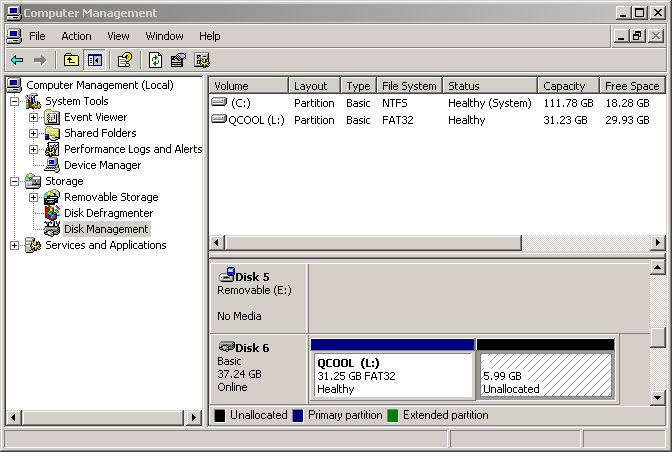
Once I was able to fix that problem, copying from the flash cards to the
internal hard drive was a snap! This time around, pressing the Copy button
caused the QCool to immediately begin copying everything from the inserted card
to the internal hard drive.
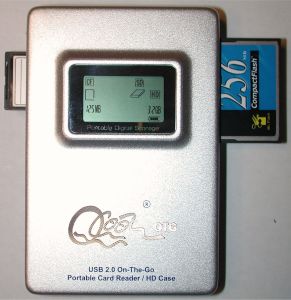
While the copying is in process, a simple progress part tracks percentage of
files copied.
After the copy is finished, the files on the flash card are NOT
deleted. There isn’t a way to do anything except copy files with the QCool.
Deleting the files is faster using your camera’s menu anyway.
If you would accidentally press the Copy button a second time while the same
card was inserted, it would just transfer a second copy of the files to the
internal hard drive. The files are placed in sequentially numbered folders
according to the media time.
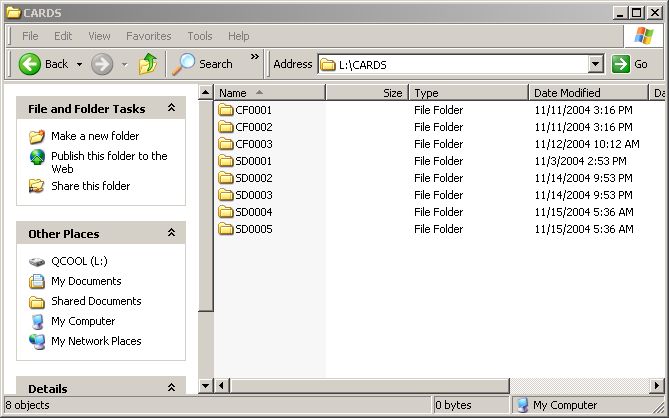
What happens if you have a card in each slot and press the Copy button? It
will copy both sets of files one after the other into their respective folders.
Regarding copy speed, it all depends on the media cards that you use. If you
have a fast card, copying will naturally go faster. I tried copy operations on
several of my cards and was pretty pleased with the speed. I don’t have any high
speed cards, or if I do, they don’t say what the speed is on the labels. I was
able to copy 203mb from a 256mb Transcend CF card to the hard drive in 2 minutes
and 452mb from a 1gb Kingmax SD card to the hard drive in 5 minutes 30 seconds.
As a comparison, the same transfer using another card reader to my PC’s hard
drive took 3 minutes 30 seconds and 8 minutes 30 seconds respectively.
Battery life per charge is rated at 2hrs. I found this to be pretty accurate.
That might not sound like a lot of time, but consider that you’ll probably only
be using it for a max of 10mins at a time (if you had a totally full 1gb card).
That said, it would be nice if there was a cigarette lighter charger accessory
for this device…
The only other problem besides the format issue that I had with the QCool,
was with an old 48mb Kingston CF card. It would not copy at all to the internal
hard drive. The only reason I could come up with as to why this was the case was
a small blurb on the QCool site stating that the QCool only supports 3.6V cards, not 5V cards.
I guess the old card is 5V.
The QCool OTG is a simple product that is easy to use and really fits a niche
market. I know I’ll definitely be adding it to my gear bag when I go on my next
vacation!
Price: $99 SRP
Pros:
Can add / upgrade hard drive
Easy operation (when you follow directions)
Cons:
On/Off, and Copy buttons are too easy to accidentally press
Quick Start Guide needs some embellishments concerning hard drive capacities and
format types
Gerber Gear Suspension 12-in-1 EDC Multi-Plier Multitool with Pocket Knife, Needle Nose Pliers, Wire Cutters and More, Gifts for Men, Camping and Survival, Grey
(as of July 13, 2026 19:01 GMT -05:00 - More infoProduct prices and availability are accurate as of the date/time indicated and are subject to change. Any price and availability information displayed on [relevant Amazon Site(s), as applicable] at the time of purchase will apply to the purchase of this product.)
Gerber Gear Diesel Multitool Needle Nose Pliers Set, 12-in-1 EDC Multi-Tool Knife, Survival Gear and Equipment, Black
(as of July 13, 2026 19:01 GMT -05:00 - More infoProduct prices and availability are accurate as of the date/time indicated and are subject to change. Any price and availability information displayed on [relevant Amazon Site(s), as applicable] at the time of purchase will apply to the purchase of this product.)Product Information
| Price: | 99.0 |
| Manufacturer: | QCool |
| Pros: |
|
| Cons: |
|

Gadgeteer Comment Policy - Please read before commenting
Post your comments here on the QCool III On-The-Go USB Portable Card Reader / HD Case review.
http://www.the-gadgeteer.com/qcool-otg-iii-review.html
Just click the POST REPLY button on this page.
Hi! Vosonic has had similar devices for a long time, now, although the QCool
seems to be (slightly) more advanced, compared to the equivalent model.
I own a X-DriveII. It’s bigger, runs for about 1.5hrs and has the same two buttons, Power and Copy.
It can only make copies from Card to disk (standard laptop type). It’s recognized by the OS without any trouble, as a Disk and 3 Card-Readers.
The instructions state the same problem about FAT32 and >32GB disks. Vosonic provides an utility to format larger disks. They can then be used with Windows, without any troubles.
Have fun,
Nuno Pedrosa.
You can only copy to the 32GB partition? What can you do with the 6GB NTFS partition?
JohnKes, I can’t figure out how to format the remaining extended 6gb partition. I’m thinking that if I could format it, that it would show up as another drive letter and allow copying from XP.
I clicked on the Qcool link to their home page to see if there was information about a USA reseller but I could not find anything. Is this product avalible in the USA yet?
DanZeman:
No, there isn’t a US distributor yet. QCool will take orders though if you are interested. I can give you an email address if want to contact them.
About the max size of a Fat32 harddrive partition…
Wikipedia says (and therefore, its true:)) that its possible to make a fat32 partition as large as 124.55GB.
The Qcool support pages also now include a guide to do this:
http://www.qcool.cn/SupportFormatHD2.htm
– if you do not have a PC and a 3.5″ to 2.5″ converter, you could insert the harddrive into a laptop, and boot through the floppydrive.
By the way you can download the win98 bootdisk (with fdisk) from http://bootdisk.com
Thanks for a really great usefull site…
HrMansen:
Thanks for the tip! I don’t have a converter, but I guess I could try putting the drive in an old Dell laptop that I have… or I can just say ‘oh well’ to the 6-8 gb that I’m not accessing right now 😉 Me thinks I’ll probably go with the latter 🙂
Jule or Dan: Please reply with the EMail Address. I want one.
Moe:
The contact is: PeterTsoi < peter @ qcool.cn > It looks like they are still waiting for a US distributor. When I wrote the review, I was under the impression that they would fill individual orders when directly requested. I’ve passed several people on to them, but they don’t appear to be taking orders.
If you’re ever in Canada, you could probably get one, since his email address ends in .cn 😉
Tyler:
FYI: .cn is China, .ca is Canada 🙂
Yeah…I knew that…. :dry:
this might be a little late, but the model you reviewed is NOT the OTG III. Its in fact, the original OTG. there is also a OTG II. Look at http://www.qcool.cn/Products.htm. The OTG III has a curvy LCD screen, instead of a straight rectangular one.
An alternative is the Vosonic XSDrive II+, aka VP2160. Check it out at http://www.vosonic.com/index.php?php_mode=spec&php_itemid=29. It’s pretty much identical to the OTG. Since Vosonic has been making digital wallets for a long time, it might be more easily available in the US.
chriszzz:
I was also confused about the model version when I received the device, but my contact at Qcool assured me that the version I had was the OTG III. That said, I’ve not been very impressed with them as a company. They led me to believe that if people were interested in purchasing these devices, that they could do so directly though Qcool. I sent them several requests after the review and kept receiving the response that they were still looking for buyers in the US. I think they just used me (the review) to promote their product in order to find a potential distributor.
Because of your review I was able to to format my hard drive. You saved me alot of trouble.
Thanks so much I still have some hair left,
Chad 🙂
Has anyone gotten more than the 32gb formatted for use in the QCool? I noticed that the qcool website is down, and so cant get any of their ‘support’
I am looking at getting a Digimate Photo Companion, which seems to be a rebranded version of these, which comes with a 80gb drive, but I dont wanna pay heaps for it if I can only use 32gb!!!!
It’s actually likely it’s an XP limitation, as Fat32 has a limit of 2TB IIRC…
You could simply use a third-party formatting utility to format the drive.
I was able to format my 40GB hard-drive with FAT32 in Windows XP using the directions here:
http://www.uwe-sieber.de/usbtrouble_e.html
I hope this helps.
Simon