
Product Requirements:
Device:
Bluetooth enabled PDAs and Smart phones
ThinkOutside’s Stowaway
Universal
Bluetooth Keyboard now has a competitor.
Brando is selling a similarly sized
product named the Smart Keyboard. Priced $50 cheaper, what does this
keyboard have that might make you purchase it over ThinkOutside’s offering? Keep
reading…
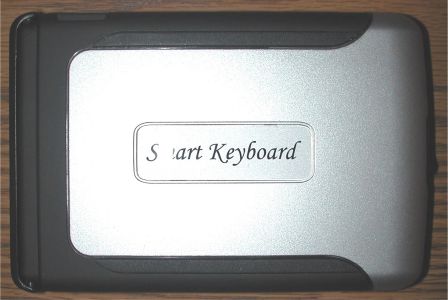
Package Contents
Smart Keyboard
2 AAA Batteries
Zippered vinyl carrying case
CD with drivers
Quick Install Guide
Hardware Specifications
QWERTY keyboard layout with dedicated number keys. (5 rows of keys)
10 dedicated programmable hot keys.
Lock open for stability.
Dimensions folded : 140 x 95 x 19 mm
Dimensions Open : 280 x 95 x 9.5 mm
Weight : 205gm
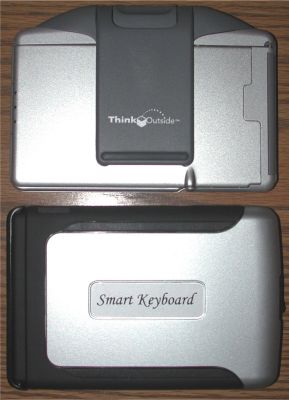
Top to bottom: ThinkOutside’s Universal Keyboard, Brando’s
Smart Keyboard
Made of silver plastic with black accents, this keyboard has a sturdy robust
feel to it. Unlike the Universal Keyboard, it’s not that hard to immediately
figure out how to open. A black sliding latch located on the side of the
keyboard easily unlocks the keyboard so that it can open like a book. A slider
at the bottom of the frame pushes the left half of the keyboard over to meet the
right half. Another slider at the top locks the keyboard into an open flat
position. In this position, the Smart Keyboard is not quite as rigid as the
Universal Keyboard. That said, it will work perfectly fine on a flat surface.
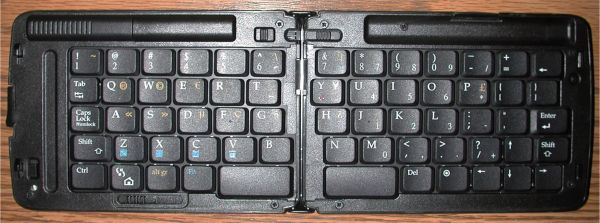
Left and right sections apart
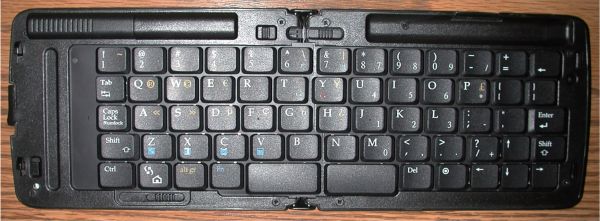
Left and right sections together
The two included AAA alkaline batteries can be installed by removing a cover
located at the top of the frame. A small power switch at the bottom left allows
you to manually turn the keyboard on or off. An LED under the power switch
blinks Green while the keyboard is in use.
Before you can use the keyboard with your Pocket PC, Palm or Smart Phone, you
will have to install the included driver.
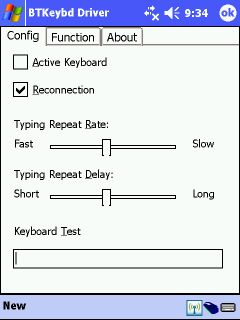
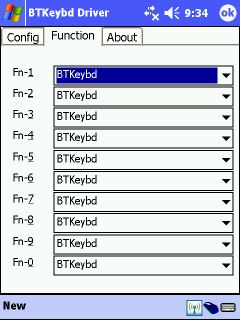
After installation, it’s just a matter of activating the keyboard in the
driver, turning on the keyboard via the power switch and enabling Bluetooth on
your PDA / Phone. With my HX4700, the keyboard was recognized pretty much
immediately, and was ready for use.
For those of you that like to assign applications to function key
combinations, you can set up 10 different apps to launch when holding the Fn and
a number key.
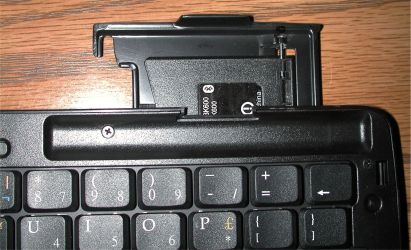
The first time I went to use the Smart Keyboard with my Pocket PC, I was
annoyed by the lack of a stand for the PDA. It’s a good thing I went to Brando’s
site and happened to click on another review of this product. In the review the
author talked about the slide out stand. I was like "what slide out stand?!"…
But upon a little closer investigation, I found it. There’s a little lip on the
top right side that pulls out and swivels around to create a stand. Pretty nifty
design actually. The stand works well in both landscape and portrait
orientations.
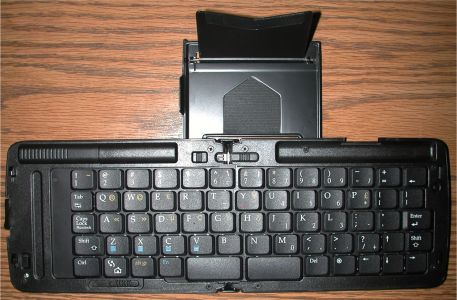
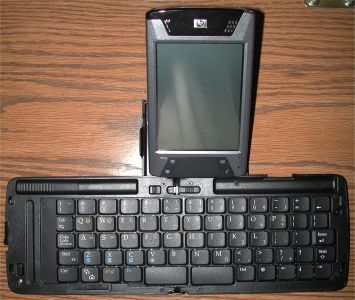
The Smart Keyboard has one thing going for it that the ThinkOutside Universal
Keyboard does not. The addition of a dedicated numeric and punctuation key top
row. That gives this keyboard 5 rows instead of just 4 like the Universal
Keyboard. There are also a total of 63 keys.
The keys are definitely smaller than the Universal’s. Touch typists may find
them too small. I had a bit of trouble with them myself. Nothing I couldn’t get
used to though if I wanted to work at it. Hunt and peck typist should have no
problems at all with this keyboard.
So here’s the thing… There are only three real advantages that the Smart Keyboard has
over the Universal keyboard. One is the addition of the 5th row of keys. For someone
that plans to type a lot of numbers, or a lot of !@#$%^&*()_+’s, that might be a
deciding factor on the purchase of this input device. Another reason is that
this keyboard is compatible with with Bluetooth enabled Palm OS PDAs. The
Universal Keyboard currently is not. And the last reason is price.
For me personally, the
full-size keys of the Universal Keyboard keep me from making the switch to the
Smart Keyboard. If the
smaller keys don’t bother you, or you have a Palm OS PDA then the Brando Smart Keyboard is a good product
that can easily give your Pocket PC, Palm PDA or Smart Phone the data input
power of a larger bulkier computer.
Price: $99.00
Pros:
Wireless
Small, compact size
Dedicated numeric / punctuation key row
Cons:
Smaller keys
Slightly unstable to use on lap

Google Pixel 3a, 32GB, Titanium - Unlocked (Renewed)
(as of June 12, 2026 19:31 GMT -05:00 - More infoProduct prices and availability are accurate as of the date/time indicated and are subject to change. Any price and availability information displayed on [relevant Amazon Site(s), as applicable] at the time of purchase will apply to the purchase of this product.)
Palm Tungsten E2 Handheld
(as of June 12, 2026 15:07 GMT -05:00 - More infoProduct prices and availability are accurate as of the date/time indicated and are subject to change. Any price and availability information displayed on [relevant Amazon Site(s), as applicable] at the time of purchase will apply to the purchase of this product.)Product Information
| Price: | 99.0 |
| Manufacturer: | Brando |
| Pros: |
|
| Cons: |
|

Gadgeteer Comment Policy - Please read before commenting
Post your comments here on the Brando Bluetooth Smart Keyboard review.
http://www.the-gadgeteer.com/brando-bluetooth-smartkeyboard-review.html
Just click the POST REPLY button on this page.
Did you try this device on your Tungsten T? Since I am now a T|T owner, I am interested in this keyboard…
One other pro should be the support for windows Smartphones. Thinkoutside still hasn’t come up with driver support for these devices.
While the infrared version of the Brando keyboard works quite nicely on my Orange E200 smartphone, I presume the bleutooth keyboard will work even better.
I do agree the keys on the Brando keyboards are a bit small, but the extra row does make up for this. And as mentioned in my comment in the other review, I do think there is quite a substantial price difference too…
I wrote a short review of this in our Geek.com Holiday Buying Guide and the only real positive I had with it was the fact that it worked well with MS Smartphone and Palm Powered devices. I thought it felt cheaper than the Think Outside model and the flimsy stand was atrocious and did a very poor job at holding a PDA or Smartphone in place, especially when trying to use it in landscape mode. I can use the Think Outside model on any surface, including my lap and the stand is very solid and works well. I just hope they come out with Palm and Smartphone drivers soon.
Oh yes, there are also a TON of keyboard shortcuts you can perform with the Think Outside and you are VERY limited with this Brando/Proporta/JAVOedge model. If you read the manual on the CD for the Think Outside model you will be quite amazed how many things you can do with the keyboard, including accessing all the bottom toolbar menu items on a Windows Mobile device!!! This is the first time I have seen the ability to keep your stylus in its slot where it belongs when you are using an external keyboard.
Palmsolo:
The only way the Brando keyboard feels flimsy to me is if you are trying to use it on your lap. It isn’t as rigid as the Universal. Other than that, it seems pretty rugged.
As for the stand, I’ll agree that it isn’t as good as the one on the Universal, but saying that it is atrocious is a bit harsh in my opinion. It worked great for my HX4700 in either orientation. I can see how it would not work well for a smart phone though.
Tyler:
My T|T is packed away in a box somewhere (still remodeling my computer room). I only tested with the iPAQ.
Julie, maybe it had to do with how we used the stand. I tested it out with the stand detached from the keyboard with a Tungsten T3 and Dell Axim X50v. The hump on the left side (used as the lip to slide the stand out from the keyboard) made the devices sit crooked in the stand while in landscape mode. The devices also kept sliding forward at the bottom and sometimes right off the stand when trying to use it in landscape mode.
I also did not like the small keys and key travel compared with the Think Outside model. Then again, for someone with smaller hands the Brando one may work better. That is why we have different options and choices.
Thanks for the review and keep up the excellent work 😀
Since this Keyboard is a re-brand of the Freedom Input Bluetooth Keyboard (which in turn is a re-brand of some tawanese company), you could probably get this keyboard cheaper than Brando is charging, but not by too much. Just thought I’d throw that in there.
Julie:
Thanks anyway. I’ll probably just get an IR keyboard, as Bluetooth has really allueded (sp?) me. I’ve bought 2 dongles off of ebay that I could never get to work, so I think I will leave it alone until it matures a little more.
palmsolo:
I didn’t even realize that you could totally detatch the stand from the keyboard. Yes, I can see that this would make the stand pretty unstable.
Has anyone tried this keyboard with the Tapwave Zodiac?
hey does any one have the driver software for this keyboard i lost my cd and brando’s website drivers do not work any more?
I forgotten the password to my Smart P/N Bluetooth Keyboard.
is there any other possibility to start it
I am looking for the came thing. Were you able to find the password/passkey?
Thanks!
May I have a Brando smart keyboard driver for Ipad use?
Thank you