
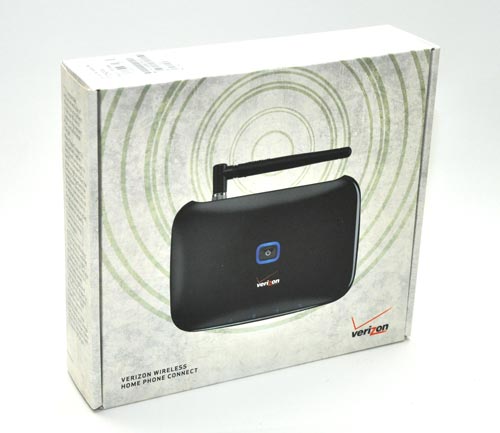
For those long-time readers, you might remember my rant/question about Comcast charging too much for their multimedia services (i.e., HDTV, phone, and internet) last year. Well, I am finally getting around to cutting the cord. We will be keeping Comcast high speed internet but our household is giving up cable TV and switching home phone service from Comcast to Verizon’s wireless Home Phone Connect service. So, I thought I would share the process and review the service along the way.
Adding the service to our existing wireless account was quick and easy. I was running behind and in a hurry….the process took less than 5 minutes. I had them port our number from Comcast. The Verizon sales rep informed me that the port could take up to 10 working days to complete the process. It is longer than porting a number from one cellular provider to another because you are going from a land-line to a wireless. While we could call out on the service immediately, it actually took about 5 days to become fully operational and could receive calls.
Contents:
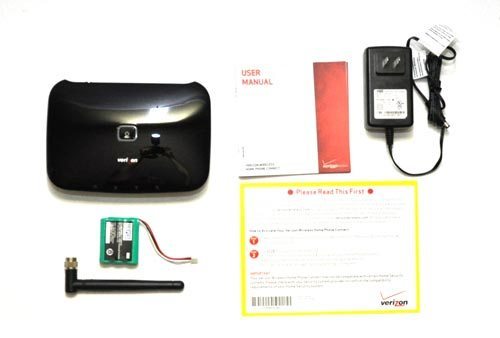
Once I got the Home Phone Connect unpackaged, setting it up and getting it operational was quick and easy. Install the battery, screw on the antenna, plug in the power cord and the device is ready to activate. Finally, plug in your regular home phone and dial *228 (just like your typical cellphone) and you are good to go.
Features:
- Call Waiting
- Call Forwarding
- Caller ID**
- 3-Way Calling
- International Dialing***
- Voice Mail (*86)
- Account Balance (#BAL)
- 411, 611 & 911
Technical Specifications:
- Manufacturer: Huawei
- Model: Verizon Wireless Home Phone Connect
- Frequency: 1.9 GHz and 800 MHz
- Connectors Two RJ–11 interface jacks for telephone
- GPS Integrated GPS for 911 support
- Dimensions: (H) 1.5″ x (W) 7.0″ x (D) 5.0″
- Weight: 12 oz.
- Battery Backup – 1500 NiMH
- Provides up to 3.5 hours talk time and up to 36 hours standby time
- Input: Standard 110V
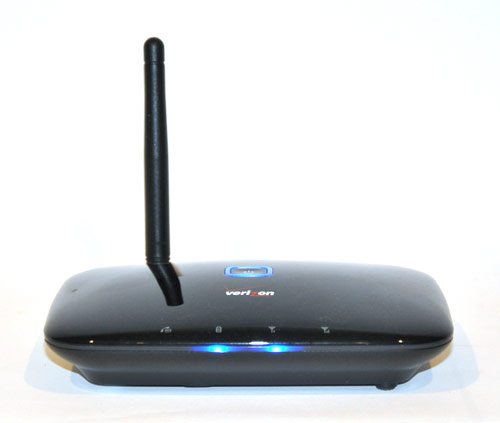
The Home Phone Connect device is simple to use. It is either on or off. A blue LCD indicator lights let you know if it is on/off, signal strength, battery charge, and whether it is in use.
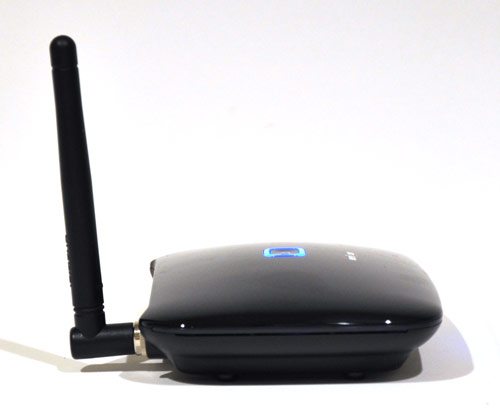
The device is nice enough looking; clean and simple lines. It’s small footprint does not take up much room where ever you choose to place it.
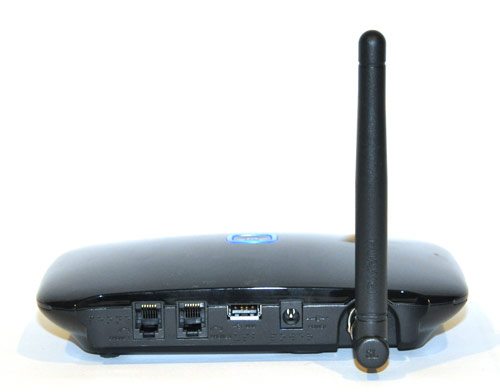
The backside of the device allows for up to two phones to be connected. I connected our home phone base station to the device and we had connectivity throughout the house; the same as any other home phone service.
I assume the usb port is for Verizon to program and update the device.
Performance:
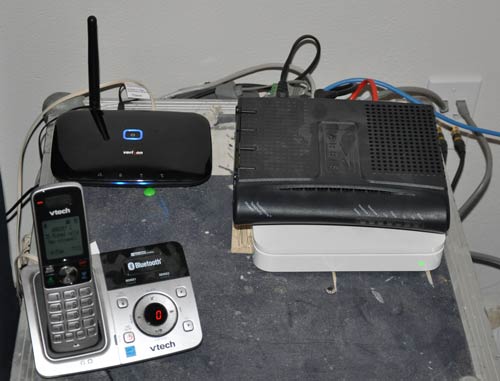
(Scary as this picture looks…this is not a fire hazard). We have good Verizon coverage/signal strength at our house; ranging from 5 bars outside, 4 bars on the upper floor, and 3-4 in our basement. I placed our Home Phone Connect device in our upstairs office where the indicator light(s) tell me the signal is good but not great (100%). That said, the call quality we have experienced has been excellent. It is comparable to the quality of service we received from Comcast voice.
An additional operational perk, is that the unit’s battery and cellular connection can be used for (3) hours (and up to 36 hours standby time) while power and other phone/cable lines are down. A definite plus living in a highly treed area where lines are down regularly.
Bang for the Buck:
Verizon’s Home Phone Connect is available with two pricing options:
- $19.99 gives you unlimited In-Home Calling to any number on any network in the U.S.
- If you have a Verizon Family Plan, $9.99 gives you Unlimited Mobile to Mobile Calling with other Verizon Wireless customers and Unlimited Nights & Weekend Anytime Minutes when you add a line to your existing Family SharePlan for monthly access. This means that during the day, if you make a call outside of Verizon’s network that time will be deducted from your monthly limit.
The move from Comcast to Verizon service reduces my basic phone bill from approx. $35 to $20. A pretty good monthly cost savings and enables me to further disassociate our household from Comcast. An additional plus is the fact that since its on the Verizon Wireless network, calling my home phone number no longer counts against my minutes.




Gadgeteer Comment Policy - Please read before commenting
It doesn’t “boost” your cell coverage, does it? My iPhone 4 doesn’t get great reception in my house, and I drop a lot of calls.
I just got my modem a few days ago, with instructions to not plug in/turn on until I did NOT have a dial tone in my home phone. Although I still have a dial tone, and can dial out, I cannot receive any incoming calls on my landline. I will be setting my home phone connect system up this evening, plugging into my phone box in the basement versus plugging phones into the unit. This will give me service for all phones in my house, cordless and corded. Wish me luck for a (moe) seamless transition!
This service stinks. I downgraded from the hub. The hub used to send me the voice mail message to my email account. I won’t even go into the tablet display that the hub had. This Home phone connect is an awful replacement.
This service is of totally subpar quality. Shame on Verizon.
1. Many times the call is disconnected. And I had dial the same number many times to make a call.
2. You cannot disable voice mail feature. I wanted to use my phone’s answering function, which tells if there is a message.
3.Caller ID shows only the number, not the name of the caller, which makes the feature useless. This is a fraud!
4. Also Caller ID is not shown and no indication of any message after a caller left messages.
4. One day, I could not make a call. When I pick up the phone, there was a signal but on dialing numbers, nothing happens on the phone. Just no sound at all.
Note: you have to “buy” the modem (it is actually a fixed wireless terminal”). You can buy it at a cost of $0 if you commit to a two-year contract. If you only commit to a one-year contract, the cost is $49. For no commitment, the cost is $139. If you later cancel the service, the terminal is pretty much worthless; it only works with the “home phone connect” service. It can not later be used with Verizon’s prepaid service.
Another note: this is actually the cheapest “car phone” service available. I have seen cab drivers use it; works great for them as a super low cost wireless phone.
If I disconnect the phone line coming to the house and connect the device to the wall jack, will all of the wall jacks work?
Greg, we got this for both my mom and for my MIL. Yes, once their landline numbers were ported, we plugged the device into a wall jack and plugged the cordless phone base unit into it too (there are two ports on the back of the device). It now runs both their cordless phones (my mom has 5 handsets on her cordless phone, including one in the garage and she has no problems with it) and all of their corded phones. I was a little concerned about 911 though (my mom is 90 and my MIL is 87). It may take a little longer for 911 to figure out the origin of a call to them. We are pleased with the quality (better than a cell phone, but not quite as good as a landline). We plan on getting one for ourselves once our contract for our landline has expired. Caution: you cannot use this to send and receive faxes. That could be a show stopper for some folks. Also, we live outside of Verizon Wireless’ territory and apparently they cannot port our 304 area code phone number. We are still trying to double check on that though.
This has been an amazing move for me. I decided to cut costs by doing away with my cell phone and transferring it to home phone connect. My bills went from $70/ month to $25/month. Impeccable clarity, never had a dropped call. The clarity is better than landline or cell phone. I live 200 miles from the closest metropolis. It’s a rural town near the Canadian border, wedged in the mountains.
I am so ticked off at Verizon lying about how there would be no problems – no extra fees involved – I am out over $80 just to get back what I had. – 1st they authorized the change without the account holders permission – spouse ok’d change – cost me $35 restocking fee – never got system out of box – $46 to get back on my landline provider – which I had to do myself – sales rep that talked me into this is NOT returning my calls/messages after giving me her phone # to call “anytime” – have called 3x various times for 2 days didn’t tell me this is not compatible for DVR service – NEVER initially told me this was a Wireless service from the get go which is why I changed my mind. Needless to say I can go on with my rant but its doing me any good
Hey, you should take a look at and/or review the oOma box.
I don’t understand why it does not get s lot more attention as after you buy the box your local and long distance phone service is free. Why use Verizon with an eternal $19.95/ mo or voyage etc.
So my phone bill was roughly $40/mo and the oOma box iOS $200 so a few months break even and after that totally free phone for life. I guess your key risks are 1) if the box breaks and you have to buy a new one or 2) if the company model ever fails and they go out of business. I’ve had mine for about a year so I’m well past B/E. So even if it breaks and I go back to my old service I’m still ahead. And the sound quality I was surprised was as good or better t most of the time than my old land line.
Anna,
You posted, “we plugged the device into a wall jack and plugged the cordless phone base unit into it too (there are two ports on the back of the device). It now runs both their cordless phones (my mom has 5 handsets on her cordless phone, including one in the garage and she has no problems with it) and all of their corded phones”
Did you use a splitter on any portion of the connection? I’m assuming that you plugged the device into the wall via telephone port 1 and from port 2 to the wall.
I’ve tried it and can’t get it to work?
The landline must be unplugged from the house by your previous provider to allow for the wireless feature to work properly on the HPC. Also, nothing should be plugged into your wall jacks from the base stations or HPC unless you want to create a “closed circuit” within the house/office through the older wall mounted phones. This can only be done by, again, removing the old landline connection. This should be done by your previous provider. Then plug in a phone cord from the phone base station into the wall jack. Make sure the HPC is plugged into the base station also.
The simplest way is to use the HPC unit is just unplug the cord from the wall and use a cordless base station setup by only connecting the base station to the HPC unit.
Also, dialing ” * 228, option 2″ will allow the roaming capabilities to be updated if you travel with the HPC unit, just like on your cell phone. Updating when you return home from a trip with it will also benefit future home use.
Also, dial “* 71” then a 2nd phone number (not cell…may charge minutes). This will enable CONDITIONAL CALL FORWARING. Just FYI, this will allow the 2nd phone number to receive the call if Line 1 is being used so you don’t miss the call. This works best in a home or business setting where cell phones won’t be used, just cordless or corded phones. If multiple HPC units are used in one setting, you could theorectically use CONDITIONAL CALL FORWARDING for each HPC unit so no calls are missed. After 4-5 rings, the call will be forwarded to the designated number. The last HPC unit will take the caller to voice mail if desired.
This is a nice tool risk management tool provided by Verizon Wireless.
I got my Home Phone Connect on Friday and they said it would take a few days to port the number from Verizon to Verizon Wireless. It would seem that the conversion could be easier and not inconvenience you for 5 days, but by the time I got home the land line was dead. Perhaps some animosity between V & VW with the customer in the middle.
No problem. I hooked up the HPC, pulled the wires from the base wireless unit of my DECT 6.0 system and plugged it in and got nothing but some static and no dial tone. Hopefully someone here can confirm that the HPC works with the DECT 6.0 phones and maybe something I might not have done correctly, but that’s still an issue.
After finding one corded phone laying around the house and still not getting a dial tone, I figured there was something wrong with the HPC or I didn’t have a clue what I was doing. I decided to run to mom’s house where I knew she had at least one corded phone still in operation. Success, a dial tone and a *228 later and I had a working HPC. I also found that the corded phone I had was dead and her Vtech 6.0 wireless phones didn’t work in the HPC either. However she had a 2.8 ghz wireless which also worked fine so she lent it to me until I get the Vtech issue resolved.
I still can’t receive calls until Tuesday they say, but I’m hoping someone here can resolve my DECT 6.0 issue.
I have DECT 6.0 and have no issues with the HPC, but my DECT 6.0 is a Uniden so I don’t know about the Vtech.
I still had a dial tone after AT&T disconnected me. The only way I knew I didn’t have service is my husband called and couldn’t get through. I can’t tell you how long I had a dial tone because I immediately set up the HPC after he told me that.
As far as providing the name along with the number for Caller ID, 90% of the time I can tell if it’s a sales call just by the number.
Someone complained it didn’t tell you when you had a message, but there’s a symbol on the unit that will be blinking if you have a message (see manual).
Tomorrow I’m going to the phone box outside on my house and disconnect it so I can plug the HPC into the phone jack inside so my non-cordless phone will work (keeping my fingers crossed :-).
We are a one cell phone family as my husband’s is from his work. Adding the HPC was considerably less expensive than adding another line to my plan. I’m saving $30 a month by using the HPC instead of having AT&T. Now maybe I can upgrade my cell phone and use the $30 for a data plan!
I’ve been using the Home Connect service on my home phone, home office, and my husband’s home office for 6 months. The good news is we are saving roughly $150 a month using the friends & family plan for three cell phones + 3 (formerly) landline phones.
The bad news? Well, first off, I’m in bed with Verizon until the day I die. Actually, even longer than that…
2nd: the quality is not great. We seem to have lot of dropped calls on the home system. It’s funky, and it drives my husband crazy.
3rd: Though this was sold to me as an “invisible upgrade” (no changes to services we were previously using) you cannot download movies to the DVR unless you’re using cable. Also! and this is no small problem: most phone-driven alarm systems will not work with wireless! This is a fairly substantial problem for which we had to have a new phone number assigned by AT+T just for our alarm (additional $17.50/month).
The alarm problem – once we found out about it – was enough to have me try to cancel my Home Connect account, but I was at 31 days and Verizon would not relent on the substantial early-termination fee (though I’ve been a Verizon customer for more than ten years). As I say, I’m wedded to Verizon to the death…
One more thing! Our Family minutes went through the roof when we combined all the home & office phones with the cell phones. Make sure you check your plans carefully! My first bill was more than double a normal bill (a whopping $550.00, versus the only-slightly-less nauseating $275). Verizon *did* help me with the “overage” – my first ever with Verizon – so at least there was that….
A helpful hint:
Make sure to dial “star 228, then option 1 when prompted” to activate your device if it’s not done in the VW store by the sales rep. This won’t allow your unit to connect to the VW network. Also, if you travel with your HPC unit, occassionally dialing “star 228, option 2” will update the roaming capabilities to ensure robust connectivity with the towers nearest to your current location.
This device is a great cost savings resource, especially for unlimited calling at one flat rate per month. Additionally, this would work great for small businesses!
Tim, sorry I didn’t see your comment sooner. We did not use a splitter. We used one of the ports on the back of the home connect unit to plug it into a wall jack (this is after the landline number was ported and landline service was disconnected). This connection runs my mother’s hardwired phones. We also directly connected her cordless phone base unit into the other port on the back of the home connect unit. This connection runs my mom’s cordless phones. Is your landline number ported over to the home phone connect service?
Nancy, you can structure your home phone connect account separately from your current wireless plan for $19.95 per month (plus local taxes). This would prevent the overages on your wireless minutes. It is unlimited calling under the stand alone plan. Also, you don’t have to get into a contract with VZ Wireless for the service. You can just buy the home phone connect unit outright (I think it cost $129 or something like that?) and then if it doesn’t work to your liking you can take it back (within a certain time period). I was really clear with the folks at the VZ Wireless store when I bought my mom’s unit that I wanted to make sure I could bring it back if the service wasn’t as good as we wanted it to be. But it is fine and she loves making unlimited, nationwide calls with her home phone without having to pay attention to the time of day or the friends and family list. Anyway, there are different ways to set up the accounts depending on your needs. (I think for my mother in law we did the contract and for my mom we did not.)
@Mary
My problem was resolved by spending $100 for new Panasonic DECT 6.0 phones. It was an issue with the Vtech CS6329 phones I had and also my mom’s Vtech which was similar, but not the same model #. The Verizon stores are supposed to have an operating HPC demo and mine had 2. They were using both Panasonic and Uniden so I went with one of them on the replace.
It’s a shame the great bargain became less than great with the additional expense but so far the call quality is fine so no problem there. I do have a query into Vtech why there phones are not compatible with the HPC and it was the first Verizon ran into the issue so maybe it was just that model series of Vtech.
The pictures in the above aryicle show a Vtech phone, but they could have just been staged pictures. Who knows.
Be aware that if you switch to the Home Connect phone and you decide it does not work for you (within 14 days), it may take a week or two to restore your original landline service. I could not get acceptable service with the Home Connect phone, dropped calls, etc. On the 12th day, I did an order with verizon landline service to restore my old phone and original number that was ported to the wireless Home Connect phone. I returned the Home Connect phone on the 14th day, not to pay a $150.00 penalty. It has been two weeks and my original service is finally to be installed tommorrow. When people call my landline, they get the recording “number has been changed or not in service”. It is not the same thing to port a number back to landline service as you can see from my post. The rules are different. This transfer back and forth was verizon wireless to verizon. Make sure you have a good signal on your cell phone in same house that you plan to install the Home Connect.
To avoid future hassles with porting your home phone #, consider porting your number to Google Voice. After that, you can easily switch from one service to another, without the hassle of porting your number. But to keep the costs under control, check the web for advice from others who have documented how to do this.
A follow up on my other two posts about my issues with VTech phones on Home Connect.
I contacted VTech and their response was that they built their phones to connect to “traditional” phone systems, ie. landlines. I made the comment to them that if you build for dinosaurs you eventually become one.
Well I took the phones to my second home where I have VOIP and they won’t work there either. Fortunately I have a 92 year old mother who will have land lines for the duration. I’ll just install the 3 phones in different rooms since I’ll never have a need for the again. I won’t be buying anymore VTech’s though.
I recommend not porting your landline over to the HPC wireless service until you thoroughly test the device with using your cordless phone. This would allow you to use your hard wired phones with your current landline phone number and the cordless phone with the temporary wireless number VZW issues you at the time you purchase the HPC device. That way you can easily return the device within the 14 day timeframe if you aren’t satisfied and you won’t have to go through the hassle of getting your landline restored.
I got my HPC about 2 weeks ago and it works great. I have it at my business. I took it to my home about 15 miles away, out in farm country, to see if it would work. I had to move it around and put it by a window to get the first signal strength indicator to light, but then it seemed to work fine. CAN I PLUG IN A BIGGER ANTENNA SO I GET THE SECOND INDICATOR TO LIGHT?
We have cordless phones in the house, and a corded phone in the barn, which is connected to the house wiring. We did disconnect the phone co. wires. When I answer in the house my wife answers in the barn, she can hear us talking, but she cannot talk. We found out that we cannot use both phones at the same time. Ed
Google voice doesn’t have numbers in my area…could I get the home ohine connect and then port the number to Google voice within the trial period, and cancel / return the hpc without paying a fee?
We’ve used our new home connect for a while. I discovered that someone plugged a line into the phone jack and into the home connect, that explained the sudden issue with the line yesterday (loud clicking and inability to dial out). After unplugging from the wall jack, I restarted the home connect and now I don’t have dial tone. So, I can’t dial *228 to reactivate. I spent 45 min with tech support today and they tried everything. They think all that’s left is that a board went out on my home connect and are sending me a replacement. Has this happened to anyone?
Love this service! Would recommend to anyone. Glad to be away from comcast…… Love it!!!
I bought a hpc connected it ok got a dial tone ok and started receiving calls within two days with my same number. I do not
get caller ID or call waiting. I get the telephone number only, no name. And no one on the other end knows who is calling. I have spent hours on the phone with the Verizon people and the tech people. I am given the runaround. No one seems to know what to do. They also give different answers and don’t seem knowledgeable about the product. Now they don’t even return my calls. Shame on them and who is in charge?
I have been using the HPC for over six months and the service is excellent. No dropped calls, clear signal. I have the HPC plugged into my wall jack so all phones in the house are on the system. I have my answering machine hooked up as well, so I do not have to use the Verizon voice mail service unless I want to. A definite money saver over our old landline service. Very satisfied.
I had and existing family plan with two cell phones and added the HPC. It showed on the purchase order as an additional $9.99 charge for the new line. I also ported my existing home number to the new wireless line. When I tried to activate the HPC I was told I had to take the additional unlimited plan for $19.99. It was not an option. I had two different verizon reps tell me that the unit would not function without the additional plan. The $19.99 plan plus the $9.99 access fee for an additional line, plus the fed and state taxes makes this more expensive than the plan I had with Charter. It wasn’t worth going through all the trouble. I was hoping to just add this unit as an additional line for the $9.99 and share my minutes under the family plan with the other cell phones. Verizon would not let me do it. I was told the $19.99 plan was a requirement and not an option. I ended up shipping the unit back and eating the restocking fee.
As for the performance I think it was adequate if you have no access to a normal (wired) phone provider. Initially, there was quite an echo when I made calls using the HPC. I moved the unit further away from my cordless phone base unit and the echo went away.
Can you use this service for a dial up internet connection?
Bought mine the 7th, found out that land line was down the 10th so I hooked this HPConnect up and did the *228 option 1 thing and then …
… then I went into the basement and cut the “in” line from outside to my phone wire distribution box. I have lines running to abouty 8 or 10 outlets, I have two Sat recievers that have a phone connection and 7 telephones in various places ranging from a new corded handset to a wireless 6.0 phone and includes a old AT7T pushbutton princess type phone, a corded unit in the kitchen that’s 20 years old, and back in the bed room a large and very heavy but immaculate Bell systems Dial desk top phone which has a disconnected ringer in it, it’s a good 40 years old.
I secured the cut ends, there’s enough slack if I ever need to splice them. I then came upstairs and left the one phone hooked into one jack and ran a cord from the other jack on back to the wall jack where that phone used to plug in. This way “out put 1” feeds a single phone, and “out [put 2” feeds the now isolated phone jack network in my whole house. In testing with my cell phone, I found that every single phone works as well on the HPConnect as it did the land line.
Plus now, no one can disable my phones by attacking phone line in at Customer Servioce Box on outside wall. Even if power is cut (I would not want to hold the axe cutting those lines) … the HPConnect’s battery backup and the phones will alow one to make emergency calls.
Hooked up my hpc disconnected phone wires on outside at the .And i lost my internet service uverse said you need the telephone wire for your internet
My internet is via VerizonWireless MiFi Hot Spot so I didn’t loose that. The info I have is that the DirecTV recievers are OK with the HPConnect. Tested 7 phones against my cell phone, both ways …. the 40 year old Bell dial phone will not dial out but it talks great. That’s the one the ringer is undone on anyway, I like the look and there’s another phone across the hallway in the laundry room.
Also, two of my older corded and cordless phones with the “pulse / tone” switch have to be in “tone dial” position to dial out.
Found out you dont need to disconnect anything!!!! Just Plug your hpc device to phone and you are all set to go. the only time you need to disconnect the incomming tele wires is to make all of the phone jacks in the house active.
“… the only time you need to disconnect the incomming tele wires is to make all of the phone jacks in the house active.” which is what I did. ;~)
I am interested in hearing from small business owners that have used this device. We mostly use our current business line as an answering machine. With HPC, we would save with Caller ID and call forwarding functions but I do have concerns regarding the yellow page listing w Verizon. We are listed online and we personnally do not use phone books but am I going to be sorry getting rid of my “free” listing which may cost me in the future? Are there any other business options available?
Can you use the Home Connect as a wireless broadband and do away with Internet all together? Like tethering?
Hello, I was wondering if there was any way to keep my internet service (DSL through the phone line) and still be able to plug the HPC into the phone jack so that all of our jacks are active. I hope that made sense! Thanks
Can you plug your satellite receiver in as normal when you convert the house to HPC? The SAT receiver needs to be plugged in to display caller ID on the TV, and to order PPV movies.
Home phone issue. I cannot receive calls from people with the same prefix that i had/have if they are calling from a land line. Everyone else can call me. The others get a recording from AT&T saying my phone has been disconnected. Anyone else have this issue?
Don’t get home connect unless you have a cordless phone that you enter the phone no. before hitting dial. Otherwise you have to be really good at quick dialing on your phones.
Also home connect will not allow faxing (send or receive).
Guess what? The $200 early termination fee is not prorated. You only reduce the fee by $5 per month. Then after 2 yrs, they forgive the remaining $60.
I want to here from the guy w ooma? Do you still like it? My parents have it so. So far they like it, but its only been a few months.
Oh.. and Jane too. Do you get the free listing in the yellow pages? how much space?
We tried this system earlier this year and it was a total bust. Although our cell phones work fine on Verizon in our home, home phone connect kept dropping calls, people couldn’t get through to us, and the sound quality was awful when they did. After mucking about for two weeks with Verizon’s tech people, we finally had to give up and go back to AT&T. Save yourself a hassle and stay away from this.
Close to half the time we get a message that we didn’t dial right, although we are dialing correctly. Big waste of time.
This home phone connect idea is a smart way to cut the cord with the expensive digital phone that’s offered through Time Warner and Comcast, and this setup will work when the cable’s out, BUT… there are much cheaper alternative phone services out there that will save you a ton of money. I use magicJack, and it works great. The magicJack Plus does not require a computer, and plugs into your internet service similar to how Vonage does, so if you don’t have a router, you’ll need to get one… but for $29.95 a YEAR, equivalent to $2.49 a month, you can’t beat it. No termination fees, the MJ+ is $69.95 upfront, and the original PC reliant MJ is $39.95 (both include a year of service). You can also transfer your existing number for around $20. Their customer service isn’t very good, but there are several third party support sites, such as the Unofficial magicJack Support Forum. If magicJack isn’t something you prefer, there are other services such as NetTalk (similar to magicJack Plus) and Ooma.
I called VW to disconnect one line (we have 2 cell phones) because my husband passed away 3 weeks ago. During the same call, the VW rep asked me if I would be interested in the Home Connect program and briefly explained it to me. He said it would save me a lot of money (we have been with Vng) for our land line service. Absolutely must save a lot of money since I am now the only one bringing in money (both of us on SS so one has now been dropped). He handled all the tech issues (I am totally clueless when it comes to this) and we operate a business from the home so it is critical that I have good, clear phone service at all times that works all the time. The package from VW just arrived today and I have not opened it. After reading all of these posts, I have not a clue about what anyone is talking about and am now terrified it won’t work here. Cell phone calls often drop from our location (in the mountains). Did the rep take advantage of a very recent widow or am I overthinking this? Please help. I am in tears over this, let alone all of the other issues I have to tend with right now!!!!
Dear Diane,
I’m sorry for your loss. I’ve had the Verizon service November. The call quality is spotty at best, and if I lived in the mountains (esp. with only “fair” cell service), I would not sign up. You should have time to decline the service (at least 14 – 30 days). I don’t like the Home Connect service and I’m sorry I gave up my land line. In terms of cost, yes, it can be less expensive, but the quality of the calls is pretty rotten. Good luck, Diane.
Just set up HPC with one corded phone. Activated the phone. Everything works, except that the ringer volume is so low you can barely hear the phone ring. Tried adjusting ringer volume on phone. No change. Tried swapping out two other phones. Same problem on all three intruments. These are all corded old desk phones with an actual metal bell inside. These worked fine with our VOIP service. Do I really need to go buy a new instrument? Modern corded phones are so flimsy. You grab the handset and the base comes flying with it. Hate that.
Nancy – thank you so very much for responding and your sympathy comment. It is very much appreciated. I think I will take your advice and probably not even open the box. If anyone else has any comments about my earlier post today, it would be greatly appreciated! Again, thank you Nancy!!!! Diane
I tried the Verison hone service. It is awful!!!! I tried to work with them to fix but, they could not change the clarity of the calls. When I tried to cancel they said they would charge me $175. since I just lost my job I do not have the extra money. When employed, I will cancel them no matter what it costs.
Diane, in your situation, I’d take it back. Everyone needs to understand the reception will be similar to what you get with your VW cell phones. If you have decent cell phone coverage, you should have HPC coverage that is similar. Then you add what you’re attaching to it.
I had cordless phones that didn’t work at all as I stated in an earlier post. However, when I got new cordless phones, it worked better than my land line and was much cheaper.
The bad was that FIOS came through 6 months after I bought it and I no longer needed a landline. The good news was my 93 year old mother sometimes doesn’t hand her phone up correctly and we don’t know if she has a problem or not and have to run to check on her.
I just moved the HPC to her house and can now dial her on that phone, if the other is not working.
Thank you both so much for answering my post. It has been invaluable since I no longer have my ‘best friend’ to bounce things off of. Had he been here, I wouldn’t have been ‘taken’ in the first place based on the conditions of our location in the mountains. Although VW is often very clear in the home/office, there are times when the call is dropped or the words drop off. Therefore, I am going to return it unopened based on your recommendations. I hope they don’t give me a problem. I don’t need that right now. This site and your posts are gratefully received. Thank you so very much!!!!
Home connect nightmare… I had set up auto auto payments for $22 a month. It worked a few times than stopped I guess. They never notified me and turned my phone off. I tried to access online web account account and it was locked. This stopped me from seeing why auto payments was not working. Then I call and they say I can only do cash payments now and wont unlock my online account. So I paid the $74 and told them to cancel my account. Thats costing another $135. Con artists. Thats VERIZON. Stay away. Other than that… the home connect worked pretty good. But due to the above issue and yet another earlier issue with home connect I will never use verizon again.
We have been using the HPC for a few months and it is working fine except for one thing. When someone calls us the caller hears 3 rings before our house phone rings once. Since we answer on the second or third ring that means the caller hears 5 or 6 rings before we answer. Most callers hang up before we get to the phone.
Is anyone else having this problem?
Franklin Farm Verizon WirelessZone in Herndon Va is the worst store . They told me they could sell me the triple play. I bought my cell phone there an then came the bait and switch. They told me I could pay $20 a month if I bought the system. I paid $200 and then got hit with fees. What is worse is they knew the Home connect service didn’t work but then told me that it was a new product . Boycott Franklin FArm Wireless Zone!
I just got the Home Phone Connect and read threw this blog prior to its arrival and before install and I need to say that in reference to all the stuff on here about the V tech phones not working with the system. All I have in my home are V-tech phones (3) and they all work just fine. I almost went and bought a new one so glad I did not. The install was easy, the best part is since it uses a duplex receptacle, you have more options where you can move the phone as long as you have the bars. Call quality for me is no different then it was threw my cable company actually its a little better. I have noticed that as stated in a few of the prior posts the phones do not seem to ring as loud as they use to . And yes I checked the ringer status , not sure why but I think with the savings I am getting I can deal with it . For the complaints in some of the blogs that no one told them about faxes , alarm system etc not working , all I can say is had to have been the rep they had mine asked me 3 times if I had anything linked to my phone as in fax , internet, alarm , etc. as well as a 14 day fee trial , no they do not tell you that they charge a 35 $ re stock fee if you decided to send it back and you only have 2 days to keep from losing the activation charge that you learn with the paper work when you get the box. But that is all I can say is hidden and not disclosed on the sale. Also on the not being able to see the name of the person calling you / or of the call waiting person you can have that added for 1.99 extra a month. So if you want to cut your phone bill in half and do not want it to affect the cell min. All I can say is call them and give it a try . You can do the 14 day trial and see if its right for you some may like it some may not , as for me I am happy with what I got and yes I would suggest getting the warranty. Since you can move it you never know what can happen to it so why not add it and be safe then be sorry ?
Terry, glad you reported that although I don’t think I’d buy another VTech due to their arrogance when I hit the issue. Saying that a phone is only good for land lines is ridiculous.
I don’t know if I followed up here, but I took the phones to my second home in VA that has cable phones and they wouldn’t work there either.
I moved the home phone connect to my mom’s so she has two separate lines. At 93, it helps if she doesn’t hang one line up correctly and has saved me a couple trips already.
My elderly parents, who live in a small Kansas town, purchased the Verizon Home connect system and were told that their home number could be ported from their current phone company to Verizon. After two weeks, my parents have received a bill to be paid by July 1st yet, their original phone number still has not been ported to Verizon. The bill contained their regular home number as active yet, no one can call in. When they contacted Verizon Customer Service, they were told to change their number or wait, maybe until July. I have been a happy Verizon customer for a long time. I wonder what is happening to their service. Has anyone else experienced issues with porting phone numbers?
Dumb question first: I can’t find the default code for the HPC voicemail. Anybody know what it is? Thanks.
Second: I’ve had the service about a month. I connected one CPM outlet to a wireless set downstairs – then physically disconnected the ATT line (they just turned off the service, did not do a physical disconnect). Plugging the other HPC outlet into the wall enabled every other phone in the house. I did turn off the ringers on all corded phones, thinking there might be a power problem getting them to ring.
We love the service, and because we are old goats and spend the winter in Florida – we’ll be able to take our home phone with us. Nice deal.
To JHH regarding porting the home number to the HPC. I was told that it could take a few weeks to port the number from a land-line service to the cellular service. I did not try to activate the HPC until the land line stopped working. The problem there is that the trial period is running out while you’re waiting for the number to be transferred.
I just signed up for home connect and have 14 days to decide. I live in verizon territory and hope I don’t get the droped calls AT&T wireless gives me. I work in sales and the worse thing that can happen is to be on a sales call and get droped. Have AT&T wireless but it drops calls and charges additional for LD when I call Canada. $89 isn’t enough for them? Previously I had a verizon home phone (land line) but wind blew my box outside off the wall and it took them 10 days to fix. I work from home & was furious so dumbed them as I can’t afford to be without a phone. I have magic jack and for the price it’s great but still not reliable (can call 911 & fax) and it costs 19.99 a year. Great for those who don’t have connectivity problems with verizon home connect and are just in need of this feature. At least that is what I am hoping as my only & main concern is droped calls. However you do have to have internet connection. So with my magic jack, cell which I will get limited calling if home connect works, and Home connect I hope I can make all three work for me & still stay within my budget
No matter how much all my neighbors brag about HPC, I will never know. Why? Verizon REFUSES to allow me to become a customer without a social security number AND state-issued ID, despite the fact I tried to pay for the unit AND TWO YEARS of service, in cash, in advance. I have never heard of such lunacy in any business dealings in my 59 years. Verizon is run by idiots.
I was disappointed with the Customer Service for HPC. They must not do too many of these activations. Anyway, I bought one on Ebay $30. And Verizon still wanted my social and id #…kind of WRONG! Then they wanted my check card number over the phone, then a $35 activation fee. I just got it so I’ll see if it works, If not Im cancelling before the 14 day period!
Good luck with it tg, after almost a year, I couldn’t be happier. I replaced my land line for at least 9 months, then when FIOS finally arrived, I moved the unit to my 93 year old mother’s house as a second line to get to her. She managed to not hang up her one phone correctly at times which would require a 30 minute each way trip. Now it just requires a call to the other phone.
Thanks Rothen…what is FIOS??
FIOS is Verizon’s (the land line people as opposed to Verizon Wireless) Fiber Optics Network that provides TV, Internet and Phone as a bundle. They basically are in the same space as Comcast. Where I live there was no cable technology so I had to use a land line and Satellite for TV and Internet which was expensive and restrictive. FIOS bring my area into the current century.
I bought one of these home phone connect it had #ID for about 1 week then it went away. I have tried to get verizon to fix it nobody seem to know anything. Wil not buy verizon product again.
Teo, Just an idea. Did you try *228 to see if that would fix the caller ID?
I have had the home connect for several months, connected it to a wall jack and it works with all phones in the house. The only problem is that we periodically hear dial tones like someone else is on line and dialing during a phone conversation. Has anyone else experienced this? Ideas?
What a piece of JUNK!!! I bought the HPC from Verizon at their recomendation. As a senior citizen I liked the $19.95 per month. Yes the porting was a pain!! But the sound quality was terrible!! My wife hated it from the getgo! I have hearing loss so I couldn’t be the judge. But everyone and I mean everyone said what is wrong with your phone! I called my 90 yr. old aunt to check up on her. I thought she had a stroke!!! I couldn’t under stand her. I complained and they sent me a new one. It was slightly better. I complained some more. They upgraded the program and gave me a free $10 antanna to replace the one that comes with the unit. Still very little improvement. So I took it back and told them what where they should stick it. They did not charge me for restocking it. But the $155. fee for early termination is hard to swollow! I could accept the HPC if it was as good as our cell phones. But it isn’t! And not even close to our land line. Everyone said we sounded like we were in a room that had no furnature. Some said it sounded like we were in a tunnel. We are so glad to get our land line back. The HPC is a great idea BUT the quality isn’t there yet. I wouldn’t buy this again if my life depended on it!! Go onto the Verizon websight, go to Home Phone Connect and see the reviews!! People either loved it or hated it. I hope this helps someone!!
The salesman at verizon talked us into trying Home Phone Connect for 14 days and if we did not like it we could return it to the store and only pay the prorated per day charge of $20/30=$.67. I returned the device after three days – $20 does not include tax, voice mail has poor quality, caller id does not have names and I found a much cheaper service. I was charged a little over $37 for returning it! It seems there is a $35 re-stocking charge the salesmen failed to inform me about even though I asked a number of questions about what I would be charged for the 14 day trial. I consider this lying to me.
VZ seems to do this crap all the time. I will be getting VOIP from Ooma. They’re more straight forward with their cost and their premier service is $10+tax. I will be looking for another cell service when my VZ contract is up.
Being a satisfied customer (after replacing the existing wireless phones that wouldn’t work with it), I feel your pain. Even with the new phones, my payback was three months.
That being said and reading the comments of the dissatisfied, if you’re going to try this, get in writing what you’ll pay if you return it in 14 days that way there can be no issue. I would have been upset if I was hit with a restocking fee, that wasn’t mentioned to me when I purchased.
If you’re porting your number, make sure, in writing, that the 14 days don’t start until your number is ported. It took nearly two weeks for verizon wireless to port mine from verizon (separate companies on paper).
Finally, if you’re having issues, take it to a friends and try other phones with it. Signal strength and hardware can make a big difference.
How can Home Connect be used in a car? Do you have to have a special plug for your home base phone?
The Ooma box is well worth it. Amazon sells it for $150 and you spend another $40 to port your number. The result is crystal clear voice quality and a bill of under $4/month. If you want all the features beyond voice mail, caller ID and call waiting then they have a premium subscription for about $10/month. US calling is included but their rates to Canada and International are reasonable. Check them out….highly recommend this product. Not sure why people don’t know much about this. I read a great review in the Kiplinger magazin who did a comparison with Magic Jack, Netduo and Ooma…Ooma was pricier but a clear winner.
Very informative article. However, with all the negative comments I heard from the users, I am still grateful I chose Ooma. It’s not just cheap, I get great voice quality, reliable and I was able to port my current number without any problem. It’s easy to install and I never have problems with it. Calls are free anywhere in the US and charges very low for international calls. I am an Ooma user for three years now and still they lived up to their promise. Their services are great and still they don’t at that. Check out their site for more: http://www.ooma.com/micro6/index.php
I bought the home phone connect in June 2012. Being a widow with limited funds, I liked the idea that my bill would be less. However, yesterday my device stopped working again for the 3rd time. If and when they ship me a replacement, it will be my 4th device since June. I am very disappointed. Then, of course, I am only guaranteed a free replacement for a year. I am locked into a 2 year contract. What happens after that first year, and I am having to pay for a replacement? If things continue as they have been, I will need to replace it every month! I feel that I have been ripped off.
10-25-12 Considering moving my CenturyLink land line to Verizon Home Phone Connect, so I called VZ and asked if my number will still be printed in the phone book (DEX)? VZ rep said no, because it will become a cell phone #.
I’ve installed with no problem. Disconnected the ATT line into the house, then plugged the Verizon receiver output into a house wall jack. Everything works fine (6 phones – old ones with the ringer diabled). Good call quality, and when I go to a winter home in Florida I take the home phone and number with me…..no problem.
So a number isn’t in the “phone book.” Who cares. Anyone you want to call you has the number….the phone book is a dinosaur.
R Schaffer– So you can take it to your winter home and it works there? The Verizon person online just told me it was meant to be at your home and cannot be moved.. it is not portable like a cell phone. I hope they were simply wrong.
Then a second question. Can you have two phone numbers associated with it? I’d like to have a local number for winter in Arizona in addition to the Minnesota number.
I hear mixed reviews about quality.. The cell phone works good in both places, I would hope this would too. Thanks..
Brad, I’ve had no issues with mine, other than the wireless phones I had originally didn’t work with it. It’s quite mobile. After I had it several months, FIOS showed up in my area quite unexpected. They were not supposed to be around for another 5 to 10 years. Thus I had no use for it anymore, but my mom needed a second phone that we could sit right next to her chair in the LR. I just packed it up and plugged it in over there and now she has it.
I had my number ported from Verizon land line to the HPC box and had a new number assigned to the HPC. As far as having two different numbers, you’d have to speak with Verizon Wireless. I’d guess you’d want them to be permanent numbers (not changing each year) so I don’t know how difficult it would be to keep both without having a phone to attach them to.
An idea, if you have VW cells that aren’t being used, perhaps you could activate it on a family plan and flip-flop the numbers depending where you were living. It would cost a couple bucks, but it might be a method. I really don’t see the need much anymore to have a local phone anyway other than when you have a 93 year old mother who has old land line service and she only knows your old number.
I have Verizon’s home phone and I like it very much. I live in the country and have a cell phone that does not pick up in the house and I really don’t care anything about going out in freezing weather. I found a spot in the house where I can get good reception and I have no problems whatsoever. I’m getting ready to retire and have dropped my usage for the cell. However, sometime in the future I will be going with Straight Talk as it is cheaper a month. I did not have to pay for the unit nor the activation fee as it was a special. All I had to pay was the $19.95 plus tax and I got to use my old phone number. When you live in the country all the “gadgets” the city people take for granted are not available for us “county bumpkins”.
I’m surprised by all the problems….I’ve been using the service for about 6 months. Call quality is fine, service is fine. I move between summer and winter homes, and it is delightful to be able to just move the phone from North to South with no problem.
I did disconnect (myself, not through the providers) the local phone lines before plugging the unit into a wall socket. It works great throughout our homes. However, if one does not have decent Verizon wireless reception…..get something else and stop whining. I do have good signal strength at both of my locations, and it works great.
I never had any issues with the way this device functioned. My only issue was with the cost. I already had a cell phone plan with enough minutes to cover this device as well. I was being charged a 9.99 line fee and a 19.99 phone plan fee. I tried to drop the 19.99 plan, but was told it was a requirement. The problem with Verizon is you can’t get two reps to tell you the same story regarding costs, fees, etc. This device would have been great if I could have just added it as an additional phone on my existing cell phone plan. Verizon wouldn’t allow it. I do agree that it would be worth the additional 19.99 if you have a vacation home or alternate residence. I was willing to spend $9.99 a month for the device, but not $30.
This might be a change brought on by Verizon making changes to their charges earlier this year, but I’ve had mine for over a year and I’m paying $9.99 plus all the bs charges and surcharges that bring the cost to about $17. There were two options $19.99 for unlimited calling or $9.99 on a family plan with shared minutes.
I can’t see how you could be charged for both unless they put you on two separate plans and at that, I think it should have been the $19.99 plus those other charges, which probably would add up to close to $10, perhaps that is what you’re seeing.
I know they wanted to get me to pay $19.99 when I moved it to my mom’s house and changed the number, but they changed it back when I realized what they did.
Verizon wireless absolutely ripped me off I was in a Verizon store and was convinced I could save money by dropping my phone part of my Fios plan and go with this wireless 20$ a month plan. Well by dropping the phone off Fios my pill did not go down 35$ like they promised. And the wireless phone made popping sounds and got dropper calls. So after two months of no savings and bad phone service I went back to Fios and received a 150$ early disconnect fee. And got no were trying to get this removed. So mad
I hate dealing with dishonest people and company’s. I was going to leave Verizon but would have to pay 575$ more for early disconnect fee WOW
If I could I would
One of the most confusing things about dealing with Verizon and Verizon Wireless id understanding that you are dealing with two separate companies. Until I got my HPC, I thought Wireless was just another division but I learned my lesson.
I don’t understand why you even considered HPC when you already had service via FIOS, a Verizon product. I had a Verizon land line and the HPC, even with a new set of cordless phones paid for itself in 3-4 months. As far as dropped calls, my unit was flawless both here and at my mom’s house after I no longer needed it. Do you also have cell phone issues at home?
I’d say you got a shady salesman and perhaps you should have checked with Verizon on how much your FIOS bill would drop before making the purchase.
you people are all messed up in the head …just send a telegraph , that’s the best form of communication in this day and age , and greatly reduces noise pollution !
I am considering getting the Verizon HPC. I have an AT&T cordless phone system with 9 total handsets (the base and 8 satellite handsets). How do I get the incoming voicemail messages to ring through to the cordless system and leave the message on it and not the HPC? Also, will it go to both systems?
Thanks, Gordon
Gordon, if you can set the number of rings on your HPC (I think I had to have VZ Wireless customer service do this) to a number greater than your answering machine, your answering machine should come on first. However, in a call waiting situation when you are on a call, when a second call comes in if you don’t answer it, the second call will go to the HPC voice mail. I went through this issue with my 91 year old mother who despises voice mail and call waiting. At first we used number of rings to bypass HPC voice mail, but she was still getting vm messages because of call waiting (and she NEVER answered a call waiting call). Anyway, I finally asked VZW customer service to remove both vm and call waiting from her account. They did so and she is much happier. Now if she is on the phone and I call, I get an old fashioned busy signal.
Anna & Julie,
Thanks. Is it better to have Verizon increase the ring count/delay on the HPC or decrease the number of rings on my phone answering system? Thank you again for your time.
Gordon
Hi, Gordon, I think it depends on what the default ring count is on the HPC vm and how many rings you need so you have adequate time to answer your phone before the answering machine comes on. (I need at least 4 rings). You may need change both.
Has anyone attempted to use this device to replace a land line for a gate intercom system? I have a Linear 500 intercom system and am looking for a more affordable phone line. Verizon sales say it won’t work. But other tech savvy people have said it might.
Seems a Verizon service would be overkill for this application. Do you need a commercial/public phone service? otherwise a private PBX would work fine. If it is a distance issue and there is no copper pairs going to that location, perhaps a wifi access point? then there are VoIP devices that can attach to an analog phone (like the Linear 500). ObiTalk is one such device.
Just a few ideas anyways.
I have had the phone connect for 6 months, it stinks! I’m on the fringes of the cell towers 3 of them. None will keep the service connected. Calls coming in are either dropped, get a busy signal when you pick up, or you get the “the verizon customer that you are trying to connect is out of the service area” If you have any type of spotty service do not use this device.
Since we purchased the Home Jack Unit nearly 2 years ago (July), the 1st one was hit by lighting, the 2nd one was dropping calls all the time so Verizon replaced those units. It seems like every 6 months or so, something happens to the Unit. Now, we have a lot of buzzing and static (I guess our signal gets dropped) but the Home Jack Unit is only warranted for 1 year from the date that its bought, not the last unit. Verizon said we could have an extended warranty for $1.84 per month or get a new unit with a 2 year contract. There is nothing in writing or verbally abou this extended warranty. I wonder why Verizon is not forthcoming with this information. Does anyone else have this problem? Going back to the store to complain about this unit. Maybe there will be other customers interested in the Home Jack Unit while I am complaining about it in the store.
I can not get the unit to send a fax is it me or you can not use it to faxes
You cannot use the device to send a FAX…Verizon should have mentioned that to you. However, you can use your smartphone to e-fax
I hate to post a comment on the Verizon Home Connect Phone after less than one day of use, but I have expereinced good quality
service even though I only get Moderate signal strength.
The time it took to set up an account and get the phone adapter
provisioned took less than 15 minutes and has worked well so far.
I will keep my fingers crossed this continues . If it does I can say
goodbye to Time Warner Cable’s ever increasing phone bill!
Just got it 6 days ago, if I call from another phone call will go straight to voicemail how can I fix that?
I have used this phone service for over a year. I hate it!
The sound of people talking is mushy and hard to understand. They replaced the phone system and is still not satisfactory.
It’s interesting how you get a vibrant ready to help happy person to help you at Verizon (sales only), but when you have been suckered into buying any of their services and need any kind of assistance for anything from Verizon, you often will be treated very rudely, and that’s after being on hold for an hour plus, and that’s if the line didn’t already go dead.
I hate it. Have had nothing but trouble with it. At first only one phone worked , went to store and they told me to connect it differently than the instructions. Did so and all but one phone worked , then replaced that jack and all phones worked for a day. Now can call out on all phones but incoming calls ring once then disconnect. What a piece of crap this device is.
A significant problem with this device is that it does not automatically disconnect when the far end hangs up, unlike a normal cell phone does. This causes serious problems when it is used with other devices that require a normal hand up at the end of a call.
Heads up, those of you considering VZ Wireless’ Home Phone Connect service. Walmart now has the exact same thing only the device is cheaper and the monthly cost is cheaper. I looked at the network map and it appears that Walmart’s service is carried on VZ Wireless’ network.
http://www.walmart.com/ip/Straight-Talk-Wireless-Home-Phone/22084643
Had the service 1 yr. Waiting on my 3rd replacement as I write this. If you need service plan on 2-3 days without a phone. When my contract is up, I am gone
So, I just hooked this up yesterday on a free 14 day trial,, and it works,, sound is good, but not real sure about incoming calls, since I dont get many, My question is, if my phone experiences noise, as in from mice and stuff in the lines outside my home, on the poles,, who do I call to fix it? or does this bypass all this all together? via wireless signal?
this unit drops calls all times and calls are broken up barely worth trying too figure out whats or whom is calling, time for land line it seems.
My phone has a lot of static now and I hear a popping noise pretty sure Im taking this product back it sucks.
I live in a rural area and for years I’ve been using Verizon Landline, at a cost of $59.00 per month plus $32.00 for taxes and fee’s. I do not have cell phone service at my home, Verizon signal too weak. While visiting Walmart I discovered Straight Talk Home Phone, exactly the same device the Verizon uses for their Verizon Home Connect. Cost 69.99 plus $15.00 per month with $2.75 taxes, total $17.75 per month, saving me $73,25 per month, (with more features than my copper landline, that would be $879.00 per year savings. This device does get a good signal from a Verizon tower and works great, haven’t had a dropped call since I installed this product 4 months ago, and the quality is the same or better than my old Verizon landline. There is no contract needed for this product unlike Verizon Home connect and the service is less than Verizon Home connect at 19.95 plus taxes and other reg charges. I have no affilitation with Straight Talk and no axe to grind with Verizon. I just want to share my story.
This is one time that if it sounds too good to be true it is. Check it out, if it doesn’t work for you no harm no fowl Walmart has a 14 day return policy. Last but not least you can port any number to this device including your landline. All the best….David
I have used the Ooma Telo for 3 years. You purchase the device for $150.00, plug it into your modem/router and make unlimited calls in USA.
It costs around $4.00/month which is for government required fees.
It works really well and has extra features. They have a Premium service that adds lots of features for around $100.00/year.
I don’t use premium as I do not need the features.
Your computer does not need to be on to use it. You need a computer to do the original install.
It does what the Verizon unit does but costs on about $4.00/ month.
Their tech support is quite good. Short wait times.
No one has explained what this device / service ACTUALLY DOES! Is it a router? Is it like a Vonage box? What is the antenna for? Is it for landlines or a cell phone? What happens when I travel away from my home?
Dirk, it enables you to use your house phones as cell phones. I bought mine when the only thing I could get was a land line. I was paying nearly $80 for the land line and less than $20 when I replaced it with HPC.
I used it for about a year when FIOS came into the area so it was redundant. However, my mom was getting senile and she sometimes forgot to hang up her phone. I took the box to her house and she suddenly had two lines.
If you have a second home or go on vacation, you can take your house line with you. Things like fax don’t work on it but not a bad deal if you have a use for it.
Everything is great. Easy connection and sound quality is good. But, the only phone that rings is the portable that is plugged into the unit. None of the other phones in other rooms ring when there is an incoming call. Anyone experience that too….is there a fix?
The one feature that counts the most is the call block feature which verizon conveniently doesn’t offer. The typical landline service always had that feature. I was really p’off when I signed on with verizon AND THEY CONVENIENTLY didn’t say upfront that we wouldn’t have the call block feature. The sales rep. said that we would have all the features our old service had when we signed up for service. And, now we have the wait before the contract is over.
Can I shut off the answering machine part of this product? I don’t know how to retrieve messages from machine and my phone has an answering machine built in it. Please help
Sheila, my mother didn’t want the voicemail service either, so I called Verizon Wireless customer service on 800-922-0204 or *611 from the home phone connect line and asked them to remove that feature from her line. She also had an answering machine built into her cordless phone and found it much easier to just press a button on the machine to listen to her messages. However, because the line has a call waiting feature (which she hated too) this then meant that if a call came in while she was on the phone and she didn’t answer the incoming call, the caller was not able to leave a message (because the voice mail feature was disabled). She eventually had me remove the call waiting feature too because she couldn’t stand the beeping it caused while she was on a call and she never answered the incoming call anyway. Now when someone tries to call her while she is on the phone they get an old-fashioned busy signal, which is perfectly okay with her.
Iamthatiam, don’t you have 15 days to return the device if you aren’t satisfied? There may be some kind of restocking fee or whatever, but you should be able to get out of the contract if you aren’t satisfied. I have to say that for me call blocking is definitely NOT the most important function, but if it is for you and they don’t have it, a work around is that some cordless phones have that feature built in. Our panasonic cordless phone does (under the “initial settings” menu function) so this is something that you could check out.
Bob, you have to have the main unit of your cordless phone system plugged into the home phone connect device to ring all the hand sets on your cordless phone system. Is that what you have done? If you want your corded phones to work off the system, you also have to plug the home phone connect device into one of your wall jacks (there should be at least two ports on the back of your home phone connect device, one for the cordless phone system and one that you can use to connect the home phone connect device to a wall jack).
These in home connects are about as much as a joke as verizons customer service. The phone echoed and I had to switch back over. Lost phone service for my business for 2 days trying to switch my # back. Then I was charged $170 for an early termination fee. Months and many hours on the phone later I was told by manager Randy that he called his tech supports and they said the towers are fine in my area. Interesting that when I asked for Randy’s last name he couldn’t give it to for security reasons. Or maybe that was so he could hang up on me
I have three phones only one of them rings now that I have the new wireless system for home lines.
I talked to a guy about the home phone connect and was sent the phone. I’m not home at present and just got s bill for $67.85 for the land line phone. I was quoted $20 for that phone. I can’t afford it and want to cancel. I have not activated the account, so I’m using my cancellation for the service. Send me info on how to send it back. I’m still out of town on a family emergency. The phone # they gave when i talked I’d 9894393964. I can’t find any way to get a person to talk to on this, but I’m needing the info to send it back when I get home. The price isn’t what I was quoted. Linda Hansen
I cannot express how much I dislike the home phone. It sounds garbled. There is not date and time stamp on the answering service. Calls do not go through many times.
I have an alarm system in my house that runs off my land-line. Will this unit render my alarm system, useless?
Mike, No, your alarm system will not work with Home Phone Connect. See #11 on the FAQs about home phone connect from Verizon Wireless’ web page.
http://www.verizonwireless.com/support/faqs/Equipment/wirelesshomephone.html
there is a $20 line fee and you now have to paid a data fee of a least $20 for a total of $40 + tax. ends up same as my cox phone.
Watch out if you want to return it even if it does not work acceptable as in my case. A un-mentioned $ 150 Early termination charge appeared on my bill as I allegedly was in a 3 Year contract… never heard of it? I am in a fringe area w/Bad and spotty reception many dropped calls unacceptable sound… even with the Wireless extender I use for my iPhone.
Verizon could not fix the original porting over for several days as a conflict with the Verizon Wireless Cellphone extender existed… I finally figured it out myself.
Sorry I was talked into getting that Wireless Home Phone >Beware
Something seems very strange about what they told you. I think some sales person put you into a weird contract. I know I got my first HPC for free and it may have had a two year contract. I can’t remember. It enabled me to get rid of an $80 a month land line cost. Then FIOS came through so I no longer needed it, but I moved it to my mom’s house because she had a tendency to not hang her phone up properly (in her 90s) and it made it easier than running half an hour to find out if she had a problem or just a phone problem.
Sometime during that period they gave me an upgrade to the newer version of HPC. I don’t think I even signed anything. When she finally fell and broke her hip and ended up in assisted living, I moved it to where she was until she no longer used it. I called and cancelled and had no problems.
She passed away last June and now her 93 year old brother is in assisted living. Rather than setting up a land line, I called Verizon and had them activate it at his place. I also verified that there would be no cancellation charges in the event that he’d no longer need it.
I recently purchased this device and all went well in setting it up. I do however have a problem with calls cutting in and out. I have a big problem trying to hear a conversation because I’m only catching part of it. My device shows 2 lights for signal strength. I also have a Verizon cell phone which works pretty well in the same location as the Wireless Home Phone device.
Any suggestions?
I have the home phone box that you are talking about and I feel I need a new battery. I need some help. Thanks, Eric ( 71 year old VET and I have a time with computers) Can you Help?
Eric, this web page is public and I don’t think it is a good idea to put your phone number in your comment. Just a thought. If you are having problems with the battery on your device (is it Verizon’s?), you can probably contact them directly to ask for help.
I have this device and live in two places where I carry it back and forth thus keeping a single “home phone” no matter where I’m living at the moment. Even places with no Internet connections. My only concern is I don’t know how to block certain incoming numers, like I can on my cell phone. Any ideas?
I run mine into my cordless system. The cordless phone system I have allows me to block numbers just like my cell. I haven’t hit a limit yet.