
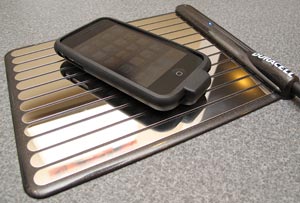
 One of the burdens that every gadgeteer must bear is the burden of gadget charging. You know what I mean, almost every gadget that we own runs on battery power. Mobile phones, audio players, video players, etc. Even though many of our devices can be charged via USB, which is a convenience, that can have its own challenges, such as running out of ports. Fortunately, the age of wireless charging is dawning and I’m going to tell you about one such solution today. It’s the Duracell myGrid Charging Pad. Let’s take a look.
Wireless charging really isn’t a new idea. I remember having that feature 5 years ago with the SPOT watches back in 2004. Some of them had a special cradle that you placed the watch on for charging. I thought that feature was the coolest thing ever and thought it would usher in a trend that would show up in new devices from that point further. Unfortunately, it didn’t. We had to wait almost half a decade before the next wireless charging feature was sighted. This time it was with the Palm Pre’s Touchstone charge. And now we have the Duracell myGrid.
Hardware Specifications
Max Number of Devices: 5 (15W max)
Dimensions: 6.75 in. W x 8.5 in. L x 0.75 in. H
Power input: 100 – 240 VAC, 0.4 Amps, 50 – 60 Hz
Power output: 15 Watts max
Weight: 4.0 oz.
Certifications: UL, FCC, ETL
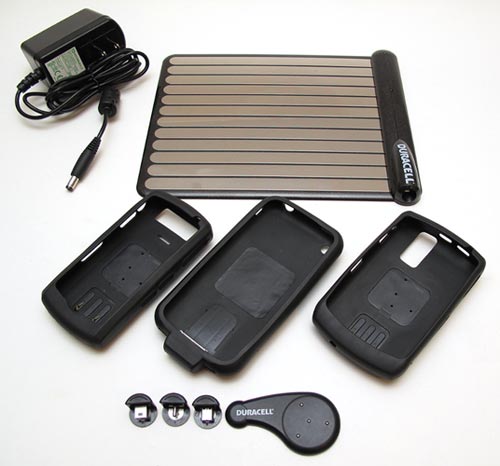
Package Contents
myGrid Charging Pad
AC Adapter
Power Clip Adapter
Power Clip tips compatible with: BlackBerry Pearl 8100 series, Curve 8300 series, 8800 Series, Bold Series, Motorola RAZR series, RAZR V3 Series, MOTOQ Series, W385, W370, Nokia E71 Series, #2610, #6085, #6061
(The three cases shown in the image above are sold separately for $34.99 each)
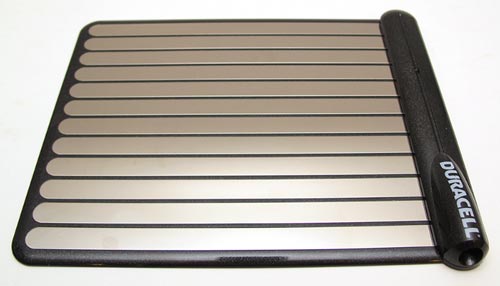
The charging pad has a hard plastic base with flat chrome metal slats on top. I think it looks attractive and doesn’t look out of place on a desk.
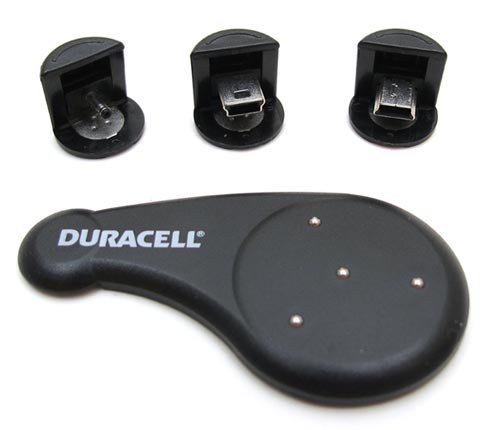
The starter kit comes with a Power Clip Adapter and three Power Clip tips.
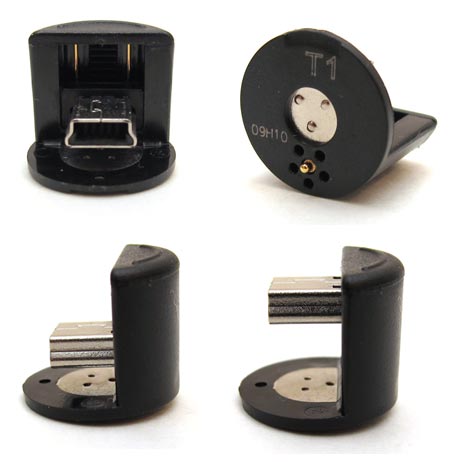
The tips are adjustable. The connector part can slide up and down to accommodate the thickness of the device that you need to charge.
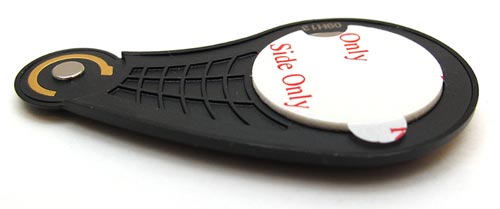
The adapter is made to stick to the back of the device you want to charge. It has an adhesive sticker on the back.
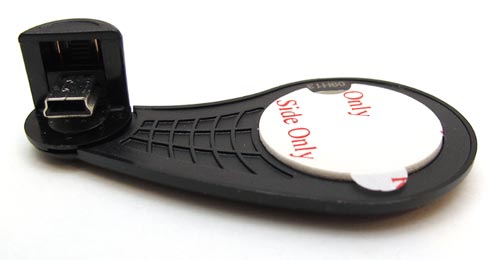
The smaller end of the adapter is magnetic and is designed to connect to the bottom of the Power clip.
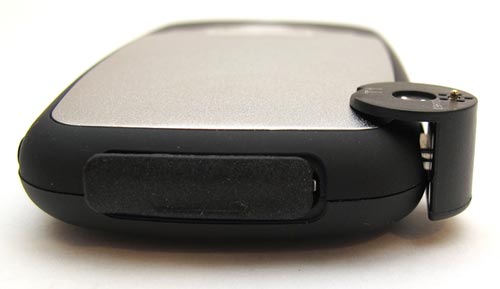
To use a Power Clip, you insert the appropriate tip into the charging port of a compatible device. Here is the mini USB tip inserted into the charging port of my Slacker G2 Radio.
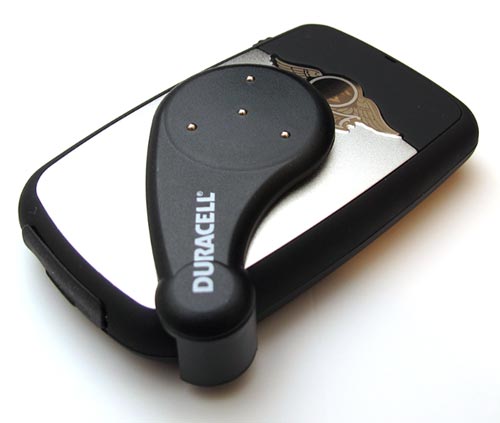
Then the Power adapter attaches magnetically to the bottom of the tip. You’ll notice 4 contacts poking out of the back of the adapter. These contacts touch the metal slats on the myGrid to charge the device.
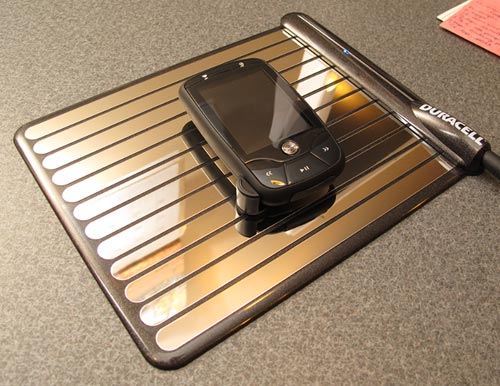
At this point, the Slacker G2 should be charging. You can see that there is a small Blue LED on the myGrid. When that LED is lit, it means that there is contact with an adapter. Unfortunately, I had almost no luck using the adapter tips with the devices I tested them with. The Slacker G2 would show that it was charging only every so often like there might have been a bad connection. I also tried one of the mini USB tips with the Sandisk Sansa Clip. I had 0 luck with this device as well and didn’t get it to charge at all. I also tried the USB tips (both of them) with a couple different Motorola phones that I have laying around. No luck with them either. 🙁 I don’t know if I can really complain about tips not working because the devices that I tested them with are not listed as being compatible with the myGrid. That said, they all are using mini USB connectors to charge and they charge fine with my computer. So go figure…
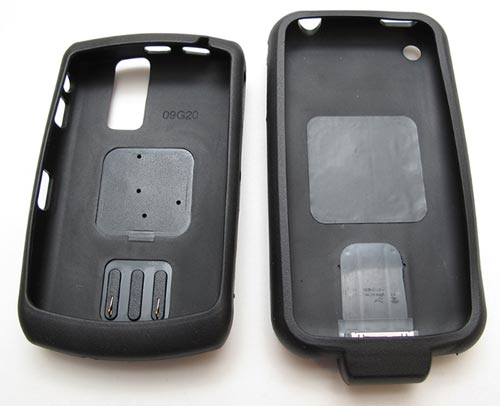
So the tips didn’t work. But the sleeve did! I was sent two BlackBerry sleeves and an iPhone sleeve (which isn’t available yet). I don’t have a Blackberry phone, so the iPhone sleeve is the only one that I was able to test. These are flexible Black rubber type sleeves with a built in connection to the charging pins on the phone. You can see the iPhone sleeve above on the Right. It has a stand dock connector built into it.
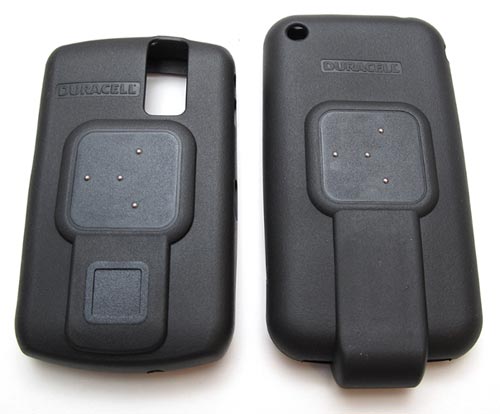
The back of the sleeves have the same spring-loaded contacts as the Power adapter that stick out and touch the myGrid charging pad surface.
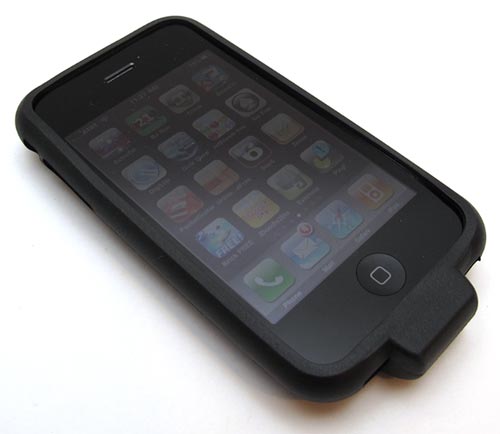
The iPhone sleeve fit my iPhone 3GS just fine. The only down side is the somewhat ugly lump on the bottom that houses the built-in dock connector. Another down side that you’ll want to consider is that you’ll need to remove the iPhone from the sleeve in order to sync with iTunes on your computer.
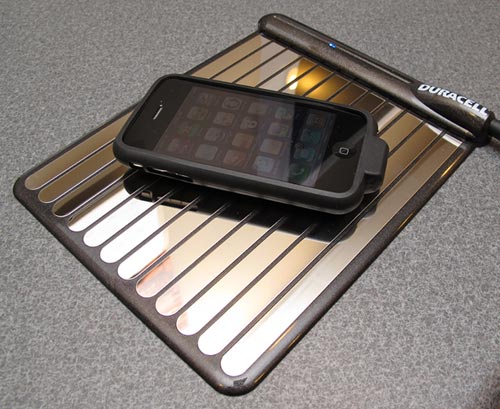
I like that you don’t have to even think about how you place the device on the myGrid. The orientation doesn’t matter. As soon as I dropped my iPhone on the base, it began charging. Simple! Charging seemed just as fast as when using a USB docking cable with my computer.
An advantage of the myGrid is that you can charge up to 5 devices at one time. You might have a hard time fitting them all on the base though.
I see the Duracell myGrid as a definite step in the right direction as far as wireless charging is concerned. I hope that we’ll soon see devices that have been designed so that special sleeves and adapter tips aren’t required in order to charge wirelessly. But until that happens, the myGrid is a cool alternative (if the adapter tips work).





Gadgeteer Comment Policy - Please read before commenting
It annoys me that devices like this are referred to as “wireless”. The expectation of a wireless device is “no contact” charging because it uses radio or inductive means to transfer power to the device. What this product should be referred to is “cable free”
it’s an ugly and cumbersome design trying to come across as something it isn’t.
the idea sounds good. but they need to work on the look.
seems easier to plug in the old fashion usb-cable than having all this lying around.
wonder what happens when you throw some keys on the that grill.
@greg I don’t mind the look of it at all. 🙂 The grid has fault detection built in and won’t supply power if you put your hand on it or place something metal on it.
Dear enegizer,
The day integrated wireless becomes available on gear I’ll come knocking. Please keep your additional bulk cases out of my already limited carrying space.
But I love your rechargable batteries and charge docks.
– regards
More tiny parts to lose and more parts to buy to get the thing to work.
Does this device raises the price of my next device by $34.99.
Will it charge my Garmin ?
What an ugly arrangment of smoke and mirrors
Another way of uglying up your devices plus permanently blocking the USB/Docking-Port. 🙁
Don’t want that Grid-thing messying up my desk.
Its hardly wireless.
Has nobody here heard of Powermat? The initial tech is more expensive and does not inlcude tips, and only supports 3 devices, but it has much more device support in terms of jackets (many smartphones and even the DS lite and DSi) and the jackets cost less.
@darkshaddow42 I have the Powermat as well. Look for a review soon.
Plugging in a cable is -that- much of a chore?
How shallow and lazy is the average consumer? Ummm, don’t answer that, heh. For the skinny on wireless charging;
http://www.wired.com/gadgetlab/2009/02/wireless-charge/
Oh, if you throw out an alkaline battery after using it for only one cycle, think first. ALL batteries can be recharged, it is simply a matter of how much current you use and the time involved. Do a google search for “renu-it”, you’ll see what I speak of. I have been re-using alkaline batteries for about 2-3 dozen cycles before they develop ‘memory’. Had to built my own charger though.
The definition of wireless is “lacking or not requiring wires.”
Is the myGrid Charging Pad compatible with the Palm Pre wireless charging system? Or in other words can I purchase the myGrid Charging Pad and use the Pixi or Pre on this charger with the charging backs I already own on the Pre and Pixi?
@jmc They are not compatible.
This requires contact for current.
I have had a “true” wirelessly charging electric toothbrush for decades.
I think the truth can be found in the profit margins by selling individual chargers for every model of phone (SAMSUNG !!!!).
Nokia seem to be more reasonable in universal charging solutions….let them lead the way with the first induction mat.
I just saw an banner advertisement on Yahoo for this product, and googled it to get further information.
It appears that each product must have it’s own custom sleeve – that can cost a pretty penny! – and if the writer of this article debates how many products can actually get onto the grid, well, yes – your time would be better spent just plugging it in to the wall.
Besides, quick math illustrates the obvious solution:
Mygrid ($79.99) + 4 adapter sleeves (@ $34.99 each, assuming you would use 4 devices) + HST (13% here in Ontario) = $248.54
vs
An extension plug with up to 4 outlets ($5) + HST (13%) = $5.65
Again, I think the winner is obvious here.
yeah, i was thinking about getting this as a gift, however, after reading this review, and the preceding comment by dee, i’m not sure i can justify this hassle. i’m trying to make someone’s life easier and lighter, not more cumbersome and difficult. those sleeves are definately not wireless…
Good review, Thanks alot for the in depth look at this product.
This article starts out by stating that charging your device is a burden. Really? Since when is plugging a cord into a wall a chore or burden? Every time I read an article or blog concerning “wireless” charging I chuckle, because I can not recall a time in my life where plugging my device in to charge was ever a problem. As far as USB charging goes, it’s not always the best solution, because not all USB power sources provide adequate power to properly charge your device, which leads to battery damage, and poor battery life. Most cell phones these days function as multiple purpose devices ie; MP3 players, camera’s, time management…Common sense is not so common, when it come to technology such as this. If you’re too lazy, or feel inconvenienced having to plug in your device to charge it, grab a pencil and paper, and a handful of quarters and use a pay phone, then complain about the hassle of charging your wireless phone or other device. A very small price to pay for convenience. That’s my two cents.
Anything to cost you more……plug your phone in while you sleep people! How hard is it?
@pups i agree,is it really that hard to plug your phone up at night.!!!!!
It seems to me that having to put a sleeve on a phone to charge it takes almost as much time as plugging it in….you don’t save much time. The only positive I can see is that you can charge multiple devices at the same time. Now, if they could come up with something you could just walk up and lay your phone on to charge without having to mess with sleeves and clips I’d be the first one in line to get it but I’m not gonna pay high dollar for something that’s not any more convenient than what I’ve already got.
Can I charge my police scanner on this wicked thing.
Well, I just got mine and it’s the easiest coolest thing to use. I have it on my Samsung Galaxy S and my wifes LG Xenon. It looks ok on the phones and easy to remove to sync. Very easy to remove! I mean it, it’s as easy as swiveling the part which has the contacts then pull off the usb connector. The charge pad is super thin and looks good enough to be put just about anywhere. I hated hunting for the cable every time I plugged it I though to myself how many times can I plug this before the connector gets damaged? Not a worry any more.
I definitely recommend…
Well, the author didn’t really say that plugging things in was a bother…She was referring to having so many gadgets that the search for enough outlets or ports becomes somewhat of a hassle. However, she did mention that during her trial of MyGrid that it doesnt facilitate many devices, space- and otherwise. And @Dee…You’re right. It doesn’t seem worth all the money.
Ok here is the deal , when you actually think about this thing logically it is just another docking device , that’s all it is with a different shape change and the down side to this dock is that you have to add an additional component onto whatever you are charging you don’t have to do that other docking systems of which I am sure the phone companies or whatever will build in if this thing really goes but I don’t think so, this is basically the same thing as a cordless phone charger from back in the 80’s ,
the idea is creditted though with be able to charge many things at one and different items so I will give it that much
ok yeah I know credited is spelled wrong lol
Is this device compatible with a Droid phone from A T & T
@Sharon Unfortunately no. Droid’s use the micro USB connector for charging and so far Duracell only offers mini USB power clips for use with the myGrid
I have a Samsung Galaxy S Vibrant and it uses micro USB and works perfectly. My Grid comes with both upside up and upside down micro usb adapter pieces.
I love it.
While Julie says that this device is not compatible with the Palm Pre, Duracell’s website specifically reads that it is:
Duracell MyGrid Compatibility List:
http://www.duracell.com/en-US/product/mygrid-kits.jspx
I love this device!!!! My son has trouble hooking up his charger to his phone due to a genetic disorder that makes his hands shake and this gadget has made him feel so much more independent. Before I would have to plug up his phone for him, but now, with the mygrid skin on his blackberry, all he has to do is set it on the board and it’s charging. I can’t thank the people at Duracell enough for this product.
Thank you!!!
1. I have to leave a bulky connector on my phone to make this convenient.
2. If I want to use the micro usb to connect to my computer or charge in my car I have to remove the duracell connector, which is more of a pain than they plug in power chord.
3. The charger is less mobile than a power chord.
4. I have to leave a bulky connector on my phone.
5. I have to leave a bulky connector on my phone.
Did I miss something or is this just as (if not more) inconvenient as using a normal charger?
If you have the sleeve on the deviceto which has the contacts for the charging mat, what happens if you put the device on a metal table. Do those contacts short the battery of that device
My blackberry charger is worn out so I thought I would give this a try, so far works OK, best thing is it is able to charge my phone and my wifes so now only one charger. took a few tries to get the charger to work is kind of positional on my phone but is working good
Whats the point? Replace a free usb charger for a plug-in just so it will charge on a matt? False advertising IMO, they make it seem like you can throw any rechargable device on the matt and charge it….no mention of buying ‘tips’ or ‘sleeves’ in order to make it work.
Lame ass is all I can say.
will this work with the samsung facinate and the samsung reality?
its all good and well but way too expensive. forget this.
Surely if the wire is in the shape of an adapter or a sleeve regardless they have to make a contact. Does that not make them wires. Just cus there not flexable doesnt make it wireless. hell on that standard u can charge a ps3 controller ona dock wirelessly
Is this compatible with the Motorola Cliq from T-Mobile??? Please let me know asap!
for some of us, charging IS a pain in the butt. between hubby and I we have so many freaking charging cords it’s a mess, i had to add a socket extender on each side of the bed for all our chargers to be plugged in, and when it comes to traveling, a whole pocket of my backpack is taken up with that tangle of cords. i’d kill for a mat i could just lay my EVO, Ipod, Kindle, his Pre and maybe even our DS’ on. they’d all be in one place, no cords to remember, no problems with AC ports getting messed up from plugging and unplugging…. i can dream, can’t i? and if i could charge my netbook without a cord i’d sell my first born. i’m hard on AC jack on netbooks/notebooks, so if i didn’t have to have that stupid cord in the jack in the first place, it could never break. …either that or the companies could take a little extra time and make them more secure. it’s not wobbly from being yanked out or anything, just a tug here, a jiggle here, pressure from being at an odd angle during use over the course of a year or so…. these things shouldn’t be so stinking easy to break. but, to save a couple cents they’d rather just drop some solder on the connections rather than secure it properly…their gain, my loss.
That’s just wrong they don’t think of all the other types of devices out there. They only do it for the ones that they think are most popular like the crackberry and the isuck
Sadly, after rereading this I saw the part about the mini USB not working on anything. My EVO uses that which has freed us from a few cords since hobby’s phone uses it and the kindle too so we only need one type of cord for all of them, rather than having to have the specific cord for each item. God I wish my ipod was like that…I’m forever losing that cord.
A question…my EVO came with a bad AC charger so I’ve been using my USB. Is that really going to affect my battery life? What if It’s only until (if??) they replace it? They told me something about not being able to replace accessories yet….but why can’t they just send me one that was made to ne packaged with a new phone…It’s not like they’re not manufacturing them! She just told me to borrow someone else’s??? So what can I use but my USB?
Will this work with the palm pixi from sprint on the site it says the pre works put not pixi. Does it work?
The only advantage i can see in using this is if the wired charger input on your phone is broken, and you have no other means as to charging your phone. Although, it would make just as much sense to get a new phone since your going to end up paying about the same.
Does this charger charge up an Samsung phones I have a S5
What type of charging port does the S5 have? mini or micro USB? I don’t think this product has a micro USB connector. I doubt this product is even available now. That review was written 3 years ago.