
Over the years, I’ve tried quite a few devices that allow you to watch and listen to your digital media through your television set. Some of these devices have included WiFi, some included hard drives, some required that you stream the content from a computer to the player and some required that you convert the content to a format that the player could handle. For one reason or another, I stopped using all of those devices except for the AppleTV. I really like the AppleTV’s user interface, but have never really liked the fact that I have to convert the files and then ‘send’ them from my desktop computer to the AppleTV in the living room. I’m all about simplicity, and while the AppleTV comes close, it doesn’t quite get there. I think I’ve found a device that does get there tho. It’s the WD TV HD Media Player from Western Digital.
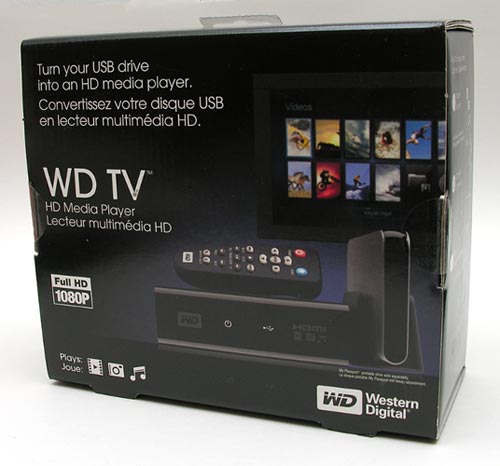
The WD TV doesn’t include YouTube or allow you to rent movies, but it does play the video, audio and image content that you already have, and does so in a really user friendly way.
Hardware Specifications
File Formats Supported:
Music – MP3, WMA, OGG, WAV/PCM/LPCM, AAC, FLAC, Dolby Digital, AIF/AIFF, MKA
Playlist – PLS, M3U, WPL
Photo – JPEG, GIF, TIF/TIFF, BMP, PNG
Video -MPEG1/2/4, WMV9, AVI (MPEG4, Xvid, AVC), H.264, MKV, MOV (MPEG4, H.264)
MPEG2/4, H.264, and WMV9 supports up to 1920x1080p 24fps, 1920x1080i 30fps, 1280x720p 60fps resolution
Subtitle -SRT (UTF-8)
USB 2.0 ports: 2
External Drive Formats Supported: FAT32, NTFS, HFS+ (no journaling)
Video Interface: HDMI, Composite A/V
Physical Dimensions: 1.57 x 3.94 x 4.94 Inches
Weight: 0.67 Pounds
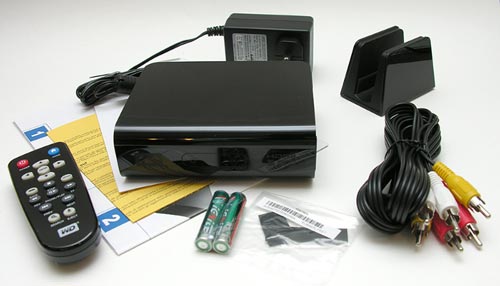
Package Contents
WD TV Player
Remote Control
2 AA Batteries
AC Adapter
Composite A/V cable
Passport USB Drive stand
Instructions
The WD TV unit is small, allowing it to fit into even the most cramped areas of your entertainment center.
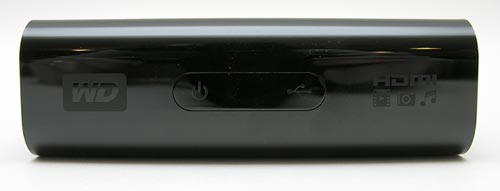
It’s made of shiny Black plastic and lacks buttons, dials and switches.
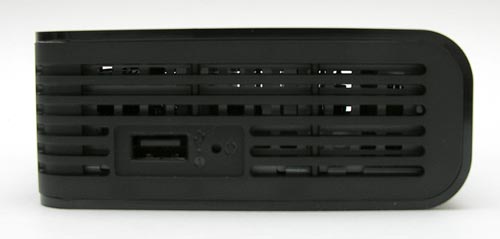
On the Left side, you will find a USB port and a reset switch.
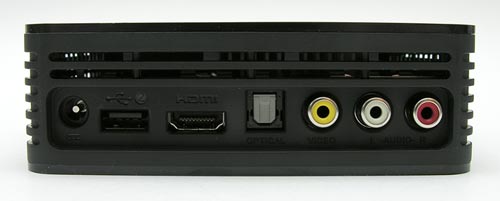
On the back side, you’ll find an AC power connector, another USB port, an HDMI connector, TOSlink Optical audio port, and composite A/V connectors.
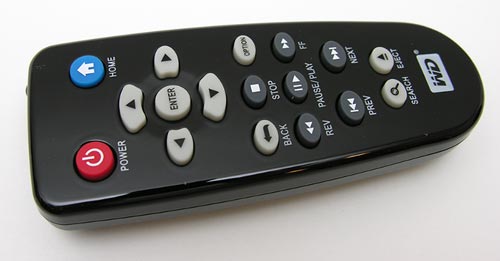
A small remote control with real buttons is also included along with the batteries to power it.
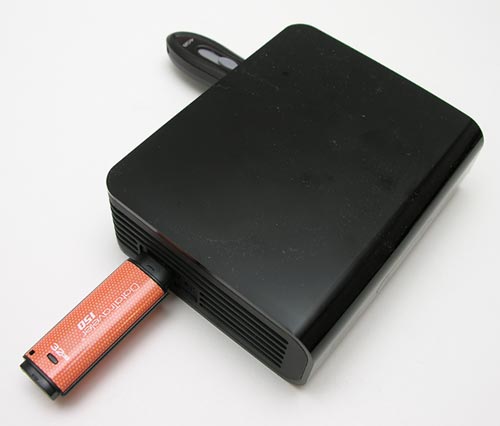
The WD TV doesn’t include its own hard drive like some players (AppleTV, MVIX). Instead, it has two USB ports in which you can plug in thumb drives or even WD’s own USB Passport drive.
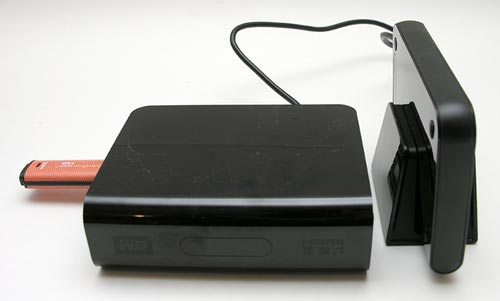
There’s a little stand included specifically for the Passport drive, so that you can set it next to the player.
I tested the WD TV with my 32GB Kingston flash drive and a WD Passport drive. The cool thing is that you don’t have to specify which USB drive you want to view content from. The software in the WD TV reads both drives and creates one list of all the content.
Setting up the WD TV with your TV is a snap. A composite A/V cable is included in the package, that you can use to connect to your TV. While this works fine, you can get MUCH better video quality by using an HDMI cable (if your TV has that capability). The only bad thing is that you’ll have to go out and buy your own HDMI cable. Tip: Don’t go to Walmart, Target, Best Buy or other local stores to buy an HDMI cable. They will charge you $25-$30 for one, which is robbery when you can buy the same thing from NewEgg for less than $10.
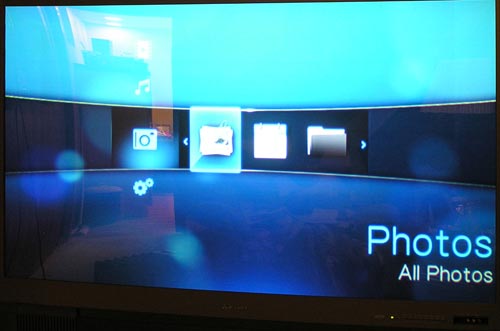
After you connect the WD TV to your television and power it on with the remote, you’ll be presented with a simple user interface. You can scroll up and down to choose the main function (Photos, Video, Music, Settings) and then side to side to pick options for that specific mode.
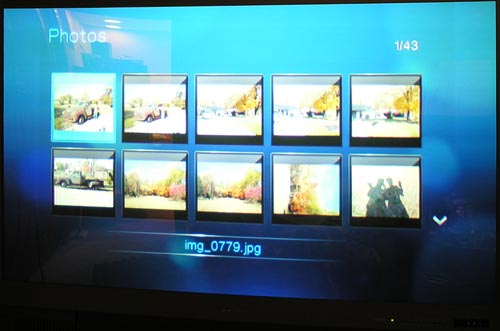
In Photo mode, you can view images on the attached USB devices by thumbnails or a list of file names.
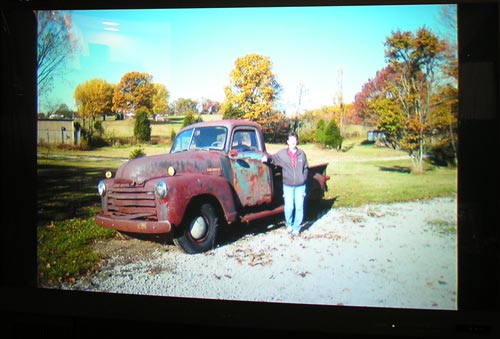
You can click on an image to see it in full screen. You can also rotate, pan and zoom. You can view the images in slide show mode and even have music playing in the background.
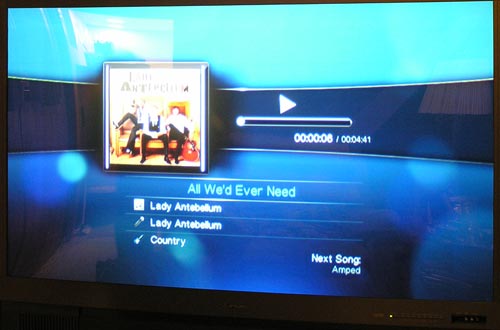
In Music mode, you can easily play your tunes. Even the album art will display on the screen while music is playing. You can choose music based on Artist, Genre and Album.
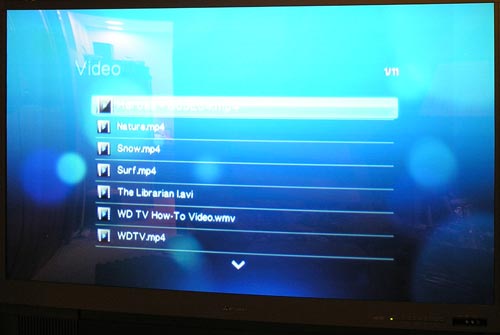
Photo and music modes are nice additions, but my main use for a device like this is to easily view my video content on my TV. I have to say that I think the WD TV does this easier than any device I’ve tried so far. Save your videos on a USB device, plug it into the WD TV, scroll through the list of files, press play on the remote and away you go. The best part for me is that no time consuming file conversions are needed. This is something I had to do all the time with the AppleTV in order to play video that I’d downloaded from the internets. I much prefer downloading the file, copying it to a USB stick, plugging the stick in the WD TV, sitting down and watching it. Easy!
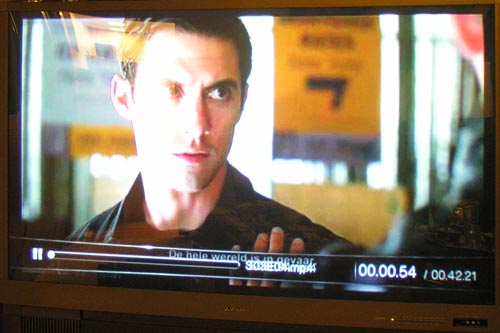
Video quality using HDMI is great to my eyes. Of course it will really depend on the video itself. If you have low resolution video, it won’t look the best on a large TV.
The WD TV impressed me after I had downloaded an AVI video that wouldn’t play on my MSI Wind and wouldn’t play on my iMac using VLC, without VLC having to reindex it. I thought for sure it wouldn’t play on the WD TV either, but I was wrong. It worked just fine. The only video file that would not play for me was a really old .WMV file that I had created using Movie Maker on a Windows PC. The WD TV comes with some software that you can use to convert files if necessary. I didn’t try it, but I bet it would have fixed that file for me.
One nice feature is that you can resume playing a video if you stop it and want to go start it again later. The player will automatically remember where you left off.
While watching video, you can rewind and fast forward at four speeds (2x, 4x, 8x, 16x). I wish there was a feature to skip ahead so many minutes or to go to the end of a video. Just nit picking here though…
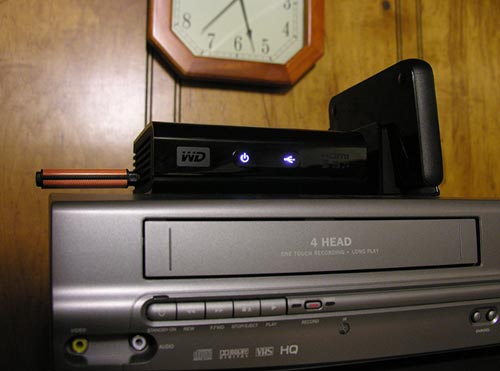
I really like the WD TV HD Media Player from Western Digital. Its small size and ease of use has me sold. It’s definitely going to stay in my entertainment center until something better comes along.
Auto Amazon Links: No products found.
Product Information
| Price: | 129.99 |
| Manufacturer: | Western Digital |
| Pros: |
|
| Cons: |
|

Gadgeteer Comment Policy - Please read before commenting
Excellent review of what sounds like a capable product. I’m not in the market for a Media Box, but I now have the WD TV HD Media Player on my shortlist.
P.S.Thanks for the HDMI cable tip, will have to remember that.
Great review. I have a question. I see it supports the mkv format. It says it reads it but will it read h.264 embeded in mkv. Do you have anything to test that?
[Edited at December 09, 2008 01:01:50 AM.]
Bought one of these last month and I’m totally loving this device. Plays all my avi & mp4 shows and movies. I think it even applies a sharpening filter or something on the video file as it plays.
The only thing I wish it had was WiFi or an ethernet port. Shuffling my flash drive back and forth is getting annoying.
sparky:
If you can point me somewhere that I can download that type of video, I’ll check it out and let you know the outcome.
Thanks for you review.
I’ve got 2 questions left:
I’ve got lots of files I created using Windows MovieMaker (hours of kids-movies, in all over 60 GB).
We don’t like the fuzz of converting and moving them to DVD in order to play them on our TV. This WD-player would be very handy indeed if it could play WMV-files.
[Edited at December 11, 2008 04:06:45 AM.]
Ronald:
I don’t know about the PAL TV compatibility. I have an email to my PR person asking for that info and will update you as soon as I get it.
Regarding the WMV file, I created it at least 5 years ago, if not longer… If you can point me to a newer file somewhere, I’ll download one and test it for you on the player.
Ronald:
I just heard back… The WD TV is compatible with BOTH NTSC and PAL.
Hi Julie,
Thanks for your reaction.
Could you please check this file:
http://oase.uci.kun.nl/~ronaldl/200805_12tuinbloemen.wmv
which I created on my pc with Windows MovieMaker.
[EDIT … it seems that the editor doesn’t display all underscores in the upper URL … it should read “2008 underscore 05 underscore 12 underscore tuinbloemen.wmv … no spaces in the URL or filename]
I saved it from WinMovieMaker as a file for PAL TV.
I’m curious to see whether the WD device will play this type of wmv-file. If it does, the WD could well be the device I need in my living room 🙂
TIA !
[Edited at December 12, 2008 05:54:55 AM.]
Ronald:
I’ve downloaded the file. I’ll try it tonight and will report back here with the details.
Ronald:
The .WMV file worked fine. Video and music :o)
that’s great
thanks a lot Julie
Ronald:
Please let me know what you think of it, if you end up buying one.
Yep, I will do that.
I’m looking for a reseller here in The Netherlands right now.
Nice present to play with during X-mas holidays
😉
Just wanted to say HI. I found your blog a few days ago on Technorati and have been reading it over the past few days.
Boy oh boy, these WD’s are sooo popular over here in The Netherlands.
MyCom, a pc-store over here, was got over 1100 reservations for these devices !
Wow, that’s incredible! I didn’t realize that they were that popular.
hi buddy, Thanks for the review. It seems to be a nice product, just one question for you: do you know if it will work with my 24″ LCD PC Monitor (with a HDMI connection, and supports 1080P)?
Larry:
My best guess without personally trying it myself would be that yes, it will work with your LCD monitor. As long as you have HDMI or composite connections for video, you should be fine.
Anyone know if it plays .iso files?
Thanks
Hi Julie,
thanks a lot for your review, it made me purchase this device.
This is as simple as plug-and-play. Simply attach the cables to the TV, plug in your harddrive through on of the USBports … and you’re up and running within minutes!
It does play my (kids) wmv-files perfectly, even fast forward works fine.
Thanks,
bye
Ronald
Ronald:
I’m so glad that you’re liking the WD TV. It sure is easy to use, that’s for sure 🙂
Question i’ve converted a bunch of movies to wmv9 but they wont play on the wd tv it keeps unsupported format any ideas.
Thanks
Ian:
I’m not sure about the WMV9 movies. What format were the movies in to begin with?
I just learned that there’s a new firmware update (find it at http://support.wdc.com ) to the WD TV that fixes bugs and adds some new features…
New Features:
· Added .MKV chapter selection for video playback for MKV with chapter support
· Added .MTS file extension support
· Added .TP file extension support
· Added .TS file extension support
· Added 1080p 24hz support
· Added disk volume name to folder navigation in list mode
· Added EXIF orientation flag functionality for auto picture rotate
· Added file size in filename
· Added jump feature to the remote: While fast forwarding or reversing, if the “Next” or “Prev” buttons are pressed, video will jump 10 minutes in the respective direction
· Added progress indicator for the duration of the FF or REV function
· Added a blinking status LED behavior while drive is mounting; previously the light just stayed on
· Added sequential .M2TS file playback function
· Added additional subtitle support (SMI, SUB, ASS, SSA)
· Added user selectable font size for subtitle support
· Added song title scroll in music playback to prevent truncation
· Added embedded subtitle display in .MKV files
· Added additional subtitle encoding support for the following: Western Europe (ISO), Traditional Chinese (Big5), Simplified Chinese (GB18030), Japanese (Shift-JIS), Korean (EUC-KR), Cyrillic (Windows-1251), Cyrillic (KOI8-R), Greek (ISO); previously only UTF-8 was supported
· Added display sizing menu for photo playback: Fit to Screen, Full Screen, Keep as Original
· Added accelerating scroll speed based on how long the arrow is held down on the remote when navigating folders with a large number of files; previously only one, constant speed was available
Resolved Issues:
· Resolved issue when 2 drives were connected, then one drive was disconnected, the files from the disconnected drive still showed up on the file list but were not playable
· Resolved “repeat one” failure during music playback; previously songs would not repeat
· Resolved artist name truncation issue during music playback
· Resolved issue where WD TV would not turn back on with remote after extended period of inactivity; previously WD TV had to be unplugged and was unrecoverable with the remote
· Resolved image size and position issues during video playback; previously the image displayed did not fill the screen until the picture was zoomed in and then out again
· Resolved info bar display issues in PAL (European display standard) mode
· Resolved issue of the slideshow playing while in the Option menu during playback, slideshow now pauses if the Option menu is accessed
· Resolved issues surrounding drives going to “sleep” and folders showing as empty; previously drives equipped with a sleep feature would not re-initialize before the WD TV timed out and displayed the folders as empty
· Resolved issues with DVR-MS file playback, FF and REV now function properly; previously FF or REV during a DVR-MS file would cause the file to stop playing and the video signal to be lost
· Resolved issues with forced resolution changes dropping video signal; previously the signal would be lost if the user switched between forced resolution and auto
· Resolved photo self re-sizing issue; previously during photo playback the pictures would randomly re-size themselves
· Resolved Status LED behavior by blinking to reflect accurate read cycles while data is being read; previously the LED just stayed on
· Resolved subtitle default to “on” issue (subtitles now default to “off”, unless there is an external subtitle file created, then subtitles default to “on”)
· Resolved subtitle position issue, the subtitles were moved down towards bottom of screen; previously during playback of some files subtitles were positioned too high blocking the view of the video
· Resolved the 1-2 second FF during initial playback of .MPG video; previously video would play in what appeared to be FF for the first 1-2 seconds and then slow to standard play rate
· Resolved video signal failure when pan function in video files with subtitles is used; previously subtitles would stop functioning, video would stop playing, or TV would lose signal
· Resolved zoom issues while file info is displayed during video playback; previously signal would fail or video would stop playing
· Resolved zooming issues while subtitles were on; previously the screen used to go black and the video would stop playing
Known Issues:
· When image is rotated 90 degrees there is some elongation in the rotated view
· If the user unsafely removes an HFS+ formatted drive from the media player without using the Eject button, the drive will become read only media
that for this information.
I will visit the update website.
thanks for the great review and answeres. I liked the device when I first saw it. now after reading this, I am going to buy it now especially after you mentioned the firmware upgrade.
thanks
hi
dose he supprted Divx 3.11 or Higher ?
According to this site it does support Divx 3.11 AVI files.
The WD TV does allow you to skip ahead, not just fast forward.
Press the Fast-Forward button (2x will do).
Then Press the Chapter-Next button while it is fast-forwarding.
The Video will advance 10 minutes for each press of the Chapter-Next button.
Steve:
Yes, that’s a new feature that was just added with the latest firmware update. 😀
Aaron:
I just tried this player with an ISO file and am happy to report that it works 🙂
I only need the player to show JPEG photos on my 42″ LCD TV.
I want to be able to take, say 40 shots at a family gathering, download to my PC, select the best, download on a USB stick, plug into the WD box, & show the photos to the waiting audience.
Is that achievable?
Later I will want to put my best shots onto a WD Passport, using some sort of folder system, so that I can show a selection of photos to someone who has just dropped in.
Your advice is appreciated.
Anton:
Both scenarios will work fine 🙂
dose subx subtitle works?
omar:
Yes, subtitles do work. The only customization that can be done with the subtitles is to change the font size. There are 5 different font sizes that you can pick from.
i am using .avi divx files they play great but they don’t show thumbnails in the wd tv. is there any way to correct that
I don’t mean to call everyone here wrong…. but we bought this and used it for a day, and during the first couple hours it had problems. Strange lines and messed up background colors (was blue but began showing up as all black, etc) on the menu screens (not in the movies but the unit’s own menus). Rebooting fixed it for a few minutes. I do not suggest buying it. A more mature technology or higher quality product would be preferred.
This unit lacks a handful of desired features, sorting ability, icon flexibility, but the worst case was its own stability and ability to play the media that we put into it. If a family of engineers and videophiles has problems with it, chances are you might too. Save your $100 until a better product comes along.
We took it back for our money back. Since we had purchased 4, we have $400 now to go find another similar better product if one exists.
Aric:
Did all four of them exhibit those problems? I have only had one problem with mine so far. I had a MKV file that will not play the sound because it says it wants to play through the digital audio channel and I don’t have that channel hooked up to my TV. But other than that, I love this little player. No issues like the ones you’ve mentioned…
Maybe you got a dud?
I have been looking all over to try and figure this out:
why do avi videos not show a thumbnail of the video.
Is there a way to modify the avi file to allow a thumbnail to show up.
thanks
Justin:
I’ll write to my PR contact and see if he can get you an answer. I’ll post here about it if I get some info.
Julie,
I have the same question that Justin did for .avi and .mkv files. Also, is there any way to change the background and the screen saver to something better than a block WD floating around.
Justin and BC:
My PR contact for WD has taken the thumbnail question to WD to answer and will get back to me with details as soon as he hears something.
Thank You for the great review. Helped me a lot. I just got a regular old style tv: I read in other forums that the signal via the composite A/V exit isn`t great. Can you confirm this? Are there other players you can recomend?
Carsten:
I used the WD TV with composite cables for several days before an ordered HDMI cable arrived in the mail. It doesn’t look THAT bad. Another player is the MVIX.
http://the-gadgeteer.com/2007/03/23/mvix_mx_760hd_wireless_hd_media_center/
Carsten:
Before buying the WD TV I had the MVIX MV 5000 with a 500 GB hard drive inside. I loved this player and only had one problem with it not recognizing a movie. I recently upgraded for the WD because it has HDMI out and plays .mkv files. Comparing the two it was nice to have the hard drive installed, but it is also nice to use a USB flash drive to look at pics or play MP3’s. I did not get the 760hd because it doesnt play .mkv (HD) format files.
Great review – I got one of these 5 days ago.
Initial reaction was FANTASTIC, it plays stunning .mkv files on my 40″ lcd via HDMI (my pc is too old & slow to play these 🙁 ).
but i am having a few problems – .mkv (x264 files) with DTS 5.1 show great video but no audio – would the TOSlink cable allow me to hear these files just using the TV speakers (i’m not interested in getting surround sound)?
A bluray WMV file says unsupported format 🙁
Overall great product at at good price (£80 GBP) also purchased a 1TB WD “Elements” external drive for £80 also, seems to have no problems even though it’s not the suggested “WD passport drive”.
Thanks in advance Julie
Since the box doesn’t seem to have a DTS decoder in it, probably the only way you’re going to get any sound from a DTS soundtrack is to connect via optical cable to an external digital receiver that can decode it. If your TV can do that, you’re good to go, but I suspect that probably isn’t the case 🙁
Thank you for all your tips. I went and bought the device after reading your review. I am convinced that this is a superior product compared to its competitors, and I am very happy with it so far. I just had one minor problem. I downloaded the latest firmware onto a flash drive, plugged it to the device and turned it on. When the device scanned the external drive, the file (firmware) disappeared from the flash drive. The firmware version is still shown 100.01. Also, I never saw the firmware option in the menu. Is it possible that the device’s firmware may be too old and that’s why it doesn’t have the firmware option?
Thanks, Kevin
I upgraded my firmware yesterday by following the directions.
I saved it to the root of a flash drive and had no problems. Did you unzip the file? There should be two files (.BIN and .VER) and the firmware update popped up in the setting menu. This is probably the first upgrade to the firmware since it came out and it is unlikely that the device has firmware that would be too old to upgrade. Either way, more than likely you wont notice the difference with the upgrade and your machine will run just fine. Start the process over and make sure your flash drive is empty when you start.
I bought this today and I’ve been playing around with it and it works great. However, I can’t seem to figure out an easy way to have thumbnails of the actual movies as I’m searching through to select a movie. Is there an easy way to add thumbnails (say the movie poster itself off of a google image search) so that I have a picture of the actual movie on the screen as well as a title? All my movies are mpeg4.
hi, thank you for this thread and all the helpful comments, I appreciate it very much. Like Anton I wouldd like to use the player for picture shows of my jpgs.
I still have some questions left:
1.Is there anything like an manually operated slide show: Can I use the remote control to jump from photo to the next in a blending sort of way? Without black screen or thumbs page between the photos?
2. About the automatic slide show: What are the options that I can customize? Time (in which steps?), blending, what else? What happens if I want to pause the show: pictures stays, thumbs show or what else? Can I for go back one picture without going back to the the thumbs page?
3. Which algorithm controls the order in which my pictures are shown? If it is by date: latest first or oldest first? If it is by name: alphanumeric by which method? – Do I havea chance to switch from one sorting method to another?
Thank you very much for your attention and any possible clue!
Sabine:
I’ll try to get you some answers to your questions later tonight. 🙂
Sabine:
1. You can manually view images by pressing the Next and Prev buttons. The current image will stay on the screen until the new image is loaded. There is no indicators on the screen that you’re loading another image.
2. For the automated slide show, you can customize the time interval (3, 5, 10,20, 30 seconds, 1, 5 min). There are two transitions. Fade and normal. Normal is like I mentioned in answer #1. Pausing the slideshow will show a status bar at the bottom of the screen with the current image. Yes, you can move back a picture while the slide show is playing by pressing the Prev button.
3. The pictures are shown in alphabetical order. The only sorting options you have are normal, shuffle, repeat all and repeat all and shuffle.
Hope this helps 🙂
thank you so much, Julie, that was very fast and very helpful! I am just about convinced to buy one. Now I only have to find the right software how to bring a couple hundred fotos in alphabetical order. 🙂
thanks again!
Hi, I got this media player about 2 months now, I have problem playing the avi file recorded with my canon Canon PowerShot A590 IS. The video is okay but sound is bad a lot of distortion, can anyone help. Video frame rate is 640 x 480, 20 fps.
There IS a way to skip! just hit ff and as it is ff-ing then hit next button and it will skip 10 minutes at a time. i also have the same issue as herman at post above me. it will play the video of avi from my canon dig camera but the sound is distorted. any help would be greatly appreciated by both of us. zach mentioned a few posts up that thumbnails from movies do not appear like they do on pc so if anyone knows how to make this happen that would awesome also. other than these couple of issues i love this WD media gadget that i have been waiting or the last 8 years to have! i love it!
an update to my last post about the skip function. i had done a firmware update prior to using so i was able to skip without knowing it was part of an update. but here’s the info on that.
UPDATE: Western Digital just released a firmware update to the WD TV HD Media Player and the WD TV now has a 10-minute skip forward or skip back feature! Just download and install the firmware update to get this feature.
I love this product. Everything you need in one little package thumbs up.
I was woundering if you can attach a thumbnail to a video image for the menu?
@Rod
I’ve searched high and low, and thumbnail images for videos seems to be one of the most requested additions. Hopefully its something they can (and will) add in with a firmware update. I hope Julie is able to get some feedback from WD soon that they’re at least aware of the request and working on it.
Crossing my fingers!
Hi all,
Thankyou for asking the important questions and seeking answers. I still believe there needs to be another firmware update. I have AVI files that won’t play. I can’t get ISO to play. And still no thumbnails. (That needs a solution because I’ve read on numerous posts that people can’t get them to work!) Thanks Julie for helping all of us out! If someone can put together a WDtv guide for idiots, we’d be happy.
@Jake and JTrain: I’ll go poke my WD PR guy again. He told me he sent a message to people at WD about these questions… I think that was last week. I’ll see if he can ask again. 🙂
I am having problems with the audio connection for the wd media player. I have connected the digital optical audio from the wd box to the receiver and the composite video from the wd box to the tv. There is no sound. I have changed the setting from stereo to digital on the wd box and still no sound. What am I missing? Please help.
Thanks,
Al
Ok guys, Here is the response I received from WD today.
“The avi format does not have thumbnail support, therefore it will not
appear as a thumbnail when using WD TV.”
Bummer… Maybe they will fix it in the next firmware update…
I love my WD HD TV MEDIA PLAYER. But I really want them to add a better thumbnail system. I’d like to see something similar to Media Center. Add any jpeg you want and name it the same as your movie and BAM, instant cover art. Please do this Wester Digital! Its all thats missing to make it the ultimate movie watching gadget! This whole searching for embeded images in the metadata or whatever is no good. Firmware update please!
@Adam: I’ll make sure that WD knows that everyone really would like a much better thumbnail system.
Just purchased the WD player last Saturday so it has original firmware. Even though it does not state that it will play ISO files in the specs – it does play ISO files now. My question is – Will it still play the ISO files after the firmware update now on the WD site. Has anyone tested this for sure – before and after update.
Hi Julie, I am a little confused by the claim it plays .ISO as I have a lot of these and they are all showing as 0 bytes which means the WD can’t read the file. I can happilly create DVD’s with Nero using the .ISO files without any warnings or issues. Also, can you get a definitive for the types of MKV files it will play as most of mine have been ripped at x264 format and not h264 so don’t appear to play at all. I want this box to play all my files but even files of the same format are conflicted by this box as some play while others do not. I can’t seem to find a consistent file format for it to play movies. I have the latest firmware. Oh one more thing…. Are the WD people working on more movie formats to play in the next firmware release?
Hi Julie!
Found this site after a long time being away (from the old #palmchat days!)… this was the best review on the WD HD TV that I found, and the one that caused me to order it 🙂
Quick question, have you figured out what movie formats actually allow you to rip a DVD and still be able to use the menu’s on the WD device?
Thanks!
-James
@James: Long time no see / chat! 🙂 You know, I’ve never ripped a DVD before… It’s true! The .ISO file I tested with was obtained by other methods. 🙂 I might give it a try as I have the first two season’s of Bones on DVD, that I’d rather watch through the WD TV.
@Julie: I presume the .ISO file didn’t have/support menus?
Just trying to figure out what I will eventually rip my DVD collection to. For most DVDs, I don’t care about the menus. But there are some I think I will.
@James: No, it just played with no menus at all. When I get a chance, I’ll try to create one with and without menus and see what happens. I’ll have to do some research because I don’t have any tools to rip.
No mention that 5.1 digital audio wont work unless you have seperate dedicated decoder and using a toslink cable?
No mention that movie thumbnails wont display unless you edit the ID3 or EXIF?
you cant fail to notice these things!
I constantly hear reviews saying audio worked just fine even digital 5.1 without mentioning you need a decoder as the unit wont do it by istelf….why not just say digital audio worked just fine if you have a seperate decoder and toslink cable?…eh?
I have had to convert nearly every single mkv I have because they are encoded with DTS audio (most are) using the popcorn audio converter. Once converted to stereo all I need if the HDMI input to hear sound…brilliant! The software is easy to use and it only takes 10 mins because it only deals with the audio…your not decoding the whole 10GB movie 🙂
DVD iso files work fine and cut out all the rubbish menus and ads you normaly get so brilliant…sub work too!
this item is FANTASTIC but I still havent read a proper review yet, and I still cant get thumbnails for my mkv movies (or any other) to display!
surely someone has written a proper review dealing with fundemental issue that THIS UNIT DOES NOT PLAY 5.1 DIGITAL AUDIO UNLESS YOU BUY A TOSLINK CABLE AND PLUG IT INTO A SEPERATE DECODER???
Not sure if Julie is just ignoring me { 🙂 } but the MENU vob is ignored when playing the .ISO files. Oh yeah, I managed to redo my ISO’s with Magic Iso and now all work. MKV’s are still a problem so maybe I’ll give up on them for a while until the next firmware release…. assuming there will be one?
@Jonnyboy: I read on another forum that Western Digital is indeed listening to all of the suggestions. It sounds like another firmware update is in the works, but CES was a big distraction to them. I gathered that thumbnail support (i.e. some solution for viewing the cover art for movies) was in the works for the next firmware.
So you are just creating .ISO’s for all your movies? I presume then you don’t have any cover art associated with them. I just got my WD HD TV last night and started playing around with what format I was going to use. Cover art is kinda big thing for me, so I think I might go the .mp4 route and use iTunes to embed the cover art (I am open to Mac solutions to do this without iTunes).
@Jonnyboy: Sorry, I wasn’t ignoring you. Hard to keep up with all the comments throughout the site sometimes 🙂 I’ll send your MKV questions to my WD PR guy and get back to you as soon as he sends me the info.
i too wish they’d work on a fix for the movie thumbnail issue.
all my ripped dvds are in folders and have a folder.jpg inside the folder – mce displays cover art nice. wd still does not even with the firmware update. to date i can’t find a app to embed cover art into an avi file.
Have just set up my wd hdtv put all of my kids movies on wd elements hdd no cover art for video files , this spoils what is a very good piece of kit , come on wd cover art please .
@JohnnyBoy: Got an answer back…
Here’s the PDF file he sent: http://static.the-gadgeteer.com/WDTV.pdf
@guest: From all of the reading I have done, I have only found that .mp4 lets you embed the cover art. I was using iTunes to make the changes.
I don’t like false advertising and it’s not fair to the consumer.
Examples are showing VIDEO cover art on page 23 of the manual and the on front and back of the box.
I hope WD will work on making this available without having to re-encode to mp4 in order to browse using cover art. I wouldn’t have known of the conversion posibility had it not been for this forum.
I would be one happy camper if they fix the movie thumbnail issue. I use it in list mode now and that makes it look better than big thumbnails of nothing but I’m an artist and enjoy my user interfaces. One of the reasons I chose this over other boxes was because it looked like it did thumbnails easily. Converting all my movies and trying to embed cover art is not an option for me so I hope WD fixes this for the next firmware update.
Also, anybody know how to play a bunch of movies at once? I have some home movies that I would like to watch all clips together and not have to go back to menu screen after each 15 second clip. Thanks!
Received my WD yesterday. Not had any issues with almost everything I throw at it including all .mkv files I have tried. If .iso is supported why is it that they have chosen not to support .img files? Also I have updated my firmware but find no change to chapter skipping in mkv or iso……. iso still not finding menus etc….. anyone with any ideas. Was thumbnail support suppossed to be included in this firmware release?
hi ive been playing with my wd tv for 1 week now,I encountered a few bugs like delay subtitle display and unsupported audio channels for the likes of ogg vorbis. mkv was all good except when it has an ogg vorbis audio. and subtitles was displayed really ok as long as the files isnt that big. is there a way i can adjust the subtitle display delay? or ill have to wait for a new firmware which will support new audio channel and will fix subtitles delay? oh yah bought two of these babies and have the same problems so definitely its not because of my device 🙂 also when a movie automatically stretch or fit to tv size it was revert to its original aspect ratio when i changed its audio channel. has anyone encountered this bug? my example is i was watching an anime with an mkv format but not a 720p or 1080p format rather a 4:8 aspect ratio compatibility and not so compatible with 16:9 ratio. but after upgrading the firmware it was automatically stretched and i was happy to view it fully on my tv. but when i changed its audio it reverted back to its square format which is 4:8 ratio 🙁 is there a way i can view it on a full screen without restarting it? coz restarting the video will fix the ratio or format but it will have its original audio again…
TIA!
I have the same problem as Herman. I love this device but when I play videos taken with my Canon 860is camera I have problems.
The videos play ok for a while but then suddenly just freeze and thats it you cant play them any more. You get a message saying its an incompatable file etc. If you disconnect all the cables and re start they will play again but only for a short time again. There is no consistency to how long they play before encountering the problem.
They show as an avi file but I don’t have the same issues with other avi files. I have emailed WD but so far have no real viable explanation.
Anyone else having the same issues?
I have purchased the device, tested it quickly with few movies and I love it ! I only had two issues, one is the thumbnail issue which many of the comments here share, so I hope WD takes our feedback seriously. The other unique issue I have (and hope someone can help here) is that I get a slight time lag between the audio and video of the movie, which makes it a bit irritating ! I use the latest firmware (1.01.02), HDMI cable, and I run AVI files. This problem does not happen when I run the same movies through other players (PC or DVD Player with USB input). Any suggestions ? (thanks in advance)
One last comment : Did anyone confirm that the WD player does NOT support 5.1 audio ? I did not test that yet, but that would be a serious issue as well 🙁
@Khaledal: I thought the box supports 5.1, but only through the optical cable.
With that said, I am having troubles getting the 5.1 working… I spent a good chuck yesterday playing around with different encodings, but did not get 5.1 working. I still suspect it is something I am doing wrong on the encoding part.
But, I have not been able to get any sound out of my optical connection. I use HDMI to my tv, and optical to my receiver. The sound is going through the HDMI, even though I have the option set to “digital” on the box settings.
@SeahorseSeaEO – I use (Slysoft) http://www.slysoft.com/en/ for all my video software. I have had zero problems with .iso files
@Rod: Thanks for the suggestion. I would prefer a Mac solution, but could always use this under my Widnow VM if needed. I might check it out.
HELP!
Does it work with
250GB Simpletech portable hard disk
OR
1TB Seagate external hard disk
i just want to check if it will work with these before i buy.
@Schahzad: I have mine working with a 500GB Simpletech portable hard drive.
I know it works with the Seagate 1 TB Drive as that is what I am using with it. I have some bigger drives coming in I want to test also to see if it works but dont seeany problems in that regard.
I finally had some success with 5.1 surround sound! I had to encode the dvd to .mkv with AC3 passthru. Works perfectly…. but I loose cover art support. Oh well, hopefully in the next firmware.
Oh, and I had to play with the optical connection on the WD box. It seemed picky how far in it was.
thanks Julie,
you made me pull the trigger today…
great review~
Is there a solution to the distorted sound when playing avi files generated by the Canon PowerShot A640. I tried the conversion S/W but that actually made the sound worse. Also updated firmware.
@paul:
I have the same problems Paul. From an older canon ixus30 I have distorted sound while watching videos from it. However on my later canon ixus 860is the sound is fine but I have problems as described above in my earlier post with the videos from that.
Do your videos just suddenly freeze up or do you sometimes get an error message about the file not being compatable even though you have played them before?
Hi, I’m using HDMI cable to my LCD but some MVK file don’t have sounds, just wanna ask if instead of converting the audio of MKV files, can I add audio cable on the A/V Composite jacks of WD hdtv to the LCD as well, althought I’ve tried it already and still no sounds. I don’t want to mess with the files just because when the time comes that I can afford a home theater with decoder, it might not sound right. I don’t want to have two files of same title with different audio files, too much space will be wasted. Any suggestion will be greatly appreciated.
Paul,
I have the same problem, but after using “Any Video Converter” all my converted file sound are no more distorted. You can even merge the video clip to make them ito single file, you can even ajust the sound output of the video. Try it, I think you will like it.
Note: I convert the file to AVI with MP3 audio.
Jeff,
Have the same problem too, it will freeze after couple of clip, but after using the “Any Video Converter” it doesn’t freeze anymore.
Any Video Converter is an all-in-one video converting freeware with easy-to-use graphical interface, fast converting speed, and excellent video quality. It can convert almost all video formats including DivX, XviD, MOV, RM, RMVB, MPEG, VOB, DVD, WMV, and AVI to MPEG-4 movie format for PSP or other portable video device, MP4 player, or Smartphones
@Herman, Thanks for that information. Let me make sure I understand you correctly though. You have taken the avi files from your camera then converted them to avi again but with mp3 audio?
Having done that you now have no issues watching your videos created from your camera with the WD HD TV device?
Sounds good. I looked at the Any Video Converter and it looks simple. I will give it a try tonight.
Thanks.
Hi Jeff
Yes, have taken the avi files that have distorted sound and converted them to avi again but with mp3 audio. There’s couple of option to choose, for example mpeg2 you still get undistorted sound after convertion. For me I use avi to avi with mp3 and increase the output sound to 8db
i noticed that every time i leave my wd tv on standby mode it surprisingly warm. is it safe to leave my wd tv plugged (standby mode) or should i unplugged it after every use? pls dont ignore my question not like my last post 🙁
@mike: I’m sorry, but I can’t answer all the questions about this product. I’m a product reviewer, not a support person for Western Digital. I’m sure you can understand. 🙂
As for the heat issue, I unplug mine when it isn’t being used. I don’t like wasting electricity.
no harm done julie 🙂 hmm will that be safe for the product then? i dont mind using electricity if it makes my lil life comfortable 🙂
@mike: I’m sure it’s fine if it’s a little warm… as long as it doesn’t set things on fire 🙂
Thanks for the review and all the other info here from everyone, Julie,
Have got one now and have a reason to organise my movies better. I use both wd 500GB and 1TB drives. Like Justin and BC I’ll be interested to know if there’s a way to get thumb nails into my filing or better to make my own thumb nails.
Thanks again
Terry
@Terry: Thumbnails are a big issue with a lot of folks. It appears to be a deficiency in current firmware version. Here’s hoping that WD will listen to everyone and add better support for this feature in the next update. 🙂
@Terry: So far, the only format I found that supports thumbnails is .mp4. I found this site, http://www.cdcovers.cc/ , has a lot of great DVD cover art (I was cropping the DVD covers to the front only).
Thumbnails was a big issue for me, but so is 5.1 surround, and I could not figure out for the life of me how to get it to work with .mp4. So now I am encoding my movies in .mkv to get the 5.1 surround working, and hoping that WD offers a thumbnail solution in the near future.
Hey as anyone tried to see if a Drobo unit would work with WD. It run Raid 5, shows up as a single drive and is usb 2.0. I was going to get one of these with 4 1TB drive I think I will order it in Febuary and let you guys know.
@Herman
Thanks Herman I have solved all my issues with Any Video Converter. Your a gem! 🙂
I recently purchased the WD TV at Best Buy. I’m using DVD Decrypter and Handbrake to convert all my DVDs to MP4 (especially the kids’, before they are damaged from handling). I’m using iTunes to add the cover art, but I find that even though all the covers show fine in iTunes, only about half of them appear in WD TV. It’s very annoying. I’ve even tried finding alternative images and pasting over the old ones in iTunes, but it’s really hit or miss. WD should add the option to have a folder named .artwork, and inside that folder you could add folders for video and audio. Then, inside the respective folders, you should be able to add files named the same name as the movie or album, except with a .jpeg, .jpg, .bmp or .gif extension, and the cover art would be displayed. I wouldn’t even mind if they added dimension or file size restrictions, since you can always use Microsoft Photo Editor to do that. This would make the unit near perfect in my opinion.
@JohnnyBoy in post 73 you stated the menu .VOB was ignored when playing ISO images. Were you able to get menus to work by editing the iso image using iso magic?
Hi Julie
Thanks for all your hard work here re the WD TV.I got one about a week ago and it does some amazing things. However, I have seen a few audio problems and perhaps you could forward back some comments to WD. Seems that some WMV files play fine but display the followng on the top of the screen
“Audio channel 1 (not supported)”
and there is no audio. I have tried digital optical output and also tried the option for additional audio streams. I have the same problem playing back 720p HD video from my Kodak z1015 and that is one of the main reasons I bought the WD TV. That file is an mp4 file (.MOV). I’m not an expert on encoding of audio on these video formats but I think the problem may be something like WD only looks at channel 2 and these files are encoded on channel 1 which is not supported. I’m not too concerned because I suspect WD may correct this in a firmware update but maybe you can give me a clue about that. I have found a bug however. When viewing a 1080p WMV file and hitting the fast fwd button and then returning to play, the WD shrinks the image and the movie has to be restarted. They can easily duplicate that and correct in the next firmware rev. Thanks in advance for any help here.
@Ed: So far the only audio problem that I’ve encountered (similar to the message you show) was with an .MKV file. Yes, I’ll definitely ask WD to take a look at all the comments that you’ve all posted in the past few days.
Which HDMI is supported by the WD player?
Julie, the problem can be corrected by running the file (whatever it may be) through an a/v converter and redesignating channel 2 for the audio. From what I have seen it degrades the video that way but the audio gets fixed. So it seems that a firmware fix might do the trick.
I am usually one to return a product at the least provocation, but I believe this WD TV has great potential. It has been favorably reviewed in many places and is well liked around the blog and forum scene. I’m sure WD is aware of that. If they stay on top of the bugs and glitches they will have a winner! Thanks for all your support.
Is there a way of playing/converting WMV files with WMA3 audio without compromising sound quality?
Hi guys! i just recieved this wonderful little pease of perfection….BUT!!!!
There is no audio!!!
I plugged only hdmi to hdmi, but it wont even play mp3 songs!
there is no audio at all! help plz!
Hi Julie, I’m thinking about buying this great toy, but I’ve a doubt, they say that FLAC audio files are supported, but there are the need of convert it or is it native, i.e., just plug the device and play… And what are the major differences between a WD My Passport device and other external hard drive. Thanks in advance 😉
@joao: The WD TV player has nothing to do with the WD My Passport drive. The player has two USB ports. You use them to plug in a USB flash drive or hard drive with the content that you want to play stored on them.
Regarding FLAC audio files, I do not know the answer to that one as I’ve never used that format before. Hopefully someone else can answer.
Hi Julie, thanks for the quick answer, if I upload a FLAC audio file, can you try it out for me, please?
Well, regarding the drives subject, I’m afraid I was misunderstood, I know that the media player is one thing and external devices are other, my question has to do with another review I read in PC Magazine, I think, and they said (or what I think they said) that there are differences (I think on interface) between a WD My Passport and another hard drive devices. They say “You can use other USB devices, but the included software works best with the Passport series. So, really, for a fully functional WD TV, you’ll pay roughly $200 or more”, have you note any differences? Thanks again 😉
@joao: Sure, email ( [email protected] ) me a FLAC file and I’ll try it tonight.
What software are they saying works better on a Passport drive? I don’t see why it would matter. A USB drive is a USB drive. There can’t be that much of a difference besides maybe speed and / or outward physical appearance.
Check email 😉
I would like to say to you what are they talking about, but I don’t understand either…
Here’s the link to the review http://www.pcmag.com/article2/0,2817,2335890,00.asp
This review is on “reviews and awards” WD website.
@joao: I took a look at the review and don’t see how it matters what type of USB drive you use. I wouldn’t let it bother you.
@joao: the FLAC file worked just fine. No conversion needed. 🙂
Does it support Gapless Audio Playback ??
I mean when one audio track mixes into the next is there any silenec between the two tracks ??
Hi guys! i just recieved this wonderful little pease of perfection….BUT!!!!
There is no audio!!!
I plugged only hdmi to hdmi, but it wont even play mp3 songs!
there is no audio at all! help plz!
Hi,
I just received this unit, and have been eagerly anticipating it since my purchase. However, when I connected it today, (with HDMI cable), I noticed my TV had a strong purple tint. At first, I thought it was just the splash screen, but when movies, photos, music covers loaded, they were all unwatchable. I tried to adjust the tint on the TV, but it seems my TV will not adjust while the unit is hooked to the TV. And of course, when I switch back to another input like my DVR, the picture is fine. Any thoughts?
@Duane: Sounds like you either have a bad cable or a bad player…
Great news, thanks a lot Julie, I’ll get mine tomorrow, can’t wait 😉
@Duane: … or try to check the settings of NTSC vs PAL, just my two cents 😉
Thanks the feedback. I tried the cable, but no-go. I will check the unit to make sure it’s in NTSC mode, but I imagine that if it wasn’t, I wouldn’t get a picture at all.
help, many of my mkv files will not output sound to my panapv70. it is connected via hdmi. some will have sound but others dont have sound. when it shows “audio channel 1(digital) there is no sound on my tv!
stevie the audio is probably DTS on the mkv files that you have no audio on.
the wd media player does not decode dts,you have to use either the optical out on the back of the player and run a toslink cable to a receiver
or you can use a free app and convert the dts into ac3 audio.
Hi Julie
Could you find out why WD manual shows a playlist icon for video
but it is not present on the menu
Spencer
@Spencer: Sure, let me try to find out.
I already have it, I love it, so far I’ve tried to play .ISO, divX, Xvid, mp3, VOB, FLAC and everythings plays like a charm 😉
Thank you all, especially to Julie 🙂
@joao: Glad it’s working out for you 🙂
Any updates about the thumbnails feature? I guess everybody would love to have something like Adding a jpeg/png/gif with the same name as the video and load it automatically as the thumbnail in the unit.
Thanks
Has anyone tried to convert FLV files to WMV using the included conversion software ?
TIA,
Ray
Just got a WD TV player a couple days ago and found that the sound on some of my home video do not come through (video works fine but no sound). These home video were originally in DV and I converted them to DVD using Pinnacle Instant DVD. The DVD files plays fine on my computer (video and sound) but no sound when I play them through WD TV. Any idea what may be causing this problem? I emailed WD support and they told me the WD TV does not support DTS sound format which I did not think is the case with my DVD files. I bought the WD TV for this specific purpose and now found this problem which put a damper on the whole thing. Any help would me very much appreciated.
Hi ive noticed that using hdmi when playing avi (dvix) files, there is a slight sync problem, i see the actor mouth move then after 2 seconds hear the audio,
Using composite connections i dont have this problem
any take or solution to this issue
thanks
Jeff, I’ll bet you see a note on the screen that says
AUDIO CHANNEL 1 (not supported)
If that is the case (as it is with my home videos) there is nothing you can do for now except to convert the files using a av converter program. If your files are DTS audio, then you have to send audio out to a DTS decoder (as in surround sound receiver) via TOSLINK but I doubt that they are DTS. I’m hoping for a fix for this in the nest firmware update. But as each day goes by, I love this little box more and more!
I too had the muffled audio issues with video from a Canon PowerShot camera (SD600) when playing through the WD TV player and the issues were generally resolved with the conversion of the audio to MP3 using the freeware version of Any Video Converter. Thanks for the advice.
One drawback however was that the video quality went down a bit. Anyone else notice this? I used the profile of “Customized AVI movie”, assuming that that was the profile to use to keep it as an AVI file, but did not really fiddle with anything else. It seemed that when using this profile it auto convered the audio to MP3 by default, which was fine.
Regardless, I would prefer for now to have clearer sound and a slightly less quality video at least until WD resolves the issue (which I will report to them). Thanks again for the suggestion.
I’ve had this a couple of weeks now but am just getting it set up permanently. I just found that I can’t select NTFC; it’s set to PAL and doesn’t give me a choice. It is displaying OK though.
I also don’t have the Update Firmware Icon under Settings. Anybody else seen these issues?
Thanks.
@dogdog1: Did you put the new firmware on a USB stick or drive and plug it into the player? You won’t see the update choice unless you do.
Thanks Julie,
I had the new files on a stick but they were still in a folder. I didn’t realize the Update Icon was only there when needed.
I’m very happy with the box and am just waiting, like everybody else, for thumbnail support. Like all the other Mac users I’m just not used to looking at a list.
@dogdog1: As a Mac user, I actually prefer the list view 🙂
Thumbnails, Thumbnails, Thumbnails… Everyone (including me) wants thumbnails for video. After trying and trying I think I found a simple work around. Keep in mind I’m not an expert in all of this digital media stuff but I know what works for me.
*First of all I use HandBrake to convert my DVDs to H.264.
*I use the Apple TV preset
*On the video tab I select 2-pass encoding and Turbo first pass
*Avg bitrate 2500 kbps (I don’t know if this is the best setting but it works well for me)
*I set the file extension to m4v (not sure if this is the best but it works for me)
*Then encode the video
*Once the video is complete I change the file extension to mp4
*Import the video into iTunes
*Right click on the file, click get info, then click the art work tab.
*Find a jpg that I have already saved to my computer (I get art work from Amazon.com or movieposter.com)
*Like magic the thumbnail now shows up on my WD TV..
No audio sync issues, no video issue, and now no thumbnails issue…. I really like this product.
I hope this helps.
Sorry I forgot to state in my previous post that I am using the 1.01.02 firmware. Unfortunately I did not try the iTunes step before upgrading to 1.01.02 so I don’t know if that makes a difference.
I am having a problem with the remote. I have to be inches away from the player to use it. Is this a common problem or do I have a bad unit?
I found out that my DVDs were encoded with LPCM audio and as such the WD TV player cannot decode the sound – that’s why I get no sound when playing my home DVDs. That’s weird though because the WD TV specifications say it does support LPCM .. but apparently not! Wonder whether the next firmware update will fix this problem.
Hello Julie,
Great and very informative review! I have been enjoying this gadget for about a couple of weeks now… But yesterday, the remote acted funny where the unit would just scroll through the menus uncontrollably. It is connected via HDMi to my Pioneer receiver. I thought it was a defective remote or IR sensor but when my friend brought his box, it did the same exact thing. Now check this out… when i connected the unit (via HDMI directly to my 1080i LCD TV it works perfectly, no problems. I’ve tried re-setting both via menu and the button on the side – same results: works fine when directly connected to TV, but non-responsive when connected to receiver (both via HDMI). Do I have a defective unit or it just has a fixable bug? Please help. Thank you so much!!!
@berlian: That is a very odd problem and one I’ve not seen on mine. I have mine hooked to an HDMI switch box though. Not a receiver. It sounds like some kind of interference…
Has any one sucess with 1920p materials. None of my 1080p materials did play. Once converted using the supplied software the quality of the video is useless. Much worse than 576i.
Hey I bought this like 2 months ago and of course it is the best thing out there right now. I bought a 750gb hd and put right next to it. The ? I have is I want to add thumbnails of the movie files I have and most movie types I have are mkv format, so my ? is – Does anyone know how to add pics or thumbnails to mkv files to browse through my collection on my wd hd media player?
Travis, thats what half the people on here are wondering. I really wish we’d hear about some sort of firmware update with REAL thumbnail support added. If anybody knows about plans for another firmware from Western Digital please speak up!
Seems as though this unit doesn’t do gapless playback of flac files. Big two second pauses between songs. Pretty useless for listening to live shows. Sure hope there will be a firmware upgrade to address this issue. Also won’t play LPCM 48 khz audio from dvds, even though the specs say it does. Very disappointing.
Hi Julie! Thanks for the quick response! You we’re absolutely right! It’s the darndest thing… When you mentioned interference, I remembered reading from another forum that if the remote is buggy, try putting a couple of sheets of anti-reflective film in front of the IR sensor of the unit. I did just that and IT WORKS! Great forum! Great source of info! Great poeple! Thanks!!!
Hello everyone, i bought a WD TV this month… I tried playing some mkv files with DTS sound, but there was no sound, on my laptop the sound is hearing very well, when i played the movie on WD TV it switched to digital and the stereo mode is unsuported, what audio sistem can i buy but please i need to be cheeper then 500 euros, to connect the digital optical to hear the sound of those movies, the same is with blurays, the audio is dolby true HD and i can’t hear it. Please help me i have a 42 inch lcd tv 1080p Samsung series 6, and the WD TV is connected with HDMI cable. Please answer me… sory for my poor english…
Hi Julie, well done for so patiently helping everyone’s problems. Here are mine! 🙂 This is an awesome player but here are my 2 cents:
1) thumbnails – nuff said (am happy with list though)
2) support for .img files would be good (renaming them .iso probably works but even so)
3) support for dvd menus would be nice – just looks professional, although with a settings option to enable/disable would be perfect. Also, as long as they allowed skipping of commercials/govt warnings etc.
4) when I cycle through different subtitle options, it would be good if it displayed what they were (most software players say ‘English’, ‘Korean’ etc.
5) ditto cycling through audio options
6) music – when navigating by the “Album” menu, the album songs appear in alphabetical order rather than in the correct playback order. Not a problem when navigating by “Folder” but nevertheless…
7) with certain of my mkv files, audio ‘stutters’ every 4 or 5 seconds or so (not really stutters but literally fades out for a split second before coming back again – anyone else notice this?). Was with DTS but switching to dolby digital solved it, although DTS preferable
8) certain 1080p mkv files play back with artifacts where they don’t on my computer. Most ok however. Am sure they just need to stay on top by including all the latest matroska codecs in firmware updates. Hopefully it’s not a matter of horsepower though these are 9-12 GB files so I wonder…
9) to the canon camera peeps – my panasonic lumix .mov video files don’t play either (other .mov files do though). Unfortunately more a fault of camera manufacturers for allowing their cameras to record in such obscure formats!
/rant over/ – any replies, suggestions welcomed!
hi.
great review, i’m really intrested in buying this but, does it upscale, if i have a normal avi file will it upscale to 1080i?
thanks in advance
steph
Hi,
I have the WD TV for some weeks I besides some issues I like it very much.
But the problem is: I stop listen any sound from the TV. I use a HDMI cable and from a day to another I just stop listen any sound 🙁
I already make the restart, unplug the cables and put them on again and… no sound. Any clue?
Many Thanks,
António Trindade
Julie
Any luck with that playlist icon in video menu
Spencer
@Spencer: I’m very sorry, I forgot to send the question to WD. I just now sent it though. Hopefully I’ll hear back today.
I also mentioned again how much you all want better video thumbnail support. 🙂
Just bougth my WD today, very stylish but dunno if its only with mine, the remote control is crazy y press the rigth buton one time and its moves 4 times, then the left and moves 2 times, err just updated to the last firm and still the same.. remote controll problem???
will test in the weekend….
Hi Julie,
Do you know if this device could successfully be programed to a universal remote control, since the remote doesn’t seem to be all that sturdy to me!
If anyone has a universal remote control… would you please be kind enough to give a try and let us know.
Thanks
@Henrique & @Mike: Hmmm, several people have complained about the remote. Mine doesn’t exhibit any of these problems…
I don’t currently have a universal remote to try… not sure what you mean about it not being sturdy.
Just bought the WD and like, but have two issues. Can anyone help?
1) AVI files from my camera really sound bad when played on the WD. They sound like a heavy wind is blowing by the mike, but play just fine on the PC. I tried to convert it using the ArcSoftware the WD played with, but the sound on that got completely scrambled. I’m waiting on my optical audio cable to arrive to see if that will help. Anything else I should try, without converting the file to something else?
2) I’d like to rip some DVDs and have basicaly two choices – ISO and the DVD file folder structure. I would perfer to stick with the ISOs, but my portable USB drive I’d like to use with the HD is formated FAT32 so it won’t take files over 4GB. So iso won’t work without a lot of trouble on my part of moving stuff around on my USB drive and reformting. If just save DVD file structure, the HD will play it, but all the files are in labeled as VT_02_01.VOB which isn’t exactly understandable. Is there some other way to quickly put a full DVD for the HD, that can be then burned back to DVD’s at a later time?
So – will WD ever support thumbnails for .avi files or what? Does any know of any homebrew firm ware that will do the job?
go a question when I’m playing a movie file form video TS folder after 5or 7 minutes screen freezes 30 seconds later it fastforwards again and resumes playing
Hi you say you play iso dvd so we assume a dvd is 4,34G(dvd5) so now there is a problem you cannot put a file over 4 gig to usb device or external hardrive because of fat32 and when you say dvd movie are you saying original dvd movie or the one you create ,me i try to play those iso dvd but cannot work so pls can you tell me the way you make it work.
john
@Dave
To answer your first question. You will find a program called “Any Video Converter” very handy for your problems. Convert the sound part of your video to mp3 and I think you will solve your problem. It cetainly worked for me.
I Just bought the WD media player on 12 Feb 2009 and it work very well until yesterday that the problem started and it only happen when I connected to my Sharp LCD TV, it is fine when connect to my CRT TV.
1) The problem is when I press the remote control to navigate, the navigation menu continue to rotate and it is unable to select the icon that Iwish .
2) The remote control respond was very poorly and sometime, it does not respond at all.
Julie, could you please assist me to find out whether the WD media player’s remote control (infrar) has compatibility problem with certain LCD TV and how should solve this problem.
Thank
Jul
@Nam Keng Loon: I’m not really a tech support person for this product 🙂 I just happened to have reviewed one and use it all the time and really like it.
I’m not really sure about the problem with your remote. Since you say it works, but poorly, that makes me think that either the batteries need to be replaced or that you’re not pointing directly at the Sharp’s IR port or are too far away.
Greetings Julie:
I’m also curious about 2 things previously mentioned but not answered. I too am converting my old dvd’s into the multiple .vob file structure so as not to have to compress them and lose quality. Is there a better way to keep the original quality without having folders full of multiple oddly named .vob files? Also very curious about upscaling – will this box upscale to 1080i? if so, how? I’m used to my upscaling dvd player so having to watch these ripped dvd’s at original resolution again kinda stinks. Other than that this box is an amazingly useful piece of equipment for the money. Thanks, I look forward to your response!
Hi Julie,
Good review.. You got me to buy this unit ! WD should definitely give you credit for that 🙂
I only have one thing that am not sure if it’s a problem or not, and since you have the unit I’d like to ask you if you noticed (in Photo mode) that it takes about 2 to 3 second after I press the next button to go to the next picture. Is that OK or do I have a problem with my unit?
I also found the remote a little bit slow and I have to aim it really well to get it to work!
Thanks
@Henry: There is a slight delay when switching pix if I remember correctly. As for the unit getting hot, I’ve not felt it lately 😉 I know it stays warm just sitting idle. But I don’t think it gets overly hot…
Oh … One more question :-))
I’m not sure how long you use it, but does the unit gets hot or is it within the expected limits (does it get hot like some satellite receivers) ?
any updates on when a new firmware is going to be released?
btw, this product is dabomb! and you did a great job on the review.
@Spencer: The question was:
Could you find out why WD manual shows a playlist icon for video,
but it is not present on the menu?
The answer is:
This is an error in the manual. WD will address this in the next firmware release by adding the feature that is illustrated in the manual.
Jeff,
I did the conversion using “Any Video Converter” and the sound works fine now, however the quality of the video degraded a bit in the conversion. Did yours?
To note, I contacted WD support regarding the sound issue with videos created with Canon digital cameras and their response is below. I responded back letting them know that using ArcSoft Media Converter made it worse, and if they could look to support this Audo Interleave in the future, since tons of people use Canon digital cameras.
WD support response:
The file may play fine on your computer because computers can use several different types of codecs. If the file is playing fine on you system then we known that the file appears to be working fine so it is most likely a compatibility problem between the WD TV and the file. I was looking at the attached file and one thing that I noticed is that the Audio Interleave is around 1,000ms. The WD TV is only recommended to play files that are 100ms or less. You will most likely need to convert the file into a useable format with software like the included ArcSoft Media Converter.
@JCK….
When I changed the sound using Any Video Converter I found there is a setting that allows you to keep the video part the same as original. I’m at work now so cant check home pc what the exact wording is in the drop down box. Its something like “duplicate” from memory. Anyway, I used that setting and found no real degrading of the video quality. I seem to remember I had to make the bitrate as high as possible as well to not lose any quality.
For the sound problem I had the same problem as you with an older Canon Ixus 30 but with my newer Ixus 860is I had no distortion with the sound at all. However the media player still had problems playing them until I did the conversion. Also like you the Arc Soft program made everything worse!
Hope some of that helps.
I just bought this gadget after reading all the rave reviews, but I’m a little disappointed that it wasn’t quite as simple to set up as I was expecting.
The first problem I had was getting it to stay on HDMI output rather than composite – whenever I changed the setting to HDMI it would apparently work, and then it would prompt ‘save this setting’. If I select OK then it jumps back to composite output again. The workaround I’ve discovered is to press the HOME key when it asks you this, rather than ‘OK’. This then keeps the HDMI setting – until such time as you remove power from the unit and then it reverts back to composite again.
The second problem, which I see other people have been experiencing, is that I cannot get the digital optical output working at all. Even If I select Digital audio, it still outputs stereo only.
It seems to me that both these problems could be related to the unit not saving configuration settings properly.
Has anybody had any luck getting the Optical Audio working?
Frugal, have you downloaded and installed the latest firmware update? I recently bought my unit and updated before I even tried it out and I’ve never had a problem with my connections. Both HDMI and Optical work great and my settings always stay as desired.
Frugal, I have optical out working fine…. however; only seems to output 5.1. It doesn’t matter what I do I cannot get this damn box to output DTS soundtracks. The setting must be set for Digital to output as it is not capable of both at the same time.
Frugal and Andy – my box is outputting in DTS just fine. Here’s my setup:
I have both an HDMI and an optical cable connected to the box. The HDMI goes to my TV and the optical goes to my receiver, which automatically detects & outputs DTS. I have the WDTV settings at “HDMI” and “Digital.”
A few things to check: Did you convert your files to play in DTS? Does your receiver detect, convert & play DTS?
Hope this helps!
I have this and have no problems. All my mp4 videos are tagged with thumbnails using tagandrename and i have no issues. try it for those of you with thumbnail issues.
Thanks for the suggestions Richard and Andy, I think I’ve solved it 🙂
Firstly, it seems my surround sound doesn’t actually decode DTS signals! I had always assumed it did as it was connected to my DVD player via optical link and my DVD player has a ‘DTS digital out’ badge on the front. But perhaps by DVD player was outputing AC3 all along…
The second thing I found was that the optical connector on the back of the WDTV is very fussy. I had pushed the plug in until it clicked into place, which you would assume is what you’re meant to do, and there was no output. But if I gently pull it back out again very slowly all of a sudden the surround sound amp detects the signal and it works! It’s hardly any further out, just a mm or two, but it makes the difference between it working and not working. Perhaps my cable’s connector is not very good – I don’t have another to check it against. But I suggest if anyone’s having problems getting the optical to work at all, give that a try!
Anyway I’m keeping my fingers crossed that all is now well 🙂
I feel like I’m in an alternate universe!
I read your WDTV review as well as all the reviews on newegg.com, amazon.com, and bestbuy.com. The reviews indicated that the box would play almost anything thrown at it. I was hooked so bought a WDTV a week ago.
First the good — it does indeed play my limited song collection as well as my 19,000 photos collected over the past 10 years.
Then the terrible — I have 750 video clips collected over that same 10 years as well as 150 MiniDV one hour tapes I want to load onto a hard drive plus another 40 or so VHS tapes I want to commit to disk. Fewer than one tenth of the existing video clips play without any problems. I want to capture all the tapes using the high quality AVI DV format that is common to editing programs such as Pinnacle Studio and Ulead Video Studio. To my dismay I find that the WDTV will not play the AVI DV videos. The majority of my existing video clips have come from Canon, Fuji, and Nikon still cameras with a video capture feature built in. Some save to the MOV format and some to the M-JPEG (motion jpeg) format. Neither of those formats is supported by the WDTV. Also, I have a few VOB files ripped from DVDs; some of those play, but many won’t. I don’t understand why some would play but not others.
I installed the ArcSoft MediaConverter software supplied with the WDTV so I could convert some video to see how long it would take and what the results would be. I tried to convert both AVI DV and M-JPEG files. Neither would convert. The software reported a problem and gave “Failed reason: File failed to save” with every file I tried. I uninstalled and reinstalled the ArcSoft software but got the same failing results. This was on a Win XP Pro system with SP2 installed.
I’m surprised that none of the reviews I read mentioned that the AVI DV format wasn’t supported. It’s also amazing to me that there has been little mention of the sound problem with the M-JPEG files from digital cameras. Apparently there aren’t many people using the WDTV who have the same situation with home video that I have.
It’s very odd to me that the WDTV doesn’t support two of the most prevalent video formats in existence over the past few years.
Hi Julie,
Is there a way of not having the video Information Panel show up on the bottom screen. If I pause my video, the panel shows up, very annoying. You must then go each time in the video toolbar and deactivate it and it will reactivate if you play or pause again. It’s make this unit almost useless for me since I need to analyze some shots.
Thanks!
@Robert: There isn’t a way to disable the panel as far as I know… Sorry.
Thanks Julie, hopefully a firmware will make it an option!
@DLarryJ
Look at posts 97,98,99,108,165,170,179,and 180.
You might find some of it helpful.
@Jeff
Thank you for your references to the conversion process information. I have converted a few small files as a proof of concept. I was successful and the WDTV will play the files satisfactorily. However, I’m selfish and just want all my 750 existing files to play correctly without the effort of converting them to some other format. I also want to be able to do the high quality AVI DV capture from my home video tapes and have those files play back without any further conversion too. It’s very surprising to me that the WDTV folks don’t have the playback capability for the native file formats of two such popular products, Canon cameras and MiniDV tapes. Perhaps it is technically impossible to make the WDTV play these files formats. Does anyone know of any media players that will play these formats correctly?
Read through all the great info on this gadget and I like what I’ve read thus far. My question: Has anyone tried to see if this unit will loop a slideshow continuously?
@DLarryJ
Yes, I share your frustration.
The info I have had suggests that it’s the sound that is the problem part. To fix my Canon Video’s I only changed the sound component to mp3 and I was in business.
Hopefully a fix may come along in the next firmware update. And sorry I don’t know of another media player. This one is pretty damn good I reckon and Any Video Converter is not very cumbersome to use, so I guess i’m willing to do the conversion needed at the moment.
I must say my only current gripe/issue with this device is the slow release of firmware updates by WD. With a device as new as this I would expect regular releases in line with issues as raised by the customers feedback. This is shown working well by the tech support for the Popcorn Hour owned by my relative, regular firmware updates with reference to issues raised by us the customer. No firmware update for WDTV since Dec…….. COME ON WD PULL OUT YOUR FINGER.
Hi,
This product sounds good. I am wondering, can it also scan USB DVD drive (i.e. External DVD drives, which are connected with USB interface to the computer). Computer detects it as new storage device, but not sure, what this device would do. If it can detect that DVD player, it would mean that we can have our DVD also play here. This will help when we rent movie from blockbuster – you dont want to download on your drive and then connect drive to the device.
@Paul
Yes, it will loop a slideshow continuously. Also, it will loop one video continuously. And, it will play one video after another automatically — in alphabetical file name order.
@Tapan
I connected an external DVD drive via USB to the WDTV. The WDTV did NOT recognize that the DVD drive was even attached.
The WDTV will only recognize an external storage device eg hard drive. It is not designed to use an attached optical drive… that would defeat the object of this little thing. The idea is you don’t need or want a dvd player or drive or you would not need one!
Has anyone managed to convert a WMV with 5.1 sound to an AC3 compatible format….? If YES what did you use to convert?
BETTER THUMBNAILS PLEASE!!!!!
I was wondering if anyone had found or heard what the sollution might be to the .mkv unsupported audio problem?
Grtz.
hi i got one of this a couple days ago and i have a little problem it doesn’t seem to play dts volume on a mkv files i have no clue…. am sure everyone is having this problem…. and i was wondering if you knew anything about it or how to make it work….or do i have to convert the file to something else?
@Adam
I agree. I’m glad thumbs work 4 people who have m4p files…but guess what? The WDTV box says it supports other video files.
The box shows a nice “itunes like” thumbnail interface. False advertising. WDTV tech support is worthless too. I asked when an update will be released to enable thumbnails for .avi files. They wrote me with a weak attempt to explain how to encode wmv and m4p files…. nice – if thats what I had.
The homebrew sites are worthless too – they release unofficial updates to resolve what can only be described as “nerd crap”. I say that with 15 years in IT – I have no idea what they are tallking about or really trying to improve. Hello Guys… Thumbnails? This is a audio visual device after all. WD doesn’t really give a crap about this product. They make hard drives. This device is only made to sell more WD HDDs. It’s been out for 2 years now. I’m going to return mine and buy an Iomega ScreenPlay, PopCorn or build my own damn media center PC. How frustrating…..
I have one of these. To say the least it is excellent value for the money. 1 With the origial firmware I found that audio shift was common, since the new version of 1001 it is awesome and have not thought it needed the option like on an xbox running xbmc of changing the audio allignment.
2 Personally I do not like compression and want to keep the files as close to the original as possible.
2a. For dvd’s I use a combination of dvd shrink http://www.dvdshrink.org (menu removal and tidy up, removing un-necessary audio and foreign subtitles)
2b. Dvd decrypter (change default option to 1 read try of bad sector or rips will take for ever)for dvd’s with bad sectors (new copy protection techniques) then clean bad sectors files with FixVTS.exe then use dvd shink to clean up the files as in 2a.
2bI. You may need to use ifoedit to re- generate the VIDEO_TS.IFO (this is like the catalogue file for the vob’s, it allows the wdtv to flow form one vob to the next during playback) file if you used dvd decrypter.
3 The above for dvd’d keeps the original video files as close to the original as possible and is the fastest way to get it from dvd to usb hdd in around 15 mins per dvd. Storage is cheap 1tb usb hard drives are aorund $175 odd aud from office works, this works out at around $1-2 per movie which is a bargain. I personally can not see the point ripping to divx when storage is so cheap but for the few I have been bothered to do I have used a free tool Gordian Knot supposed to give the best type of divx or xvid r6 files.
4 I use mine with a logitch 1000i touch screen remote and it is just awesome for menu scrolling, much better than the factory remote. On the down side the touch screen is sensitive so it is common at first to do dual touches (moves twice in the direction you touched) when you only mean to do one with the wdtv. So yes it works with non std remotes and lagrely much better than the factory remote.
5 The thumbnail issus has been well covered as a feature that with firmware 1000 or 1001 does not work unless you are using mp4 formats. I personally do not like itunes like many apple products, the reason for this is that they tie you to using thier products like itunes. Personall I have setup my folder structure to be based on the name of its contents, then just set the wdtv to display as a list and it is very easy to navigate and scroll through movie names etc. Yes I have read nearly all web pages on how to display cover art and wanted to do this! but it seems at the moment that I am not happy to compress my media to an inferrior format just to display cover art, with new tv’s and the resolution that they are now, you do not want to reduce the quality of a non hidef dvd even further in my opinion. Mind you the wdtv seems to play everything I chuck at it and plays it well, all i can say it be mindfull of the compression tools you use.
6. Camera users: Yes the wdtv does seem to have trouble with the audio from movie files captured with the cameras, but as the guys say above this is more of a problem of the camera makers. The answer is simple to use “windows media encoder” or similar, it is free from the MS web site. They play fine once converted. Yes I did say I do not like conversion or compression but it is a work around in this case.
7. So like all of you I get mkv, xvid and divx files from my mates and off the web. It seems to play almost everything that is common from any torrent site so it is not a biggie when you come accross a format it does not play from someone who has used a lets say “non std” format.
8. So why did I choose a wdtv? I have an xbox running xbmc! The answer is simple. It will not play .mkv files of a network storage device without buffering errors. Usb storage is now super cheap and it is not logical to use a nas (network access storage device) say with a “POPCORN” similar to a wdtv to stream over the network. All costs are doubled with storage if you go down the nas path, the “popcorn” and power cost are way more to run a nas 24/7 than the alternative: usb hard disk or disks with a wdtv. The wdtv will control the usb storage disk from my experience, only powering it up when it needs it. Both the wdtv and a usb hard disks like WD essentials 1tb only draw a max 1.5a each and that is just bugger all. So it is very cheap to run.
9 If you have problems like one guy above had with having to reset it then it only worked for 5mins then your unit is faulty and you should return it for replacement. Before you do that you should update the firmware, If that fails to resolve the issue then you are doing something wrong or it is plugged in via soemthing that is faulty like a cable or faulty TV. You have to expect some failure rate in any product, mine works sweet as. The best laptop vendor has a failure rate under 1% but it does have failures, most vendors report 10-20% failures on laptops. The wdtv does not seem to have a high failure rate, it is quite un-common from what I have read so do not expect it.
10 Heat, yes it does seem to get warm but it has to be within a tolerance that is deemed to be safe, even in so called standby it will generate heat. In order to sell them in Australia we have quite tough tests and safety standards to meet. I can not see WD wanting 1000’s of fire related court cases so I do not see it as an issue or it would have been pulled off the market. I personally turn it off at the wall when I am done most days. It does seem to power down the USB hdd’s when it goes in to power save mode via the remote.
11 I read an article on turning off the file catalogue function and glad that I did, read up on it, I hate un-necessary file scanning. It is in the options of the wdtv.
12 Firware upgrade is easy as, just follow the instructions from the web site.
13 Hard disk formatting: I am impressed that the wdtv seems to be happy with most file systems. One article above talks about a 4gb file limit with fat 32, the answer is format the disk if large to ntfs (windows). Fat 32 came out with windows 98, yes 10 years ago. Ntfs works a treat! and is a far more stable file system. I did find that I had problems with a mac, fat32 and ntfs partitioned disk. The mix of partitions did seem to upset the wdtv. Answer was to move the files to a ntfs formatted disk. I have tried 4 usb sticks and 3 different hard disks and all seem to work fine, I suggest if you had any trouble it could be related to the multi partition of differing file systems on your disk.
14 I think form memory I read that they have let a copy of the wdtv OS out as open source so you can expect a group to jump on and take this little cheap device and take it to the enth digree like the xbox with xbmc. If it was going to be anywhere it would probably be here http://sourceforge.net/search/?type_of_search=soft&words=wdtv .
15 Apparently it will work with USB hubs, therefore you can plug in more than the 2 usb ports provided. Personally I can not see why it is a biggy to unplug one drive and plug in another to gain access to a further 1tb of files. One Guy reported that he had 6 drives plugged in at once via a usb hub on a forum I read.
16 One of my mates chucked a 15gb blueray rip it at it the other day and it just as expected played it 🙂
17 My final word. This thing is Cheap for what you get and WD are listening to what you have to say from what I can see from the firmware upgrade to 1001. When I registered mine (necessary to get firmware) they asked for feedback on the device, good to see. It uses bugger all power and seems to do 95% of what people want from it. If it was not for forums like this I would have probably gone down the wrong path to a NAS and am gratefull I did not due to everthing costing double. For yours and other words thankyou!
Go buy one or look at a “popcorn hour” http://www.popcornhour.com/onlinestore/ , suggest you read the reviews like this page.
@Paul: Thank you for the excellent comments, advice, etc!!!
I wanted to mention that I have the Popcorn Hour to test (I’m just waiting for them to send me the wireless module before I get started…).
Paul, very well said! I am VERY happy with mine and I’m patient to let WD work properly on the next firmware–not just throw it out.
@Jeff
Responding to your post #180, thanks for the info. I had a little free time this weekend, and found what you were talking about. The setting to keep the video the same is simply “original” :-), however for whatever reason the developers of the software package did not make that the default video format in the custom AVI option (its the last option in the pull down menu). Using the “original” video format and using the default audio format of MP3, the converted file sounds great and now looks as good as the original, when played via the media player.
Thanks again.
@JCK
Thats good news. Glad it worked ok for you.
@ saddue. I would be happt if they would just release an update that allowed us to view image files named the same as the movie as thumbnails. Windows MC style. Come on WD. Get on the ball or I may return mine too. I hate to sound so superficial about thumbnails but I’m an artist and I like my user interfaces nice looking 🙂
Can somebody list the videos formats which has thumbnail support?
Like I know mp4 has thumbnail support… Please list the formats …
Regards
Great unit. I use it mostly for AVI (DivX) so these are some suggestions/feedback (I hope WD people read these blog 🙂
– the Settings/Movie/Video Sequence when set to Play All does not play video files in the same folder continuosly but rather stops after each file
– mentioned before: the unit apparently is constantly ON and pretty warm despite turning it off with remote control
– mentioned many times before: thumbnails for all video files (not only mp4), either image with the same name in the sub folder or how Vista does it picking some random (not sure) frame from the video to be a thumbnail
Also it would be good to have these options in the Settings:
Display file extention (Yes/No)
Display additional info next to a file name (File size/Duration(min)/Nothing)
Remember last used folder for the unit to start with (Yes/No)
While playing video file display Time Elapsed/Total Video Duration information with the following options:
– In the corner (Top Left/Bottom Left/Top Right/Bottom Right)
– Opacity (20%/40%/60%/80%/100%)
– Font size (1/2/3/4/5)
Big thanks for Julie, for maintaining this thread
So this thing can play divx files? Im seriously thinking of getting one and since most of my videos are in divx format. This thing will be very handy, but wd didnt list divx in format supported. I heard some people said the player do play divx and some people said they cant get their divx to work. Man…
This machine will play almost every video format you can throw at it. Although I don’t personally use them I have played Xvid, Divx and Avi files through this little beauty. I mainly use this device for 720P and 1080P high definition .mkv files which I have found to play flawlessly. Once you have watched a film in either 720 or 1080 you will never go back to standard definition again!!!!!
does any one know how to get the sound working on wmv-hd 1080p files pic is 10/10 i have tryed the leads all of them from hdmi to red and white to the dig out lead, the mkv files play fine sound and pic just no sound on the wmv-hd files 720-or-1080p and they do work because i watched them on my xbox and pc can anyone help me and i have update to the latest drives
regards david
@George Yes it support avi, divx files…
David. I had the same issue and believe this unit doesn’t support WMA3. I simpy ripped the sound out in to AC3, ripped the video to MKV and remuxed them back into a TS HD file.
The one I bought is great. I keep about 1300 albums I converted to MP3 on a portable drive. I don’t have to look for a cd unless I really want to listen to the better resolution (I use 192k bit-rate).
I’m also impressed with the person moderating this site. Quite a bit of time involved with finding answers for people. It’s nice to see.
@Andrew
Can you give a good en easy program to rip out the audio and convert is to AC3? Thanks.
Andy-comment 213, you said you play .mkv files flawlessly, on mine, it freezes 10 seconds in and that’s with the firmware update.
Has it played every MKV you thrown at it flawlessly?
Thanks
All but three files in .mkv have played flawlessly. The three I believe may have had a corrupt file as I got major pixelation with 1080P files I had downloaded, avoided the people that encoded them and have had no problems ever since. Are you using the DTS output as I believe this has caused video stuttering problems for some people. I convert all my .mkv’s to 5.1 AC3 and use only 5.1 sound as my current system does not support the DTS.
Bart. I use xvid4psp to rip the audio as AC3 and SUPER to rip the video.
a fairly simple question but relatively important, will this play avi files with audio tracks encoded in ac3 (2.0/5.1) format using the rca audio outputs? I have tons of videos/movies ripped in this format and just want a simple stereo output to watch my videos.
Thanks Julie and to all
jay
I have the Popcorn Hour and have ordered the WD device to give it a try. The DTS audio “problem” is not unique to WD’s device, it has to do with licensing fees.
AC3 is open source and unencrypted, so it plays freely through the TV speakers. DTS is proprietary, so it can only be processed through a certified DTS decoder/amplifier. On the PCH, the DTS signal is passed through the unit via a “Toshlink” which can be attached to an amplifier/speaker combo. I suspect this would be the same setup on the WD Media player.
Anyone with even an average level of computer knowledge can use easy to find programs to convert the DTS track into AC3, allowing it to play on TV speakers. The conversion process takes only around 5 to 10 minutes per movie (depending on your CPU speed), is permanent, and is very simple to do.
Ok I purchased this yesterday. I can play DTS and Dolby Digital…. the whole thing is to make it passthrough my 7.1 surround Samsung receiver via HDMI (of course). Any receiver with a HDMI passthrough should be able to do this with no problems. My unit came with the latest firmware updates already on it. I can play all the blu-ray rips I got off the net with no problems…. mkv, mpeg, mp4, vob, ts, avi. I read all the comments on here and I think the ones connecting this directly to the TV is having the audio problems because MOST tvs don’t have a DTS decoder, if theyt have any its Dolby Digital. I know videophiles have a good surround setup, so I would definately recommend this to this with one.
Thank you for a fine forum Julie.
I have only one question: How can I get my Apple .mov files to play? Any file output from iMovie or Final Cut Pro, even re-saved in Quicktime will not play. I thought .mov files were supposed to be supported. Must I convert them all to H264 or another format?
Thanks for the help in advance.
I just got one of these the other day and have been through some of the growing pains mentioned above. Overall, I love this unit even with some of its warts. Fact is, it plays my movie files and does so nicely. Navigation can be a bitch if you don’t have an efficient folder system ….
That all being said, I’ve experienced a problem that I haven’t seen mentioned anywhere – my unit is a NTSC, I bought it on Amazon and confirmed its region in the “about” option in settings. After playing a couple of movies, I noticed that the region automatically changed to PAL. This is very weird, and I cannot explain it … and it does not appear to effect playback so maybe it is a non-issue. I’d like to reset it to NTSC but I have no idea how.
Last thing is be sure to check your firmware version BEFORE updating. Nobody seemed to mention that. Seemed like updating was a “MUST do first” with every unit purchased. So, naturally, I went through all the trouble of downloading the latest firmware, only to be frustrated because my wd hd tv media player was not recognizing the firmware update on my USB device .. there was no firmware update folder to select in the settings. After about 30 minutes of cussing I looked up the “about” in the settings tab and recognized my wd hd tv media player already had the latest firmware installed out of the box.
Now if I could only understand why it switched from NTSC to PAL, and figure how to reset it to NTSC (already tried system restore/reset and nothing changed) … unless this isn’t really going to be a problem, in which case I won’t worry about it. But I’d like to know either way if someone can help me out.
🙂
Hi Julie,
do you know or can you find out whether the ability to play Flash FLV files (without conversion) will be included in a near future update? Thanks!
I just wanted to know why most of my mkv files (DTS) don’t have any sound on playback. The picture quality is superb, truly superb. But, what can I do to get these files to playback with sound. Any help will be greatly appreciated for sure. Thanks In Advance!!! 🙂 Oh, and I’ll buy an optical cord just to see if that’s it. I believe my 47″ Vizio will decode DTS, so maybe that’s it.
Dave…
You can convert your drive to NTFS using windows XP without data loss… Google it 🙂 Its NTFS Convert
I just received my WD Media Player yesterday and I love it. It plays movie files beautifully. However I am having audio headaches. It’s literally driving me insane and the WD tech support is basically useless, as I’ve emailed them several times to no avail. I don’t have an amp/receiver set up, it’s just ran through an hdmi straight into my TV. I couldn’t even get sound when playing mp3 files until I hooked up the analog composite audio cables (I shouldn’t have to do this if hdmi is hooked up right?). Switching from digital to stereo in the settings makes no difference either.
I understand that when playing .mkv files with DTS audio that I have to convert them to 2 channel ac3, and this works through the composite audio cables only, not through hdmi, which I thought it should. Also, .mkv files already encoded with ac3 audio WILL NOT play through my speakers even though I have a Dolby Digital capable TV. I don’t understand this at all….and I’m not sure how to downmix an ac3 file to 2.0 stereo, and the program that I use (Popcorn audio converter) only downmixes DTS (that I know of). Shouldn’t my TV set play ac3 audio directly through the speakers??? I can’t find a solution anywhere…..PLEASE HELP!!!
P.S. – Can anyone recommend a decent amp/receiver setup that won’t break the bank? Thanks.
This device will only support DTS over HDMI passthrough…. so unless your surround system has HDMI input and output you will not get DTS sound. I use Popcorn MKV Audio converter by Heartware to convert the DTS track to AC3 5.1, it is simple to use and takes about 10 mins to complete an mkv file of about 6gb. An AC3 5.1 track should also be able to output through most TV’s as they are able to internally downmix it to 2ch stereo. If using a surround amp and outputting through a Toslink (optical out) you must set the relevant option in the settings menu…. this is a common mistake being made by thousands of owners. This is a great piece of equipment if you take time to get to know it properly!
@ Andy, I understand the DTS situation, as I use the Popcorn audio converter as well. But what if AC3 5.1 doesn’t play through the TV speakers? No AC3 5.1 file will play through the speakers no matter what I do…and I’ve tested 3 different TV’s in my house, so I know it’s not the TV. Matter of fact, I can’t get any sound to come through the HDMI connection with the WD Media Player….nothing….not even mp3’s. Mp3’s as well as downmixed AC3 2.0 audio will only output through the analog audio cables. I shouldn’t have to use any other cable other than HDMI but only the picture comes through the HDMI for me. I’m really fed up and am almost to the point of returning this Media Player. Nothing but headaches for the first couple of days of owning one, which is a shame because the video playback is great.
WD Media Player after the updates is the best and most completed piece of software I’ve ever had.
Whether you can afford it or not, BUY IT. It will pay off.
Jason…. it sounds to me like you have a faulty player as AC3 5.1 should play through your HDMI through your TV. mine will play through Toslink or HDMI to my plasma. Are you sure you haven’t set your output to digital?
Anyone with audio issues just invest in a nice receiver that supports that format and has optical input and your problem is solved.
A warning – as of March 09, with all firmware updates, this box is not as universal as everyone claims. I have 50-60 DV files from my older sony camcorder – the WD TV will not play them. I have another 20-30 hours of analog video captured by Studio as .avi files – WD TV will not play them. I have another 30 hours of HD video from my Sony HDR – HC1 camcorder, which captures as .m2v with a separate .wav file for the sound – the WD TV will play the video OR the audio, but not both at the same time. Like watching silent movies.
Playing DVDs means you have to go through the directory file structure and find an obscure .VOB file – no menus, no features, no chapters – very primitive.
Yes, of course you can go through and convert all your files, but with 1 terabyte + of video in already otherwise useful form, why should someone buy anonther 2 or 3 hard drives, and spend 100+ hours at least converting all these files to something with less resolution. That’s why I bought this box, so it would play these files, not to make more work for myself. This WD TV is a real disappointment.
Until there is a significant, if ever, firmware update for all this mess, this was a $120 mistake – another piece of near useless gear sitting in a box. So much for early adopters…
I really love this player, only problem i have is not supporting central europe charset for subtitles (with character like ščćž)
Derek, quit your whining pal, poor poor you whaaaaaa. You make it sound like they were suppose to develop this device according to your needs only….wow, lighten up dude !
Hey, anyone create mini-ISO’s out of serial DVD’s (like cartoons, etc…). I extracted each episode’s video content, then made a DVD ISO out of it so I could play them without watching them all together… but the WD TV won’t recognize the smaller ISO’s (<2gb) or VOBs.
Any suggestions besides re-encoding in a different format?
Hi Dan,
Yes me – and I was wondering why I was (also) getting a message about an unsupported format.
Yet I do have a small number of re-authored iso’s that WILL play. And lo and behold they are >2gb. Thanks for helping me to realise what the issue is and that this is just another bug.
I do not intend to re-encode everything, I have a life to lead. I just hope a firmware update (soon!!) fixes this.
Maybe you could re-name your <2gb .vob files to .mpg – that should fix your problem.
Does anyone know if there is a tool (preferably free) to re-mux an .iso or .vob into an .mkv (without re-encoding and the ability to keep subtitles)? This would then be a way to get the cover art to display? (by including it in the .mkv)?
Other than these issues, I am delighted with my unit. There are some minor niggles, all of them easily fixable in firmware updates, but it plays h264 encodes at 1080p/24fps with no issues and that’s what I bought it for. FLAC support is just a big bonus for me. Though I wish it would handle gapless playback.
Anyone know if WD has any plans to ever release another firmware update?
Do you know how I can change the thumbnails of my files so they can be displayed instead of the generic image of the WD TV? Do you know how to change the screen saver to make it display my images instead of the WD logo? Thanks.
I got the device and it seems like a cool product….at least at first. I have lots of .mkv files with DTS, which apparently don’t readily work with the device (they should advertise this). I’ve just purchased a fancy new receiver and it can decode about every format there is (including DTS), but I can’t seem to get the audio to play.
I’ve tried hooking the device up via hdmi (audio and video) to the receiver then out to the TV w/ its speakers, this didn’t work (the receiver is capable of doing this…and works like this with .avi files).
I’ve tried hooking the video up to the receiver via hdmi and the audio via the optical cable, then both out via hdmi to the TV using the tv’s speakers. This didn’t work.
I’ve tried hooking the device up via hdmi directly to the TV for the video, and via optical cable to the receiver which then goes out to the TV via hdmi to the tv’s speakers, and this also didn’t work.
I’m kinda at a loss here on how to make it work. I don’t have any speakers yet to hook up to the receiver (can’t afford them right now), so I need to have the sound go through my TV and out the speakers on it.
Does anyone know how to make this work? Is it possible to have the audio and video for .mkv files go over the hdmi cable alone (without the optical cable)…my receiver is capable of doing this? I know it works like this (video and audio over one hdmi cable) for .avi files, but I cannot get mkv with DTS to play with audio.
I have a brand new model receiver that’s supposed to be great: Yamaha RX-V465 which has decoders for HD audio formats: Dolby TrueHD and DTS-HD Master Audio; Dolby Digital Plus and DTS-HD High Resolution Audio, so it can handle the decoding.
Please help….
Hi Julie & all,
Thumbnails, thumbnails, thumbnails!!!
Like all of the previous ppl, I am having the same issue. WD havn’t been able to give me a definitive answer either.
I came across a guy at “VR-Zone” that apparently has been able to get thumbnails to work.
http://vr-zone.com/articles/western-digital-hd-tv-media-player/6178-2.html?doc=6178
I have posted a “HOW?” note on his thread. If he gets back to me, I will post the answer back on this site.
WD… I can tell you it is a slight downer but not the end of the world.
I, like most people would have expected this toy to come with avi thumbnail displays.
I look forward to any solutions in the future.
Hello,
There’s some good info on this site….thanks for that.
I’m hoping to see if anyone else has found the same issues I have with playback of .iso’s of Blu Ray rips.
I have absolutely no problems with any other files including straight rips of DVD files to .vob which is great.
My biggest issue is that I want to be able to rip in the simplest and quickest way possible without having to convert to some of these other formats that loose quality. (FYI is use DVDFab Platinum for DVDs and AnyDVD HD for Blu Ray…both are great)
I also have quite a large Blu Ray collection that I was hoping would play on this unit and they do…..kind of. I rip my Blu Rays to image and although the files are visible and play in spurts they are totally choppy and often the audio cuts in and out. These same files play flawlessly on my HTPC w/Power DVD.
As mentioned above I also have had some audio issues with these same files but having read through the posts it sounds like this may be a DTS issue. I get an “Audio 1 ” message but do get the other tracks albeit in Spanish and other languages. I assume this is DTS issue because on Pride and Glory (as an example) I have no problem with any audio.
I’m beginning to think this unit just doesn’t have the muscle to play these larger 40-45gig 1080p .iso files.
I’m running these over a 1080p projection system with HDMI. My reciever is the Denon 4308CI which supports pretty much all audio formats.
Any comments/recommendations would be welcome.
As mentioned this is great for .vob DVD files but I would like it better if I could play my .iso Blu Ray collection as well.
Oh ya…….thumbnails would be great as well!! (in case requests were being counted)
Hope someone can help. Ideally I’d like to hear some input from anyone that has successfully been able to do what I can’t seem too.
Cheers
I am not the first to ask…
Please…firmware update or solution to show thumbnails for the folders (just like in windows explorere) and video files.
Hmmm, it seems that I still cannot figure out why some ripped DVD’s will play and others not. Does not seem to matter if they are .iso or .vob format.
Some will play, others not. I thought it might have been to do with the size of the .iso/.vob (see above) but it appears not….
Does anyone anyone else notice this?
Any help/advice warmly received.
Thanks
Hey Mike,
Not sure if this unit is geared to playing iso & vob files. When ripping, I have been using magic dvd or imtoo dvd ripper to rip dvd’s straight into avi files. Takes about an hour per rip.
You can also try ripping into a vob file then converting with divx converter. I have used this process in the past however it can be a lengthy process; around 30 mins for the rip and around 2hrs for the conversion depending on your circumsatances.
Hope this helps. Maybe someone else can add to this or correct me if I’m wrong about the iso/vob thing.
julie… all this seems like a lie to me. I have plenty of mkv files and h264 format files, but none work on this media player. i am guesssing u were paid by western digital to come up with a scam
@salem No, I was not paid by WD to write that review. Did you upgrade the firmware on your player?
@ Julie
I’m not sure why you even bothered to dignify that with an answer! You are doing a great job and this site has helped heaps of people including me,
Thanks.
@Jeff Not answering a comment like that can sometimes convey the wrong message. But thanks for your comments on the topic 🙂
@ Salem – I have no problems using these files on this unit. I have tested all of the files it is meant to play and had NO issues!!!
Maybe your settings are incorrect or the unit is not doing what it is meant to! Try calling WD, they are normally a great help. Rather than blame and be silly, why not ask a question???
Julie, see @ Jeff; Thanks heaps for this thread 🙂 Lots of good info
Looks like a great device, and the comments here have given me a lot of insight into the pros/cons.
One thing I would like to do is to connect the output from the device to two TV’s using either:
a) a HDMI splitter
b) using both outputs from the device i.e. the HDMI to one TV and the component to the other TV.
Does anyone know if this can be done?
Hi,
Just following up on my previous post (#245). I still have had no luck with .iso images of full Blu Ray backups playing without choppy playback and/or questionable audio.
I have however figured out that pulling the ‘main’ .mt2s file from the stream folder works without hiccup. (the picutre is magical!)
As you will have gathered the WD unit does not like DTS so the “Audio 1 (Unsupported)” message is a result of this. This was remedied when I connected to my 7.1 Denon reciever via optical out. I guess it just passes through the audio and the reciever does the rest.
So although the unit certainly can play the .iso there still seems to be some bugs. The alternative approach for your backed up Blu Rays would be to just pull the main .mt2s file from the stream directory. Since you don’t get menus or bonus items to play anyways this shouldn’t be a big deal.
As far as ripped DVD files (vob) (Mike #247 above) I have yet to have any issues with playback of these…..so I don’t think its the unit in this case. Although the file structure shows all the vob files if you pick the first one it knows to play all the files and the movie playback is flawless.
I haven’t tried .iso of DVD files yet but given my experience with .iso’s of Blu Rays I’m guessing I’ll find the same thing you did there.
If you want to post a list of the DVD (vob) files you’re having issues with I can check if I’ve got the movie and try it myself….but to date I haven’t had any issues with vob playback.
Cheers
P.S. WD…..Thumbnail support is always welcome!
Ducer1,
As my post above #255 above illustrates I have been successful with .vob files.
I use DVD Fab Platinum for ripping my DVDs and its real quick in doing so.
I used IMGburn to rip my Blu Rays to .iso format. Typically I’d just use Daemon Tools to mount the image and AnyDVD HD to decode the .iso image. Playback would be in Power DVD. Given limitations of .iso playback with WDs unit (that I’ve encountered anyway) I now just use AnyDVD to rip the mounted .iso image to Hardrive which puts the full file structure on the drive. I pull out the ‘main’ .mt2s file and voila….she plays perfect with WD unit.
All files are 100%, uncompressed quality and both methods are fairly quick and easy. My Blu Ray solution is a little longer simply because I like to keep a true protected back-up of my Blu Rays but otherwise I could just skip the inital IMGburn step and let AnyDVD just rip the movie to hardrive. Depending on the Blu Ray size that would take about 45-60 minutes
Anyway…hope this helps.
Cheers
Roland,
Re: post #254
I tried you plan (b) to see if there was a difference in quality. However both leads were going into the same tv. Not sure if it would make a difference if you had 2 different types of tv’s. If i had 2 tv’s I would give it a go for you…. but I dont 🙁 soz!
One would assume that you would be happy watching the same thing on both tv’s though.
Maybe someone else can help further.
ducer,
Thanks for trying it out for me. Although I intend connecting it to 2 TV’s, its for the convenience of watching a movie either on my main TV (in the basement) or the bedroom TV. So I guess the question that I should perhaps have asked is whether the WD TV supplies a signal to BOTH outputs simultaneously.
I ask this question because I know that some devices only apply a signal to a single output. In other words, if the HDMI is connected to a TV, then the signal to the component out is cut off.
Cheers
I love this little device. I’ve had it now for about a month and a half and it’s great. It plays almost anything I have thrown at it. But best of all it’s easy enough for my wife to use. She does not have to mess with the media center pc and does not have to deal with a key board and mouse. The only thing I really dislike is the lack of an ethernet port. Has anyone come up with a clever way to copy movies to the device over your network? For my uses I don’t need to steam over the network just being able to get data to the attached hard drive would be great. Any advice?
Roland,
My brother lives next door (lucky me!). If i get the chance over the next few days, I will get his tv and try it out. Until then… not sure 🙁 Let you know how I go.
ducer
Mark,
Firstly – happy wife, happy life 😛
I & a lot of ppl agree 100% with the network issue. I have cat5 cable running through my walls at the moment. Once they get fitted with wall plugs I am going to try the following plans in order:
1- buy a ‘3 port usb hub with ethernet adapter’. Plug my WD unit and HD into the usb ports and my cat5 (pc) into the ethernet port. Hopefully my main pc will pick up my HD & voila… network.
E.G –
/–usb— WD HDTV
PC Hub
\–usb— HD
2- buy a usb/ethernet adapter that sits between the main pc & wd hdtv. Hopefully the HD can be detected via the WD unit. e.g –
PC adapter WD HDTV <—– HD
3- buy a usb/ethernet adapter & stream – not a great option.
In theory, scenario 1 looks like the best option but these are thoughts only at the moment. Will it work… don’t know. These are my thoughts tho. Hopefully they might get you started.
If you or anyone else ever solve this issue, pls post & vice versa if I do.
ducer
Sorry, diagrams did not work as hoped 🙁
For people having trouble with WMV WMA-PRO audio this tool might help.
http://www.networkedmediatank.com/wiki/index.php/WMV_Converter
Hi all here,
Thanks for so many great inputs on the device. I have been proud and happy owner of the same for two month so and have not many complaints regarding it.
It is sweet small but powerfull device.
I too had a problem with DTS.I do have the sound. I have connected my Onkyo receiver through toslink and it shows DTS(video through HDMI to sony LCD). But the only problem is the that the audio stutters every 8 to 10 seconds. I have converted the same to ac3 using pop corn audio converter which is very simple software.
But would like to know whether this is a known problem and would a firmware upgrade solve the same.
Julie, Do you know if there is any talk of another update anytime soon? If they do one I’m sure they’ll fix the thumbnail issue so many people don’t like and some other minor issues. WD needs to get on the ball, only one firmware update so far isn’t cutting it for a new piece of hardware. Thanks for all you do here Julie!
@Adam Unfortunately, I don’t have any inside track on the updates. 🙁 We can hope…
@rajesh, you can also clean the DTS track using the DTS converter instead of converting it to AC3.
Julie,
I keep trying to post a question to millertime but it doesn’t come up at all. I have tried from 3 different pc’s and the same result… nothing. All my other posts seem to be fine. Any ideas?
Cheers, ducer
@ducer1 You’re trying to post a message in this same thread that isn’t showing up? It’s not showing up as spam, I can tell you that much.
Morning Julie… Well it is here anyway 😉
Thanks for you unbeleivably prompt reply!
Exactly right. But everytime i go to post, it shows up with a blank screen and in the progress bar it shows ‘Done’.
Are there key words or links that will not allow a post to go through??
It is a general question about quality for converting and playing on the WD unit.
@ducer1 No, I don’t have a list of ‘bad’ keywords. Hmmmm, I have no idea why it won’t let you post it. Can you try rewording it? Or adding more text to what you’ve tried to post before?
No worries,
Have tried diff things but none work. Will try again. Thanks for your help 🙂
Millertime77 & All,
Please excuse the long winded explanation.
I am going through the process of converting all of my dvd’s to avi’s so that I can watch from my WD HDTV.
My issue –
I can not get the image any bigger than 720 x 504. I have a Samsung 1080p HDTV & everything appears in the centre of the screen with black bars around it which I don’t want to crop.
I have tried using:
– ImToo dvd ripper Ultimate; picture’s great however to small for my tv
– Magic dvd ripper; Picture show up full size but lacks quality
– DVD Shrink & Divx converter; for some reason even on divx’s 1080 setting it stretches the image from top to bottom leaving black bars on the side
– About to try using ‘dvd decrypter’ followed by ‘auto gk’ as suggested by a forum.
I’ve spent for ever (it seems) trying different settings & configs but cant get it to work. I’m going nuts!!!
– Does anyone know of software/process/config to help give me a max image quality for 1080p hd tv?
– Is what I am asking possible?
Any help would be greatly appreciated
Cheers – ducer1
All I want to do is watch movies in great quality on my beautiful little WD HDTV and I can’t 🙁 🙁 🙁
Julie, I think it was the link I had put in. Also, I hope the above post isn’t out of line for the thread.
Ducer1,
To be honest. I really haven’t experimented with any of those other programs. I happened across DVD Fab Platinum (DVD Fab Gold is a free version without the mobile options) and haven’t had any reason to try anything else. (I do not have any vested interest in this program just conveying my experience..LOL)
Can I inquire as to why you are converting your DVD to .avi’s?
All of my DVDs are in the TS folder in .vob format. It literally takes about 20 minutes to rip a full DVD. When I open this folder on the WD I simply choose the first .vob file and the whole movie plays from start to finish without fail.
This format is great. Before I came across the WD unit I would always make a second hard copy of my original and put the original away. To do this all I had to do was simply dump the files back onto a DL disk and any newer DVD will play it like its the original disk. (Of course now I don’t have to as I can just play it electronically)
I guess the only down side is the size of the ripped dvd is as it was on the native disk. There is an option to rip the ‘movie only’ which helps a little with file size……point being you need a lot of storage space to go this route.
I’m just not sure what the avi conversion is doing to the native files.
This is probably a stupid question but what happens when you use the zoom feature?
Anyway….love to help more but I’m all about quality and keeping things in their native format so other than some simple tests with a variety of file formats I haven’t dealt much with file conversions.
Cheers
Ducer1
I do not understand why you are wasting time converting DVD to avi. The player plays dvds (vob files) perfectly. I burn straight from dvdv to my usb and then hit play. As for the image you may need to just playaround with it in the settings however some movies are in widescreen so you will never loose those bars. I don’t have a problem with seeing the bars.
MillerTime77 & Stevedog,
Thank you both for the reply. I am in total agreement when it comes to quality of things. Hey, I still buy my music on vinyl when I can 😉
The two main reasons that I am trying to convert to avi:
1) I would like to create some torrents for uploading. No massive drama if I can’t though… Just thought it would be nice to give back to the community.
2) MT77 – As you say, more of a storage issue than anything else. I have around 600 dvd’s that I want to watch through the WD unit. If I ripped to vob, each file would be around 4gb meaning I would need 3, 1TB external HD’s.
With a higher bitrate conversion the file compresses and creates a 2gb file instead of the normal 700mb. Quality is much better than you traditional torrent d/l but not as good as vob.
Zoom – Not a silly question, I asked myself the same thing then tried it on both tv & wd units. It doesn’t really do great things to the image or my eyes for that matter.
I’ve been using ImToo for a while plus their support has been good as well. If I can’t get ImToo to do what I want it to, then I might buy and try DVD Fab. (Salem #249, no vested interests here :P)
MT77 – When you create the TS Folder on you HD, I am assuming that it would include audio ts as well?
I will try the vob option when I get home from work tonight.
Thanks again guys, ducer
MillerTime77 & All,
Let’s say I did rip everything to vob and stored them all on 3 external hd’s.
If I attached these 3 hd’s to a hub, do you think that the WD HDTV could read all 3 drives simultaneously OR do you think that I would have to switch and change the drives all the time?
PS – MT77, Wish I could help with you BlueRay issues but to date, I don’t own any 🙁
No problem Ducer.
I here ya on space…when you start looking at Blu Ray rips you’re looking at upwards of 45gigs!! I’ve got over 6 TBs of storage, but its pretty cheap these days. I just picked up a 1TB ext drive from Best Buy for $120 CDN.
As for your other comments:
The file structure when I rip with DVD Fab looks like this:
Main Folder (movie title) —>inside that there are two folders
Audio_TS & Video_TS.
There is nothing in the Audio_TS folder which I found odd. All audio and video must be in the vob files in the Video_TS folder.
I wanted to see if I could eliminate the number of folders I had to dig through so I’ve even had luck just renaming the Video_TS folder to the Movie title and leaving only that folder on the drive. I think the stucture that DVD Fab rips is identical to the structure that a DVD player wants to see. WD HD doesn’t care…it only wants to see the files.
With regards to the USB hub despite specific text saying it wont work in the manual (Can’t remember the page off hand) I have read on a forum where a guy had 4 USB drives connected. I haven’t tested this so I’m a little hesitant to believe it at this point. I’m not sure how the unit would handle the ‘library’ feature with these additional drives. To be honest I haven’t connected two devices yet….I’ve just been testing the unit out to see how it performs.
Now that you mention it I think I’m going to stop by Future shop this week-end and grab a hub and see what happens. I’ll let you know how that works out.
As far as my Blu Ray issue…..I think I’ve pretty much got a work around figured out for now. No luck with .iso files but per Post #256 above I just pulled the ‘main’ .mt2s file out of the stream directory and that seems to work. The sound issue was mitigated by using the optical out into my HD reciever. Not an ideal solution as I wanted to just connect this unit to my TV upstairs and have a simple set-up. But anyway…I’m happy for now and hopefully future firmware updates will allow the .iso’s to play.
Long post….sorry.
I’ll let you know when I test the hub.
Cheers
Ducer,
Reference the bottom of page 7 of the manual for the note regarding hubs. Still can’t remember which forum I saw the comments regarding a set-up with a hub actually working. Maybe WD’s comment that it doesn’t support it just means they haven’t tested it. Anyway…only way to know for sure it to try it. I’ll give it a shot.
Cheers
Ducer,
I can confirm that the unit WILL work with a usb hub. I tried it with a Dynex 4 port usb hub from Best Buy ($40).
I connected a 500Gig Mybook to USB 1 (side port) and the hub was connected to USB 2 (back port). To the hub I had 1TB Mybook and 320Gig Passport.
It recognized all three right away except you have to dig into USB2 to see the two drives connected to the hub.
The other thing I noticed is that unless I turned off Media Library the usb icon on the front of the unit would continue to flash and it the notice that it was searching the drives remained on screen. I turned Media Library to off and everything was fine.
I see no reason why it wouldn’t accept the full 5 ports that I have connected which is pretty great news.
Anyway….thought I’d let you and others know.
Maybe WD’s warning on page 7 is as I thought…..they hadn’t tested with a hub or they meant that it wasn’t supported with Media Library enabled. (which isn’t true either as I could get to all the drives but as mentioned above the drives were continuously being accessed and the usb icon continued to flash)
Cheers
Julie,
I’m having issues with my device where I cannot view the contents of folders. After I attempt to play media after it’s either been: turned off, or left on (left powered on while not being used) for an extended period of time, folder contents are unreachable. It seems that I have to eject my hard drive and re-mount it before I can view folders again. This is happening every time I turn it off or resume from the screen saver.
When I go to view folders as described in this scenario, it shows the name of the drive (USB2 for some reason, even though I didn’t name it this way), but when you select this, it shows “this folder is empty”. I’m able to view individual files on the drive when it does this, and they seem to play alright, but I have so much media it makes it difficult to navigate without the use of folders.
As a note, it seems the system temporarily locks up when resuming from being in screen saver mode (after extended idle time when powered on). It unfreezes after a 10-15 second period of time, but this is quite aggravating.
Another issue I’ve found is with music playback (mp3). The manual navigation between songs is quite cumbersome. There is such a marked delay when manually changing between songs (by hitting the next button) with no system response, that your inclined to press the next button again and it ends up playing only a few seconds of the next song, then goes to the very next. Again, i have lots of music, but nothing unreasonable (80 GB).
I am using a 750GB Seagate Free Agent Pro. It’s approximately 9-10 months old.
Have these issues been experienced by other owners?
Do you know of any possible fix that could potentially be expected?
Do you have any idea when WD intends to release a new firmware update?
To be honest I only use this to watch HD porn i DL off the internet, and pretty much most rippers encode in MKV H264 720P or it is in an blu ray ISO form and everything plays fine with sound and is awesome. Not trying to play obscure home movies from proprietary formats, just PORN and an occasionally bootleg movie off thepiratebay. With that being said, poeple who dont like paying for anything rest assured all your bootleg stuff will play just fine, let these fools trying to rip their own dvd’s and flac music themselves have their own fun. And yes, this will answer what I am assuming is 80% of lurkers who come to this review like myself looking for that answer.
ilovegoodnugz,
Your a funny bastard! 😛 What an opening line! lmao
Your right tho, this unit will play most, if not all, formats of d/l movies.
And yes, this fool will still continue to have fun ripping all the movies I can’t d/l )
Heya MillerTime77,
Massive thanks going out to you for trying this out for everyone, inc myself 🙂
Re: ts folders – In the past when I’ve ripped & burnt back to dvd (before the days of avi playing dvd players), I came across the same things as you mentioned previously. Thought you might say to just keep the video ts and rename it. Thanks for confirming.
USB Hub – Is there any down side to disabling the Media Library? By the sounds of it, no. Just seeing if you have come across any issues.
Page 7 of manual – “Note: The WD TV HD Media Player does not support USB hubs” I originally read this thinking ‘There must be a way’. Conspiracy – I don’t think that WD actually do a usb hub. Could be possible that WD just dont want you to buy someone else’s product and use it with theirs!
I know that this is the angle they have been taking with the external harddrives. WD told me to buy their ‘Passbook as they claimed other brands may not work…hhmmmm!
Cheers, Ducer
Ducer,
No worries…..I enjoy mess’n around with these new gadgets.
Interesting enough I actually found an issue when I changed the Video_TS folder . Its seems for some reason it didn’t recognize all the vob files and play them one after the other. It actually only played each vob as though they were individual files. When I put back the structure it was fine. Odd.
As far as downside to the hub….I’m not sure I see any. I haven’t noticed a difference without Media Library enabled. I haven’t tried the search feature however and if I was to guess I’d say this might be affected.
I tend to think they’ve made their disclaimer because they didn’t test it and didn’t want to have to answer technical inquiries for those that tried it and had problems……..but there’s probably some truth to your theory as well! The only reason this unit exists is to help sell their harddrives.
That being said however….I’m happy it does exist!
Cheers
ilovegoodnugz,
Still think your opening line is a cracker!!
MillerTime77,
Interesting find re: vob files. I am going to have a muck around with it this weekend and see how I go. Bizarre that it would do this tho. Will let you know how I go.
Am in total agreement with you, I am glad this unit exists!
Cheers, ducer
Hey,
This looks pretty good, I wish it had wireless networking and space for an internal hard drive.
I ended up buying a HDX-1000 just before this unit was announced, and I’m still happy I bought it. It’s a little bigger, about the size of mac mini, and I installed a 1TB WD green drive inside.
The interface is a bit clunky, but the controls are great. 2x 4x 8x rew and ffw, the number buttons go in increments of 10%, and the left and right buttons skip 30 seconds at a time. Really nice.
They run close to $250 though, without a drive. You can do youtube on it and other streaming websites.
This is how I have connected my drives to the unit using a combo of USB and Cat5 my Hard drives are in the server room and my WD is in the Den about 50 feet away. I use this(http://www.tigerdirect.ca/applications/SearchTools/item-details.asp?EdpNo=3246389&CatId=444) to connect my Drives to the WD and when I want to add more content I just unplug from the cat5 and plug into the server which has an exact copy on the server so it updates the external using icemirror to copy any changes over than reconnect back to the cat5. Have not had any issues yet which I was surprised with thought I would see stuttering I have had it disconnect for no reason twice so far in 6 weeks but it reconnects on its own right away not if the cat 5 is the problem or not.
dlanson,
refer to post #261
So no problems (a) streaming from your HD room to the WD unit in your den? & (b) using a usb/ethernet adapter that is not usb 2.0? “Note: This Cable is NOT USB 2.0”
If you had the adapter connected this way – MAIN HARD DRIVE CAT5 USB/ETHERNET ADAPTER WD HDTV EXTERNAL HARD DRIVE, do you think that the main hard drive would see the external HD via the wd hdtv? Have you tried it this way?
In theory, this would leave the network connected at all times and I guess this way you could still create a mirror image on the external.
What you have explained is pretty much what I would try to do if my point 1 didn’t work. However you still have to physically unplug and replug it. Personally, I would like it to be connected to the network at all times rather than mucking around every time I either d/l or rip, which is almost everyday.
Once I get the wall points connected I am going to try my scenario 1 using something like the ‘GWC USB 2.0 3-Port Hub with Ethernet Adapter’ http://www.supermediastore.com/gwc-usb-2-0-3-port-hub-ethernet-adapter.html
This scenario MAY also alleviate the ‘usb hub’ scenarios that MillerTime77 & I have been discussing as well as the networking issues… I guess killing two birds with one stone. However I am not sure… will update once tried… hopefully within the next couple of weeks.
Sorry for the long post.
cheers, ducer
Apologies, this thread isn’t fond of arrows & dashes 🙁
Diagram from above –
MAIN HARD DRIVE
to
CAT5 (in wall)
to
USB/ETHERNET ADAPTER
to
WD HDTV
to
EXTERNAL HARD DRIVE
Phillip (post #282)
Let me try to address these points one by one
DISAPPEARING FOLDER VIEWS
WD release notes to their firmware update state:
– “Resolved issues surrounding drives going to “sleep” and folders showing as empty; previously drives equipped with a sleep feature would not re-initialize before the WD TV timed out and displayed the folders as empty”
– “Resolved the issue surrounding updating the firmware from a large (500GB or larger) drive, previously the WDTV™ would not recognize the updated firmware on a large drive”
http://www.wdc.com/en/products/wdtv/releasenotes/WDTVreleasenotes101.pdf
Have you installed the current firmware properly? I would assume… no!
Maybe try the firmware process from the start. i.e – by downloading the firmware (Version 1.01.02 ) and then installing it following the instructions. Should resolve the above issues.
USB2
is the port that you have your HD connected too. Mine does this and I assuming everyone else’s too. No biggy.
HARD DRIVE SLEEP MODE
I currently use a 1TB Seagate Free Agent & I also get a 5-10 second delay when my HD comes out of ‘sleep’ mode. I think it goes into sleep mode after around 30 mins.
You have to remember that a hard drive is moving part. It stops moving upon sleep mode and starts moving again when waking up. Your PC does the same thing, only it takes a few seconds so you dont realise it.
I know when I wake up in the morning it takes me about 30mins for my brain to start working… same thing with HD’s 😉
MUSIC PLAYBACK
I get this with my TV series sometimes when I press the buttons to quickly. Have you ever tried to scroll through 3mb pics on your PC… If not, let me tell you, it doesn’t happen straight away. Same thing with your mp3’s.
PATIENCE
Patience, Patience , Patience… by the sounds of it you tend to want everything immediately.
You have to remember that PC and gadgets like this have to read, process and spit the info back out. Sometimes this process happens straight away, sometimes it takes a few seconds.
E,g- You can’t get on your PC, open 15 apps and expect it to open them all simultaneously. There are 3 outcomes here – (A) It will take forever to open everything, (B) your PC will freeze and not open anything & (C – my favourite) you’ll get a BSOD – google it! this one’s lots of fun 🙂
Take your time and be patient.
Again sorry for the massively long thread – Hope this helps
cheers, ducer
Networking the WD HDTV,
The other device I have come across is the ‘Belkin Network USB Hub’.
Has anyone used or tried this?
http://www.cnet.com.au/wireless/accessories/0,239028911,339284455,00.htm
ducer
Hey all,
I read elsewhere that USB Hubs are not supported. Someone from WD was posting in AVSForums I think..
I will google and try and find the link.
Kiwi – Refer to post #281. It works. Supported is another issue all together. I’m pretty sure, although I have no evidence to support this, that this just means they have not tested and done trouble shooting with USB hubs. (Plus as Ducer has mentioned…..this note in the manual will probably change if WD starts making hubs…LOL)
Bottom line is I’ve tried it and it works. Don’t believe me simply go to Future Shop/Best Buy or equivalent and buy a hub and try it out. You’ve got 30 days to return the item so you have nothing to loose.
Ducer – Let me know how your networking exercise works out. I’d get involved but I don’t really have a need for it right now as I’m really only using this to play my kids DVD collection and my own archived DVDs/Blu Rays but I’m sure I’ll look to streamline the transfering process in the near future. Right now the Passport and my netbook are doing the trick.
Cheers
I see alot of people asking about using USB hubs. Just wanted to chime in to say I have a Belkin 7-port hub attached to my WDTV and it works perfectly. I even like how the WDTV now requires me to choose one of the HD’s connected to the hub, which I have named “WDTV Black” “WDTV Blue” & “WDTV Silver” (because the little MyPassport drives I’m using are colored). This allows me to more easily choose which drive I’m searching without having to check which WDTV USB port the drive is in (before, with 2 drives connected to the WDTV, the options were “USB1” or “USB2”).
And regarding file types, I’m using Magic DVD Ripper to rip to .vob files and I’ve never had any issues watching them. They’re uncompressed and look perfect. Each DVD takes around 5GB of space so I’m fitting around 100 movies on each 500GB MyPassport drive. Those little drives are perfect for the WDTV because they’re USB powered (no need for an extra, ugly power chord connected to your outlet) and about the size of a checkbook. I have 3 stacked neatly on top of each other, routed through the Belkin hub and into the WDTV. A really nice little setup with plenty of room to add more drives.
I’ll be trying Blu-Ray soon!
Richard, MillerTime77 & all,
Thanks for confirming that the Belkin usb hub works. This may mean that there is now a higher chance that the network hub will work.
To rename the drives I would assume that you would re-name it as per a normal drive?
I have spoken to Belkin regarding their Network USB Hub. They claim that there should not be a problem with doing what I want it to do.
Harris Tech. (Melbourne, Aus) sell it for Aus$199. They also seem to think that it shouldn’t be a problem. As MillerTime77 says with his supplier, these guys also have a return policy and have no probs with me bringing the unit back to them.
Plus it works to their advantage – 2 guys there also have a WD HDTV and are keen for me to try. Go me, the guinea pig 😉 lol
From what I understand, this the software for this unit tricks the PC into thinking that all the devices connected to the hub are actually connected directly to the PC. http://www.belkin.com/au/networkusbhub/
I am going to buy it this afternoon, much to my wife’s disgust! My sparky is coming to fit off the cat5 points in my house on Monday morn. So hopefully I should have an answer for you all by mid next week.
cheers,
PS – Ignore me saying that I will but a ‘GWC USB 2.0 3-Port Hub with Ethernet Adapter’… have found another toy 😛
could you please tell me which one is the best to buy, wd movie player or lacie lacinema?
thank you
odysseas-post #298
Well I own A WD Movie Player but not a lacie lacinema but from the Specs I would stay with WD as you can add hard drives to the WD but not the lacie. Lacie also doesn’t have HDMI output and doesn’t support as many file formats. The remote on the lacie looks better than WD but that still wouldn’t get me to switch. Hope this helps
Odysseas-
I would definitely go with this unit over the Lacie Lacinema. I have both and I find the Lacie to be very buggy in comparison to the WD. It will often freeze up when fast forwarding, leaving me no choice but to pull the power cord. The Lacie does not play lossless audio nor does it do HDMI. The WD will also play a wider variety of video formats than the Lacie and I find its photo navigation to be far superior to the Lacie’s. The user interface is also much smoother and visually appealing than that of the Lacie’s. Now if WD could just address the lack of gapless audio playback issue…
More good news.
Lots of people have been complaining about the small, cheap remote control. I agree, it’s not the greatest and if it goes, so goes your WDTV because there aren’t any controls on the box itself.
Yesterday I successfully programmed my Logitech 550 universal remote to control the WDTV! I wasn’t sure if the WDTV was too new to be in Logitech’s system, but sure enough it’s there. Took just a few minutes and now I can fully control the WDTV with my nice big remote. No more worries.
Great detailed review. Thanks Julie.
Question is, why wouldn’t I connect a laptop directly to the TV using some kind of HDMI adapter instead of using this gadget? I understand price might be a consideration. Is there anything else to consider other than that? I just want to watch DVD rips or downloaded ( legally of course 😉 ) avi’s.
@George T There is no real reason why you should not do what you suggested if you already own a laptop. The WD TV isn’t meant to replace a media center PC, it’s meant to be an easy way to watch video, display pix and listen to music on a TV. Of course, if you already have a dedicated media PC, you probably would not be interested in this device in the first place. 🙂
Other reasons:
– Most laptops don’t have a remote control
– Connecting and unconnecting the laptop from your TV when you want to play content would get to be a PITA
– The WD TV doesn’t take up as much space as a dedicated computer or laptop
Julie,
First of all, you are so admirable and very prompt with responses and got me going with my question below.
I still have yet to purchase this unit. I read all the comments and solutions to problems hoping I would see a topic on “karaoke” files. At the moment, I can play karaoke files on my PC with my CDG Karaoke player. Both audio
and text show up fine on my PC. Audio works as well also.
Each karaoke song need2 to have 2 files to play both audio and video. 1 mp3 and 1 cdg
For example:
Ah2005-12 – Rundgren, Todd – I Saw The Light.cdg
Ah2005-12 – Rundgren, Todd – I Saw The Light.mp3
I am just wondering if WD Media supports Karaoke Media player using the CDG format.
More power to all the people here and to your site Julie!
@jwbl .CDG files aren’t listed as being supported by this device, so my guess is no…
Ducer1 (post #292), or Julie,
While I appreciate your response, I want you to know that I work intimately with software and its’ code myself, and routinely search for bugs as part of my job, so I’m familiar with how code, and their associated bugs, reveal themselves.
I have the current firmware release from WD, and I assure you it’s installed correctly, notably because I purchased the device at the beginning of March 2009 and it came installed with the Latest Firmware Update – version 1.01.02 (12/2008). So, these issues I addressed were not resolved by this release.
DISAPPEARING FOLDER VIEWS:
Can you tell me if this issue is to be RE-addressed and properly fixed in WD’s not-soon-enough firmware release? This is an habitual occurrence and I hate the need to eject, wait the 30 seconds for this to finish, unplug the drive, plug it back in, then wait the 2-3 minutes for it to read and index (poorly index might I add) the contents before I can use it again.
“USB2” Volume Name:
While your explanation makes sense, they should be able to read the volume name off the hard drive. Many devices can do as such. This product seems to have lots of potential but has some shortcomings that make it quite aggravating and troublesome to use as part of a home theater. It’s certainly the weakest link among all my equipment in my media room.
HARD DRIVE SLEEP MODE:
I get that hard drives have moving parts (thanks for explaining this to me by the way), but if you’ll notice when your hard drive is plugged into the usb of a computer, this lag time which is experienced on the WD device is not noticed, and if there is any lag to be found on a computer, it is negligible. The WD lag is marked and appears to be software related as it is pronounced only with this device.
MUSIC PLAYBACK:
I don’t notice this lag when switching between episodes with my TV shows as you mentioned; they all switch fine (so this rules out the file-size theory). I’m not a huge photo person, and don’t even use the device for photo viewing, but i don’t really notice any lag when using my computer (could be that it’s a mac and just works very well :-p ). The troublesome aspect is, as i previously described, specifically music playback. I’m not being impatient when I say that it takes a long time to change between songs. On the contrary, I’m being realistic with my impatience of the device when I find it taking 10 seconds or more to change between a 3-6MB mp3 file. This is a problem that needs to be fixed. I can use the very same hard drive, with the very same contents, with iTunes when plugged into my computer and it changes songs the moment I hit the next button. Again, i have to point at the software of this device. It’s not reading or indexing the drive correctly as it should, or it wouldn’t have this issue. There needs to be a software (firmware) improvement made with which the device reads/indexes/accesses media on hard drives. I feel fairly certain that I’m not the only one experiencing this dilemma, and preaching patience to customers of a product does not fly, not with my company’s software, and I’m certainly sure not with Western Digital’s either. Do you notice a delay when changing songs on older iPods (pre-flash hard drives) which have drives with “movable parts”? I surely didn’t, and don’t expect that you did either. 🙂
Nowhere in my previous thread did I mention opening multiple applications (disregarding the fact that this device is incapable of such a task), so I’m somewhat confused why you would compare the reading/playback of a single file stored on a hard drive with the processing of numerous functions/data associated with software running on a computer. I notice a couple of second delay when changing between very large (4-12GB) mkv files which is acceptable, but the marked delay I find when changing relatively tiny songs is terrible and needs to be addressed.
So again, can you tell me if these issues will be addressed by a new firmware update, and when might we expect a new release (not to be “impatient”….as everyone else complaining seems to be)?
Cheers,
Phillip
Having problems when playing Video_TS folders. It will play the first file then stop. I have to press play on the next file to watch the next part of the movie. Anybody else having this problem? I bought this to replace my dvd player, so I could put all my dvds on hard drives and have a video juke box. Not working out that way though….
thank you very much you were very helpful.i now decide which to buy
Hey Millertime, (or anyone else who may know)
Along with everyone else I would like to say Thank You for all of the time and effort you’ve put into testing different features of this unit. I have yet to buy one but my decision is mainly hinging on my following questions.
I just wanted to confirm a few things. I too rip my DVDs into the format and file structure you mentioned:
“Main Folder (movie title) —> Audio_TS & Video_TS.”
My question is, “when browsing the device for the movie I want to watch from the main menu, if I have say “Nemo” as my folder name and within it the Video & Audio_TS folders, it simply displays the name “Nemo”, then I go into the “Nemo” folder and subsequently the VIDEO_TS folder and execute the first .vob file in order to play the movie…is that correct?
My other question is, “what is sorting functionality like?” In other words, are the movies listed in alphabetical order and/or is this customizable? My thought is to categorize movies in folders such as “Kids Movies”, “Action”, etc on the hard drives themselves and then place the movies into their associated folders using the aforementioned format of “Movie name > video & audio _ts folders”. Would/does the following occur:
I’m viewing the main screen of the WD menu and see “Kids Movies” which I can enter and find a list of all of these types of movies and then access the sub folders to play the movie I want or is there a limit to the file structure level the WD reads?
Sorry for the long winded message, I just wanted to be sure I explained myself properly (which hopefully I did) 🙂
Thanks much!!!
As of March 09, with all firmware updates, this box is not as universal as WD claims. I have 50-60 DV files from my older sony camcorder – the WD TV will not play them. I have another 20-30 hours of analog video captured by Studio as .avi files – WD TV will not play them. I have another 30 hours of HD video from my Sony HDR – HC1 camcorder, which captures as .m2v with a separate .wav file for the sound – the WD TV will play the video OR the audio, but not both at the same time. Like watching silent movies.
I contacted WD, and they tell me they don’t support Sony codecs, and that I should contact Sony and tell them not to use proprietary codecs they cannot incorporate for free – so why does freeware like Picassa or Irfanview play these files with no problem?
Yes, of course I can go through and convert all the files, but with 1 terabyte + of video in already otherwise useful form, why should someone buy another 2 or 3 hard drives, and spend 100+ hours at least converting all these files to something with less resolution. That’s why I bought this box, so it would play these files, not to make more work for myself. This WD TV is a real disappointment.
Will not play the HD .mov movies generated by my Panasonic Lumix HD FZ28 Camera either.
Just what will this box play? These are all formats advertised on your website as compatible, but NONE of them will play. It only plays about 10% of the video I have. Most of the reviews I have seen seem to tout that it plays all forms of downloaded content – likely ripped DVD’s and other material violating copywrite laws. It seems that is only what this product is designed to play – definitely not your home video collection.
After transcoding some of the above files, it played a .mp4 file, then 3 minutes later would not play the SAME file anymore – format not supported. I understand if it does not have the codec, but it played it, then refused to play it? 3 minutes later?
This box has serious problems, I would recommend that people stay away until WD gets the firmware updated in 6 months (if at all)
Derek N I have had this box since December and have not had a problem with it yet as for ripped DVD’s I own mine but with nephews and nieces it was easier to rip them and put the orginals away so I dont end up with damaged products. Granted it took almost 3 month to convert them all to mp4 but now when we want to watch something its right there. I would almost think you have a faulty unit if it played the file once and than wont play it anymore.
From another website where a Western Digital engineer has been providing updates:
Here is a bit more information to share about the upcoming release!
What’s new?
– Enhanced cover art, album art, and thumbnail support for media files and folders
– Additional subtitle languages and decoding support
– Improved media playback and navigation
– Added more audio formats for MKV container
– Fixed several bugs that were reported by the WD TV user community!
More information to be posted later…
-ScottWD
Supposedly the new firmware is going to be released sometime this week (no, this is not an April Fools :).
I Got this player for my birthday lastweek and I like it so far. The only issue I have is the finding the fastest way to get the files converted from dvd. I have used Clone DVD from slysoft to backup my files and it works great. the thing is to convert them so that they will play on the ipod takes FOREVER! I use Handbrake to convert to MPEG4. Do any of you know of a faster way to convert?
Hi, Hopefully somebody can help me out on this peculiar problem
I recently upgraded my firmware to the latest 1.01.02 and ever since I’m not able to read my usb drives anymore. I have two different drives both formatted HFS+ (no journaling) > Samsung 250 GB mobile USB drive and Maxtor 500GB One touch
after succesfull fw upgrade the USB led will flash and the menu will say no storage present. I have tried system reset to no avail.
Must admit that I have disconnected my drives without first pressing the eject button on the remote…
Note that now after pressing the eject button both drives are still not being recognized
Thanks in advance
E
Jason (#307) – I too noticed the same issue as you have, however I only noticed it when I messed around with the file structure that DVDfab rips the DVD to. I thought I’d decrease a few levels that I had to ‘dig’ into by simply renaming the Video_TS folder as the name of the movie and just playing the first .vob file from there. It was when I did this that it seemed to only recognize each .vob as a seperate file and I had to start each one individually. If I took that same movie and left it in the proper structure (“Main Folder (movie title) —> Audio_TS & Video_TS.”) it would recognize all .vob as one and play from start to finish.
Webspyderz (#309) – your procedure is what I do and it works fine. So too will your file organization. I’ve done the same with all my kids movies in one folder. The obvious downside is you have that extra level to ‘dig’ into to get to the movie. Although I haven’t tried to find any other settings regarding the WD’s ability to sort I believe it just sorts alphabetically. So on each level it would sort your folders from A to Z. I have yet to find a limit to the amount of folders you can ‘dig’ into so I wouldn’t worry too much about that.
Derek N (#310) – Haven’t I seen this exact post on other sites? As you can see there are a ton of people that are finding great use for the unit. I think your recomendation should be taken with a grain of salt. Don’t get me wrong someone trying to do exactly what you are doing may find your opinon very helpful but in general I think an all out “stay away from” recomendation is a little harsh. As someone else commented on, it sounds likely that you have a lemon of a unit. It plays pretty much all the file formats its says for me with the exception of my issues with Blu Ray .iso’s.
One last bit of info if anyone is interested. I recently purchased the Happauge HD PVR as I wanted to expand my ability to store HD TV programs beyond the limitations of my set top PVR box as well as start to archive electronically all my Hi-8 home videos from my old Sony Video Camera. The Happauge captures its content in the .mt2s and .ts format. I was happy to find out that the WD unit played all these formats without flaw. I tested HD TV recordings in both formats as well my home video files. Everything worked well.
SeahorseseaEO (#312) – if this is a joke you are cruel……LOL. If not….good news!
Cheers
New firmware version (release 1.02) can be found at the below link. I haven’t applied it as yet, so I can offer no feedback.
http://www.wdc.com/wdtvprerelease
Phillip,
Re post #305
I have the feeling that you think I work for WD. Sorry mate, i don’t… just trying to help out where I can.
Also, I didn’t know that you work intimately with codes etc. Generally, ppl like my boss think that pc’s should be able to produce everything in a split second… . Hence all the talk of “Opening multiple applications”
You mention that your device came with the firmware installed. Have you tried d/l from their site & re-installing them? Looks like new firmware update will hit us soon. Thx SeahorseSeaEO. Maybe your issues may be fixed then.
As mentioned, I have almost the same set up as you & I have had no issues such as yours since I bought it in Feb. Having said that, I installed the firmware again. I would have assumed that mine came with the latest firmware installed as well.
I have tried re-naming my drive but it only comes up with USB1/2. Maybe you need to own WD HDD’s to enjoy the luxury of this feature. Part of the conspiracy theory in post # 285. See… it keeps coming up 🙂
As mentioned, this lag can be annoying & I am glad you liked my explanation 😛 I would have assumed that a computer holds a far greater amount of power & read capacity than the WD unit does hence “negligible” lag time. Just an educated guess tho.
Wish I could help with your music issue but I am not using the WD unit for music. Have vinyl & cd’s for that and when in the car – ipod. Occasionally on my old and current ipod there is a lag of a second or two where the drive juuuust can’t keep up with the soft/firmware which is racing ahead. I just assumed that it was stock standard… all my 3 ipods have done it. Maybe I have bought duds.
As I have mentioned in many forums… Call WD – They are normally quite helpful. Alternatively, Take the unit back to where you bought it. They should swap it straight over if its faulty.
Sorry I can’t help any further 🙁
Cheers, ducer
MillerTime77 et al,
Re: #297
I bought the Belkin Network usb hub, hooked it all up but to no avail 🙁
The WD does can not read the HDD through the network hub nor does the software for the hub see the wd unit.
For me this is not logical tho. If it works on a normal hub, why would this scenario be any different???
Tried many different configs and hub settings, ruled out any “fat32 or ntfs” questions I had – nothing seemed to make a difference.
Good news tho – created a small network between my HDD’s and my PC. Ecstatic about this!! Means I do not have to unplug, re-plug & cart the 1tb HDD from one room to another when I want to copy/rip dvd’s…. I can now rip straight to my external…. WOO HOO 🙂
All this means is that when I have finished ripping I have to take the HDD’s usb lead out of the hub and put it into the WD unit. No biggy in my books.
Greatly appreciated if anyone has a better scenario.
SeahorseSeaEO – Thanks for the great news
cheers, ducer
@enufspace
Do you have a computer you can hook the drives up to? I had this issue also, and it was due to not properly ejecting the drives from the WD player. My solution was to hook the drive up to a computer, let it “fix” the drive (this took 10-15 minutes), properly disconnect it from the computer, then plug it back into the WD player.
should b good now.. thanks
Hi All,
re: my post – #316
Just following up to let you know that I upgraded my firmware from 1.01.02 to v1.02 and it’s working well. The thumbnail issue has been addressed so I think everyone will be pleased with that. My only gripe is that I’ve noticed a slight delay before the video files actually start playing. Nothing big, maybe 10-15 seconds, but just a small grumble on my part. But the indexing of the drive is noticeably faster to me for my 640GB drive. The update’s not on WD the main page, but on this page.
http://www.wdc.com/wdtvprerelease
The release notes also outline in detail the changes made in the new release – http://www.wdc.com/wdtvprerelease/releasenotes/WDTVreleasenotes.pdf
Fan-f**king-tastic! Finally…
G’day all,
Re: Belkin netwrok usb hub
Have since found out that the WD unit, unlike popcorn or mivx, is not set up at the moment to deal with a LAN set up. Apparently there are no drivers on the WDunit that support a LAN config (see conspiracy theory; post #285)
Looks like no LAN issues have been addressed in this firmware update either. Still a little confused as to why a normal hub would work and why this network hub doesn’t. Any one??
WD – thanks for addressing the thumbnail issue. Any chance you could make it LAN compatible??
cheers, ducer
Hi All,
Re: #318 Belkin network usb hub
I am interested in the Belkin hub too. The WD can not read the 1Tb drive through the Belkin network hub? I’m guessing you hooked up the WD to one port on the Belkin and the 1Tb drive to another port on the Belkin and the WD could not see the 1Tb drive? Have you tired connecting the WD and 1Tb to a regular usb hub and then a third cable to the Belkin? Being able to download to the 1Tb drive from the Belkin is great. Would be nice not to have to keep moving the usb cable after a download so the WD drive can see the 1Tb drive though.
Cheers
I have downloaded and installed the new firmware. The improvements seem really good so far.
However I dont seem to be having any luck with the thumbnails. Can some kind person once they have figured it out please post what needs to be done.
Thanks in advance.
My mistake I had it in list mode. All fixed now – thumbnails work well!
Have downloaded the latest firmware and I must say that having waited months the updates are not really as extensive as I would have expected. The support for VC-1 embedded .mkv’s is a nice touch as most encoding tools support this format as standard.
I must say that although the thumbnails are now a nice touch it has not come without a price to pay. It would appear that drives now take considerably longer to be recognized and synced with the WD, also I don’t know if this is a standard problem but I am finding that I have to complete a system reboot everytime I add a new thumbnail to a file or folder as the device does not notice that you have added any new ones when you simply eject and reconnect. Can anyone else clarify this or may this just be a problem on my device.
I would have expected the device to archive more quickly and I would certainly of expected something to address the power issue with the attached drives.
Also just noticed that I am getting up to a 30 second delay when starting video files……. Is this now a common problem – I would say yes!
Yet again in my opinion WD have failed to impress. This is a fantastic device but WD are being a little to slow with its development. This thing could be made awesome with a little care and attention being put in by the engineers. In contrast Popcorn release updates almost fortnightly with many more issues being addressed in each release. To that end I am personally considering buying a Popcorn for my living room and putting this in the bedroom or spare tv room.
I love this device, cause it is compact and pack with lot of functions. I wondering if it can play Karaoke (vob) file in a way that I can turn off the vocal chanel?
Thank you for your reply.
Hi all,
I too have updated and have noticed some good and bad. The thumbnail addition is certainly a welcome improvement. I only experimented with a few to make sure they worked but I see it taking a while to load if you have a ton of movies on a TB HD. Is there a trick that anyone has found that streamlines things? It may be in the manual but does anyone know the ideal image size to use?
I like Andy have also noticed some increased delays in starting video files although not nearly as long as he has experienced. I can live with it.
On another note has anyone else played around with Blu Ray playback? As I discussed previously my .iso images of Blu Ray movies would not play (of course AnyDVDHD has done its thing to the image). To get this to work I’ve pulled the main .mt2s file from the Stream directory and simply play that. I’ve been noticing a few issues with a couple movies. The most recent is Quantum Solace. It actually plays the first couple seconds and then goes to black screen and locks up the WD unit to the point that I have to cut power and reboot.
Another thing I noticed is that the main .mt2s files sometimes only plays in a foreign language and there is no option to change audio tracks.
Is anyone else playing around with native Blu Ray files? Any pointers?
In any event I like to see the firmware updates……keep them coming WD.
Cheers
#329 Millertime?
Did you need to system reboot to get the thumbnails to appear?????
Andy – No I didn’t. I simply ejected. Connected my Passport to my Netbook, copied over a couple covers and reconnected to the unit.
It did take a couple seconds to load the covers in Thumbnail view once I went into the Movie Folder view though. This is why I was curious to know if someone had fooled around with the ideal .jpg size to optimize the thumbnail view. (ie. Size to fit the thumbnail space and open as quick as possible.)
Cheers
Hi all
downloaded latest firmware and tried to get the thumbnails working but as yet to no avail, I have a avi file and jpeg image as a test piece but no thumbnail as yet although the image appears as a photo no problem
I assumed from the wd info that both file and image appear in the same folder called folder.jpeg if anyone has had sucess with this could they please help with this you help would be greatly appreciated
many thanks
Hi Everyone:
Re: Post #329
WD has now indicated on the site that this is a beta.
“This is a prerelease version of the firmware. Feel free to install it but be aware this is beta firmware so use it at your own risk. If you are not comfortable with this, please wait for the final version.”
Based on this, we can only hope that the feedback they receive will result in these bugs being resolved in the final release. Hopefully the final release will be soon. This is a nice little unit, which IMO can be a great product if they get these little thing right…
I just returned my WD HD TV because I have alot of WMV video files that would play with Audio Channel 1 (Unsupported) because it was encoded in wma 9 or 10. Does anyone know if this firmware update fixed this? I would hate to have to rebuy the damn thing because they fixed it right when I returned it.
Chengster,
Out of curiosity how did you connect your Audio? Did you try Optical? I had a similar issue with audio, although not with wma files and once I connected to my receiver things were OK. Not the most convenient solution if you just want to connect to your TV but it did help me out.
Cheers
Nick (#332),
Did you refer to #326 above? I think the unit defaults to List mode after the firmware update. In thumbnail mode I haven’t had any issues with cover art so far, other than the lad in loading them up.
Cheers
Mark (#324)
Correct – The WD can not read the belkin through the network hub
Yep – put both usb leads the external & the wd (male to male usb) into the belkin and both the PC and the HDD couldn’t see the WD.
Agreed – It would be GREAT not to swap the leads around. Will let you all know how I go.
Havn’t tried the hub into the Belkin scenario. Will buy & try. Thanks for the suggestion.
cheers, ducer
Seriously tho, you would think that WD would have thought of these things before releasing the unit.
Maybe it is like the iphone. They wanted to get a unit out on the market to compete with the rest of them and are fixing issues as they go – Who knows!!!
I’ve been looking at the Mvix lately. It seems to do everything I want it to. Takes an internal as well as 2 externals – forget the hubs etc.
Hope I don’t have to jump ship 🙁 Apparently the 800HD will be out in 4-6 weeks. Mmmmm – will persist for another couple of weeks.
FYI WD – Lots of people who are into a slightly more complex version of this unit are either jumping ship on it or are not going to buy in the future. Need to fix issues asap.
Having said that, this unit is great for ppl who want to simply plug and play
cheers, ducer
Going to go back to xbox360 its easier to re encode a handful of MKV with gotsent really quickly that to re encode wma 9 audio on a wmv file. Anyone having problems, the xbox is pretty much an all in one solution unless you need subititles.
@millertime77
Just HDMI, WD TV HD does NOT support WMA pro audio. So if you use alot of WMV then ur out of luck.
Millertime – Thumbnails have miraculously just started working without restart of device. I have played around with different file sizes which doesn’t seem to make any difference it must just be the time it takes to archive the cover art to the relevant file etc.
Millertime re#332
I was in thumbnail mode but have finally got one to work in video folder options only not in video also this file was an mkv file as opposedto the others which are avi maybe avi is not supported at the moment unless other people here have got them working also do you have to rename the jpeg’s or folders to make them work?
other than this I think this is a great piece of kit!
Nick,
WD included a pretty good set of instructions with their release of 1.02. I just rename cover art to folder.jpg and put it in the first folder. Seems to work well
Seem to have cracked this one maybe we just weren’t reading properly. Thumbnail support is for image files only… so AVI etc will not display them however .mp4 is on of the file systems that can have an embedded cover art so they will work anyway. Two different ways of naming the jpg file for cover art. If you are creating a file thumbnail for a video you put a Video.jpg into the folder where you store your video or if you want to add a thumbnail to a specific folder you have created you call it folder.jpg. Things then archive a little better – not quite clear enough in the release notes but does make sense when you sit and read it in depth. For thumbnails I have trialed jpg from about 10kb to 1.5mb and nothing makes any difference as to how fast they appear so keep them in the best visual quality you can.
thanks for the info will try it out and hopefully will get a better result
ducer1 (#324)
Thanks for the reply. Looking at the Belkin doc you should make sure automatically connect is disabled. You would only want to enable connection when you want to download from your PC to the 1Tb drive. If the Belkin is still connected to the 1Tb drive the WD TV probably would not be able to connect to the drive. Hope to hear how you make out.
Cheers
Hi Mark,
Even when the belkin software has been disconnected from the pc, the WD & HDD still can’t see each other. Still have to physically remove the HDD usb lead from the Belkin and put it into the WD.
Actually not that much of a pain except that I am currently ripping everything to .vob (cheers MT77 – works a treat) and my kids are wanting to watch their movies at the same time… not possible!
I have a feeling that the media player described by Belkin must be their own product, not just any media player, even though I was told different by Belkin.
Am still mucking around with all the setting etc. Will keep you updated.
Cheers, ducer
Sorry, Opening line is meant to say “Even when the belkin software has been disconnected the network usb hub from the pc”
Hate it when that happens 🙁
Hi All,
Found a site which outlines how to downgrade. I’ve used these steps to successfully reverted to v1.01.02 because of the delay before video files are played with v1.02.00. The site also has all the versions previously released available for download. If interested, go to: http://wdtv.wetpaint.com/page/Firmware?t=anon
How to revert (downgrade) to an earlier firmware version
Warning: Western Digital does not officially support firmware downgrading. Use this method at your own risk!
Many users have used the following method for downgrading from a more recent release (e.g. 1.02.00 or an unofficial firmware), to an earlier release (1.00.01, 1.01.02 etc). Basically, it is the same process as the firmware upgrade, except for modifying the wdtv.ver file to trick the WD TV to recognize the older firmware as being new:
* Download the older firmware to your computer
* Uncompress the firmware ZIP file to the root folder of a memory stick or hard disk: there are 2 files wdtv.ver and wdtv.bin
* Open file “wdtv.ver” with notepad
o Change VERSION=’1.xx.xx’ to VERSION=’1.03.00′ (or any number higher than the current version installed)
* Perform the normal firmware upgrade procedure
o Plug the USB memory or disk into the WD TV, which will recognize a new firmware (because 1.03.00 is higher than e.g. 1.01.02)
o Press HOME, and then select the Settings bar.
o Select the firmware upgrade icon, and then press ENTER.
o You are prompted to perform the firmware upgrade.
* When done, the WDTV (system menu “About”) will report the correct firmware version, not the fake version in “wdtv.ver” (1.01.03)
Hello guys.
I didn’t really read all the reviews but i have a little something to write and also a problem that i am having with this unit.
First of all i am loving this unit. i bought it 2 days ago and this unit saved me atleast $1000 because i was about to make a custom built computer which can play all my HD movies (720p & 1080p) with no problem. i came across this unit and bought it right away and so far its pretty good…………………………BUT………………………. :
1. Sometime it takes a little longer to turn ON.
2. When fast forwarding, it keeps on coming to the same position from where i press the FF.
3. When i tried to play 1080p file with the extension of WMV, it was not playing and said something like FORMAT NOT SUPPORTED, after that i went to the Western Digital Website and thank GOD, there was a firmware update available for the WD HD MEDIA PLAYER. I download the firmware and installed it. After installation, I played the same 1080p file with the extension of WMV, This time it played the file but there is no AUDIO. It said (Audio Channel 1 (Unsupported). As i said, it plays the 1080p files with the extension of WMV now but there is no AUDIO.
Now, Is there anyone who can tell me why it doesn’t have audio or why its not supporting audio? This is a bit TURN OFF for me cuz i watch 1080p files mostly but if its not fulfilling my need then i think its a little useless for me.
I need help guys.
Thanks
Just an addition:
My system is hooked up something like this:
Western Digital External Hard Drive to WD TV HD.
WD TV HD to my Samsung TV Via HDMI cable directly.
WD TV HD to my Pioneer VSX-1016TXV via Audio (Red and white) cable and also through OPTICAL Cable but still NO AUDIO 🙁 All other files are playing fine with regular Audio cables as well as Optical cable.
I tried to switch between STEREO and DIGITAL on my WD TV HD but no luck on Audio and as i mentioned above, VIDEO is fine in fact, it plays all sort of movie files directly from my external HD.
The file i am trying to play says something like:
Bluray.VC1.1080P.5.1.WMV-NOVO.wmv (The same file works fine on my computer. i can get both video and audio but not on WD TV HD 🙁 )
HELP ME GUYS.
The WD does not support wmv audio embedded in video files i believe. You could try converting the file but it is more hassle than it is worth.
Hi guys and gals.
FYI for those that don’t google firmware update for WD HD TV everyday (LOL) it looks like there is another “beta” update out there (1.02.03).
I downloaded last night but haven’t tried it yet….so no first impressions to speak of.
http://www.wdc.com/wdtvprerelease/
Cheers
Contacted WD and thats what they are saying:
My question:
Hi,
i have a couple of 1080p movie files with .WMV extension. When i play that file thru my WD TV HD from External Hard Drive, it says (audio channel 1 (unsupported).
i upgraded the firmware, before it was not even playing that file but now i have video but no audio.
All the other files work just fine.
Can i get some help?
Thanks
————————————-
Dear Fahad,
Thank you for contacting Western Digital Customer Service and Support.
It seems that the audio track on this file is encoded either in a variable bitrate or an unsupported format. Converting the file to another format should solve this issue.
Sincerely,
Johnny H.
—————————————————————
Now, If i have a 1080p .WMV file! is there anyway to convert the audio only? All i have is only 1 file on my HD which is 1080p.wmv, so i am thinking how will i convert the Audio of the that Video FILE? without disturbing the video quality.
i see there is a new update available. i will update the firmware on my Box and lets see that might help. I will look again for my answer and will post the result i get from the new firmware in about 11hrs.
until then please help me.
Fahad, buy an xbox360 it will play just fine, in HD
Prerelease firmware 1.02.03 – support of digicam video
The 1.02.03 prerelease firmware plays digicam video without distorted sound now. Great job WD team! Video files from the following digital cameras play correctly now:
Canon Powershot A70, Canon Powershot SD630, Canon Powershot A590is, and Fuji Finepix 4700 Zoom.
I hope the WDTV will someday support the DV video (DV-AVI) from consumer camcorders of recent vintage.
I have installed 1.02.03 and I still find playback of videos taken with a Canon Ixus 30 crash sometimes. Last crash cut the connection of the WD HD TV. Left message on TV saying “no signal” just like you would get if I tuned the WD HD TV off….the interesting thing is the unit shows all the signs of still being on eg- the various lights are still on.
Only fix I have found so far is to remove power plug and start again.
Videos from my much later Ixus 860is seem fine. Worth noting the sound for the Ixus 30 which used to be totally distorted is now fine with the new update.
Keep the updates coming WD! 🙂
MillerTime77 & all,
BETA UPGRADE
Have been waiting to read reviews etc about the new update (1.02.03). If someone could kindly answer the following –
– Please excuse my ignorance, what is the difference between Beta firmware & the normal firmware updates we have been getting?
– Why use the beta version ‘at your own risk’?
– Are there any real dramas that have occurred since upgrading to the pre-released firmware?
– Most importantly, Why cant I find this the pre release upgrade on WD’s website? I can only ever access it by the links provided.
Cheers, ducer
MillerTime77, Julie & all,
FYI – MVIX MEDIA PLAYER 04/10 – sadly dissapointed
I bought a Mvix last week… Looks like I will stay with the WD unit.
Network transfer speed reaaalllyyyy sslooowww; around 1.4 – 1.6mb. Takes forever to transfer a vob. Through the belkin network usb hub, it takes around 2 mins/vob. I can live with swapping the lead between the belkin and the WD unit.
Interface is really awkward and painful. Not easy to manoeuvre around. WD is much easier & simpler
When playing a vob, you cant skip chapters like you can on the WD. It actually skips vob files.
Noisy – When I leave it on either – my desk, tv cabinet or floorboard, it vibrates loudly – have to put a tea towel under it to stop the vibrations.
Media – Doesn’t play all the media types that WD does
It is painful to set up the network. Once you have, you then use NDAS software to allow the ext HDD to talk to the PC. Every time you want to transfer a file you have to – go to the Mvix switch a setting, go to your PC & mount the drive, transfer the file at 1.4mb, unmount the drive, switch the setting again… OMG – takes about a few mins extra to transfer a file!! I guess its not such a problem just swap a lead around.
What does it have going for it, is the array of media inputs & outputs. Two usb hosts are fantastic. http://www.anythingbutipod.com/archives/images/mvix-mx780hd-2.jpg
Like I said, I’m sticking with the WD HDTV for the moment.
Julie – did you have slow network transfers with the 760hd that you tried out??
Cheers, ducer
Hi guys,
i have been following this thread for quite a bit of time and then i stopped due to my laptop being taken for repairs, now ive come back and wow theres a huge increase in the amount of contribution to the tread, loving it.
my question is this, has there been an update or will there be an update that will allow one to play a bluray movie (in mkv format) without having to convert the audio.
im awaiting on that update so i can buy one.
Ducer1——
A beta firmware is one that although changes have been made it has not been thoroughly tested and not fit for general public release. You use it at your own risk although you can downgrade the firmwares.
Drumstick——
The WD does not support DTS sound in any format. As such you will always have to convert your mkv.s to 5.1 sound. This is a simple process that takes about 7-8 mins at most for a 6gb file.
Thanks heaps Andy, I think I’ll wait for the official release then.
“The WD does not support DTS sound in any format. As such you will always have to convert your mkv.s to 5.1 sound. This is a simple process that takes about 7-8 mins at most for a 6gb file.”
What program will do this in 7-8 minutes? Every program I tried took much longer and the audio lost some sync making the movie very hard to watch.
@ Chengster
i am trying to save some money and these days i cannot afford another new gadget.
GUYS!
Can some one tell me if i have a .WMV file, is there anyway to convert the AUDIO from .WMV file to some other format like AAC or any other format so then my WD TV HD can play it without loosing the VIDEO quality?
OR
if there is any software available which can convert .WMV file to MKV without loosing the 1080p quality? so then the audio and video both can be played on my WD TV HD?
IF YES
can you guys tell me from where i can download that software (free if possible) and also a step by step method will help as well.
Fahad,
download “popcorn hour” it can convert DTS audio to AC3
although it’s a bit confusing to use
Any feedback on the new beta?
1.02.03 (compared to prior versions of 1.02.0x)
Is it any faster at loading movies etc?
http://www.wdc.com/wdtvprerelease/
I’m keen to try it but also just happy to wait till the final version…
@ Noli
Yes it is back to normal time to load movies. A couple of seconds or so…certainly not annoyingly slow like it was with the previous version.
There is a new prerelease version available: 1.02.04.
Check it out here: http://www.wdc.com/wdtvprerelease/
@ andy.
thanks for that. do you reckon it will support dts in the future, at the moment im good with what i use but i just wanted to make it easier with the wdtv player.
i hope after prerelease version available: 1.02.04. they could add support for vorbis.there are many anime that have this audio type.
Support for ogm and ogg combine would be good too and and windows media video also.it appears I’m complaining to much but they could do an effort to hear all the opinions that us users give.In doing so the WD TV could be the best media player out there.
FLAC support?
If there is one needed audio support upgrade, it is to play lossless FLAC files! pretty please? thanks!
FLAC!
wait – it plays flac! now I have to buy one!!!
Popcorn hour audio convertor is a simple to use piece of software that will easily convert DTS soundtrack to 5.1 AC3 soundtrack in around 7-8 mins. Once the settings are in place then all you have to do each time is to navigate to the file for conversion and let it do the rest. If anyone wants the setting that I use for this let me know. Obviously the 7-8 mins is dependant on your machine spec etc so don’t quote me if you have a dinosaur of a computer.
Drumstick—
I don’t think DTS will be supported unless the price of the device goes up coz obviously they have to pay to use it. Maybe if enough people hassle them they may change this in the future.
So can I just confirm something about DTS? Many of the movies I have are DTS only – they don’t have a secondary AC3 / DD track. Although I have an amp which can accept the optical in and decode DTS, often I take my WDHDTV to my parents’ house etc where there is no amp. As such it is only connected to their TV via hdmi. In such cases, I’ve noticed that I get NO sound on DTS only movies, even when I change the WDHDTV setting between Stereo and Digital. Only 5.1 AC3 / DD sound tracks decode down to 2 channel audio via hdmi.
Can anyone confirm if this device can downmix 5.1 DTS to 2 channel audio out through hdmi? If not, is there a technical reason why not (I don’t see why as my pc can downmix 5.1 DTS to stereo) or is it an ability that a firmwire upgrade could add? Thks in advance for any help…
The latest beta firmware has resolved the extended pause before files play but it has caused a few things to go backwards aswell.
– The new VC-1 container support has now gone wrong. There is a massive video to audio delay of about 15 seconds. This is particularly annoying as many of my blu ray files are in VC-1 and were playing perfectly on the previous beta firmware.
– Subtitles now come up as default on all video files…. mainly defaulting to a foreign subtitle of some description.
– Thumbnail display also appears to have become slower at cataloguing.
My personal opinion is that the previous beta is the better firmware. So if you have not installed this latest firmware avoid it like the plague and hope for a final release to put things right.
You can downgrade firmware but this is not advisable as should you cause a problem with your device doing this WD will not cover you under guarantee.
@ andy. many thanks for that. i was not aware that they would have to pay to use DTS. maybe if there was a petition for people who want DTS implemented in a software upgrade they may actually consider it. any ideas on how to get one started or if there is one already started.
“The WD does not support DTS sound in any format. As such you will always have to convert your mkv.s to 5.1 sound”
Hang on – what do you mean by this?! When I have the optical out plugged into my multichannel amp and select ‘Digital’ under the sound settings menu, my amp shows DTS and the channels used (eg FL, FR, CE, SR, SL, LFE) and the bit rate eg 1448 kbit (which is clearly DTS as higher than the max Dolby Digital rate). So I’m not sure what you mean when you say the WDTV doesn’t support DTS….
It would appear that I have been misinformed by WD. Sorry if I have caused any confusion for people.
I took my WD TV to a friends house and plugged it into an ONKYO home cinema amp and the DTS sound worked flawlessly through both HDMI and OPTICAL.
Have reviewed my cinema system and can’t find any reason for it not to work on mine as DTS works fine off standard def DVD’s. WD obviously gave me an I can’t be bothered answer over the telephone!
I got one of these media players about two weeks ago and while I’m having one, specific, horrible problem with audio other then that, while it was working, i had no problems playing everything from 1080p/mkv to flac audio (via TOSlink cable to my receiver). Anyways, my audio problem is just awful and I could blame it on either my tv manufacturer or western digital but it’s looking more like western digital. First time I connected this thing to my tv I turned it on and got horrible pink noise from my tv speakers, even with volume on tv all the way down. I spent about 1/2 an hour trying different hdmi cables, settings, etc, and i couldn’t get it to go away (the initial screen with wd logo is fine but as soon as menu kicks in the noise comes). eventually i said screw it and forgot about it for a few days and just used my normal laptop setup but a few days later i decided to try it again and when i turned it on everything was fine. it worked great for a week or so with no probs then i took it to a friend’s house so he could try before buy on his tv and it worked great, no probs. i got back to mine, hooked it up, had a blank screen, had to reset the thing (prob due to being stuck in 1080p from my friend’s tv) then i got the picture back but pink noise is there again. i tried a bunch of stuff last eve with no luck so i’m upset again. i realize this is due to the audio coming over the hdmi cable to my tv. i don’t need the audio to do this as i have a toslink from the media player to my receiver but it sounds like even then wd has this thing sending a blank audio signal over the hdmi cable for some reason. the audio menu has two settings, stereo and digital. it needs three: stereo, digital/hdmi, digital optical, where selecting digital optical disables the sound over the hdmi. i realize my tv may be lesser since it doesn’t have an option to disable audio over hdmi but since i have a playstation 3 and am using the exact same setup as the media player (hdmi and toslink to the tv/receiver) and have never had a problem like this, i’m leaning towards it being a somewhat crappy design aspect to the media player. it’s a shame as other then that it works great but i can’t use it when it’s blasting pink noise over my tv.
No worries – just wanted to clear that up. Anyway, if anyone can answer my original question – can anyone get the WDTV to downmix multichannel DTS to a stereo audio over HDMI? That possibly is the only reason I might want to convert 5.1 DTS to 5.1 Dolby as I’m pretty sure it will downmix the 5.1 Dolby to stereo audio over HDMI. Definitely a feature I’d welcome via firmware if not. Also, if you do use the popcorn hour audio converter to convert DTS –> DD, does it add this as an additional track to the mkv, or does it create an entirely new mkv with DD but without DTS? Any advice appreciated
The audio converter gives you the option to set the quality of DD5.1 and it also allows you to maintain the DTS track or remove it whichever suits. I have one of these devices attached to a TV aswell as home cinema and yes it will downmix DD5.1 to stereo via HDMI.
If anyone is having trouble remuxing or (converting) .mkv files with DTS to AC3, a free program that will do it quickly and effectivly is mkv2vob . it has options to change the container i.e. file ending and audio options. It has instructions if you are new to it. It will also split files to fit on FAT32 drives.
I am sad that people find these boxes and buy them not knowing there are products a billion times better… I know people like to buy little prepackaged perfect boxes but there is stuff out there that makes this device look like a dot matrix printer… check out xbmc.org… even the appleTV is better.
Instead of writing a comment on a forum for which you have no interest, why don’t you take your sadness and give somebody who gives a crap about your comments the benefit of your advice….. then leave the rest of us who are happy with our inferior as you put it device to enjoy what we have. If we cared that there was something better out there then we would not have bought the WD in the first place.
Hey JeffL,
Its tough to give any credibility to your comments without any elaboration as to why you think there are products a “billion times better”. Maybe an example or two would help.
I think everyone who buys this product is aware of its limitations. For what most of us use it for this unit is by far the best bang for your buck out there.
Bottom line….. I’m really not sure what value your comments bring to this forum and to date there have been 382 posts that do. I guess I took the bait but your ignorance and my mood dictated a response.
Hello i have installed the latest beta 1.02.06 and had to revert to 1.02.04 because had some anime files in avi with h264 and the file passed 10 minutes timeframe returned the video to the beginning and the sound continued.
Compliments
well said Millertime77 and Andy to JeffL.
Quick question on this player and cover art for music – I don’t have my cover art embedded but in the folder with the album as either cover.jpg or folder.jpg. Does the player automatically assign whatever sole graphic is in the folder with the mp3’s as the cover graphic or does it need to be embedded?
Also – when looking at a list of your music with these thumbnails via the menu – does the thumbnails for these load near instantly or is there any lag when you’re scrolling through music in seeing album cover thumbnails?
Reid #388 – Can’t really speak to music (mp3) cover art but as I understand it, and as it applies to movie folders you can have individual .jpg files in the folder that the unit will recognize and display. There is some slight lag in displaying your art when you go into certain files……..its tolerable though.
FYI everyone else. I remember there was some comments regarding the size of drive the WD would recognize and that there was an early firmware edit to address. I can confirm by trying it myself that the unit works absolutely fine with my 2TB MyBook Mirror Edition. Essentially this drive is two 1TB drives in Raid 0.
One thing I have notice with the Mybooks (I have the 2TB and 1TB connected to the unit is that the power does not turn off on these when I power down the WD unit. Has anyone else run across this. My passports do turn off fine but no the Mybooks. I guess its not a big deal as I just leave the Mybooks on….its not like anything is accessing the drives…but not that great for the utility bill!
Cheers
millertime – so if you’re scrolling down fast say from artists that start with C down to artists that start with G – and when you stop – it may take a second to pop in the cover art preview at that point?
Your other thing with My Book – I’ve read that elsewhere – apparently the WD HD TV supplies power to USB regardless if it’s in an on or off state – so the My Book doesn’t turn off as the power is still on for the USB port. I was initially interested in this also as the power down with the unit seems obvious – not sure if this is something they’ll address via firmware.
Reid – Actually…..I’ve found that the load time is typically when you first go into the folder. Once they’ve loaded and you scroll they are much quicker to generate. Again I don’t really use this for music so I’m not sure how it will work for you as I can imagine the volume of cover art is much greater for your music files vs. movie files. Its not like Itunes cover flow if that’s what you’re looking for.
Ya I figured as much about the Mybooks. When the drive is pluged in will the disk spin even if the WD is turned off and there is no information being accessed. I’ve felt the Mybook and its warm but not nearly as warm as if I’ve been watching movies all night. I obviously don’t want to prematurely wear out the drive. Just as a side note the 2TB Mirror addition actually has a power button on the back which is nice. The other nice thing about keeping the power on is that it doesn’t have to find the drive when you turn the WD unit on again.
Cheers
I have question concerning the My Book hard drive. Does the power cord of the My Book need to be plugged in or does it run off the power of the WD HD Tv player????
@ jonathan
I have a my book and it still needs its own power supply connected.
Hope that helps.
Beta firmware 1.02.06 now available
http://www.wdc.com/wdtvprerelease/
So far I like the unit. Works very nice playing all my music and viewing my photo’s. I am having problems getting it to play HD video from my Panasonic DMC-TZ5 digital camera. The files are in mov and I can watch them on my computer through quicktime. WD website says this unit should be able to view mov so any suggestions on why I can’t
Thanks
Jonathan – you will need a power supply. I believe passports can run with power through the USB because they require less power and spin at 5400rpm. My books are larger drives and spin at 7200rpm. There just wont be enough juice if you just connect the usb cable.
Gari – I’m not sure why you can’t play the movies. I tested a Kodac Zi6 which records to 780 .mov files and all played perfectly on the wd unit. I also have a Sony HDR-TG1 which records to 1080 .mt2s files and they two play absolutely fine. When you say “problems” what specifically is the unit saying when you try to play the files?
Thanks MillerTime77 for getting back to me on this. My Panasonic TZ5 camera records in .mov HD 720p format. The WD media player tells me “unable to play the selected file. Please refer to the user manual on how to change the file to a supported format.” My firmware is 1.01.02
Any help would be appreciated.
Thanks
Gari,
I had a typo in my previous post….the Kodac Zi6 records to 720p .mov files not 780. In any event its the same format that your camera saves to so I’m not sure why you’re having those problems. I kept a few of those video files…..I’ll try another one tonight to see how that works.
Now that you mention it I do remember running across a couple .avi files a friend gave me that gave me the same message. They weren’t important so I didn’t dwell on it and have never had a similar problem since.
On another note…I’m curious to know if anyone else is playing native Blu Ray .mt2s files on their unit. I have been experiementing with my unit which is attached to a Denon 7.1 reciever that can decode every imaginable audio track (including Extra Terrestrial radio chatter…LOL). I have found that any Blu Ray movies with Dolby True HD showw the main audio track as (unsupported) and there is no sound unless I change to one of the foreign yet any movie in DTS HD plays the digital track fine. (Keep in mind this is all over optical into my reciever) Anyone have any idea why this would be?
@ Gari
Update to the new firmware. I have found it to be very stable and I think you will find it is now playing a lot more formats.
http://www.wdc.com/wdtvprerelease/
Having just posted my suggestion to Gari, another new firmware has arrived.
http://www.wdc.com/wdtvprerelease/
Fixed items:
* Added option to toggle subtitle default to ‘On’ or ‘Off’
* Added subtitle outline thickness selection
* Added hard drive spindown on WDTV power off
I havent tried this one yet so cant report on it.
The latest firmware has resolved the earlier issue of the audio/video sync problem with VC-1 files which has made my day. Also the toggle function for subtitles is a very welcome touch as I was fed up of having to switch the subtitles off each and every time I started a film. Spindown for the drives is useful but I wish they could do something about the drives powering down when the Wd is switched off as I’m sure that being left plugged in for any length of time can not do them any good at all. Thumbnail support seems to be more fluid since this update appearing quickly as you scroll through screens.
The firmware appears to be very stable and I think most people should be happy to install it as more file formats are now supported. Especially useful for people trying to play video files from cameras etc as this was supposed to be addressed in a big way in this release…. I’m sure the main release won’t be far away either.
Julie,
Is there a way to plug this unit in to a router or plug a usb wireless NIC on it?
Thanks,
Thanks Jeff for the info on the new firmware update. Unfortunately the new update didn’t solve the problem. My Panasonic TZ5 says the video files are .mov but I did a search on codecs for this video file and it says it is a M-JPEG type video file with a codec id of jpeg. My next question is does anybody know of a media conversion program that would convert this to another HD type file that would play on the WD TV. A free shareware program would be nice but would be willing to put out a few bucks if the program worked.
Thanks again for all your help
Hi Gari.
I’m really suprised you are having problems with that. I also had issues playing video captured with my Canon ixus30 and Canon 860is early on but all that has been solved with the various firmware updates.
When I was still having problems someone on this site put me onto a great free program called “any video converter”. I think it works really well and you get a large selection of video and audio formats to choose from including staying with “original” for either video or audio.
The other interesting thing I found was that it was the audio that was causing my problems not the video format. So to fix things in the end I kept the video as “original” and changed the audio to mp3. After that all videos from each camera played fine. But as I said, now I dont have to do that as new firmware updates have solved any problems I had.
Have you installed 1.02.07? As Andy said it seems very stable and has fixed some other issues. Give it a try if you havent already.
Good luck and let us know how you go. I share your frustration, I was there about 2 months ago when I first bought the WD HD Media Player.
Gari, this probably wont help you but may help explain. I took this from another forum….
“Just got the WD media player. A nice player unit. However, I am surprised to find it can’t play my .mov video shot with my Panasonic LX3. As I kow, a bunch of other brand cameras (Nikon and others) use mjpeg .mov format for their video too. Any chance WD will include this popular format in the supported video format in its firmware update? Thanks.”
(answer)…
I think it has more to do with the licensing of the .mov files. I believe it was said before that in order to officially support this (much like DTS downmixing) WD would need to pay Apple so that they could add it. IMO like DTS, DVD Menus, ect…, we may never see .mov file support officially if ever. Hte more things they add to this unit that require a license to work the higher the cost is for them. This would in turn most likely increase the cost of the unit, which IMO is one of its strong selling points.
Not sure if people here are aware, but the wd tv hd is already being modded for extra functionality – wired and wifi support and more. Read more at http://www.wdtvc.com 🙂
Does The WD TV HD Media Player support and external card reader
Joseph — your question of “Does the WD TV … support an external card reader?”
Based on my test, the answer is yes and no.
I have a single slot card reader for a secure digital card; that works fine — just like a USB thumb drive with the WDTV.
I also tried a four slot card reader. The only way I could get it to work was…
1. Insert only one card into the card reader at a time.
2. Connect the card reader to the WDTV AFTER inserting the card into the reader.
I could not get it to work with two or more cards inserted. Also, when I tried to Eject the card reader from the WDTV, that didn’t work right. I pressed the Eject button on the remote and was then asked which of TWO USB devices I wanted to eject. I had only the one card reader connected to the WDTV so the WDTV was confused. I selected one of the devices to eject. The WDTV appeared to hang in a never ending eject mode. I didn’t wait a long time — maybe about 2 minutes — and then tried to turn the WDTV off with the remote. It wouldn’t turn off. Since the WDTV would not respond to any keys on the remote, I finally disconnected power from the WDTV and then removed the card reader.
I just got a WD TV for my birthday (yesterday) and upgraded the firmware.
I’ve spent the last 48 hours trying to figure out how to fix the MKV/DTS issue. My device is connected to my TV via HDMI and I added the TOSLink thinking that the audio might work itself out. For one, I wish Western Digital would address why this does not work, whether its licensing, conversion issue, or just a bug that will be fixed in a future firmware. It seems like many of us our facing the same issue.
Unfortunately, I am a Mac user and I cannot simply convert the audio portion using “Popcorn” or other software that many of you have recommended. I look to this post, as this is probably the biggest community of WD TV supporters, to find a solution. Thank you.
Has anyone out there had a problem with (.wpl) Music Playlists?
I just can’t get them to play the tracks in the order that I have saved them in Windows Media Player. WDTV lists and plays them in the order the files are named ie. Alphabetical or numerical. (Just like when you browse by the Album Menu)
Have contacted Western Digital and they don’t seem to understand what I’m saying.
This I find irritating as Music is my thing. If anyone has worked out how to fix this please please can you let me know?
Appart from this detail am very happy with WDTV
@ FreshKicks
Have you changed the audio setting in the WD HD TV to Digital? You have the choice of ditital or stereo.
@ Paul James
If I understand you correctly it is the same problem I have with photos. It shows the photos alphabetically rather than in order of when taken. Only solution I have come up with is to re label everything starting with 1,2,3,4 etc or A,B,C,D etc. A pain I know but I don’t have any better ideas sorry.
Firmware 1.02.07 now released as a final release…….
http://www.wdc.com/en/products/wdtv/
What’s New?
Release 1.02.07 (4/27/2009)
(includes all previously released updates)
* Enhanced cover art, album art, and thumbnail support for media files and folders
* Additional subtitle languages and decoding support
* Improved media playback and navigation
* More audio formats for MKV container
* Fixed bugs reported by the WD TV user community
@ Jeff
Thanks Jeff for the response.
Yes, I go into the settings and change the audio setting from stereo to digital. When I do this, I lose sound on all files. I bought this optical wire hoping that it would fix the problem.
I have both the HDMI and Optical Audio connected directly to my television (I don’t have a stereo system to route it through).
I’m looking for either a Mac software solution to convert MKV files to AC3 5.1, without to much hassle (I don’t want to convert the videos, just the audio) or firmware update that fixes this issue.
Can you plug this in to WDA4NC40000 NAS storage. If so what type of a wire would you use. USB A MALE to A MALE?
PLEASE HELP!
THANKS!!!
@FreshKicks
Theres your problem. Unless your TV processes the DTS audio and I doubt it will you will get no sound. You need to run it through a reciever that accepts DTS.
Sry guys this thing isn’t worth 25 $.
Bad points.
– extreemly slow menu and remote control.
– can’t handle external Hard drives like 500 Gb because it keeps scanning the disk (WD my book) for about 2 hours.
– after disconnecting it from power supply it loses all settings.
– TV composite signal is very bad.
– i tried display port to HDMI for my monitor i don’t get signal (not supported) so i have to connect it to composite to change settings to hdmi, but as said after cutting power it loses settings?
– too expensive for worthless thing.
– limited functionalities.
No good points found
@Kurt
It’s up to you Kurt if you like this thing or not. I don’t work for WD so it doesn’t really worry me. Having said that though, you either have a faulty unit or you are doing something drastically wrong. I use this device for my photos, movies and music without a problem.
* On the current firmware update 1.02.07 the menu and remote are not slow.
* I’m running a WD My Book 600gig external hard drive and it reads it in less than 30 seconds even after I have had it disconnected and added new content. I know of people successfully running 2 TB HDD.
* Mine doen’t lose settings after disconnecting power . In fact it doesn’t lose settings ever.
* I run mine direct to my TV via HDMI and it is perfect. I have tried the composite cables and the picture was fine. The device recognised both immediately without me needing to do anything with menus or settings.
* For less than $200AUD I think it’s fantastic value. Can’t find anything that comes close.
* It does all the functions that are claimed by WD. Can’t expect to it to do more.
Sorry, but I can’t find a bad point. Best thing I have bought for ages and I have had mine since early Jan this year.
Robin, thanks very much for the link to WDTV modding site:
http://www.wdtvc.com
I’m not brave enough to try the custom firmwares or other tricks yet (eg a gadget to allow viewing apple 1080p trailers on the WDTV!) but did find a lot of interesting info.
The site makes it clear that WDTV will never allow DTS downmixing to stereo as the DTS license is too much for WD to support. Interestingly, although the WDTV outputs DTS, I gather that it is not “officially” supported by WD. Site therefore emphasises that best thing to do is use the MKV popcornhour audio converter to convert DTS to Dolby Digital AC3:
http://www.networkedmediatank.com/showthread.php?tid=20887&pid=178585#pid178585
This allows DD 5.1 output to go over hdmi/phono downmixed to stereo.
Having bitten the bullet, I can say it’s fantastic software and kudos to the author – includes links to an easy to understand tutorial. You can still keep the DTS track there in case you upgrade your equipment in future. Only drawback (for my personal circumstance) was that it made the new AC3 track the default but you can change the track priority easily using mkvtoolnix. In fact the author of the PCH audio converter is looking to support DTS/AC3 prioritising in a future release anyway!
As an aside, I’ve upgraded to the 1.02.07 firmware. It seems stable and it is now good to see the jpegs for movies etc although not exactly nippy in the navigation stakes. My converted DTS tracks used to have intermittent pauses/stuttering but as a bonus, they play perfectly with this firmware! Good to see new subtitle settings – especially the ‘outline’ option as it does make them a lot clearer IMO. Also, ffw and rwd’ing of 1080p mkvs seems smoother and having mkv chapters is also useful…
Finally, this media player is now beginning to support everything I want! Apparently new firmware spins down the disk when player is off but I was disappointed to see that it still remains on but maybe that’s ok if no mechanical wear & tear. @Kurt Callebaut I have no probs with my external 500GB hard disk which is packed to the brim – media database is read/constructed in only a min or two at most. I have never lost settings on power down. Your tv has display port but no hdmi?! Unusual but am surprised it doesn’t pick up the hdmi signal. TV composite signal is bad because composite is ancient not because of of the player….
I can’t understand why anyone can moan or grown about this device it does exactly what it says in the description plus more…….. yes it has its flaws but it doesn’t claim to be a Popcorn hour for example and trust me this little thing is a damn site easier to use than most other media players that are available.
The WD is a simple to use and simple to set up answer to the requirements of the most basic needs for a media player. I also don’t work for WD but give them many thanks for this great little machine they have come up with.
*MESSAGE OF THE DAY*
READ THE BOX —— IF IT DOESN’T DO WHAT YOU WANT IT TO DO ::::DON’T BUY ONE IN THE FIRST PLACE…… OH AND IF YOU STILL GO AHEAD AND BUY IT STOP WHINING!!!!!!!!!!!!!!
“*MESSAGE OF THE DAY*
READ THE BOX —— IF IT DOESN’T DO WHAT YOU WANT IT TO DO ::::DON’T BUY ONE IN THE FIRST PLACE…… OH AND IF YOU STILL GO AHEAD AND BUY IT STOP WHINING!!!!!!!!!!!!!!”
Good stuff. i’ve been wanting to say this since january.
Man this thing rocks. Nothing wrong with it at all. So far I have 75 movies, 8 tv series, 1080p movies trailers loaded up on a 400gb WD Elements drive. Thumbnails a great. Surround sounds works perfectly. No loss in any area what so ever. Ther good thing is, if it breaks you can buy another cause they are so cheap. I can’t think of one wrong thing except for the remote but seriously who cares about that…..only nerds I guess. Good stuff WD!!!!!!!!!!!!!!!!
Hi guys. 🙂 In case you haven’t noticed, Western Digital has graciously allowed me to giveaway one of these players in a contest here on the site. Go sign up: http://the-gadgeteer.com/2009/05/06/win-a-wd-tv-hd-media-player/
Today I just found new product that has the same ability (I think), it’s Argosy ( http://www.argosy.com.tw/product-detial.php?prod_id=133 ) but if you buy argosy, it’s seems that you can plug the HDD into the body of Argosy. Which one is the best ?
@ Andre —–
The most obvious thing to mention at first appearance is that the Argosy only supports 1080i which is a massive difference in quality to true HD whcih is 1080p. This thing is almost twice the size of the WD and does not support as many audio or video formats…. the beauty of the WD is that it is such a small and compact piece of kit you can almost hide the thing totally out of view (in fact i know people have used velcro to attach the device to the back of their TV’s). Take the plunge the WD is a cracking piece of kit and is only getting better as the firmware updates are released.
Not to be picky Andy however you must have super eyesight to notice the difference between 1080i and 1080p. I can hardly notice a difference between watching a dvd to watching blu ray. I don’t see the fascination in needing TRU HD when the differences are hardly noticeable. Put a movie in and watch it. As long as it plays it shouldn’t really matter what the quality is like.
anyone knows how to make one of the picture come up in folder mode? tired of generic gray folder.
magycman2000 – Update to the latest firmware. Read instructions for said firmware. WD has provided pretty decent instrucitons on how to generate thumbnails. I do assume your reference to folder mode = thumbnail mode?
steve – you’re funny. You either need new equipment or glasses. How can you “hardly” notice the difference between watching a dvd (480P) and a blu ray (1080p)……Come on now…
WDTV Version 2 is apparently coming:
http://www.homecinemachoice.com/blogs/team+hcc/western+digital+confirms+wdtv+version+2+adds+ethernet+sneakernet+hit+08+05+09
Hi all
thumbnails work great but can they be made bigger, or to fit the folders, or increase the size of the folders would be better, as some of the cover art
is difficult to see because of the small size has anyone had any luck with this
nick
Hi all
thumbnails work great but can they be made bigger or can the folders be made bigger so as to increase the size of the cover art as some of the pictures appear to small it would be nice to enjoy the covers in their original full size. has anyone had any luck with this
nick
Millertimewest -my eyesight is fine and my equipment is state of the art. I do notice a difference but it hardly squabling over like that Andy fella. Seriously just be happy that you can see the damn videos. Only geeks with no girlfriends pick at crap like this. Are you a one of these people?
Hello all.
I’m concerned that my WD TV is faulty.I bought back in February and play all i want and all because recently i notice interference in the image.I used composite video and i would like to know if the problem could be from my TV or in fact my WD TV has become faulty.
Could someone help me and tell me what i can do=?
Thanks
An update to my problem if i change the pal setting to ntsc i don’t notice so much but only one of my tv’s supports this and the rest is pal tv’s.Please help.
@Steve,
I am a geek and I have partner and child and I can instantly see the difference between standard and high definition video. Sky hi def is poor as limited by bandwidth but BBC freesat HD and blu-ray rips are very much more detailed than SD. I have better than 20/20 eyesight and it is easily worth ‘squabbling’ over. Yes, artistically, the film is more important than the resolution, but you can have both and the whole point of having the WDTV for me is that I have easy & cheap access to 720p/1080p videos! Anyway, enjoy decoding this message from morse code wireless telegraph… oh you’re using the internet now are you?
Noli
Man your a nerd. Nothing more to say. Have a beer with some mates, put your feet up and watch the bloody TV…..OH SORRY, nerds don’t have friends. Their too busy worrying about the difference in picture quality to realise their is more to life. Crunch those numbers geek!!!
Steve,
I only meant my message in jest but if that wasn’t obvious, then I am sorry. I think I was just trying to object to your assumption that “only geeks with no girlfriends” care about stuff like picture quality. If you read this whole thread you’ll find that most posters here actually do care about stuff like that and so might find your assumption a little out of place. I find it a little surprising that you bothered to buy “state of the art” equipment, “surround sound” and fill a 400GB drive with thumbnailed movies including 1080p trailers no less and then declare that “it shouldn’t really matter what the quality is like”. Really?
I could argue that only men with really small penises and inferiority complexes have to spend time on internet forums belittling others’ interests to boost their ego and justify their own views but that would be stooping to your level wouldn’t it?
Enjoy watching tv with all your mates, beers and girlfriends you complete man you.
Thats right Noli. I am the man and don’t you forget it geek….with no penis whatsoever.
I have been thinking about getting one of these as well and setting it up for wifi.
Well said Noli! I really don’t understand why anyone would want to make wide-ranging assumptions about a person based on whether or not they prefer 1080p over 1080i! How ridiculous. Any credibility he had about ANYTHING was gone from that moment on. Probably just a troll and we should ignore it’s posts, or just laugh at them. :O)
@ Steve,
What is your problem with someone pointing out something as simple as 1080P being better than 1080i. I at no point made reference to me preferring 1080p just merely stating that that it is better. I personally only use 720p for most of my videos so the difference between i and p was merely to help the person asking the question to choose.
Why do people insist on coming onto this forum and posting abusive and derogatory comments about people that they know nothing about……. is it one of those LOOK AT ME I’M GREAT THINGS. Or is it just that in their own virtual world they want to feel important than they really are. Also isn’t the same person that is slagging me off for making a clearly obvious helpful comment the same person that posted on here saying this device was great and that he had 1080P movies on his drive, then after my post states that he cant see the difference between Standard DVD and 1080P.
* CAN ANYONE ELSE NOT SEE A DIFFERENCE BETWEEN 480 AND 1080P *
I THINK THE MORAL OF THIS POST IS CLEARLY *****GROW UP STEVE***
Andy
So you’re thinking now. Don’t hurt yourself.
That just simply proves my point doesn’t it !!!!!
“That just simply proves my point doesn’t it” (sarcasm with a girly voice)
The only point boywonder is that you have no point at all. HAHAHAHAHAHAHAHAHAHAHAHAHAHAHAHAHAHAHAHAHAHHAHAHAHAHAHAHAHH
Maybe time to move on now children…..
Word is there are some exciting upgrades on the way for the WD TV HD. Looking forward to them.
Ok guys, can we try to act like adults in here please? Thank you. 🙂
@ Julie
Don’t you have any way of blocking these annoying people from posting on here. Most have us have constructive comments and opinions to post that merely get snubbed by these rude and obnoxious individuals!
@Andy Once a person has been approved to post comments, they can post without moderation from then forward. I can delete offensive messages if they get out of hand and block the person from posting any more. I have to be honest that I don’t read every single message in this forum as it’s pretty active. But if someone would like to volunteer to be the moderator, they can send me an email with people that continue to be offensive and I’ll block them and/or delete their messages.
I am prepared to take on the role if it would help. I would love to eradicate these pathetic people that come on here and belittle people that they don’t know. It just makes for a forum for people to vent their stupid opinions on life rather than the constructive comments most people tend to post.
I have a problem with my WD HD media player. When i have it powered off for a couple of days and then try to turn it back on via the remote, it wont turn on.
If i unplug the power supply and then plug it back in, it turns on and off and i have no problem.
Has anyone experienced this problem?
Cheers
Harry
Sorry Harry but no I haven’t. Mind you I use mine nearly every day but I’m sure there have been occasions when it has sat for 2 days without use.
Have you contacted WD? Also what firmware are you using?
Hi Jeff,
I have not contacted WD and firmware version 1.00.01
thanks
Andy
No shock you are running to the teacher to assist ratting out people. I bet you did this in school too. Geeks always follow this type of behaviour. Proves MY point yet again. HA HAHAHAHAHAHAHAHAHAHAHAHAHAHAHAHAHAHAH
Harry,
Try this, I think you will find it helps. Read the text and you will see you will get a lot of other benefits as well.
http://www.westerndigital.com/en/products/wdtv/
Let us know how you go.
Hi everyone, somebody told me that there is a cheat for HD Media Player to make it wireless by putting a usb wireless adaptor. Is it possible? I was searching web but I could not find it. If there is any please let everyone know to get more out of this beautiful media player.
I was reading a couple of days ago that WD already have a second edition of the media player in the pipe lines which will fully support wireless networking… how true this is I don’t really know yet!
Leo,
You will find all the “unofficial” downloads for the WD HD TV here….
http://www.wdtvc.com/
Haven’t tried any myself so cant comment on how good they are.
Andy,
Yes there is plenty of chat around that there will be a heap of new features coming soon but no one seems to know if it will be via a firmware upgrade or a mark 2 version of the player. Clearly existing owners hope its the former! 🙂
Hello,
I bought one yesterday, and tried it. Works with lots of videos except the most important: my camera’s AVI. Playing it, but the sound is loud-noisy. (Fujifilm finepix S1000, and a Canon A60)
Btw, now, i cant try the firmware upgrade, because the remote controller wont working (or the device wont receive its commands) …and yes, i tried with new batteries…
Good points:
– brilliant HDMI/optical output
– nice, easy menu
– setupable…
– 2 region adapter (UK,EU)
Bad points:
– bad HDMI connector (the cable can slip out)
– after using hours, get warm (and the pens too)
– camera’s AVI not fully supported (maybe fixed in the new firmware)
– only has remote control…
Jesus Buzal why don’t you just throw it in the bin. Bitch bitch bitch mate. Nothing wrong with HDMI connector. Mine has nver slipped out. Your obviously not putting it in right. All machines get warm after a while so naturally this will as well. It doesn’t get that warm to be honest. Pens? What the hell are you talking about. Only has remote control. What other way would you use it. Did you expext it to work by using your mind or something. Some people really are hard to please.
@Buzal
I had the same issues with camera videos. They were all fixed with firmware updates. Would be interesting to know what firmware you currently have? Clearly you will have to get the remote fixed before you can continue though.
The getting warm bit is normal…doesn’t seem to effect how it performs so don’t be concerned.
Hopefully that is a bit more helpful than the previous response.
Today, I went back to the storage, and had a miracle, the remove control has worked.
I tried at home, worked fine.(just checked the power on/off).
I plugged in the HDMI: not working anymore. The device worked properly (detect, boot), but unuseable without RC.
Now I tried with RCA with a hard-reset. The RC working again.
I updated to the new firmware…now working with HDMI too, and the sound issue is fixed 😛
So dear Steve: i had a real problem, that i cannot check the hardware w/o an RC (i mean, no next/play emergency button on the back or somewhere)
Btw, the HDMI not fixed – its a hardware problem. Not slipping out realy, just a bit. Have to touch the cable and no video signal…(Noooo, the cable is fine, used with PC and BluRay as well)
Ps. pens: pendrives, like my Kingstone 32GB. My pen wont get warn in a PC, but in the WD HD TV…maybe caused the airflow… 😛
Does anyone know how to cover art to the movie files so your not staring at blank albums trying to squint out the file names?
thanks in advance, please email..
Pre-release firmware 1.02.08 released
What’s New?
Prerelease 1.02.08 (includes all previously released updates)
•Enhanced cover art, album art, and thumbnail support for media files and folders
•Additional subtitle languages and decoding support
•Improved media playback and navigation
•More audio formats for MKV container
•Fixed bugs reported by the WD TV user community
Hello,
I have one of these units on the way…pretty excited. 🙂 I had heard that it can play WMV HD files (formatted for an Xbox 360) but that it can’t play the audio (I believe its WMA 10). Anyone know if this has been rectified in the latest firmware releases?
Thanks
I have hundreds of movies on 2 usb drives hooked up which are in individual folders so as to display thumbnails however i have to choose which usb to view those movies. Is their a way of viewing all movie folders from both usb’s in 1 go. I know you can view all media content in 1 go but this does not display the folders they are in whcih defeats the purpose of thumbnails. Please advise.
To quote another Steve on this site………..(is this the same one?)
“Seriously just be happy that you can see the damn videos. Only geeks with no girlfriends pick at crap like this.”
LOL.
To answer your question though, I don’t know of any way of getting around this. It is a slight inconvenience that we have to make that extra click but as you’ve correctly pointed out the alternative ‘all media’ solution is not viable since you loose the pretty pictures that we all wanted so badly.
Cheers
Hi all,
As per previous discussions with MillerTime77 & others, I have ripped all my dvd’s to vob. However when I went to watch them, they stop after the first vob and and do not automatically continue onto the second. I then have to press play on the next vob to continue watching.
From memory, you guys get them to play one after the other without stopping. Is there something I am missing here? Is there a setting I should have set on the wd unit?
Any help would be greatly appreciated as I wouldn’t want all the time spent to go to waste.
Cheers, ducer
Ducer1
Make sure that the multiple vob files for each movie are in separate folders. Mine are in Video_TS folders and they play straight through no problems. Try that.
Thanks heaps Steve,
I will give it a go now.
cheers, ducer
Ducer1
Steve is bang on. I enountered the same thing when I tried to minimize the number of folders I had to dig into. If I changed the ‘native’ DVD file structure it would play each VOB file individually. Once I put it back to the Video_TS folder it worked like a charm.
The one I’m still trying to figure out is my Home Video Camera. I have a Sony HDRTG1 which is 1080 and captures in .mt2s. When I watch from the camera it plays the videos captured in series, but when I pull the files to the WD it plays each one seperately……its a little frustrating.
Cheers
I gearing towards buying the WD TV as it seems like a great stand-alone media player… however, I would like to know if I can plug a usb DVD-rom drive and play a DVD from there? If it is, then i’m sold. Thanks a bunch!
Hey everyone,
So nobody has any info on it’s ability to play WMA 10 audio?
Thanks
does this work well with PAL TV [using Composite A/V cable] or it is good only for US NTSC ??
I understand HDMI makes it universal but little concerned about Composite A/V cable thing as I would like to use it outside US.
Thanks
Jolly. There is a PAL/NTSC option in the menu so I’m not sure why it wouldn’t work just the same. Of course being in North America I haven’t tried PAL…….
Cheers
QUOTE: Einzberr23 May 29, 2009 at 5:54 am
I gearing towards buying the WD TV as it seems like a great stand-alone media player… however, I would like to know if I can plug a usb DVD-rom drive and play a DVD from there? If it is, then i’m sold. Thanks a bunch!
END QUOTE
The unmodified WDTV does NOT support USB DVD-ROM drives. However, someone has written an unofficial (that is, not from Western Digital) firmware upgrade that does allow the use of such a drive. You can check it out here: http://b-rad.cc/wdtv-firmware-dvd-enabled.
Since this already has optical Audio port will it be possible in the future to out put 5.1ch sound just by software updates?
I think it uses HDMI version 1.2. Can this help produce 7.1ch sound in future just by software updates?……………just thinking…… 🙂
……Can you also make it cook my dinner in the next upgrade? HEHEHEHE
Quote:
Millertimewest May 27, 2009 at 10:05 am
Ducer1
Steve is bang on. I enountered the same thing when I tried to minimize the number of folders I had to dig into. If I changed the ‘native’ DVD file structure it would play each VOB file individually. Once I put it back to the Video_TS folder it worked like a charm.
This works fine and dandy with me too except i can’t get the pictured thumbnails to work when i do this. So for me its either a pictured thumbnail with multiple stops for each VOB or 1 VOB continous play with no thumbnail. Ahhh anything else I can do?
Richard,
The cover image should be in the main folder not in the Video_TS folder. IE. The following structure should exist :
[MAIN FOLDER] (Movie Name) –inside this folder–> [Audio_TS] + [Video_TS] + folder.jpg. Where […] indicates a folder
There is typically nothing in the Audio_TS folder and all the .vob files are in the Video_TS folder
I have a 2TB drive of movies all like this and the thumnails as well as continuous play works fine.
I trust you have the latest firmware update as well as thumbnails “on” for video….right
Cheers
Quote:
Millertime77 June 4, 2009 at 9:16 pm
Richard,
The cover image should be in the main folder not in the Video_TS folder. IE. The following structure should exist :
[MAIN FOLDER] (Movie Name) –inside this folder–> [Audio_TS] + [Video_TS] + folder.jpg. Where […] indicates a folder
_________________________________________
Millertime77,
For some reason I can’t get it done.
This is what I have. A direct DVD rip.
Example:
[Main Movie] (Matrix) -> [Video_TS] + [Audio_TS] + Matrix.jpg(DVD Cover art I added)
[ ] = folders
This is real frustrating to me. Thanks Millertime77 for all your help. I hope hope to enjoy a cool one once I get this done.
Hi Richard
To explain it a little easy all you need to do iS the following for eg the Matrix movie.
1. Folder titled “The Matrix”
In this folder you should include your jpg picture named “folder”
You should also have 2 folders in “the matrix” folder called “Video TS” and “Audio TS”
Remember that the picture should always be named “folder” and in jpg format to view. Also ensure that you have installed the latest firmware updrade.
This should definately work. Let me know how you do.
Quote:
“steve June 5, 2009 at 8:20 am
Hi Richard
To explain it a little easy all you need to do iS the following for eg the Matrix movie.
1. Folder titled “The Matrix”
In this folder you should include your jpg picture named “folder”
You should also have 2 folders in “the matrix” folder called “Video TS” and “Audio TS”
Remember that the picture should always be named “folder” and in jpg format to view. Also ensure that you have installed the latest firmware updrade.
This should definately work. Let me know how you do.”
__________________________________________________
Thanks Steve and Millertime77 for your patience and not clowning on me. My problem was naming the picture folder.jpg. IDIOT. I have the file extentions turned off so I was naming it with a .jpg. hehe. This should work. Cheers you 2.
Remote switching is not a problem got my WDHD synchronized with my Logitech remote works like a charm
Steve & Millertime77,
Started using DVD shrink again & the vob files are playing continuously. Thanks 🙂
Any idea if chapters are available via either the vob file or wd hdtv?
I know that if you get rid of the audio & video ts folders that you can use each vob file as its own chapter, however you cannot watch the dvd continuously.
Look forward to hearing from you soon.
Thanks yet again, ducer
PS – I am assuming that MillerTimeWest & MillerTime77 are different people? :S
Hi Guys,
I’m really planning on buying the WDTV but i can’t afford adding a WD external HDD anytime soon. I have a backup 320GB HDD connected to my USB 2.0 port thru a HD enclosure. Has anyone tried connecting an enclosed HDD? I just want to know if it’ll work.
Thanks a bunch!
An internal HDD is no different to connecting an external drive! after all they are exactly the same thing just one is made by you. By the way you don’t need to buy a WD external drive as most are compatible and alot of other manufacturers are cheaper than WD. For example I recently bought an LG XD1 500 gb esata drive which works excellently, it still connects to WDTV by USB but has esata for transfer of files from PC which is much faster.
Has anyone tried to see HD videos taken with a Sony HDR-SR12 which uses the MPEG-4 AVC/H.264 format?
Diego –
I haven’t tried video from that specific camera but I do have the HDR-TG1 HD video camera and I believe its the same file format as yours. I can confirm the videos play fine on the WD unit. The one issue I have is I haven’t figured out how to get it to play the files continuous like it does when I hook the camera directly to my TV. I can only get it to play the individual clips. So if you take 10 2minute videos of trip/event you will have to start each one individually.
Let me know if you figure out an easy way. I’m sure you can mux the video but I’m far too lazy to deal with that. I’m all about native and simple drop it in and play.
Ducer1 –
Millertimewest and Millertime77 are one in the same. I just changed computers and forgot my previous name. Regarding your question about chapters I’m not sure…..I’ll try it this week-end. I usually just watch a movie from start to finish so I haven’t had the need to skip through chapters. I know when I mux a blu ray there is an option to add chapters at certain intervals throughout the movie, but I haven’t even checked if that works. I guess its just a matter of me pressing the “next” button on the remote. I’ll try and let you know what I find out.
Cheers
I have had this WD player for a few days after swapping some unwanted cordless headphones for it with a friend. I was immediately interested in this player mostly for playback of flac music files i have on my pc which i put on an external hard disk too. I must say that the WD playing flac is on par with pc streaming using asio4all out and then usb into an external DAC. This is a great achievement because i can listen to all my digital music files without the need of a pc and without losing any audio quality. My only issue is that it does not have digital coaxial out aswell as optical out and i am unable to use my favourate coaxial cable for digital audio out. As mentioned above i find it a hassle to unplug the external drive everytime i switch off the WD to prevent leaving the hdd constantly spinning when not in use. Also browsing through photos is slow compared to doing this on a pc.
I experienced the viewing of a blue ray movie on a sony full hd bravia using the WD player and the material on hard disk as astonishingly good. AVi movie was on par with a good quality dvd and it was impressive to note that the WD seems to upscale movies to the native resolution of the tv used – in my case 1080p. (The inclusion of HDMI is greatly appreciated.) This feature cost me alot of money in the past from a good quality upscaling dvd player.
So all in all an extremely enjoyable and high performing little piece of kit that would be ideal for me if it had coaxial out and could power down the external attached hhd as you switch off the WD player.
I think you have hit a hole in one with this player Western Digital!
Kal
Millertimewest–
To play your camcorder files one after the other… Browse to the folder that contains the individual files. Then press the Play button on the remote control. Don’t press the ENTER button. Does that work for you?
Kal,
If you have the latest firmware you shouldn’t have to unplug the unit to turn off the ext drive. The latest firmware will spin down the drive. You will however still see the light on on your WD ext hard drive which is sometimes distracting but the drive is not spinning.
DLarryJ
I’ll give that a shot later this aft and report back…..interesting approach though and one that I didn’t think of. Thanks
Cheers
MillerTime77,
Tried the next button and it just restarts the movie. Looking forward to hearing any outcomes though. I am currently using dvd shrink to get the vobs and it doesnt seem to have a chapter option… could be wrong though.
As always thanks again for your time.
cheers, ducer
Millertime77
I updated to new firmware but the the external hdd still spins when the WD powers down . Are there any settings i need to adjust or should the WD automatically power down the External hdd with the new firmware?
Tahnks
Kal
Kal
There are no settings to play with but the latest firmware is 1.02.08. Is that the one you are using? All reports seem to be that it atomatically spins down pretty much all external HDD’s. I am running a WD HDD and it certainly spins it down.
Kal – ditto for me. I have two WD Ext HDD attached and both spin down. I too am running 1.02.08, but I also thought 1.02.07 had the spin down feature added.
What type of drive are you running?
Cheers
Hi Millertime,
I am using a hitachi travelstar model IC25N080ATMR04-0 80GB ATA/IDE MADE IN THAILAND FOR HITACHI.
This hdd is in a craft external hard disk enclosure model cooler master.
I have upgraded to the 1.02.08 version and i still cant get the hdd to power down when the WD is switched off.
Perhaps my hdd is not compatible to power down when the WD is turned off?
Thanks,
Kal
Kal – hmmm…really can’t say. I thought it would be universal. Honestly I only have WD drives so I really can’t speak to other brands. I’m sure others can comment with some real experiences…..sorry
I do feel your pain though….you don’t want your drive spinning for no reason….wasted energy and lifespan of your drives!
Cheers
Hi
Has anone figured out how to display all movie folders (from both USB’s) one screen. This can be done for individual fies but not folders. Any one accomplished this. I would like to see my entire movie catalogue on one screen instead of having to choose a particular drive.
hello Millertime77
Yep it is a pain but i just plug manually the usb cable for the external hdd each time i use the WD player. Perhaps future firmware updates would allow universal hdd to spin down when the WD is turned off. This would make it more attractive to buy if someone already has an external hdd. otherwise one would consider a hard disk media center that is not far off the combined price of a WD player and a my passport hdd.
Kal
Prerelease 1.02.10 is available now. Check it out here:
http://www.wdc.com/wdtvprerelease/. The information below is from the prerelease web page:
Fixed Items:
•Greek subtitles now render properly. Previously they rendered slowly, causing them to briefly flash on the screen.
•Korean subtitles now render properly. Previously they disappeared during video playback.
•Playlists play in the correct order. Previously they played files in alphabetical order.
Added feature:
•Metadata support for music improved over previous releases. For example, browsing by genre is broken down into artists, then albums, then tracks.
Known issues:
•A few text strings were not translated properly over different UI languages
I had 8mm movie film from the 50’s, 60’s converted to external hard drive in the MJPEG format.
Wdtv will not play it.
Any help would be appreciated. Thanks in advance
P.S. have not installed firmware updates
noncomputer person,
I think updating to the latest firmware would be the best start. Let us know if that helps and we can proceed from there.
As a matter of interest, do you know what firmware it currently has?
To: Noncomputer Person
The 1.02.07 firmware plays MJPEG format files from Canon digital cameras correctly. Some earlier versions of the firmware did not play the Canon files correctly. What version of the firmware is installed in your WDTV?
This page should lead you to the various firmware versions that are available: http://wdtv.wetpaint.com/page/Firmware+1.02
If you can post a sample of your video I will be glad to try to play it on my WDTV and let you know the results. I have firmware version 1.02.07 installed.
–David
Hi all,
I have noticed that the WD can play VTS.VOB video/audio files but every couple of minutes it has drop outs or “clipping” then it resumes and does it again every few minutes until the end of the file. I do not have this problem with avi files. I also updated to the unofficial firmware version 1.02.10 so i don’t know if that has anything to do with it.
Is there any way i can roll back the firmware update to say 1.02.07 to see if if this version plays VTS.vob files without the problem of dropouts? or is it once you update you cannot go back to earlier versions?
Thanks,
Kal
Okay folks,
I reinstalled the firmware 1.02.07 official version instead of the beta 1.02.10 ( i had wanted this version for greek subtitles.) i played again the same VTS.VOB files for a good half hour and didn’t seem to have the drop out problems like with the beta 1.02.10 version.
(* i reinstalled the 1.02.07 version by tricking the WD player into thinking it was a version 1.02.11 by re naming it using notepad and it worked fine. after the update the WD states it is the 1.02.07 version in the “about” info of the WD menu. Very handy if anyone else wishes to roll back an update from a beta version to a previous official version ) .
Kal
Hi all, Love this product, but one serious area of concern that WD must fix. When you play MP3 files it shows a static image on the screen with only the tags scrolling. If you use this on a PLASMA TV for any length of time it will BURN an image and ruin the screen. All plasmas suffer from burn-in if you have static images. So be carefull. WD have to ensure the player shows a screensaver type of moving image while playing music.
David,
The WD TV does has a screensaver with adjustable settings. Maybe yours is turned off.
Look for it in settings then system.
noncomputer person
Firmware 1.02.07 will play MJPEG files correctly from Canon digital cameras. Earlier versions of the firmware played the video but garbled the audio from the same Canon cameras. So the .07 firmware MIGHT play your video correctly.
–David
David Ball
Why would you buy a Plasma anyway. Everyone knows they suck cause of this. LCD all the way man.
Hi all,
today i received my audiophile optical cable – see link below:-
http://cgi.ebay.co.uk/ws/eBayISAPI.dll?ViewItem&item=350140455775&ssPageName=ADME:B:EOIBSA:GB:1123
I must say that the WD player playing flac music files is extremely enjoyable with a good quality optical cable. The music is more airy , soundstage more pronounced and greater detail in instruments and vocals. I have difficulty to say that pc streaming music flac files using xp and asio4all is any better than this great little WD media player. I would highly recommend this cable as it seems to offer very good synergy with the WD player.
Movies also sound much much better with this optical cable. i don’t agree with a review above to buy a cheap optical cable. if you want the best audio reproduction from this player go for a good optical “all glass” cable with good connectors to reduce phasing and jitter issues that may arise from an inferior optical cable.
Kal
HELP! I have just bought a WD Media player; connected to the TV using HDMI cable and the sound to my home theatre with an optical cable. The DVD ripped movies work fine; however the BluRay ripped movies (5.1) doesn’t have any sound! The setting on the WD for sound is set as digital. Somebody please help. The format of the movies are in MPEG-4 format.
Hi Naveed
you need to convert the audio first…use the audio converter popcorn to do it…then it will work ! 🙂
The WD Media Player is great, except it won’t play multiple VTS’s in the same VIDEO_TS folder. I have a number of DVDs on a USB drive and I want to play them (so I don’t have to be constantly switching DVD disks). However, the MP will only play one of the VTS sets. For example, a particular DVD has the following files in the VIDEO_TS folder: VTS_01_0.VOB, VTS_01_1.VOB, VTS_02_0.VOB, VTS_02_1.VOB, VTS_03_0.VOB, and VTS_03_1.VOB When I select any of the VOBs to be played, the Media Player somehow chooses VTS_02_0.VOB and then plays that entire VTS set. It will not continue on to the VTS_03 files, nor will it play the VTS_01 files. I have updated to the 1.02.07 firmware, no change.
Hi Guys,
Does WD Media player have the option of loading subtitles(srt) as a seperate file.Im an english teacher and need to show stuff with subtitles always and shifting and pausing very often between language tracks and subtitles.I have got a large collection of hollywood movies but the subtitles have to be downloaded as a seperate file very often since they are not always a part of the video.So far Ive been using vlc mediaplayer on my computer which gives the option of loading subtitles seperately….welcome ur comments!!!
Mark –
Update to 1.02.10 and see how that goes. They work fine for me.
Richard –
Yes I am pretty sure it will do what you want. I have avi files with a seperate file for subs and they work fine.
Does this thing play x264 files ? (I know it should, but for me this is crucial – I have a huge collection of them lol)
-Jeff
Thanks for your info and I just bought a WDTV.Its a pretty nice gadget which is really easy to use.Ive come across a problem though!!!
Ive got a lot of video files encode in MKV format with DTS sound and the WDTV seems to be giving the DTS signal only through the optical cable.There is no sound through my TV(32”Philips LCD) which is connected to WDTV with HDMI.Ive tried changing the settings in in WDTV from digital to stereo but it didnt seem to help.Video files with other audio output(ac3 etc) seem to work fine.There isn’t a problem with my TV cos I play blu-rays on my PS3 with DTS and even connect my laptop to the TV with HDMI and they all play normally.
Ive upgraded the firmware to 1.02.07
pls advise !!!
Richard,
Yes DTS is a problem that has caused a few people to be upset. The short answer is WD has never claimed it will play DTS but the word is that it may come in a future firmware update. I have heard it is because they would have to pay a license fee or something similar. In the mean time I think your only alternative is to convert the audio.
Tsudo,
It plays H264. But I’m not an expert on all the different file types, so if X264 is different then there is no mention by WD of X264. So if they are different then I would suggest it won’t play them. Maybe do some research on the specs.
Yes Tsudo is does play x264, although it doesn’t say it anywhere… I was questioning that myself before i purchased mine and never got the answer until i tried it out myself and it looks freaking amazing.
Tsudo
Just buy the damn machine a find out man. Its not that expensive plus most places will refund or give you store credit if it does not suite your needs.
Richard
Sorry, I forgot one thing. DTS sound will work through the optical cable connected to a reciever that will decode DTS. It will not work through HDMI connected straight to your TV.
It’s true this is a very good player for the money though it does have buggy issues as many have reported. Too bad western digital has not released a firmware version yet to fix these problems. once they do this will be a hard to beat player since it can do ALMOST everything you would want it to do. Seems there are two types now: with and w/o hard drive. those with HDD like the Mediagate or Popcorn hour are a good choice. those w/o hard drives like the WD TV, IOMEGA Screenplay are good too but you have to attach some sort of external usb storage anyway. So choose wisely. If you are looking for something that may be better than the WD TV, search for this: “Mediagate MG-M2TV”. this is the newest player from Mediagate which can do everything the WD TV can but actually supports more formats like RMVB (real video) for many Asian videos. so this is one item i’m really looking forward to. hoping the reviews are good on this one.
I just bought mine yesterday,
and I am pretty happy with it.
I am using a passport elite with it.
I programed my logitech harmony with no issues.
Comments:
Music playback:
——————
Would be nice if we could select the menu font size.
I am using the music playback using my old 27 inches without comb filter (don’t care about the picture).
I found that when pressing the skip button, while in random mode, the delay is a bit long, but still acceptable.
Video playback:
—————–
@Julie “I wish there was a feature to skip ahead so many minutes or to go to the end of a video”
while in FF, you can skip 10 minutes by pressing NEXT
this was released in a firmware update after you reviewed the product.
Question to ALL:
——————–
Why is it so difficult to support wmv format ?
neither MY DVD player with USB port or the “WD TV HD”
can playback this….
thank you,
Benoit
REF: http://en.wikipedia.org/wiki/Windows_Media_Video
OK review, but as this test is principally about video there are a lot of functionality aspects missing that the reviewer should have explored. Just have to appeal to the more-informed commenters, as usual 😉 So, is the WD TV dual (110-240) voltage? Does it recognise the comon formats people will rip from their DVDs (i.e., TS folder with VOBs, ISOs)? Does it play PAL as well as NTSC video (i.e., 720×576 as well as 720×480)? What does it do with PAL video on an NTSC television via composite (i.e., does it up frame rate to 30 fps / do pull-down)? If not , audio and video are out of sync. Does it support anamorphic video? If it caters for these, it’s a portable worldwide winner… Roll-on 500 GB pend drives and SSD.
Need help! Just got my wd tv and upgraded the firmware already. Why is my video playing slow motion and the audio suddenly disappears? Video was recorded from my Nikon D90 (avi, 720p). Does it have anything to do with the ram of the wd tv? How can I resolve it? Do I need to upgrade the firmware again?
Thanks.
Daryl
What firmware are you now running?
Can you attache a SATA hdd via USB ?
Will it play Blu Ray files ( .ts ) off of the HDD ?
Craig – not sure why not. You’d just need a sata to usb cable. You can buy this for $15 bucks from any computer parts store. It will also include the power adaptor.
An external hard drive is just an normal hard drive in an external enclosure.
Your only issue may be whether your hard drive is compatible with the WD unit. That being said I haven’t heard many issues with compatibility. (I only used WD drives so I can’t be of help here)
Cheers
HI,RECENTLY BOUGHT wD MEDIA PLAYER ,HAPPY WITH VIDEO,BUT NOT WITH AUDIO QUALITY,CAN ANY ON SUGGEST HOW TO IMPROVE AUDIO OUTPUT?
SS
It will depend a lot on how you have it connected and what you have it connected to. I have mine connected through toslink to my home theatre system and the sound is first class.
I also have it connected direct to my Plasma via HDMI which sounds as good as the TV ever does.
As I said it will depend on equipement and how you have gone about connecting it.
SS
I have my WD player connected to an external DAC( digital audio converter) via a high quality all glass optical cable(see my previous post above re: optical cable) which gives amazing audiophile quality music reproduction playing loosless wav and flac music files. I am using a heavily modified older tc 7510 beresford dac but i would recommend the newer tc 7520. here it is…
http://www.beresford-dac.com/
this also has a top headphone amp for those who prefer headphones.
I listen to two channel audio , music or movie audio. but you could use an av amp , use those internal dacs of the amp( connecting optical cable directly to av amp) and not bother with an external dac. All depends on what top audio reproduction you wish to achieve, 5.1 surround or 2 channel stereo. whatever path you decide to take audio quality will always be interdependant upon the quality of your amplification, speakers, interconnects/speaker cables and the quality of component power supplies used.
Kal
I have not been able to figure out why my music files did not transfer properly from my Windows Media Center to the WD TV HD. The wav files transferred fine but on each song I play via WD TV, I don’t see the info for artist, album, album art, genre and date.
Help! Any ideas?
Thank you.
I really like my WD TV.
My question is, does anyone know if the WD Passport HD will turn off with the WD TV power when connected to the unit as it would if it were attached to a computer… I specifically bought one just for my WD TV but I noticed the WD Passport stays on even after the WD TV unit has powered off. Perhaps there’s a setting I’m unaware of?
If anyone can confirm if the Passport does or does not power off with the unit, I’d much appreciate it.
Otherwise, very cool device…
Cheers,
TS
Samson,
I am using the WD passport HD, Yes, it does turn off once you turn off the media player, but the Hdd light is still on but the Hdd motor is not spinnng. You need the new frimware too. Firmware 1.02.07
WD TV has problem with playing VOB files. I want replace my DVD collection of movies by this device, but I’m dissapointed.
WD TV freeze or jump into another position during playing movie.
I can’t convert DVD format into other format (mkv, ….) – it takes too much time.
I hope that WD repair DVD format support very soon.
Used last firmware.
Bob
Not sure what your doing but my entire dvd collection (700 movies) are all on a WD usb and they all work fantastic. No problems at all. Perhaps it is the USB you are using. I would use a WD USB. Make sure when burning a dvd to a usb that the files stay in the Video_TS folder before viewing otherwise the movie will not run continuously. Hope this helps. WD do not need to fix anything. The player is perfect.
Herman,
I updated to the latest firmware but when I turn off my WDTV, the WD Passport drive is still vibrating until I unplug it from the WDTV. If it’s not the motor, then what is causing the vibration?
Seriously people. Just unplug the USB’s. I do everynight before bed and turn the machine off at the wall. Its note even worth metioning. Just don’t be so lazy.
I think I faced the same issue as Daryl’s, the video (720p avi) recorded by my Nikon D90 camera can not be fully supported by WDTV media player, my firmware version is 1.02.07 which is the latest on the official website, does anyone know how to solve this issue? Thanks.
There is a pre-release firmware website for WD TV HD device at:
http://www.wdc.com/wdtvprerelease/
The beta firmware is currently at 1.02.10.
Has anyone noticed any overheating problems
WDTV wouldnt turn on, if i unplug it then plug it back in, the light on the front flashes for a second then goes off, I left it unplugged for a couple of hours and seems to work fine now. Going to unplug it in the future
What happens if you loose the remote. Doesn’t look like there is any controls on the actual box!
A friend of mine wrote a great little program to get the cover art for your movies for this WD media player.
Find out how he wrote it and the app itself here:
http://www.seesharpdot.net/?p=157
Enjoy!
Steve,
I bought Toshiba 1TB external HD. If I discover these problems, I bought WD 1 TB external HD (but why do anoyne write about bad USB? Does WD have problem with standardized USB devices?)
But problems remain.
I tried place my vob file/s into folder VIDEO_TS.
I discovered, that WD need other DVD files (ifo, bup) although WD TV doesn’t know work with them.
I joined all movie vob’s into one. This joined vobs are 100% correctly played by PowerDVD and other players.
WD TV can play joined vobs correctly. But some new movies maybe has somehow different structure, and WD TV doesn’t know roeproduce them correctly, for example ‘Monster house’ or ‘Wall-e’.
If I put full copy of DVD rip into WD HD, WD TV doesn’t freeze in 3th minute(in ‘Monster House’), but in this place skip a few seconds, or play them accelerated.
I use:
1. WD HD (1TB)
2. Actual firmware
3. DVD rip, which is ALWAYS, and 100% correctly played on PowerDVD
4. But WD TV play some movies (maybe 20% of my 200 movies) with problems.
WD TV probably use some own DVD format manipulation methods, which is different than common methods in software and desktop players.
If I play my DVD movies 100% without problems at desktop and software DVD players, and then if I use just WD hardware for playing the same files with problems, there is just one possible problem: WD TV.
I’m dissapointed.
I bought WD, because it isn’t ‘noname’, but it have basic problems with playing DVD format.
I don’t mention other minor problems – strange thumbnail orientation, and a lot of others – people vote which of them will WD repair.
If you do not have problem, I don’t undestand how it is possible. But it is possible it is good luck you don’t encounter DVD movie with such structure, which HD TV play with problems.
Bob
The best program to rip dvd’s is DVD Shrink. Rips all movies and works perfectly with WD TV. Garruntee 100% of your movies will work using this program. You should not need to join any vob files together at all when using WDTV. The vob files will play as one if in VIDEO TS folder.
Thier is no problem at with playing dvd movies through this devise. If you are ripping the entire disc (special features, trailers) then this will cause isues as WD does not recognise the DVD structure and menu format. Only rip the movie itself and nothing more. Everything should be fine then. Can’t see the point in the extras anyway. If you desperately need to see the extras then convert back to using your dvd player. WDTV is for movies only, not the extras.
Thubmails are excellect so their should be no issue with this. Just read the latest firmware manual to get thumbnails.
Would this device work well as a digital picture frame that can show pictures and videos in a random order? I would like to hook this up with a small TV and leave it on like a picture frame. Will this work only on a TV or can it also work on an pc monitor? I have been shopping for a digital picture frame but they are either too small in size or do not have good reviews.
I use HandBrake to rip dvds and WD TV doesn’t support fast forward on these files!
Excellent device.love it but with a small problem no volume control on remote as i am using separate amplified speakers. i have to control sound from speaker’s control.
Steve,
thank you for advices.
I use DVDFab. This is very good software. I try DVD Shrink – result is – of course – the same – with problems.
Because WD TV doesn’t know to play vob file alone (but other software players know), and need folder VIDEO_TS ( but WD donesn’t know DVD menu, and just play vob files), I rip my movies again. I leave my movies in VIDEO_TS folder. And now I try to show thumbnails. It seems, that WD TV is unable in this case (for example: USB1\Movies\Australia\VIDEO_TS\*.vob) to display thumbnail. (Or show it on inappropriate place – after I enter into movie directory – through VIDEO_TS to first of vob file. All this navigation is senseless.)
I’m shocked how low quality product WD sell.
Here – lbuglist of WDTV: http://www.avsforum.com/avs-vb/showthread.php?t=1100499
WD TV has basic problems. It seems that WD now invent DVD format and have to solve all child problems.
But truth is, that any video player has solved all such problems – very very long ago, except WD TV.
I hope that WD repair all basic problems.
But it seems that it will be very long.
Ash,
I use my wd player to view 12megapixel jpeg photos on a sony bravia lcd. They do look very good with crisp colours and a 3d presentation. I also have music files playing simultaneously.
However i took the wd player to a friends house and hooked it up to a full hd jvc projector and tried some 23megapixel photos. The results were amazing and on par with that of 35mm slides if not better!!
Also blu ray movie rips from hard disk played via wd player and through the projector gave a sense that one would never need to go to the cinema theater ever again – it was that impressive!!
As for using a pc screen I have not tried this so can’t be of any help. I don’t personally see the use of a pc screen with a wd player as I view my photos(on pc) with pc software such as acdsee or the windows fax and picture viewer.
So yes I would recommend the wd player instead of a digital frame since the wd player upsales to 1080p for jpeg photos aswell.
Kal
Bob
I am not sure what you are after then if you don’t find this machine magnificant. It does everything with ease. Plays dvd movies with ease. Shows each movie with coverart with ease. DVDFAB is ok but shrink is better in my opinion. I only use FAB when shrink can’t get past the copywrite protection which is hardly ever. I really don’t know what you are hoping for with your moviesif you can’t get it this simple process right.
1. All you do is burn a dvd (movie only) to a USB.
2. Add a coverart image named folder.jpg to a new folder.
3. Copy the Video_TS folder to this new folder with the jpg. in it (Do not add the jpg to the video_ts folder. This needs to be separated.
4. Plug in your USB and you should see the cover art for your movie. Click once to open the folder . Click again to open VIDEO_TS folder. Click again to start movie.
Thats all you need to know to view movies with this awesome devise. If your not happy with those 4 simple steps then I reckon you never will be.
I suspect you need to read a bit more on what you want before you buy.
99% of the reviews in this forum think this machine is the best. You must be doing something wrong of have faulty equipment.
I’m with Steve. This is a great device and it does all the things Steve describes. It also shows your jpeg photos awesomely well on a big screen TV.
I even play my music through it and the sound is fantastic.
Best investment I have made in a long time!
I have a WDTV and it’s awesome. Plays the MOST variety of video formats of the other media players. Wired Magazine rated it VERY High when it graded various players. The WDTV player is a BARGAIN at less than $125. I have absolutely NO complaints about it —
To skip ahead by 10 min intervals just press the fast forward button then the skip button. I figured this out while messing around with it! makes it neat that i can skim around fast enough!
Hi,
Just bought my WD Tv yesterday an tried playing my video collection. I specially bought it to play my HD video files from my canon IXUS camera which records at 720p in H.264 format. However to my dissapointment it plays video but shows a message Audio 1 unsupported. Can anyone suggest how can I fix this?
One more thing, I had a ripped blu ray in 720p in DTS audio. The video got played but no audio. My WD is connected to tv through HDMI but to test it out I additionaly connected it thru optical audio cable and the sound came out perfectly. So a tip, for DTS audio, try playing it through optical cable and it works.
For my other issue, please help.
AJ
AJ
First thing to check is what firmware your unit is running?
Jeff,
Its the latest one that WD has to offer. Just downloaded it today and updated it, but still the same.
Just tried using DVD shrink to back up one of my DVD’s however it doesn’t seem to ‘Shrink’ the film very much. Can any one tell me how to shrink a DVD (just the film) down to under a 1000 GB ?
Thanks
Simon
AJ
I had trouble playing video from my Ixus 860is Canon early on. (I have had my WD TV for over a year now) but later firmware updates fixed my problem. I am now running 1.02.10 firmware without any issues.
To fix my early sound problems I used a software package call Any Video Converter (free) to keep the video the same but convert the audio to a file that worked on the WD TV….mp3 I think. But of course this is a lot of work and a bit of a pain.
My suggestion though is keep mucking around with the sound options within the unit…stereo, digital, optical cable etc and see how you go. Go into the settings section and change the audio settings….see if that helps.
Also contact WD direct. You can call them which might be helpful.
Hope it does. Sorry I dont have a magic fix.
Simon
I thought shrink allowed you to shrink to any size you want. In other words compress the film to a size that suits you.
Simon
DVDchrink does not let you shrink below 50% of the movie which is about 2.5gb. I use AutoGardianknot to compress my movies down to 700mb, 1.4gb etc to an avi format. I did this with a lot of my dvd’s to get more movies on. For my favourate movies though I did not shrink at all. Wanted to maintain full quality. Also you can you Divx Converter. Compressing them down this low though takes a long time. About 6 hours sometimes. Download the program free and read the manual to help you get it write. I always start with a tv episode I have on dvd to see if it works. That way your not wasting hours to find it didn’t work for you.
Anyone out their got problems with audio for their Video camera files just convert it to MP4 using Nero Recode. Baic and simple. works evertime.
Jeff,
I have the 1.02.07 version. Will try updating it again with 1.02.10. Thanks for the help.
Hi everybody,
my WD TV is connected to Philips HTS 8140 via optical cables and I still have no sound when playing mkv format files. Firmware is upgraded to latest version. Can anybody help?
Thanks
Neno
Is the audio DTS?
Hi everybody,
Have went through the entire forum but I’m still a bit confuse regarding the audio playback. Maybe the fallowing questions will be stupid but :
The hardware solution: If I need external DAC to convert the DTS should I connect it via Optical and in the same time to use the HDMI for the video?
The software solution: Is the above mentioned popcorn software similar to nero? Do I just need to pass the movie through the program, set the parameters for audio and save the result?
Can somebody clarify this for me.
Anyways I’m very happy with the device. And I strongly recommend it.
Thank you,
Can anyone confirm or deny that styled .ass subtitles play in their original format or does WDTV convert them all into a bland generic looking white format.
Hi Jeff,
Audio is DTS or at least I think it is. Any suggestions?
Thanks
Neno,
I doubt your TV will decode DTS so hence no sound. So you need to run the audio through a reciever that decodes DTS with a toslink cable.
Thats how I have mine set up and it is perfect.
Hi Jeff,
my WD TV is connected to Philips HTS 8140 Home theatre system via optical cable and to Philips TV via HMDI cable. Home theater should decode DTS but looks like it doesn’t. I am not trying to play audio straight to TV.
Thanks
Neno
Ah I see….I thought you had connected straight to TV. Sorry about that. You will need to check if your reciever decodes DTS.
I run mine through a Pioneer and it has written on the front of the unit both Dolby Digital and the DTS symbols.
To all,
I was pleasantly surpised and extremely delighted that the WD player can play lossless 24 bit / 96Khz flac music files. The audio from this type of music file is even better than 16 bit/ 44.1khz . What a great piece of kit this is for the price!!!
Kal
I also rip my DVD’s with handbreak for WD media playback purposes and DOM, you are right, for some reason it DOES NOT allow you to fast forward or rewind, WHY NOT!??!? Any help here would be GREATLY appreciated!! JR
Hi,
I have problems with HD 1080p playback. After sometime audio is lost and subtitle is shown for a blink of second. Also, video is slowed down and become “shaky”. My brother have box also and have same problems. It looks to me that WDHDTV have problems with throughput and is not able to process that volume of information. This is happening on files coded with f.e. 15-20Mbps in size over 20Gb. I’m talking about mkv files. I think its not ripping problem, ‘cos files are played perfectly on PC.
Can anyone state what are maximum capabilities in Mbps?
Can this be due to firmware or it is just hardware limitations.
I tried with 1.02.07 and 1.02.10 firmware and same behaviour.
Interesting thing is when this is happening, pressing brief Back and after that Play would put it back in normal (audio and video) until next audio loss which can occure in 30 seconds or so.
Please can eny1 advice?
Thanks,
Neven
I have had the player for a few months now, and it is a gr8 piece of kit. The only issue that i have, is that i have connected it to my LCD using a HDMI cable, but when i turn the WD on, and flick through the AV channels to the corresponding HDMI channel, i don’t see the WD screen. The only way around this is to disconnect and reconnect the HDMI lead from the TV. Any thougts??
CHeers.
Manj
You could have a faulty HDMI cord or plug in your LCD. I too use LCD for this and I have never had a problem. Have you checked that your settings are correct to show HDMI and not composite cables. I reccomend trying another HDMI cord to check.
Neven
Would love to help but your grammar is appalling and I can’t understand your complaint.
J Ryan, DOM
It hink its quite obvious that Handbreak (never heard of it so it must be crap) is a crap dvd ripper. Use DVD shrink or HD DVD Decrypter. Never fails and you can fastforward/ rewind on the WD with this.
Is there any way to stop the WD from picking random pictures for my folders, I have the folders split up into categories, ie films for the kids, films for me etc, and have the jpegs with each film, but for some reason it picks a picture for the category folder as well, even though it is named something else
Only a minor gripe I know, but I cant really fault it for anything else
Dont bother answering Ive found for myself, OH wait, you didnt!!!
Steve,
WD TV has half the price than similar devices.
Performance of this device corresponds to its price.
I am surprised that you write that WD TV works with ease. You reminded me of how my WD TV Works: Loading discs takes sometimes minute. Viewing coverart? This is terrible slow.
It gets gradually coverarts after 2-3 seconds.
Responses to the remote control? Take sometimes 5-8 seconds.
Slowness is the most typical feature of WD TV.
Or self resetting of WD TV during playing movie. Sometimes, not at the same point of the movie.
Or unable to remember movie position (it last after power off).
Why has WD TV access to TB discs, if he is unable to write movie position?
I am glad that WD add the possibility to move a movie by 10 minutes.
Without it was WD TV almost unusable.
Hooray.
Thank you for advice on how to rip movies, but I am not new to the technology of processing DVD movies.
To make sure, try for example, Monster House “(2006), or” Get Smart “(2008) in DVD format. Doesn’t depend if you rip it via DVD Shrink or something else.
Surprised me as you consider WD TV as perfect.
It is not. Maybe WD TV has good price / performance ratio. Low price, low performance.
For example, WD TV is only device, which only works with vob files, and can not handle DVD menu.
Because WD TV has a lot of problems, there are an alternative firmwares for WD TV.
And exists of WD TV lacks.
After some time of investigation I found out that WD TV is Linux based device.
This can be reason of strange operation of WD TV, its slowness and unexpected problems.
The Western Digital company has surprised me. They came to market with the device, which is so cheap because it is not complete.
(The functionality in viewing pictures and music I don’t comment, I do not use it)
Sorry.
Bob
Thanks for your comments however they are no longer valid since the subject you are replying too was back in August. If you wish your comments (however misguided they may be) to be recognized you need to respond while the subject is still worth discussing. Maybe the late replay is due to you trying to work your WD devise still. Its understandable, some people just don’t know how to work electronics. Or maybe the late reply is due to you still waiting on the coverart to load. Seriously 5 seconds is sooooooooooo long. I still think your equipment and your negative attitude is to blame for half your comments above. As stated previously, 99% of the people love this machine so maybe you should get over your low intellect for electronics and be happy with it. Speak to you in December.
PS If you are going to write a big comment please ensure you check your pathetic spelling and punctuation. I was barely able to understand you. Yet another fault of your own.
I’m astonished you could read it Steve…..I gave up after the second paragraph.
@ Steve it is apparent you are a windows user: “Never heard of Handbrake so it must be crap”. Sure just speculate.
Handbrake is a ripper for a more advanced OS, Linux.
@ J Ryan- I use Handbrake and things are ok.
-My movies are transcoded with no problems. I can play them on laptops or desktops but when I transfer files to my WD 640gig Mybook for some reason they become corrupted.
If you notice Mybooks are preformatted to ext3.
I had reformat to NTFS to get all to load however some became corrupted. I installed new update version for HDMI player and still problems. I contacted Tech support from WD, they have no understanding of Linux.
I have found that Handbrake, K9, FFmpeg and all the other command line transcoders do a great job but it is the software in the HDMI player that still does not read all the linux encoding.
You can check out ubuntu forums for specific fixes.
Overall if I was running a windows system I would give the player an 8/10.
Since I am running a linux system and have a good understanding of A+ and Net+ I would give it 4.5/10.
You can just as easily download geeXboX free and install it on a new netbook for $150 more than WD HDMI Player and accomplish the same thing. + you get a netbook!
STEVO
Linux is a more advanced system you say, yet it cannot even transfer files to a simple hard drive. It sounds more advanced alright. Yes I am a windows user like 90% of the world mate. If you need tech support you may want to ensure you are using the sytem that the whole world know and not a select few geeks such as yourself. 8/10 is better then 4.5/10 so its obvious what you must do. Run Windows.
Bob,
Your comments below…………
“WD TV has half the price than similar devices.
Performance of this device corresponds to its price.”
Well I shall have to disagree here. I have compared the WD player with a popcorn media player a friend of mine has. Although the popcorn has slightly more features I can easily live without, the performance is the same IMHO – in all areas video, music and photo playback. This is no coincidence since both popcorn and WD player have the same sigma chipset inside( this is what I have read on forums so appologies if this is not the case) . Yet the popcorn cost much more than the WD player. My friend was very impressed with the WD and the only reason he went for the popcorn is that he needed component connections for his CRT tv – the popcorn has this but not the WD player. This was not an issue for me as I use HDMI for connection to LCD.
The WD player offers the performance other media players 2 or 3 times its price if you can live without features that the others offer over the WD player.
Kal.
Can somebody please list the features to come on WD HD TV player. I couldn’t find this anywhere. I bought this recently and seems to be a very good one.
And, I have few queries on the connections,
1. hdmi connection delivers only video, right?
2. for audio, to get the best output from WD HD TV, what cable do I need and how best can I use this?
Thanks
Sen
I have this media center and I have a problem, because it starts to overheat and have problems. WD needs to fix this with a fan.
Travis,
Yes the WD player does warm up even when it is swiched off from the remote.( Afriend of mine has a mac pro laptop and you should see how that heats up!!) Some here just switch off the Wd player from the mains. If you want it on stanby like I do then to To solve your problem:-
1. Re position the WD player to a better ventilated place( avoid placing in an enclosed area such as the shelf under the tv and use a longer connection lead for the tv).
2. I glued some 2 cm rubber “feet” (that audiophiles use under cd players too”) underneath the WD player( on each corner underneath, or 2 infront and one on the back to form a triangle shape underneath) to lift up from the surface it is placed on allowing ventilation from below too.( This also helps to isolate the player for audiophile purposes if you are using the player for music reproduction too.)
I now have no problems with the WD player after doing the 2 steps above. Hope it helps you out too.
Kal
Hello All, can somebody maybe help me , i’m downloading movies and when i want to play them it shows english digital in the top of the screen when you search in the option menu.
i have a lcd tv and hdmi in my tv from wdtv and a optic cable to to sound system and it’s set on digital but i don’t get any sound.
Hope somebody can help mee greeetz
Steve,
You are no longer factual in you last answer.
You gave me the answer as “DVD Shrink” is better than DVD Fab ‘, although I have written you that I also used DVD Shrink – with the same problem results.
I wrote you a list of DVD movies that you can play to try to convince you to play the defectiveness of WD TV in certain cases. Nothing.
I wrote you a link to a list of problems this device ….
http://www.avsforum.com/avs-vb/showthread.php?t=1100499
Nothing.
You like WD TV.
For me it’s wery poor device.
That is all.
You’re right in one – my English is not good, English is not my native language.
Bob I’ve watched both the movies you mention on my WD. You’re doing something wrong or maybe you’ve got bad originals. I use DVD fab Platinum…movie only.
Your list of problems doesn’t mean anything…you show me any product that doesn’t have a long list of people crying about it….its typical. Fact of the matter is a lot of the issues are user error……refer to comment one above.
Best product for the $$ out there in my opinion…..no question.
There is no optical connecting port from the WD TV. How do you connect the optical cable to the AV amp to decode DTS? Thanks for any help.
Please disregard previous optical connecting question. My bad.
Millertimewest
Totally agree with you. Bob obviously has no clue on how to use this machine. DVD FAB is alos a great burning tool. I use this as a backup to DVDSHRINK. Never met a DVD I could burn with these 2 programs. Bob take notes man so we don’t have to hear your winey comments any further.
Hello All, can somebody maybe help me.
I Love this product, have the WD TV Media player for a few months now, have connected it to my LCD using a HDMI cable, but one serious problem:
When i watch movie, any times suddenly stop playing, usually for 1-2 minutes. Is this a WD TV Media Player or a HDMI cable problem?
CP,
You’d need to provide a little more info. What exactly does it do? Lose picture only, lose picture and sound, freeze picture and sound, reboot unit…….?????
Very unlikely that its an HDMI cable problem assuming you’ve got it securely connected.
Have you updated the WD to the latest firmware?
Is this common to all your movies or specific ones? How were these created?
Maybe Bob can help……..LOL.
cp I had a similar problem, and it was caused by a faulty hdmi cable. Try a different cable and if it stops cutting out then you found your answer.
Hello all ,
I recently upgraded to firmware 1.02.07. Since then any video over 720p is causing a freeze after a few seconds of playback. Trickmodes are also causing freeze. Same videos were playing just fine with original firmware.
Has anybody experienced similar problems ?
thanks in advance
laszlo
Have had a WDTV for past year. Been a great little trouper and played most *but not all* 1080p files I’ve chucked at it. Have commented once or twice before on this thread.
Slight gripes with WDTV are that: slow on menu navigation.
DTS output is great to my 5.1 hi-fi but this is a great unit to chuck in a backpack and take home for xmas hols etc… except that my mum doesn’t have 5.1 hi-fi (lazy cow) so lack of DTS decode becomes apparent then. Can transcode mkvs to DD AC3 first (google “popcornhour mkv audio converter” for HeartWare’s excellent free tool that does just that – thks to those on this thread that pointed me to this).
Just ready to sell it though as have bought the excellent Xtreamer. Made by a v enthusiastic korean company. No distributors, just direct sale from internet to keep costs down (€99 or £99). Much more powerful chip and there is now a passive cooled version (a must as the fan is a little noisy).
I know the improved WDTV Live is out now but check this.
Plays all that WDTV plays plus more. Shows DVD menus. And it can decode DTS and output it either 5.1 or downmixed to stereo over HDMI or optical. No more converting. And get this: it can also output DTS-HD MA, DTS-HD HR and Dolby True HD too. Supports BluRay ISO format plus supports multichannel FLAC on movies.
Plus has ethernet adaptor +wireless-n optional adaptor antenna, plus *internal* 2.5″ HDD bay. Can use uPnP, SAMBA, FTP. Uses internet for youtube, flickr, bbc.co.uk, internet radio, has iphone remote app +much more.
Active forums with developer participation and regular updates. Costs a bit more than WDTV but so worth it. Google “xtreamer mavvy” for a comprehensive review.
Have loved my WDTV but it is inherently limited in some ways and now time to move on…. hope this may help any of you who feel the same way…
Noli
Is there anyway to change the thumbnail view from 12 to 21 on a screen. Also, can you change the wallpaper to your own custom wallpaper???
By far the biggest disappointment for me is that I cant zoom my very high resolution 4:3 photos to just fill a widescreen TV without black bars and without terrible stretching distortion. It cant be that difficult. What is the point of 3000x4000pixels when you dont even use your available TV screen!? I dont have time to resize and convert 12000+ pics…
Perhaps they can put this to firmware update No 1? Otherwise it wont be used nearly as much by me.
Thanks
Chris
IF YOU HAVE ANY IDEAS OF ARCHIVING YOUR DVD COLLECTION ON A MASS STORAGE DEVICE, AND THEN WATCHING IT ON THIS OVERATED PIECE OF JUNK…. FORGET ABOUT IT!!! UNLESS YOU LIKE WATCHING YOUR VTS FILES IN PIECES, THIS IS NOT THE MACHINE FOR YOU. FreeAgent Theatre IS MUCH MORE FUNCTIONAL, AND STRAIGHT FORWARD. A QUICK COMPARISON OF THE TWO REMOTE CONTROLS WILL GIVE YOU SOME INDICATION AS TO EACH OF THE DEVICES CAPABILITIES, AND USING THEM WILL IMMEDIATELY PROVE IT. HAD A SEAGATE FOR A COUPLE WEEKS AND WAS VERY IMPRESSED. BOUGHT A FEW WD HD TVS AS CHRISTMAS GIFTS, TRIED ONE…AND THEY WERE ALL ON THE RETURN COUNTER TWO HOURS LATER.
BUT, IF ALL YOU’RE GOING TO WATCH IS LOW- QUALITY CRAP YOU DOWNLOAD, BE MY GUEST. WHY WOULD YOU NEED AN HDMI JACK FOR THAT ANYWAY?
YOU CAN’T POLISH A TURD.
Curt,
I suggest you learn how to use the product before you bash it. I’m not sure how this machine can get any easier to use?
You can watch full unconverted rips of DVDs without a hitch. It plays every other type of file I’ve thrown at it with the exception of Blu Ray ISO rips. It plays the .mts blu ray files very well however. It doesn’t get any better than Blu ray quality. Does the free agent play 1080p? There’s a ton of these media players out there but a lot play 1080i only.
Bottom line……I think you’re way out of line. I’ve tried many products and this one has the best bang for your buck by far.
I just actually bought the WDHD TV Live as well and so far I’m impressed with that as well, despite the fact that my relocation to Dubai is affecting my ability to access some internet radio stations.
P.S. You don’t seem to know how to use your keyboard (all caps?) so I guess it shouldn’t suprise me that you can’t figure out how to use the WD unit.
Hey Millertimewest,
As you have probably seen from my previous posts here I have had this device for over a year now and love it. Recently a friend of mine asked me what is the best media player for her to buy for her husband for Xmas.
They mainly want to look at photos and listen to music, not so much of the viewing movies. My question to you is do you think the WDHD TV Live is better than the original WDHD TV and if so why?
Also having used other players is there any others she should consider such as the Xtreamer?
Thanks for your opinion. 🙂
Millertimewest and CURT
Right on Millertimewest. Curt is obviously a usless person with no patience. I agree the remote is bit slow (a whole 3 sec delay sometimes) but its not worth handing back. What a loser. WD HDTV is the best looking devise of them all and is small and compact and doesn’t look like a big chunky 80″s VCR. As for Curts comment about playing individual VTS files, he obvioulsy doesn’t even know how to copy a simple dvd to harddrive. HEY CURT, IT DISPLAYS MULTIPLE VYS FILES BUT PLAYS THE MOVIE RIGHT THROUGH TOOL.
As for your comment on low quality I think you need to read what you buy as WD HDTV is 1080p loser. I reckon the guy you handed them back to at the counter was thinking “what a idiot, this guys has no clue what he is on about”
WDHDTV ALL THE WAY PEOPLE. BEST MACHINE EVER. DOES IT ALL AND LOOKS FABULOUS AGAINST ALL OTHER CHUNKY COMPETITIORS.
PS – I THINK CURT HAS A FETISH FOR POLISHING HIS TURDS
Steve – amen brother!
Jeff – Honestly….I only use the WD unit for movie watching so I’m not the guy to answer your questions regarding pictures or music. To be fair as well, my affinity to the unit is soley based on its ability to play video. It may very well have holes in Pictures and Video that I’m not fairly considering in my assessment.
As far as the difference between HD Live and traditional HD, the big difference I see in the specs is the ability to better handle DTS audio, although I haven’t confirmed it. Of course the ability to network the Live unit is an obvious difference as well as the ability to check out You Tube and online radio. The unit is the same size and looks the same with the exception of a revised back panel. Control is the same. I do sometimes experience the lag that people talk about, but I’ve found that since I’ve combined all my remotes into my Logitech Harmony remote that its operated in a much more consistent manner. Oh ya the other difference is a cool preview mode for video which is in addition to the original Thumbnail and List mode.
Cheers
Curt is obviously a walley,i have one and its brilliant no lag with remote noticed yet and it plays mkv files at 1080p no probs, which was the reason i bought it, as my laptop cannot handle them.All in all a great piece of equipment.
Steve
I do know how. What I’ve done works on Nero Movie Time, Windows Media Centre, and Freeagent Theatre. I’ve got 250 dvd’s backed up to hard disk! (full disk, all menus, all extras, no compression). Why would I do them all over for Western Digital TV with no DVD navigation? And since you want to attack ME instead of my review, without explaining yourself in technical terms, YOU are the quintessential tool. For someone who spent only $100 on what you claim to be the greatest thing since sliced bread, you’re hostility is confusing. You really should be very happy you own one and I don’t.
Gotta love gangsta consumerism! Better not say nothin’ ’bout my GE fridge beeeee…otch!
It does so make ice cubes!
Clowns.
Hi guys,
I love this device. Got one for about 2 months now.
I have a comment about this part:
While watching video, you can rewind and fast forward at four speeds (2x, 4x, 8x, 16x). I wish there was a feature to skip ahead so many minutes or to go to the end of a video. Just nit picking here though…
You can skip per 10 minutes. Press FF then Skip. 😉
Also a commend about Curt:
He’s is right about the DVD’s (VOB files) not having a menu. But that’s not why this device was made. 1080p all the way baby!
Tho you can just press play on the folder where you DVD is in and play it from start to finish.
BTW Curt, you might want to get a new keyboard. It seems that your Caps Lock is stuck.
Does anyone know if it is bad to have your WD HD TV and external HDD sitting next to a plasma TV with nothing between the 3 components? Like CRT TV’s were affected by other magnetic components next to them, are Plasma sets the same and could the WD TV and HDD do it?
Thanks in advance of any answers.
Curt
Sorry I don’t speak monkey language. The bottom line is if you wanna watch a dvd with all the features, menu’s etc then use your dvd player tool and stop wasting time on sites like this that have surpassed dvd players. Why would you want to watch dvd menu’s ect anyway. The movie is the only thing worth seeing which WD hd tv does excellently. To all people who wanna see crap extras and menu’s I can give you 3 dvd players as they are all now collecting dust in my garage thanks to this great devise. You sure you don’t want one Curt. From your previous comments perhaps you should stick to working old chunky devises for dummy’s.
Jeff – I wouldn’t think there should be any concern. I think initial concerns were with audio speakers being close to your TV. I remember seeing an older TV distort when a friend had some old unshielded speakers near his TV. You’d notice very quickly if there was a problem anyway and it was never permanent unless you left it there. I have my equipment right next to my LCD without any issues.
As far as Curt goes I think we all agree he doesn’t know his head from is arse. His latest response still shows he’s confused. First off…hostility…..read your ALL CAP post and then we can talk about hostility especially given the fact that your comments are not at all based on fact.
Second Curt you don’t have to ‘redo’ anything. You can play the movies as they are by simply playing the first vob file from the VIDEO TS directory. You will not get menus but who cares. You can still watch the extras if you want by simply picking the individual files which is no different than having to click a menu button. If you do not leave the DVD files in the structure that they are initially burned in then the WD will only play each individual VOB file on its own. (I tried to eliminate the Audio TS and Video TS folders and ran into some problems.)
Anyway…..since you don’t own a unit and don’t like it (for reasons still unclear) I may have just wasted my time since there really is no reason for you being on this site.
Later
Does anyone have any suggestions as to why my WD TV HD won’t play the AVI files that I spit out of final cut pro ? I’ve tried changing the settings for different compression rates but the media player doesn’t seem to like them. Also, I thought it was supposed to be able to play the MOV files from final cut ?
hi,
great review,
i like the device and already have one,
but i was wondering, any device available that can do the same job + RECORDING, because sometimes we all like to record something and view it later or share it with others,
i know there are devices that can do the recording thing, but i was wondering if i can get an all-in-one device like the WD plus recording function,
thanks
Hi All
Anyone know how to make a video playlist added in the latest firmware. I do not know where to start.
hello all,
good review,I just purchased this and absolutley love it. Was looking for something highly portable to take to my rec property and this does more for me than i had hoped for.
I may just buy one for both home and the cabin.
hi all,
nice review. i already owned this for more than 6 months and agree that it is very easy to use. main problem is with the digital audio where some files cannot be played (not its fault).
my other popcorn version 1 can play all my .avi files one after another like in a playlist. just need to check that this wd can do the same as well. thanks in advance.
Doesn’t anyone right in here anymore. I need help with Playlist people. Make it happen.
Mine is on its way from Amazon and will arrive hopefully at the beginning of next week. Delighted by this review but nobody has mentioned the network abilities. I don’t intend to directly connect any external drives as Julie did. My primary reason for buying this is to stream content from my D-Link NAS via my (wired) router. Can anyone confirm the abilities regarding streaming 1080p content over a LAN?
Just got this WD a day ago, before a purchased it a read all the features and comments it. I can rate it now 9/10.
Only 1 thing that want to know, can i connect this device to a a receiver in order to utilize my sorround speaker when i watch movies?
Thanks
Yes Rogel,
Connect with a toslink cable to your reciever and your surround sound will work perfectly.
Bought a WD media player a few weeks back. Very pleased but I have a problem , it doesn’t seem to recognise my Sandisk cruzer 32gb flash drive. Any suggestions?
FOR VIDEO BUFFS ONLY…..I love films and have approx 2000 stored on a couple of 1TB ext Hard Drives in Avi Format. I bought a Cyclone Micro which enabled me to view the films directly from the hard drive to TV. The problem was this unit hadn’t the capability of easily accessing a certain film say no 895 for example.
The ‘WD TV HD Media Player’ is the answer to my prayers. I have stored all my DVD covers in the photos folder which I flip thru & chose a film. I then click on search which brings up a virtual keyboard, enter the film title and hey presto! Within approx 5 secs the unit has searched thru about 1000 films and found my selection. Hit the play-open a beer- this unit is the dog’s B *&^%$£cks!….Love it…worth every penny.
Stu Taylor
You do realise you can can view coverart under the movies icon instead of the photos icon. That way you don’t need to use the silly search option and just start watching the movie.
Hello i got the wd player last week and i think its great but can anyone tell me why some off my moviees some times go to file managment instead off play list/movies……. ect for some reson i can not play them form file managment and there not in any other file this only happens to a few movies but always the ones i am looking forward to please some one help i am giving up hope …
Hello everyone,
I am a bit of a newbie when it comes to storing my current DVD library onto hard drives but I am learning. Anyways, I just bought the WD live tv and I was wondering if it is worth it to just keep the original ts files or to compress to divx. Memory is not a main concern for me since I have (2) 2tb hard drives for my movies. I put them on hard drives so I can get rid of the disks and cases and of course for the cool factor. So any advice would help as to if the picture qaulity makes a big difference with divx and also if you guys have any problems playin the original ts files on this unit. Thx
Mark,
If “memory” or space is not a concern then I’d stick with the native files. This gets to be an issue when you get into Blu Ray files of course. I have close to 10TB of movies right now but wouldn’t do it any other way since my biggest consideration is time. One of the biggest reasons I prefer the native files is that I don’t have to waste any time converting files. In my experience with this, the conversion of files can take longer than watching the darn movie. Plus, although I don’t have any real quantitative data for you, any time you convert or compress a video file you’re going to do so at some quality loss (whether it be sound or image).
My vote is for Native format…..save your time and keep things “real”
Cheers
I AM USING THIS SINCE 3 TO 4 MONTHS AND ENJOY THE MOVIES USING USB AND EXTERNAL HD. I PURCHASED IT FROM COSTCO BUT NOW THEY ARE NOT SELLING IT. MY FRIENDS NEED. IT IS EASY TO USE.
Hello All,
The WD Media Player is excellent and play native (TS) folders most of the time. But space is going to become an issue for me soon.
I’m a bit new to converting files and I’ve spent hours testing ripping/converting applications to create files to use on the Media Player to view on my HD TV.
All the applications seem to concentrate on converting to mobile, hand held devices, but I just want to compress my DVDs at a reasonably high quality – a compromise over the large native files.
Can anyone suggest the optimum file format, settings, image size, frame rate etc,.
There seems to be loads of movies and TV shows posted on the web, and they’re great quality (for compressed files) but I’m confused as to how they’re ripped/converted.
I have an iMac running Snow Leopard.
Hey there have had a read of the above posts and sounds like the general consensus is that the WD is the shiznit. Can someone clear up just one thing for me. Where possible I backup full discs and menus without compression. On such a disc will I have to go into the Video_TS folder and select the films first .vob file? Also that sometimes on the laptop for no explicable reason my player will decide that is is going to default to a random language. With no menu navigation is it easy enough to alter audio and subs info?
Cheers
hey every one, can i just start by saying i have been on ALOT of threads/sites looking for people who know what they are talking about and finally i found you. thank God!!!!!!!!
know for the science part i have ripped all of my dvds onto 5tb of lacie hard drive, i was about to buy a mac mini just to use plex to play them but i found the wd hd tv just in time my question is because i used mac the ripper to rip them will they play on the wd??? thank you matt,
Anyone help me regarding music album artwork … I cant get the artwork to appear at all!!
What am I doing wrong guys??
The artwork ripped to my external drive along with the relevant wav files and album info … but no fecking artwork icon … hmmm.
Thx for any suggestions.
Steve
I bought the WD TVlive Media Player to play the iTunes TV shows & movies I have downloaded to the “My Passport” WD portable hard drive
History –
I have a WD “My Passport” 350 MB portable hard drive (S/N WXE80PP2606). I have 3 computers “authorized” to play iTunes downloads (office, home & another at the non-internet location). My iTunes settings allow the TV & movie downloads to be sent directly to the “My Passport” portable hard drive. I take this portable hard drive with me to watch iTunes downloaded TV shows & movies on an “authorized” computer at a location with no TV or internet service. This is the same WD portable hard drive I have tried to use with the WD TV live media player. The WD TV live media player recognizes the files, starts to play, then stops & says it cannot play the file. It plays the iTunes audio files with no problem.
A WD customer service rep told me I must ‘convert’ the files – tried movavi (got only white screen when playing through WD TV live media player – PRISM could not convert)
The primary reason for purchasing the WD TV live media player is to be able to watch the iTunes TV shows & movies I have paid for & downloaded on several TV’s without the need for a computer.
My simple logic asks “is there a way to “Authorize” (through iTunes) the WD TV live media player?”
I’m with Ted. I feel misled. The advertisement I read just said that the WD Live TV could play MP4 movies; it didn’t say it wouldn’t play iTunes movies. I bought it with the intent to watch movies and TV shows I have personally purchased and want to watch on my 40″ TV rather than my 15″ laptop. I feel jipped.
I feel there should be a way to do this in the comfort of my home. Why else would someone need such a thing?
Willum,
Yes you will have to navigate into the Video_TS folder and press Ok on the first vob file. The movie will play from there. Menus are not supported by the WD unit so it will just be the main movie that is played. No worries about the audio tracks or subtitles…there is an in movie “options” menu that will allow you to pick audio tracks and turn subtitles off or on.
Ted/J.LYnne….do a little research. Read the box or check out the website. Its pretty clear that the WD unit does not support these protected media types.
“Does not support protected premium content such as movies or music from the iTunes® Store, Cinema Now, Movielink®, Amazon Unbox™, and Vongo®” (taken from Western Digital website)
You shouldn’t feel “jipped”, just embarassed by your inability to do a little research before purchasing something.
Where did you buy it from anyway…..there is usually a 30 day return policy from most big box electronic stores so get off your butts and return it if it doesn’t do what you want it to do. Come on now……
I hate to suggest it but there is a very interesting thing on-line called google….use it and I’m sure you’ll find a way to do what you’re trying to do……..
Hi,
Loving my WD TV Live. I copy my videos and music to a local drive over my network, which gives me local drive speed, with network ease of access and a backup copy of my media.
QUESTION: Can you tell me how to configure the WD TV Live so it ONLY and at the top level shows the local USB drive in the menu? That is, to no longer display the menu where media servers and network shares can be selected, but I can still access it over the network from my computer. (To speed menu navigation)
Thanks.
Need help
my name ry i have wd live mediaplayer ineed help how to setup to have aresume play?
Ry Ly
Speak english if you want to use this site mate. Can’t help unless you speak properly.
Great review!!!
P.S. ….and nice clock! XD
Hey! I just bought a WD TV HD Media Player 1080p. However when I connect this to my TV using a HDMI-DVI cable the video quality I must say is simply the best! BUT, the movies don’t play with sound. I have a FULL HD LG Flatron TV, and I play 720p movies from my USB drive. Any idea how I can get sound to work? My firmware version on the WD is not the latest. Is this the reason? Will it give sound if I use a proper HDMI-HDMI cable?
Emmanuel,
How come you’re connecting through DVI? If your TV has an HDMI connection then use just an HDMI cable and you’ll get sound assuming your movies have a sound format compatible with your TV. If you only have a DVI connection you will not get the sound through DVI. You’ll have to connect audio cables from your WD unit to your TV.
Cheers
Does anyone know if you can use a universal type remote controller with the WDTV as I’ve recently moved house and lost the dammed remote so my WDTV is just sitting there teasing me!
Any help greatly apprieciated
Thanks
Nick,
Not a problem. I use a Logitech remote myself as it replaces about 6 other remotes. You’ll need to buy a remote that has the WD key mapping available on line or you’ll need to borrow someone elses remote to get the mapping into your remote.
Hi all
need help regarding the remote moved house and lost remote so my wdtv just sits there staring at me!
does anyone know of a universal remote that works with the WDTV
any help greatly appreciated
Nick
please disregard last post
many thanks millertimewest will look for a Logitech at my local store is there a particular model I should go for and where do you go online for the mapping is it available on the WD site itself
many thanks
Nick
Nick….the model escapes me at the moment, but there are a bunch of models available and I’m sure they all run from the same platform. The mapping is actually from Logitech….you’ll program all your compenents into the remote online and it will grab the functions from their data base. You can also let the logitech remote learn functions, but you’re S.O.L there since you don’t have the original.
The other options is to simply purchase a WD unit from a big box electronics store that allows 30 day returns. Just use the remote to program your Logitech and then return the WD.
Cheers
Hi everybody,
i’ve been using the WD HD media player for quite some time now. It’s quite an impressive thing for such a (relatively) low price. I have one problem though: i have one problem though: i have to connect the device to my tv with the composite cable as an HDMI cable connection doesn’t seem to work. I’ve already tried to connect it by composite and hdmi at the same time and then switch to HDMI in the menu and plug out the composite cable, but then it doesn’t work anymore…
Anybody some advice? I don’t know if it’s the device itself ( which works fine, except for the damn remote control which requires you to really aim on that small thing), the HDMI cable or the TV (might be the tv as it has no direct HDMI ports, they’re all integrated in the foot, difficult to explain:p but our digirecorder isn’t directly connected to the TV either: http://www.shoponsite.be/shops/robberechts/product_detail.php?pid=21278)
BTW, i don’t know if it’s really a problem that i have no HDMI connection as i only watch dvd ripped movies( 700mb) and the standard size for tv shows ( 175/350mb) so no HD or blue ray
Thx in advance guys!
Hi all,
I am going to by WDHD Live very soon … thanks for your review and comments. i tho have a few questions?
1. Does it support other makes of USB HDDs other than WD passport? In either case what is the max size of HDD it can read.
2. Can it read the shared files from my computer on the network.
3. I understand that it requires and additional device for the WiFi connection, can anyone tell me what are the supported devices.
i will be really appreciating your feedback on above.
anyone know when another firmware upgrade comes out.
I bought the very basic WD TV Mini and wrote all my DVDs to .ISO files. When you click on the file it plays as if you just inserted the DVD (irritating trailers and all), but exactly how I wanted it – easy for kids to use and I have all the subtitles and DVD navigation available. The only slight issue I have is that every so often the video jerks for quarter of a second – but I guess it must be the WD drive (1.5TB) that has a delay so I cannot blame the device.
I would really like the artwork (DVD cover) to show as I browse the available movies. Does anyone know how to do this?
I have a question for anyone who has this device.
Does this device allow you to load on, say, 10 different video files and then have them play in a continuous loop? I’m looking for a device that does that.
Thanks very much,
Brian
Hi Brian
Yes this devise does play videos ina continuous loop. All the files need to be in the same fold though to acheive this. Press the op[tion button on the remote and move across to the last icon (i think). It looks like a little arrow repeating on itself. Press that and it should repeat all files in the folder. I use this for watching tv series so I don’t have to start the next epsiode. Works a treat.
As many of the posters here in this forum I like my WD enormously. One downside though : it does not seem to be able to handle “chapters”. When I play an ISO of a series, it plays the first episode flawlessly, with the correct subtitles and all. But I cannot get to the second or third episode. The “Chapter”-icon through the OPTION-button is greyed out, so that ‘s not an option either.
Anybody any ideas ? Was the ISO maybe badly ripped ?
WD HD TV Rocks! The best I’ve ever seen in the same product line. I’ve had this product for almost a year and this thing still amaze me. Not to mention the cool interface that they had created. No other product has the same features as this.!
Hey guys ..
i have a simple question : when playing a list of files , say apple trailers what do you get on screen between the files, i want it to be just black and not show anything else like the filename or anything else like ‘loading’ etc . Also , how quickly does it load the next file ? .thanks in advance.
First thanks to Juan for the 10 min skip (FF+ Next) also to Steve for the play mode info.
Trying to figure out how to make movie play list. Thus far putting movies in same folder works. My video play list has same audio music listed as they audio play list. Have only had it a couple days (daughter got it for my bday) and still learning the devices functionality.
As for those like Curt calling this device an overrated piece of junk that’s only feasible for low quality downloads you’re clueless. Today I watched an mkv Avatar blu ray rip and the picture was amazing even my dvd rips look slightly better using this device. There are some functions I wish it would do for they are to my liking but because they aren’t there doesn’t make the device crap.
Overall I’m enjoying the device and glad my daughter didn’t try for cloths again this year. Have no plans of returning this gift.
I’m going to agree with Ken David, people bashing this device either aren’t encoding their videos properly or perhaps using crappy drives? Not sure but I encode all my own content at very high resolutions, in MKV formats and this thing performs beautifully.
Just got my WD HD player because SONY decided that we cannot watch dowwnloads on the PS3 anymore via CINAVIA.I am letting “The Social Network” run all the way through just in case that horrible watermark rears its ugly head , so far so good.My problem is when I turn on the WD , I get the logo when it boots but then its like my TV loses connection with the WDHD.I have somehow sorted it but not sure how I did it , but when I turn it off I will be spending time using trial and error.Any ideas?
hi
i have a Q
this WD TV HD Media Player support RMVB/RM and all Avi and bluray????
Will a usb hub work on the wd media player, as I have three usb external drives to connect
I am still in confusion which one to buy from these two. Please help me.
Western Digital WD TV Live Plus 1080p HD Media Player
or
Micca MPLAY-HD Net 1080p Full-HD Digital Media Player and Network Streamer With UPnP Client and Internet Radio
thanks a lot
Hi,
I have a blu-ray rip of a movie but for some reason I cannot get sound. When I play the same file in my PC it is fine. I am using the HDMI cable. Any answer?
I have both the WD HD 1st Gen and the WD HD LIVE Plus.
My 1st gen is still working great coming close to 2 years now. As you get more and more content, the unit does start to lag alot as many have posted. The new HD Live plus runs alot smoother and includes some extras.
Both players did not play some .avi files I got before. Reencoding the files will work. RMVB DOES NOT work. (as per my experience only). I simply reencode these to .MKV (.264+MP3) and all is good. 1st gen does NOT play .flv, the new Live one does.
FYI: I use ANY Video Converter to convert files. Program is free and works nicely and quite quick too. I reencoded a 1hr RMVB to MKV in about 5 mins.
Overall very happy with these units. I have recommended these guys to some people and everyone was very pleased with it. The real key in these units is that they play .MKV perfectly. Nowadays this format is extremely popular due to smaller files size, multiple audio, and multiple subtitle all in one file.
Hey, have been using my media player with a 1TB hard drive, which became quite full so
I purchased a 2.5TB hard drive. Transferred everything over to it and plugged it into the media player and it said that it will not support over 2TB at this time, have read through instructions and box and there was nothing written about this.
Is there something I can do to get it to play?
Please let me know how to open .srt files of subtitles while playing avi files (both files in the same folder)
SKA:
To open .srt. Put the both files in the same folder. Both files must have the exact same name.
ex. The new movie.avi / The new movie.srt
@Tom, there are limits to what size hard drive these things will play. I was wondering myself, so thanks for the info because I was wondering if it would support a 1 TB or larger HD.
@Ska, play your video, then hit the “option” button, a menu should appear at the top of the screen. One of those is the option to turn on or off the subtitles.
There is also an option in the setup menu to have subtitles automatically load (you can press the “home” button to get to the main menu).
@Shabbir – your video file might have DTS audio which this player, I think, doesn’t support.
@ Johnny D. – When I had this first generation one, we had a 1.5TB hard drive plugged in and it was fine. Now I have the WD Live Plus with a 2 TB hard drive plugged in and this too is ok.
1st Gen player does not support DTS. You will have to reencode the file. The new live and live plus models support DTS.
Is the WD tv HD WiFi compatable