
Update 07/20/07: There’s a new and improved version of the Kill-A-Watt now. Read the review of the Kill-A-Watt EZ.
Product Requirements:
An electronic device that uses a regular US two or three (grounded) 125V pronged power cord
I don’t know about you, but there are some months when I get my electric bill that make me feel like I might pass out from the shock of the displayed total. Granted, we do use a lot of electricity in our home. Between three computers and their peripherals, ceiling fans, air-conditioning, an oven, a microwave, the refrigerator, a freezer in the garage, the hot tub, TV’s in most of the rooms, audio/visual devices attached to said TVs, lamps, room lights, porch lights, the alarm system…you get the idea…there is no doubt that if a serious blackout were occur in my town, we would be in deep kimchee. Fortunately, blackouts are few and far between. Unfortunately, it is typical for our electric bill to be in the $250 (and up) range during the summer.
While I realize that a good part of that bill is the fault of our electric central air-conditioning, there is still no doubt that our other electronics and appliances are using their fair share of juice. Until now, I had no way of determining what our costliest devices were, other than the obvious kitchen appliances. That is, until I received the
Kill-A-Watt Electric Usage Monitor from Convenient Gadgets.
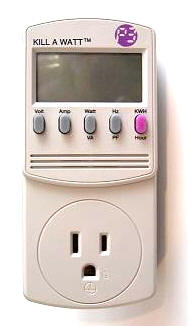
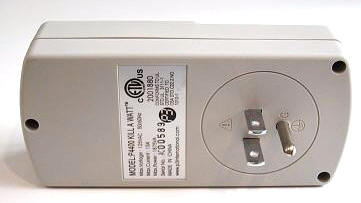
The Kill-A-Watt (KAW), manufactured by P3 International, is 5″ tall x 2.25′ wide x 1.5″ thick (not counting electrical prongs) and weighs 4.6 ounces. The bottom front portion contains an electric plug receptacle, and the bottom rear has a typical US three prong (grounded) plug. The device is intended to act as a meter, going between the item that draws power and the power source – a typical wall outlet.
In order to determine which information to show from that which the KAW has gathered, there is a 2″ (measured diagonally) LCD screen as well as five rubberized buttons.
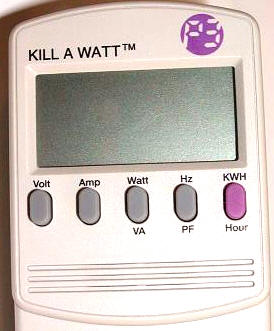
The buttons are marked, from left to right: Volt/Amp, Watt/VA (Vrms Arms), Hz/PF (Power Factor), KWH/Hour
Under the row of buttons is a simple speaker that will chirp when a button is pressed (and the KAW is plugged in).
To begin using the Kill-A-Watt, you simply plug it into a wall socket and then insert the plug for the electronic device that you wish to monitor.
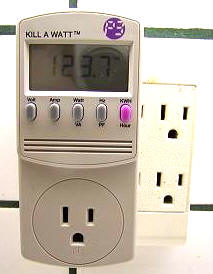
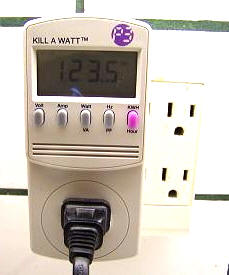
According to the package documentation, the Kill-A-Watt’s LCD will display all meter readings: Volts, Current, Watts, Frequency, Power Factor, and VA. The unit will start to accumulate KWH and powered duration time (hour) after power is applied.
For the purpose of this review, I decided to monitor the TV in our kitchen, which is always on when anyone is in there. I figure that except for during the holidays, when cooking can be an all day affair, we probably don’t spend more than two hours total in this room per day. So for this review, I left the TV on from 1:30 pm to 3:30 pm. Here are my results…
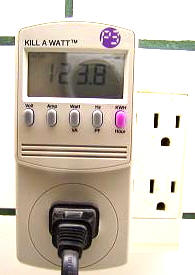
123.8 are the volts shown when the TV is plugged in and turned on. This is a true RMS (Root Means Squared) Voltage display…
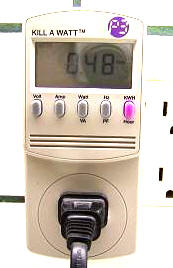
0.48 is the Amps, which is the true RMS output current …
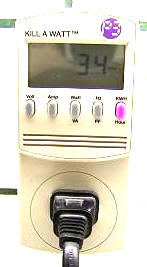
34 is the Watt meter, or active power…
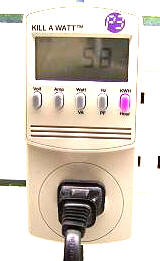
58 is the VA (Vrms Arms), or apparent power…
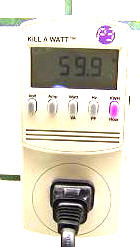
59.9 is the HZ, or frequency of output Voltage…
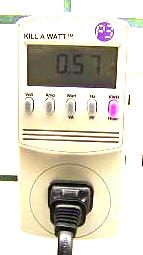
0.57 is the PF, or Power Factor (wherein PF=W/Vrms Arms)…
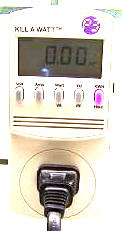
The final button is the money button. This is where all of the factors are figured, and the results are displayed. But before I get into that, I want to mention that when you first use the Kill-A-Watt, time is displayed in minutes and hours (00:00), but after 99 hours have gone by, the display will switch to show only hours (up to 9999). The Kill-A-Watt will start over again at zero when the time limit is reached, and if you would like to reset it and test a different electronic device, you just need to unplug it from the wall outlet for a little bit.
At 1:30 today, my KWH said 0.00, since I had just plugged in the TV. When you press this toggle button once, the “cumulative energy consumption since power was applied to the unit” will be displayed. If you press the button again, the display will show the “cumulative time since power was applied to the unit.” Since I am doing a two hour test, leaving the TV on all the while, I will be able to figure out approximately what this TV is costing me to run – either by the hour (by dividing my total in two), by the day (the two hour total), by the week (two hour total multiplied by seven), month (two hour total multiplied by 365 then divided by 12), or the year (two hour total multiplied by 365).
At 3:30pm, my KWH read 0.06 and the cumulative time displayed was 2:00 hours.
So what did I learn today? By cross referencing my results with my latest online electric bill, I found out the following:
Through my energy provider (TXU), I pay an average of 9.17 cents per KWH (excluding taxes and non-recurring charges or credits). At the end of my test period, I found that I had used 0.06 KWH for two hours. At this rate, it costs me 0.002751 dollars an hour, or 0.005502 dollars to run this TV for two hours a day (my average usage). Per week, I pay 0.038514
dollars, per month 0.1673525 dollars, and per year, the total would be $2.01 – at the rate of two hours usage per day. Obviously, some days may be a little less usage and some a little more, but I now have a good idea of the average cost to use the kitchen television: peanuts, or maybe I should say sunflower seeds. ;0)
Granted, my results were much more dramatic when I monitored our refrigerator for an hour – 0.14 KWH, or 0.012838 dollars per hour to run, which can be multiplied by 24 hours and 365 days to get my true yearly total ($112.46). But the thing about appliances such as those is that you already know up front that they are a big power draw – plus they generally come with a sticker that tells you what their average yearly usage will run. Electronics such as computers and televisions don’t, and this is a great way to find learn.
It’s very simple to monitor just an hour’s usage of any single electronic item or appliance. If you ever want to really know – beyond a shadow of a doubt – what devices are the major contributors to your monthly power bill, then this is the device that can help you answer the question. If you think that worrying about what an hour’s usage of any particular item may be costing you is just too nit-picky, then you can always use the Kill-A-Watt for other things. Its packaging also states that you can detect “voltage drops and brownout conditions before they damage delicate equipment.” You can also use it to test the outlets in your home to be sure they are working, or you can measure the quality of the power provided by your utility company by monitoring voltage (Volt) and line frequency (Hz).
I would love to have a 220V version that could test things like what my air-conditioner or my hot tub are costing me to run per hour…or maybe it is better that I don’t know.
Personally, I found the simple tests I ran today to be eye opening. I can remember how my mom would always say to shut the TV off when I left a room, because it was running up the electric bill. If she only knew….
The Kill-A-Watt Electric Usage Monitor is available from Convenient Gadgets and other retailers.
Price: $39.95
Pros:
Easy to use
Portable
Allows you to pin-point which electronics are sucking the most power
Allows you to figure hourly, daily, weekly, monthly, yearly costs for running an electronic device
Cons:
None – except for the nasty surprises you might encounter as you test various electronics’ and appliances’ power consumption…




Gadgeteer Comment Policy - Please read before commenting
Post your comments here on the Kill-A-Watt Electric Usage Monitor.
http://www.the-gadgeteer.com/killawatt-review.html
Just click the POST REPLY button on this page.
It’s part of my job to analyze utility usage and figure out ways to save money so here are some good ones.
1. AC Make sure the larger diameter line that runs to your AC’s condensor (the part that sits outside) is insulated. That line needs to remain cold to help cool the compressor. A cooler motor uses less electricity. Plus, it’s easier on the motor.
2. Make sure that condenser is CLEAN! Take the top off and use a garden hose to blow anything out that is in those little metal fins. Be careful of the fins, bending them over will reduce efficiency. Dirt is death to AC and cottonwood pollen is the worst. Don’t forget to turn off the AC before you do this, losing an arm to a fan is more expensive than the utility bill.
3. If your AC still turns off on the hottest day of the year, then it’s oversized. A constant run uses less electricity than starting and stopping. Probably not a lot you can do about this.
4. Attic ventalation. A well ventilated attic will make it easier on your AC in the summer. Plus it makes the roofing tile last longer.
5. If you’ve got a kitchen exhaust fan, make sure it’s got a good damper so when it’s off it doesn’t let air out, if you’ve already cooled it, don’t let it out! Same in the bathroom.
6. Fridges and freezers like to be full. If it’s not, put in big jugs of water to fill up the space.
Thanks for the tips – I really learned something, including the fact that our AC is probably oversized. I thought it was bad for an AC to run the whole time, I thought it meant it was either overtaxed or gobbling electricity. I could kick myself for getting a bigger unit than we probably needed last year when we had to replace ours (due to hail damage). Bummer. 😮
At least the other hints are things I can do something about.
Thanks for posting,
Judie :0)
AC sizing is a touchy deal. You need a certain amount of fan for a a give AC size (typically sized in tons, 12,000 BTU per ton).
In a perfect world you see 15-20 degrees of temperature drop across the AC coil. For instance. If your fan is sucking in 75 degrees from the house. The temperature coming out of the duct should be 55-60 degrees. If it’s in that range it’s all good. If it’s less, you run the risk of iceing the coil. This makes the problem worse as it further reduces airflow and hence even lower discharge temperatures and even more ice until the whole coil is iced over.
For maximum efficency/comfort I like to set the house about 75 degrees. That’s warm enough to mimimize the use of the AC while still being a comfortable temperature. Around here it gets to be about 105 on the hottest day of the year. On that day, in perfect world, the ac should run from a little after 10 am until about an hour after sun down and the temperature should never get about 76 degrees. Of course that’s about impossible.
I usually upsize by about half a ton (but no more) assuming that the fan puts out enough air to support the additional cooling.
Most people will waste a little electricity rather than having an AC unit that can’t keep up. 🙂
You can usually do a pretty good guestimate based on house size and location. Assuming modern construction and double pane windows.
I believe the calcs on the electricity consumption for your kitchen TV are incorrect.
…correction… nope they are correct! But I was confused by your mixed use of cents and dollars.
Sorry!
The Kill-A-Watt is definitely a fun gadgeteer’s tool, but I don’t see its usefulness after you’ve tested everything.
Since the buttons and display are already there, why not add a simple digital timer? That way I can use it to turn my lights on and off when I’m not monitoring my minor electrical usage!
I found your calculations to be very interesting. I was just wondering if you also checked the meter when your television was turned off. You may not be aware that TV’s and similar divices consume energy even when turned off. This is to allow them to power up quickly when you want to watch them.
I recently saw a demonstration showing that a TV left off for 20 hours used as much energy as one being watched for four hours. It was very interesting. Cost wise it still might be pennys but overall energy used in a large city must be outstanding.
sparkleclown – I did not try that test and I no longer have the device – but if what you say is accurate then…wow. I wonder how many other electronics do the same thing? Interesting stuff!
Judie :0)
For products that cycle, like refrigerators, heaters, air conditioners, the length of the test should be much longer than a few hours because the running time will be different during part of the day or part of the year.
Refrigerators will use a different amount of electricity when the door is being opened more often than when not. It will also run longer when the house is warm than when cool. So to really know how much electricity your refrigerator is using your test should be at least one day long, and should be repeated in different seasons if the house is warmer at times than when cooler.
In general longer tests will more accurately reflect your true cost than shorts tests.
My biggest disappointment with Kill-A-Watt is that it will not work with a modified sine wave inverter. I’m installing a wind turbine to supplement electrical use in my home, and had hoped it would help me track energy use. Unfortunately when connected to the inverter, it says the frequency is DC and will not work. On regular AC power it works very well, and I’m pleased with the performance.
Thanks Judie for the detailed review. It was very helpful. I’m going to order this product, but would also really like to monitor the direct wired items – which are also probably the big users (HVAC, Pool Pump & Filter, Solar Hot Water Heater (back up is electrical), etc. Does anyone have any ideas on this? The only thing I can figure out is IF the item is on a circuit breaker alone, you could turn everything off except that one CB and do a reading on the meter. But obviously you would need to measure this in large segments of time – probably a day. And that’s not possible.
Anyway, thanks again for the review. I just found this site! 🙂
I just purchased one of these to try to figure out why in the world myelectric bill is so high- I have only used it once for 24 hours on my refrigerator, and now I am starting 24 hours on my sump pump. The problem I am having is that it really doesn’t come with any instructions. I know NOTHING about electricity and am a little disappointed that there weren’t any directions explaining how to do the calculations.
Jaye, did you try following the example I gave in my review to figure out what it is costing you? You’ll need a copy of your latest electricity bill to do it.
Let us know how it goes. :0)
Ohm’s Law is the big one. It states that
Watts = Volts * Amps
So, 120V household current * 5 Amps = 600 Watts. Multiple by the number of hours at 600 watts to get Watt Hours. A kilowatt hour equals 1000 watt hours. Remember, your household voltage will rarely be exactly 120. Lots of houses run 132 or as low as 95. Amps will fluctuate to make up the difference resulting in the same number of watts. For example
600 watts / 132 volts = 4.54 amps. or
600 watts / 95 volts = 6.31 amps
It all comes out in the wash. Assuming your not running some strange frankenstien experiments in you garage, your heating/cooling load will be the biggest energy user in your house. Followed by your major appliances, then lights, then computers/home entertainment. Even silly fast computers running seti@home are only going to draw ~300 watts. Or about 2 light bulbs.
Thanks Gremlin. :0)
Hi everyone. I just bought this based on this recommendation, and if anyone is watching perhaps they can clarify for me.. My confusion is the calculation that was made. I’ll quote the text for ease of use…
So to make it look like my bill I would convert that to dollars: $0.0917
0.06 KWH / 2 = 0.03 KWH used on average..
So this is where I got lost. When I do the calc, I get
$0.0917 * 0.03 KWH = $0.002751 = 0.2751 cents an hour, does it not?
$0.002751 * 14 hours = $0.038514 = 3.8514 cents a week
$0.002751 * 2 hours * 30.4166 days = $0.167352 = 16.7352 cents a month
$0.002751 * 2 hours * 30.4166 days * 12 = $2.01
Can someone check me? To me it seems like the yearly calculation was correct, but everything was quoted as being in cents rather than dollars? I guess after going through this post just now I think my confusion was when he said 0.002751 cents an hour, I’m thinking a 2/100th of a cent, not $0.002751 which is 2/100th of a dollar… I can see how other people could be confused too..
yep, you seem to be right. I didn’t catch that mistake earlier 🙂 The reviewer needs to change the cents an hour to dollars an hour and then they are ok.
Hey guys, I just looked at the problem, and I see that my terminology was incorrect. Yes, I should have referred to the numbers calculated as dollars, since I was using decimal points (although it made perfect sense to me at the time -ha!). Mea culpa.
I’ll go back in and correct the review. :0)
Interesting read on that gadget. The test you did on the refigerator needs to be longer then 1 hour. The reason for that is, the defrost cycle has to be included in your calculation of how much it costs, and adds a lot to the total cost of running it.
Since I own a HVAC and Appliance business that gadget has peaked my interest, need to get one..lol
Also someone mentioned it not working on a modified sine wave converter, let me state to anyone thats interested in such a device, I highly reccomend a full sine wave converter unless your only interested in some basic electric usage. Many devices you would plug in to a wall socket will not work properly, including many of the wallwart chargers, and may damage the equipment your trying to charge.
There is a good reason why full sinewave inverters are more expensive.
Roy
I am trying to determine why my KWH usage is so high. I understand that the price per KWH has soared over the past year but I am hoping to rule out the 110 volt appliances around the house before I call in a high $$$ electrician. So far, I have narrowed the cause down to my heat pump. I was able to just about rule out the hot water tank by monitoring the amps used on each hot lead going to the tank. Unfortunately, that involved watching the load for 15 minutes and manually timing the duration of usage.
I agree that the KAW meter is a great tool for monitoring my appliances, but I think that a simple users’ manual would be very helpful. It seems very straight forward for an appliance that is operating at full load while you are monitoring the flow of electricity to it. However, I don’t think that the usage is as clear cut for an appliance, such as a dehumidifer, that creates a load periodically.
I’m guessing that to calulate an average KW per Hour, you must divide the recorded KWH by the recording time span. Am I correct?
[QUOTE=Judie]I thought it was bad for an AC to run the whole time, I thought it meant it was either overtaxed or gobbling electricity. I could kick myself for getting a bigger unit than we probably needed last year when we had to replace ours (due to hail damage).
Your heating and air company should have advised you not to install a bigger unit than normal. An oversized unit runs less than a correctly sized unit, but that means it spends less time filtering your air and removing humidity. In areas where humidity is an issue (as it is here in central Florida), an oversized unit won’t run enough to control the humidity and even when the temperature is right it won’t be comfortable. In fact, I know your post is old at this point, but for other readers who come along late, the modern, top-of-the-line heat pumps now have the ability to run longer with less cooling specifically to do a better job of controlling humidity.
I just have one question…Is this device made here in the U.S.A or in Communist China? If it is the later, then I’m not buying it!
If you have any readings that you’d like to share, I’d appreciate it if you can add them to http://www.thewattdb.com .
The concept and the function of a watt meter is great. But can you trust the reading from this meter?
The reviewer observed that “At 3:30pm, my KWH read 0.06 and the cumulative time displayed was 2:00 hours.” for the TV during ON state.
This reading doesn’t sound believable. It indicates that each hour the TV runs like a mere 30W light bulb (0.06 KWH means 0.06 kilowatt hour or 60 watt hour, so divide by 2 hours, it means 30 watt power rating). Remember this was not measured when the TV is off, but when it was working.
Maybe should go for more expensive brands?
Judie:
1
Kill-a-Watt is a GREAT product. Simple to use. Not cluttered. Like Einstein said: “something should be simple, but not too simple.”
2
GREAT price point.
3
PROBLEM. I can only find ~1/2 the KWH on my bill. I have detailed my regrigerators’ usage, my waterbed heater, my PCs, my displays, my cable box, my projector, each carefully weighted by time usage. Now I’m worried that there may be a meter innacuracy or a short somewhere. I know that this segway is off topic — but I’d appreciate your pointing me to any relevant forums.
4
I love the gadgeteer. It has helped my choose several PPC purchases, etc.
Thanks!
Henry Robbins
Keep in mind that the manual for the Kill-A-Watt indicates that you should let your tests run for a “period of time” (“the longer, the better”) to get a “true indication” of actual usage of an appliance, which means that such appliances that cycle on and off could take up to a month to determine an accurate power consumption rate, in order for you to see how much energy you’re using in a year. So, depending on how many items you have to test in your home (and how many others you buy throughout the year and test when you bring them home), it may take you almost a year to find out how much it’s costing you.
Upon reading the users manual for the Kill-A-Watt EZ P4460, it indicates that it uses 10Watts, which comes to 87.6KWH per year. At a low rate of 14-cents/KWH (in my area), that comes to 12.26/year.
(Reference: http://www.ccrane.com/instruction-manuals/kill-a-watt-ez-P4460.pdf – I couldn’t find the power consumption info for the P4400)
So, to find out that your microwave oven display clock is costing you $2/year or a 4W night-light is costing you $3/year or that your 5W desk lamp is costing you $6 year (if these were all left on 24/7), you have used more power trying to determine how much you can save, than it cost you to determine the costs of those units.
When you’re doing your cost analysis, don’t forget to add in the $20-$40 cost of the unit… after all, those pennies add up. Has anyone asked how much energy the manufacturer is using in a year, to build these units? How much is this adding to the “greenhouse effect” on the Earth’s environment.
And while we’re calculating the costs to the consumer… it would be interesting to find out if the company received any federal grants to design & build the device and if they get tax credits/deductions for their contribution of an energy-saving device. If so, then we would have to determine how much this is costing the average taxpayer each year.
How much would we all save if we threw out our computers? Instead of sitting here reading about how much energy we could save by buying one of these units and unplugging our microwave or toaster when not in use. Of course, that would lead to more landfill rubbish and the environmental problems that would cause… and the cycle continues… I guess we’re doomed?
Wow Jim, your a nut case.
Im going to buy one just because you said that.
To HRhotrod: Probably the other half of your energy usage is in such things as water heater, range, clothes dryer, other laundry equipment, lamps and ceiling lights, doorbell transformer, cable boxes or modems, electric clocks and of course heat and AC. Your heat and AC also have tranformers which are “on” constantly so that the units can respond to the thermostat.
As another reader mentioned, there are many things that even when not turned on, are not technically “off”, because they’re in standby mode, just waiting to be powered up by remote control or the push of a button. Most of these devices can be unplugged or connected to a switched power strip. The biggest money savers for me were replacing fitting the lights I use most often and for long periods of time, with compact flourescent bulbs AND using an outdoor clothesline in good weather.
Also bear in mind that today’s detergents are formulated to work just as well in cold water as in warm or hot. Water heaters gobble up lots of electricity.
Has anyone made a list of common appliances/devices and there average cost?
I want to know what an oil furnace burner costs to run.
Reply to smhse. Regarding where the product is made. Yes, it’s made in China.
So if you are boycotting Chinese made goods, you should not buy this. And also you may want to throw away half your clothes, and rip out many of the electronic parts that are in your car causing it to be inoperable. Gut out your TV and computer. Move to a farm and produce everything on your own. Do not shop at grocery stores as many of the foods produced and shipped use equipment and electronics from China. Good luck.
Regarding the product… I’m going to buy one.
Warranty on this unit is only 6 months. It’s not well posted by the reseller sites (but it’s in the manual). Many many positive reviews for the product but on any item like this it’s often important to pay attention to those that claim it is often inaccurate or loses accuracy as time goes on. I am not claiming those things but after all the effectiveness of this product is lost if the readings can’t be trusted.
It’s an affordable product but to me is like a portable Breath alcohol content analyzer – When calibrated and working within specs its a good “guide”…but never admissible in court as fact as a booking stations much more expensive well calibrated machine is… So if you find a troubling reading might need a second opinion.
P.S. they have had a newer model out for a couple of years now that has a battery back up (for memory) so you don’t loose data if unplugged etc. P4460 but I dont’ think they fixed the display / lighting issue and it’s about $20 more.
P.S.S. Earth to Jim… you aren’t supposed to keep this thing plugged in for 365 X 24hrs a day to test a night light (you can accurately test a night light in an hours time as it’s a constant power draw)… BTW, I just replaced my night lights with .3 Watt LED versions – Much more light and less than 1 Watt of power. Jim my night lights also “claim” 4 watts but some drew more than 8 Watts.
And that’s so true of many items Jim; like TVs list “MAX” wattage. Because they can’t possibly know the true power draw once a TV is configured. So a 200 Watt Max rated LCD Big screen might actually use 120 Watts during the day and less at night when the Brightness is turned down to a lower but excellent viewing level… You can’t just read the ambiguous labels they put on an appliance and expect it to be accurate for all of them…or to account for appliances such as a refridgerator or an AC unit that can cost more as they age/become dirty.
Most of the time these meters should stay unplugged. BTW I didn’t buy TWO meters to test the second one but the 10Watts listed is MAX wattage…If your comments weren’t so silly I’d pull out my voltage meter and find out exactly what’s it’s drawing just to say nana boo boo!
Bought a Kill-a-watt.
My Dell laptop pulls 27 watts when charging.
My Dell PC with 17 inch flat screen monitor and 2 internal hard drives and one external hard drive pulls 130 watts on average.
At work I took a 22″ flat screen monitor and plugged into the Kill-a-watt and it only pulled 26 watts at medium brightness.
I love this thing!!! Also at home depot you can get an amp meter that you can put around the black lead on your large appliances–at the breaker box. You can the figure out how much it pulls at that moment, not over time like the Kill-a-watt but should give you an idea. Experienced persons only, don’t mess with your breaker box otherwise!!!
A more obtuse way of figuring what’s wasting energy is just to get a feel for how much heat its creating. The energy used can’t just disappear. Some of it may get turned into light, or kinetic energy but ultimately that will end up as heat as well. For example my fridge is actively blowing hot air out from underneath so its definitely a power hog. An incandescent light bulb cools passively with a small surface area, but its still too hot too touch. My old laptop charger cable had a converter on it that got searing hot so it was probably wasting as much energy as a low wattage light bulb, my new one gets lukewarm so it must be more efficient. Etc.
Stephen —
That’s not obtuse at all, it’s smart. While it doesn’t give you a number, it costs $0, no s/h, no packaging, no manual and no fishing it out of the closet. It’s also a good way to determine whether to bother unplugging wall-warts etc.
I recall a quick-thinking tech who used that method to check if a router was bad. The wall-wart was cold, which led us to isolate the problem in another 30 seconds.
HM/Stehen
Love hearing two smart people talking. So much bullshit around these days.
It sound like a useful device that is pretty accurate, and for $25, I’d buy a couple. I’m an EE and and an ex-physics grad, so I do understand all of the basics, but its a PITA that folks who build the appartments where I live (Hong Kong), and most of the appartments in Asia pay no attention whatsoever to energy conservation.
Out here, the main problem is heat. If its 30C all year round, then the main cost of life after paying the rent (building) and food is the cooling, ..the aircon!I have a batchelor falt that is little more than 200 square feet, but all the aircon can do is keep it dry and one or two degrees less than the outside air temperature. That means an appartment ambient of more than 27C for 6 months of the year with the aircon full on.
Compare that to a house I have in Europe that was 2,500 square feet? Bizarre thing was that was cheaper $ for $. Cheaper to cool 2,0500 square feet than 200 degC by degC. So the Hong Kong style buildings where it is just pure concrete with zero insulation, are costing me $100 a month instead of $10 per month.
When I complain to my landlord, he can use a weak excuses: “You leave the lights on to much(Yes, but all are fluorescent)”, “You cook a lot at home (true, but microwave covers half of it, and there the consumption is almost nil if you average it out over a year). I can just here the idiots saying “you don’t realise how much your TV costs “(zero, I don’t have a TV), “and the cooking” (2KW at say 1 hour per day, I can calculate that pretty easiily).
If I look at the real answers, I can estimate, roughly (+- 5%), that cooking is about 10%. Aircon is about 85%. The rest is the bits and pieces, mostly PC related. Lighting is irrelevant when flourescent tubes or bulbs are used.
At least when the idiots say “you consume to much, you should be careful”, then I can wave the $25 box in the air and say “That’s wrong, I have the proof on spreadsheet, next question?”
Commons sense and a bit of learning helps a lot. But, in the end, a black box can talk harder!
I’ve had a KAW for about 2 weeks. I first used it to measure a 35 year old chest freezer that I found was using over 1600 kWh a year! I replaced it last week and after 2 days the new one has used .20 kWh (35 kWh per year). If you assume a cost of $.09 which seems common then I will save 1565 x $.09 = $140 per year and I get the cost of my $600 freezer back in 4 years. My new freezer is rated at 357 kWh per year which is 10 times what I measured with my KAW but it seems to only draw about 80 watts when running and won’t run often if kept full and closed. Even if I use the entire 357 kWh as per the rating, I save about $112 a year for a payback period of less than 6 years.
I also measured my 5 year old desktop computer which draws about 190 watts. It drops to about 10 watts when powered down and only to 0 if unplugged. I have an Asus netbook that draws about 13 watts when plugged and running on AC. Now I tend to shut off my desktop most of the time except when I want to do some more serious surfing, email, or when updating files I want to keep secure (I have USB backup drives for the desktop. I use the netbook to check email or stock markets throughout the day, saving about 160 watts per hour. It also shows the value of shutting off the PC when not in use. When mine goes into “standby” it still sucks up 145 watts (the saving is mostly the LCD monitor in save mode).
I have no idea if my frig., 10 years old is worth replacing? It shows .19 on Kwh and 174 watts with 2.4 amps and 120.4 volts. Can you help?
Incidently, this is while running.
We used two Kill-a-Watts to compare Christmas Lights.
http://www.grimaldielectric.com/services/green-tips/97-holiday-and-christmas-lighting-led-holiday-lights-versus-traditional-holiday-lights.html
My Kill A Watt was killed last night. Was using it to measure the KWh of my resistive heater and this morning a horrible plastic smell in the room. There were burn marks on the front plug pins. I had the heater on the 1500W setting and the KAW says max 1875.
I suppose it could have been the plug from the heater, it’s also burned black on the contacts.
Fredrick,
I don’t know how long you have had your kaw, but mine ended up having broke the pins from the internal circuit board after about 5 years of ownership hard use. I had used a short 1 foot long right angle with swivel jumper cord for better access to outlets behind fridges and furniture. I don’t know if the cord broke them, or if it was just wear and tear. I’m ordering 3 more units, but a mix of the 4400 and 4480 ( the newest unit) with graphic display. The 4400 has been fantastic, I found a problem in my friends business that was burning out their refrig. units due to over voltage. When the power company guy showed up,
he pooh-poohed my unit-said he would hook his up and get a true reading of voltage–mine was .1 number different- he was impressed then. His meter was $400.00. Mine 22.00 at radio shack closeout years ago. I would not use this unit for a long term (anything over where I was not watching it) for a heating type appliance. Sorry this was so long.
Ahhhhhhhhh!!! HELP? My electric usage went up 2 – 3 times more than last year. I’ve done what the electric company said to do and determined during my investigation that my 20 + year old refridge needed to be replaced and that my hot water heater had passed it prime 6 years earlier. Upon replacing them, my usage and bill went down, but my usage is still at least double than the years before. We keep our home at 65 during the winter and still we’re getting gouged. What culprit/s should we look at more closely?
Thanks, Gouge-o Marks
@Mark – I think the culprit is the neighbor…
I just bought an item on ebay listed as
18KW Power Saver
it claims to “use a state of the art electrical technology to actively monitor and improve the power factor of electrical appliances ,suit for household or office.”
so, it claims to improve “power factor” (PF=W/Vrms Arms)
This will make the most difference in . .
Electric motors
Fluorescent bulbs
(probably) bad connections in heating device thermostats
A brief explanation of how it works is here.
Anyone have comments or experience with this?
NIST Team Demystifies Utility of Power Factor Correction Devices
http://www.nist.gov/eeel/quantum/power_121509.cfm
I would suggest this to undercomplicate the entire process. Use this guy on your big electricity consumers like lightbulbs, appliances, and then the smaller ones if you are really trying to cut costs. Write a quick chart of how much each one costs to run for an hour. Pick the ones that look particularly nasty and go buy some garage sale stickers (the ones with different color dots). Red for big consumer, Orange for medium, and Yellow for small. YOU decide which is which. Then you can use the thing just to try out different combinations later.
I think the Ted 5000 is a great thing to own as well. You can connect it to Google PowerMeter to track it on a daily basis.
I have even connected it to a game for my kids to teach them how to be more energy efficient.
ttp://nexus.kumagames.com/portal/welcome/t5000
Great news.. our local library in conjunction with Xcel Energy have 40 Energy meters available for use for free. 2 week check out period. If Xcel Energy is your provider, you may want to check with them directly or with your local library to see if they have these available (their versions hook into your computer too!!!).
For those of you on the west coast, this device (the P4400 model) is now for sale at Fry’s for $14.99.
Are we pulling power when an electric object is plugged in but the switch is not on the ON position?
Well it is funny to sit and read all the comments that everyone has left regarding the Kill-A-Watt. first of all let me just say that I am an Electrical Eng with 30+ years in the business. Let me just point out a couple things. First of all these little meters are quite accurate and they will remain that way for many years I have 2 of them and the old one that I have had almost sens they first came out is still with in one digit +- of the new one that is only about 2 years old. The intended use of this instrument is to give an indication of real time power draw. For most devices this this is a relatively constant value. Which means that you plug the device in take the reeding. Do the math Watts X Hours = Watthours X 1000 = KWH. And if you already know the wattage of a device you don’t need the Kill-A-Watt to figure out how much it will cost you to run that device for a month. Example 100 Watt light bulb
you burn it an average of 5 hours per day. 100X5=500X30days=
15000/1000=15 KWH X $0.0917= $1.3755 or $1.38
Where the KWH counter comes in handy on the Kill-A-Watt is for things like a Refrigerator, Coffee maker, Crockpot, Electric blanket, Water-bed Heater, things that have a thermostat and randomly cycle on and off. But for an accurate reading you need to leave it plugged in for at least a weak. Power to run the
Kill-A-Watt on a 4400 is 0.947 Watts. And to answer the other question. About things being plugged and turned off. If it has a remote control yes it takes power. In most cases less than 2 Watts the secret killers is the Cable or Satellite DVR’s mine draws 37Watts 24/7 when off 43 when on and it’s not a HD model. I have herd that some are lot worse than that. Also anything with a clock in it like your Coffee maker Microwave etc. Also Computers unless you turn off the little black rocker switch on the power supply on the back of the computer it draws power, only 3-4 watts, but when you add it all up. There is between 40-90Watts draw when no one is home and that don’t count the Refrigerator.
I am trying to figure out how to find out what my spa costs, it is 120v 11.7 amps and 60 hz.
and where did you get the .0917 number above? Just curious cuz i was trying to apply your formula to my situation! thanks.
To cristina lazaro
The .0917 number is the electric rate from your electric bill. A 1000 watt load run for 1 hour will cost you $0.0917 or 9.17 cents.
As for your spa 120 volts X 11.7 amps = 1404 VA or 1.404 KVA
kill a volt amps. If it were a purely resistive load that would be the same as the watts. But sens it is a spa that involves a pump which means an electric motor. An electric motor is an inductive load. To find the actual watts you will need the power factor. That will normally be printed on the motor data plate. It will normally look something like “PF .86” although the number will most likely be deferent. Once you have the PF you are ready to proceed.
120 volts X 11.7 amps = 1404 VA X .86= 1207.84 watts X the hours you normally run the spa example 4 = 4831.36 watt hours or 4.83136 KWH X the rate that you pay from your electric bill $0.0917 = 0.44303 or $0.44 per day X 30 days = $13.20 a month if you use it every day. Otherwise X the actual number of days you use it in a month. The Kill-A-Watt just solves all the math for you and tracks actual Volts, Amps, Power factor, Watts.
Sens it can vary from the data printed on the motor.
Hope this answers your question.
It’s the power company that’s gouging us. Ever notice the month after Christmas how high your electric bill is regardless of whether or not you ran Christmas lights? I am convinced the meter has a device built into it that is reset by the meter reader. Why else would the electric company not have gone to remote meter reading like the water company did so many years ago. I got into a telephone argument with one of the electric companies representatives a few years ago over the fact that my meter was old and needed to be replaced. Eventually the argument became heated and he told me that he wanted to fight me and would be down my house later that day. I told him to bring it on. He never showed but my meter was replaced a few weeks later with one that I swear gives the wrong reading every other month, showing up in my electrical bill. I was once charged over 10,000 kilowatts! I live in a fifteen-hundred square foot non electric house. I told the electric company but they were no help. They want me to prove that their meter is not working correctly by paying an independent electrician of their choice to come out and wire some device to my incoming lines to see how much power I’m consuming in a month. I asked if I would be reimbursed for the electrician and the past billings if their meter turned out to be wrong and the person said no. I don’t have the three-hundred dollars to prove them wrong and probably be lied to in the first place by their selected electrician. They will not believe any other independent electrician except the one they choose. I’ve purchased the 4660 to conduct my own test. It may take me a year but eventually I will have my proof and then I’m going to hire an attorney.
Let us know how that goes vinnie! 🙂
I really appreciated you explaining how the kill-a-watt is to be used, I tried the manual and was a bit lost , it doesn’t explain the amt. used divided by the time very well. I like the meter, maybe you need to explain things for them in the future, considering the popularity and how times electric companies have used this to show people how to figure this. Thank you, I shall use this for quite a while.
Also Posted at: http://electronicdesign.com/Blogs/Communique/tabid/731/entryid/182/Default.aspx
What needs to be done is have someone run an experiment. Take four Kill-a-Watt (KAW) metering devices with battery back up, One power strip with out surge suppression, one power strip with surge suppression. Two manual vacation electrical timers. Four table lamps or floor lamps two with CFLs and the other two with incandescent bulbs. Plug the lamps into the KAWs then plug 2 KAWs into each power strip one CFL and one incandescent into each. Plug the power strips into the timers then plug into a wall outlet.
Set the timers to cycle on and off, on for about 3 hours and off for an hour, throughout the day. Then let them run until one of the lights burns out. Then compare the total electricity used and the cost of replacement light. Probably will be the CFL since they last longer being on instead of being switched on and off. You can also simulate them being in a bathroom by cycling them on for 15 to 30 minutes and then off for 30 minutes to an hour. Do that for during the day and then leave on overnight as a night light. This will give a good indication of which is better in terms of usage.
I seem to be getting on this board late, but I am so lost right now. I have had my refrigerator running for 17 hours with the KAW plugged in and it reads .78 kWh. Is that a number I need to divide by 17, or is it the average? Is that high because it seems to be to me, and my fridge is over 10 years old.
THanks for your help.
Hi,
I bought a EZ p4600 kill a watt meter to measure how many watts my 48v battery charger would use to charge the battery on my electric bike While it was charging the watts could be read. However when fully charge the charger goes into trickle mode and the information is not retained. Is there a meter on the market that would retain the information when unplugged and reinserted in a different power source? Regards Herby
I would not leave the Kill-A-Watt plugged in for an extended period of time.
Most plug in Hybrid users have discovered they melt at 12 amps continuous.
I have pictures of mine… but you can google it.