
Product Requirements:
Device:
PC or MAC with a USB 1.1 or 2.0 port
I’m a tea drinker and have been since I came out of the womb. My mom would
fix us hot tea every morning for breakfast (good old Lipton) and we would then
have iced tea for supper. It’s no wonder that now, every morning at about
8:30am, I make myself a cup of hot tea. It doesn’t matter if it’s Spring,
Summer, Fall or Winter, my day wouldn’t be complete without a cup of tea. The
thing is though, I’m a sipper, not gulper. By the time I drink the last drop, my
hot tea has turned into cold tea… bleh! So, when
Brando sent me the USB Cup Warmer,
I was anxious to see if it might keep my tea warm to the last drop.
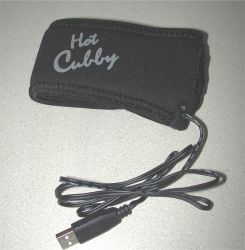
The USB Cup Warmer is a black stretchy neoprene 11.5 inch wrap with a 38 inch
USB cable extending out of one end. A 2.5 inch cutout to allow for a coffee cup
handle is located on one end of the wrap. The idea is that you slide the cup
handle through the cutout, then pull the wrap around the cup, where it is held
in place with Velcro. In practice, the wrap fit my standard sized mug perfectly
snug.
You then plug the USB connector into a free USB 1.1 or 2.0 port on your PC or
MAC computer, where it will draw enough power to warm the wrap and the cup that
it is enclosing. By the way, it’s a good idea to put the wrap on before
you fill the cup up with boiling hot water. Wrestling with the wrap while the
cup is full, is a good way to spill hot water on your hand… ouch!
The Cup Warmer does not require a driver or any special computer settings. As long as
you plug it directly into a free USB port and not a hub (unless you have a
powered hub), it should be a simple matter of plug and play.
Of course, I wasn’t going to believe the colorful chart printed on the
packaging, which said that the wrap would maintain the temperature of a hot
beverage at 40°C (104°F)
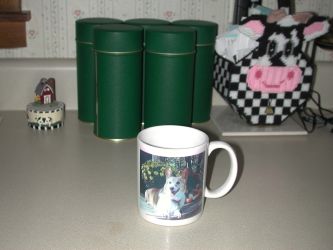
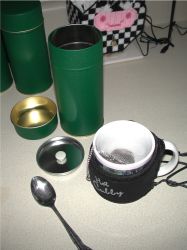
after one hour, I had to see for myself. So, I washed up my favorite mug, filled
a tea ball full of Orange Pekoe, put a
kettle of water on the stove and waited for it to boil…
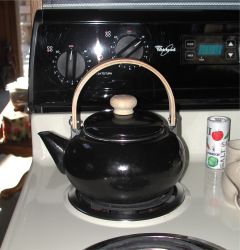
You know the old saying: a watched pot never boils… It seems
to be true!
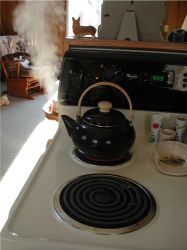
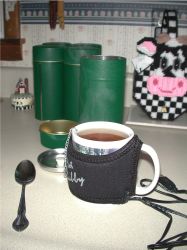
Of course, it finally did boil. After which point, I poured the boiling water
in the cup, and let the tea steep for 3 minutes.
When the 3 minutes were up, I used a cooking thermometer to check the
temperature.
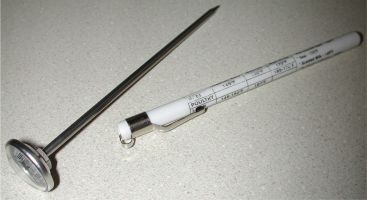
I recorded the reading, set the timer for 5 minutes and continued to record
readings at 5 minute intervals.
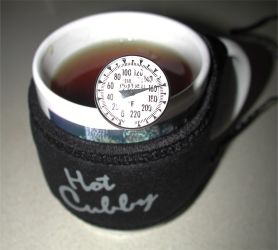
For the first test, I didn’t plug the Cup Warmer into the computer. On the
2nd test I did.
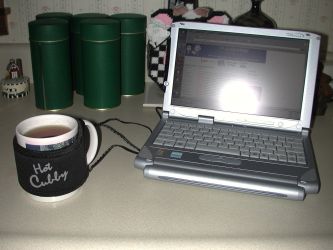
Here are the results. The test was done in a 74°
room.
| Time Elapsed | Beverage temperature (Fahrenheit) without Cup Warmer plugged into USB port |
Beverage temperature (Fahrenheit) with Cup Warmer plugged into USB port |
Actual impression of temperature |
| Begin | 160° | 160° | Scalding |
| 5min | 152° | 148° | Very hot |
| 10min | 142° | 138° | Hot |
| 15min | 131° | 131° | Very warm* |
| 20min | 122° | 125° | Warm |
| 25min | 112° | 120° | |
| 30min | 107° | 117° | |
| 35min | 102° | 113° | |
| 40min | 98° | 110° | |
| 45min | 107° | ||
| 50min | 105° | ||
| 55min | 103° | ||
| 1hr | 101° |
* optimal drinking temperature (for me anyway…)
As you can see from the readings, when the wrap wasn’t plugged in, the
temperature dropped approximately 10 degrees every 5 minutes during the first 25
minutes. However, when the wrap was
plugged in, the temperature dropped at a slower pace. True to the packaging, the
wrap kept the liquid at approximately 104° (or 101°
in my test) after 1 hour.
Here’s the thing though… 101° is not really
all that warm. At least it doesn’t seem very warm to me. Maybe lukewarm.
Another consideration is the length of the USB cable. People that have their
USB ports on the back of their desktop machines will probably be unable to drink
from the cup without pulling the cable out of the PC. Notebook users will have a
much easier time though. I would prefer if this product was a hot plate type of
warmer instead. That way you could just set your cup on a heated base and lift
it off when you needed a sip.
The USB Cup Warmer is a novelty more than anything. Although it will keep
your beverage somewhat warmer for a longer period of time, it’s up to you to
decide if warm is warm enough.
Price: $10
Pros:
Use for USB port other than something computer related
Inexpensive
Plug and play
Cons:
101 – 104° really isn’t that warm
Product Information
| Price: | 10.0 |
| Manufacturer: | Brando |
| Pros: |
|
| Cons: |
|

Gadgeteer Comment Policy - Please read before commenting
Post your comments here on the USB Cup Warmer review.
http://www.the-gadgeteer.com/usb-cupwarmer-review.html
Just click the POST REPLY button on this page.
Julie,
One additional test would really let us know what effect the USB portion of the device has on the situation:
How about running your test one more time, using the wrap on the cup, but without plugging it into the USB port?
Mikey
Mikey:
If you look, I already performed that test. It’s the first column of the results table 🙂
Oops! Your’re right. I assumed the first column was the cup WITHOUT the wrap.
Julie, I bet it would be kept warmer on a desktop machine. Desktops have more available power than a laptop.
I could try another test… But it appears that 101-104 degrees after 1hr is what the warmer is rated for, and that is what it was able maintain on my notebook.
I’m just trying to decide whether the warmer is kitschy enough to be fun or if it is just completely silly… I’m leaning towards silly.
If you have a problem with beverages cooling too fast, just get a proper insulated mug. Then you’ll have the problem of beverages not cooling fast enough, so you burn the lining off the roof of your mouth regularly, like me. 😉
I noticed that when you tested the mug warmer, you were using a laptop. Laptops are not always a reliable source for testing USB devices because most manufacturers trim down the mA output to USB ports to save battery life; I know this because I am a tech and deal with this on a daily basis. Front USB ports are also unreliable because some do not have the +5v-5v connected, thus lack sufficient power output. All in all, when testing USB devices it’s better to test them on a desktop, or if you only have a laptop, plug it in to the power supply, also disable power settings in windows control panel. It would be interesting if the tests were done on a desktop to see if the results are different…
Josh
That is without a doubt THE singlemost ridiculous, pointless and poorly-conceived computer-related hardware product I’ve ever seen.
Okay, but what did you really think about it?
sorry, I couldn’t resist! 😉
Judie :0)
My engineering intuition tells me that they should have used thicker insulation. I’ll bet if you ran the test without the thing on at all, the results would be similar to the unpowered results. In other words, a simple insulated cup might work better.
Perhaps plugging into a powered USB hub would guarantee 5V, 500mA (per USB specs) – 2.5W of heating power, whoo hoo!
I guess it would be great if you had a favorite cup with a neat design painted on it. Oh wait! It covers up any design that might be painted on the outside. 😉
It might work better if you used a cup like the gift shops sell…one of those that comes with a porcelain cover/coaster.
Think I’ll just stick with my insulated cup. Interesting idea though!
i thinik this product would be better if it was a hot plate like julie siad, but mostly because i can imagine someone getting the wire caught in thier mouse/speaker etc wires from the abck and suddenly theres tea on the computer.
i lost several keyboards in college this way.
well it was to beer, not tea, but its the same general idea.
Good review. You were honest about it not being too warm after a while. I have been totally frustrated in finding a way to keep coffee warm for very long – insulating cups, coffee warmer plates, etc. Two days ago found the answer from Sharper Image. You insert a metal cup into a holder and push the hot button. Keeps drinkable for hours. Also does cold with the metal cup or even a soda can. Keeps a multitasker like me from microwaving the cup over and over. $49 + shipping.
John
digital843:
Do you have a link? I’d like to check it out.
Another night owl! http://www.sharperimage.com In SEARCH type
Hot+Cold Beverage Holder (or just “coffee warmer”)
John
That product looks pretty interesting. I’m not sure I’d want it sitting on my desk though. It looks pretty big. How hard is it to remove a can of pop?
I do not usually have soda at home in a small can but I’ll get one and let you know. The coffee holder – like a smaller thinner car cup – lifts right out. It is thin enough so that only the bottom actually touches the bottom, not the sides.
John
I switched the beverage holder to “cold” and inserted a soda can. Like the coffee cup it fits snugly but not tightly and is easy to remove as about 1″ of the can extends above the top of the holder.(even easier when flip tab is up)
I left a can cold from the fridge inside the holder for an hour and it came out frosty cold. I opened it and left it for another hour and it also was just right. I actually believe both hot and cold settings make liquiids a little bit more so than when inserted but not uncomnfortably – very nice.
Hope this helps.
John
I think this is just about the funniest product I have heard of in a while. A great gag gift, though not as funny as the home grown “Ready for Windows 95” fly swatter (it had an ethernet cable attached to the handle) that a friend gave me a few years ago.
On the serious side
I’m really curious to know hotwhat this does to the battery life on your laptop…
Completely mystified by last message. This is a kitchen product. Has nothing to do with laptops. I have found it very practical.
digital843:
It’s a USB product, so it requires a computer / laptop in order work….
Actually the one that Ditigital is talking about isn’t USB based.
From Sharper Images web page:
But I don’t think ctdahle was talking about that product.
Anyway……………
I was talking about the USB powered cup warmer that Julie reviewed in February. That is what lead me to this thread.
I’m just trying to learn my way around this board. I’m sorry if my post was out of line.
Cheers,
Chris
ctdahle:
It wasn’t out of line at all. You’ll find that we’re all friendly around here. Welcome! 🙂
Oh, I didn’t think post was out of line either. I could see that we were talking about two different things. I just received the notice there was a new post and saw it came right after mine so didn’t completely understand. And yes, all are very friendly.
I’m surprised no one has ever marketed the cup warmer to work with the cup holder that’s in almost everyone’s computer. Maybe route the cable inside to one of the internal USB ports, and to make it really swift, have it come with a software routine that keeps the cup holder from retracting while the warmer is on.
That’s the one problem I have with those cup holders: I keep tapping it accidentally when the cup is still there, and it spills coffee on the front and inside my computer. Once it happened when I was drinking hot chocolate. Now THAT was difficult to wash out (especially because the CPU fan kept spraying the chocolate and the soap suds all over the place)!
I remember that story, I believe it was an AOL user that thought their CD-ROM drive was a cup holder, and broke off.
Although it’s completely false (a cup is nowhere near heavy enough to break off a tray), it was pretty funny!
What I am looking for is a BATTERY operated cup sized warmer – just like the plugins for the office, no USB. I’d like to take to restaurants when drinking warm beverage so it doesn’t turn so dang cool so fast.
The latest and cheapest USB steel cup warmer
http://www.giftwhole.com/usb-warmer-usb-fan/usb-cup-warmer-112.html
I would like to know how warm the neoprene warmer got. I have another use in mind and it would be used without the coffee cup.
i got a cup warmer for xmas, and it IS the hot plate kind, and I use mine on my DESKTOP PC, not laptop, and it only maintains that 101 for an hour, which i feel is not that great. I previously owned a cup warmer that plugged straight into the wall, same size too, and it kept my cup HOT all day long… Im not sure where people are going to be where they need their coffee to stay 5 degrees warmer for an extra 30 minutes… and fail to have access to an outlet. I suppose if you had a laptop and you were hiking in the mountains, but then you could just do a camp fire, or maybe on a long flight… but who has room for all that when you are crammed in coach anyway? If you are in first class, you get an outlet i think anyways, not to mention… HOT COFFEE FOR EVERYONE!! 🙂 If you ask me, this usb hot plate was a money making scam for last minute xmas shoppers. THE LIGHT AT THE END OF THE TUNNEL is… i cracked mine open, and altered the circuit a bit, to make it get quite a bit hotter except its not all that safe to leave on all day, im not going to share how i did it because I dont want a lawsuit but I will say this, use a heat fuse always, it will prevent fire, and you’ll need to be using a multimeter so you dont fry you pc.
I personally like this product cause it is what i am looking for. where can i buy a couple of them? i want to repurpose them as an onboard warmer for a motorcycle suit that has a warming and cooling tank and hoses controlled with a thermostat to maintain temp during hot or cold weather.
I’m desperately trying to find one of these. Not to heat cups, that’s just stupid. But these would make excellent dew heaters to stop dew forming on camera and telescope lenses when doing nighttime timelapse and astrophotography. Given that all the battery banks nowadays have at least one 5V USB port, these would be the perfect solution. But it seems all of these are now discontinued, can’t find one for sale for love nor money. Such a shame, if only they’d marketed and sold it as a dew heater instead of a mug warmer!
If anyone has one of these and are willing to part with it please reply as it would save me from building one of these from scratch.