
I’ve always been interested in small, powerful computers, and when I saw the Sony U3 advertised in Tokyo, I couldn’t wait to get my hands on one. The dream was short lived, since I did not have $2000.00 for a machine at the time. I consider the Sony U series to be the beginning of the UMPC Revolution!!
Several years have gone by now and I found a company on eBay- Direct from Japan, thats sells new and refurbished units with a 3-6 month warranty. A warranty!?? Yes it true. The refurbished Sony U3 I purchased came with a 6
month warranty. OK- on to the Review.
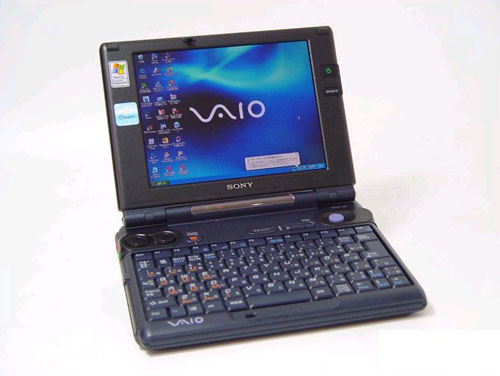
Hardware Specs
Model: PCG-U3
CPU: Transmeta Crusoe processor TM5800 933MHz
Memory: (maximum) SDRAM 256MB(on board) (maximum of 512MB via upgrade) * 24MB used by system
HDD: 20GB (Ultra ATA100)
Video: VGA ATI Technologies MOBILITY RADEON-M 8MB
PC card Type 2×1, also CardBus compat.
Ethernet 100Base-TX/10Base-T LAN
Interface USBx2, i.LINK (IEEE1394) terminal S400(four pin) x1, microphone input (mini jack) x1,
phones (stereo mini jack) x1, DC OUT (power supply) only for biotechnology related products, connector x1, Video out x1 (option cable PCGA-DA1S), AC adapter 100-240V 50-60Hz (included)
Loaded OS: Windows XP Home Edition (Japanese pre-install, English – option)
What works in English XP? ALL hardware – Zoom, Hybernate, Jog Dial, Keyboard, Memory Stick, PCMCIA, LAN, FireWire (iLINK), Video, Sound, Power Management, etc.. (All accept Thumb phrase)
Monitor 6.4 inch XGA (1024×768) TFT color liquid crystal
Extras Magic Gate/ memory stick slot x1
Battery time (standard) About 2.5 – 4 hours
* When in power-saving mode. Battery time may vary with use, setup, etc.
Outer size 184.5(W) x139(D) x30.6(H) mm 7.3 inches wide/5.5 inches deep/1.7 inches thick with standard battery
Mass About 820g (with standard battery)- 1.8 lbs.
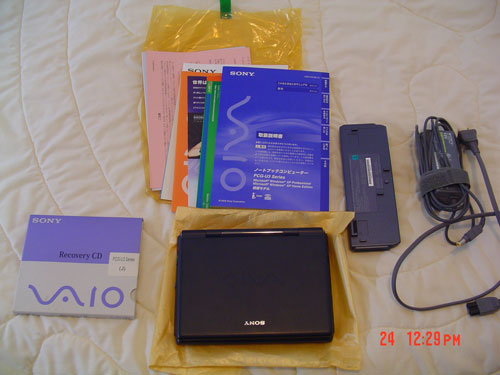
Package Contents
PCG-U3 unit
1 Standard Battery
Sony Power Supply
Japanese manuals/Paperwork
Restore CD Rom package
(Please see Picture)
I purchased my unit on a Thursday and it was shipped the following Tuesday, and it was in my hands on that Thursday. Three day EMS Shipping was $40.00.
The unit came in the original box with all the original paperwork.
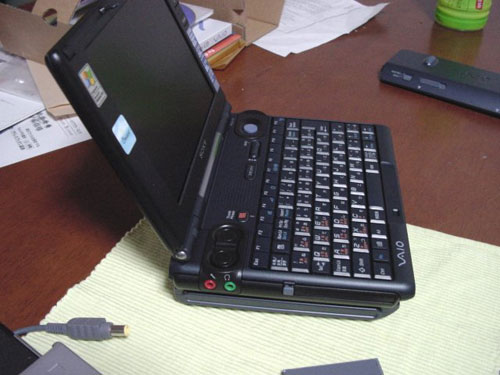
U3 with extended battery
The Sony U1 is the first in the line of U series and was followed by the Sony U3, and later the U101. The U3 is a compact laptop with many ports and a fantastic screen. It’s small enough to fit in a briefcase or large purse and is only 1.8 lbs. with the standard battery. If you take 2 DVD cases and stack them together, that about how big the U3 is.
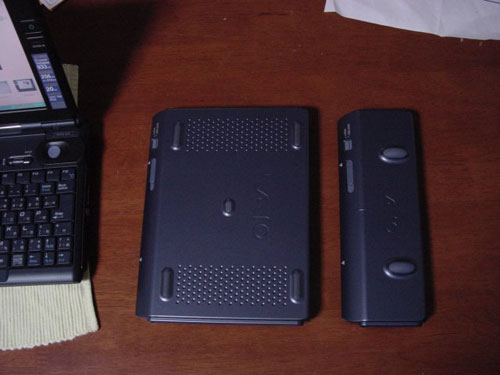
Standard and extended batteries
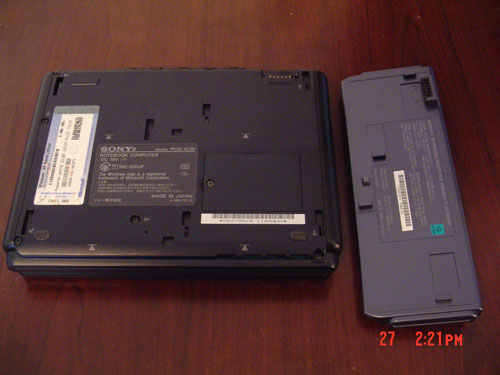
Bottom of U3 and standard battery
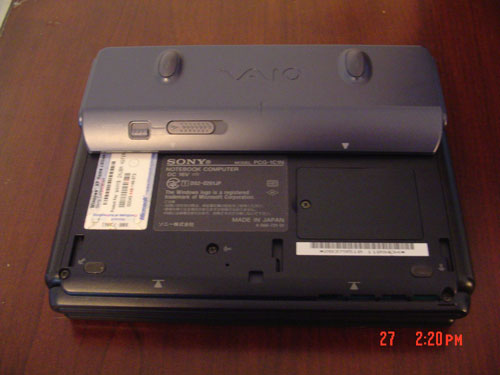
Standard battery installed
The standard battery is good for 2.5 hour depending on what you are doing. There is an extended battery that replaces the standard battery on the bottom and covers the entire bottom of the unit. The extended battery is good for up to 7 hours.
Since it is an older model it lacks built-in wifi, but that is easy to fix with any wifi PC card, or usb adapter.
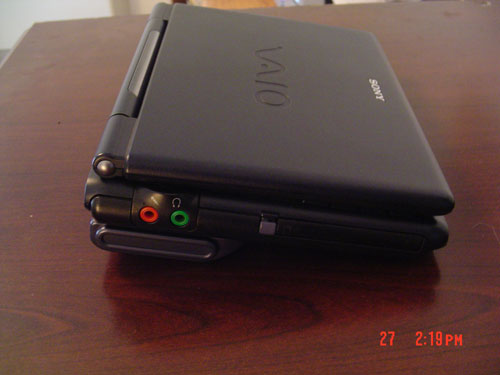
Left side / microphone and earphone jacks
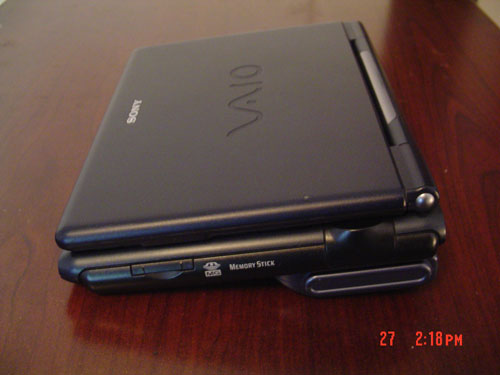
Right side / memory stick slot
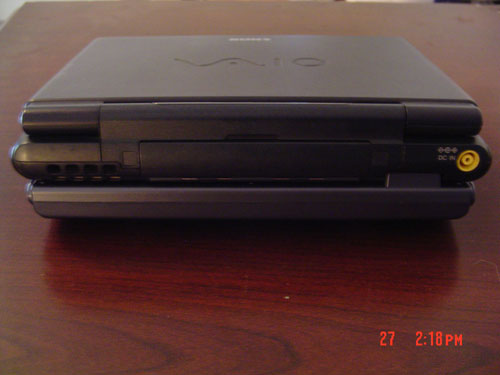
Back view / power port
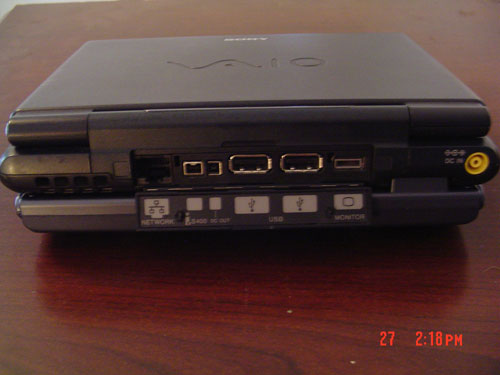
Back view / port cover removed
The screen is 6.4 inches in size and is viewable from many angles. The unit has 1 Type II PCMCIA slot, 1 Magicgate memory stick slot, 2 usb ports, a firewire port, and external monitor port for VGA output. The unit is too small like most UMPC devices to have a Optical drive, but there are many examples of external optical drives that will work with this unit.
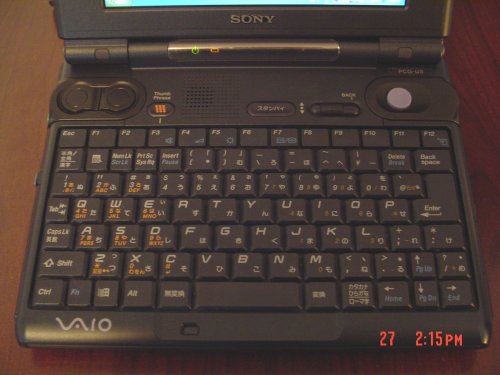
Since Sony created this unit for the Japanese market, the keyboard has the Japanese and English symbols,
but some of the keys are marked in Japanese only like the suspend/sleep key and a few others on the keyboard itself.
The Thumbphrase function is an interesting idea, but does not work with English software. It’s like using a Blackberry with just your left thumb. The keyboard is cramped, but it is easy to get use to, since it is larger than the keyboard on the UX series. The keys are responsive, but have a short push.
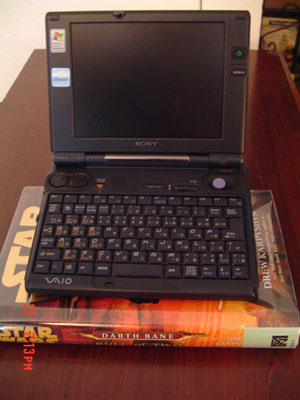
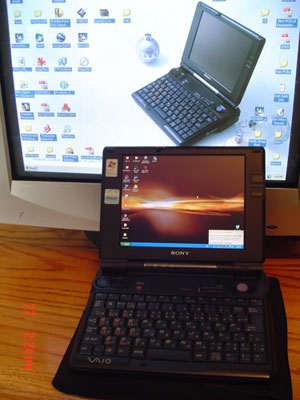
The placement of the Trackpoint mouse on the right, upper corner,and mouse keys on the opposite side are perfect for control, when holding the unit in both hands. The Trackpoint is very responsive and is easy to use. I have heard from some people that the trackpoint on this unit wears out fast, but so far I have not had any problems. The unit is fast booting up and shutting down, even with only 256 megs of RAM.
I plan to upgrade fairly soon to 512 megs, to maximize the unit’s potential.
I’ve loaded Google Earth and Microsoft Streets & Trips and both are a little slow, but not so much that you notice it. The unit works with the Bluetooth PC card I installed, and the Bluetooth GPS works great.
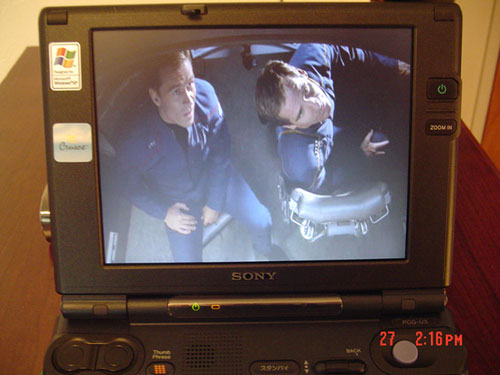
The Unit has a built-in 8 meg video card,and video streaming off the net is smooth.
I don’t think this is a good gaming machine, since I did try Halo on it and it was pretty slow, and choppy. Remember that this unit was designed a few years ago and as a portable office, not for gaming. I’ll be trying it again after I get the memory upgrade, and that will probably boost performance enough, for most older games. AVI video playback is very smooth and watchable from many angles. The screen is viewable indoors and outside.
Overall I’m very happy with the performance of this machine. The wait was well worth it!!
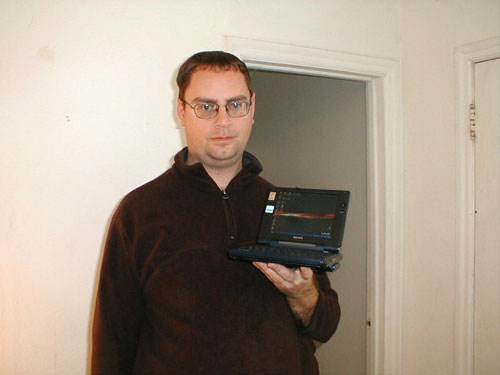
The past week I’ve used the U3 for my consulting business, Checking my email, writing reports and as a GPS for business travel. It’s very light and is easy to carry anywhere.
I can slip it into my hip pack with the charger and a spare battery and jump on the bus,and not have to carry a brief case or backpack with me. People in my home town, don’t have much experience with laptops, and they think I’m joking when I show them the U3. I’ve had small laptops before but this one is the handiest. I prefer the screen size, compared to the Sony UX series,because on this unit, I can see everything without having to squint. I feel the U3 is good for anyone who needs a laptop with keyboard, but is put off by the small size of the Sony UX series and other models of UMPC. I was worried about purchasing a used/refurbished item, but Direct from Japan gave me a 6 month warranty, with free return shipping to Japan for servicing. Thank you Direct from Japan!!

Ftenlyen 90W 19.5V 4.7A Laptop Charger Compatible with Sony Vaio VGP PCG Series, 19.5V Power Cord with Bravia TV KDL Series KDL-32W600D KDL-40W650D KDL-40R510C KDL-48R510C KDL-48W600B KDL-40W600B
$14.39 (as of December 16, 2025 04:39 GMT -05:00 - More infoProduct prices and availability are accurate as of the date/time indicated and are subject to change. Any price and availability information displayed on [relevant Amazon Site(s), as applicable] at the time of purchase will apply to the purchase of this product.)
Now retrieving an image set.
GinTai DC Power Jack with Cable Socket Plug Charging Port Replacement for Sony VAIO Sony VAIO PCG-3B2L PCG-3B4L PCG-3D3LL PCG-3J1L PCG-3D3
$9.88 (as of December 16, 2025 04:39 GMT -05:00 - More infoProduct prices and availability are accurate as of the date/time indicated and are subject to change. Any price and availability information displayed on [relevant Amazon Site(s), as applicable] at the time of purchase will apply to the purchase of this product.)Product Information
| Price: | |
| Manufacturer: | Sony |
| Pros: |
|
| Cons: |
|

Gadgeteer Comment Policy - Please read before commenting
Hello,
Very nice review. Excellent pictures too !
Thank you for taking the time to post it.
I guess I’m a gadget freak also. Just got one of these units on flea bay (haven’t received it yet). I’ll come back with more when I get my hands on it.
Paul
Hi Ben,
I just received my U3 and haven’t had a chance to put it through it’s paces yet. One of these evenings. It sure seems like an amazing machine though.
One thing I don’t get though…..The ‘Jog’ dial. What is it showing me here. I see it rotates through some kind of menu. I don’t know what that stuff means though. Do you activate a selection with the little button next to the dial?
Anything you can tell me would be appreciated. Thank you…Paul
The jog Dial is a quick program launcher, and control all in one. You move the dial to get to the program/menu you want to access and then press down on the dial itself to select. The jog dial has menus and sub menus you can access by just pressing down on it and moving up and down. It takes a little practice, as you will find out. The button in japanese to the left is the sleep button.
Enjoy-Ben W.
Hi Ben,
Thank you for your reply. Yes, I’m figuring out the jog dial now. The fact that it ‘pushes down’ is the key. I could not figure that part out. This sure is a neat little machine.
I like having the auxiliary CD drive and Floppy. I just enjoy cables and parts. I’m still getting used to the key-board. Some of the keys are mislabeled after the English conversion.
My 256 Meg chip is on todays FED-EX truck. I’m anxious to get that in there. I hope it helps a little bit.
Thanks again for getting back to me.
Paul
I’m waiting for my 256 upgrade as well. I have had any speed issues, except with games. I decided to forego the External drive for now and use a SD Memory card and adapter for loading programs. I’m using CDrom imaging software on my desktop, and then I just copy to the SD card and pop it into the PCMCIA slot and the u3 thinks I have a CD rom drive plugged in.It works great for Halo!!
Enjoy- Ben W.
Hi Ben,
My RAM chip came in today. A little disappointing. I really can’t discern any differences. The system now recognizes 488 Megs of RAM. It’s possible that a few things may open slightly faster. Possible, but not too discernible. My major speed issue is with some online poker playing software. Even my faster machines sometimes have a little issue with that though, so perhaps I’m just expecting too much. I use the machine mostly on-line, and I would say that pages open a little more slowly than I’m used to, but that’s not too much compromise for a machine that’s so cool.
Very good on using your SD card. There’s always a way.
I’ve got the jog dial all configured now. That’s a handy little thing. I’ve also been brushing up on my keyboard shortcuts. They’re a little bit of a time saver. I never used to use them before.
Let me know what you think when you add the RAM chip.
I’m interested to see what you think.
Paul
I installed my ram upgrade yesterday, and so far I have seen some inprovement, in boot time for most of the software I use all the time. The unit does respond faster, but not lightning quick. I tryed Halo again and that was a waste of time. The processer just cant handle that load of graphics,even with the upgraded memory. I’m got some older games I’m going to try next, and see what happens.
I’m writing a basic guide to the U1/U3 unit for us english speakers and hope to have it done soon. When you have time checkout my U3 yahoo group.
Enjoy- Ben
Hi Ben,
Very good on the Yahoo group. I’ll go look for it.
Your ‘basic guide’ sounds cool. That’s a great idea.
Paul
Like this article, Ben. It’s very informative. Do you (or anyone else) know where I can find a new keyboard/part for this Sony PCG U3? I also need a car adapter for this model. Thanks! 🙂
Hi, this is actually not a comment, I need some help, I have a pcg-u3 and I need to replace the hard drive but I do not have a clue how to open the Laptop, so any help will be appreciated.
Also, when I first bought, after a while I had to format the hard drive, and I lost that japanese thumb feature for writing in japanese, I have not found a way to recover that even with the recovery CDs.
I’d appreciate very much your help, mostly in the replacing of the hard drive issue
thanks
Hello, thank you for the great review. I’m thinking of purchasing U1 at Direct from Japan and I would like to know if your U3 is still working well without problems. Also, do you think it is safer to order from eBay store (rather than ordering from their direct store)? And how do I use internet wirelessly when using U1? Please let me know soon, thank you!
Hi All. I also have a U3 and love it, but it seems the memory stick port only works with an original plain old memory stick, not the later memory stick Pro or Duo. I wonder if there is a driver to update the port to take the Pro and/or Duo. Anyone know?
[Edited at October 30, 2008 19:14:29 PM.]
HEllo,
finally i got mine from Australia 😉 too, with 512MB ram, but only 20GB HDD, do you have some advices for me how to upgrade my hdd.
Thanks in advance!!
roman
Hello,
May somebody is able to contact me recording drivers for english WinXP?
I have all 4 recovery cd’s but I do not know how to get to the drivers…
little boring without the jog dial, screen-brighness-control,…
Thanks,
(-:
OK, I found out how to upgrade the Memory Stick slot to accept MS Pro sticks, if anyone is interested. First you download this utility:
ftp://ftp.vaio.sony.co.jp/pub/vaio/download/SP-005422-01/SOFMSC-00542201-UN.exe
Then you put a stick in the slot (a non PRO stick), and run the program. The program formats the stick and puts the firmware upgrade onto the stick. You power down, power up and the firmware is automagically upgraded from the stick.
i have been using the u1 for 3yrs at uni,
only recently sold it as my parents gave me there u3,
the only problem i have with the u3 is booting from a external drive,
on the u1 you can boot from usb but the u3 gave me lots of problems when i installed vista basic editions,
if anyone goes down the route of installing vista remeber hard drive will need to be upgraded unless like me i used nlite and stripped out all the useless drivers and programs i didnt need and then installed it,
works a treat,
speed wise probaly 10% slower then xp but programs open quicker…
Hi, Can anyone e-mail me the correct driver for the memory stick slot of this Sony PCG-U3 running Windows XP. Thanks a lot for ur great help.
hi
were can find or download the driver of my PCG-U1 notebook? because i lost it, that why my computer does not work properly, thanks hope u can help me tnx a lot
hie everyone i need help,have sony pcg u3 the system crashed,can’t remember where i reft the recovery disks tried to load xp but it won’t recognise extenal dvd rom what should i do please help am so desparate
hi! I have a sony pcg-u3 and the operating system (windows xp) happened to crash, whe I try to install it again it wont recognise amy external cd/dvd drive what should I do? pls help me on this..
Apparently installing from CD is only possible with a firewire CD, not a USB one. I am not sure if that means only a specific Sony firewire drive will work.
What I have done is install over the network, but this requires a server that can serve network boot images. I used Windows Server 2004 for this. There are probably some other options to enable a PXE boot scenario.
Hi Everyone, I recently picked one up and the person loaded it with WIN XP Professional, and now the PCMCIA slot will not see my card and the functions on the keyboard like the volume and LCD brightness control are not working either, will restoring these back ti factory settings take care of this?
hola donde consigo los driver para esta pc no los encuentro y los necesito si alguien los tiene le agradeceria me los iciera llegar al correo gracias
Hi all,
I am looking for the ThumbPhraseSetup application for my VAIO U. It used to be available at
http://www.vaio.sony.co.jp/Enjoy/Dow…se2/index.html
but Sony is no-longer hosting this file. There is version 1.0, 1.1 and 2.0, I think and any one will do for me. If anybody can give me a lead, I will be immensely grateful.
Cheers, Jamy
I have been using a U1 for about 5 years. Great machine. Now I would like to swap out the HD for an SSD. Any ideas?
grtz
ER
Hi i have just purchased mine of ebay in its original box mint condition all the extras including a new battery.I would like to know where i can get that extra 256 memory from in the uk.I would like to remove the 20gb & put in a 500gb hard drive.please let me know.Thankyou.
I have this nice U3, but I didn’t use it for a year!
Tried to use it again for my daughter to use, it started up but when the Xp logo came it reboots again?
Wut seems to be the probs?
Do I have to overhaul the hardware and clean everything up?
I’ve lost the driver cd and installation CD!
hello there, want to upgrade my u3 with a ssd. cannot figure out how to dismantle it. am somehow stuck at the end, where the power adapter input is. please, anybody?
Hello Everybody
I have one question about the Sony UX U3, I presume that when you wish to connect to the internet through a wireless network you can do it through the wireless PCMCIA card as the unit does not have built in Wireless, if this is true do you know if it is possible to upgrade the unit by installing an internal WIFI card.
Simon
I don’t remember, if there is a port to directly install one nor if there is any connection to solder one onto, but you definately can use one of the USB ports. Be prepared for an adventure to dismantle this beauty. It has plenty of screws hidden under stickers and covers. Took me a while to figure everything out. You may post a comment, if you bump into any problems. I will get a notice email from the-gadgeteer.com and try to guide you through. Other than that, there is plenty off space to put any extras in. Happy that there is someone out there, who has this little computer, too. It is really tough to get hold of one, since it’s only sold through the Japanese market. Always getting the looks, when I use my U3 in public and always respond:”Yes, this is a full laptop and it’s a Sony” ;).
Thank you for your reply, I have just bought mine on Ebay but have not got my hands on it yet but it was exactly what I was looking for as I need something very small enabling me to stay in contact 24/7 so I am going to buy extended batteries it already comes with a PCMCIA cellular modem and loads of other goodies, the only disappointment is no internal WIFI card which seems crazy considering the way it was designed being highly mobile, I think I will refrain from pulling it apart and just go the Nano USB WIFI card route although I have installed internal cards before I would rather make sure that there is an actual slot before going through the adventure of pulling one apart.
I have tried to install an OS by using PXE. There are a lot of ways to do this on the internet but I have quite found the right one. I first tried using PXE to send WinPE and install XP that way but had no such luck. I am trying a different method so hopefully i will have a little more luck. I will update if it works correctly.
You might have to go first into BIOS to change the boot order. Me personally I just had Windows XP on disk and booted from an external drive using the serial key for verification.
Can anyone tell me where I can download or get the factory recovery discs for my pcg-u3? I just bought it used, with no discs, and it needs to be recovered to factory. The drivers I got on Sony’s site don’t work on mine. Thanks in advance of any info.
Hello, i want to know if somebody wants to sale the u3 umpc netbook, and if somebody wants the sony vaio c1mzx japan model with bluetooth i have one with new battery and all drivers webcam, bluetooth, fn keys for brightness volume working and i have a 384mb of ram with a japanese/english keyboard and i put myself a windows xp tiny with all drivers like i said working and wireless wifi sony pcmcia card and the best i have the original factory cds for recovery in japanese, do you change for a u3 or maybe if somebody wants my netbook i will want 230 dollars with shipping cost, my email is: rollin842010 with hotmail.com, thanks alot
@ louis –> you have got mail (-:
sorry i didnt saw your email i sold the little sony vaio c1mzx to a guy in mexico now i have the sony vaio p second generation with 2.13ghz processor and 3g unlocked and 128gb ssd i want dollars color is black and i have both original charger and ethernet/ vga adapter for sale $750 dollars and i can put in ebay for sale my email its still the same rollin842010 at hotmail com
Hi All
I Desperately need Help
I am trying to restore my PCG-U3 using the recovery CD’s provided but to English Windows XP in the beginning of your post you said there was an English option do you know where this is or where i can choose it as i cant find it at all. I have restored it once using them but everything was in Japanese. and from the translated guide found here there appears to be no option. http://qa.support.sony.jp/solution/S0201170009223/?rt=pt
I have also tried doing a clean install of XP finding drivers ect but the unit is slow as hell and doesn’t give me the other functions like jog dial.
If anyone could help id be very very appreciative as i have spent 2 days on this now and am exhausted with it.
Many Thanks
Jim
Hi
i have that thing too but my mouse is not working and there is nowhere a driver for this machine. crazy, Sony has the worst customerservice ever! Never buy a Vajo again, besides this thing is slow as hell.
Somebody know where i can get the drivers and upgrade the memory??
Chris
Hello Chris,
here are the drivers for xp download:
http://www.driverscape.com/manufacturers/sony/laptops-desktops/pcg-u3(j)/110053
Don’t be too harsh with the Sony customer support.
The Sony pcg-u3 was only produced for the Japanese market in 2002,
so you should learn Japanese and check Sony.jp for the drivers.
Have that said,
yeah, the laptop is 12 years old and Internet was during those days not that advanced.
Tried myself to install Skype a few years ago,
but only voice was working.
For camera it was too slow.
Increasing the memory will burn out the motherboard,
as it just a pentium 3, which is already over a decade old.
For standards now,
It is just a good toy and if you minimize xp to the basics to maximize the speed,
It’ll be good to watch some movies … No hd of course.
You can also play the old warcraft, diablo, the old duke nukem or any other vintage pc game.
Won’t recommend you to upgrade to an ssd drive.
Just not worth to put more money into it.
If you like the size,
you should have bought the vgn-ux390 or vgn-ux490.
Both have a better processor, higher memory, ssd, touch screen and wireless wan for SIM card mobility Internet.
Let me know, if you have any further questions.
Would have answered your question faster,
but was traveling through Europe and
just came back.
Chris
For my drivers, i use Driver Navigator to update my Dell drivers. And it can also update Sony computer and other hardware drivers. i found it from http://www.dell-driver.com/driver-updater/ i think it is a good software for your hardware drivers.
I think for the Sony Vaio pc, you can get more information from here: https://www.driverdr.com/sony-drivers/