
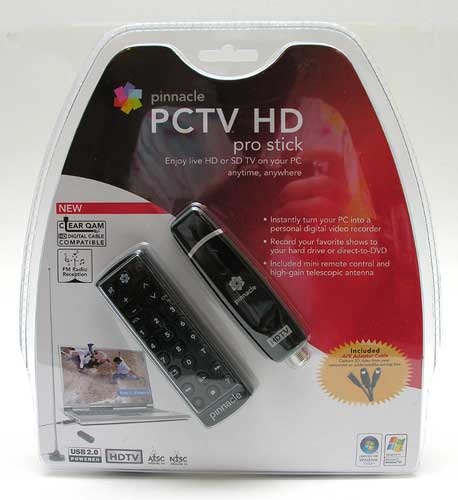
I’m a minimalist. The problem is that I’m a minimalist that has too much stuff. ;o) For those of you that might be true minimalists, I have a nifty USB doo-dad to show you, that has the potential to allow you to ditch your High Def TV and DVR. It’s the PCTV HD Pro Stick (801e) from Pinnacle Systems. With it, you can use your Windows laptop or desktop computer as your TV and DVR. Let’s take a look…
I’m sure that you’ve all been seeing the public service announcements on TV regarding the fact that as of February
17th next year, analog TV signals
will be going bye bye. This tuner will allow you to pull in DTV (digital TV) channels over the air or via your cable company.
Hardware Specs
TV Standards:
-ATSC (HDTV up to 1080i, SDTV)
-NTSC (cable, over the air)
-ClearQAM (HDTV up to 1080i, SDTV)
Inputs:
-TV/FM antenna (F-connector/Coaxial)
-S-Video, Composite Video (RCA), Stereo Audio (1/8″)
Recording Formats:
-MPEG-1/2
-DivX4
-MPEG-4: compatible with PSP or iPod (Trial Version)
Package Contents
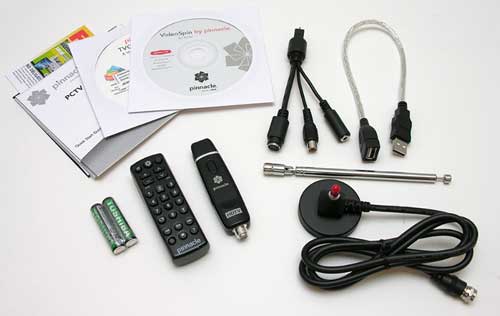
USB 2.0 TV tuner for ATSC/ClearQAM/NTSC and FM radio reception
Mini remote control including batteries
Portable telescopic high-gain antenna
A/V Adapter cable
USB extender cable
Printed quick start guide
CD with Pinnacle TVCenter Pro and VideoSpin editing software
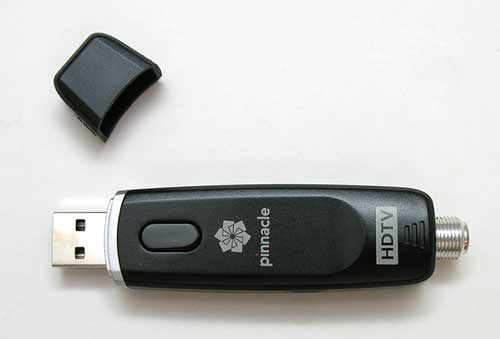
The PCTV USB tuner doesn’t look much different than your run of the mill flash
drive. The only noticeable difference is the threaded connector sticking out of
one end. You can attach the included telescoping antenna to this connector, or
a coax cable to another antenna or cable TV cable.
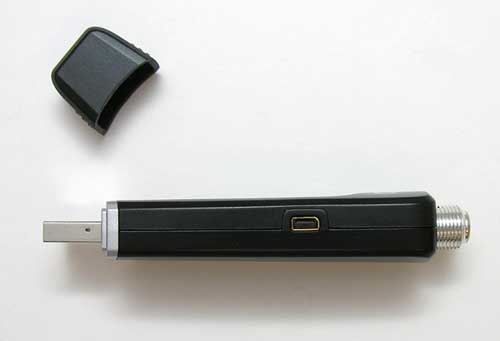
On the Right side of the tuner is a small connector for the A/V Adapter cable which is included
with the package. You can use this cable to attach the tuner to a satellite or cable box.
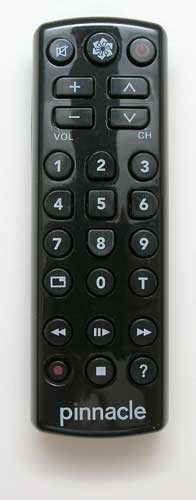
I love the 25 button IR remote control that ships with the PCTV. It has real
buttons instead of the crummy plastic membrane type. It runs on 2 AAA batteries
which are thankfully also included.

To use the PCTV, you first need to install the Pinnacle TVCenter Pro software which is included on CD. Then plug the USB tuner into a free port on your computer, attach the included antenna and start launch the TVCenter Pro software. FYI: you can also use this tuner with Windows Media Center. The included remote is not compatible with Windows Media Center though…
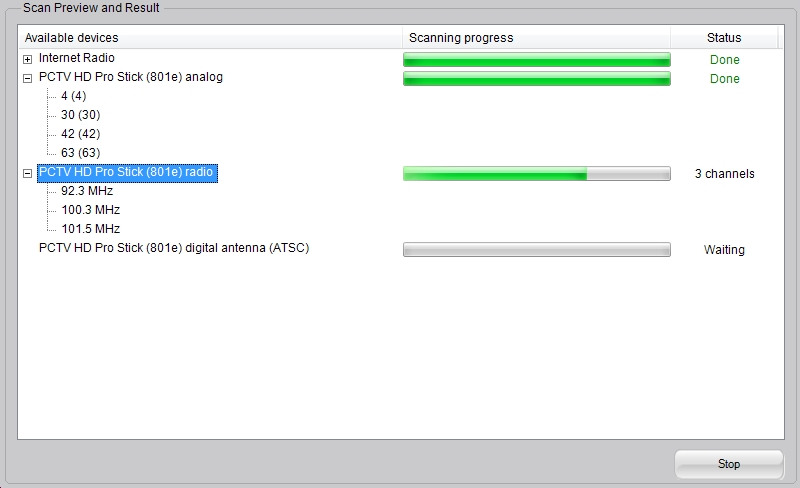
The first time you run the software, it will scan for available channels in your area. It will find analog and digital. It will also find FM radio stations for you. Scanning can take awhile, so be prepared to wait about 10 minutes or so for that step to complete.
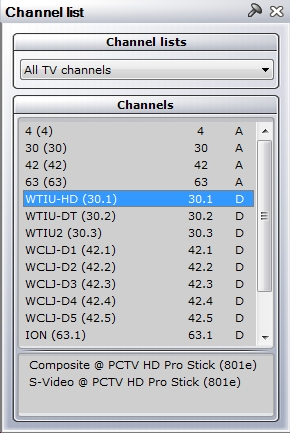
I was really surprised how many channels the included antenna found when I did my initial scan in my basement. Of course, when I did a second scan with the tuner connected to my 30 foot TV tower, it found quite a few more. The moral of the story is that the number of channels that this tuner can find is entirely dependent on your location.
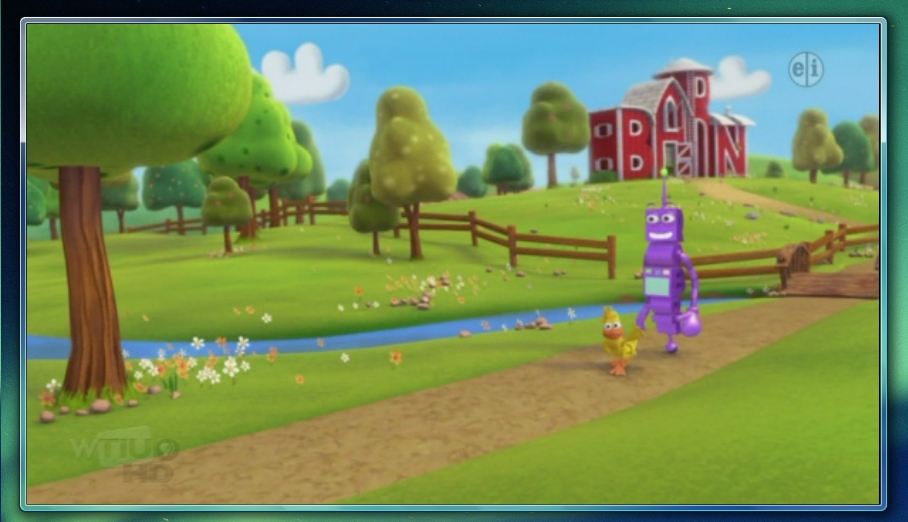
It’s also important to remember that even if you get a long list of channels during your scan, that they might not all actually look that great when you try to watch them. Your signal will definitely vary per channel. In my area, scanning with the included desktop antenna found none of the network HD channels (ABC, CBS, NBC, FOX) in my area. But when I connected the coax from my 30 foot tower outside, it found all of them. I tried to get some screen shots of different channels in action, but had a heck of a time doing so. As luck would have it, the only screen shot I was able to capture that wasn’t completely blank was of a cartoon. I will say that when the signal was good, that the HD broadcasts looked great. You can watch the shows in a window or full screen. I did all my testing using my Macbook Pro running Windows Vista with Bootcamp. The HD channels (all channels for that matter) looked considerably better in window mode instead of full screen.
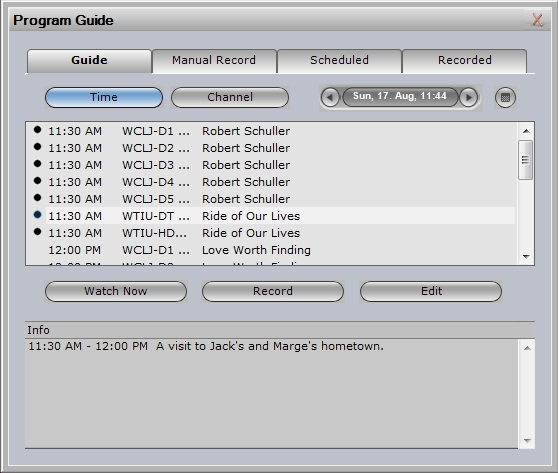
The software interface allows you to pause live TV just like a DVR / Tivo and then unpause to start playing the show where it left off. You can also schedule recordings like you would with a Tivo or VCR and save them to your hard drive or DVD. The program guide only allows you to see the guide per channel instead of all the channels in a grid, but it works ok. When you install the TVCenter Pro software, it gives you the choice of using the premium electronic program guide or the basic guide. The offer is 1yr free of the premium guide. Since they didn’t require a credit card, I went with the free offer. To me the premium guide seems pretty basic… but I’m coming from using a DirecTV HD DVR, which has a full programming grid, with searching and other features…
In addition to watching TV, the PCTV HD Pro Stick also picks up FM radio broadcasts. The software interface even has internet radio too…
If I was super short on space, I might even consider using this USB tuner with a desktop computer and a large LCD display in the place of a regular TV. That said, I’m really spoiled by my DirecTV HD DVR, so I wouldn’t want to deal with the weak program guide offered with this product. The other issue is the fact that there isn’t a Mac version of the TVCenter Pro software… But, if you’re a Windows user with $100, the PCTV HD Pro Stick from Pinnacle Systems is a fun USB gadget to play with.

Now retrieving an image set.
2-Pack LED Video Light Kit, NiceVeedi Studio Light, 2800-6500K Dimmable Photography Lighting Kit with Tripod Stand&Phone Holder, 73" Stream Light for Video Recording, Game Streaming, YouTube
(as of July 14, 2026 14:09 GMT -05:00 - More infoProduct prices and availability are accurate as of the date/time indicated and are subject to change. Any price and availability information displayed on [relevant Amazon Site(s), as applicable] at the time of purchase will apply to the purchase of this product.)
ALTSON 60 LED Portable Selfie Light Video Conference Lighting with Clip & Camera Tripod Adapter Rechargeable 2200mAh CRI 97+, 3 Light Modes for Phone iPhone Webcam Laptop Photo Makeup
(as of July 21, 2026 01:58 GMT -05:00 - More infoProduct prices and availability are accurate as of the date/time indicated and are subject to change. Any price and availability information displayed on [relevant Amazon Site(s), as applicable] at the time of purchase will apply to the purchase of this product.)Product Information
| Price: | 99.99 |
| Manufacturer: | Pinnacle |
| Requirements: |
|
| Pros: |
|
| Cons: |
|

Gadgeteer Comment Policy - Please read before commenting
I have a similar version of this USB TV stick and I have to agree, this TV Tuner kicks ass. For this TV tuner in fact u don’t even have to use windows. If u use somewhere like eyeTV for the mac, the TV tuner works extremely smooth. Under windows however, I had bad experiences with it; it would be super laggy and would not let me use the DVR/time rewind features. Heck, even under OS X the remote control that comes with the stick works.
Thanks for the review…
are you saying that this works like a converter box so that it will continue to work after 2/19/09 even if you are using an analog antenna instead of cable?
Second, when you record something what form does it take? avi? mgeg4? is there a choice?
thanks again for the review
does it have dual tuners so u can watch one program whilst pulling in another
Jeffrey:
Thanks for the tip. I’ll try to get my hands on some Mac software to try with this tuner.
Bill:
The PCTV is not a converter box. It’s a tuner and it will continue to work after 2/19/09. You’ve always had the ability to pull in HD signals with an analog antenna (I’ve been doing it for quite a while now). The trick was that you need an HD capable TV, satellite box or cable box in order to show the signals / programs on your TV. You can go to antennaweb.org to see what channels are available in your area that can be pulled in with a regular antenna.
Shows can be recorded to your hard drive in MPEG-1/2 or DivX formats, or direct-to-DVD.
Jake:
Sorry, it just has one tuner, not two :o)
how is the windows software? please e-mail me
then you have said that this TV tuner has a RCA input, but i don’t see the cable with the 3 colours Red Yellow and White, can you solve me this question??
thanks 😉
@Andres: I no longer have this item to double check, but if you look at the package contents image, you can see the included cable that has an S-Video connector, a stereo jack and an RCA video connector. There’s a picture of the cable on the Features tab of this page: http://pinnaclesys.com/PublicSite/us/Products/Consumer+Products/PCTV+Tuners/PCTV+Analog_Digital+PVR/PCTV+HD+Pro+Stick.htm
why is no longer available this product, i did search in google and nothing. is there any other similar product
i need something to record hdtv in my pc, thanks
I have purchased PCTV HD Pro Stick (801e) from best buy, it is a very very poor quality. When i used with PIV XP Dell Laptop, the laptop heated up within 15 minutes, they i continued to use, in the long run it will harm the laptop i believe. The laptop heated up in such a way we can make tea on it. If i remove this stick, Laptop worked very well, it did not heated up. If you record for more that 30 minutes, it will not record well.
When i tried with the high end system to certain extent it failed miserably. I had the following configuration.
Operating System: XP SP3
System Manufacturer: Gigabyte Technology Co., Ltd.
System Model: GA-73PVM-S2H
Processor: Intel(R) Core(TM)2 Duo CPU E4500 @ 2.20GHz CPUs)
Display: Samsung LCD monitor 22″
It installed, After that i was not able to watch video using Composite, Antena worked but not the composite input. After trying hard for two days some how made it work. I use Samsung LCD monitor 22″. On the screen it displays properly when we record small tiny line appears, I tried to capture using other software in vain. Very very bad experience. Do not waste your money.
Hi there,
I purchased the pctv from Pennacle last year. I just got a new computer and they can’t install it on my new computer without the disk and I can’t find it. Is there somewhere that I can go to download it to be installed?
Everything I’ve read about Pinnacle mentions their lousy software, and I’m the owner of an older Pinnacle Dazzle with really crappy software, so I understand. My question is – will the PCTV HD Pro stick run successfully with just Windows Vista Premium Media Center, or is it necessary to install the Pinnacle package first?
I am not real computer literate so I need step by step instructions. I want to copy the shows I have saved on my direct TV DVR to my computer. I have a HP USB TV Tuner but the directions do not show how to setup for a DVR or I do not understand them. Any help will be greatly appriecated.
@MaryAnn I don’t believe there’s a way to play the video files from your DirecTV DVR on your computer. They use a special format if I remember correctly. Someone please let me know if this isn’t true…
After my Avermedia TV tuner USB connector broke off, I purchased te Pinnacle Super stick thing. I’ve used Avermedia on one of my laptops (Thinkpad T40) with no problems whatsoever. Watched cable TV and recorded to an external drive flawlessly. The unit, however, was a bit bulky. So I figured I’d try the $99, smaller, USB stick for a change.
That was my biggest tech mistake of 2009!
The software is flawed (I’m using it with XP Pro). It has a ridiculous delay after you press the RECORD icon, while the audio ‘hiccups’. When the unit finally starts to record and I click the STOP button, a confirmation box pops up!!!!!!!!!!!! “Are you sure you want to stop recording????” Suddenly the software sounds like a mother-in-law!!!! Why the &*^*% do you need to confirm stopping a recording?????
It’s moronic.
Oh, then there’s playback…looks like crap.
About the only clarity with the program output is in the still capture BMPs!!!!! 99 bucks for a frame grabber!!!! whoopy!!!!!
This product is crap. And what confirms this? Anytime a company omits its corporate contact info on its website, it means it’s got something to hide.
This is true with Pinnacle.
As for me, I’m going back to my clunky Avermedia tuner. It may be clunky, but it works. And that’s more than I can say about the Pinnacle debacle!
I got this two years ago for Christmas and have had little problems with it. Sometimes it is slow. (I blame that on Windows OS) I also live out in the middle of nowhere and TV signals are very few. But what does come in is crisp and sharp. All the channels are HD. If you hook up to cable no box you will get just local channels no cable and they will be analog not digital.
Hi,
Unfortunately I am in iraq and have misplaced my product key. Any info on how to get another would be appriciated……………Thank You
Can I use this device in India for PAL TV format
Dear Julie:
I need the software (Pinnacle PCTV HD Pro Stick USB 2.0 TV Tuner ) to this device (Pinnacle PCTV HD Pro Stick 801e)… I lost my original CD and I can´t use this device. It´s posible?
Thanks
@Luis Did you try downloads section of Pinnacle’s site: http://www.pctvsystems.com/tabid/62/default.aspx/Downloads/tabid/87/language/en-US/Default.aspx
I have purchased PCTV HD Pro Stick (801e) for use in my ACER laptop with WMC XP SP2, but the digital TV system in Brazil is ISDB-T and the appliance is for ATSC system. Does exist any kind of firmware, software or something else that can I use to transform the system from ATSC to ISDB-T, unless I purchase an appliance that I can’t use.
Please help me.
Best Regards
Arnei Bittencourt
I’ve had nothing but problems also.
re Justo May 12, 2010 at 7:57 am – I hope you are home by now.
forget the pinnacle soft ware – you don’t need it. The product key is to use the pinnacle soft ware.
I have vista and I would hope win7 would be just as easy. The great thing about Vista is that when you plug something into the usb it automatically downloads and installs any drivers you need. [you Must be connected to the internet.] then use –windows-media-center–. Look through the settings option. set up the guide and scan the channels then go through and un-check the ones that are poor quality.
I think PAL should work. When looking through the settings section of the –windows-media-center– look for the country of origin and that should configure the device for you.
Never could get the remote to do anything. I think it is made to work with a “set top box.”
oh yes – all the above probably depends on having a legal up to date version of windows. If you are pirating you are on your own.
task-settings-set up tv signal- change country of origin
Brazil was listed for me.
I can’t get anybody from Pinnacle technical/customer support to contact me. Everything I try to view says I need a program to view tvvi format – and nothing I try works?! The USB drive itself only picks up 3 channels, but the book says you can watch Titan TV with this product as well. But not unless you can find a way to view .tvvi files/format. And that appears that will forever remain a mystery – since there is no support available to let you know what is needed to view the .tvvi format/files. Don’t get suckered in to downloading all of the programs that say they will – they won’t.
I have lost my prouduct key for my pinnacle pctv pro. Can you send me the key so I can use it.
Picked up no channels,,what so ever….;[
WITH WERSSION OF Pinnacle PCTV TV Center Pro with HD stick 801e I can use with windows 7 and where I can download it all software and drivers but version 4.96 and any version 6.0 or 6.5 not works properly
Does it support Pal Standard. Is it available in India.