
If you are a geek, chances are that you have a gear bag or a gear closet / cabinet. If your geekiness is truly l33t, you may even have both. Yes, I am proud to say that I do have both! I carry a nice assortment of gear ‘stuff’ with me in my gear bag everyday, but I also have some indispensable tools that I keep at home. One of these tools has been the second version of Brando’s USB to IDE cable. These cables have proven to be very handy for computer upgrades and also for family members and friends that have encountered hard drive problems. Often, I’ll give away sample products to friends after my review is complete. Not so for these particular items. I kept the original cable until the 2nd version came out, and now that the 3rd version is here, I know I’ll be keeping it around until there is a 4th.
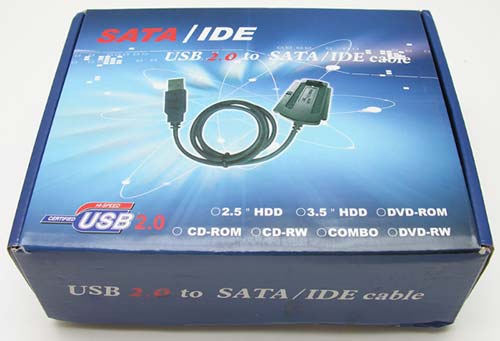
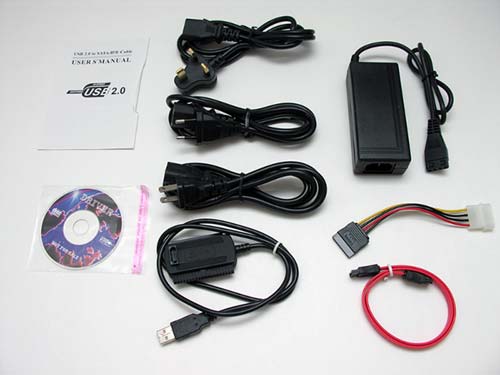
Package Contents
USB to SATA / IDE cable
SATA Cable
SATA Power cord
AC Power Adapter (100-240v, 50-60Hz)
AC Power cable (UK, Asia and US style cables included)
Driver CD
User’s Manual
The new USB 2.0 to SATA / IDE cable really kicks things up a notch this time around by adding support for Serial Advanced Technology Attachment or SATA hard drives. Not to worry, the cable still works with 3.5 and 2.5 inch IDE hard drives too. And although I’ll only be testing this cable with hard drives, it can also be used with CD-ROM and DVD drives.
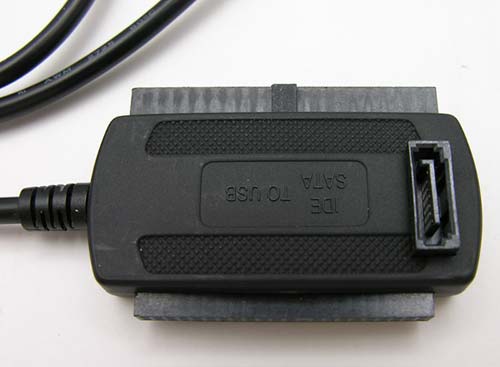
The main cable looks almost identical to the 2nd version of this product, except that an SATA connector has been added to the top surface.
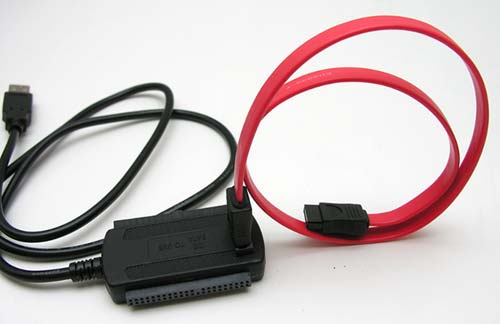
The included SATA cable snaps into the keyed port easily and securely.
At this point you might be thinking that since this cable has 3 different connection points, that it might be possible to plug in 3 different devices at the same time. Ah, great minds think alike! But alas, 3 at once is not possible. Believe me, I tried. Two at once though, will work as long as it is an IDE and an SATA device. Two IDE devices at one time will not work. Sorry.
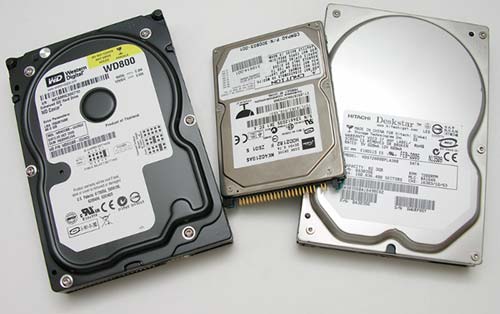
The test candidates for this review are shown above. I’ll be testing with a 3.5 inch Western Digital Caviar 80gb IDE drive, a 2.5 inch Toshiba 40gb IDE drive and a 3.5 inch Hitachi Deskstar 80gb SATA drive. Let the games begin!
Hooking up a single drive is a simple operation. Connect the SATA or IDE cable to the matching connector on the drive, plug in the power plug into the drive’s power port (if one exists), and then plug in the USB cable. That’s it. Once all connections are made, the drive should spin up, and then automatically mount as a removable drive on your PC or Mac computer (all my testing was conducted on a 20″ iMac G5).
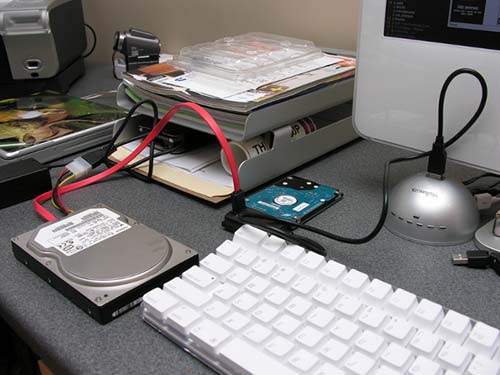
My first test consisted of the Hitachi SATA drive and 2.5 in Toshiba IDE drive. The little Toshiba does not require power, so setup was a snap. Both drives spun up and appeared on my desktop.
The cool part about being able to connect 2 drives at once, is the fact that you can copy / move files between them.
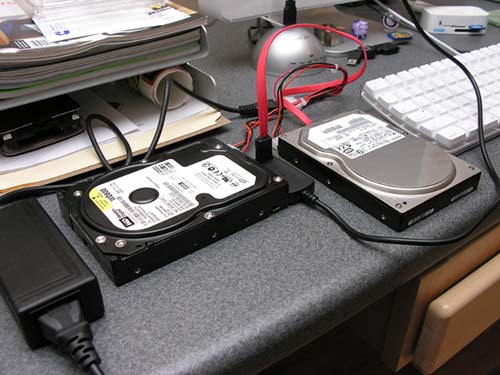
My second test involved the Hitachi SATA drive and Western Digital Caviar IDE drive. Connecting the interface cable was not a problem, it was only when I went to connect power to both of them, that I realized that I only had one power connector and two devices needing power. A quick trip to Radio Shack and $5 resulted in a Y-adapter power cable. With this cable, I was able to connect power to both hard drives, without needing 2 AC adapters. Nice!
I had no problems copying files, moving files, running programs, watching videos or listening to audio files using this cable and the test drives. Yeah, I know, you want to see test data. The test file that I used for all of the transfer tests was a 118.3mb .WMV video of the Napoleon Dynamite movie.
File copy from Mac to Hitachi SATA 11.12 seconds
File copy from Mac to 2.5 Toshiba IDE 33.68 seconds
File copy from Mac to 3.5 Western Digital IDE 11.06 seconds
File copy from Hitachi SATA to Mac 10.22 seconds
File copy from Hitachi SATA to 2.5 Toshiba IDE 45.58 seconds
File copy from Hitachi SATA to 3.5 Western Digital IDE 20.91 seconds
File copy from 3.5 Western Digital IDE to Hitachi SATA 20.75 seconds
File copy from 3.5 Western Digital IDE to Mac 11.07 seconds
File copy from 2.5 Toshiba IDE to Mac 11.72 seconds
File copy from 2.5 Toshiba IDE to Hitachi SATA 22.25 seconds
This cable is easy to use, works great and is valuable tool for techie’s and geeks. It’s one of those items that doesn’t get a lot of use, but as soon as you need one, you’re thankful that you do.

SinLoon USB to SATA IDE Converter Cable Adapter USB 2.0 to 2.5/3.5/5.25in IDE and SATA Adapter Cable (1.8FT/Black)
$10.96 (as of July 13, 2025 14:55 GMT -04:00 - More infoProduct prices and availability are accurate as of the date/time indicated and are subject to change. Any price and availability information displayed on [relevant Amazon Site(s), as applicable] at the time of purchase will apply to the purchase of this product.)
Warmstor SATA/PATA/IDE Hard Drive to USB 2.0 Adapter Converter Cable for 2.5" 3.5" Hard Disk HDD SSD with External AC Power Supply, Compatible with All Computer System PC Desktop Laptop
$15.99 (as of July 13, 2025 14:55 GMT -04:00 - More infoProduct prices and availability are accurate as of the date/time indicated and are subject to change. Any price and availability information displayed on [relevant Amazon Site(s), as applicable] at the time of purchase will apply to the purchase of this product.)Product Information
| Price: | 35.0 |
| Manufacturer: | Brando USB |
| Requirements: |
|
| Pros: |
|
| Cons: |
|

Gadgeteer Comment Policy - Please read before commenting
Post your comments on the Brando USB 2.0 to SATA/IDE Cable review.
http://www.the-gadgeteer.com/review/brando_usb_2_0_to_sata_ide_cable
Just click the POST REPLY button on this page.
Hi Julie,
I came across the subject matter and I am interested about it as I have an old cable bought back in 2008, i wounder, can you update on the same for WIN10 users, is it possible to use the same cable anymore with legacy disk drives of SATA and IDE type and windows 10?
Yousif, I don’t have a way to test it myself, but it can’t hurt to give it a try 🙂 If the drive doesn’t spin up and mount on your Win10 computer, you’ll know the answer soon enough.
Damn, I *need* one of these… it would replace about 20 adaspters, cables and bits of duct tape.
If you could use 2 x IDE drives (can you use 2 x SATA drives, or a SATA and IDE at the same time ??) it would be almost perfect.
BTW, you must be *evil* – your desk is way too clean for a techy person…:-)
moldor:
This cable allows for the following scenarios:
1. 2.5 IDE Drive
2. 3.5 IDE Drive
3. SATA Drive and 2.5 IDE Drive
4. SATA Drive and 3.5 IDE Drive
As for me being evil, rest assured, that you’re only seeing a very small section of my desk 😉
I think overall this is a very good product.
TekGems has it for $26.99
http://tekgems.com/Products/kl-usb-sata-ide-25-35.htm
Julie, what did you think of it using it with a IDE 3.5-in hard drive? Doesn’t the USB cord get in the way of the 4-pin molex? Its not a big deal, I just bent the cord down slightly to expose the power connector.
sun818:
I didn’t have a problem when using a 3.5 inch IDE drive. But now that I have the latest version of this product, it’s even easier to use:
http://www.the-gadgeteer.com/review/usb_2_0_to_sata_ide_adapter_with_one_touch_backup
Julie
i bought usb 2.0 to sata/ide cable and i installed it and i have a proplem
i cant find my hdd
the windows cant find it
my hdd is wd 250gb sata
plz help
seems great with 2.5″ or sata drives but i can not get it work with any of the 3.5″ ide drives i have???? so unless there is a driver somewhere for this and xp its useless for normal ide drives.
hman:
I tested this adapter with a 3.5 in drive and had no issues. It does not require any drivers for XP. It’s all plug and play. Are you certain tha the 3.5 in drive works? Have you tried switching between master and slave mode?
Att.,
Please for inside CD(driver), special for WIN98,who have,
via email, or full URL where to download, for
USB 2.0 to SATA/IDE Brando cable adapter.
Product Code: UCABL000100,
bacause thay are not in package contents!
Thanks in advance.
Best regards.
Ilija Lekic
http://usb.brando.com.hk (producer)
did u manage to get it workin on Mac OS X 10.5?
if so, can u please tell me how?
thanks
h:
I no longer have this cable, so I can’t try it under OS X 10.5. Sorry… I do know that Brando’s newer products work fine under 10.5. You can find links to similar reviews that I’ve done above, in the right sidebar.
how do you power down your hard drive?
I bought this one and found that Hard Drive Inspector doesn’t display HDD connected through this cable!!! weird……
Can anyone list softwares like Hard Drive Inspector to test HDDs connected through this cable?
have any one try this in vista / win 7… does the driver work under vista and win 7
When i connect the cable usb2.0 to SATA, it shows USB Device not recognised (Generic USB Hub, Unknown device), If you please help me on this, iam using window xp service pack2.
Need drivers for Winxp Service Pack2
i need the drivers for windows vista!
please if somebody have the driver, send it to my mail!
as*********@*****il.com
hello
received the product yesterday 18mar09
tested it on Vista
worked fine once, was able to view drive, scan for viruses, view files, then after disconnecting and reconnecting, drive does not show up in file explorer.
tried with 2 different drives, same problem.
is this a pbm with Vista ?
is it necessary to have specific Vista driver ?
if so, where can it be downloaded from ?
searched Brando website, found no driver download.
help greatly appreciated, thank you
hello again
after my previous post I tested again and found out that
the 40 pin connector can easily be misconnected excluding 2 outmost pins of the hard drive; of course in this case, connection will not work.
I tested and re tested again many times with Vista and XP SP2, and when connector is correctly inserted, everything works absolutely fine, no need for any special drivers.
Hope that helps
Francois
I Need drivers for Winxp Service Pack3 please!!!!
ba******@***il.com
I just purchased the product and can’t get it work on any OS. forgot to check and now found that the driver cd not there. can someone pls. email me the driver?
i need the drivers for windows vista too!
please if somebody have the driver, send it to my mail!
to******@*****il.com
Thank you very much!
I need the driver for Mac OS. Disc didn’t come w/ package. Says the filename is:
USB SATA/IDE_05E3_0702.sit
I lost the CD that came with the cable and also need the driver for this. If someone can advise where to get it, I would appreciate it. Thanks.
i’m not saying it works all the time. But i need to go to computer management and reactivate the disk (which is marked as disk 1).
it’s not really plug and play for me!
i need the drivers for vista as well have new hp dvdrw and unknow device everytime please help. this is the second drive ive tried and nothing. please email me. ar*********@*ol.com
I work with Mac OS X 10.5.7 and I think the
USB SATA/IDE_05E3_0702.sit ist not necessary since OS X. Or am I wrong?
But what format must have the connected HDs? Must they formatted in FAT32 or can they also be in NTFS?
(Apology for my bumpy English, I write from Berlin)
i bought the USB SAT/IDE cable to get files off of my old hard drive to my new computer (10yr old computer power supply fizzled and decided to get new computer). my user on the old computer was password protected. i can get to my user folder by sharing it, but MY DOCUMENTS under my user won’t share, copy, open, anything. “access denied”. any ideas? i have resume files i need to get onto the new computer. thanks!
hiii
i bout usb 2 to sata but there was no driver cd
its not working not show hdd
what shuld i do
plz help me
@limi The first thing I would to is to contact Brando and ask him for the software.
Requesting drivers for XP SP 2 and 3
Please email me at to*******@*****il.com
Guys i bought this device today but am not able to run it out with visa it showing not recognizing please if someone has Vista driver pls mail it to me and really wired comes without CD driver with the pack,
ob********@*****il.com
I Need drivers for Winxp Service Pack3 please!!!!
bn******@***oo.com
The product is cheaply-made. the material used shows how flimsy it is. once i connect my SATA HDD to my laptop, it is detected but as I run a movie or so, data transfer rate is so slow that it’ll displays frame by frame with a lot of distortion and suddenly ends into disconnecting the device or hanging the system.
Seems loose.
Maybe your laptop has a USB1 interface? Is it an old computer? USB1 is compatible with most USB2 devices but speed is dramatically slow… Have you tried it on another computer?
Still didn’t understand if it does work under Mac Os X 10.5 or not.. mine doesn’t seem to work but it also might be the disks I’m trying.
Device does work but takes awhile to load. Drive will show up in list of icons.
i need the driver to mac osx [USB SATA/IDE_05E3_0702.sit]
When you connected a 2.5 IDE you say you did not need power.
I have a new 2.5IDE but it does not spin up, except in the laptop.
I also see some people have suggested the outside pins (each end) should not be connected. This will cause a problem because the blanked out pin is the only edge that can be used and it fixes the position of the HD!!
I’m confused.
hi friends
can anybody tell me whether using this device i can boot OS ? I have tried that but facing problem with that.
conoce algun driver que mi gatewey pc no me reconoce el disco duro hitachi de escritorio como usb
I brought this exact cable and it is utter crap.
It does not detect anything i plug in. Tried DVD-ROM/RW in IDE and SATA form, tried 80GB barracuda in SATA and IDE and many other various drives. Have tested the cable on 2 Computers and 1 notebook still nothing…. I wanted one of these to hook up misc drives via USB to my XENServers. My colleague has one thats IDE only that works a charm with all these drives mentioned…. Buyer beware….Done waste your time with this one
i need the driver to sp3 XP please help me !!!
i need CD image cause ny imac can´t read minicd….. or sit archive…
ha***********@*****il.com tnxs
umm sera que ustedes me pueden ayudar con los controladores es que no me sirve el dispositivo x q me dise que no es compatible tengoo windows 7 procesador de 64 gracias x su colaboracion..
i bought this last week. and it doesnt work with my hp laptop.
my laptop runs on windows 7 64bit home premium.
it does not even recognize anything.
i tried with 250gb sata hdd (seagate) it recognize, but cant access. so i tried to initialize the drive. it does not allow me to.
so i tried 1 tb sata hdd (seagate) and it does not even recognize.
what should i do? i need a driver for win 7 64 bit home premium.
please email me the driver.
ba******@***il.com
Hi there! !
The same problem! ! ! , this kind of cable dosent’ works with XP, I really don’t know why, it will get out of my mind … I hope that someone find what we need.
All people here are searching for the software/driver. I am at same side. Can anybody please help.
i need the driver to sp3 XP please help me !!!
hello
can you help me
i also want to find the driver
can you email me
fm**********@*******om.my
Hi I also need the driver for Win Vista, please email me di**********@*****il.com
i need the driver software for windows 7.
i want to knew how to connect my ide harddisk using this usb 2.0 to sata ide converter
just got this cable today so i could get some files from old hard drive to new pc. all went simple to start. the icon popped up on screen saying device installed and ready to use, but thats when i had problem. i am not a techy person on computers. the device is working but how to i get into the hard drive to see files on the old hard drive ??????????????. please help.
i have clicked left and right buttons on the icon for the drive but it just opens properties,doesnt open anything with files in etc.
@chris Silly question… have you double clicked the icon? If you go to My Computer, is it showing up as a drive letter? You should be able to double click to see all the files like you would your C or D drive or if you plugged in a flash drive.
i need driver for win 7 ultimate!!
Can see it as a “storage device” in Computer, using W7 but all the clicking in the world doesn’t open it up. It did work the first time I tried it but now nothing. Not a very good device.
I have now found it won’t let the draw open on a CD Rom Drive when you plug it in…before even connecting to the USB port. It was ok earlier as well but now gone belly up. I think these gadgets are very poorly made.
I have Seagte 500GB 3.5 ‘ HDD SATA i got the cable today i have WIN XP SP2 bt when i connected my Seagate 500GB nothing flashes out. But when i connected IDE DVD Writer its worked very well as plug ny play, But why cant my 500GB Seagte is working kindly help me with this on an urgent basis.
And does this need any drivers on XP SP2 to be installed if yes please put some light really am in need to use it as external HDD.
Waiting for urgent response and solutions
Thanks in advance
I bought the USB to SATA/IDE cable from Dexlan.
I couldn’t find the “USB SATA/IDE_05E3_0702.sit mac” file on the driver-cd, no hd appears on my desktop.
Does anybody know about, I really need it for my Mac OS 10.6.5, send me information to de********@***oo.fr.
Thanx
Has Anyone found the drivers?
No, as I said above they are useless. Obviously not made very well.
hi!
can someone help me
I need to find the driver for Win 7.
can you email me
sa*******@*****il.com
i need the driver software for windows xp.
pls help me .
aa*****@***il.com
i dont have driver cd……
and i use windows 7…… now how to install the driver?
wer to copy Gene USB SATA/IDE_05E3_0702.sit
wer this Gene USB SATA/IDE_05E3_0702.sit is present?
Geez. I stumble accross this article searching for the drives for this brando piece of junk, just to find it is just an infomercial blog. Shame on the blogger for recommending and endorsing the manufacturer of a piece of junk without FAQ, nor driver support.
I purchased one of these and like so many others, it doesn’t seem to work without the driver. Mine never came with a CD. Not sure why it isn’t downloadable…
If anyone has the driver for XP (SP3 if that is of any consequence) can you please email it to me at
yk***@*****il.com
Cheers
i have windows vista ultimate, this read your usb cable, bat no read the volumen! what happeng?
Adquirí este cable adaptador, el sistema lo reconoce pero no le asigna volumen, no puedo leer la información. He probado en 3 computadoras diferentes!
I need Driver this product for Mac. thank you.
I bought it today, I tried with a 2gb ide HDD and it works fine. I tryed with a 80gb ide HDD and it also works fine, but I bought it because I wanted to use a 2Tb sata HDD, and is the only one that doesn’t work. I think it has to be with the size of the HDD, so if you are trying to use it with a large HDD DON’T BUY THIS!!!
My laptop is running on windows 7 64 bit.
it does not recognize my seagate 1TB hard drive.
please let me know if there is any driver for this product.
Please email me the driver software.
or
Please send the link for downloading the drives for USB 2.0 to SATA or IDE 2.5-in, 3.5-in Converter Adapter for windows 7
Thanks.
Same problems with win7 64bits, plz, help us driver…..
Thx,
Irage!
@Gaurav @Irage The Gadgeteer doesn’t provide customer support. We are a review site. If you need help, you’ll need to contact Brando.
Thx, problem solved (W7 64-bit), defective product and was also discovered that does not work with ATA … after which traded product, works perfectly with SATA.
Required drivers for usb 2.0 to sata /ide for windows 7 ultimate
hello
i install the usb 2 to sata ide cable .only find the hard no find the drive hard disk.what do work?
Please, I need driver to install on Win 7 Ultimate
Thanks
I also need the Mac Driver – Anyone email it to me or post a link?
I lost the CD that came with the cable and also need the driver for this. If someone can advise where to get it, I would appreciate it. Thanks.
i need a driver for win 7 64 bit…
we*************@***il.com
Is this Device can be use fowith Mac 10.5 &10.6 ? How ?
What is ? & how to install/download Software Gene USB SATA/IDE_05E3_0702. SIT. ? Thanks !
i need the driver software for windows xp.
pls help me .
i bought this package one week ago, and this package does not come with driver-CD. And am using window 7, after every necessary setup there is no icon or notice that pop-up on my desktop.
pls.I Required drivers for usb 2.0 to sata /ide for windows 7.
THANKS.
@cashgrade You’ll need to contact Brando. The Gadgeteer is a product review and news site. We do not sell items nor provide support for products.
Thanks to send me the driver for usb 2.0 to sata /ide for windows 7 Home
fu****@***il.com
I need the driver for windows 7 please help
Where could I find that driver for mac os lion ? Thanks for helping me ! Cheers from France
Hi, I have the cable but no driver, where can I download the driver? I have a mac pro with OS X.
thanks
Hi,
I’m trying to connect this product with my Laptop having windows 7, it is not detecting any hard disk. Do I need the driver?. If yes, Pls provide me the driver download link.
Thanks
What is “sat/die_05e3_0702.sit” ? How to get it ?,
i need the driver for windows 7..
plz send me..
thanx..
I also need the driver for this ASAP !
Windows 7 64bit
Email-
ga********@***oo.com
I need the driver for Win 7 64Bit, please send me the link or the driver within my Email at ar************@***il.com
Thankyou.
As I mentioned earlier in this post these things don’t work very well and for W7 you don’t need a driver that I know of you just have to hope your Hard Drive you are trying to see works with this device. They seem to go ok with one and then suddenly not with the next. Not a good unit I found
how many comments have come up requesting a driver and how come a link to it not put up yet by the the site admin?!! Please respond as I myself am looking forward to it as well.
@KG, the product brand that I brought clearly mentioned the driver sat/die_05e3_0702.sit support for higher versions than XP.
To ManojVarughese and everyone else wanting drivers: The Gadgeteer is not a support site for this nor any other product. We do product reviews and news. If you need support for your device, you’ll need to contact the product manufacturer directly.
Janet Cloninger ” contact the product manufacturer directly ”
Who and How ?
You’ll need to contact Brando at the link in the first paragraph. You’ll also find the link under the Product Information section, just above the comments.
I already tried that about a month ago. no one is answering over there (at brando).
*I thought you had someone else which we could contact…
I’m confused by the A/C adapter that plugs into the IDE drive. Although it has the four holes, three of them look like they have some kind of gold-plated insert that makes the hole too small to plug into the drive. One hole looks like it’s big enough to fit over the IDE pin. Any comments?? Thanks.
@fssbillk You mean the short cable with the 4 colored wires? The clear end plugs into the drive and the other end into the adapter cable. It’s been a long time since I used this device, but I don’t recall having any issues connecting everything.
I just got this in the mail and it’s missing the driver disk.
I need to recover some info off a 1TB drive off an iMac.
Seagate
Barracuda 7200.12
Plug and play yields me nothing. I hear the drive running, but it does not show up on the computer at all. I suspect I need the drivers?
Just got this in the mail and missing the driver. Need for Windows 7 64bit.
jt**********@***il.com
TK and JT, The Gadgeteer doesn’t provide customer service for any companies. You’ll need to contact Brando directly.
I need the drivers for windows or Mac
If somebody have the drivers, please send to my email!
Jr*******@***il.com
Thanks!!
works with WinXP. No good for Win7. tested 4 hard rives.
Kindly send me driver file for Brando USB 2.0 to SATA/IDE.