
If you have not cut the cords and gone wireless with your computer keyboard and mouse, now might be a good time to jump on board the bandwagon. Let’s review the Rocketfish Wireless Bluetooth Keyboard and Optical Mouse to see if they have what you need to join the revolution.
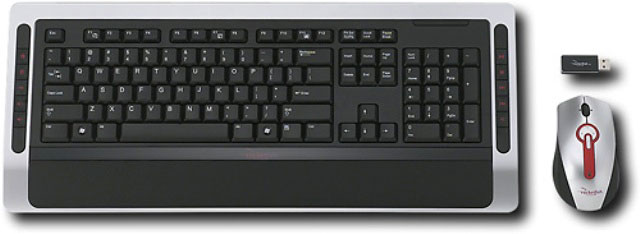
Hardware Specifications
Color: Silver, Red, Black
Up to 30′ wireless range
Keyboard features:
104 keys
10 one-touch multimedia keys
One connect button
Optical mouse features:
4-way scrolling
4 multimedia keys
1000dpi resolution
Battery indicator
One pairing button
On/Off Switch
Ergonomic rubber side supports
Dimensions Keyboard: 1.1 x 19.8 x 8.3, Mouse: 1.6 x 4.6 x 2.6 inches
Product Weight: Keyboard: 1.6 lbs., Mouse: 3.2 oz.
Port Connection: USB
Serves as a Bluetooth hub
USB Bluetooth Adapter support below Bluetooth profiles:
Generic Access Profile (GAP), Generic Objective Exchange Profile (GOEP), Serial Port Profile (SPP), File Transfer Profile (FTP), Objective Push Profile (OPP),
Dial-up Networking Profile (DUN), Synchronize Action Profile (SYNC), Fax Profile (Fax), Personal Area Networking Profile (PAN), Human Interface Device Profile (HID), Headset/Audio Gateway Profile (HSP), Hardcopy Cable Replacement Profile (HCRP), Basic Imaging Profile (BIP), Basic Printing Profile (BPP), Generic Audio Video Distribution Profile (GAVDP), Advanced Audio Distribution Profile (A2DP), Auto Video Remote Control Profile (AVRCP)
One year limited warranty
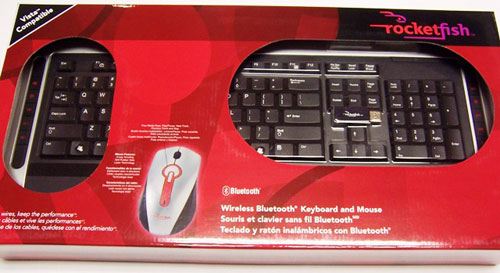
This package includes three of Rockerfish’s products. Included are the keyboard (model #: RF-BTKB2), mouse (RF-BTMSE2) and blutooth dongle (RF-BTAPDT).
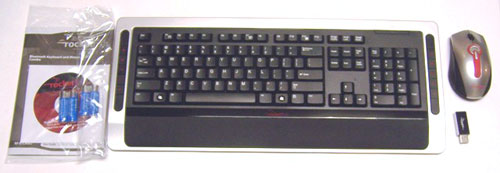
Package Contents
Keyboard
Mouse
USB Bluetooth adapter
CD driver
User manual
4 AA batteries (2 for keyboard; 2 for mouse)
The use of the silver, red and black color scheme makes a nice first impression and provides a sleek, stylish appearance. Rugged black rubber nicely accents the sleek design while providing surfaces that can be easily gripped.
Further inspection of the rubber, reveals a leather grain-like pattern, which adds a nice, fine detail to both the keyboard and the mouse.
Installation was extremely simple. I just put the 2 AA batteries in the keyboard and the mouse, plugged in the USB Bluetooth adapter, turned on the mouse, my computer immediately recognized the new hardware and both devices were functional.
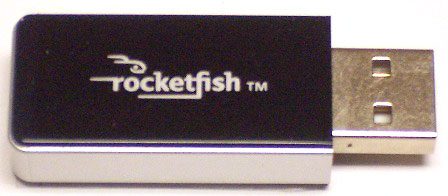
I was surprised that I did not have to go through any pairing process to connect the devices, but, just in case, this process is explained in detail in the user manual.
In regards to the manual, it is well put together with detailed drawings with callouts. The user manual appears to be too big but upon closer inspection you will see that it is repeated 3 times, in English, French and Spanish.
An electronic copy of the manual is also available on Rocketfish’s web site, along with the necessary drivers and warranty information. The warranty covers the product for one-year.
In comparison to the Microsoft wireless keyboard I was using, the Rocketfish is not as deep and feels lighter. Weight is not a huge factor because the majority of the time users will have the keyboard sitting on their desk but I often sit away from my desk a little and type on my lap, so even a few ounces less is noticeable.
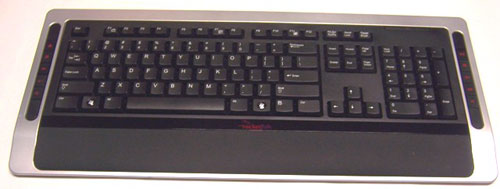
The black, leather grain-like rubber, mentioned earlier, is on the keyboard’s built in palm support. The contrast from the plastic to the rubber is noticeable, in a nice, comfortable manner.
Ten one-touch multimedia buttons are positioned on both sides, flanking the 104 keys in the middle. The multimedia buttons are labeled with icons for easy identification. To utilize the functionality of these keys you have to do an extra installation step.
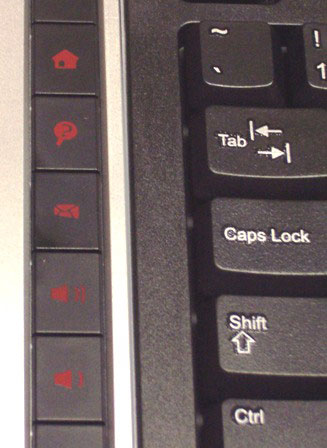
On the left side (top to bottom):
Home button,
Search button,
Email button,
Increase volume button,
Decrease volume button.
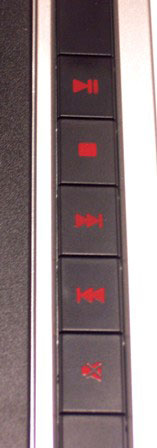
The right side (top to bottom):
Play/Pause button,
Stop button,
Next track button,
Previous track button,
Mute button.
A status LED is positioned in the upper-right section of the keyboard. The indicator descriptions are:
Green = System is ok
Flashing Red = Low battery
Flashing Red and Green = Pairing mouse and keyboard
The underside of the keyboard has the normal rubber-stopper feet, located beneath the palm support, and the two extendable legs in the back.
I found the keyboard to be too flat and preferred to have the legs extended while using it.
Between the two legs, you will find the connect button to pair with your PC and the battery location for the two AA batteries.
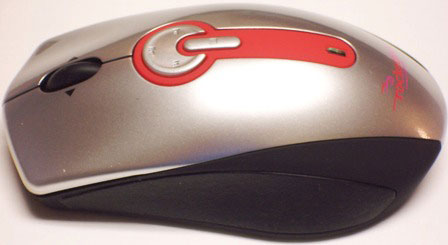
Moving from the keyboard to the mouse, eight features are located on the top of the mouse. These features include the basic three:
Left mouse button,
Scroll wheel button,
Right mouse button.

And four additional multimedia features:
Play/Pause button,
Previous track button,
Next track button,
Stop button.

Lastly another status LED is included on the top of the mouse, closer to where your palm would rest. The status indicators are the same as described for the keyboard.
The bottom of the mouse is where you will find the optical laser, an on/off switch, battery compartment and pairing button.
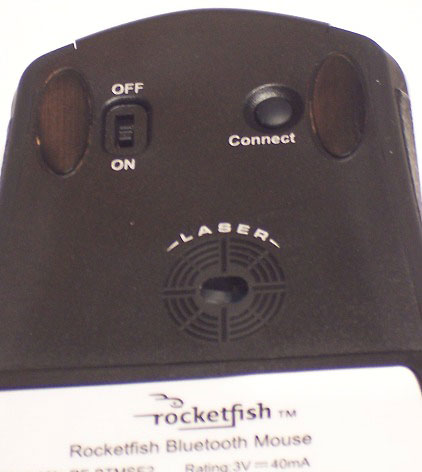
I really like the feel of the mouse. My hand just seems to cup around the mouse nicely and the rubber on the sides just adds a nice contrasting feel.
Another feature of the mouse, that my old one lacked, was the 4-way scrolling ability. Having the ability to scroll from left to right is not something that I would use everyday but I could definitely see that feature being useful.
For example, if you have a spreadsheet with multiple columns and rows, you can use the scroll wheel to navigate around the file, side to side and top to bottom.
In terms of use, the keyboard and mouse perform their duties like any other pair. The only issue that I experienced was when my computer was inactive for a period of time.
I found that if my computer was inactive for a period of time, before it entered standby or sleep mode, the mouse and keyboard would give a 2-3 second delay in responding to my commands.
I found the delay very annoying, especially since my wife and 4 year-old girl noticed it and continued to remind me of it and how it was affecting them.
I even tried to turn off my standby and sleep options, but that failed to improve the delay issue. This was very disappointing because I doubt that I would ever get use to the delay. I am an instant gratification person.
A positive of this package is the capability the USB Bluetooth adapter gives. By plugging that adapter in, the doorway to Bluetooth technology is opened on your computer.
That adapter gives you the capability to connect other Bluetooth devices to your PC. So this package offers functionality outside of the basics from a keyboard and mouse. Great!
In conclusion, I like the sleek and stylish design of the keyboard and mouse combo. Plus the extended functionality from the 10 multimedia keys and the USB Bluetooth adapter are a definite positive.
That said the response delays that I experienced were too much to overcome. That was the only negative that I found but, unfortunately, it was enough for me not to recommend this package.

2-Pack LED Video Light Kit, NiceVeedi Studio Light, 2800-6500K Dimmable Photography Lighting Kit with Tripod Stand&Phone Holder, 73" Stream Light for Video Recording, Game Streaming, YouTube
(as of June 9, 2026 04:52 GMT -05:00 - More infoProduct prices and availability are accurate as of the date/time indicated and are subject to change. Any price and availability information displayed on [relevant Amazon Site(s), as applicable] at the time of purchase will apply to the purchase of this product.)
ALTSON 60 LED Portable Selfie Light Video Conference Lighting with Clip & Camera Tripod Adapter Rechargeable 2200mAh CRI 97+, 3 Light Modes for Phone iPhone Webcam Laptop Photo Makeup
(as of June 8, 2026 12:59 GMT -05:00 - More infoProduct prices and availability are accurate as of the date/time indicated and are subject to change. Any price and availability information displayed on [relevant Amazon Site(s), as applicable] at the time of purchase will apply to the purchase of this product.)Product Information
| Price: | 99.99 |
| Manufacturer: | Rocketfish |
| Retailer: | Best Buy |
| Requirements: |
|
| Pros: |
|
| Cons: |
|

Gadgeteer Comment Policy - Please read before commenting
I’m conflicted when it comes to Rocketfish products. In general, they seem like pretty good things, but have little gotchas that make you question your decision to trust them.
I bought the same keyboard/mouse/dongle combination that was listed here, and found the keyboard to be quite useable on my Mac, even though it’s not listed as a supported system. For laptop typing, though, it’s a bit on the large side, unless you have a very large lap. The sleep delay effect is common on BT devices, but doesn’t interfere with regular typing, only when you need to wake up the keyboard after several minutes of inactivity. Still, it would be nice to have a power switch on the keyboard, so you could turn it off when you aren’t using it, or when you are transporting it to another location.
The mouse, for me, was a total disappointment. Laser tracking, the tilt wheel, and media player controls are nice sounding features, but I never got to try them. My mouse turned out to be missing a more basic feature: the power switch. Unlike the keyboard, the mouse does have a switch, or at least, is supposed to. My unit was missing this critical component from the factory, and this is where the trouble began.
When I called the number for Rocketfish support, I told them about the problem, and they told me that their warranty was not valid because I had a defective product! So, what is the point of the warranty? Apparently it’s something they do so they can say they have one, but is about as useful as a snowflake in a sauna.
Thanks, Rocketfish, for a warranty that isn’t worth the ink used to print it on the paper it’s printed on.
I find the delay with the keyboard annoying. The delay is only seen when the keyboard hasn’t been used for a number of minutes. I don’t see a delay with the mouse. The mouse wakes up quickly. I always leave the mouse on. The keyboard doesn’t have a on/off button, and that’s why it goes to sleep to save battery power and thus the wakeup delay. RocketFish support took over a week to respond to my email query, and gave no useful answers. This keyboard delay really messes up my gaming. Othewise all other features are good.
My rocketfish mouse works perfectly, but I had the same keyboard problems as Peter. After days of unsuccessful web browsing and troubleshooting, I finally found a workaround. It was to switch the dongle from HCI to HID mode (google ‘hci hid mode bluetooth’ for definitions). Here are the steps I took:
A) Unplug the dongle and uninstall the product software.
B) Restart the computer, plug the dongle in a USB port, and BEFORE windows load, e.g. you can go into the system BIOS or the boot menu (you obviously need a wired keyboard to do this unless you are using a laptop), do the following:
Press the connect button on the keyboard (you should see a light flashing) and then immediately press and hold the button on the dongle (until it starts flashing). The lights in both devices should stop flashing after a while and the devices should now be paired in HID mode.
C) Load windows. If your bluetooth dongle is auto-detected, do not install it. (If you do, the device will go back to HCI mode). Instead, press cancel. Then go to the device manager and disable the detected device (in my case it is named “Broadcom Ultimate Low Cost Bluetooth”). This will prevent the device from going back into HCI mode, it will stay in HID mode.
-The upside of this is that my keyboard no longer exhibits the aforementioned frustrating problems, and can also be used in the BIOS or in Linux.
-The downside is that (with HCI mode disabled) the bluetooth dongle can no longer be used to connect other devices (except the mouse and keyboard) in windows, and that media keys no longer work.
Keyboard: 4/5 stars
Mouse:4/5 stars
Keyboard sleepmode would be less annoying if the first key pressed was recognized (e.g. Come back from coffee break to continue typing “Bass fishing…” skip the “B” what do you have left?) After keyboard starts responding, I don’t notice any lag, until it sleeps again.
I tried this keyboard/mouse setup using included bluetooth dongle, my own no name brand bluetooth dongle, and onboard bluetooth radio with included drivers and with generic drivers on three different computers running XPSP2, VistaSP1, and Windows 7 but could not overcome the following problem: I can’t even come close to using both devices at the same time. About the same amount of wake up time delay (about two seconds, plus skipped key) between which device you want to use. The only thing worse than standing still and shooting in a first person shooter game is standing still for two seconds before you can shoot because by then either you are dead or the target is gone. I would have given the mouse a higher rating if I didn’t have any problem using it at the same time as the keyboard.
Maybe I’m alone with a one-off mismatch keyboard/mouse combo. If not I’d like to read about this problem. Until then, I will be perfectly happy playing Unreal Tournament with my 20 year old IBM “click-key-board” and a three button ball-and-chain.
stay away from this mouse and keyboard , it just does not work ,sucs
I bought this combo and loved it, but it stopped working after 1 day and I couldn’t get it to function again. I called support and they took me through several steps with no success & finally told be to take it back to the store. I got a replacement and have had no problems since then (I’ve been using it for about 5 months now).
Despite the initial problem, I really do like the setup. I use it to move back and forth between my computer setup in the den and the home theater next to it that is connected to the same computer. Works really slick and I am able to use the keyboard and mouse in the other room from about 12 ft away without issue or delays.
Regarding the response delays, I have experienced the same thing. Whenever I sit down to type or use the mouse after a period of idle time (15 minutes or more maybe?), I have to wait about 3 seconds for it to relink or something. I’ve come to the habbit of sitting down, clicking the Esc-key and moving the mouse once then wait 3 seconds. After that it works flawlessly from then on until another period of idle time passes. It really hasn’t been an issue to me at all. I’ve also heard of this same behavior with many other bluetooth setups where it takes a few seconds to resync after a period of inactivity, but I’ve never had it display any response time issues once it successfully resynced.
I also experienced the delays, but was dealing with it. After about a year of use though, the sides of the mouse came unglued and you get sticky stuff all over your fingers. it’s hard to get it glued back where it will stay in place all the time. Also the common keys on the keyboard have faded. The product is clearly not made to be used long-term (several years).
I have had problems with the keyboard and mouse since I purchased it. The mouse would be unresponsive for seconds and then it would work. Then it would get sluggish for a while. The Keyboard would disconnect and then I would have to reconnect by switching the USB connector around. The Rocketfish site is poor at support so don’t bother. I looked at the XP drivers and they were Broadcom 2006. Three year old drivers are to old to be on a new keyboard. I found that I needed a GBU221 driver set for my combination. Hey my keyboard and mouse is a Rocketfish BTMSE2 on the mouse and a -BTKB2 on the keyboard. I found a site with a google search http://www.iogear.com/support/dm/driver/GBU221 I thought that it couldn’t make things worse installing iogear software so I downloaded the free driver and installed it. I am completely happy now with my Rocketfish combo. After the install my drivers are updated to 2008. The keyboard still hybernates to save batteries. I hope this helps the rest of you.
I have a problem with the mouse, I recently installed windows vista 64 bits and the scroll doesn’t work, if I push the scroll it works, but if i role the wheel nothing. I tried reinstalling the driver from the original cd, I tried updating the software and It didn’t work, it’s very annoying, if anyone can help me please give me a respond.
I love my Rocketfish keyboard. The delay happens if you don’t use the keyboard for a while. I don’t see a problem with waiting a few seconds for the keyboard to become active again. My batteries have lasted a long time, so I’m assuming that every time the keyboard goes into sleep mode it’s saving battery life. I’d highly recommend the Rocketfish keyboard.
This is the worst piece of cheap junk I’ve ever used. Lags like hell, Freezes frequently, I have to reboot every so often because the keyboard stops responding. Don’t buy this. Trust me
I like the feel of the keyboard and mouse, but don’t care for the 2 second wake up delay. Although, I have noticed that it will buffer about 11 keystrokes. If you are a slow typer this delay will not bother you as much. I type about 100 wpm, so I always overrun this buffer and have to go back and correct a typo every time the keyboard wakes up. If they could make the keyboard wake up faster this product would be perfect for me.
I love this keyboard. The installation was a little tricky but once it went through, I have never had a single problem. The rocketfish keayboard is unique but wish it had a caps lock and num lock lights indicator. Hope the manufacturer will consider this option for their next update.
Ok, i was about to give this product a 10/10 but while typing this review i actually ran into a funney issue my shift key does not work. luckly this is just for ez of use on my main computer for multimedia use thats about it none of the other problems with the exception of maybe the 10 key buffer. also i am a linux user so it may just be linux not seeing the keys that i am pushing who knows all in all i am 3.5/5
I really liked the look of this set, and bought it at Best Buy, when my keyboard suffered a ‘toxic spill’ (LOL) and I needed an emergency replacement. I especially liked the feature of having the media/programmable key’s down the sides, instead of above, the main keys. I use a keyboard drawer on my desk, and hate having to pull the drawer out further whenever I need to access media keys on most other keyboards.
Imagine my mood when, after spending about 4 hours fiddling with settings while trying to set this up with my HP TouchSmart IQ504, I called tech support at Rockfish only to find out that this keyboard won’t work with 64-bit machines.
NOWHERE….on the box, in the user guide, on Rocketfish.com or any other site I surfed while shopping for the perfect combo, was there any mention of this limitation. In fact, the tech support person (on the phone) said that is a frequent frustration for them, too, because this issue comes up often.
Potentially a good product, but ….. I’ll never know.
I just tossed my Rocketfish keyboard in the trash (I might look for a greener way to dispose of it but right now it’s my way of telling it I’m done babysitting it). I am tired of re-pairing it to my Mac and then trying to reconnect it…. what a time-intensive and pokey process to get this piece of sh*t to work for me. I plan a trip to the store to shop for something else. (FYI, my cordless mouse by Microsoft works fine.)
The Rocketfish combo works well on a Dell Latitude e6500, Win 7 Pro 64bit. It also works well on a PS3. I purchased this, open box “new” from an auction site @ a very reasonable price. This is used, along with an HP Media Center Remote, to control the Dell as Home Theater PC setup, running XBMC, Hulu and Netflix. The only real issue was the included Bluetooth adapter, which simply never worked. This is likely why I was able to purchase the combo, shipped to my door, for less than $20. The PS3 didn’t require the adapter. On the Dell I originally used a generic USB BT adapter ($7), until purchasing and installing an internal Dell BT 370 mini-card for $7 on eBay. After rebooting or hibernating I must reactivate the Keyboard (not the mouse). The process: Right-click the BT icon in the system tray, select “Show Bluetooth Devices”, select the keyboard, right-click & select “Properties”, then the “Services” tab. Wait about 5 secs & Bobs Ur Uncle. If someone knows of a method to avoid/automate these steps, that would be excellent. Due to a spinal cord injury & partial paralysis, performing these steps on the Dell touchpad, while contorting to see on the LCD, is a bit painful. I’ll follow for a bit in hopes a script junkie can refresh my rusty Powershell skills. Might this be scripted in XBMC? I also have a Harmony H659 gathering dust, in the event there is an HTPC eggspurt out there < :- )
keyboard flashes red red and green I use a different mouse because of it getting broken and the keyboard it will not connect