
Product Requirements:
Device:
Windows PC running 98, 98SE, 2000 or XP with USB
port.
Jet-Audio Software:
Windows PC running 98, 98SE, 2000 or XP with sound
card and speakers.
About three months ago I started going to the gym again in an effort to
harden my physique. It was never my goal to make myself look like one of the
muscle-bound individuals you might see at the Mr. Olympia contest. I just wanted
male model washboard abs and a hard chest. Throw in powerful delts, glutes,
quads, and all those other cool abbreviations you hear in the gym. Oh, and I
wanted all of this in two months — three at the outside.
OK. I have strayed far away from the theme of this venerable website. What
does the resurrection of my forty-one-year-old body have to do with gadgets? A
valid question, and one I am fully prepared to answer. Please bear with me just
a bit longer…
The first morning I dragged myself into the gym to thrash my body on an
elliptical machine I looked forward to catching up on the previous evening’s
important news (of course I am referring to ESPN — the ONLY news of any
consequence). Then reality set in. The gym has 20 television sets, so they use
FM transmitters to allow the customers to catch the audio from their chosen TV. I watched
ESPN for 30 minutes, but there was no "He … Could … Go
… All … The … Way!"
I needed a portable FM radio.
Julie reached down into her bag of gadget goodies and pulled out the
JetAudio
iAudio4 mp3 player.
This miniature device does it all, mp3 recorder, mp3 player, FM receiver, etc. Just what I needed to take my mind off the physical toil of the
cardio machines. In case you have ever wondered just how deep into a review you
might get before a gadget was actually mentioned, refer to this review.
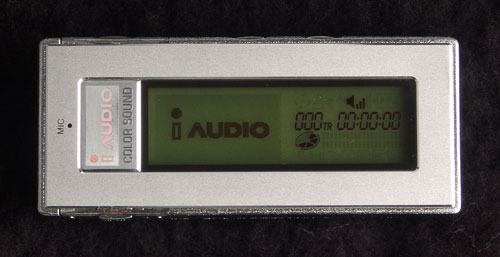
Here is a shot straight on the front. The rectangular area under the i AUDIO
logo plays host to a short video when the player is turned on. The video is cool
for about one power up and then I started wondering if the video caused the
delay to be longer. That’s just the way my mind works. Another example: I have
noticed that my connection to Netzero takes exactly as long as their new Mustang
commercial (the one with a deceased Steve McQueen returned to catch the keys and
drive off in some guy’s new Mustang — takes place in a cornfield?). The
commercial plays in the dialup window and invariably ends at the same time that
login completes. What a coincidence I tell myself. My guess is that JetAudio’s
little video was produced to match the existing boot up time for the iAudio4
(about 10 seconds), but Netzero is definitely messing with the kid.
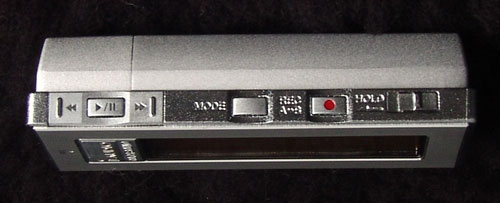
The majority of the controls are placed along the upper edge. From left to
right: beginning of selection, play/pause, end of selection, mode, record, and
hold. The first three and the record are just typical player controls. The mode
switch brings up a menu in the video area of the screen which allows you to
choose between mp3 player, FM radio, voice recorder, and line-in recorder.
Yes, you an actually plug another audio device into the iAudio4 with the
included patch cable and use it to record mp3 files from an analog source. I
didn’t have another such audio device handy, but the voice recorder function
works as advertised. It also records FM radio while allowing you to listen to
the broadcast simultaneously.
The hold switch disables all the other controls — including the volume and
menu buttons on the opposite side — so you don’t accidentally change mode, etc.
A potential gotchya, if the hold switch is set to hold when the power is off
and you hit the play/pause button which also serves as the power button, the
unit will get about halfway into the power on sequence and then shut down. It
looks like the battery is dead. I went without sound at one morning workout
because I thought my battery had died. The battery was fine — turned out it was
my brain that had died.
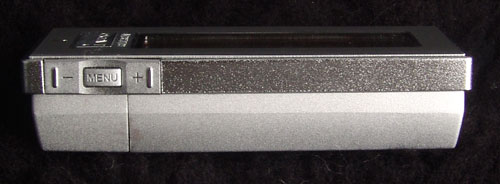
Here are the aforementioned volume and menu controls. The menu provides
access to a plethora of options and settings including the following:
-> JetEffect — preset equalizer settings for rock, jazz, etc.
-> BBE — improves brilliance and clarity
-> Mach3Bass — provides deeper and tighter bass sound
-> and others
I basically stayed with the defaults and it sounded great to me.
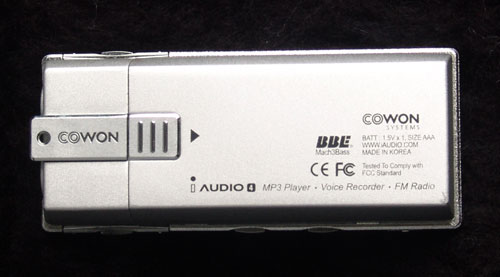
To open the back you press in on the square to the left of center and slide
the cover to the right. When I first got the player, this was extremely
difficult because the plastic was stiff. After I used it for a few weeks and
changed the battery a few times it became easier to open.
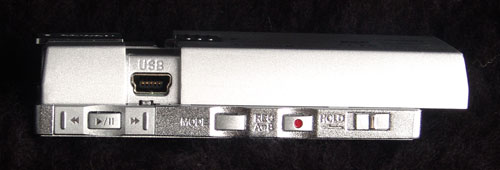
The USB jack is buried behind the battery cover. This can be a pain, but it
also serves to protect the jack from dirt, moisture, etc. I found this to be a
lot less annoying after the cover latch loosened up with use.
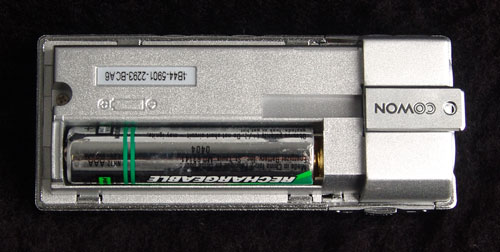
The JetAudio
iAudio4 uses one AAA
battery. They include your first alkaline battery, but I immediately purchased
NiMH rechargeable batteries. I am thrifty like that. The initial alkaline
battery lasted approximately fifteen hours with the player used primarily as an
FM radio receiver. I wish they would have left a bit more space for the battery.
The fit is extremely tight and it is difficult to remove the battery for those
of us who bite our fingernails.
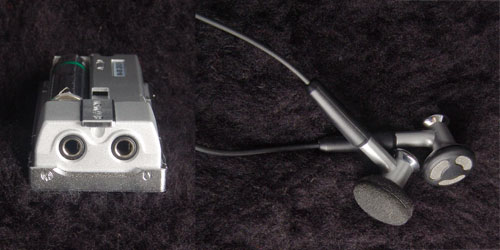
The headphone and line-in jacks are situated on one end of the
iAudio4 mp3 player.
Also pictured are the included ear buds. These sound really good and I use them
when I will be stationary, but I had to get a pair of cheap Koss ear pieces with
the wire that clips behind the ear for working out. The ear buds feel like they
are falling out and occasionally do.
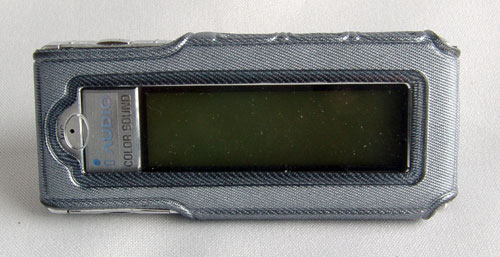
Here is the wrap around case included with the player. The case has cut outs
for all of the controls, but must be removed to access the USB jack or battery
compartment. The player comes with a couple of sticky plastic screen protectors,
as well, but I just keep it in this case all the time. It has a clear plastic
window over the screen (note the cutout for the built-in microphone. The case
has a loop on the back, but no clip of any kind. A quickie belt clip of some
kind would come in handy.
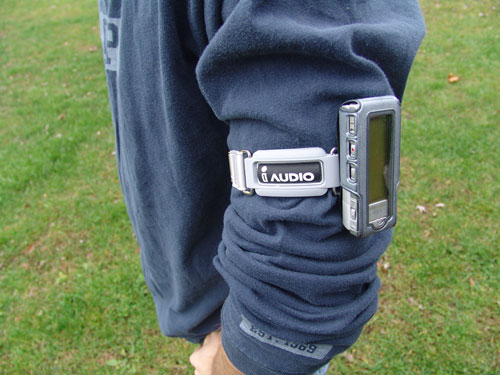
Here is the player with the included arm band. You have to thread the arm
band through the loop on the back of the case, clasp the ends of the band
together, finally sliding the whole works up your arm. At first I did not like
the hassle, but it is very stabile and the arrangement grew on me. In case you
are wondering, there IS a bicep hiding under the folds of my sleeve.
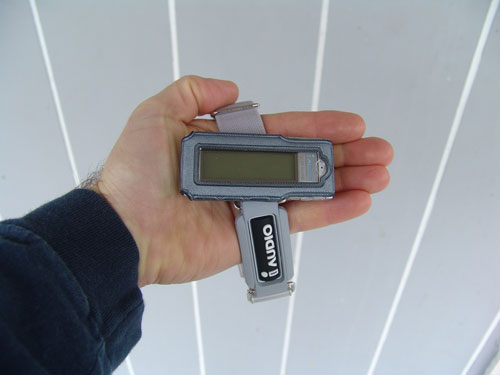
Here is a shot of the unit in my hand for perspective.
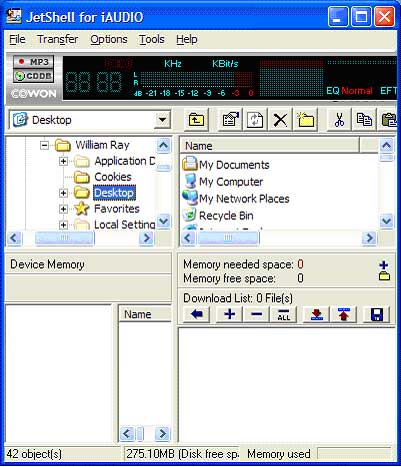
Here is the JetShell interface that you can use to manage the audio files on
your iAudio4. This
program also allows you to rip CDs to mp3, convert wav or wma files to mp3, or
convert mp3 files to wav format. There is an editor for the id3 tag header
imbedded in mp3s that contains the artist info, album name, etc., that can be
found under the tools menu.
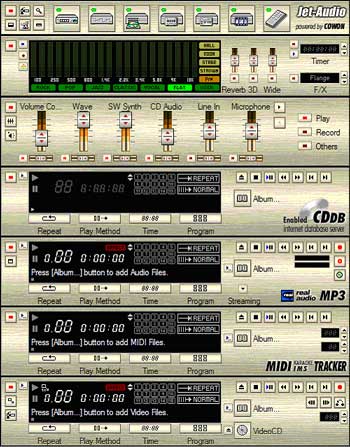
The iAudio4 player also comes with a fully featured media player called
Jet-Audio. Above you can see the ‘rack’ of components used to play CDs, mp3
files, etc.
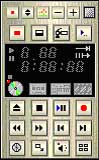
Here is the remote control that can be accessed from the system tray when
Jet-Audio is running.

This is the docking toolbar interface.
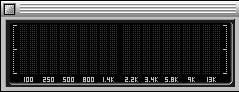
This is the floating equalizer-type readout.
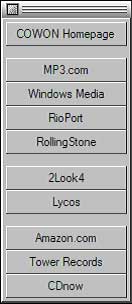
And, finally, a customizable floating web resource toolbar. All of these
components and toolbars can be turned on and off from the top portion of the
Jet-Audio interface.
When I visited the JetAudio website to
get the prices and options for the
iAudio4 I was reminded
that one of the features that sets this player apart from the competition is the
124 color LED screen. You can customize the interface to use different LED
screen colors based on the mode or even set it to change on a random basis. This
feature did not really matter to me and I almost forgot to mention it. If colors
are important to you, you will surely find one of the 124 available that fills
your needs.
Overall, I really like this player. It is easy to use and small enough to fit
in my jeans pocket or in a side pocket on my gym bag. The battery life is great
and the sound quality is excellent, too. Nothing much to complain about with
this one.
Available Colors : Metal Silver and Metal Black
Price:
128MB $99.00 (Metal Silver only)
256MB $149.00 (as reviewed)
512MB $199.00
1GB $249.00
Pros:
Ultra compact
Long battery life from single AAA battery
Excellent sound
Secure arm band
Useful multimedia software
Records mp3 from analog source
Cons:
battery compartment very tight
USB jack behind battery cover
Gerber Gear 22-47162N Fast Draw Folding Assisted Opening Pocket Knife, Fine Edge, Black
(as of June 14, 2026 18:43 GMT -05:00 - More infoProduct prices and availability are accurate as of the date/time indicated and are subject to change. Any price and availability information displayed on [relevant Amazon Site(s), as applicable] at the time of purchase will apply to the purchase of this product.)
Gerber Gear EVO Jr. Folding Knife - Serrated Edge [22-41493]
(as of June 14, 2026 18:41 GMT -05:00 - More infoProduct prices and availability are accurate as of the date/time indicated and are subject to change. Any price and availability information displayed on [relevant Amazon Site(s), as applicable] at the time of purchase will apply to the purchase of this product.)Product Information
| Price: | |
| Manufacturer: | JetAudio |

Gadgeteer Comment Policy - Please read before commenting
Post your comments here on the JetAudio iAudio4 MP3 Player review.
http://www.the-gadgeteer.com/jetaudio-iaudio4-review.html
Just click the POST REPLY button on this page.
Nice review!
Funny you should mention the new Mustang…it uses the same sort of LED light arrangement on the dash to let you choose any color you want for the gauges.
Joe
Joe,
Glad you liked the review. Odd coincidence on the LED color scheme, eh?
Bill