
Our friends at ThinkGeek were nice
enough to ship me a new toy: The Digital Hotspotter from
Canary Wireless. This is probably
the best portable 802.11b/g WiFi signal detector that I’ve tested so far. We’ve
had several detectors reviewed here in the past that were either disappointing
or just plain mediocre. They usually consist of a small blob of plastic with a
few LEDs and a push button. Push the button and the LEDs light up to show the
presence of a signal and the strength of that signal. Problem is that these
detectors are unable to show multiple networks when available. They also don’t
show you the network’s SSID (service set identifier), encryption status or
channel number. Guess what? The Digital Hotspotter is able to give you all
that info in a small pocket friendly package.
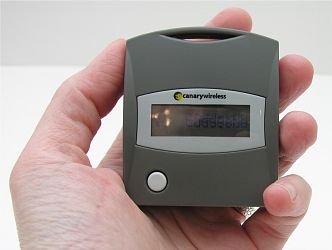
The Hotspotter is 2.52" x 2.17" x 1.06" in size and is powered by 2 standard
AAA batteries which are included. Battery life is expected to be about 2 months
when scanning an average of a couple times a day. The module turns off after 30
seconds of in activity.
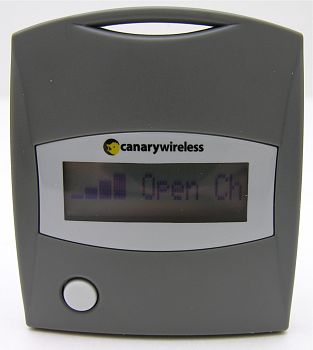
Here’s how it works… Press the white button on the front of the device and
it powers on and begins scanning for a signal. If it finds one, it will
horizontally scroll the SSID name, signal strength, encryption status and
channel # across the one line LCD display. Pretty nifty!
For those of you that don’t know the term SSID, it is the name given to the
wireless network by a network operator to distinguish the network from other
networks. In an airport, you might see an SSID of “wayport_access” or “t-mobile”
for the commercial WiFi hotspots used by Wayport and T-Mobile. If you’re just
out roaming around your neighborhood, you might see an SSID of “default”, which
may indicate that the access point was setup by a home user that did not
specifically configured the SSID for his or her network. Sometimes the
Hotspotter will show an SSID of "Cloaked". This means that the person that setup
the access point has disabled the broadcast of the SSID.
Signal strength is displayed as one to four vertical bars. If you’re looking for
a hotspot and find a weak signal, you can use the Hotspotter to determine
whether you are moving closer to or farther from a network access point by
watching the increase or decrease in the signal strength display.
The encryption status display will show either "Open" or "Closed". If it is
closed, that means that network is not encrypted using WEP or WPA which are two
types of encryption that are typically built into access points. If you see an
open network, that doesn’t necessarily mean you’ve just found a free ramp onto
the net. Even commercial networks like Wayport and T-Mobile will show up as
open, but then route you to a webpage that requires payment before you can
actually surf through them.
The channel display is pretty useless for a normal WiFi hound, at least as
far as I’m concerned… It’s more for network administrator types that might
want to use the Hotspotter to troubleshoot their networks. Channel information
can help in detecting reasons for interference. Most access points are set to
channel 1, 6 or 11 by default. If you see more than one network on the same
channel, it is likely that you may experience problems with interference.
As mentioned before, the Digital Hotspotter can show info for multiple
networks. After it find one network, you can just push the white button to cycle
to the next network in range, if it exists.
The only problem I had with the Hotspotter was viewing the LCD in dim light.
Unfortunately, it lacks a backlight, so if you plan to do a little war driving
in the dark, you’ll need a flashlight to seen the info.
According to the Canary Wireless website, the only other problem that one
might have with this scanner is the fact that it may have problems detecting
Linksys and D-Link access points. I was unable to test this potential problem
since all the access points I tested it with were not either of those two
brands. So, your mileage may vary.
All in all, I really like this little scanner. It is super easy to use and
the extra info on the LCD display makes it way nicer than just looking at
blinking LEDs.
Price: $59.99
Pros:
LCD displays SSID, Signal strength, Encryption status and Channel#
Can show multiple networks
Cons:
LCD not backlit
May have problems detecting Linksys and D-Link access points
More spendy than other scanners on the market

AAWireless - Wireless Android Auto Dongle - Connects Automatically to Android Auto - Easy Plug and Play Setup - Free Companion App - Made in Europe
$59.99 (as of August 8, 2025 00:22 GMT -04:00 - More infoProduct prices and availability are accurate as of the date/time indicated and are subject to change. Any price and availability information displayed on [relevant Amazon Site(s), as applicable] at the time of purchase will apply to the purchase of this product.)
HUIFU Wireless Earbuds, Bluetooth Ear Buds Headphones, 40H Long Playtime, Stereo Deep Bass, LED Power Display, IPX7, Lightweight in Ear Earphone with Mic for iPhone Android Phone
$199.99 (as of August 7, 2025 21:02 GMT -04:00 - More infoProduct prices and availability are accurate as of the date/time indicated and are subject to change. Any price and availability information displayed on [relevant Amazon Site(s), as applicable] at the time of purchase will apply to the purchase of this product.)Product Information
| Price: | 59.99 |
| Manufacturer: | Canary Wireless |
| Pros: |
|
| Cons: |
|

Gadgeteer Comment Policy - Please read before commenting
Post your comments here on the Canary Wireless Digital Hotspotter Review.
http://www.the-gadgeteer.com/canarywireless-digitalhotspotter-review.html
Just click the POST REPLY button on this page.
Hmmm, I guess that explains why I can’t detect all my neighbor wifi APs…even though they interfer with my network just fine. The problem with people always using 1,6,11 is that they often don’t care if your already on that channel. Some times you need to scan to see what channels have the strongest ‘interference’ on…and set your AP to where it will hopefully see the least….
Though intermittently, I can pick up an open ‘linksys’ AP at work with it….though I no longer have a work laptop…so I haven’t tried to see it….
The Dreamer.