
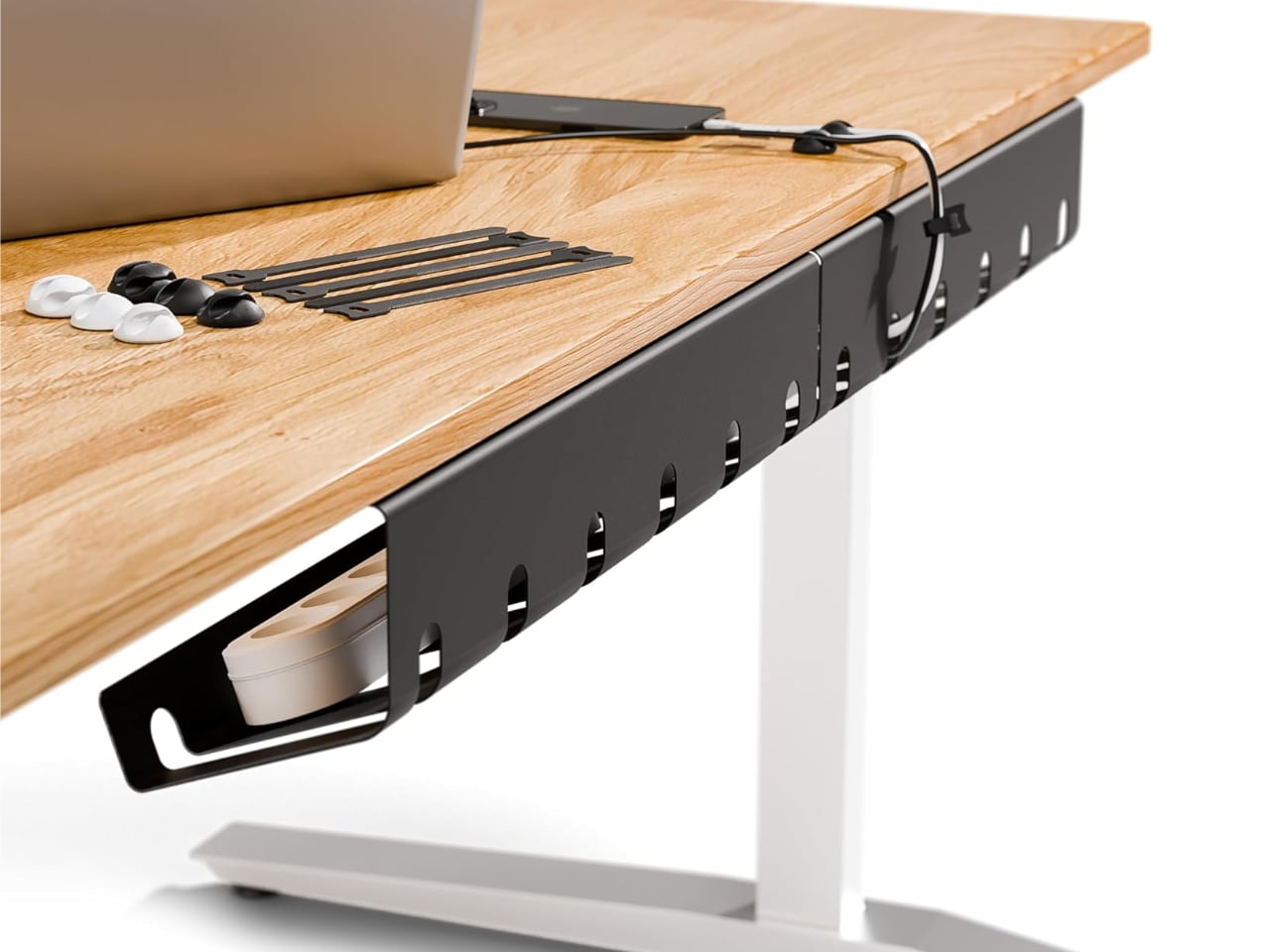
The cables always come back. You tuck them away, coil them neatly, maybe even add a few clips, and three weeks later your desk looks like a charger graveyard again. That cycle happens because modern desks support too many devices at once: monitors, laptops, phones, tablets, webcams, lights, controllers, and the adapters they all demand. A desk cable management kit works because it addresses the structure of that problem, not just the mess it leaves behind.
Most people try to fix desk clutter by cleaning what they can see. They bundle a few cords, shove a power strip into a drawer, and move on. The mess returns because every cable you use daily needs three things: a home, a path, and a place to park. Without all three, clutter isn’t a failure of discipline. It’s the default outcome.
Shop Cable Management Accessories on Amazon:
Adhesive Cable Clips | Velcro Cable Straps | Plastic Zip Ties | Cable Tie Mounts | Cord Protectors | Slotted Holders | Under-Desk Cable Trays
Variety matters more than raw piece count. A kit with 200 identical clips offers less real value than a kit with 80 pieces spread across multiple accessory types. Look for kits that include adhesive clips, velcro straps, zip ties, and at least one mounting option. That mix covers routing, bundling, and anchoring across most desk setups.
Surface compatibility also matters, especially in rented spaces or on furniture you want to protect. Some adhesives grip smooth surfaces well but struggle on textured wood or painted metal. Others remove cleanly, while some don’t. Because contents vary by brand and bundle, always check the listing details to confirm which accessories are included. If you want flexibility, prioritize velcro based options and test adhesives in an inconspicuous spot first. Think in zones, not perfection. Start with the area that causes the most frustration and expand only as needed.
Add The Gadgeteer as a preferred source to see more of our coverage on Google.
What a Desk Cable Management Kit Actually Is
An all-in-one cable organizer kit isn’t a single product. It’s a collection of small accessories bundled together, usually ranging from 100 to 200+ pieces, designed to handle different cable types, surface materials, and routing needs across your entire workspace. You’ll typically find adhesive clips, velcro straps, plastic zip ties, mounting bases, cord protectors, and slotted holders all in the same box.
The variety matters more than the piece count. A kit with five different accessory types gives you options for under-desk routing, desktop cable parking, and drawer organization all at once. That flexibility is what separates a proper cable organizer kit from a bag of zip ties and good intentions. The sections ahead walk through how to choose and use a kit correctly.
Breakdown of Common Accessories
Adhesive cable clips and holders are the workhorses of any kit. These small plastic or silicone pieces stick to your desk surface, wall, or monitor stand and hold one or more cables in place. They’re ideal for routing a charging cable along the edge of your desk so it doesn’t fall behind when unplugged. If you’ve ever fished a USB-C cable out from behind your desk at 7 AM, you understand exactly why these exist.
Velcro cable straps bundle excess cable length without the permanence of zip ties. They’re reusable, adjustable, and perfect for cables you might swap out later, like a laptop charger that travels with you or a headphone cable you occasionally replace. The soft loop-and-hook design also prevents cable damage that plastic ties can cause over time.
Plastic zip ties serve the opposite purpose: permanent bundling for cables that never move. Under-desk power cables, monitor feeds, and ethernet runs all benefit from zip ties because you set them once and forget them. The trade-off is that cutting them open means starting over, so they’re best reserved for cables you don’t plan to touch.
Cable tie mounts act as anchor points. These small bases, either adhesive or screw-mounted, let you route zip-tied bundles along a specific path instead of letting them dangle. Stick one under your desk every 12 inches or so and suddenly your cables follow a clean line instead of pooling on the floor.
Cord protectors and sleeves wrap around cables to shield them from wear or hide visual clutter. They’re particularly useful where cables rub against desk edges or where a tangle of wires would otherwise be visible. Slotted holders park cables at the desk edge so they stay accessible. Drop a charging cable into the slot and it won’t slide away, even when nothing’s plugged in.
How These Kits Actually Reduce Desk Clutter
No single accessory transforms a messy desk into a clean one. The value of a kit is combinatory: clips route cables, velcro straps bundle them, mounts anchor the bundles, and slots keep the tips accessible. Each piece handles one part of the cable’s journey from source to device.
Think of your desk in zones. The under-desk zone handles power strips, surge protectors, and permanent feeds. The desk edge zone parks cables you plug and unplug daily. The desktop zone keeps short runs tidy where they’re visible. A complete home office organization strategy covers all three zones with different accessories, not just the one you notice most.
Who These Kits Are Best For
Remote workers with multi-device setups benefit the most. If you’ve got a laptop dock, external monitor, webcam, and a phone charger all competing for desk space, a kit handles the infrastructure that makes daily use tolerable. Multi-monitor users face similar complexity, especially when adding USB hubs or KVM switches into the mix.
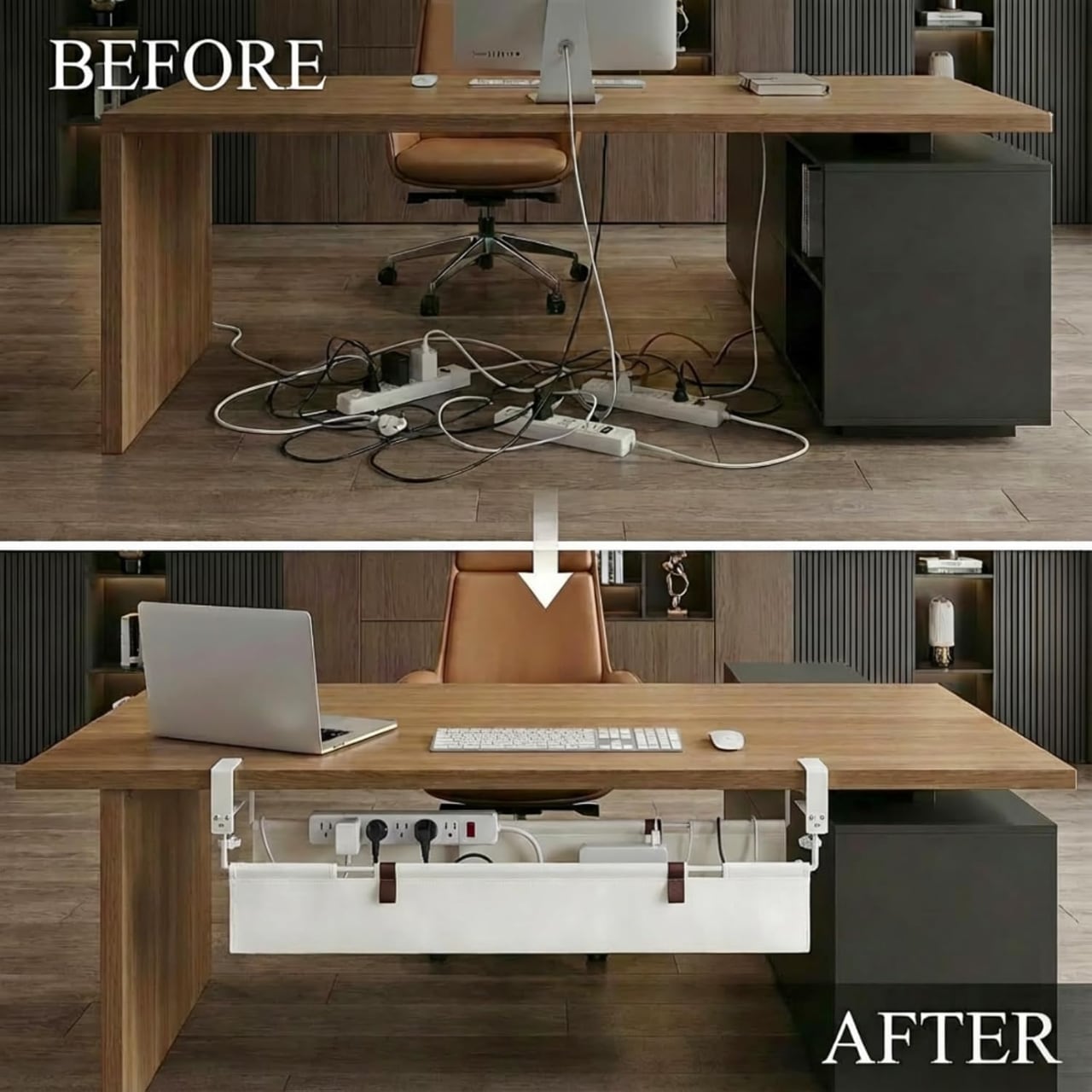
Creators running audio interfaces, camera mounts, or streaming gear often deal with thicker cables and more of them. Gamers with RGB peripherals, controller chargers, and headset stands face the same issue from a different angle. Students in small spaces get a different advantage: maximizing usable desk surface by routing everything out of the way.
Not everyone needs a full kit. If you work from a laptop with no external devices, a couple of clips and a velcro strap will likely cover your needs. The 150+ piece kits exist for setups with genuine complexity, not for minimalist desks.
How to Choose the Right Desk Organizer Kit
Variety beats quantity. A kit with 200 identical clips offers less value than a kit with 80 pieces across six accessory types. Look for kits that include at least adhesive clips, velcro straps, zip ties, and some kind of mounting option. That combination covers most routing and bundling scenarios. Because kit contents vary by brand and bundle, always check the listing before buying.
Surface compatibility matters if you’re renting or using furniture you don’t want to damage. Some adhesives grip well to smooth surfaces but fail on textured wood or painted metal. Others leave residue when removed. If you need a temporary setup, prioritize velcro-based options and test adhesives in an inconspicuous spot first. Think in zones, not perfection. You don’t need to cable-manage every inch of your desk on day one. Start with the zone that bothers you most and expand from there.
Setup Tips That Prevent Re-Clutter
Plan your cable paths before you start sticking things down. Trace where each cable needs to go, where it’ll bundle with others, and where you want it to emerge for daily use. That five-minute exercise prevents the “peel and restick” cycle that wears out adhesives and your patience.
Label or color-code cables at both ends if you have more than a few running to the same destination. Electrical tape in different colors works, and so do small cable tags. Leave slack wherever a device moves, like a laptop that travels or a monitor arm that adjusts. Tight cables look clean until something shifts and pulls a clip off the wall.
Decluttering as a One-Time Reset
Desk organization isn’t a daily habit. It’s a system you build once and adjust rarely. The goal of any desk cable management effort is to make your cables invisible to your workflow, not to maintain a pristine aesthetic every morning. Good systems fade into the background. You stop noticing them precisely because they’re working.
A single afternoon with the right kit can eliminate the low-grade frustration of tangled cables, missing chargers, and cluttered sight lines for months or years. That’s not a productivity hack. It’s just friction removal, the kind that makes your workspace feel like it’s actually working with you instead of against you. Before buying, compare a few kits based on your desk’s complexity and the accessory types that match your setup.
Shop Cable Management Accessories on :
Adhesive Cable Clips | Velcro Cable Straps | Plastic Zip Ties | Cable Tie Mounts | Cord Protectors | Slotted Holders | Under-Desk Cable Trays

KAMRUI Pinova P2 Mini PC 16GB RAM 512GB SSD, AMD Ryzen 4300U(Beats 3500U/3550H/N150/N95,Up to 3.7 GHz) Mini Computers,Triple 4K Display/HDMI+DP+Type-C/WiFi/BT for Home/Business Mini Desktop Computers
(as of March 11, 2026 10:43 GMT -05:00 - More infoProduct prices and availability are accurate as of the date/time indicated and are subject to change. Any price and availability information displayed on [relevant Amazon Site(s), as applicable] at the time of purchase will apply to the purchase of this product.)
