
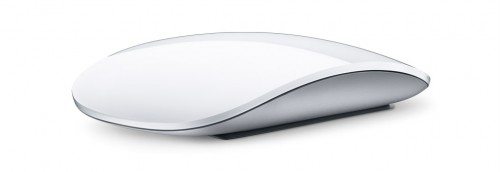
 Apple introduced the Magic Mouse today and besides being magical it is smart and sleek. The concept of using gestures to interact with a device was made popular in the iPhone, iPod Touch, and Macbook. Now the concept comes to the desktop in the first ever multi-touch external mouse. The Magic Mouse has a smooth and sleek look with no visible buttons. The entire surface of the Magic Mouse is clickable. Drag your fingers along the surface of the mouse for scrolling. Other features include screen zoom and two-finger swipe to browse Safari and iPhoto. The Magic Mouse uses laser tracking and Bluetooth. It is now included with every iMac purchase and, for the rest of Mac users, it’s $69.
COLORCORAL Cleaning Gel Universal Dust Cleaner for PC Keyboard Car Detailing Office Electronics Laptop Dusting Kit Computer Dust Remover, Computer Gaming Car Accessories, Gift for Men Women 160g
42% Off

Gadgeteer Comment Policy - Please read before commenting
Order placed! Gotta be an improvement of the Maligned Mighty Mouse!
Wonder if it works with a PC?
An excellent question… esp for those of use who use Bootcamp!
From another tech site:
“So far the Magic Mouse is only compatible with the iMacs that they ship with, but will get broad support soon.”
So, I can’t pick one up & use it with my aging G5 tower at work? Hmmmmm.
WAIT A SEC. Where’s the middle button click? I’ve looked everywhere and can’t find it. Unless someone like Steermouse develops a driver and permits a two-fingered click as “middle click”…! Oh no!
According to Magic Mouse System Requirements you need:
Bluetooth-enabled Mac computer
Mac OS X v10.5.8 or later with Wireless Mouse Software Update 1.0
Existing keyboard and mouse for setup
So, it looks like no PC support. Although if you did plug it in it may move and click but don’t know about the other features.
Middle mouse button…hmmmm…good question.
Went to the Apple store in my neighborhood (5th Avenue, NYC) and saw the mouse “live.” Web pictures do NOT do it justice. It is so sleek and beautiful – the store had none in stock so I went online and had to order one.
@Nilay I just wonder how easy it is to do the multi-touch on top, without moving the mouse itself in the process…
@Julie – the store was so crowded that I didn’t get to play too much with the mouse at the time. I’m sure there will be a learning curve associated with it, but as with the multi-touch trackpad on my macbook, once I got used to it, it works really well.
just got mine and it’s great except can’t get it to scroll.
Any help?
Rubbing fingers down and across has no results whatsoever
Be sure to run Software Update; there is a driver update that won’t download until you pair your mouse with the Mac. And (sadly), no middle button function…
Havent tried it but use this to enable three-finger middle click:
http://clement.beffa.org/labs/projects/middleclick/