
I started exploring PC based digital multi-track recording well over a decade ago, when it was expensive and impractical. After investing over $5,000 in the endeavor, I eventually wound up with a system that exceeded my much maligned cassette based 4 track portable studio. Fast forward and Cakewalk just sent me their most recent solution, a $99 hardware and software package promising the world and more. I know what you’re thinking, this is a joke right? Not so fast, read on…
Features
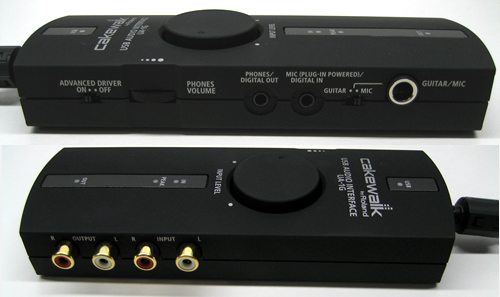
Hardware Specifications
Number of Audio Record/Playback Channels- Record: 1 pair of stereo
- Play: 1 pair of stereo
- REC SOURCE switch = ANALOG: Full duplex (except for 96 kHz setting)
- REC SOURCE switch = DIGITAL: Recording only
- PC interface: 24 bits
- AD/DA Conversion: 24 bits (linear)
- ADVANCE DRIVER switch = OFF: 16 bits
- Digital output: 32/44.1/48/96 kHz
- Digital input: 32/44.1/48/96 kHz
- AD/DA Conversion: 32/44.1/48/96 kHz
- ADVANCE DRIVER switch = OFF: 32/44.1/48 kHz
- Line input jacks: -10 to +4 dBu
- Guitar input jacks: -30 to -16dBu
- Mic input jack: -40 to -26 dBu
- Line output jacks: -10 dBu
- USB
- Digital input (Optical mini type)
- The same jack serves as both the Mic Input jack and digital input connector
- Digital output (Optical mini type)
- The same jack serves as both the headphones jack and digital output connector
- Conforms to IEC60958 consumer format
- ADVANCED DRIVER Switch
- Guitar/Mic Switch
- INPUT VOLUME knob
- PHONES VOLUME Dial
- SAMPLE RATE Switch
- 96kHz MODE Switch
- INPUT MONITOR Switch
- REC SOURCE Switch
- USB Connector (B type)
- Line Input jacks (L, R) (RCA phono type)
- Line Output jacks (L, R) (RCA phono type)
- Guitar/Mic Input jack: 1/4 inch phone type)
- Mic Input jack (Plug-in powered miniature phone type)
-
Digital Input connector (Optical mini type)
* The same jack serves as both the headphones jack and digital output connector. - Headphones jack (Stereo miniature phone type)
-
Digital Output connector (Optical mini type)
* The same jack serves as both the Mic Input jack and digital input connector.
Supplied from the computer Current Draw
200 mA Dimensions
- 160 (W) x 58 (D) x 28 (H) mm
- 6-5/16 (W) x 2-5/16 (D) x 1-1/8 (H) inches
165 g / 6 oz
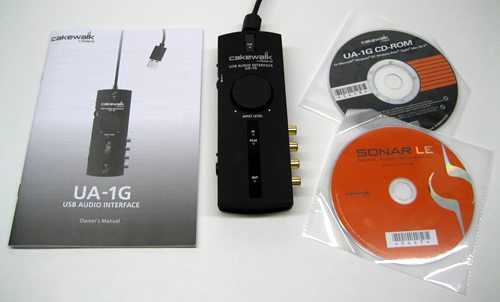
Package Contents
Test Machine
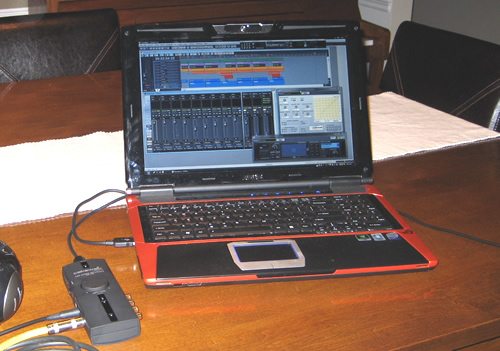
One of my big initiatives lately (and mostly at the behest of my beautiful and beloved wife), has been to spend less time within my fortress of solitude and more time within reach and earshot of other humans that occupy the home. So when I noticed on the packaging of the UA-1G that it was geared to work well in a mobile environment, I thought ok, you asked for it. Throw a $99 multi-track studio in a box at me and then tell me to use it on my laptop? Ok, where’s the hidden cameras? Where’s Allen Funt? I did fall off a turnip truck, but not yesterday, I’ve done this before, and it takes a monster machine to do this right!
Now granted, my laptop can probably beat up your laptop, I bought it specifically for gaming and other intensive apps. I was hoping sometime around 2050 to be able to do multi-track recording on a laptop so we’ll see where this goes, because if this is achievable on any laptop, in my mind it’s a huge step forward. Here’s the machine spec just so you know:
- ASUS G50Vt-B1
- Intel Core 2 Duo T9550 (2.66GHz) Processor
- 15.4″ WSXGA+ (1680×1050) Display
- 4GB DDR2 Memory
- 640GB (2 x 320GB 7200RPM) Hard Drive
- DVD Super Multi
- NVIDIA GeForce 9800M GS 512MB Graphics Card
- Microsoft Windows Vista Home Premium 64-Bit
Setup
Cakewalk is by no means new to this game. They were a pioneer in home studio technology, being one of the first to bring commercial quality recording capability into your bedroom. Now owned by Roland, a name synonymous with pristine quality, this old dog is kicking out a few new tricks. Setup was a breeze. I first loaded the windows driver, then the Sonar LE software package, and then plugged in the interface. It truly couldn’t be easier. The UA-1G was immediately recognized by windows and by Sonar LE.
Initial Impressions
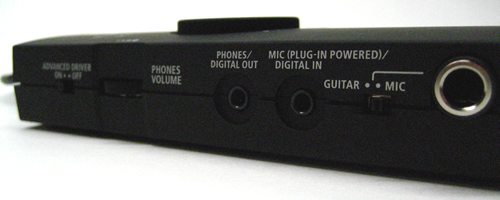
The hardware is simple enough. It’s about the size of your average notebook power supply but thinner and much lighter. The tactile feel is great, it’s got that matte black rubberized feel to it that I’ve come to love on my gadgets. The in and out jacks feel solid, and the input adjustment knob is large enough to grab quickly and tweak the signal. I really like the hardware knob for volume adjustment as well. One of the big problems with these types of systems when they first came out was that everything was a mouse click, and coming from the days of huge consoles, this was a horrible thing to stomach. The UA-1G has just what you need where you need it while maintaining a very portable form factor. In addition, it’s powered by the USB port you plug into, no external power supply is needed. Cakewalk UA-1G, you are now officially, my new best friend.
I found the software to be extremely robust yet simple to use. While any multi-track computer software takes a while to wrap your head around, I found navigating Sonar LE intuitive and logical. When I did get stuck, the extensive built in help section was quite adequate. I cut my teeth using huge sound boards and I still like that environment. Sonar LE incorporates a console view along with the industry standard wave form view which I really love. For those of us that grew up throwing faders and tweaking knobs, this environment lets us enjoy this technology instead of fighting it. Sonar is operable by an external control surface or keyboard if you choose, so it should be easy do dial in an environment that you’re comfortable in.
Click the picture for a larger view of Sonar’s environment.

Performance
I’m not a midi guy or a keyboardist. We’ve got a piano and a suitable Yamaha keyboard in the house, but my two sons and wife are much more apt at keys than I. I’m a guitarist and bassist mostly with enough drumming ability to keep a steady beat. So I’m all about the digital audio when it comes to multi-tracking. That being the case, I look for two must-have criteria for these types of solutions:
1. ASIO – As usual, Wiki says it most concisely:
Audio Stream Input/Output (ASIO) is a computer soundcard driver protocol for digital audio specified by Steinberg, providing a low-latency and high fidelity interface between a software application and a computer’s sound card. Whereas Microsoft’s DirectSound is commonly used as a stereo input and output for non-professional users, ASIO allows musicians and sound engineers to process their audio via Windows computer software instead of external hardware.
ASIO bypasses the normal audio path from the user application through layers of intermediary Windows operating system software, so that the application connects directly to the soundcard hardware. Each layer that is bypassed means a reduction in latency, the delay between an application sending sound to the sound being reproduced by the soundcard. In this way ASIO offers a relatively simple way of accessing multiple audio inputs and outputs independently. Its main strength lies in its method of bypassing the inherently high latency of Windows audio mixing kernels (KMixer), allowing direct, high speed communication with audio hardware. Unlike KMixer, an unmixed ASIO output is “bit identical”, that is, the bits sent to the sound card are identical to those of the original WAV file, thus having higher audio fidelity.
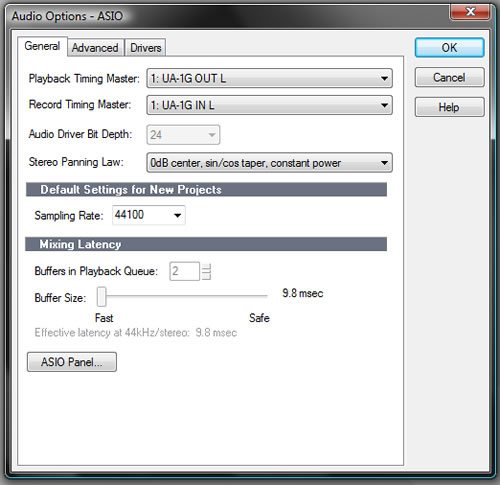
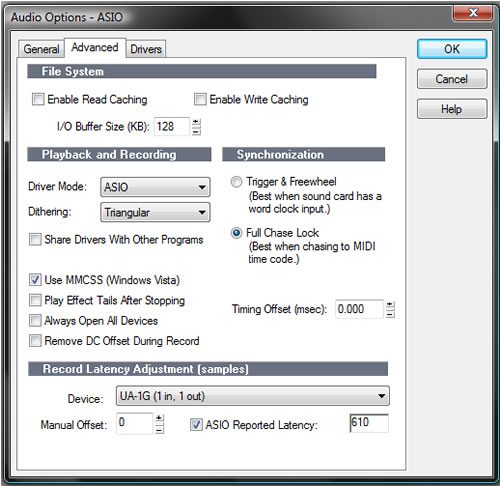
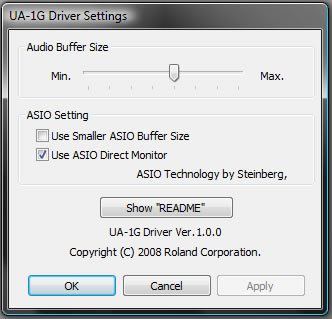
Do not, I repeat, DO NOT ever, ever, under any circumstances try to do multi-track recording without ASIO driver implementation. It won’t work. The sound you are attempting to record will be completely out of sync with tracks you’ve already laid down. Therefore, you most definitely want to ensure that your recording environment is picking up your interface as the input and output, and that it is using the ASIO driver. This is easily done under the Audio Options menu.
And one quick note on the input / output settings. Make sure you plug your headphones or external speakers into the UA-1G itself and not your computer when recording. Not doing this negates the awesomeness of ASIO implementation and the UA-1g offers a handy and easy to reach volume scroll wheel. Record and monitor thru the UA-IG.
2. An Amp Simulator
If you’re a keyboardist, you’ll do fine with just about any solution out there, it’s easy to hook up a usb or midi keyboard these days, load up a synth, and make your cheap-o keys sound like world class instruments. But if you’re a guitarist, and you want to minimize cables, complexity, and signal noise, an amp sim is a must. While doing a little pre-review research I couldn’t determine anywhere in the advertising that noted the package included one. Luckily for me it did, and Cakewalk should push this feature hard in their marketing in my opion, it’s a very valuable asset to a huge segment of their targeted market.
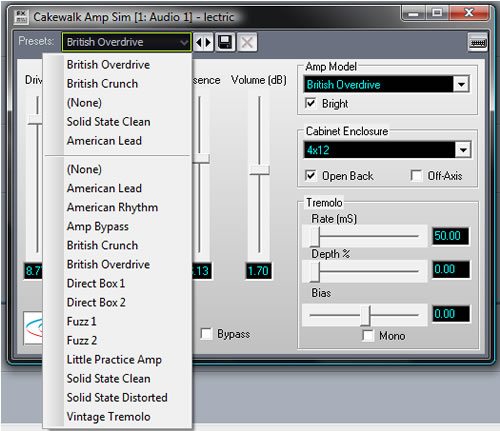
That means I don’t have to plug in my amp, and line out or mic it to get some decent tone. There’s little more offensive to me than a direct, un-processed electric guitar sound on tape. It’s horrible, stale, and dead. Many large commercial studios utilize direct boxes for recording bass specifically, but I’ve always hated it. The amp simulator included is not overly extensive, but it’s plenty good with enough presets and ability to customize that you’ll have no problem dialing in a few fun tones that are inspiring enough to get the creative juices flowing. I was able to even dial in a decent clean bass guitar tone even though there’s no preset for bass.
I could go very in depth into the Sonar LE software as it has a ton of functionality, but that review would be something no one would read, so I’m going to just hit the high points. Beyond the ASIO and Amp Simulator, there are a virtually unlimited number of audio and midi tracks you can create. Everything is rendered at 24 bit rate, which is currently the professional industry standard. There is a more than adequate amount of routing and effects processing ability in Sonar LE. All in all, I was pleasantly surprised at the capabilities of this light version of Sonar. I have been using FL Studio Producer Edition for years, and I really didn’t see much missing from LE that I couldn’t live without. And for you keyboardists and midi heads, it’s got all the same stuff I don’t understand about Steinburg Cubase, FL Studio, Ableton, and other packages including piano roll, a fully functional synth, midi clocks, and other associated goodies.
Now that I was all ready to go, I first grabbed up my Godin electric, and had to check out the British Overdrive amp sound with the 4×12 open back cabinet. It just sounded too lush and creamy to pass by. So I plugged in, set up a track to monitor the guitar thru and hit a few chords. I was immediately transported back in time when I first picked up the guitar as the tone, to me sounded like a classic Tommy Iomi crunch back in the day. When I first started playing, Zepplin and Sabbath were my favorite things to hammer out while I learned, and this tone took me there. I wouldn’t dare unleash my attempt at Mr. Page on the public at large, but since Tommy Iomi is one finger shy of a full 5 on his fretting hand, I figured I could manage a very abridged few bars of “War Pigs” in order to let you a listen to the built in amp simulator.
After exhaustive noodling thru every 70’s classic rock riff I know ( I found the tone really inspiring), I tried out several of the other tones as well. While the amp simulator included is not as extensive as some dedicated packages out there, I found it much more than adequate, and actually quite fun to play with. After an hour or so of this, my wife insisted I quit making “funny rock star faces” and get on to the more serious side of things. So I saved the track, exported it to MP3 format with the built in encoder, and put the good old days back where they belong.
I opened up a new project, cued up a track ready to record, grabbed my Seagull concert acoustic/electric and plugged in. I decided to do a clean finger picking thing to illustrate the clarity of the package. I can tell you that I was really impressed with the complete lack of noise in the headphones I was monitoring while recording, and in the recorded track itself. The little clip below is a very un-recognizable version of Mercy by Widespread Panic I came up with. I always seem to warm up with it when I pick up an acoustic, and it worked for the purposes here. You’ll notice the guitar is effected with a some Chorus and Reverb. The effects are heavier than I would ever put on a finished product, but I wanted them to be noticeably audible for demonstration purposes.
Media Archiving and Restoration
As a parent, I’ve noticed that the older your children get, the less cool you become. My 10 year old son happened to be hanging around while I was doing my testing. He’s taken an avid interest in drums, keys, and guitar, and of course technology. Most of what he’s ever been witness to me playing, was acoustic guitar, or easy jazz or blues electric, or some jazzy or funky bass. He remarked that he didn’t know I could “shred” the heavy stuff while I was laying down the War Pigs clip. I professed to him that indeed I used to rock! Long before he or his mother came along, I spent a few years rocking it out full time. Those days are long gone, but a light bulb went off. I told him to go pull out a bin of old cassettes that have traveled with me for years and years and bring them to me.
In the meantime I ran to the garage and pulled out the old Teac cassette player, grabbed some RCA cables and headed back to the laptop. I plugged the cassette player into the UA-1G, grabbed the oldest, crustiest tape I could find and slipped it in. I loaded up a new project and used the “Stereo Master” template, hit the record button in Sonar, and the play button on the Teac. What emanated from the headphones was the horrible quality recording of me and one of the first bands I was in, playing an outdoor festival. I was able to dump the entire contents of the cassette onto my hard drive, and am planning on doing a lot of dynamics processing, slicing it up into different tracks and making a CD out of if for us. All of which the UA-1G and Sonar LE should be able to do easily with the included features.
The UA-1G did this archiving easily and never once taxed my laptop. It dumped about 1 hour and 40 minutes of audio straight without a single glitch or pop left on the track. I’m going to get to re-live the glory days as I go thru this process with all of my old recordings, and I can’t tell you what a big deal it is to be able to do this. My son still doesn’t think I’m cool, but he will now at least admit that I used to be! So this was an added bonus I really hadn’t considered, but the UA-1G is going to let me do all this archiving on my laptop as I get time to do it. This is huge!
This was my first home studio, it comprised 600 square feet and tons of equipment.
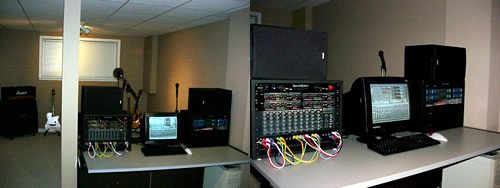
It’s now this, it comprises 6 square feet, minimal equipment, and has more capability.
Conclusion: The UA-1G is a JamGasmic Must Have!
The UA-1G simply blew me away. As someone who’s seen first hand this type of technology evolve from infancy to today, I can tell you in no uncertain terms, that this package is simply beautiful. I love a good bargain, and especially when it comes to musical instruments or related equipment because I love to see it in the hands of the masses. The UA-1G puts a really shocking amount of functionality within very easy grasp of a lot of people. For $99, I almost still can’t believe it. To me, a good technology is transparent. While playing with the UA-1G, it disappeared, what was left was pure clean fun bundled in a functional tool set.
What’s more is it performed flawlessly on my laptop, making this package truly portable and flexible. Imagine being able to travel and capture those fleeting inspirations quickly, or simply carrying it to a friends house, or being able to capture a 24 bit recording off the soundboard at your next gig. Whether you buy this for yourself or as a gift for someone, you can’t go wrong. I’ve not reviewed or purchased anything recently with this much wow factor, it’s that good. It’s capable enough to do most of what you want, and simple enough to just have fun. Go get it!



Gadgeteer Comment Policy - Please read before commenting
Thank you David for an inspired and full review. Being from the same era I share similar experiences. I am going to buy this. My creative juices are fermenting!
Marc.
Can you record a vocal track or something using a mic so we can see the quality?
I’m intrigued by this as well for my son to get into as a means to create his own music for his Flash animations, but need to get a grip on what this would really do for him if he does just use a keyboard. As you say, it seems more geared towards interfacing a guitar than a keyboard, yet when I look up some keyboards, I start seeing other components and software that people use as well, which leads to more research and head scratching! But, you started me thinking about this, and it is a great article, so thank you.
Wow you sold me i just got the Asus g50vt-x5 not as beastly as yours but it definatly gives me confidance knowing you tested it on a similar rig, thanks for the review
Im snatchen one of these for sure next check
You need a mike preamp to record with a microphone to me this is an advantage since I have a great mike preamp that is better than the ones most mfg include and I am not paying for a mike preamp that I neither need nor use.
cakewalk should hire you. Fantastic review.Thanks man
I am buying now. Click click click aaaaaand click! Done.
🙂
This is a great product. I am using it to do multitrack recording on an ASUS eeepc 1000H netbook. One problem I had with sonar 6LE was that it defaulted to mme and I wanted asio drivers. If you have this problem go to this link and down load the application it refers to. It sorted it out for me.
http://z8.invisionfree.com/GAPers/index.php?showtopic=82
Would also recommend that you try the amp sim without a cabinet and then load up cabinet impulses in a free impulse loader like Kefir, Le Pou or Voxengo Boogex. Lots of great free impulses to be had out there.
UA-1G spec seems to indicate their D/A converter is as good and the A/D. The overall build and design looks good also.
I am looking for a USB DAC with headphone output that is capable to drive either AKG K 701 or Sennheiser HD650 headphones. Do you think UA-1G is good enough (within its price context) for listening to WAV files from my laptop?
Many thanks for any advice. Cheers,
JK
I was looking for an inexpensive way to start into the digital recording age. I bought the UA-1G because of your review. My experience with it so far (basically 1 day) has been fantastic. It is everything you said it was and the LE software included with it made this an incredible buy. After about an hour of hacking around with the UA-1g and the software I was able to record tracks with ease. The only thing I would remind users of this is when you select the UA-1G as your sound card you have to close the program and restart it for the changes to take effect (at least I did before I could hear out of the phones jack and get levels in the software). I haven’t tried anything with midi yet but am looking forward to it. I think I might buy the UM-1G for the midi. Anyway thanks for the review you hit the nail right on the head.
“Do not, I repeat, DO NOT ever, ever, under any circumstances try to do multi-track recording without ASIO driver implementation. It won’t work.”
The above statement is ***absolutely and completely wrong***
I suggest people look elsewhere for recording advice
HTH 😉
OTHER ROLAND Boxes are generally really good with SONAR, so I have high hopes for this.
ASIO drivers are not necessary for recording timing. The timing on SONAR, and all other cakewalk systems will be rock solid with MME and even WDM drivers. HOWEVER. the ASIO drivers are faster (in computer terms) for realtime playing through effects – so you can plug your electric guitar into the UA-1G, then route it through a SONAR track with effects – and listen to the result while you play to get inspiriation.
So I use the ASIO drivers, but UA-1G will still work with MME drivers.
i’m a fan of sonar and just bought this ua-1g audio interface. i was dismayed when i don’t know how to set up this piece of gadget…. i am a keyboardist and was told that all i have to do is plug my keyboard to the two stereo. as i did that at my keyboard when i got home, it never did. it even didn’t show a blinking yellow light as i tried to play from my keyboard. i need help really badly since i can’t return the gadget.
Simon… You are a genius.
I bought a different product yesterday, Line 6 UX1 and nearly smashed it up with a hammer after having all kinds of problems trying to enable ASIO in Sonar 6 LE. It was defaulting to MME and not letting me change. I have spent hours searching Cakewalk pages and Line6 forums etc for a fix, your link to the fix has sorted it! I have an audigy 2 within PC and thought it must be conflicting. Still not 100% sure if i like the UX1… but at least i can try it now.
Cheers mate
I bought UA-1G to transfer audio tapes to HDD in 16/44 format. I modify high end Hi-Fi equipment and quality maters to me. I was sceptical about the sound quality when I ordered it, but gave it a shot. There’s also optical in/out to transfer mini discs as well. So, there’s no doubt it is a great value for money. The software looks okay and is easy to use. I am not musician by any means and all I need the software to do for me is to record from one audio track. Sometimes I use input pan, and that’s it. Exporting is from 24/44.1 to 16/44.1. This gives good results and is quick – no re-sampling required. Note here: I extensively tested all options and various export file resolutions. 24/96 works really good with a lot of ambiance and detail. It also sounds least fatiguing! However, the low frequency definition suffers compared to 16/44.1, so at the end I settled for 16/44.1 export format and 24/44.1 capture (with advanced driver in ON position). Selecting the ASIO driver wasn’t the problem neither… I used the reset utility posted above (thanks Simon!)
Now – the sound quality….
In its original form, the sound is a bit soft for my licking. I remember having 002 audio interface (with ProTools 7.3.1) at my place for couple of weeks. This was also a bit soft for my taste… but that was before I modified it. After the mods were done, this audio interface sounded amazing… but it required major rework. The UA-1G sounded similar – soft and slightly shut-in. But still it sounded really good for the money! So, can it be improved? Definitely, but I did not want to go with external power supply. The whole package is very portable and handy, so installing an additional jack for 5V DC in and using low noise external power supply would be really cumbersome. So, the only other solution was to check what could be done with PC USB power (ouch!). Before I start, here are some details about A-to-D / D-to-A chip and DIR chip:
A-to-D and D-to-A chip is AK4556 (very high quality device designed for portable audio)
DIR is AK4114 (very capable digital audio interface device)
So, the hardware is there… but single +5V rail took its toll. There are too many signal coupling caps, but there’s no other way with +5V DC, unfortunately.
3 things I did to boost the quality:
1. I used an extra filtering cap at the “input” where the USB power is fed to the UA-1G PCB. The capacitor in question is probably the best (still) available – Black Gate 0.1uF /50V N type. I soldered it on the PCB “under-side” right across black and red wires.
2. The in-series inductor used at the “input” (as filter) is bypassed with a peace of ribbon (wire). The idea is great (to filter high frequency noise coming from the PC USB port)… but it just never works with large inductance in series with power supply rails… The above mentioned Black Gate is great at doing this job. I measured DC drop of 200mV across this choke (inductor) with UA-1G fully “loaded” – so there’s plenty of small diameter wire windings that should definitely be bypassed.
3. The crystal oscillator (6MHz) case was grounded. I used a bit of ribbon (wire) and soldered the case to ground.
The result?
Sound firmed-up and gained in definition – just what I wanted. The original tape and the exported file sounded almost identical. There was just a very tiny hint of softness still present in exported file, but I blame cheap and long-ish USB litz cable for this. The end-result was excellent.
Can the UA-1G be used as a digital send/receive? I was disappointed that the UA-25 routes the digital input to the digital output. Thoroughly pointless and rendering the UA-25 incapable of use for digital send and receive. So, can you send the UA-1G digital output to a hardware reverb (e.g. Lexicon MX-series) and then record the resulting digital input to the DAW?
This Device has AKM DA & DIR?
“A-to-D and D-to-A chip is AK4556 (very high quality device designed for portable audio)
DIR is AK4114”
Wow. I just ordered it because I search a small USB Audio Interface for my Notebook and alle the Creative & NoName & Cheapo Crap uses low-fi DA from VIA, ESS, Realtek……….AKM is good. Thanks for the review and the comments…very helpful.
cheers
Alan
@ Mike: Digital Send/Receive
The UA-1G is a very affordable Entry-Leven Device for Home Studio and as far I can read in the manual – it can only record OR Playback but not both.
Many People use it for Recording Instruments at home and others for Audio Playback (with foobar2000 and ASIO for bit-exact audiophile Playback).
For 40-50 bucks it better than all the Terratec Aureon 5.1 USB and Creative USB crap. Just sayin 🙂
regards
Rolf
“…as far I can read in the manual – it can only record OR Playback but not both”
I believe this is the case at 96kHz level only. It is full duplex below that and should record and playback.
Looks like that’s just analogue, though, not digital as the original question may have pertained to
Dear David ,LOved your comments on Audio interface but my problem is that mycomputer XP will not accept UG1.When I use cubase LE and I go to control panel for Sounds, the moment I call up UG1 on audio instead of Realtek I cannot record voice or hear play back.This is most annoying When one has just finished 16 tracks say and are waiting to download audio for mixing.Any Ideas?Thankyou in anticipation .Little wolfe in France.
hi thanks or ur review! im really curious into buying this, but i dont know which is better, this device or the LINE6 POD GX? they both come at same price, and my needs are basically recording heavy and clean guitars + singing + tracks i make at FL studio. any advice?
Hi,
Please can you tell me if the knob volume works only for the input volume or if it works for the output contol volume too.
Dan
Sorry. This was a very amateur review. Amateur writing, basic knowledge of the subject at best — but worst was the totally contrived writing. You called Black Sabbath’s guitar player “Tommy Iomi”. It “brought you back” and la da da… His name is TONY IOMI. And you were just spewing a poorly woven fictional tale of regaling in the “tones of yore”…. I can’t believe the comments were other than from your close friends and family trying to boost this artificial nonsense. Average audio interface, average/entry level daw, software. Pretty bad writing.
@Steven It’s actually Tony Iommi.
Just a typo, thanks. Not like calling him Tommy repeatedly anyway. Yes, double-M
@David Flowers I meant to say this earlier… My husband read and re-read your article for days. Just thought I’d let you know that he bought the Cakewalk as a result of your great article. He was using the Cakewalk just a couple of nights ago.
-I found noise and latency unbearable.
-Using a dell 1550 (4GBram, 500GBSATA, Win7 64x)
-I used it on sonar le and ableton live both in guitar or vocals using a mic, but just couldn`t cause the quality was too low.
Any advice? I would appreciate.
Question – you can’t do live guitar effects at 96 KHz, right? By the specs it looks like the card can only do that at 88 KHz/24-bit max.
Ah, bother, only 48 KHz. Which is nasty.
Anyway, this is a great thing just for playing music. A lot cleaner and more detailed/spatial sound than most common soundcard. For a MIDI musician, this is essential too, as it has low latency (real latency range is something like 3-20 msec.) and supports 96 KHz. They have saved on the headphone output, it’s not as loud as it could be, but it does drive AKG K-240 Studio.
Extreme_Boky: how does one open the thing up? There’re no visible screws.
Blas:
Set the CPU scheduling to “background services” in the system control panel. Both the readme and manual mention this. Once the driver gets more CPU time, most dropouts and latency problems go away. Also check whether there’s anything running that’s hogging the CPU/file operations (like an antivirus), and don’t bother saving to a USB drive, record to the internal hard drive (the readme mentions that too). Basically check for any interference (USB, hard drive, PCI bus, etc.) that can draw resources away from the interface.
there’s a screw beneath long plastic strip that covers IN LED, PEAK LED & OUT LED… lift the plastic strip carefully… you’ll be able to put it back in no probs…it has “long-lasting” glue applied, so multiple removals are ok.
Boky
Thanks!
I would like to know how to connect the the UA-1G to an Amp such as a Marshall MG100HDFX head or a PA. I want to use the Cakewalk software as an effects processor. Can you help me out. Would I run the line out through the FX Return and then the FX Send to the Line in? I am looking gor some in put so I don’t blow anything up like my computer or amp
Got a bunch of these for sale from the UK, we bough them for a project which didn’t come off. Thinking of banging them on Ebay.
Would anyone be interested ?
Frank: a bit of advertising could be done for that. Or a “group sale”. Contact me at my website or directly at s-priest – at – portafi.com
Hey Frank,,I should be interested by one or two interfaces..but I’m in Norway..can you post here?
Thanks
Hey Frank,
I’ll buy one direct from you, if you have them still. I live in South Africa and it’s really diifcult to buy this sort of gear online (Amazon etc won’t sell electronics to us down here, go figure…)
Cheers,
Paul
I’m looking for a solution that will allow my son to record his guitar tracks as well as digitize audio from LP’s. I take it the rca jacks are line in? I.e. any turntable with a preamp will work with this external sound card?
Yes, the RCA connectors are line-in and line-out.
To digitise LPs, you have to set the sampling rate to maximum – 96 KHz/24-bit, otherwise LPs will have a dead sound, like CDs. It also works for playing the same, there’re some classic LP records floating around the ‘net in 96/24 FLAC.
Never tested it with a guitar, unfortunately, but the mic/guitar in works fine with any professional dynamic microphone.
The minisocket headphone output and microphone in also work as optical S/PDIF in/out.
Sound quality is miles above any consumer soundcard. Instrument separation, phase accuracy, it’s all there. Very good for software synthesisers or any kind of sound work, obviously.
UA-1G really is the best value for money, but unfortunately Roland has already killed the interface. At last check there was one merchant on Amazon selling it.
i want to know your service center my Cakewalk UA-1G USB Audio Interface is not working properly where should i get this device repair
hell… is there an option to mute the clean guitar input signal when using an amp modeller/VST like amplitube or anything else? I disabled the direct asio listening an tried different scenarios but still got the clean tone “under” the processed tone – on phones and on the ouput. any idea? bevore the cakewalk i used an ESI juli card and there was an option to mute the input so only the processed sound was there.