
Whoo hoo, another WiFi sniffer review! Come on, you can never get enough
reviews of WiFi detectors. Since this is my third such review, I now consider
myself a WiFi savant. Ok, not really… but I have learned a little bit about
these gadgets and it’s my job to convey that info to you.
The WiFi sniffer of the day is
Kensington’s WiFi Finder Plus. The most compact of the 3 detectors that I’ve
tested so far (Smart
ID Detector,
Canary Wireless Digital Hotspotter), the WiFi Finder Plus has a convenient
keychain and flashlight built-in.
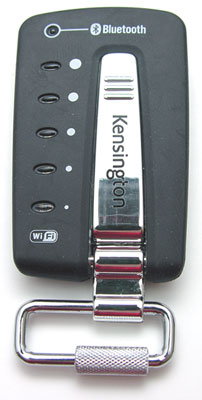
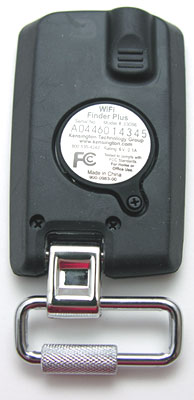
The body of the device is constructed in plastic with a rubber coating. On
the back of the WiFi Finder Plus, is the battery compartment which holds 2
CR2016 coin cell batteries. I’m not too keen on using coin cells because it’s a
pain to find replacements when you need them. The other detectors that I’ve
reviewed have both used standard AAA batteries.
Like the other detectors, operation is simple. One button press is all that
is required to scan for nearby 802.11b/802.11g networks. On the WiFi Finder
Plus, this is a long chrome button the runs the length of the top of the device.
5 LEDs to the left side of the scanning button are your indictors for WiFi
signal strength. These LEDs light up in green and the more LEDs that light, the
stronger the signal. If no signal is detected at all, the bottom LED will light
up in red.
When you first press the scanning button, the LEDs cycle through several
times in marquee style one after the other. After approximately 5 seconds, the
scan is complete. At that point, the LEDs will then pause to show the signal
strength before going off. The scan time seems to take way too long in my
opinion. The other two detectors have no scan time. For them, just
pressing the scan button will automatically show the signal strength.
You can use the WiFi Finder Plus to find the direction of the signal too. To
do this, you press and hold the scan button. Once it locks on to a signal, it
will then display the strength until you let go of the button. Moving around
will allow you to notice increasing and decreasing signal strength.
There are two other features that this little detector has that the other two
that I looked at don’t. One is a built-in flash light.
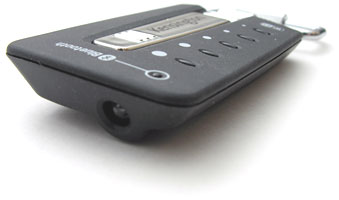
The flashlight is located on the front of the device and a pressure sensitive
activation button is on the bottom. The light itself is amber in color and is
pretty wimpy as far as beam strength. You also have to hold the switch in to
light the LED.
The other feature of the WiFi Finder Plus is its ability to sniff out
Bluetooth activity. The very top LED will glow blue when it detects a Bluetooth
device. I didn’t have a whole lot of luck with this feature though when I tried
getting it to detect my
Treo 650.
The only time the LED would light up would be when I set the Treo to device
discovery mode. I could not get the WiFi Finder Plus to ever detect my
Dell X50v Pocket PC. Not very useful if you
ask me.
In use, the WiFi Finder Plus does an adequate job of discovering and
displaying 802.11b and g network signal strengths. I found that the signal
strengths that this detector reports are pretty much equal to the signals
reported by the other two detectors. So, if you want a small detector that you
can use as a keychain or clip to your gear bag, this one will definitely fit
that bill. But, if you really want a device that can also detect Bluetooth
signals, this one is a real dud in that regard.
Price: $29.99
Pros:
Compact
Able to see signal strength in the dark
Cons:
Powered by coin cells
Bluetooth detection is lame
Product Information
| Price: | 29.99 |
| Manufacturer: | Kensington |
| Pros: |
|
| Cons: |
|

Gadgeteer Comment Policy - Please read before commenting
Post your comments here on the Kensington WiFi Finder Plus review.
http://www.the-gadgeteer.com/kensington-wifi-finder-plus-review.html
Just click the POST REPLY button on this page.
I dunno.
Maybe I’m spoiled by my Clie TH55 PDA’s ability to spot and identify WiFi hotspots.
I think these things are better when they can provide some more specific information because hey, who is using these to NOT know this stuff?
I wouldn’t refuse one as a gift, but if I was going to spend the money, I’d want more out of a device like this.
On another topic: Way to be referenced on Engadget! 🙂
(Both sites are bookmarked on my various machines.)
Thanks Strider 🙂
On the Bluetooth Indicator not working properly….
Could it be that this Bluetooth Finder on this device is designed to find Bluetooth Hubs (not Bluetooth Devices)?
I think that bluetooth hubs are not commonly available here in the states (the only ones I have seen are in Logitech Wireless mouse or mouse/keyboard sets). The Bluetooth Hub is in the Recharging Base Station for the Mouse…..
I don’t have a lot of experience with these WiFi finders (waiting until they get better based on all sorts of reasons some of which are included on reviews such as yours), but I think they are designed to find Hubs as Sources.
I don’t think they are designed to detect PCs/PDAs with WiFi (unless they are setup as a Source/Hub) and I would think the Bluetooth would work the same way….
Does it mention this in the manual or documentation?
The manual consisted of the inside of the folder cardboard backing to the plastic container the device shipped in 😉 It said that this sniffer can find active Bluetooth® enabled devices or networks.
The so-called ‘Bluetooth finder’ on the Kensington device does not detect discoverable devices, only those where there is an active connection. And Kensington do say that. But this is pretty pointless, since I want to know if there is something I can connect to, not whether something is already connected. 😡 And it will light up if it detects a cordless phone. :wow: Which is also pretty pointless AND misleading. It should really be called a ‘cordless phone’ detector. :bored:
Hi i dont know how to turn it on.I only just bought it so i dont think its thee batterys.I pressed the big silver button in the middle and that doesnt turn it on.Please help. :confused:
yy54:
That’s all you have to do. I bet the batteries are dead. Does the flashlight work?
nope flashlight doesntwork.The switch to the flashlight is the one at the top of the back isn’t it.Also how can the batteries be dead I just bought it.:confused:
yy54:
Yes, that’s the location of the flashlight switch. I’m thinking that somehow the button for the scanner must have been depressed in shipping or something, and caused the batteries to drain…
Dead batteries from new? Sometimes gadjets like these are shipped with a little slip of clear plastic inserted into the battery chamber, which you have to pull out the first time you use them. This is obviously to prevent them arriving dead by getting turned on during shipping.
But what do I know- I bought one of these used in a charity shop and it doesn’t detect anything, though it lights up alright. I’m contemplating buying a pair of new batteries for it in case they are low enough to affect operation, but I bet it’s just gone bad.
After a long delay, i decided to turn back to use my Kensington Wi-Finder, unfortunately, I had no batteries CR-2016, and was night, then any shop is closed, and the battery is not that cheap, 1.41 euros excluding shipping.
so wanting to try the operation again after you open the case that houses the two batteries after removing the batteries, I proceeded to remove the only two remaining screws.
with a screwdriver and gently placed between the slots, and gently slide it to make a slight providing strength, I managed to remove the case that houses the wi-fi finder.
the wi-fi finder comes with a large spring, this is the negative (-) and a small size spring that is the positive (+)
after to have searched through my junk, I took a cable that had a proprietary controller to be connected to a HP PDA, and at the end was placed the USB connector.
this cable was in total disuse, since the PDA in question was totally damaged by my cousin who was the legitimate owner.
At this point I cut and I proceeded to remove the HP proprietary connector, and after doing so i removed a piece of the sheath, then I cutted the mass, the shield, the white wire and the green wire.
I have only left the red wire and the black wire.
the red wire is the positive (+) pole
the black wire is negative (-) pole
Now take your soldering iron, let it warm up for a while and then Provide to remove the soldering iron and gently, the spring mainsails that is soldered on the printed circuit board and which is negative (-) pole
now remove the clip of small size in support of the batteries, which is the positive (+) pole
Now take the scissors and peel the red wire and the black wire, equally, after that is done, turn the copper with your fingers, until it is uniform.
At this point take the soldering iron and tin and started to tin both cables in the correct manner, without smudging.
After that is done, solder the black wire where it was present before the big spring on the printed cricuit
and now solder the red wire, where before it was the spring of this small size.
Now your Kensington wi-fi finder, go with a USB cable, and can be used with any source that delivers 5 volts instead of 6 volts of Kensington.
Having said this, and after several tests act both as regards the need to find the wi-fi networks, the result was successful before with a 4 on 5 leds and the next step by finding another network, which caused him to turn all 5 leds.
then I proceeded to test the lamp and also works perfectly.
Specs of the Kensinton wi-fi finder, you can find on the chipsets that are on the circuit.
then it has the possibility to mount 12 pins, i suppose to update the firmware, or if is bricked, or for errors, bugs in the firmware or else i don’t know.
as soon as possible, i’ll send the pictures to you.
Paolo Del Bene