
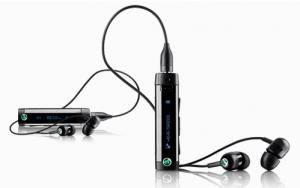
 It seems that if you have a bluetooth headset hanging out your ear you risk be labeled a “blue-tool”, but if you have your headphones on, that’s OK. If you worry about such things, I recently received a solution in the Sony Ericsson MW600 Hi-Fi Wireless Headset. While designed to work with Sony Ericsson phones, the headset will work with most mobile phones with Bluetooth. I was able to successfully use it with an HTC G1 and Samsung Devour.
I received a pre-release version of the set, so I did not get it in the packaging, but it included:
- Bluetooth receiver with 3.5 mm headphone jack
- Headphones
- Small, Medium and Large ear buds
- Micro-USB charging cable
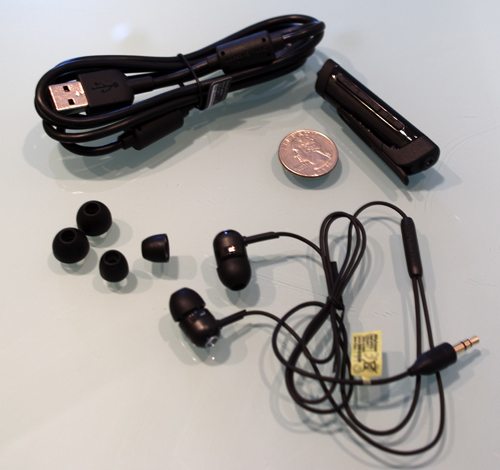
I really like the component design of the set. The bluetooth receiver has the mic for talking, a micro-USB port for charging and a 3.5 mm jack for headphones. You can use the included headphones, or use your own.
I do not have a phone that plays FM radio (since my toddler finally retired my old Sony Ericsson W810i) so I was unable to test the radio features.
Thanks to MRz’s comment, I tracked down the full manual (as a pre-production unit it did not come with the manual) and I discovered the issue wasn’t the phone features, but my ignorance. When I tried to use the FM feature, it would not start so I assumed that it used the phone’s FM tuner (my old W810i had FM) but that is not the case. Once I performed a reset on the headset, and tried the FM feature again it worked great.
You use the FF and RW buttons to move up by .05 increments. A long press will cause the tuner to scan to the next station. It is not the easiest way to move though a lot of stations, but it works. There is no way to save stations.
The receiver has a power switch on one end, and a phone button on the face to pick up and hang up calls. The player controls are located on one side of the receiver:
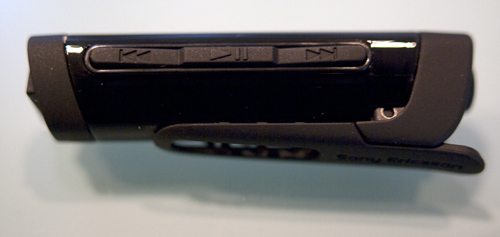
These include controls to play/pause, go to the next and previous track. They are small, but I found them very easy to find without looking. On the other side is the volume control:
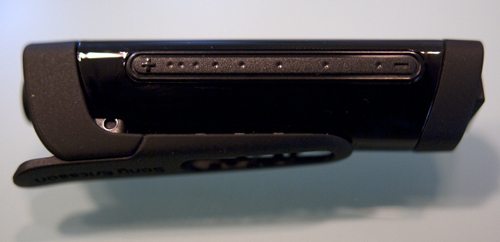
It took me a little time to get used to this touch-strip control. You use it by sliding your finger towards the – to lower the volume, and towards the + to increase. You can hold your finger at one of the extremes to adjust the volume further, but you have to slide to the + or the –, you can’t just press them. Once I understood how this worked, I had no issues.
You can pair the headset with up to three devices. You can change which device you are connected to by holding down the Phone button for 5 seconds. When you do this, the OLED screen displays an icon for each of the devices:
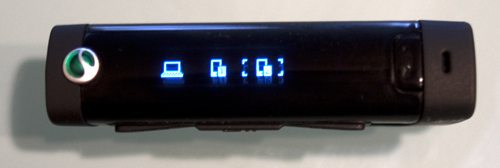
In this case, you see a computer symbol (for my MacBook Pro), and two phone icons. You use the volume touch-strip to select the desired device.
The headset supports a number of Bluetooth profiles:
- Handsfree profile Version: 1.5 Role: Handsfree
- Advanced Audio Distribution Profile Version: 1.0 Role: Sink
- Audio Video Remote Control Profile Version: 1.4 Role: Controller
- Headset profileAudio Video Remote Control Profile Version: 1.4 Role: Target
- Headset profile Version: 1.1 Role: Headset
Once connected to my G1, it performed as expected. If I was listening to music and received, or made a call, it seamlessly switched over to function as a headset. The sound is very clear, and the inclusion of different sized ear buds should help you find the right pick.
Now obviously, not everyone likes in-ear buds, but you have three different sizes to choose from. In addition I found that the included headphones were a little thin on the bass. The nice thing about this setup, though, is that you can plug in your favorite headphones.
Auto Amazon Links: No products found.
Product Information
| Price: | £49.98 |
| Manufacturer: | Sony Ericsson |
| Pros: |
|
| Cons: |
|

Gadgeteer Comment Policy - Please read before commenting
I’ve use the prior version of this bluetooth adapter, the hbh-ds970, and hbh-ds980. The in ear might not be for everyone, but they have the benefit of suppressing a lot of the ambient noise around you passively rather than actively. The ds series have the advantage of being able to hang inside your shirt and have the earbuds outside your shirt. One button to answer the phone. and most people have no idea that your being a blue-tool.
“I was unable to test the radio features”
And why is that? When I read full name “Hi-Fi Wireless Headset with FM Radio MW600” I’m assuming there is integrated FM radio, isn’t it?
Thanks MRz… I made a bad assumption on why FM wasn’t working for me. I have updated the review.
Hi Bryan:
Thanks for the review. I wanted to know whether you can pair the headset to a laptop and a phone.
I’d like to be able to listen to music from my laptop, then be able to switch over with a button push to take a phone call…do you know if this will work?
Any word on actual battery life?
I have been using one of these for a while as well. I don’t recall getting a usb cable! LOL I have the mini cord that came with my Aliph Icon so that worked as well.
To me the sound is fine for what it is. The price I got it for was $49.99 USD at mobilecityonline (dot) com. Way less than I saw on ebay. I have also used the past bt headsets from Sony Ericsson, but I have to admit these sound very good and the radio is a nice add on as well. The range is impressive compared to my Icon. All in all, a great bang for the buck.
Just what a BT headset should be: Small, elegant and unobtrusive.
Just a few questions:
– Any flashing LED that might break your cover and give away that you’re using a BT headset?
– Does this have its own buzzer to signal incoming calls? (Let’s say your phone is in your pocket, muted…)
– Is it splash-proof so you can use it in the rain?
I’ve been looking for the ideal BT stereo headset for years, and the perfect combination is still missing. It should have
– its own buzzer (that can be deactivated, so you can stow your phone away / mute it and still miss no calls)
– full media controls (FF/Play-pause/RW)
– splash-proof coating
– a small, lightweight, unobtrusive design
– no fancy flashing LEDs
– 3.5mm plug for custom earphones
– reasonable sound.
Built-in FM radio and text display are nice, but optional (for me).
What do you guys think?
UPDATE: I did receive a charging cable. It’s a wall charger not a usb one like the pre-production kit described in the review. I got one of the GreenHeart by Sony Ericsson micro usb wall chargers.
As for the battery life, of course it depends on how long one would use it, but I haven’t used it in two weeks and the battery have drained from that point. I have used it for 30 mins in total from the last charge. And two weeks from that it went ka-put.
how do you reset it?
None of the ones ive had have leds on the outside. but they do have a graphic of bubbles that float to the top on occasion. That would give you away.
They also had full multimedia controls. and they would last around 6 hours of use per charge, not the 8 sony suggested. I used it more for listening to music from my blackberry than for talking on the phone. I do use it for a desktop phone with the use of a Jabra a7010 desktop bluetooth adapter. And most of the sony bluetooth headsets like this allow you to pair to multiple devices.
none ive seen have their own buzzer.. nor are water proof/resistant.
@Jonathan
Yes, works like a charm. I paired to my MBP and G1. I was listening on iTunes, and when I received a call it rang through to the headset, I answered the call, and when I hung up it picked right back up.
@Nightcookie
Just a few questions:
– Any flashing LED that might break your cover and give away that you’re using a BT headset?
No, it just looks like a headphone remote.
– Does this have its own buzzer to signal incoming calls? (Let’s say your phone is in your pocket, muted…)
The clip device makes no noise, but if you have the earbuds in you do get a tone on a call.
– Is it splash-proof so you can use it in the rain?
See nothing on that, and not sure I am willing to test it. 🙂
@arpitha
1. Make sure it is off.
2. Press and hold power button until you get the pairing icon.
3. Press and hold power AND phone button until it resets.
You loose all your pairings, basically reboots. I was then able to make the FM work.
@Tony
I actually really like this little gadget, so I’ll see how it holds up over the next couple of days.
Does this have its own independent volume control….as in when i turn up the volume to the max on my handset. this device can further turn it up or is it shared?
The nokia BH-214 does this which is perfect, but it just doesnt have the lcd display i require.
It does have independent volume control. Some people get confused but you have to swipe the volume touch bar once to get it to recognize that you intend to change the volume then you can swipe some more to change it or hold your finger at the + or – to gradually change it. Documented in the manual but I’ve seen a lot of people complain about the volume being non responsive cause it didn’t change when they first touched it.
it occasionally loses the ability to pause/unpause my ipod touch. But it works great with my droid showing the caller id and pausing the ipod when I answer the call.
Several people have been unaware that I was on a headset.
Apart from the occasional loss of being able to pause the ipod touch I really like it.
I forgot to mention I resolve the issue by rebooting the ipod touch. So it may be a touch problem not a problem with the mw600.
Hey Bryan. Thanks for the review.
I bought it and paired it with my Lenovo Think Pad T60, but can’t get anything to work. I’d like to listen to music from my laptop wirelessly. There’re no services offered when I check the properties on my computer. Is there any driver I can install that’ll allow services?
Thanks.
i bought the xperia 10 n in tht comes mw600 headset. but dont know how to select the radio in it coz der no manual. shud i reset the haedset?
u can download the extended user manual from sony ericsson support page.
You know what is the biggest joke? It is not compatible with SE phones as claimed.
I bought it just yesterday to pair with my Xperia X10, but:
1) Song details are not displayed at all.
2) Only the phone number shows, not the contact details.
Utter rubbish! Should have just went with 3rd party products that cost much less.
Oh, and don’t even bother with the extended manual, it doesn’t even load properly.
Cannot redial from MW600 connected to a htc Legend. Music functions work but not song display on MW600
Can I listen to music and charged at the same time? My SE MH100 stop operating when in charging mode.
@dan & santazar,
That’s an android shortcoming, I believe.
I’ve had these for 3 days now.
I have these paired with Xperia X10 running Android 1.6 (with latest SE build to date R2BAO26). I also managed to pair it to Lenovo T61. The person who failed to pair with Lenovo T60, check the Bluetooth profile for the T60.
Quality Impressions:
Build quality is good and the LED screen is clear. The material used is a combination of the plastic rubber material on the underside of the Xperia X10 and a clear shiny plastic similar to the front of the Xperia X10. The headset does not have flashing Bluetooth light (fortunately!) and displays all the info you need via the LED screen. The headphones are standard, with the right ear piece cable shorter than the right – annoying.
Sound Review:
Using supplied headphones:
Hip Hop: (Artist) New Boyz – (Title) You’re A Jerk
(Artist) B.o.B – (Title) Bet I
Soft base is the downfall for this pair of in-ear headphones. If these headphones had a tad bit more base then it would be the perfect combo for the Xperia X10 (or any other phone). The mid’s are so-so – because of lack of true base we basically don’t have a proper mid. The highs border on bearable – if it were any higher I’d probable have a headache in 10 minutes of use. One thing that must be said though is that these are clear and you can pick out the high hats over snare drums with psycadelic spirally instrumental. These are certainly not for the audiophile, but they are better than iPhone standard headphones if that helps. Part of the problem is lack of EQ on X10 media player, but one may argue that the preset EQ is as music is intended to be heard.
Using Monster Beats by Dre Studio:
Hip Hop: (Artist) Rick Ross – (title) MC Hammer
(Artist) B.o.B – (Title) Bet I
The sound quality of MW600 vs. plugging these headphones directly into X10 was very good. The base was heavy (but very well controlled) and the mids and highs were OK – just what Dr Dre intended! So if you are worried about sound degradation – worry not unless you intend to stand more than 10m from the music source. I managed to get about 15m before distance became an issue. I can leave X10 downstairs and sound plays clearly as if I was next to the phone. Of course the Monster headphones are powered so they are always to have an edge over non-powered headphones when you play on a phone (or mp3 player).
Using Sennheiser HD 408:
Hip Hop: (Artist) Rick Ross – (title) MC Hammer
These are not as loud as the Dre Beats and the base is also not as heavy. These are good and clear with the MW600. The highs and mid’s are very good and clear, this is probably helped by not having the overwhelming base from the Dre Beats. Overall, the sound is very good and this would be a great upgrade for the price conscious buyer.
Have been using this device for a couple of months now and I would go as far to say that it has been a godsend… … except that till date, I had managed to thrash two of them…
The problem is that the device is not splash-proof… been wearing it when I go jogging… once the sweat manages to work its way into the device, the device is just waiting for the next charge to go kaput…
and its not so obvious that something is wrong… the charging icon still lights up… just that it refuses to turn on after disconnecting it from the plug…
having said that, all the features that I was looking out for (which is similar to what Nightcookie had listed) are there and I’ll still categorise it as a great device despite it’s little shortcoming…
Why Nokia hasn’t managed to create such good bluetooth devices as sony.
All bluetooth audio adapters from sony seem to be great (From DS220 to DS980 and then this MW600).
DS980 has very big advantage that it displays full call logs and full address book from the phone and one disadvantage that headphones are fixed to the adapter (you can’t choose and attach your choice of headphones). Also no FM radio.
Hello sir. Am in Bengaluru, India. Am looking for sony ericsson bluetooth device MW 600. But I faced difficulty in searching the dealer for it. If any one know the address please let of know.
@Shashidhara:
Just search ebay for MW600 and you’ll find hundreds of choices (I myself got one from the same).
@Nightcookie
All functionality you’re desiring exists in MW600, but one of splash proofing.
But, you’ll be happy that instead of splash proof, there exist one or two additional things that you didn’t mention/desire. Get it on EBay today itself dear.
One thing additional: The original headphones (that came with this unit) aren’t capable of producing as great sound as this device produces.
So, I’m using Nokia’s headphone (that came with N73, forgot which mode, perhaps HS23). And it is producing the best quality I’ve heard till date.
bought this yesterday and i’m looooooving it! Definitely taken the listening experience on my zylo to another level..volume output on the zylo is disappointingly low, not to mention the poor quality of the low-budget headphones it comes with…bt the mw600 has made a significant difference for me,with much improved sound quality,3.5mm socket and independant volume control,enabling me to unlock this phones true sound capabilities…i wana pair it up with beats by dre in-ear tour headphones to complete the experience. For me, this is sooo much better than having to buy a 3.5mm jack converter! Thanx 4 the info. man, your review helped me decide on purchasing this headset and i have no regrets whatsoever! Its like it was made for this phone! 😀
Did anyone had a chance to compare MW 600 with Nokia BH 214? Which one would you suggest?
Something else I wish I could get working. I can’t seem to pair it with an ipod touch 3g in such a way as the microphone works.
Everything else is great though.
Am I the only one who has a very bad sound quality with these?
Tried with both my phone and computer and the sound is really bad, I’ve tried everything.
Antti202, you may try to replace the rubber buds.. the size should be just fit… perhaps you may first play the music on yout device (pc or phone) then start to replace the rubber buds from the biggest size to the one just fix but the bass is still there.
i’ve tried these wit mobiles and ipod touch and comp ….finally the best way to listen to music is, if ur really into music is through wired..tat gives the max output…for the same cost u can get the best of the wired…tat’ll give great output…unlike these…
@dink
I don’t agree with you.
I also tried the same song directly from the mobile phone and thru this MW600 dongle (using the same– Nokia HS28– headphones). I heard the same pitch and quality of music.
Ive been using SE Aino for 6months now and I have just lost its bluetooth headset amonth ago. Do you guys have any idea on where I can buy MW600 SE Bluetooth as replacement of the lost one..I’ve long been searching for direct stall selling here in the Philippines but still have’nt found any until now.. Please somebody help! Thanks in advance..
@ryan
Sorry ryan, but had you read all the comments carefully enought, you wouldn’t need to ask the source of MW600.
Hi bryan, big thanks for the review.
Before buying it, I wanna ask something.
I wanna ask about pairing with my blackberry (curve 8520).
Is it fully compatible with my blackberry?
@Abas
I have no experience connecting BT headsets to Blackberrys, but i would expect it to work. You may not have ALL the features. For example, it may not display the song title on the display, but it synced with any BT phone I tried it with.
@Ryan
Sorry, I did missed your comment (it is an old review). Not sure how you can get it in the Phillipines, but I do see it listed on Amazon: http://amzn.to/eIN9FJ and it is down to $55
Oh I see now.
Thanks for the info.
@zopfan
Hi Zopfan,
After searching for a lot I can’t find any of these devices in Bangalore. Then finally I order from Ebay India and when I got the device found that the seller does’t provide any guarantee card and just given his bill. Seems like it is from gray market.
So did you got guarantee from the seller when bought from Ebay.
@abhijeet
Yes I also got it from ebay without any warranty (just 20 days ebay guarantee for any fault exists).
But the product is working excellently for the past 4 months with me. And moreover it would be far more expensive if we got the same from sony showroom with bill and warranty.
Is it possible that I have better sound this way
– first I put on MW 600, then I put on bluetooth on my phone and connect MW 600 with phone – sound is much better than when I let MW 600 to pair with phone. True?
Hi Zopfan,
Thanks a lot for your diligent and quick response. Now I can relax about it that I am not been cheated by the dealer..
Is it possible to use two devices at one time . Like listening songs from laptop and music will fadeout when I will get a call on my mobile.
Right now I have manually switch from one device to another.
@abhijeet
Acc to sony, we can use/pair 3 devices with it. Any time, 1 device will be active, and the other two passive.
E.g. I’ve paired it with my N8 and acer laptop. A movie is playing on laptop and am listening the sound thru MW600. Whenever my phone rings, the movie sound is muted (on one of my laptops, the laptop movie is automatically paused also!! what a wonder of technology!!!) and phone sound starts coming into the MW600.
But this scenario doesn’t work successfully on all devices. You’ll have to check out. Even on some laptops it didn’t connect at all (perhaps those laptops bluetooth chip wasn’t as powerful as needed).
@Tomaz
I’ve not found any (sound quality) difference when I connect MW600 with my phone in any different ways.
@zopfan
You are correct. In my case my Nokia N81 is not fully compatible with the headset 🙁 . One to One pairing with the phone working fine ( I can listen to music and receive calls) . Problem peep in when I am connecting the device with my laptop ( for stereo ) and assign call mode (mono )to mobile. My mobile will disconnected as soon as I change to this mode.
It seems like this is a issue with Nokia N81 as this is 3yr old model. It seems like I have to upgrade my mobile for my headphome 🙂 .
@Abhijeet
For how much you got this wonder? And from ebay or elsewhere?
Also you must be aware of radio function (reached by keeping the play button depressed)?
@zopfan
I got this from Ebay @ 2950… This is lowest price at ebay.. @15 Days back it was sold @2550 🙁 (Bad luck).
How much you paid for it?
Yeah I checked the radio. Also verified the multi connect issue. I connected the device to my mobile and kept it in play mode ( sterio ) and connected another samsung corby to call mode ( mono ) . It got beep sound when I got call on corby and able to switch from music to call and vice versa. My N81 is not at all connecting to the device in call mode, it is only connecting through stereo mode.
@abhijeet
I got it for 4000.
How did you get it, and from which seller, on ebay for Rs 2950/-
Because I might need another one.
@zopfan,
I bought it from the seller “take4less” from ebay. Black ones are out of stock at 2950. You can contact the seller at: 9223442177
I’m interested in buying one of these, but I’m concerned that the volume won’t be loud enough. I have a nice set of Sennheiser studio headphones I’d like to use.
Anyone with experience using this with large headphones?
thanks!
I can say this much that while listening these headphones, we can’t take the vol level to 100%. This much can I guarantee. (may we can take it to 80 or 90%, but not 100%).
I have been using the MW600 for the last 6 months. I use it for connecting two phones. I literally have to change the active mode from one phone to another when I receive the call on the other phone. This is annoying.
I would preferably like to have a bluetooth which connects to both devices and without having to change the mode I should be able to answer the calls on either of the phones.
Anyone else having same issue like me?
How you do you reset the headset?
I have one of this.
It works fine with my pc: I used to listen music, and change to the next or previous song. All I have to do is install the complete set of drivers of bluetooth (that came with the PC).
To reset read page 15 of the manual
http://www.sonyericsson.com/cws/support/accessories/mw600?cc=gb&lc=en
See you
Does this headset have caller id?
Yes.
But it only shows the number of incoming or outgoing call, not the name fed into your phone/device.
But its good.
I wish sony had improved upon this model and brought out a newer model with all its functionalities intact.
While playing the music the play pause and next and previous button is also not working. tried to reset the devise ( MW600 ) but not getting reset.
Can someone help out wat to do.
Hi,
nice review and product seems really great. I have a SE K790i phone with Bluetooth 2.0+A2DP. Will this device work with my phone? Please let me know.
Thanks,
Sarath
Looking at the SonyStyle site, that don’t list that specific model, but they list 34 models including K and W phones.
I have had no issues pairing and using with my old G1, Droid X and any Android phone I have used, so I would think it would. But I am certainly not sure.
As there is no tether point on the unit itself, I attached one to the clip. I found out the hard way the clip was held on by two tiny posts, the unit is lost. The volume doesn’t go very loud, but otherwise it worked well with my Z710i.
A month ago I bought this device for its FM radio function. But I could not make it work. I returned it and got a new one this morning. Well, it won’t work either. When I turn it on, the pairing icon appears along with two dotted squares. I follow the instructions to open the radio (press and hold down the play/pause key) but nothing happens. It is ridiculous.
I went on the net and found your review, wherein you refer to a similar problem, which you were able to resolve by “resetting” the device as follows:
1. Make sure it is off.
2. Press and hold power button until you get the pairing icon.
3. Press and hold power AND phone button until it resets.
You loose all your pairings, basically reboots. I was then able to make the FM work.
I tried that procedure but got back to the same screen with the same pairing icon. The radio will simply not turn on.
Can you help? Thanks.
Michel from Montreal.
Zopfan – using it with iPhone 4 – for incoming calls MW 600 shows also the name from phone menu .
@Michel
I think you’re doing it wrong.
To use/listen to FM, you don’t need it to pair MW600 to any device. Rather, while in standby mode when no pairing etc is going on, just keep side middle button (i.e. of music play/pause button) depressed for 1-2 seconds and there will appear the fm radio icon and the paired devices list. There with the help of volume button, you will select radio icon.
Thereafter, you can tune the radio with the help of forward or backward buttons. That’s it. (Don’t forget to attach headphone before tuning the FM).
@ zopfan
I wish I could do it as you describe. However, I never get to this “standby mode when no pairing etc is going on” which you talk about. As soon as I turn on the device, the pairing icon appears on the display. And the icon rolls on itself. What should I do to reach the standby mode?
I tried to turn on the radio without turning on the device, but that does not work either.
For your info, I have not paired any phone with the device. I bought the device solely for its radio function. Thanks.
@michel
May be you have to pair it to some device before you get to standby screen.
Or there may be some physical fault with your device.
Still, you can try pressing different buttons when it is showing ‘in pair mode’ status.
@michel
If you have a laptop with bluetooth, you could try pairing it with the laptop to see if zopfan’s speculation is correct.
@ zopfan
@ bryan
Thank you very much for this advice.
I paired my laptop, and IT WORKED.
I now can access the FM radio. Superb!
It is unfortunate that the User Manual is silent about this.
Have a good day, and “Vive The Gadgeteer”.
Michel
I just bought another one to replace the one that was lost after the clip came off. I got the second one from eBay (sold as new with opened packaging), and right out of the box I find the clip is missing the spring. I bought the first one from a Sony Style store who is now sold out and they also have had a couple with missing springs that they sent back to Sony. I am waiting to see if the eBay vendor has a replacement or will only be able to refund (less my shipping costs), or maybe I should just take this one back to a Sony Style store with the receipt from the first one I bought.
I am still surprised how much traffic this post gets 18 months later.
This may not help you now Stephen, but I noticed they are available on Amazon now, as well. There is even a white option. http://goo.gl/l9qDM Frankly, I don’t get the white fascination.
Thanks Bryan, maybe my third buy will be my lucky time?
More info on the clip problem with links to sites that sell replacement clips and springs. http://arthyvijayaraghavan.wordpress.com/2011/01/29/think-before-you-buy-sony-ericssons-mw600/#comment-571,
hey Bryan, im thinking of buying this charming device, just a little question about it,
can you pick up skype calls with it or it’s just about music listening on your laptop ?
i used to have the Nokia BH-501 and to pair it on my laptop i had to buy some software called bluesoleil i believe in addition to the bluetooth device, so does this one need that or just pair it like a sweet cake with the bluetooth device ?
and how about the call quality, does the other party hear ya well, cuz using the Nokia BH-501 was a hell of a call, i used to shout for the other party to hear me up till i ended up breaking it 😀
appreciate it lots.
this thing is great – i think it’s silly though that the unit will not display the name of the mp3 playing – it’s weak on bass tho – but compared to the SD10-HD, it WORKS and SOUNDS WAY better – plus the SD-10HD was physically UNCOMFORTABLE
I took my second one (bought on eBay-missing the clip spring) back to the Sony Style (Canada) store where I bought the first one (that was lost when the clip came off) and they swapped it for one with a spring under the one year warranty. Then they offered me an extended warranty for an additional year for $19 and I bought it. I drilled a couple holes so I could thread a string through the unit that I can tie it off to my glasses strap or a use a stronger clip to my shirt/jacket. Today (a couple weeks later) I got a call from the store to say they should not have sold me the extended warranty because it is made by Sony Ericsson-not Sony, and will refund me the $19- sigh. P.S. Moi-it displays the mp3 name for me when using my Z710i phone.
My favorite Iphone earbuds don’t work properly with the Sony Ericsson MW600. The right ear works fine, but the left ear has only a teeny bit of sound. Has anyone else had a problem with there own personal favorite headphones not working properly?
I’m facing the same with original SE earphones that came along.
however left one works proper and right one not! Any idea?
@Tomaz Thats odd that the original SE earphones that came in the box aren’t working properly. My original SE earphones work fine with sound in both ears. Do other earphones you have work properly with the SE? I think I solved my problem with my Iphone compatible earbuds. My Iphone earbuds have a 4-pole connector. The jack input on the SE is most likely a 3-pole or 3-ring since the supplied earbuds are 3-ring. I bought an adapter. I expect the adapter to arrive in a day or two. I will leave a comment if it works or not. http://www.kvconnection.com/ProductDetails.asp?ProductCode=K-AD35M35F4&click=4101
Will check that, thank you however works great with iPhone – shows caller ID and also when listening show song titles.
Those earphones are great as pretty small and short cables? Do anywone reccomend similar good earphones? I do not like iPhone earphones at all as they do not stay in place as use them mainly during sport activity. Thank you guys!
I’ve tried many different original manufacturer’s headphones/ear phones, but have found Nokia HS28 the greatest (and yet the most inexpensive of them all) of all other brands and models (for this BT dongle or otherwise).
I need to have in ear headphones that these ones you say aren’t
@Raymond, I don’t have, or use Skype. I now you can connect it to use as input and output, so it should work. I wonder if anyone has used it with Skype?
Hello.
I want to buy a bluetooth headphones (mw600 or other bt headphone that ou can recommend for me..) for my iphone4 with ios 5 are the headphones competeble with iPhone 4 and iOS 5 regarding the volume ,mic and music control of the iPhone.
And I want to use these by headphones for my pc , can I pair it to my pc and listen to music and play games on my pc while hearing the sound of the game on these bt headset?( like FIFA 12 and more pc games) And of course to use this bt as a hand free device for my car…
I hope you can write me back… I would love to do a video review for your company if you like…
Thanks for all your help
Oded Kessler
I’ve been using this for the past 2 months,
bought for Rs.2500/- from ebay.in in October 2011
happy with the functionality.
FM option is great.
I’ve been using this with my Karbon k30.
Its keep getting disconnected, dont know its with this device or my mobile problem, other than this every thing is good.
Works best with sony ericsson mobiles or any other high end mobiles.
Hi all, How does MW600 compare with the Jabra STREET2? Also, with the MW600, how do you drill a hole so that you can string it to a lanyard as it seems like dropped-off clips are a common complaint about this unit? Thanks.
my headset MW600 is dropped into water it is not working. what i have to do now please help me…….
Rykel – I drilled small hole on the upper part of clipper.
Venkat,
Try drying it out as described on theses sites:
http://www.apartmenttherapy.com/how-to-dry-out-and-hopefully-s-107945
http://www.wikihow.com/Save-a-Wet-Cell-Phone
Rykel, I drilled two holes (in one pass) through the end piece (the part the headphones plug into) above the pivot point of the clip (in line with the first “s” in “Ericsson” on the clip). I drilled a third hole in the clip itself, through the “n” in “Ericsson” then tied a loop of strong string (you could also try fishing line, or wire?) through all three holes and attached the neck lanyard from my old bluetooth earpiece to the loop. This way I wouldn’t lose either piece (not sure if the spring would fall out or not- how is the spring attached?) It might be better to tie two strings in such a way that the lanyard doesn’t pull on the string through the clip. The first time I attached the lanyard to the clip alone, and the clip came off the unit, so I saved the clip and lost the unit.
Useless with Sony Xperia range as caller ID doesn’t work at all. Hangs a lot, disconnects between calls. Sony have launched half baked product
Im using sony ericsson zylo phone and i bought mw600 yesterday. But im not able to play/pause or fastforward/rewind back the tracks which i play through this headset!! Why is it so?? Pls help me out!!
Can anyone mail me the user manual for Sony Ericsson Stereo Bluetooth Headset MW-600, my email id is “kirsur_bt @ yahoo.com”.
Anticipating reply and the user manual.
http://www.sonymobile.com/us/support/accessories/hi-fi-wireless-headset-with-fm-radio-mw600/support-documents/
has multiple languages of the manual, I’ve emailedd the English version.
does MW600 has noise cancellation features??
Hows the battery
No, it does not have noise cancellation. I find the battery life to be good, it also charges really fast.
@ zopfan and bryan
Thanks for giving time commenting on my concern on where can I get the MW600 bluetooth headset…Iv been long been lookin’ and searching every mobile and gadgets store here in the philippines including SE booths and stalls but unfortunately I found no establishment sells the item that almost got me disappointed w sony ericsson for its poor local support.. Determined and obssesed w it, fortunately upon browsing the net, i found this http://www.gadgets888.com and able’s me the chance to have this MW600 on hand for about $93.. still quite pricey but happy w it. Iv been using it till now for almost 8mos.. =)
…just wanna share the site for filipino users anyway..thanks and more power to gadgeteer.com
It’s a perfect device… It works peferctly with my Blackberry, but I’m looking forward to use it with my SE W995…
But now I have a problem… The device works good playing the music, but any of the buttons work… I mean, I can’t play/pause a song or change the volume, or change a song, I can’t even turn it off, I’ve just got for like 3 weeks, and I’m desperated… Anyone knows what to do in this case??
PD: I can still play music, but if I want to play/stop a song or change a song I have to do it directly with the phone….
I have some issues using this with my Xperia Arc, the MW600 doesn’t show the title of the song I’m listening to when I’m playing music using this device. Within 1 minute after I start playing music using my Arc, the buttons on the device, “Play/Stop”, “Forward” and “Back” work well, but after a few minutes of playing musics, the buttons doesn’t work as they were supposed to be. When I press the “Back” button, the music stops completely and I have to take out my Arc from my pocket and start the music again using my Arc. Anybody having this issue? I’ve tried rebooting the MW600 and repairing with my Arc and it didn’t solve the problem. I’ve searched for a firmware update but there is none. Is there a solution to this problem?
Try resetting it and then, pair it with no other device except your arc only.
I think this will get you to the fault.
:(( During cycling mine stopped working; I have noticed some times before that I was loosing connection but had in mind that due to bad connection. Now “dead” – no sign at all. Tryed to dry it but nothing happens. However when pluged in to charge it – it shows sign as it is charged – any idea what to do or to throw away?
I couldnt connect it to my ipod touch…any answers?
No, answers but I have the same problem. Couldn’t get it to connect to my 2nd gen iPod. Just got the new 5th gen and same problem.
Mine stopped charging, when I took it to the reatiler he said it cannot be sorted out manufacturing defect. Therefoe I bought another one, this one stopped charging too. Now, it just lies there useless waste of time and money
Hi Anil, don’t throw it away do you mind if I buy it as is. Hope I can salvage some parts for my MW600. Hopefully I can make it work.
Mine is also lying idle because of zero backup time. (Its brand new, used less than 1 month).
Do you know from where I could get its battery replaced. And if not, how much INR can I expect it from anybody.
How do you reset the unit? The FM radio feature does not work
Resetting has been explained above in this post. Pls consult.
hello Brian..does it work with my acer V5 laptop or my android phone??
Hi, Does anyone have a broken/not working unit? I want to buy as-is. I the call button, and just wanted one for the body.
I do have one
I have two of them, after second one died I changed to SBH50
I do have one. 1 piece Mw600 and another SBH20 (I’m writing model numbers from my memory, there may be some spelling mistake). Both are brand new, yet dead.
I cant find in my cellphone the connection of my mw600 but it is on and when i hold down the phone button for 5 secondsnothing shows in oled screen any idea w/ that problem?and how to fix it?