
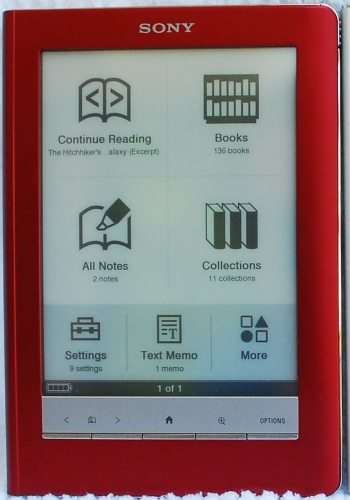
 Last month, news of two new Sony readers leaked when someone found repair manuals for new devices called the PRS-300 and the PRS-600. Gadget sites were rife with speculation about these devices and when they’d be released. Sony quickly confirmed that these new devices would be released at the end of August, and they even listed the Sony Pocket Edition (also known as the PRS-300, to use the old convention of using the model number as the name) and the Sony Touch Edition (PRS-600) for pre-order. I’ve been a devoted Sony Reader user since the PRS-500, so I quickly placed a pre-order for the Touch in red. On August 25, Sony officially announced the Touch and Pocket Edition readers, and SonyStyle started shipping the devices. I received mine on August 27.
The Touch Edition is a melding of both the PRS-505 and the PRS-700 models. Gone are most of the input buttons of the 505 model. Like the 700 before it, the Touch (or 600, as some users are calling it) uses a touch-screen for input. It retains a few buttons, but they are placed discreetly at the bottom of the display screen, similar to the old 700 model in appearance. The 600 is the same length and width as the 505, but it is 0.1” thicker. The front-lighting from the 700 is gone. This allows the touch screen to lay flat against the E-ink display in the 600.
Hardware specifications
- Size in inches : 6.9 x 4.8 x .4
- Weight : 10.1 oz
- Screen Size: Vizplex 6 inch (diagonal) E-Ink display with 8-level gray scale and a resolution of 800 x 600 pixels
- Memory Size : 512 MB. User available capacity: Approximately 380 MB
- Dual memory card expansion slots for Memory Stick PRO Duo and SD card up to 16 GB
- Media formats supported : ePub (Adobe DRM protected), PDF (Adobe DRM protected), BBeB Book (PRS DRM protected), ePub, BBeB Book, PDF, TXT, RTF, Microsoft Word (conversion to the Reader requires Word installed on your PC), JPEG, PNG, GIF, BMP, MP3 (non-encrypted), AAC (non-encrypted)
- Connectivity : USB for file transfer from PC
- Power : charge with USB cable (supplied) or optional A/C adapter
- Battery: rechargeable lithium-ion battery
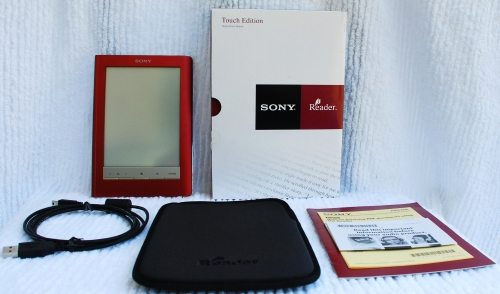
What’s in the Box?
- Reader
- USB cable for charging and synching the device
- Protective neoprene sleeve
- Quick start guide
The first thing I noticed when I opened the box is what is NOT included. This reader doesn’t come with a case, just the sleeve. I’m sure this was a cost-saving decision, but I don’t think it was a good one. The neoprene case is very flimsy. The foam isn’t dense and resistant to compression like my neoprene laptop sleeve. It is very soft and spongy, and seems too insubstantial to provide much protection for the glass display screen. The sleeve is open at the top. There is no zipper or flap or even Velcro to close the case. The sleeve fits the naked reader snugly enough that I don’t think the reader would easily fall out, but I carry the reader in my purse, and this sleeve is not going to keep pens or keys from slipping in to scratch the reader.
The body of the 600 seems to be aluminum, like all the models before it. It does have a non-slip coating on the back. I suppose this is to make it easier to hold without a cover. Holding the naked reader isn’t comfortable for me. I much prefer the book-like feel of a cover, and I like that the cover provides a little protection if I should drop the reader. Unfortunately, none of the optional covers were available from Sony when I received my reader. Luckily Sony stuck with the cover attachment method from the previous generation of readers, so I tried it in the original vinyl cover from my 505. It fits in that cover, but the 600 is a tight fit. It was hard to slip it into the plastic nubs that hold the reader in the case, and I felt I was going to break the plastic spine before I managed to wedge the 600 in there.
No software CD is included in the package, but the reader itself contains installation files. Since I already had the latest version of the Sony library software on my computer running 64-bit Windows Vista Home Premium, I did not run these installation files. My software recognized the new reader immediately. I was surprised to see a firmware update was already available. It was to fix a problem with using memory cards, and the update installed without a problem. I authorized the reader and started charging the battery and loading up books.
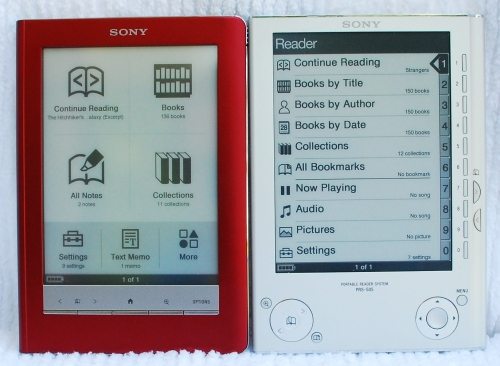
I never owned the Sony PRS-700, which was their first touch-screen model. I saw the device on display in a local Borders, and I felt that the screen was much less clear than the screen on the 505 model. Adding a touch screen layer to the device made text on the screen appear much lighter and less sharp. The fact that the touch layer was floating above the e-ink screen – to allow for the LEDs that provided the built-in lighting – only compounded the issue. I was pleased to see that the 600, while not as sharp and clear as the 505 display, was much improved over the 700. The screen has a very readable display, and I didn’t really notice the small loss of clarity until I compared the 505 and the 600 side-by-side. Since I haven’t any experience with the 700, all my comparisons from this point on will be between the PRS-505 and the PRS-600.
When I started playing around with the 600, I worried about the amount of pressure needed to operate the touch screen. It required much more pressure than I was comfortable using. There is an included stylus, but I don’t want to use the stylus to turn pages. I read so much, I fear that the stylus would eventually cut a groove through the touch screen! I found that using the tip of my finger or the flat side of my fingernail works much better than using the pad of my finger. Once I got the hang of it, operating the touch screen worked easily.
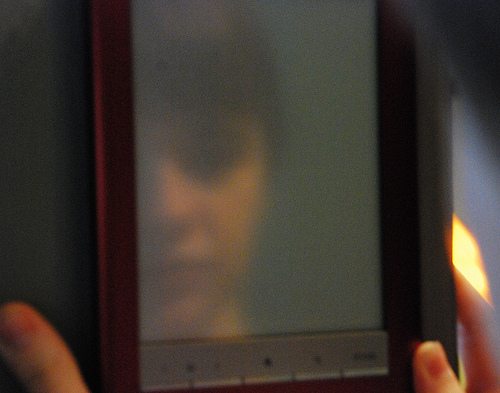
After I got used to the controls and started reading, I noticed how reflective the reader is. The PRS-505 I’ve used for almost two years isn’t reflective, and it was always easy to find a comfortable reading angle. I had also had the 505 in the Sony light wedge case since last December, so I was used to having a reading light that seemed to be part of the reader itself. I had a really difficult time with the PRS-600 being so reflective at first. This was almost a deal-breaker for me. The first night I used it, it was in a small case with a huge clip-on book light. The awkward feel of this arrangement and the reflections on the screen saw me starting the return-authorization process and packing up the reader for return when I got up the next morning. I finally decided to give the reader a second chance, and I’m glad that I did. I got a better-fitting case that’s sturdy enough to support the book light, so I was better able to concentrate on reading. The 600 retains all the functions that I’ve loved about the previous two Sony readers I’ve owned, and it has some new features, added storage, increased speed, and a beautifully sleek appearance. And it’s red – always a bonus for me! (Actually, the 600 is also available in silver and black, if red isn’t to your taste.)
What does the 600 retain from earlier generations? It’s still a compact size that fits easily in a purse, gear bag, or laptop bag. It’s light, so it’s easy to hold for hours while I read through those nights while I’m suffering from insomnia.
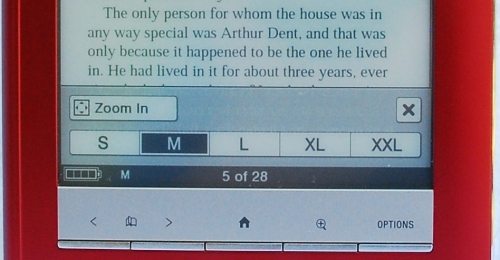
Press the hardware button marked with the magnifying glass to easily change font sizes (this model has five font sizes, two more than the 505) so you can find a comfortable size for reading. As before, the 600 supports a variety of digital book formats, both DRM and DRM-free. In addition to the proprietary Sony format, you can use Adobe pdf files. Since many libraries offer digital books in Adobe pdf format, you can check-out and read books from your local library on your Sony reader. You can also read ePub books, which means you aren’t tied in to getting your books only from the Sony bookstore. You can read text files, rich-text-format files, and even Microsoft Word files if you have Word installed on your computer to allow the file to be converted as it is installed on your reader.
Battery life is still great. I’ve been reading for a full week now on the same charge. I’ve found a charge on my 505 would usually last about 2 weeks with reading 3-4 hours a night. (I have a lot of trouble sleeping!) Sony is still persisting in describing battery life as about 7500 page changes, and people are always concerned that they’ve read considerably less than 7500 pages before they need to recharge. The fine print says you can get 7500 page changes if you fully charge the battery, open a book and continually change pages as fast as you can without stopping. What they don’t spell out is that your battery continues to drain even while you aren’t reading. The power switch doesn’t actually power your device off – it puts it into a stand-by mode. The screen is blanked and the touch screen and all of the buttons other than the power toggle button are disabled, but the reader is still “on” and slowly draining the battery. You can turn the reader off, but that requires going into the settings and choosing to power down the reader. This saves the battery, but it does take extra time to restart the reader when you next want to read.
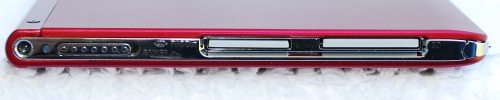
The 600 retains the dual memory card expansion slots from the previous generations. You can increase the amount of storage for books by adding an SD card (up to 16 GB) and/or a Memory Stick PRO Duo card (up to 16 GB). It also retains the ability to display image files and to play audio files. These are two functions that I haven’t ever used. The 8-level gray scale screen isn’t the best method of showing off pictures of my family. I keep only one picture on my reader, and that’s a picture of me to which I added my phone numbers and name. If I lose my reader, an honest person can use that information to contact me and that picture to ensure that I’m the owner when I come to claim it.
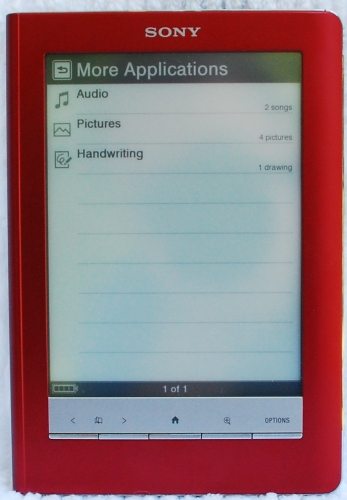
I have never used the built-in audio player in any of the Sony readers I’ve owned. I have an iPod, and I use that if I want to hear music. Unless the audio player has changed in this version, it’s not useful for audio books because it doesn’t retain the position where you left off in the book. I’d be happy if Sony just completely eliminated the audio player from its readers. Apparently others feel the same, because Sony did eliminate the audio player in its PRS-300 model.
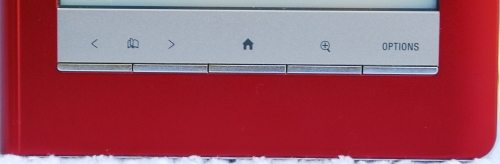
There’s a new hardware button on the 600 that I never had on the PRS-500 or PRS-505. It’s the “options” button, and it offers different choices depending on what you are doing when you press the “options” button. These functions will be discussed in the appropriate sections below.
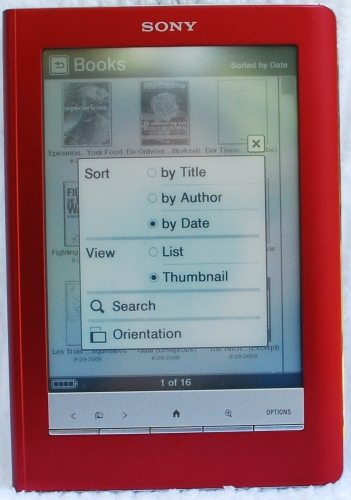
From the “home” menu, you can still choose to see a listing of all installed books sorted by various criteria. Use the “options” hardware button to access these sort methods. You can sort by title, by author, or by the date. A new option here is you can choose to view your books either by list or by a thumbnail view of the cover. Another new option here is that you can search the complete book list for a title keyword or author name for a listing of only the books that fit your search criteria. You can also change the screen orientation between portrait and landscape; this changes the orientation of the reader in all its functions.
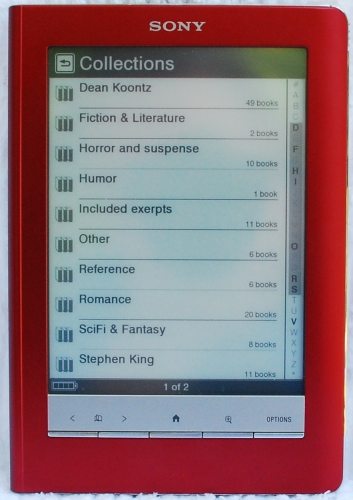
A feature retained from previous versions of the readers is the ability to sort installed books by collections. These collections are like folders with no sub-folders allowed, similar to playlists on the iPod. They must be created on the reader by the Sony library software and the books must be sorted into the collections by the library software, as well. These are virtual collections – only one copy of the book needs to be on the reader, and the book can appear in as many of these collections as you like. Collections are displayed alphabetically on the reader. The only options for collections are search for a collection title keyword or change the screen orientation.
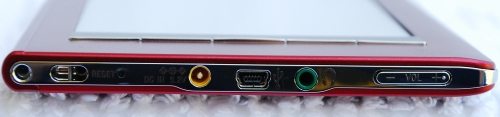
The 600, like all Sony models before it, does not offer wireless connectivity. You still need a computer to purchase and store your ebooks. You’ll need to connect the reader to the computer via usb to copy over books. The Sony library software allows you to organize and maintain your library on your computer and on the reader. The library software also allows access to the Sony bookstore and manages books checked out from your local library. This software has always been available for Windows computers, and it is now available for Mac users.
What new features have been added? The 600 has a faster processor, so page turns are much faster than with my 505 reader. I also noticed that transferring books from the Sony library software is much faster. The 600 has about 380 MB of internal storage, up from the 192 MB in the 505 reader. I was able to load all the books I had on my 505 and I still had about 200 MB free in the 600. Because I can have so many books on my reader at all times, I don’t feel the need to buy a book wirelessly in seconds. I can wait until I get to my computer to buy a book, and I don’t have to worry that I’ll find someone wirelessly deleted anything from my reader!
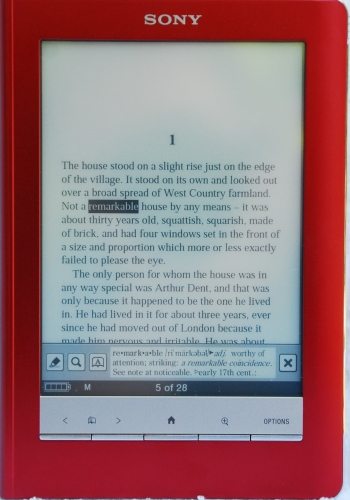
A dictionary has been added to the 600. Depending on your language and keyboard preference, you will have either the New Oxford American Dictionary (English language with US keyboard) or the Oxford Dictionary of English (English language with UK keyboard). These are the only dictionaries available at this time. During setup, if you choose a language other than English, you will not have a dictionary. To look up a word in the book you are reading, simply double tap on the word. The definition will be displayed in a box at the bottom of the screen. In this display, you have three further options. You can tap the highlighter option to highlight this word to make a “note” in your book.
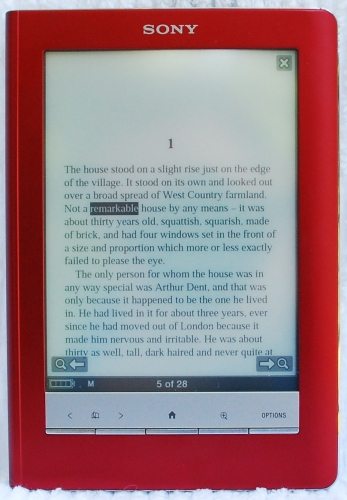
You can tap the magnifying glass icon to start a search for other instances of this word in the book. Finally, tap the icon of the open book with an A superimposed on it to open the dictionary. With the dictionary open, you can read an expanded definition of the word, if available. There is also a keyboard icon at the bottom of the dictionary page. Bringing the keyboard up allows you to type in other words for lookup in the dictionary. You can also use the hardware page-turn buttons to move around inside the dictionary. Tapping the X icon at the top of the screen closes the dictionary and returns you to your book.
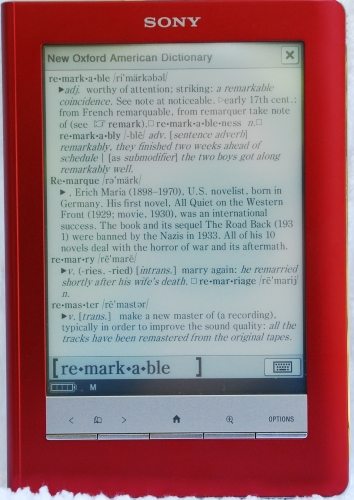
At any point while reading or while on any other function screen in the viewer, you can press the hardware button identified by the house icon to return to the main menu. This is a nice new feature not found on the 505 reader. In the 505, you had to continually press the menu button to make your way through a tree of menus to return to the main menu; you could also press and hold the menu button down for 3 or 4 seconds to return to the main menu. This single button press is an improvement because you don’t have to guess where you’ll end up in the menu tree when you press it.
This simplified home menu button is possible because of the addition of the “options” hardware button that I mentioned earlier. If you are at the home menu, “options” allows you to search for a particular author or a title keyword among all the books you have on your reader.
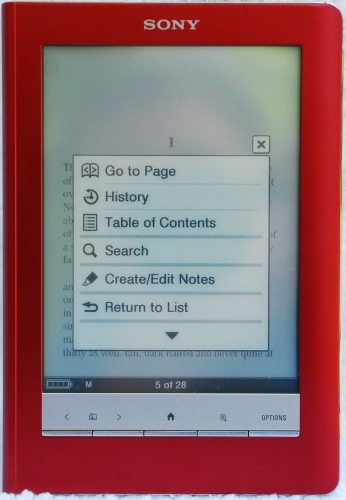
While reading a book, “options” allows you to enter a page number to go to, to browse the history of the pages you’ve been on in this book, return to the table of contents, create or edit notes within the book, see the publisher’s information about the book, delete the book from the reader, or change the display orientation between portrait and landscape. The notes option here allows you to highlight text, make handwritten notes directly on the text of the book, erase a note you’ve previously made, see a list of all the notes in your book, or simply “dog-ear” that page.
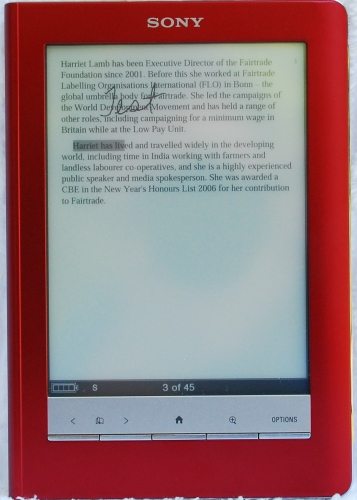
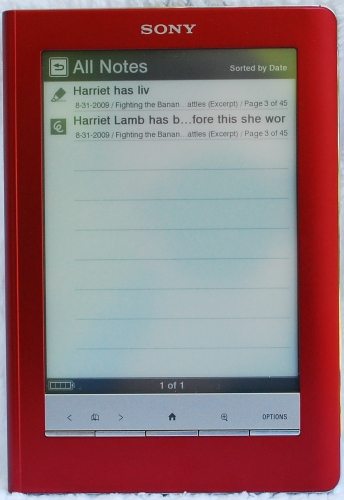
When you are at the home menu, you can select “All Notes” to see a listing of all the notes you have made in your installed books in internal memory and on any memory cards in the reader. You can set up the Sony library software to merge your book notes with the notes in the copy of that book on your computer when you use the synchronize method of maintaining your reader instead of the drag-and-drop method.
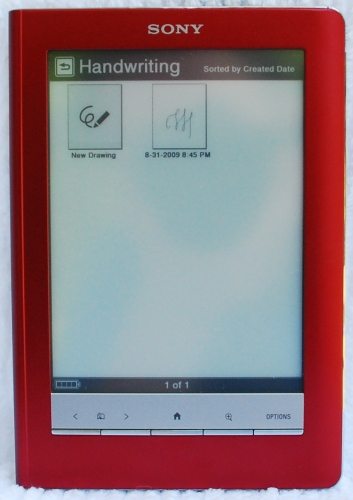
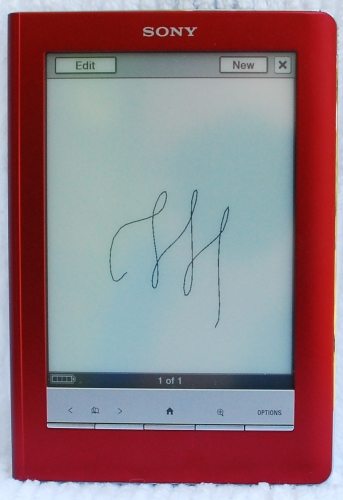
You can use the reader as a memo pad or sketchpad. Select “Handwriting” from the home menu to create a drawing or a handwritten note using your finger or the supplied stylus, see a list of all your handwritten notes, and edit and delete these notes.
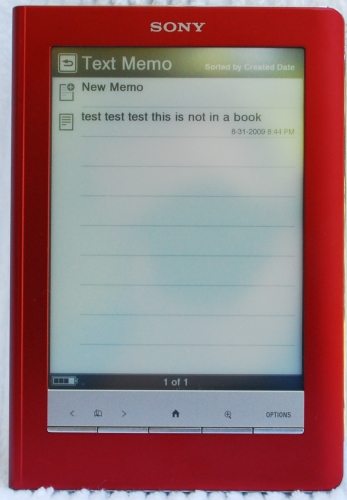
Choose “Text Memo” from the home menu to use a virtual keyboard to type in a note, see a list of all your notes, and edit and delete these notes. These notes are separate from the notes made in your books.
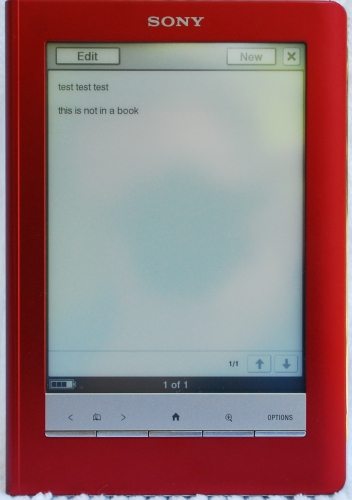
I’m sure there are other things the reader can do that I haven’t discovered yet.
I’m very glad I decided to give the PRS-600 another chance; I won’t be returning it. The 600 retains the functions I loved from my 505 and has added a dictionary and note-taking features. Writing in the books themselves isn’t something I’ll use since I read for pleasure. I was never one to write in my books anyway, so I don’t think I’d do that even in a digital book. It will be nice to make a quick handwritten note to myself if I find myself without paper handy. When I factor in faster page turns, faster loading of books from the Sony library software, and a nice screen, I’m very happy I decided to upgrade to the Sony PRS-600.
Update:
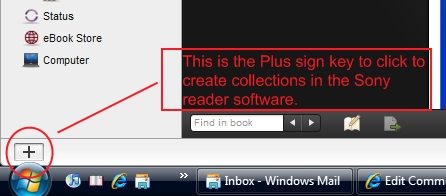
There have been several questions about making collections in the Sony Reader software. The above picture is a screen capture showing the bottom of the left frame in the Sony Reader software. I have no reader attached at the time. The Plus-sign key used to create collections is shown circled in red. If I press the plus-sign key with no reader attached, I will create a collection in the Sony Reader software. If I have a reader connected, it would be listed between the eBook Store and Computer in the list above. To create a collection in the reader itself, I would first select the reader in the list, then click the plus-sign. I can create collections in the library even if I have a reader connected. To do that, I would make sure that I had selected “Books” at the top of the left frame before clicking the plus-sign. You then rename the collection to whatever you’d like, and drag and drop books into the collection.
Auto Amazon Links: No products found.
Product Information
| Price: | $299.99 |
| Manufacturer: | Sony |
| Pros: |
|
| Cons: |
|

Gadgeteer Comment Policy - Please read before commenting
Nice!
Thanks for mentioning the MP3 defect of not maintaining its place. I’ve got MP3 books that I listen to and this MP3 capability would therefore be useless.
Have you gotten a chance to check out how PDF files with graphics appear on the Sony? That’s one of the main reasons I was looking at the DX.
I don’t read PDF files, so I didn’t have one with graphics to try out. I’ll try to find something today and give it a try. I did forget to mention that there is a zoom capability. You can zoom in on a page and then pan around to see more details. I’ll see what I can find with the pdfs and post another comment.
By the way, did you hear that Sony announced another reader for release in December this year? It’s called the Daily Edition, with a 7″ wide screen and wireless connectivity using AT&T’s 3G network. Sony’s press release about all 3 new readers is here http://news.sel.sony.com/en/press_room/consumer/computer_peripheral/e_book/release/41492.html
I’m shopping for my first e-reader and yours was the most complete review I’ve read of the 600. Thanks. Please let us know how you make out with PDFs; that’s mostly what I’ll be reading and I heard size might be a problem. Also, you mentioned you found a good-fitting cover. Which? Does Sony market one now for the 600?
For Cobin Rox – I found a pdf from the University of Nevada at Reno about Living with Earthquakes in Nevada and put it on my reader. The pdf was full of photographs, colored text boxes, tables, and drawings. The pages could be seen in their entirety using the smallest font. Enlarging the font worked to make the font bigger and more readable. Using the zoom and panning made it possible to more closely inspect the photographs and tables.
Some of the two-page spreads in this document seemed to be treated as a single graphic, so it was necessary to pan over the entire two pages to read the text and view the graphics. Panning and zooming was slower than a page turn, but it seemed to speed up a little after I’d had the document open for a while – perhaps it was doing some sort of document processing in the background at first. With this document, I could make everything big enough to read and see details in the graphics, but of course the graphics were limited by the -8-level gray scale rendition. One graph using yellow circles of various sizes to mark locations on a map was pretty useless.
Pdfs have a strange page numbering artifact because of the reflowing. For example, it continues to say page 3 of 21 until you have seen all the text on page 3. Takes some getting used to!
To Jim DeFilippi: As for the cover, I’m using one of the M-Edge covers made for the Sony PRS-505. They are on sale for $15 at Amazon.com. The 600 fits in there nicely, but I eventually noticed the bottom outer strap was pressing on the volume rocker and apparently making my battery drain faster. Being Ms. FixIt, I just took the tiny scissors on my Swiss Army knife and nipped out a chunk of the offending strap. Problem seems to be solved! Sony does have some “premium” covers available now. I haven’t seen one, but they look like the standard cover that came with my old 505. I don’t know if they are leather or vinyl. The Canadian Sony site described them as leather, but the US Sony site doesn’t mention the material at all. The “premium” certainly applies to the price – about $30! The lighted cover from Sony isn’t available yet. They seem to be backordered until the middle of September.
Hope the above information about pdfs helps.
SMH at the reflective screen.
if it wasn’t for that i would have considered picking this up
I was curious how it would work with a .pdf of a movie script. I have to read them all the time, and they’re upwards of 120 pages which I hate printing out for something I may just read once. If I sent you a script, would you load it on the reader and let me know how it works? I’m worried about the formatting going crazy which is MOST important with a script.
best,
Fred
Thanks, it sure does help. As soon as I find a store up here (Vermont) where I can hold the 600 in my hand, I’ll probably get one.
Sony sells the premium leather covers for like $25-30 apiece, IIRC. The weird thing about the PRS-300 is that it doesn’t have ANY expansion slots at all, unlike the PRS-505. They also, for some funny reason, decided not to follow the US/Canadian dollar exchange rates… so that the $199 PRS-300 costs $260 CAD (the exchange rate as of today pegs $199 USD at about $215 CAD) and the $299 PRS-600 costs $399 in Canada (flat exchange rate puts it at $322 CAD). Of course, there’s no Kindle to put it in competition against someone, but still…
Greetings,
Great Review! I want mine now.
I was wondering what case/light combination you are using?
Are you using the Leather case from Sony with the clip on light?
Thanks,
Vicks
Vicks: If you’d read Comment #4 (http://the-gadgeteer.com/2009/09/07/sony-prs-600-touch-edition-reader-review/#comment-42791), you’d know that the cover’s an M-Edge cover for the PRS-505.
Fred Raimondi: I’ll send an email to your address so you can send me the script. It’s a live dot com email address with my name.
To Vicks: I’m using an M-Edge Executive leather case (that I modified to stop it from depressing my volume rocker) with a Mighty Bright telescoping 3-LED clip-on book light. I’m thinking about getting the Mighty Bright Travelflex book light. It supposedly fits in the pen holder inside the M-Edge case, and the flexible neck allows the light to be folded along side the reader so it can be stored in the case.
I probably will eventually get one of the Sony lighted cases for the 600 when they become available. I had the Sony lightwedge case for my 505, and I dearly love that thing. Unfortunately, it doesn’t fit on the 600. I know – I tried it!
To the Guitar God: The reflection looks really bad in that picture because I wanted to show it at its worst. You do have to watch out for the reflections, but it is possible to find an angle to read. The reflections did almost make it send it back, but I’m glad I gave it a second chance. It’s a really nice reader.
Excellent review!
I have had the PRS-600 for 1 week. Yes, the screen is not quite as crisp as the PRS-505, but it is still very good. And much better than the PRS-700.
I love this thing.
Thanks for the review, its good to see they have found a happy medium between the 505 and 700 – even if it doesn’t come with the nightlight.
Thanks for the great review…I am going to get one now from Borders.
Can you transfer the notes to a desktop PC and edit them – like the Kindle ?
Richard, as I said in my review, I don’t take notes in my books. Since I have no experience with them, I checked the manual. It says:
*******
Hints
You can also create notes (excluding markups and handwritten
comments) in eBook Library.
In eBook Library, you can set to merge the notes of the Reader
and eBook Library while synchronizing. When merging the notes,
any inconsistent note for the same word will be replaced with the
latest note.
When you copy a book from eBook Library to the Reader, the
notes of the Reader will be replaced with the ones of the eBook
Library (or vice versa).
******
So it sounds like you can use your computer to edit your text notes but not the ones you handwrote or drew in the book. If you use the “sync” method of book transference, the notes on the pc will be merged with those on the reader. If you just use the drag-and-drop method, it will replace the existing notes with those in the version that got “dropped”.
Hope this helps.
I’ve gotten my PRS-600, on 09/18/2009. First of all this is an upgrade of my Gemstar 1100, ebook reader. As for the PRS-600, yep there’s glare, but I can live with it. It’s not overly horrible. I do use the SD card slot for MP3’s. I think music and reading can go hand in hand. But I suspect Sony used a Korean rocket scientist, since the earphone plug is on the bottom of the unit. (duh). Since I’ve not used the 505 model, to me the screen contrast seems just fine. I use out of habit the Buttons to page turn. It would be nicer if the buttons were a bit wider. they’re awful thin to hit with a big fat thumb. All in all, I like the reader, I only have a few issues, but nothing that makes me regret my purchase.
1. fix the page turning buttons, not all of us read with the reader laying flat on a desk.
2. move the mp3 earphone outlet to a more usuable location, like the top or sides. The card slots can be shoved to the bottom of the unit, since they’re least likely to get a lot of movement (add/removing cards).
3. Unless I’m blind I can’t see anyway in the librarian, for setting up folders. I’m used to sub-folders in my ebook librarian (rocket ebook librarian) where I can sub sort my books by author.
And as a side note, i have something like 900+ Rocket Ebooks ( .RB format). And i was actually able to convert them to ePUB AND .LRF format. It’s freeware software called Calibre (won’t run on 64 bit operating systems though).
All in all I’d still give the sony prs-600 4.5 stars outa 5.
My Sony ereader is being replaced with the new PRS600.
One feature the old had was the backlight. The new does not have, which makes me angry.
I refuse to pay up for a light as they could not fix my older version.
Anyone else find the no backlight an issue?
Gary, you use the Sony library software on your computer to make the folders (called “collections” in the Sony software). When you open the library software, you’ll notice there is a narrow frame on the left that lists your library, status, eBook store, and computer. All the way at the bottom of this frame, you’ll see a button with a big plus-sign on it. That allows you to make your collections.
To make collections in your Sony library on your pc, first go up and click either on “library” or “books” at the very top. If the “library” tree isn’t expanded for you, click on the small arrow to the left of the “library” name. You’ll see a new folder will get created under the “library” tree. Name your collection folder by double-clicking on the folder name. Populate these collections by dragging-and-dropping books from the main library collection.
To make collections on your reader, while the reader is connected to the computer, expand the Reader tree by clicking on the arrow to the left of the name. Then click on “books” under the Reader tree. Use the plus-sign button as described above to create collections on your reader. Populate book collections by dragging-and-dropping books from the readers “books” collections.
Sony made it really obscure, didn’t they? And by the way, you can only put books in these collections – no music and no pictures.
Wow, Gary! Did I give a bad explanation in comment 20 or what!
I’m sorry I wasn’t more clear. I was trying to say that you click either in the books section of your main library or the books section under your reader – depending on where you want to put this new collection. Then you click that plus-sign button at the bottom of the frame. It will add a folder called “Untitled” in the tree you’ve selected. Double-click on the title to change it to your desired name. Populate the collections by dragging and dropping from the “books” folder in that tree.
I’m sorry about the confusing explanation in comment 20. I couldn’t edit that comment, so I hope you see this one.
Got my PRS 600 yesterday, and was planning to use it for my research projects. I fell for the fact that you could highlight qoutes, make notes – and export them to a word document. This would make litterature review a lot easier. Only problem – Sony figures that a quote of 100 characters is enough, which it is not. It cannot be changed – which is sad since it is otherwise perfect for a job in academia. Has anyone got any suggestions?
jan
Great review Janet! I have been considering an eBook since the 505 arrived (I live in the UK where you can’t get the Kindle, which I don’t much fancy the looks of anyway – too many jarring angles) and your review of the 600 is certainly making my wallet-finger twitch!
@Jan: Perhaps try adding several in sequence one after the other? Like one per letter of the particular word maybe? Having not tried it, not sure if that would help or not…
Thanks, Alec! You should do it – you’ll love the Sony 600!
Challenge and Urgent Appeal — EReaders Required
I wish someone would turn or hack a cheap $20 or $30 5 inch or 4 inch lcd digital photo frame into a ebook reader for text and rtf files.
I don’t want wi-fi, bluetooth, internet access and fancy writing screens,pushing up the price.People who want that can pay extra.
A 4gb flash memory can store 10000 books easily.
Ideally it should have 4gb storage from a internal flash or memory sdd card with a long battery life or the option to turn the backlight off.
By the way why is the amount of memory on the present over priced devices so niggardly?
I mean you can easily get a flash memory of 4 gig for
$3. Most devices have 64 megs or 256 megs.What a joke.
A lcd displays don’t consume much power this could extend the battery life.
Eink is unfortunately over priced and SLOW.
Ebook readers like the amazon kindle and sony ereader cost as much as a laptop at present! Rip off pricing.
ebook readers cost from $300 to $800.
They are a rip off.
Manufacturers by keeping prices high are shooting themselves in the foot with poor sales.Very stupid people at the top.
What a rip off.
I mean $300 to $800 for a ebookreader.
You can buy a complex mini netbook for less then a ebook reader now.Only reason I don’t use a netbook is due to the poor battery life of only a few hours.
I don’t want to pay that much on principle.
Even a mini netbook is unsuitable for ebook reading due to the short battery life.
A low power low cost photoframe would be ideal.
I am surprised that no one has done this hack.
The focus in various forums unfortunately seems to be turning photo frame into video displays for moving pictures which they are not really designed due to their poor frame rates of 8/second! A pointless exercise.
They would are more suited to be ebook readers.
Anyone up for this challenge?
I also appeal to Chinese folk here if you could start producing a simple dedicated paperback sized 4 .5 or 5.00 inch sized screen size thin ebook reader with a lcd screen with optional back light.
Should be able to read text,rtf,pdf,html,word.
no blue tooth.no wi-fi,no hi-fi,no screen annotations,no screen writing,no hand writing,no editing,no coffee making.People who want these gizmos can pay extra for it in mark 2/3 versions.
should run of 2 aa batteries for a month.
should be under $50.
Just bought a PRS-300 yesterday. Nice, small, crisp and clean, just for reading books. Works like a charm, no muss, no fuss and no bother.
Most of those ‘cheap picture frames’ have AC plugins for good reason – the LCD needs to be constantly refreshed, and the backlight takes up even more power, so the claim that “A lcd displays don’t consume much power this could extend the battery life” is highly inaccurate. E-ink’s main draw is that it only draws power to keep RAM alive, when the CPU does something, when it reads from memory, and to change pages on the screen. That’s it – it doesn’t need to constantly redraw the screen the way an LCD does, which means much less power usage.
Plus, there are cheaper e-ink readers out there. Look at the $199 price of the PRS-300, the Astek 5″ Pocket Pro, and so forth.
Hi,
Does anybody know if the PRS-600 can correctly display characters specific to a language? In my mother tongue – Polish – we have chars that don’t appear in any other language. They are easily handled in doc or pdf files, but I was curious about how they will go with this reader? Can anyone try with a document in German/French/Polish to see about the special chars?
Thanks,
Chris
Chris: if the fonts are embedded in the PDF, or included in the ePub (which allows extensions as long as they’re in the file itself with a specific pointer, IIRC), it SHOULD do so, according to folks in the MobileRead forums.
Hi, Thanks so much for this. I am an American academic doing research in Africa, and I have been considering an e-book reader to make my luggage lighter–access to materials easier. I have been considering the new Kindle with international wireless access for $279, but the big downside of the Kindle for me is that you have to manually convert pdf files. The ability of the Sony PRS-600 to read many different formats makes it more attractive to me. Most of my documents are in pdf format, and I just wanted to make sure that you can annotate pdfs as well as other ebooks in the PRS-600… Could somebody check that for me? Thanks so much.
I tried making notes in the only pdf files I currently have on my reader. I used the manual for the PRS-600 and found that I could make handwritten notes and I could highlight on the page. The Sony manual was formatted to fit the display of the reader.
The other file was not formatted to fit the reader screen and required reflow. I could make handwritten notes, but I had trouble with highlighting. When I tried to highlight a line, it would draw the highlight lower in the document.
I couldn’t make notes of any sort when I was zoomed in on a pdf page.
Carmen: You can add notes to any page of a document, no matter the format, with handwritten notes, IIRC, per the manual (http://www.sonystyle.com/wcsstore/SonyStyleStorefrontAssetStore/pdf/warranty/SEL-asset-166216.pdf) as noted on page 102. just by hitting the ‘Options’ button, and then selecting “Create/Edit Note”. On page 106, it notes you can bookmark a page and then add notes to the bookmarked page (or highlighted word, if it’s a PDF which has text in it – just double-tap the word to highlight it) by tapping the bookmark or the highlight and selecting “By Drawing” or “By Keyboard” in the context menu which appears.
However, be warned that graphics aren’t resized when you reflow a text-based PDF… but again, it’s probably better than the Kindle 2 for PDF’s, if not on the same level as the iRex 1000S (http://www.irextechnologies.com/irexdr1000/specs) which has better PDF support (it automatically zooms in on the text even if the margins are large, which the Sony doesn’t according to MobileRead’s users), but is less expensive than iRex is.
Also, it should be noted the PRS-600 also supports any Table of Content data you may have embedded into the PDF file using Adobe Acrobat during creation… and still has a search feature, if you didn’t set up one in the metadata for the PDF file, for PDF’s using text.
Janet – from what I’m seeing in the manual, all you CAN do in zoomed-in mode is zoom in and out; if you want to do anything else, you exit Zoom mode, then hit the Option button or highlight. At that point, you’re probably better off rotating the PDF by selecting “Change Orientation”… or resizing the PDF to something more like Letter size (8×11) than whatever it was.
Hi guys!
I’m Nikki from the Philippines.
As I was reading the reviews of Kindle 2, I was attracted by a link directing me to it’s rival sony’s PRS-700 that led me in reading Janet’s PRS-600 review.
I really have this plan on buying an Amazon Kindle. But the problem would be the purchasing of ebooks from Amazon since they require US residents who have US-based credit cards.
After reading this review, there was a turn of tide in my dreams of having a Amazon Kindle.
Being in a Third World country like me, I dream of having books where ever I am.
PRS-600 (base on your reviews) answers my dilemma.
I’m not an american who’s future reader will download subscriptions every morning.
Though connectivity to the web is a plus, seeing my situation here, having some books to read will do fine.
Thanks for this review!
It helped me a lot!
Nikki, I’m glad the review helped you in your research for choosing an ereader. The Sony bookstore in the US also has some geographical restrictions on credit cards and books, but there are other bookstores around the world where you can purchase books for the Sony reader. The many book formats that you can use on the Sony reader helps makes it easier to find something you can read.
Haesslich, I’m sorry I didn’t respond sooner. I think the problem with some PDFs is that they have DRM, so you can’t resize them. However, I don’t use PDFs, so I could be wrong!
Janet: Yes, some PDF’s have DRM, which means you can’t resize them in an editor… but outside of reading it in landscape, it’s about the only solution I can think of. Still, it handles them better than the Kindle DX, according to all reports… which isn’t saying much for the Kindle. The Sony needs a bit more RAM and CPU (or a better version of Adobe) to do PDF’s with zoom and annotate, or at least to make zooming smoother.
Thank you for this thorough review.
I’m thinking of an eBook reader and I wanted one that had the most flexibility in reading various document formats. When I had heard that Amazon snagged a book from the Kindle it completely turned me off to the Kindle.
Never!
Besides, I don’t want to be linked to only purchasing books from Amazon.
I have always like Sony products and am pretty brand loyal to them. What turned me on to the eReader was the ability to have hand written notes. Admittedly, the $300 price tag is really spendy for me right now, although I may just treat myself to this item for Christmas. 😉
J. O., I think you’ll be happy if you get a Sony reader. I’ll admit that I was tempted by the Kindle 2 myself, but when Amazon removed the books without telling anyone first – well, that killed my desire for a Kindle!
I didn’t realize this was happening at the time, but sometimes my comments show up from JanetCinNC and sometimes as Janet Cloninger. I’m sorry for any confusion this may have caused.
Personally I use either my Ipod Touch, HTC Touch HD or 9 inch touch screen Netbook for reading (one with a swivel screen). I always have backlight, can decide the colour of background and text and have numerous extra functions on each. Even a cracked PSP would be better for reading than a greyscale screen with no backlight. I have a program for turning a document into the right layout, colours and font size for the PSP reading program and it was pretty good.
Every time I’ve looked at an e-reader they have always been too expensive for not very much, and so the trend continues.
Geoff: To each their own. I also use an iPod Touch… but being honest, there’s a huge difference between a 2.5″ screen and a 6″ one when it comes to readability, and the one major issue with everything you’ve named so far is battery life. If you’re only reading an hour a day and you have to recharge ANYWAYS, then those solutions work quite well. Otherwise, there’s something to be said for a display which uses no power to keep the text on screen, and which can also readjust font sizes on the fly… while not having to worry about the power being used for that coming out of talk time, web-browsing time, or time used to type up something in a document. With a netbook, there’s not nearly enough screenspace for me to have a document up along with another reference, and switching windows just to get a quick look at something’s a tad annoying… and none of the above-mentioned solutions (save the netbook) are good for reading PDF’s, which some eBook readers do decently well.
Hi All
I’ve been looking to get an e-book reader for a while, and I happened to stumble across this (fantastic and very comprehensive) review.
Does anyone know where I could purchase the Sony rader in Australia?
Thanks.
Sarah: Tried Borders to see if they’ve got any in their Australian stores?
http://www.borders.com/online/store/InternationalStoresView
I know they carry the PRS-600 in their American outlets.
Thx a lot Janet, loved your review and it possibly swayed me to test prs-600 and I am glad I did.In combination with Calibre it becomes mighty comic book/manga viewer and thats exactly what I wanted.Loaded my comic book library on SD card (took 6GB ^^)
and now I can enjoy all my comics on the go.
And I am an Aussie too.Bought my prs-600 from here: http://www.bhphotovideo.com/c/search?Ntt=Sony+Reader+Touch+Edition&N=0
It was $360 AU all up with delivery to Melbourne.Took about 5 days from the moment I ordered.
Cheers!
Thanks, Sarah and Ian, for the kind words! And thank you, Haesslich and Ian, for giving Sarah ideas where she can buy one of her own!
Hi, can someone tell me if the search function searches across the whole library or just within individual documents?
Also, would adding 2000 short Word docs be impractical?
And what about .docx?
Thanks.
Chris, if you have a book open, search works within that document only. If you are outside a book, search works only to find a keyword in the title or author’s name. According to the manual, it does not search within all documents on the device.
The manual says that either .doc or .docx files will work. In both cases, you must have the appropriate version of Word on your computer that is running the Sony library software. The Sony software MUST be used to transfer the Word document onto your reader, and it will actually convert the document to a RTF file before transferring it to the reader.
There are about 380 GB of user-available storage, and you can add memory cards to expand the number of documents you can store. I read about people who put thousands of documents onto their reader, but I’ve also read about the problems they have doing so. An immense number of documents causes the reader to take a long time to index the documents after you get them transferred then “eject” your reader connection to the computer. Sometimes it takes hours to index.
Keeping memory cards always in your reader causes the battery to drain faster than normal. I played around with a memory card with an earlier reader and found that accessing something from the card was much slower as well, but that may not be true for the 600 reader.
Thanks for your detailed and useful reply, Janet.
My 600 is arriving next week, unless there’s a delay with the courier service, and it will be mainly for reading Word docs at the moment. As a writer I will be reading a lot of my own texts for the purpose of making notes on them, etc. I’ve already downloaded the Sony software, which looks bizarrely like iTunes (I hope it runs better on Windows, though!). I suppose I can get the library ready for next week by adding my documents now. Thanks for your nice review.
You’re welcome, Chris.
I like the Sony library software, and I run it on Windows. Although I’ve read a lot of complaints about the software, I don’t have problems with it. I always say it’s as much like iTunes as they can legally make it.
The one thing I don’t like about the software is that the collections (like playlists in iTunes – flat, virtual folders) aren’t alphabetized in the pc software. The reader collections are alphabetized, so I can’t complain too much. After all, I spend much more time with the reader itself than I do with the pc software.
I hope your reader gets to you on time, and I hope you like it as much as I like mine!
One last question while I’m organizing my files.
How fast does the Reader do its searches? Anyone know if it would it have trouble with an RTF 500+ pages long? Thanks.
Chris, you search while you have the book open. It’s rather like doing a find/find next in Word. You find the first instance, then you select the option to move to the next instance. You repeat until you have seen all occurances or until you found the one you are looking for. You don’t submit a search term and wait for a report listing all instances.
I just tried search an RTF file with 560 pages. I looked for “help”, so there were lots of instances. I had no problems while search, but of course, I was the limiting factor for speed, as I had to press the button to go to the next occurance.
Hi Janet, Thanks for testing its speed there. I realised it would search only after the document is opened, that’s fine, I was just unsure of the search speed therefafter.
I own a data-collection Yahoo group with an archive over 7000 posts which I use for reference, so I decided to turn them into 6 Word docs of 400-500 pages each. I expect the Reader will be able to deal with that, judging by your reply. Should be a fun week.
Hi there,
After weeks of browsing, this is the most helpful thread I’ve come across. Being an Aussie, I think we’re in for a bit of a wait for the PRS to hit our shores and I think I’ll hold out for the Daily Edition. As much as I’m busting to get my mitts on one now, with the non-existant support system in Aus, I think it’d just be asking for trouble. One thing I’m still a little confused on is the file formats – If I have a heap of medical textbooks etc in pdf format on PC, am I able to transfer them straight over to the reader?
Hi Michelle! I’m glad you’ve found helpful information!
I’ll try to answer your question about pdf files. Except for the PRS-600 user manual, I don’t use pdf files. I’m not sure if you are asking if you can just drag-and-drop files directly or if you want to know if there are any extra steps to using pdf files on the reader. I’ll try to answer both questions.
You can connect the reader via usb and treat it as an external storage device, so you can just drop files directly on it without going through the Sony library software. If the files have no DRM (copyright protection) on them, you’ll be able to read the files with no problem on the reader. I don’t think the reader will allow you to create folders to categorize your files, though.
However, if the files are DRM-protected, you will have to use both the Sony library software and Adobe DE software to get the files on your reader and get them authorized to use them on your reader. As I understand it, you install the Adobe DE software on your computer, use it to authorize your computer/reader, and then it works seamlessly with the Sony library software to get the books onto your reader in a readable form.
I hope I answered your question. If not, let me know and I’ll try to find more info for you.
Janet – thank you so much for that!
From all the software issues I’ve read I honestly didn’t think it would be quite as simple as drag-and-drop!
Let the waiting game begin 🙂
Again, thanks for your help Janet, I appreciate it
While I think of it, must the books be purchased from the Sony Library?
You’re welcome, Michelle. There is a great user forum, called MobileRead, that is a wonderful resource for anyone wanting to know more about using pdf files on their Sony or about their Sony reader in general. It’s http://www.mobileread.com/forums/
No, you don’t have to buy files from Sony only. Sony readers work with files of various types, and there are several online ebook stores that sell books or offer free books that will work with the Sony reader. MobileRead is also a good source for finding places around the world where you can obtain (legal) content for your reader. That said, I’ve bought all but one of my books from Sony. I think they have a great selection of the popular literature that I read, and they have good prices, as well. However, I do know that geographic restrictions on book sellers mean that many people with Sony readers aren’t allowed to buy books from the Sony US store.
Thanks Janet!
You’ve been a great help 🙂
Janet, thanks for a great review and the support of everyone on the thread!
I know from reading the review/thread that the search facility doesn’t work with everything on the reader, but doesn’t anyone know if it works with photos? It would be tremendously useful to me to be able to search photo titles for a keyword. I have about 6,000 photos of artwork that I need to carry around with me. (It doesn’t matter that they are in b/w only on the screen.)
Now, I bet that’s an application that Sony never contemplated!
Ptolemy, the search feature doesn’t work for the photos. You can get a sorted list by name or by date for photos, but that’s it. I only have one picture on my reader and couldn’t try it out for myself, but I searched through the manual and couldn’t find any mention of searching in photos.
I do believe you are correct in thinking Sony never comtemplated someone having 6000 picture files on their reader!
Janet,
Thanks for taking the time. Somehow, I knew my wish would be thwarted! My search continues…..
Unless, of course, you converted the photos into PDFs.
Do somebody know how to change the name of a book in the Sony PRS 600?
Rafael, you have to edit the file’s metadata to change the name of the book. This is something you’d have to do on your computer before transferring the file to the Sony 600; you can’t edit the files in any manner once they are on the reader. Also, as far as I know, you cannot edit the metadata on any file that is DRM-protected.
I bought some computer tech books including code and diagrams in pdf, I am just wondering that someone had any problems of reading pdf files so that I can decide whether to buy this Touch version of sony reader.
Thank you
Has anyone had trouble with the memory cards? I put them in the reader and when I tried to download an MP3 it says that i only have 3,444 kb. I don’t know why the memory cards are not working. Do they have to be Sony brand?
Hi Janet,
I am just another person who was positively influenced by your great review to buy the Touch Edition Sony Reader. I just ordered one on ebay, hopefully it comes soon. I am still a bit anxious about different languages support and I couldn’t find any info on that except the Polish girl question on weird characters. Well, my case is even worse – I read in Russian and Greek, where whole alphabets are entirely different, I’m wondering how Sony would go about that. I am pretty sure there will be no problems with pdf files, but what about word documents, if I got it right, they have to be converted by Sony software first before loading them onto the reader, right? Will it be able to convert Russian characters? Well, I guess it’s too late to have second thoughts, as my reader is already on its way, so I just have to be patient till it comes and I can try it out. But maybe there is someone who can end my anxiety?
Thank you, Natalya. I’ve never tried reading anything other than English on my reader. I don’t have any advice for you, but you should check out http://www.mobileread.com/forums/ . I read there a lot, and I know there are people on those forums who read many different languages on their reader. Just go to the Sony Portable Reader (New Forum). People there are very knowledgeable and very willing to help.
Thomas and Lisa, I’m sure there are people there who can help with your questions as well.
Thanks for you excellent review of the Sony prs600. After reading it I decided I would have one for my 70th Birthday. I have had it now for a few days and I am delighted, especially as I am able to just drag and drop my typed Word documents into the Library/Reader. Problem is it doesn’t copy over the title of the Word Document or Folder. Is there any way I can do this? I have tried http://www.Mobileread but couldn’t find anything.
I left a comment earlier this evening asking how I could get the title of a Word document to appear in the EBL library/reader upon transfer. I have just had an ephiphany! I went into the Word Document ‘Properties’, clicked on the ‘Details’ tab and typed in the name of the document next to ‘Title’, it then appeared in the EBL ‘List’. Many thanks – thought I would let you know to save you having to reply to this old lady.
Hi, Thanks for a great review and also numerous comments by which you have tried to solve lot of problems. Even I have two.
1. Are these e-reader language specific? I mean I have lot of pdfs which are in Devnagari script (Indian languages like Hindi uses Devnagri). Can I read these on this e-reader? Also can I read pdfs created from scaned documents?
2. I came across lot of pdfs files of popular books on the net. Do you think I can read these downloaded books on this reader?
Please answer these questions ASAP, as my purchase depends on it and as this gadget is still not available in India, I have to tell one of my friend to get it from US/UK on his next visit.
Thanks
@Sharmila Gharpure I’m not sure how to answer your questions. I really don’t use pdf files. I do know that I have seen many discussions about various fonts for specific languages on the MobileRead forums I’ve mentioned in many of my answers here. The people there are very helpful and they are usually very quick to answer questions. This link is for the Sony 600 reader forum: http://www.mobileread.com/forums/forumdisplay.php?f=176 I’m sure someone there can answer your questions better than I could. I’m sorry I don’t have more information for you.
hi janet, thanks for this.
i’m presently enjoying reading ebooks off my Sony P1i using MobiReader and the convenience of it. having a large-screen ebook reader which doubles up as a scribble pad sounds nifty.
would you happen to know whether the notes scribbled on the Sony PRS-600 can be converted into text by the OCR software in Evernote?
@sputnik I don’t use notetaking, but I gave it a try. For notes inside a book, there is a very useful notes export feature that allows all the handwritten notes and highlights you made in that book to be exported into a RTF file. When I highlighted a note, the page number it appears on and the first few words of the paragraph are included in my RTF file. For a handwritten note, in addition to the page number and the first few words, a small picture of the page with my handwriting is included. The picture is small, and its size doesn’t seem to be changeable. I can just read my handwritten note (because I wrote it large), but I cannot make out any of the text on the page.
As for a handwritten note to myself (one not in a book), I don’t see any way of exporting it. I could do a screen capture, but it would capture all the Sony library controls as well.
I don’t know anything about how Evernote works, but I’m sure you know how to import the RTF and the screen captures into Evernote. I don’t know how you proceed from there.
Sorry I can’t be of more help.
Edited to add: I didn’t see the Sony Touch reader listed as a supported device on the Evernote site. I don’t know anyway that you can run other programs on the Sony reader, either.
Thanks for the thorough review! I think this reader might be good in comparison to other models, but I only have actual books to compare it to. I got my PRS-600 yesterday as a birthday gift and was really pleased and keen to make it work. I like that it supports different formats and works with my mac. In theory it’s a fantastic piece of equipment. However after I purchased a few books for it, I settled down to try and read… the writing is dark grey on a medium grey background which is really hard on the eye (my eyes were watering after half an hour, and I’m only 35 and usually read for hours). I usually read books in medium lit rooms, ie- daylight from a window but no other lights on, but in that kind of light the reader only shows me my own face. When I start putting lights on for it, or using the lamp that comes in the leather case, all I can see is the reflection of all the lights. I called customer service and there’s no way to improve the contrast between the background and the writing. I’m really giving it a good go today, but being such a strain to read will probably mean I just don’t use it. I suspect it will be going back to the store tomorrow.
@Nat I’m sorry you’re having trouble with the contrast on the 600. I found the lighted case from Sony was very inadequate as a light source. If you read my review of the M-Edge case and the e-Luminator2 light for the Sony 600, you’ll see how well the reader screen is lighted with the M-Edge product. It also helps if you can turn the light head so the lens is parallel to the surface of the screen so the light washes down the screen.
If you just can’t get used to the 600 and you don’t need note-taking abilities nor a touch screen, check out the Sony PRS-300. It’s smaller, with just a 5″ screen, but it supposedly has higher contrast. It doesn’t have the touchscreen overlay that degrades the contrast. And of course, the older Sony PRS-505, if you can find one somewhere, is considered by many (including me, I must admit) to be Sony’s best reader EVER. The contrast on the 505 is very sharp.
I really appreciate your feedback, thanks! I went to the store to look at the 300 and ended up exchanging my 600 for it. It’s so much easier to read! Practically no glare and the writing looks black on a very pale gray matte background instead of the gray-on-gray shiny look of the 600. I actually like the smaller format to hold The small screen isn’t bothering me, and I can easily read the smallest size writing.
The 600 is definitely very sleek looking and the touch screen does add some great functionality such as search and notes etc, I just can’t get past that screen glare. I’m very pleased with this little 300 though, it’s just right for my needs and I’m glad I didn’t just give up on the ebook idea.
@Nat I’m glad you found a reader you like! Those little 300’s are very cute, but they were too much like the 505 reader I already had. I was lured by the newness and the sleek beauty of the 600, but I will admit I sometimes miss my red 505. I wish I could put the faster processor from the 600 into my 505 – that would be the ultimate reader.
I have now read so many reviews on the main three Sony readers and i’m still torn between all three 🙁
On one hand the 300 seems ideal as its nice and small and is the cheapest of the three, on the other hand the 505 sounds great with the addition of the memory card slots and larger screen (I have an idea to fill the device with technical docs for work) and on the third hand, the 600 sounds great with the faster CPU, SD slot and touch screen but I have a feeling the glare will bug me!
I guess the only option is to get to a Sony store and see if I can view all three (if they still have the 505)
Oh and sorry, great review by the way! One of the best i’ve read so far and i’ve read a lot!
@Stephan Thanks! And as for the 505, you’d better move quickly if you think you want a new one of those. They’ve been out of production a few months now, and I would imagine they are getting hard to find. They have some on eBay, but you won’t be able to look at it first.
If you plan to load up a bunch of stuff on SD cards, you should be aware that the battery will drain a little faster with the SD card in. I don’t use them, but I’ve heard some people say that having a ton of files on cards can make the reader really SLOW to set up its index after updating the reader.
Also, the 505 works with PDF files (if that’s what you’ll be using), but it doesn’t have the zoom & pan feature that the 600 has for viewing PDFs.
And to confuse you further – have you heard of the Sony Daily Edition? It’s supposed to be released this month. It has a larger screen, wireless downloading of books from the Sony book store, and it also works with PDFs and (I believe) SD cards.
Hi Janet…. and friends!
I have really enjoyed reading your review as well as all of the comments, questions and answers as well…very helpful indeed!
Your review has been indispensable in my researching efforts.
I have purchased the 600 as a Christmas gift for my wife and was concerned about most of the topics that have been covered here.
She will be reading your review as well… Christmas Day!
I would like to mention that I also added a 2 year warranty to cover any unforeseen issues that might occur.
Best Buy offers this coverage.
Borders Book store did not!
They are right next door to each other in my area, and I would have bought it from Border Books had they offered one.
Borders did the demo that literally sold me on it but I just did not think it was a good idea not to get the added protection and sooooo….. I went next door and bought from their compactor.
The 2 year coverage was $70…like a $3 per month protection plan.
It may make a big difference to know that additional protection can be had depending on who is selling what.
Take care…
Hi Janet
I do have a question concerning the battery replacement.
What is the procedure?
I have heard different stories and hope that it is not a hassle to change…if need be.
Thank you so much.
Take care…
@Mike I’m glad the review and comments were helpful in your search. I hope your wife likes her Sony 600 as much as I like mine.
As for the battery question, Sony says the battery is not user replaceable. They suggest that you return the reader to them for battery replacements. I’ve never needed to have a battery replaced, and my three person family has owned 3 Sony PRS-500s, 4 Sony PRS-505s, and 2 Sony 600s since early 2006. (There was no problem with the 505, I just had to replace my silver one with the red one when it became available!) I think I’ve read that some people undertake battery replacements themselves, but I have no experience with that. Sorry I couldn’t be more help.
dear all
i just bought sony reader PRS 600, i bougth by my friend in houston and i stay in jakarta indonesia.
But now i have problem with my ebook reader, the menu still not appear, in the screen have a massage ” calibration error detected please restart calibration process”.
Any body can help me, what should i do? how to do restart calibration process…??
please info by PM to my email : [email protected]
thanks
My mom just got one of these peices of junk for christmas. The software wont install on 3 different computers we attempted and the only books that came with it in ENGLISH is a cook book. Everything else is german or puerto rican.
I advised her to return this 300 dollar waste of money and get something the actually has a backlight and is wireless.
I just got the PRS-600 for Christmas, have not played with it after reading the problems with glare on screen, thought I should maybe check out the NOOK or Kindle 2? What about in Sunshine. We go to the gulf in Al or FL for vacation and spend a lot of time on the beach. I MUST have my books!
I got a PRS-600 for Christmas and after 10 minutes I put it back in its box ready to return to the retailer – what a load of rubbish. The screen is unreadable in anything other than perfect lighting conditions, it is slow, the screen flashes black and white every time you do anything, drawing on screen is so slow it can barely keep up, ditto typing, drawing on screen is so thin it just looks wrong, writing on the screen feels scratchy, user interface is poorly thought out, doesn’t charge from a standard USB mains charger.. the list of niggles is endless. I await Apple to spend a decent amount of time designing and testing their own book (iSlate?) user interface that will blow this out of the water: it shouldn’t be too difficult… come on Apple!!
Hi Janet… love your insights. You are a pro.
I’ve had the PRS-700 since July and love many aspects of it – especially access to free public domain books + LED back lights to read at night time (without waking my wife).
I also love making notes (just finished reading a book that had over 100 notes). However, I find it incredibly frustrating that the Sony Reader’s user interface nor the PC software can’t allow me to manage my notes with simplicity. I was hoping to hear if you can tell me how to delete an individual Note.
Many thanks!
I’m reading lots of reviews to decide which e-reader i buy…I think it’s going to be the PRS 3OO, as I will use it purely for reading for pleasure when travelling. So I would like to thank Janet and many others for their very constructive comments and feedback.
Apart from contributors 87, 88 and 89, who sound like a bunch of spoiled teenagers, and should keep their thoughts to themselves!
Whats the pointif the screen is terrible(as this reader’s PRS-600’sisand nobuilt in Back light.My mum askedme if I’d like one three timesand three timesI said no as they terrible and not advanced enough yet and sony con you out of extra money by deliberately not including a backlight and charging a fortunrfor a clumsy light to attach to it,rediculous rubbish.
Tried reading it in a place with dim light (i.e. bus,only place I’d use itor train) and was almost impossible to read as no light. An ipod has ebooks on it and can be read at least as has a back light to it!!! or if you want better use your Laptop/Netbook. Why bother??? It’s like when someonegot me a PDR. My Mobile was more advanced and better than it so I never used it!!!. The sales man conned the poor person who bought it for me out of their hard earned money and sold them an ancient versionwith Green Screen and black writing (almost impossible to read off off!!!)
when i plug my prs600 into the usb….i get a usb page on the reader with a cirlce over the top….and cannot do any operations with the reader while plugged in …..i have had it plugged in more than four hours.
Is this normal.
@brian The reader is in sync mode while it is plugged into the usb. You can’t read or do anything else with the reader until you eject it from the computer and unplug the usb. If you want to use the reader while you are charging it, you will have to get an A/C adapter.
@mibeco I don’t make notes in my books, so I’m not sure if this will work – and I don’t know if the 700 is the same as the 600. While playing around trying to help people with questions, I was able to delete notes in the READER (I haven’t tried in the PC software) by going to that note, selecting the eraser, and just erasing that note by rubbing over it with the stylus.
@Jules I hope you will like the 300. From what I’ve read, the screen on the 300 is very much like that of the 505 for clarity and readablility. My 505 has a gorgeous screen – very clear and sharp.
@Jules and mibeco Thanks for your kind words.
@zein I recommend http://www.mobileread.com/forums/forumdisplay.php?f=50
for help with technical problems with your Sony readers.
Thanks Janet for an excellent review.
I am considering seriously to get the 600 although there are not many sellers yet available here in Finland. My friend is currently in the USA and I hope he could perhaps bring one for me. Given the current dollar-euro exchange rate the reader isn’t even terribly expensive. 🙂
BUT: What I am mainly looking for is a device which would allow me to write my own long notes which could be saved on the PC i.e a device which would replace the old paper and pencil. I have the feeling that prs600 would not be ideal for that. Perhaps a digital pen would better suit my purposes…on the other hand, I would definitely like to read PDF’s and make notes to them and for that prs600 seems to be a very good option.
So, although I know you don’t make notes, I was wondering what your conclusion about the note-function is. Is it possible to write (with stylus), say a shirt story on prs and then transfer it to the computer for safekeeping?
Again, many thanks for all the info so far!
Janet, thank you for all the wonderful information! You have been very helpful. Do you know if there is a way to convert my microsoft reader books to be used on the sony reader 600? Most of my books are in that format to read on my pc and I would hate to not have them for my reader!
@Antti, I don’t think there is anyway that you could write short stories on the Sony 600. With the stand-alone notes, I don’t think they can be more than one page long. When I do handwritten notes, I usually have to write large – so I couldn’t get much to fit on a page. Tapping virtual keyboard keys with a stylus takes a while, too.
@dshcultzd I believe you can find information about converting files on the Mobile Read forums I’ve mentioned before. http://www.mobileread.com/forums/forumdisplay.php?f=50
@WebSanity The reason for the flashing is the EInk technology has to refresh and it causes that effect. You will get that effect no matter what ebook reader you use.
As for the MacTablet. It’s still only a rumor but I can suspect that just like everything else Apple puts out, Steve Jobs will make it horribly overpriced and extremely proprietary. Just like the Kindle or the nook.
I used to own a Kindle. I, like most people, fell for the fad before doing any research on it. I recieved the PRS-600 for my birthday back in November. I immediately took my kindle out to the range and used it for target practice. That’s all it was good for. The Sony Reader has all the other ebook readers beat on all fronts. Oprah be damned, the Sony Reader is MY NEW FAVORITE THING!
And Janet, Thanks for the review, and info. Keep up the good work.
@Sean Thanks for the kind words. I understand not liking a gadget, but I think I would have sold that Kindle for money to buy ebooks for my Sony! 🙂
That is a good point Janet, but if I had sold it, then some other poor soul would be missing out on a superior product.
That’s true, Sean. Every Kindle sold is one less potential Sony customer. I usually like to have unique stuff, but I do want everyone to have a Sony reader. That helps ensure they’ll keep selling ebooks and new devices to feed my habit!
I’d like to add to this 3/1/10 that despite these features so well described above -it is a NIGHTMARE to use from the Uk
Hi Janet
Sony 600
I think it takes 6 hours to charge it at first…I think it does.
The manual know for sure.
Anyway, I worked with the reader, Sony 600, for about a week before I gave it to my wife at Christmas. Also with an additional 2 year warranty from Best Buy…just to be on the safe side.
I started by using the hand writing Notes taking feature.
In my own sloppy hand writing as fast as I could as a test…it worked just great for me…I could hardly believe.
I would write a page, fast as possible, like in a seminar environment, and save…start again and repeated the process until I had 10 pages.
The page were dated and time stamped as well as titled when I chose to.
It was great!
It worked.
I write poetry and draw cartoons as well…it worked just fine…I was truly surprised.
I did line drawing and that work out well also.
Then I used the Text feature, typing is not my strongest point but it went very well after a short time and I was thrilled…I have week meeting and can see where this could be God sent.
The screen is not the best in the west but I can work with it….no problem.
My wife mentioned the glare and it bugs her more than it does me.
I work from a Lap Top and am use to shifting around a bit due to sunlight and shadows… so what the hay?
These reader are the wave of the future just social networking is. IMHO
There was a front page article in Sunday paper concerning Readers.
They will be upgraded to color more features and I can see where they will rival Note Books as Lap Tops have Desk Tops…it’s coming.
Bottom line…I really do like the utility of the Sony 600…and if my wife blinks……….:)
Take care…
l
Hey Mike! I’m thrilled you like the Sony 600 so much. I get distracted trying to do handwriting on the screen. I keep waiting for it to catch up with me, and it makes it take forever for me to write. I’m glad you found it worked so well for your writing and drawing.
You need to let your wife know how much you like her reader and keep talking about upcoming holidays. Valentine’s Day, your birthday, Easter, Father’s Day – something in there surely will present itself as a gift-giving occasion when she can get you one of your own! After all, a guy nice enough to give his wife one as a gift surely deserves one of his own, right!?!
Or maybe if the glare bothers her a lot and she doesn’t need to use the notes feature, you could get her a cute little Sony 300 and take that pesky, glaring old 600 off her hands…
Hi Janet,
I live in Brazil and somebody got me a Sony 600 from the US. I wasn’t very happy about it, specially because of the software, but i never worked with other readers. Your review made me feel more confortable about it.
I’d like to know if there’s a way to insert a table of contents in a book; or any tip on making it easier to find an specific chapter when there isn’t a table of contents.
I’d be glad if you could help me on that. Thanks!
Hi Rafael, I’m glad the review helped you with your reader.
Being able to edit books and add tables of contents depends on the type of book. If you bought a book that has DRM protection, I don’t know how you can edit the book. If it’s a book without any protections on it, you can probably add a table of contents, but you’d have to link the chapters to be able to jump to the specific chapter.
I don’t use any books except for the ones I buy from Sony, so I can’t tell you how to do this. I am sure that you can find exactly what you need if you go to the Mobile Read forums (http://www.mobileread.com/forums/forumdisplay.php?f=176 ) and ask your question there. That forum is full of very helpful, knowledgeable people.
Sorry I couldn’t tell you how to do this, but I’m sure you find everything you need at Mobile Read.
Janet
I don’t know any brazilian store or who sells books to Brazil (Sony, for example, doesn’t). And if that exists, i’m pretty sure there aren’t books in portuguese. So most of what i get is public domain and doesn’t have a table of contents. If they are not protected, i’ll try your idea to link the chapters. And i’ll look for someone in the same situation on that forum to see if get something else. Thank you very much.
I just wanted to leave a link to the Sony 600 troubleshooting guide the folks over at Mobile Read have compiled. It’s a good place to go if you are having problems. http://wiki.mobileread.com/wiki/Sony_Reader_Troubleshooting_Guide
this is the model I’m looking at but I was wondering how it is for viewing pdf files for something bigger than a paperback novel (magazine for instance). Do you know?
@Adam There is more detail about using PDFs in the comments. If you have a PDF that’s all text, the page will be displayed completely – but it’s probably too small to read. You can use the text enlarge function to increase the size of the font, which will display only part of the page’s content. Turning pages will display more of the page, but you’ll have a funny page number artifact – all the pages will have same number until you’ve seen all the content on that page.
If you have a PDF will graphics/pictures and text, the complete page will be shown. You can use the text enlarge function, but this will change the layout, and you may not be able to see the entire graphic. You can use the zoom and pan function – also available from the text enlarge function. Zoom/pan will keep the layout, and you’ll be able to read and see everything by moving around on the page using the pan functions on the touch screen.
Can anyone tell me how to delete the photos that came installed on the Sony PRS-600? I have figured out how to download from Picasa, but I’m not crazy about having a picture of a baby, a family and a landscape I’m not familiar with on my Reader!
@Catherine To delete the photos, start the Sony software on your computer, and connect your reader via the USB cable. When you see your reader show up in the left frame of the Sony software, click the arrow to the left of the word “reader” to expand the display. Now click on the word “photos” (or pictures or whatever it is) in the list under your reader. The sample pictures should now be displayed in the big frame on the right side of the screen. Simply right-click on each photo and select the “delete” option from the drop-down list to remove the picture from your reader.
I think that e reader technology is not developed yet. Readers are too expensive, have too few options and are difficult to buy unless you order it online. It ssems that it will take a few more years until this technologuy is mature for a massive consumerism.
Hi all
Just tried to organise my new bought 600.
Put in the 2GB SD card Sandisk: dropped some books and music, but was stopped by the call: internal memory full (391mb)
Is there any one who can help me? How can i get access to the SD card?
Tried to format it via the 600, but no success.
It doesnt take the card.
Thanks from The Netherlands
Willem
I just bought the e-reader 600 and while I try to get it to work I face a very annoying error message that claims “calibration error detected. Please restart calibration precess ”
I have no clue how to do it so.
Could somebody help me with it?
Thanks a lot
@Harika There is a thread about this problem at Mobile Read. http://www.mobileread.com/forums/showthread.php?t=59022&highlight=calibration
Hi Julie,
I’m in the throes of ebook-reader shopping, and leaning heavily toward the Sony 600 (not in small part because of the DRM issue)… but it’s a tough call, knowing that I’ll be living with the device for at least a couple of years before my deep inner frugality can justify another purchase.
Anyway, my question: I noticed that your Julie’s Favorite Gear list shows the Kindle 2 for ebook reader and am wondering, would Kindle still be your number one choice, or has the Sony 600 supplanted it?
Love the detailed reviews you write, by the way, as it makes it much easier to judge whether my response to certain features would be similar – compared to a simple reiteration of tech specs with a whole lot of adjectives piled on, the way many reviews are written!
Ah, sorry, I had a Julie/Janet confusion there, my apologies! But I’m still keen to hear your assessment: Kindle or Sony? The Nook doesn’t really appeal for some reason: the thump-screen control at the bottom, maybe…
@Rebecc Julie still has her Kindle 2. I’ve had Sony readers for years. I had the PRS-500 back when it was first released, then I updated to the PRS-505, then to the PRS-600. I’ve passed on previous readers to my nieces, and all of them – including the oldest ones, are still being used today. I haven’t used a Kindle or a Nook, so I can’t do a comparison, but I can only say that I love Sony readers!
Janet, thanks for taking the time to reply. I’ve been reading more of your product reviews and I think we have similar “tech styles”; and that’s as good a recommendation as any – the PRS-600 it shall be! Thank you again.
Rebecca, I personally don’t think you can go wrong with a Sony reader! If you decide you don’t want or need note-taking abilities, and don’t care about the touch screen or dictionary, you should give a look at the Sony PRS-300. It should be available at any site that sells the 600. It’s smaller, with a 5″ screen, and it’s cheaper. I think either would be great for reading.
Thanks for the great review, I’ve been out and bought one this morning as all my Uni course material is pdf and I like to write notes on them.
I have one question though, is it possible to organise books into sub libraries?
Cheers
David
Sorry, I asked too soon. I’ve just skimmed your review and found out they are called ‘collections’ and I need to click that little plus sign, rtfm.
Cheers
David
@David Yes, collections work as flat folders (no sub-folders allowed). You use the + while your reader is connected to the computer. Create the collection with the plus-sign, rename it to whatever you like, then drag and drop books into the categories.
I can’t remember if I posted this in any of my replies, but you can get a pdf copy of the manual for the reader here http://esupport.sony.com/US/perl/model-documents.pl?mdl=PRS-600®ion_id=1 . Since it’s pdf, you can keep it on the reader itself.
Hi Janet,
Thanks much for your review. My situation is a little similar to yours. I had a 505, but I gave it away to my mum-in-law who loves it. Then i bought a 300, but on impulse also bought a 600. Now i’m a little put off by the reflectiveness of the 600 screen and was half wondering whether I should sell it! But reading your review convinces me to give it another try.
I like having larger storage and touch screen – although I must say the 300 is really good value. It’s pretty zippy and screen clarity is like 505 – v clear.
I find with 600 it really depends on the source of light. If there is a book light, its ok. If you’re reading outdoors, depending on where the source of light is and the angle, then the reflective screen can be pretty annoying. I hope I get used to it! Thanks again!
@Jenny22 Having a good source of light is key for reading on the 600. I found that I really love the M-Edge e-Luminator2 light for reading with the 600. You can read the review I did for the M-Edge case and e-Luminator2 here http://the-gadgeteer.com/2009/12/02/m-edge-cases-and-light-for-sony-prs-600-touch-reader-review/
If you decide to sell the 600 and keep the 300, you’ll find that M-Edge also makes a version of the case and e-Luminator2 for the 300.
Great review. Thank you. Having used your PRS600 for a while, can you transfer notes and clippings on to your PC ? (or MAC). I read a lot of articles culled from internet sites and rather than hand write out the quotes, I would like to highlight them, and transfer them to my PC. Kindle 2 does this wonderfully once you have the quotes highlighted. Highlighting them doesn’t look as easy as the PRS600.
@Richard – Thanks. If you click on “Previous Comments” below, you will see the rest of the comments for this review. If you read comments #18 and 75, you can learn more about transferring notes. I don’t ever use notes, but I understand only the first 100 or so characters of a highlighted section will be copied over.
Hi, I’m looking at buying a prs 600 but I’m a little worried about the amount of memory. I was wondering if you know if it’s possible to have a 16gb memory stick as well as having a 16gb sd card in use at the same time. It just says that the maximum for both is 16gb. Thanks, Sara.
@Sara I think you can have both at the same time, but I think you will probably find that everything slows way down with the memory cards. If you find that you don’t have room for everything in your reader’s memory, you might find it works better to have your extra books on several smaller memory cards that you can swap in and out as needed.
I never use a memory card in my 600, but I did try one in my 505 reader when I first got it. I found that everything was slower, and I found that my battery drained faster. I don’t know if this will be the case for the 600, but it’s something to be aware of.
If you want customer service, DO NOT use a Sony Reader! One of the books I purchased is next to impossible to read: there are numerous missing spaces between words, and all of the apostrophes are missing. After making numerous contacts with customer support over the past two weeks, I have not been able to resolve the problem. To add insult to injury, not only will they not fix the book so it can be read, but they will also not refund my money for the book I can not read. What a waste of money! I am not going to buy any more books. Why bother: there’s no guarantee that they will be readable!
Rafael:
I recently bought the sony 600 from the US, because of the international thing I don’t have a ebook store in my country (Ecuador). If you want to edit the table of contents of the book you can use a very nice program Calibre:
http://calibre-ebook.com/
It’s free and it can help you convert from pdf to epub and add a lot of other information, including the TOC. it works perfectly with the sony 600 and its a lot better that the included software from sony. it even lets you download rss feeds from other sites, or grab public domain books from google book, etc ( This reader is perfect for this ). I recently went to USA, and althought the Nook its kind of better for the price, for us international users, the sony one is more convinient.
hope it helps.
The Create/Edit Notes feature of this device is basically TOO SLOW to be practical.
If you’re like me doing a lot of highlighting while reading (technical books), this device is not for you.
The glare just seems like it would be too much of an issue.
I tested the 600 out today in a store next to the 300. Truly the 600 has the best features, but as another commenter said, its just too slow for practical notemaking, plus the 300 is MUCH nicer than the 600 IMHO in terms of clarity.
The text is VERY crisp on the 300, where-as the 600 understandably being a touch screen just seems like reading a book through a pane of glass.
Hi
I am trying to make a collection on my new PRS600 and don’t understand how I do this. The instructions say to press the plus sign button – but where do I find this? Please can you help? Thanks.
@Emma, I added an update to the end of the review. There’s a picture that’s a screen capture from the Sony software that will show you where the plus-sign button is.
“mikes” english grammatical errors are typical of many native japanese speakers. LOL, perhaps a proud sony engineer making a covert defense of his work.
the slow note taking isnt a problem for me.i dont intend to use it.just read books.
anyhow thanks for the detailed review. the 600 was not released here in japan, i am going to pick it up on the auction sites.
The Sony PRS looks nice. Still I think that e-readers are still overpriced, considering their technological complexity. I believe that when the Asus and the other companies get the momentum that the prices will go down, while the features will go up.
I have a 600 but when I tried to use memory cards they would not work on PRS600 I had to put them onto my computer. Are the cards special or should ordinary SD cards work. What am I doing wrong.
Marie
Hi Janet – Great Review, I have been browsing website reviews since few days now and then shortlisted PRS600. I have some pdf books on my laptop which i transferred to Reader, but then i noticed that the author information & Book Name, the Reader displays is not the one which is the name of the pdf file on the laptop, rather it displays the information from the file properties. How can i change this information of Title and Author on pdf files? I tried going into pdf file properties, but that doesnt allow to change.
Thanks
Rafiq
@Rafiq Thanks, Rafiq! As I understand, pdf files are designed to make editing them very difficult. Apparently, they do have metadata that can be edited if you find the correct tools. You could Google to find a pdf editor to see if you can fix the file attributes.
@Marie Regular SD cards work with Sony readers. I don’t use SD cards with my readers, but you could try checking the MobileRead forums for information. http://www.mobileread.com/forums/forumdisplay.php?f=100
Hi Janet,
How very nice of you to compile this. I got a PRS-600 as a gift and I have not been able to use it. The manual is not user friendly at all. Would it have killed SONY to put some decent instructions in the user’s manual. I see many people have to find a solution on the internet. Kindle I have heard is more user-friendly and now there is ipad with apps that allow you to put office software on it. Since mine is a gift I want to keep it, but it is a nightmare to use it and the screen is too small. But I am going to give it another try.
Thanks again.
Hi, do you know if there is a limit on the amount of notes that the prs-600 can handle? this is the main feature I’m looking for so its kind of a deal breaker for me.
Thanks in advance,
Gustavo
@Gus I can’t help with your question, but you could try asking at the MobileRead forum. The link can be found in my post #6 above in the comments on this page.
I can’t believe someone has written such a great review of 600. I just returned my PRS back to best buy because the battery was draining out in a few nights although I wasn’t totally using it. They were happy to make me a happy customer and exchange it with a brand new one 😀 Now I now how to turn my brand new 600 off properly 😀 thanks to your review 🙂
I hope sony ebook store gets richer real soon!! It is really annoying to see that the book I am looking for doesn’t exist in the sony store but on sale on B&N and Amazon….
Anyways, thank for the great review 🙂
Piece of garbage,
I had it since Aug 09 and barely used it with ++ glare (I am a post grad student and read a lot). Was in my laptop case and got defective monitor (lines) on it, which I think it was because of going through airport security scan (lots of info on the net with similar problem). I am sure I did not drop it or press it any harder that usual, and Sony refused to repair or replace it while still under warranty (said my fault). If that’s the case they should have told me it is vulnerale to being sneezed on! Will never buy a gain, and am going to cross over to ipad
@E.A. I’m glad they swapped your reader for another. It sounds like you had a defective battery in the first one. I can read for hours every day over a 2-week period without needing to recharge my battery. I never completely power-down my reader – just leave it in stand-by. It does take a few discharge/recharge cycles to get your battery broken in, but I never had it discharge in just a few days. My family has owned 9 different Sony readers over the past 3.5 years, and none of them would discharge the battery that quickly. I hope this one works better for you.
In the past 2 weeks I purchased a silver and a black 600. The silver I gave to my Mom (who never thought she would like such a device…only ‘real’ books for her…until the 600 arrived). After giving up the silver to my Mom I went and got a black one for myself. Unfortunately, my new black 600 suffers from moderate sun fade. When flipping pages under direct sunlight the rendered text is VERY faint, thin and washed out. Not totally gone but a ghost of normal. Even under inside lighting the black 600’s text is not as dark as the silver 600 but okay when you don’t have them side by side to compare.
Anyone else have this problem? I don’t know whether to exchange with Sony (and hope I don’t get a refurb…or even worse performing 600) or just calm my OCD down and keep my current black 600. I’m not going to be doing much reading outside anyway; I burn up like a lobster and avoid the sun as much as possible.
Hi Janet,
I’m 13 years old and I would like to buy myself a PRS 600 but I’m worried about a few complaints I read. It looks like it happens often. Did you have any problems with yours or anyone you know?
And thanks for the great detailled review!
In overall what rating would you give it out of twenty?
@Juliette I’ve owned Sony readers since the PRS-500 was released. During that time, my 3-person family has owned 3 PRS-500 readers, 4 PRS-505 readers, and 2 PRS-600 readers. All of the readers have performed flawlessly, and all of them are still being used by us or by people we passed them on to. The only problem of any sort we’ve had with any of them was the reflectivity of the PRS-600, and that wasn’t a deal-breaker. I’d give the 600 at least a 9/10 – so an 18 on your scale of 20. (And by the way, that extra 505 reader wasn’t needed to replace a defective unit. My husband gave me a red 505 for as a gift and I passed along my silver one to an extended family member.)
Janet, are you saying none of your Sony readers fade when page turning in direct sunlight?
After reading other forums with loads of posts about sun fading eInk readers, I’m concerned the sun-fade issue is more widespread than Sony (and other brands…ie, Kindle) admits. Of course, it could the the ones with problems are the noisiest.
I’ve decided to call Sony to exchange my black 600. Compared to the performance of my Mom’s silver 600, the black falls woefully short due to the overall fainter screen and sun fade issue. I figure I purchased both of the units as new and should not ‘make do’ with one that underperforms.
@Charlie No, I never said that my readers don’t fade in sunlight. I can’t say that I’ve ever sat in direct sunlight reading. I live in the southern US. Today is not so bad – it’s 91 degrees with only 64% humidity, so it only feels like 105 degrees! I tend to stay inside with the air conditioning when I read.
You should definitely try to exchange a reader that you feel isn’t performing correctly.
Janet;
Thanks for your input, review and this forum.
Your review is the most thorough one out there on the 600. The forum posts are also extemely informative.
I will update in a few days after I contact Sony to exchange my 600.
@Charlie Thanks! I’m interested to see how it turns out for you.
Really great review. It convinced me to buy PRS600 (red – really nice). I considered Kobo, but after I read your review, decided to give a chance to PRS600. Nice, easy to read (the “glare” really doesn’t bother me). I read it once or twice inside, with direct sunlight from the left (about 6PM) and it was marvelous. Even better than with the interior light.
Thanks for this nice review and other tips. Oh, yes, mobilread is a fantastic site. Thanks for this one, too.
@Mike J Thanks for the kind words. And the red readers are the best ones!
To the above commenter I had a PRS-505 and it used to fade if the page was turned in the sunlight. I used to hold it up to my body or shut the vinyl cover when reading in the sunlight. (quite annoying and I hope your new one doesn’t have the same problem)
As to my post I just received a PRS-600. Yaaay. My PRS-505 broke so I got it repaired for the $29.95 parts warranty and who would have thought but instead of repairing it they sent me a seemingly new looking PRS-600. Quite a good deal through I do miss my 505.
@Peekingrabbit Thanks for addressing Charlie’s question about the sun-fading. And congrats on your new 600! I’m sure you’ll miss the 505, though. Those are fabulous little readers, aren’t they?
Update on my 600 exchange. I decided to exchange where I purchased (Crutchfield) for another new one. The new one does fade a bit if page turns are done under direct sunlight but it is less noticeable than on the original one I had. I feel it is within quality control tolerance…I’m deeming the new one a ‘keeper.’ I easily used it on a sunny day during lunch on a park bench the other day…perfectly readable (and enjoyable). I had the opportunity to test them side by side for a day or two until I sent the original one back. On the new one the text is a bit darker under normal lighting than the original and, as a result, has more ‘pop’ and ‘crispness’ to it making it easier to read. I’m glad I exchanged it.
@Charlie I’m glad you got a Sony 600 that you like!
Thanks God for this site..! I have tried and tried to make the dictionary work and have not been lucky.
Why is that that I tap on the word and nothing pops out?
thank you
@anita Did you install a dictionary when you setup your reader? You can go into the options for the reader and see if you have one installed. Also, you have to give a quick double-tap to get the word selected, and I found I usually had the most success when I’d use the stylus to tap the word.
Thank you very much for the help.
It still did not work so I took it back to Borders. They tried to make it work and they compared it to the one on display.
They all agreed there was something wrong with mine and they exchanged it for me. I have just plugged the new one to be charged.
Hope it works this time. Again, thank you very much for all the help.
@Anita I hope this one works better for you!
Janet- Quick question, which may have been answered above. Are there any problems with buying B&N or Borders ebooks, and copying them to the Sony Touch?
@doug I’ve never bought ebooks from B&N or Borders, but I have bought a couple from Fictionwise. I just copy the epub file into the correct directory, then I import it into the Sony library software with the import option found in the file menu. Once it’s in the library, you just transfer to the reader as normal.
So I have been researching readers for a few weeks now. I found your review the most informative and helpful out of all the others I have read. Thank You so much for helping people who are sometimes a bit clueless when it comes to these products. I have actually “played” with a kindle and a nook but never had a chance to look at an e reader but with the help of your review I am sold.
@Rae Rae I’m glad you found the review helpful. I just know you’re going to love the world of ebooks!
Ordered mine on Sunday. It should be here on the 27th. Yay!!!
@Rae Rae Yay! I hope you love it! What color did you order?
Hi Janet,
Great review, very detailed, enough to make me lean towards the 600 for my first reader!
I’m a little concerned about the way in which it renders PDFs, as a lot of my reading material is in scanned PDF format (which means I would have to zoom, scroll etc. to read it).
The dictionary and hand-written notes functions make it seem more attractive than the 505, despite the increased glare!
@John Thank you for the compliment. If you read a lot of pdf files, you’ll probably prefer the 600, but the 505 is a gorgeous device, too. I have both – in red.
Hi Janet,
I’m considering buying the 600 reader. Will the Sony e book store sell their books to a resident of Puerto Rico ?
@Alfredo I don’t know for sure. The bookstore info says they sell only to the US and Canada. Whether they consider Puerto Rico part of the US for selling purposes, I’m not sure because I couldn’t find any information in their online help. You can submit a question to them here http://ebooks.custhelp.com/app/answers/detail/a_id/93
If anyone else is having the same problem as Rafiq (book titles being incorrect in your ereader book list) you can download a free program called Quick PDF Tools (just google) and you can change the properties of pdf files. Super simple, you just have to right click on the book file name in windows explorer and put your cursor over Quck PDF Tools. A menu will pop up and you click on document properties. There you can type in the title of the book and author. I’ve noticed that if there isn’t anything there in the properties, Sony doesn’t list the title (at least from reading off of the memory card).
So I actually just came home from work to find my ereader here already yay!!! I went ahead and purchased a case and the ac adapter as well. The color is silver and I cant wait to charge it up and get started!
So I followed the instructions to set up my ereader. There are lines all over the screen which makes it unreadable and I am not quite sure what to do about this problem i think it said it was going to calibrate the ereader then it went black with a line on the bottom that i believe reads no battery. I cannot get the device to turn off or charge or anything I am wondering if this is normal or if it is defective.
Rae Rae, that doesn’t sound normal at all. It sounds like it may have been damaged during shipping or something. I’d call Sony customer service and see what they say. It should certainly be under warranty.
So despite the fact that I have to send my e reader back because it is defective, I must say that sony e reader support were awesome. The didn’t act rude or unkind and they spent alot of time trying to help me fix the problem but finally we came to the solution of sending it back. I will keep you posted.
@Rae Rae I’m sorry you have to wait, but I’m glad you had a good experience with customer service. Hopefully they’ll get another to you ASAP!
Hi,
I am considering buying this or the Daily Edition reader. One concern is stopping me. Is there any way to print or email annotated PDF documents from the reader or the library software ? Annotating and sending technical papers is big part of what I do.
Thanks
Suresh
I am using sony e-book reader since june 2010, this time while i was searching it became hang. will anyone please help how to get rid of from that hang as the battery is full. I want to use it as soon as possible. I also would like to know can i press reset to get rid of hang.
@Suresh I don’t know if resetting will fix the problem, but you can find the owner’s manual here http://www.sonystyle.com/wcsstore/SonyStyleStorefrontAssetStore/pdf/warranty/SEL-asset-166216.pdf
It is a PDF file that you can view on your computer. Go to page 150 for instructions on resetting your Sony.
@PG I’ve never used – or even seen – a Daily Edition, so I have no idea what its capabilities are. You can find the manual here http://www.sonystyle.com/wcsstore/SonyStyleStorefrontAssetStore/pdf/warranty/SEL-asset-182643.pdf
Hopefully you’ll be able to find the information you need in it.
@PG I just noticed you are also interested in the PRS-600. You cannot print or email from the reader itself. You can synchronize the notes in your reader copy with the file on your computer. The library software doesn’t allow printing, either, but you could find the file on your computer and print that.
That said, you should know that I don’t use any PDF files and I never annotate my books, so I’m certainly no expert. I am sure that you cannot print or email from the reader, however.
could someone please clarify this for me. I live in Europe and wanted to buy the 600.
what is the situation with buying books from the sony store?
I hear people saying they only sell to US and Canada.
@Axler Publishers impose geographical limits on bookseller – paper or ebooks – to define what regions they are allowed to sell. The US Sony bookstore can only sell to the US and Canada, but there are other stores for other regions. For example, I believe Waterstones sell in the UK. Check out MobileRead for more booksellers; there are members for all around the globe. http://www.mobileread.com/forums/
So I received my new reader today and the first thing I did was charge it fully. Let me tell you the difference was immediately noticable!!! No more lines lol. I do like the clarity so now I am going to be working on starting a library of books. It also was surprisingly easy to use. The help option on the reader library is a life saver. Thank you for all your help.
@Rae Rae Yay! I’m glad you got a reader without problems this time! I hope you love it. I love ebooks so much that I never buy paper books anymore.
I am having some problems with my reader when it’s connected to my computer. Immediately upon conneting, I get a box from windows that says “Do you want to scan and fix reader. There might be some problem with some files on this device.” It gives me the option of scaning and fixing or continueing without scanning. But then it won’t allwo me to scan and fix because it’s “in use” So I have tocontinue without scanning. Then another box comes up regarding AutoPlay, but it won’t let me do anything either. Then when I finally open my library, it recognizes the reader after a few seconds, and then the computer says “reader library not responding”. I have to wait for 5 or 10 minutes to get a response. Any suggestions?
@Wendy First I’d make sure it had a good charge. Sometimes when it gets really low, it seems that the USB cable doesn’t supply sufficient power to recharge it. Use an AC adapter for the reader or for a Sony PSP (those are the same thing) and charge it for several hours. Also, have you tried resetting? The reset button is on the bottom of the reader. The manual instructions are:
Reset the Reader by pressing the RESET button with the tip of the supplied stylus, or a small pin or clip, then slide the POWER switch to turn on the Reader.
Removing the tip from the supplied stylus: Twist the tip until it detached from the supplied stylus. To push the RESET button, use the other end of the tip that is stored in the body. Be sure to attach again after using it.
If that doesn’t work, the only thing I can suggest is call Sony customer service.
Wendy I usually get the boxes come up that say scan then the seperate one that has the options of what to do with the device such as auto play. I usually just close these boxes out as it is your computer recognizing you have attachted a device and what to do with it. After I close those out I open up my Library and its usually fine. (I never hit any of the options in the pop up boxes)
Wow Janet,
Such an excellent and USEFUL review! I think you should go work for C-net or somebody doing the reviews. 🙂 I have been researching these readers for the last couple of weeks and I was able to get more usable info in the last 30 minutes reading your review of the 600 and 300 than in the last 2 weeks combined.
With all this new info it had pushed me off the fence to go and order the 600. I will keep you up to date on how it goes.
Thank you so much for putting things into a real world format that everyone can understand and use.
Ken
@Ken I’m very glad you found the reviews for the Sony readers helpful! I’ll be very interested to hear how you like your new 600 when you get it. What color did you get? You know the red ones are best, right? Because they are so very pretty!
Oh, and I already write for the best review site on the internet! But thanks for the compliment to my writing style.
Thank you for your detailed review! Too bad that Sony isn’t posting or linking to this info on their own website. I totally agree with everything you’ve described about the PRS-600 and it is indeed a very practical, useful and even stylish eReader. I’ve used mine now for approximately half a year and have been very happy with it. My only complaint would be that there is a certain amount of sluggishness when you work with highlighting and editing text highlights and switch back and forth between highlighting and erasing highlights (which is frequently necessary as the highlight function is sometimes a bit hyper-sensitive, especially when you sit in a moving vehicle while you do your mark-ups). Nevertheless, the flexibility of the file formats, the ability to easily read while outside and even the battery life all make the purchase of this eReader worth its cost.
The only thing I would like to add to your review is that if one has any intention of wanting to store more books than what the internal memory can hold using an SD card, DON’T DO IT. I recently decided to start using an SD card so that I could just have my e-library available without constantly having to add and remove books. What a letdown!! I copied approx. 1,200 books to an SD card and the first time I inserted the card, the device just sat there for an hour, so I assumed it wasn’t able to read the card and I reformatted the card and re-copied the books to the card. I even tried formatting it with both FAT and FAT-32. I finally accidentally came to the realization that the SD card was working just fine and it was only taking the PRS 600 a long time to read and index the books on the card. After about 2 hours, it finally completed its process and I was able to start reading. Like other readers of your review, I have since found out that every single time after the PRS 600 is charged using the USB cable (or the card is removed and re-inserted), it takes a minimum of 30 minutes to start up as long as the SD card is inserted. Without the SD card, it starts up immediately. Of course, I have to reinsert the card to access the books on it, and then I have to wait at least half an hour again, before I can do anything with it. Despite all of the good features of this eReader, had I known THAT information beforehand, I might have looked for a different device.
@Miriam I tried an SD card with my very first Sony reader, the PRS-500. Even though I only had a couple of books on it, I found that having the SD card constantly in the reader caused the battery to drain faster. I never use SD cards in my readers any more. As you’ve seen, it takes it a long time to index those 1200 books. If I were going to use SD cards, I think I’d try to find some cheap, low capacity cards and segregate my books into small collections on them and only insert one when I needed those books.
I don’t know if this would work, but perhaps charging with an AC adapter would get you a charge without requiring the reader to re-index everything. If you don’t have an AC adapter, you’ll find that the cheap chargers that work for the Sony PSP will work perfectly with the Sony reader.
HELP
THE BOOKS THAT ARE ON MY READER WHEN YOU START TO READ AND PUSH THE PAGE TURN IT TAKES OFF AND RATTLES OFF 15-20 PAGERS COULD BE FORWARD OR BACKWARDS ????
ANY SUGGESTIONS
TIM
Tim What type of reader do you have? A 600, 300, 505? I know with the 505, holding the button down a little longer made it advance multiple pages. One quick push advances one page. Could it be that you are just holding the page turn button down a little longer than necessary for a single page turn?
It is taking *forever* (1-2 hours) for my 600 eReader to sync just a half dozen files. Is this normal? Thanks.
@Annette I’ve had this happen before. I just started up the Sony library software, connected the reader back to the USB connection, then just “expanded” the reader display in the left frame. I did that to make especially sure that the Sony software could access the reader. Things seemed normal, so I ejected the reader and disconnected it from USB. It was then able to complete the sync in less time.
If that doesn’t work, you may need to do a reset of the reader.
I have had it syncing now for 5 hours so I did the reset option. How long does it normally take to sync? Thanks for your help.
Annette, I don’t think mine usually takes more than 3-4 minutes. And it’s usually a lot less than that. Did the reset clear it up, or did it just start the never-ending sync after resetting. Did you try hooking it back up to the Sony software after you reset it?
Reset didn’t clear it up; started with the endless circle of syncing. I did hook it up again to the Reader Library software without luck.
Annette, another thing to try is to hook it up to the Sony software and delete all the books you just added from the reader. Then eject it and disconnect the USB cable and see if it can finish up it’s re-sync. If it can, I’d try adding those new files one at a time to see if one of them is causing the problem.
Also, do you have an SD card in the reader? I’d remove that and see if it could sync properly without the card.
You could check over at MobileRead to see if anyone in the Sony forum has any ideas. http://www.mobileread.com/forums/forumdisplay.php?f=100
If none of these ideas work, it might be time to contact Sony.
Annette, I’ve been thinking about your problem. Is your device charged? Do you have an AC adapter for it? I read some people had similar problems that required a few hours on an AC adapter because the battery was so low the USB cable couldn’t charge it. If you don’t have a Sony reader AC charger, you can use one from a Sony PSP game player.
Annette,
Did you try:
– shutdown (hold on/off switch in off for more than 3 seconds)
– remove SD card
– fully charge, from the 5.2v adapter port, not USB
– turn on unit
If you already did, there is a reference to test software in the service manual, but I don’t see the test software available. If you need to get to this point of getting test software, highly advise posting in the MobileReader.com forums as Janet advised.
Good reading! Mark
I’ve had my PRS-600 for about a month now — nice hardware but Sony’s Mac software is PATHETIC, makes you appreciate how nice Apple’s software is. Reader users should consider the open-source calibre package, http://calibre-ebook.com/download_osx , which at least allows simple management and editing of file properties.
I have the PRS-600, but I don’t really understand how to delete notes like highlights. I only can delete the whole book, but not just one note. Does anyone knows how? Thanks. X
@Rosalie You can find the manual here: http://www.docs.sony.com/release/PRS600.pdf
HI
I have the PRS-600 since december 2009. The loading (after a OFF/ON) is very very slow if I put a lot of books on the SD Card :
1000-1500 books per hour (1500 for a 15MB/s card). So if you put 6000 books on the SD card and you you do an OFF/ON during a travel for example the battery of the PRS 600 is empty before the end of the loading… Sony support is unable or don’t want to solve this problem.
Be kind but I’m not at ease with english language.
Thanks for your help.
@JJB Books on the expansion cards have to be indexed every time you turn the reader on. This is a slow process, and it uses a lot of battery power. It is not a problem with the reader that can be resolved by Sony support. I think those card slots were intended as a way to add some songs to the reader, not as a way to carry a few thousand books. I don’t understand why having 6000 books in your reader is necessary at all, because it must take a long time to search for the one book you want to open. But if you want to do it, you should try separating your collection onto a set of small SD cards. Only insert the one card you need when you need it, and don’t leave an SD card in the reader at all unless you are using it.
Janet,
Thanks you for your help. Your advice is very usefull.
May be Sony shoud modify the product description, it’s the same for the new PRS 650.
Many thanks for your answer.
I think Sony shoud modify the product description… see the Prs 650 features.
The battery on mine started to malfunction after about two months. I don’t live in the U.S. so didn’t have the option of sending it in to be repaired, but from what I read on the web the repair service is less than satisfactory. the 7000 page turns hype is just that — hype. It’s a shoddily made product — too bad because I was initially enjoying it a great deal. Now I’m at the point of ditching my investment in e-books from the sony and switching — I’m so fed up with the short battery life and the ‘freezing’ of the screen
To Patricia,
I think the PRS600 can’t turn 7000 pages without recharging the battery.
If you turn 5000 page NON STOP without reading (just turning the pages) perhaps the battery will be OK.
If you take the time reading the 5000 pages and/or create some notes or invoke the dictionary, the battery will not be OK.
Worse : If you do a complete shut down (6 seconds on the switch) the reloading, if you have a lot of books, will drain the battery.
I think Sony should give some of their news products to real users and listen to their advices before launching the product onto the market.
Be kind with my english it’s not my language
@Patricia and JJB I discussed the battery life and the misleading use of the number of page turns to discuss battery life in the review. You will not get 7500 page turns from a battery charge in real life. You should be able to get a couple of weeks between chargings. Read the paragraph that starts “Battery life is still great.” It’s the fourth paragraph under the picture showing how reflective the screen is.
Has anyone experienced very poor battery life from the 650? I get no more than 2 days and I’m ready to go back to paper books – a bad investment in Sony, I’m afraid.
N8.
Well I’m considering getting the 600, and it my be kindda a dumb question but, can it read any pdf (by that I also mean pdf’s you may find on sites like http://www.isohunt.com) ?
@Tose I think it should read any PDF file from anywhere. Depending on how complex the pages are, some may be easier to read than others, though.
Hi,
I have made a few collections, but now I have trouble with putting books in it. I have empty collections now.
Can you please tell me how to put books in my collections?
Yours,
@Myrthe Liselotte There’s information at the end of this review that describes how to create collections and put books into them.
Hi,
Ah, I suppose I missed that line. Now I have a few collections (with books in it. :D)
Thank you very much!
@Myrthe Liselotte I’m glad you got your collections set up!
Hey Janet,
I am really glad to find this review, it helped me a lot to make the general impression.
What I would like to ask you is whether it is usable for something outside the books? I am a student and I need this reader to help me study without having to sit near PC ( I actualy can not force myself to study at PC)- that is can it load jpg, powerpoint, docx, exel files and is it comfortable to carry it arround or purchase some sort of a holder for it?
Thank you again
Hi Mindaugas, I’m glad the review helped you. Unfortunately, this isn’t going to do all you want it to do. It cannot do Powerpoint and Excel files. The complete list of compatible files is found under the Hardware Specifications header in the review. The PRS-600 is a discontinued model. It was replaced by the PRS-650, which also seems to be very difficult to find now. The PRS-650 also cannot read all the files you listed.
The PRS-600 is very small and easy to fit in any bag, even some of my purses. Because it was discontinued so long ago, it might be difficult to find cases for it now.
I don’t know any eInk-based eBook readers that can do all you require. You’ll probably need to look at tablets to see if any of those meet all your criteria.
Hi Janet, I am so glad I stumbled on this articule, even though you wrote it 2 years ago. I have just bought a new PRS-600 on Ebay, without realising it was a Canadian model. When I had some problems I contacted Sony here in Australia and they advised that they didn’t support this model. I was able to get the info I needed using e-support sony, but I couldn’t get a user manual because I had an Australian IP address and I was bounced back to Australia, which didn’t support…….blah blah.
You have helped me so much with your article, the photos and making the user manual available. Are you able to help me with one problem: I have obtained a few out of copyright books online, loaded them to my PC, converted to EPUB and loaded to the ereader. BUT they don’t fit the screen format, the RHS does not appear on the screen. I would appreciate any advice.
@Chris Carter I think your problem probably occurred while you were creating the EPUB files. I don’t know anything about that, but someone might be able to help you if you check over at the Mobile Read site. http://www.mobileread.com/forums/forumdisplay.php?f=100
Having owned a PRS600 for over 18 months now, I find it a mix of frustration and satisfaction. For the most part, I can use it to do its advertised job – Read ebooks. But its inability to properly display PDFs (some do, some don’t) is irritating. Only found out about that issue when I opened the box and found a Sony yellow errata sheet giving a spin about it. Thanks, Sony.
The other bad features are slow screen updates (including the fact that sometimes it just doesn’t change pages despite button-pressing and finger-swiping. It just locks up, then suddenly, zippo, it will flick two pages in succession), the reflective screen (which you noted) and, for me, the death of the SD card interface in the Reader suddenly, after about 14 months. It just died. No warrantee support, of course.
And the PC software is just tired, clumsy and lacking in features. It actually makes Apple’s iTunes look powerful, user friendly and feature-rich. Which, by the way, it’s not, by a long shot.
Would I buy another Sony ereader? No.
What would I recommend? Not the Kindle, due to the lack of epub file support, and the intrusive Amazon file management policy that can steal the very books you’ve bought legally (Read about Orwell’s 1984 book experience on the Kindle). I’ll probably either buy an iPad (despite the known pdf issue and the awful iTunes software) or, most likely, a lightweight Android tablet.
Since I contacted you in August I find that it is not just a problem of the few books I downloaded, but the PRS-600 I bought seems to be a heap of junk. I can’t even read the downloaded books it came with; the screen freezes and no amount of tapping, swiping, pressing will get it going again. I am embarrassed I paid good money for something that cannot be used and is not supported by the manufacturer in Australia. So no more Sony products for me.
I have to admit I bought the prs600 on the basis I could carry my library around with me. While I know I don’t need thousands of books all at once it was nice to be able to pick out different ones as I chose without needing to be tied to my computer, so I am more than a little disappointed that storing many books using an sd card is pretty much impossible as the reader indexes all the books each time yet add more or remove the card etc. VEry disappointed especially as the usb port on my ebook is broke so I can only ever add books via the sd card 🙁
sony prs-600. a useless piece of junk. total crap. having owed it for 6 months, i ‘ve met all the above mentioned problems and my patience is out. i wonder what kind of people dare to put out such good reviews, leading people to throw away a lot of money for nothing. sony? never again!
@papadopoulou This model was released in 2009. There are two newer Sony readers released since the PRS-600 was released.
Hi Janet, Thanks for the info re Sony releasing newer e-readers since 2009. Given that I have wasted serious money buying the Sony PRS-600, which is completely unusable and not supported by Sony, I would never under any circumstances buy another Sony device.
Mr/s papadopoulous.zwh, I agree with your sentiments entirely.
I love my Sony. My wife bought it for me before I went to Iraq several years ago. The only problem (big) I have ever had is that I did not charge it up for a month or two and had to get a new battery.
This reader is not an Ipad, it is not the answer to world hunger, but it does let me read books in a form that I like. I will buy from Sony again.
@Lance H I’m so glad you like your Sony reader. When you get ready to upgrade, I know you’ll like the Sony PRS-T1 even more than the 600, because the screen glare is gone and the touch screen is even more responsive. And I’m glad you are back safely from Iraq.
I have the PRS-600, but I cannot delete all notes and highlights at once (I now have a lot of them that have been accumulated from all books I have read). I just read the whole user manual and I cannot find the “delete all notes” option anywhere. Please help!! Thanks a lot.
@Vanezza I haven’t owned this reader for several years now. I don’t know how to help you, but perhaps one of our readers will know.