ASUS put the Zenni Claw beta out on July 24 as a free download, and free is doing a lot of work in that sentence. The software costs nothing to install. Unless your PC can run the model locally, the intelligence behind it runs on an API key you supply yourself, billed to your own account at Anthropic, OpenAI, or Google.
That local path exists, and ASUS recommends an RTX 5090 with 24GB of VRAM for it. Either path costs money. One meters you by the token, the other by the graphics card.
What ASUS actually shipped
Zenni Claw is agentic AI software for supported ASUS devices, and ASUS describes it as a way to turn everyday prompts into guided, task-oriented workflows. Ready-made skills cover work, travel, and daily planning. ASUS says setup is simple and skips the complex configuration these tools usually demand, and the baseline requirements are Windows 11 64-bit, 16GB of RAM, and 20GB of storage.
ASUS first showed the software at Computex 2026, where it pitched hybrid local and cloud routing as the thing that would set Zenni Claw apart. About seven weeks later the routing is real, and so is the setup work it hands you.
Availability may vary by region and device, ASUS says, and the beta isn’t offered in mainland China. The announcement never names a supported laptop, though the support guide quietly cites two. You find out for certain by running the installer, which checks your hardware before it commits.
Free to download, metered to run
Setup asks you to add an AI provider before Zenni Claw can do anything useful. You pick Anthropic, OpenAI, or Gemini, choose a model, paste in your own API key, and hit Verify. ASUS shows a confirmation reading Verified, claude-sonnet-4-6 is available, then saves it.
That key belongs to you, and so does the bill. ASUS says the software is planned to be free, and that any associated API costs or token usage depend on your own API setup. The app ships a Token Usage readout on its Models page, which tells you plainly who ASUS expects to be paying.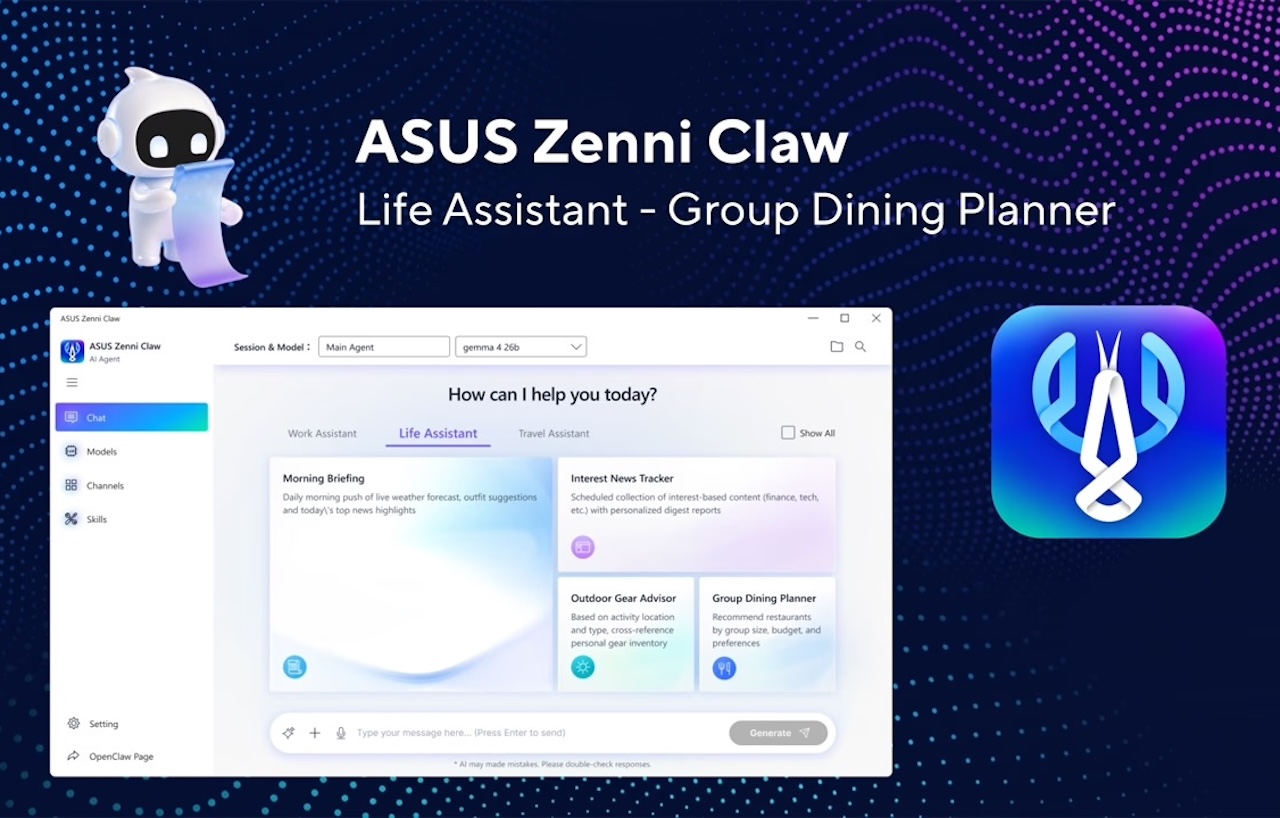
Nothing about this is hidden, and it’s a defensible design for a beta. Zenni Claw isn’t an assistant bundled with your laptop. It’s a front end for AI services you rent separately.
Cost lands unevenly as a result. A few short prompts on a cheap model is one kind of bill, and an agent looping through a multi-step task on a frontier model is another. ASUS doesn’t estimate typical spend anywhere in its materials, and agentic workflows are the kind that consume tokens while you’re looking away.
Local mode wants an RTX 5090
Running Gemma 4 on your own hardware skips the API bill entirely, and ASUS supports that path. The installer checks your GPU, VRAM, RAM, and storage before offering it. Pass the check and you can tick a box to install the local model.
Hardware is the gate. ASUS’s support guide lists two ways through it: an NVIDIA RTX 5090 with 24GB or more of VRAM, or an integrated Intel Core Ultra X9 388H or AMD Ryzen AI Max+ 300 series chip paired with 32GB of RAM. Both paths want 40GB of free storage, double the 20GB the app needs on its own.

VRAM is why the two RAM figures differ. The GPU route asks for just 16GB of system memory because the model lives in graphics memory, while the integrated route wants 32GB because system RAM does that work instead. Either way, an RTX 5090 is a flagship-tier card, and NVIDIA ran into the same wall selling local inference with the RTX Spark AI PC. Our best AI laptops guide makes the gap concrete, because the ASUS machines on it top out at an RTX 5070.
Your key, your files, and a Telegram bot
ASUS documents its safety work better than it publicizes it. The architecture is real: containerized workspace separation built on WSL2 and Docker, sensitive data filtering, prompt-injection protection, and cloud access routed through a LiteLLM proxy that keeps your API key on the device. That’s a credible list for a beta, and it’s scattered across a blog post, a support FAQ, and the fine print of the release instead of sitting where buyers will look.
Specificity runs out at the edges. ASUS says the workspace stays separate from your personal files and the main system, which answers more than the press release let on. What no document explains is the bridge, because Zenni Claw also connects to Telegram and WhatsApp, and a chat channel reaching into a contained workspace deserves its own paragraph. Ask that question before you point it at client work.
Who should try it, and who should skip
Try it if your machine already clears that local bar. Local Gemma 4 costs nothing per task and no API key enters the picture. ASUS cites the Zenbook DUO (UX8407) and ProArt PX13 (HN7306) as its integrated examples, which tells you how narrow the qualifying list really is.
Existing API subscribers are the other clear yes. If you already pay Anthropic, OpenAI, or Google for a key, Zenni Claw is a guided front end for a bill that’s already arriving.
Skip it if you expected the AI to come included with a mainstream ASUS laptop, because on most of the range included means metered. Skip it if your work touches client files or regulated data, since no ASUS document explains how the messaging channels reach into that container. And skip it as a reason to buy a new laptop, because a beta this early shouldn’t drive a hardware purchase.

TG take
Guided task paths are still the right idea. Most consumer AI hands the customer three jobs, inventing the use case, writing the prompt, and checking the output, when they wanted one thing done. Zenni Claw tries to hand back a finished task instead, and that’s worth building.
What ASUS shipped is a good interface with the engine sold separately. At Computex the company framed hybrid routing as a privacy advantage, and the beta delivers routing that mostly points your work at three American AI vendors on your own credit card. Consolidate the safety documentation where buyers will look, publish the full supported device list instead of two examples, and put a realistic cost picture next to both, and this gets easy to recommend.