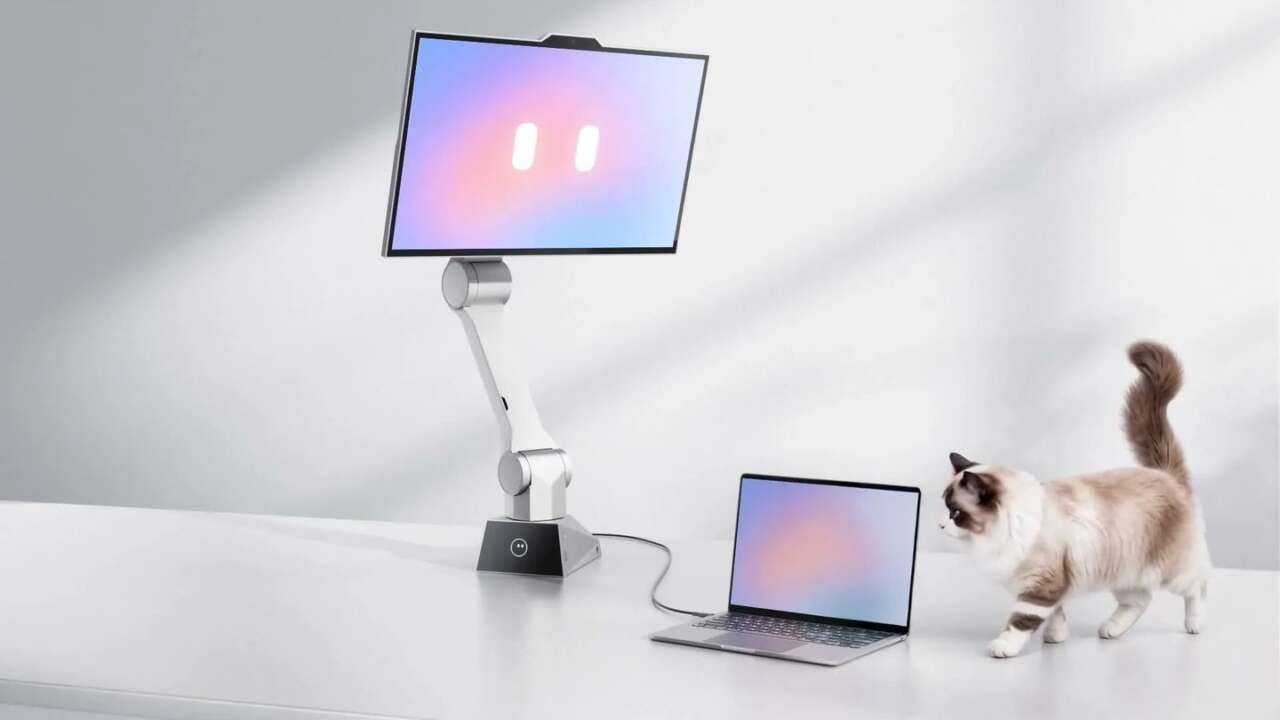
A monitor arm holds a screen exactly where you left it. CyboPal ONE does the opposite, mounting a 27-inch 4K display on a six-axis robotic arm that tracks your posture and repositions itself every time you sit, stand or lean back.
The Kickstarter campaign closes Saturday, November 21 at 8:00 AM CT, and it’s not limping home. The final day is doing real work.
Backers have pledged HK$10.7 million against an HK$80,000 goal, roughly $1.37 million in converted terms, with 539 backers on the board when we checked this morning. More than 6,000 people followed the project before it even launched. Kickstarter made it a Staff Pick, and the pledges are still landing in the final hours. CyboPal lists the United States, Canada, the United Kingdom, the EU, Australia, Japan, Singapore and Hong Kong among the shipping regions on its rewards page.
Under the display sits an AI compute base that listens, senses the room and runs an agent named Pauli. Pauli opens apps, arranges windows, runs searches and drafts text, routing each job to the tool that fits it instead of leaving you to click through the steps yourself. Everything it produces sits waiting for your review first, so the agent handles the mechanics of computer work while you keep the final say on every send, post and file.
CyboPal ONE Desktop Robotic Terminal
27-inch 4K 160Hz display · Six-axis robotic arm · RK3588 AI compute base
Price: $1,599 Super Early Bird on Kickstarter, retail $2,499 (save $900, 36% off)
Where to buy: Back on Kickstarter
The display follows your posture, not the other way around
Sit down to focus and the screen settles into a working position in front of you, at the distance your eyes wanted. Stand to stretch and it rises with you, holding the frame steady while you’re on your feet. Lean back with a long document and it tilts to meet you there, keeping a comfortable reading angle until you’re done, because on-device sensing reads your position and drives every move the arm makes.
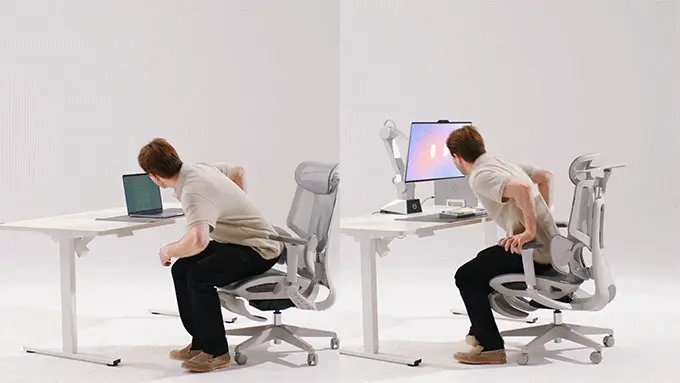
Voice takes over for the fine adjustments once you’re settled in, and the commands stay plain enough to say out loud without thinking. Tell it to come closer, pull back, rotate toward the window light or flip into portrait mode for a long page of code, and it obeys on the spot without a single menu opening on screen. There’s no remote to find and no arm to wrestle into place by hand.
Saved positions sit one command away, ready when you are. Brightness changes the same way, by asking out loud instead of digging through settings.
Pauli turns spoken requests into finished computer work
Pauli lives inside the CyboPal Client, and it treats a spoken request as a job to finish rather than a command to parrot back at you. Ask for a study setup and it opens the tutorial on the left and your notes on the right, adjusts the split to your liking and keeps the playback running while you settle in and get to work.

Each task routes to the tool that fits, whether that’s Gmail, Slack, Chrome, ChatGPT, Gemini or a coding agent, and the progress stays visible while you turn to something else. You watch it work from the client window.
Dictation runs on the same review-first pattern. Speak a reply into the field you’re already using, ask Pauli to sharpen it, and read the rewrite before it goes anywhere. The agent does the typing, and the judgment stays yours.
Gestures cover the moments when your hands are busy
Hand gestures are the second control channel, built for the moments when the keyboard and mouse sit out of reach. A gesture wakes tracking up, another brings the display closer or sends it back, and a turn of the hand rotates it toward a new angle for whoever just sat down, all while your coffee stays in your hand. An in-air swipe scrolls the page. A firm tap on the desk stops movement immediately.

Safety sits underneath every move the arm makes, because a motorized display shares space with everything else on your desk. CyboPal maps that desk with 3D spatial sensing and stays inside preset boundaries, so the laptops, notebooks and coffee cups in its path survive the choreography untouched. If power cuts out mid-move, backup power walks the arm down in a slow, controlled descent instead of letting it drop.
Privacy mode cuts power to the cameras and microphones
A desk robot that watches and listens all day has to answer the privacy question head-on, in plain terms, without hiding behind a settings page buried three menus deep. CyboPal answers it in hardware. Privacy Mode physically cuts power to the cameras and microphones instead of muting them in software, and when the red status light goes dark, the sensing goes dark with it, completely, every time you flip it on.
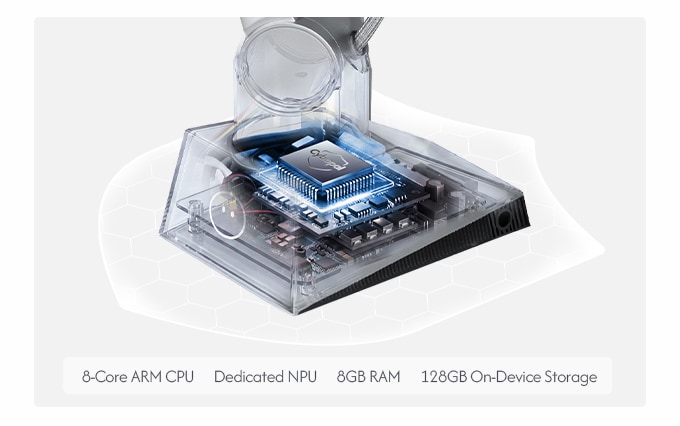
The everyday processing stays local for the same reason, and the hardware explains how. An RK3588 with an 8-core ARM processor and a 6 TOPS NPU, with 8 GB of RAM and 128 GB of storage, handles the movement, gesture and spatial data on the device. You’re never waiting on a server to decide where your screen goes. It’s also why the tracking feels instant instead of a beat behind your movement.
None of that movement, gesture or spatial data ships off to the cloud for a decision. Your workspace habits stay in your workspace.
Tiers, shipping and the final clock
The Super Early Bird tier is the one on the clock, and it won’t reopen once it’s gone. It runs $1,599 against a $2,499 retail price, stops hard at 300 backers, and 81 of those spots were still open when we checked this morning. Multi-desk packs hold the same per-unit price, running $3,198 for two desks, $4,797 for three, $6,396 for four and $7,995 for five, with a complimentary freestanding desk mount going to the first 1,000 backers overall.
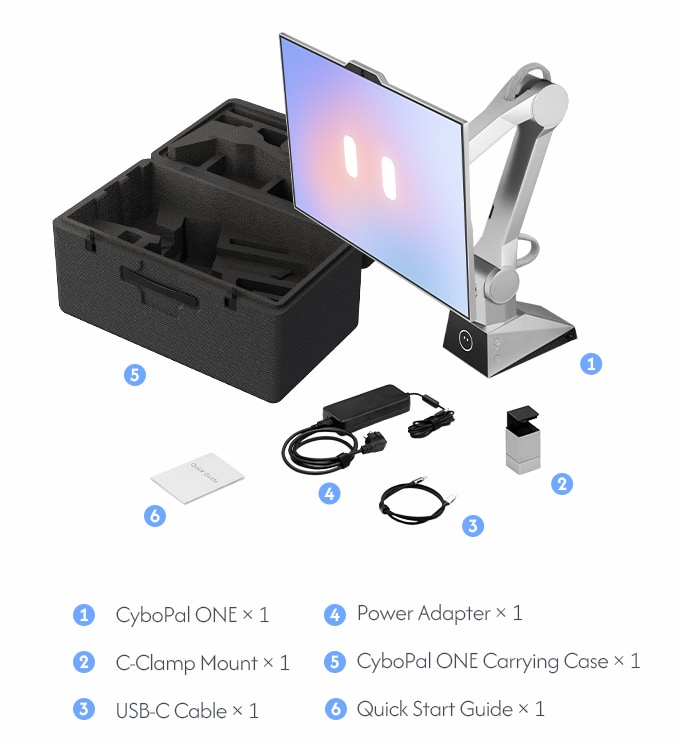
Every package carries the same kit. Inside the box sit the CyboPal ONE itself, a standard C-clamp mount, a USB-C cable, a power adapter and a quick start guide.
Shipping is included across the contiguous United States, and other supported destinations pay $50 per unit with duties and taxes covered by CyboPal. Every tier on the page estimates delivery in December 2026. Mass production is already underway, units are moving through assembly, calibration and final system testing, and a 12-month limited warranty starts counting on the day your unit arrives at your door.
The hardware has already performed in front of live audiences at CES, AWE and IFA, which puts this campaign ahead of the usual crowdfunding render reel. When a step needs a decision, Pauli brings it back and waits for your word. None of that extends the deadline by a single hour. Anyone who wants the robotic terminal at the early bird price can back CyboPal ONE on Kickstarter before the window shuts Saturday morning.